
Ableton Move Standalone Instrument with Live 12 Intro
4.8Editor score
Thirty two velocity sensitive pads
Built in rechargeable battery power
Wireless Ableton Cloud integration
This guide compares the top groovebox for live performance options to help you find the best standalone music maker for your specific needs.
Finding the right groovebox for live performance can transform how you create and share music on stage. These devices combine sampling, sequencing, and synthesis into one portable unit. Whether you are a solo act or part of a band, a quality groovebox gives you full control without needing a laptop.
We compared ten top models based on portability, sound quality, workflow, and connectivity. Each product offers unique strengths for different performance styles. From budget-friendly options to professional workstations, our list covers the most reliable tools available today for musicians who want to perform freely.
Each pick highlights key features, ratings, and ideal use cases to guide your decision. You will see why each device stands out in its category. Please note that prices and availability can change quickly, so check current details before purchasing your next music gear.
4.8Editor score

4.8Editor score

4.6Editor score
This side-by-side comparison highlights the key specifications and strengths of each top groovebox model. Use this table to quickly identify which device matches your performance needs and budget constraints.



The Akai Professional MPC Sample Portable Sampler earns the Editor's Choice award for its true standalone portability. With a 4.8 rating, it brings the legendary MPC workflow into a battery powered device that fits in a gig bag.
We may earn a commission when you buy through this link, at no additional cost to you.
Its sixteen responsive pads and intuitive chopping workflow make live sampling easy. You can record with the built-in microphone, load samples from a microSD card, and use four internal FX processors to shape your sound on the fly.
While the screen is small, the dedicated knobs and pads compensate well during performance. The lack of unlimited tracks is a trade-off for such a compact size, but the included Flex Beat and Master Compressor provide rich sound design options.
This device is ideal for beatmakers and finger drummers who want to take MPC creation on stage. We recommend it for anyone seeking a simple, powerful, and reliable portable groovebox.
The built-in lithium-ion battery and speaker mean you can sketch and perform without any external gear.
Over 100 factory kits and an Instant Sample Chop Mode help you get started with professional sounds immediately.
We may earn a commission when you buy through this link, at no additional cost to you.
The Ableton Move Standalone Instrument is a premium choice for musicians invested in the Ableton ecosystem. Its 4.8 rating reflects its powerful standalone capabilities combined with wireless integration that keeps your live set flexible.
We may earn a commission when you buy through this link, at no additional cost to you.
The 32 velocity-sensitive pads with polyphonic aftertouch allow expressive playing of chords and drums. You can sync with Live 12 Intro via Wi-Fi, transfer sets wirelessly, and use Move Manager to control your performance remotely.
Its lack of physical faders might require some menu navigation for mixing, but the touch-sensitive encoders are responsive. The price is higher, yet the included DAW software and massive sound library justify the investment for serious producers.
Choose this if you want a top-tier portable device that integrates perfectly with your existing studio. It offers a smooth, connected experience for modern performers.
The 32 silicone pads respond to per-finger pressure, adding expression to melodies and chords during live shows.
Built-in Wi-Fi lets you stream audio to Live and access Ableton Cloud for quick project sharing.
We may earn a commission when you buy through this link, at no additional cost to you.
The myTRACKS Groovebox earns the Best Budget spot for its incredibly accessible design. With a 4.6 rating, it proves you do not need music theory to create full songs live. It is perfect for those who want immediate gratification.
We may earn a commission when you buy through this link, at no additional cost to you.
No apps or lessons are required because musical notes work automatically with each set. You can record voices and everyday sounds using the built-in sampler, then transform them with filters and pitch effects using simple controls.
While it lacks deep customization, its strength is simplicity. It is a great first device for kids or adults looking to experiment with music without intimidation. The affordable price makes it a low-risk entry into grooveboxes.
We recommend this for anyone seeking a fun, no-stress way to start making music. It is the easiest tool on our list to pick up and play.
Musical notes automatically work with each set, ensuring your sounds are harmonically pleasing right away.
Capture voices and instruments directly with the built-in sampler to create unique rhythmic material.
We may earn a commission when you buy through this link, at no additional cost to you.
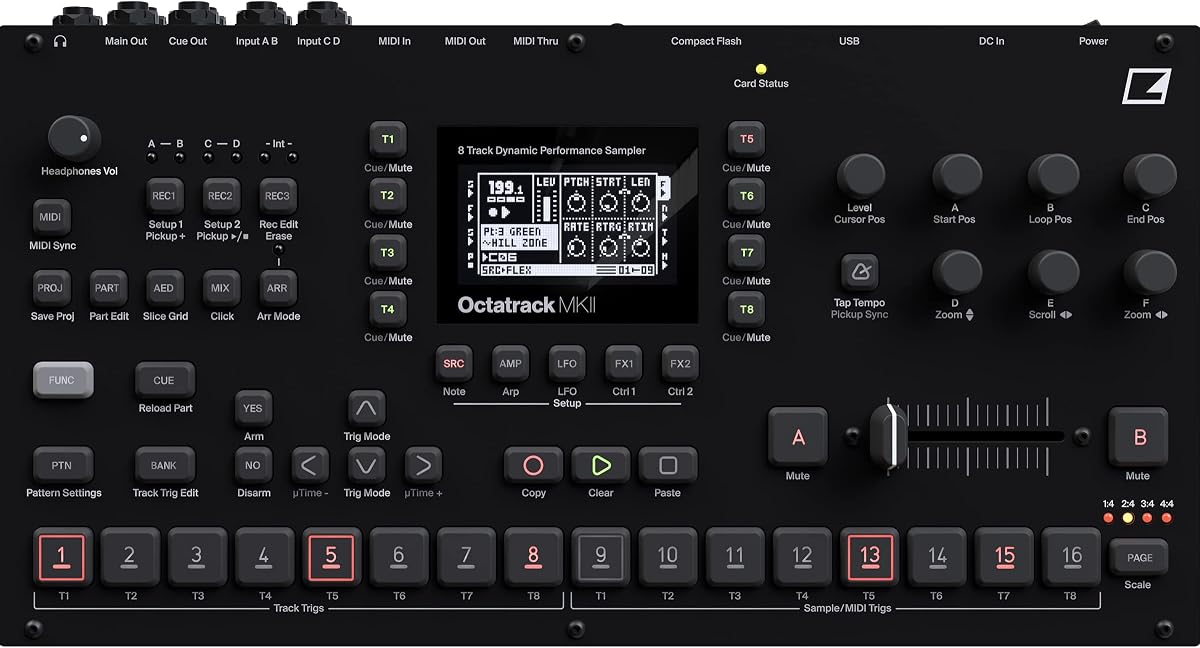
The Elektron Octatrack MKII is a legendary device for those who demand deep audio control. Its 4.5 rating highlights its power as a performance sampling workstation capable of handling complex live sets.
We may earn a commission when you buy through this link, at no additional cost to you.
With eight stereo audio tracks and eight MIDI tracks, you can build elaborate arrangements. The OLED screen provides clear navigation, and the ultra-smooth contactless crossfader allows precise performance transitions that rival hardware mixers.
The learning curve is significant due to its menu-heavy interface, but the dedicated function buttons help streamline workflow. It is expensive, yet the flexibility for real-time manipulation justifies it for pros.
Choose this if you need a powerhouse for live sampling and sequencing. It offers unmatched control for experienced musicians willing to invest time.
Real-time pitch shifting and time stretching allow flexible audio manipulation during live performance without stopping.
Equipped with rugged backlit buttons rated for 50 million presses, ensuring reliability on tour.
We may earn a commission when you buy through this link, at no additional cost to you.
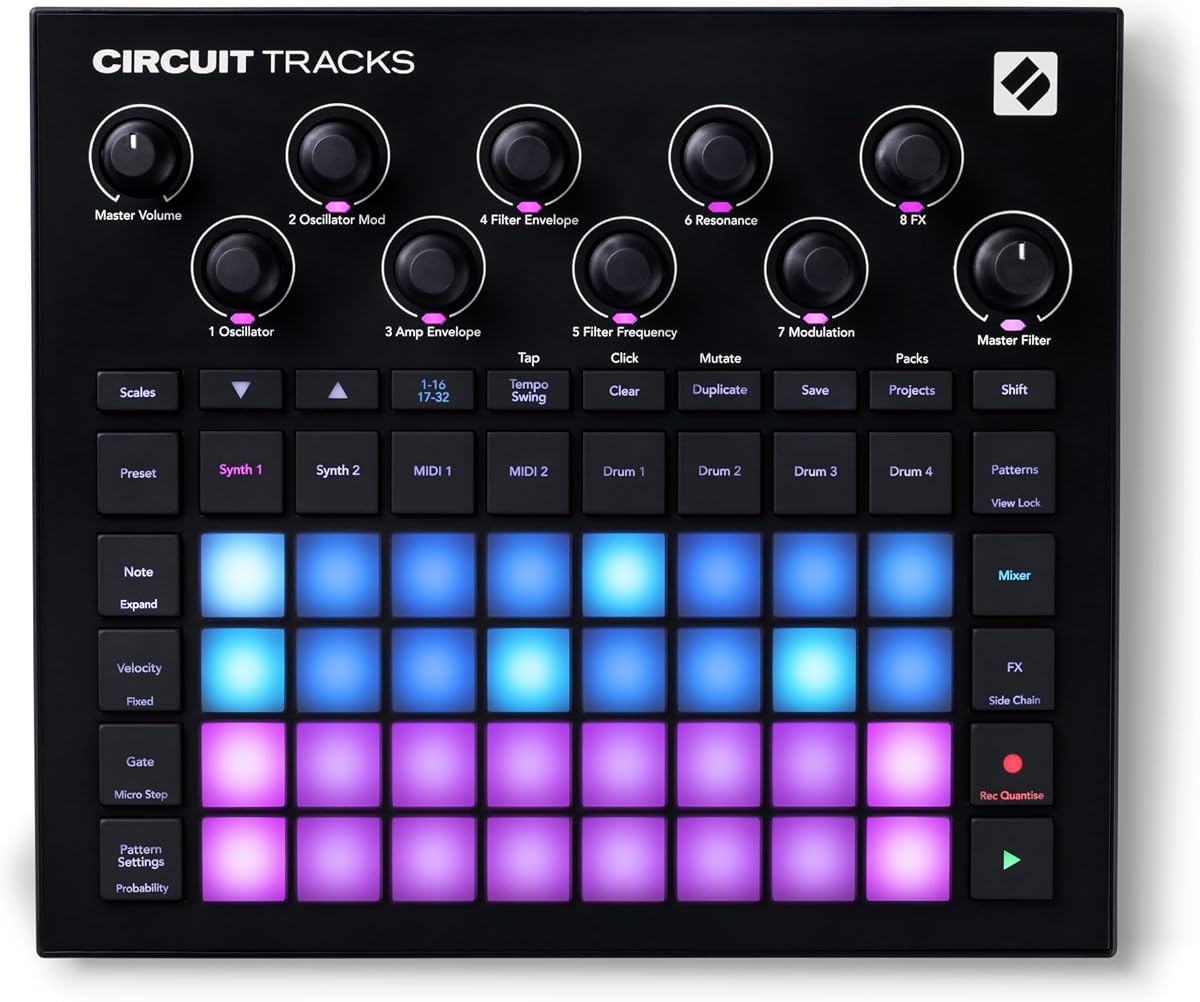
The Novation Circuit Tracks Groovebox offers a hybrid approach for live performance. With a 4.7 rating, it combines synth tracks and drum tracks into a simple, intuitive layout that feels natural to play.
We may earn a commission when you buy through this link, at no additional cost to you.
You can create 32-step patterns and use probability and pattern mutate to keep ideas evolving. The two dedicated MIDI tracks allow you to control external hardware, making it a great brain for larger setups.
It lacks internal storage for samples unless loaded via computer, which is a minor limitation. However, its velocity-sensitive pads and tactile controls make it a joy to use for live jams.
This is an excellent choice for producers who want a balance of synthesis and drum programming. It is a reliable tool for evolving live sets.
Two refined polyphonic digital synth tracks and four drum tracks give you versatile track types.
Use probability and pattern mutate features to keep your music evolving and unpredictable.
We may earn a commission when you buy through this link, at no additional cost to you.
The Roland MC-707 Groovebox Professional Music Production Workstation is designed for serious creators. A 4.3 rating reflects its comprehensive features, including standalone music production and multi-track recording without a computer.
We may earn a commission when you buy through this link, at no additional cost to you.
It offers tone, drum kit, and looper track types for diverse creation. With 90 types of track effects and a 128-step sequencer, you can build complex arrangements that sound polished in a live environment.
The unit is heavier than smaller grooveboxes, which is a trade-off for its robust build and extensive connectivity. The menu system can be dense, but the flexibility is ideal for touring pros.
Choose this if you need a full production suite in a standalone box. It is one of the most capable options available today.
Complete music production and recording workstation designed for professional use without a computer.
Track Multi-Effects with 90 types and Master Effects for detailed sound shaping.
We may earn a commission when you buy through this link, at no additional cost to you.
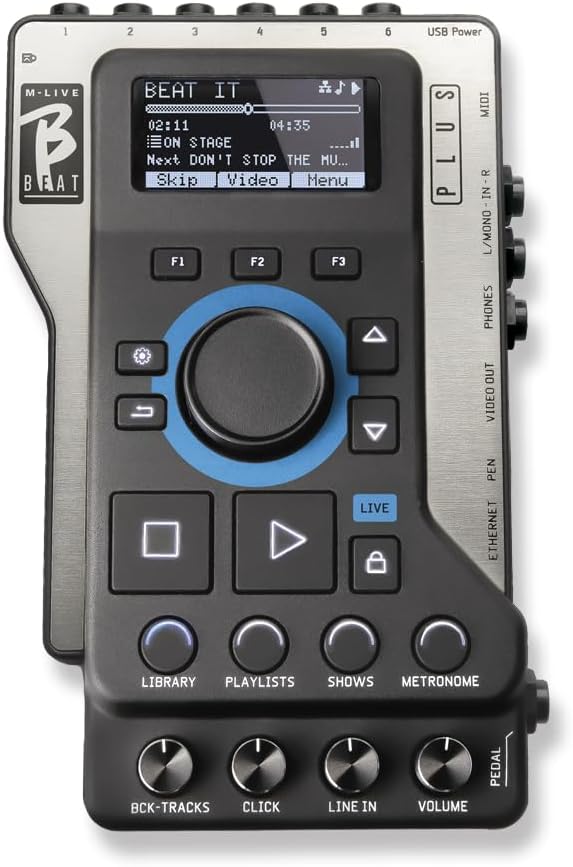
The M-Live B.Beat Plus 256GB Backing Track Player is specialized for bands and solo artists. With a 4.7 rating, it replaces laptops with a stage-ready solution for multitrack playback and video synchronization.
We may earn a commission when you buy through this link, at no additional cost to you.
You can manage setlists and playlists via an intuitive interface and fine-tune mixes in real time. Advanced amp sim MIDI control lets you trigger preset changes on your guitar modelers during the show.
Stem removal tools allow you to isolate instruments, adding flexibility to your backing tracks. It is pricey, but it eliminates the risk of using consumer laptops on stage.
This is ideal if your live set relies heavily on backing tracks and visual sync. It offers the reliability professional performers need.
Sync backing tracks with video or images via HDMI to enhance your visual performance.
Manage compatible guitar modelers directly from the project timeline for a fully automated setup.
We may earn a commission when you buy through this link, at no additional cost to you.
The Elektron Digitakt II is a specialized drum computer with a 4.4 rating. It offers 16 audio tracks ready for samples, making it ideal for complex rhythmic programming during live shows.
We may earn a commission when you buy through this link, at no additional cost to you.
With three assignable LFOs per track and swappable filters, you can shape sound deeply. The Euclidean sequence generator helps create complex rhythmic patterns easily without manual input.
It does not include a card card, which is an extra cost for storing samples. The screen is small, but the dedicated knobs for track adjustments speed up live changes.
Choose this if drums and rhythm are the core of your performance. It offers deep sound shaping tools for percussionists.
Sixteen audio tracks all ready for stereo or mono samples, or MIDI for extensive track counts.
Select from various filters like Low pass 4, Comb, or EQ to shape track sound.
We may earn a commission when you buy through this link, at no additional cost to you.
The Roland MC-101 Groovebox Compact Music Production Workstation Bundle brings professional sounds in a tiny unit. With a 4.5 rating, it offers the expansive MC-707 sounds in a version that runs on four AA batteries.
We may earn a commission when you buy through this link, at no additional cost to you.
It uses the ZEN-Core Synthesis System, delivering iconic Roland sounds. Each track contains a powerful sample player so you can import your own voice or instrument samples to sync with tempo.
The four-track limit means you need careful arrangement, and there is no internal speaker. However, the included accessories make it a great value for portable production and live sketches.
Select this if you need the smallest unit with professional Roland tone. It is perfect for travel and quick songwriting on the go.
Uses the ZEN-Core Synthesis System which delivers the Roland sounds that have defined electronic genres.
Solid-yet-light and runs for about five hours on four AA batteries for anywhere usage.
We may earn a commission when you buy through this link, at no additional cost to you.
The Akai Professional APC40 MKII is not a standalone groovebox but a powerful controller. With a 4.8 rating, it gives hands-on control of Ableton Live clip matrices and mixer parameters for dynamic live performances.
We may earn a commission when you buy through this link, at no additional cost to you.
The 5X8 clip-launch matrix with RGB feedback helps you launch clips and loops visually. You can control DAW parameters with nine channel faders and eight control knobs to manage your entire virtual setup.
Since it is USB-powered, it requires a computer connection, which limits total mobility compared to standalone units. It is excellent if you already use Live but want tactile control over clips.
Choose this if you want to control your Live set like a physical instrument. It brings the best of software performance to your hardware.
Trigger clips, loops and samples using a 5X8 clip-launch matrix with RGB feedback for status.
Use the robust faders and buttons to dynamically adjust lighting cues and effects.
We may earn a commission when you buy through this link, at no additional cost to you.
Choosing the right groovebox for live performance involves balancing portability, features, and workflow. This guide outlines the key factors to consider for a successful purchase.
Standalone grooveboxes let you create and perform without a laptop. This reduces technical risk on stage. Look for battery power and built-in speakers if you need full independence.
Prioritize devices with battery power and built-in storage to ensure you can play anywhere.
Track capacity determines how many sounds you can layer. Four tracks might suffice for simple sets, while eight or more allow complex arrangements. Check if tracks support samples, synths, or MIDI.
Select a model with enough tracks to cover your full live set.
Good connectivity ensures you can integrate with other gear. Look for MIDI in/out, USB audio interfaces, and headphone outputs. Some devices also offer sync out for hardware integration.
Ensure the unit has the necessary ports to connect with your existing rig.
Sound quality is critical for live performances. Evaluate the included sounds, sampling capabilities, and effects processing. A high-quality engine ensures your tracks sound clear through a PA system.
Check if the device offers high-quality time-stretching and built-in effects.
Portability affects how easy the device is to transport. Compact units are better for touring. Consider the weight and whether the device can run on batteries.
Choose a compact size that fits your travel requirements.
Workflow is vital during live shows. Intuitive controls like knobs and pads allow quick changes. Complex menus can hinder performance if you are not familiar with the system.
Look for intuitive controls and a straightforward workflow for stage use.
Expandability allows you to grow your sounds. SD card support or internal storage is essential for loading custom samples. Check for cloud integration if you want to transfer sets wirelessly.
Verify that the device supports SD cards or has enough internal memory.
Price varies significantly across models. Entry-level units are affordable but limited, while premium options offer more features. Balance your budget with the features you actually need.
Choose a model that balances your budget with the features you need.
Start by charging the internal battery fully before any gig. Ensure you have a backup SD card with your latest projects to avoid loss during transport.
Familiarize yourself with the interface before performing. Test the audio levels through your PA system to ensure clarity and adjust settings as needed for your venue.
Store the device in a padded case to prevent damage. Regularly update firmware via USB to keep performance stable and access new features or bug fixes.
Most grooveboxes like the Akai MPC Sample or Ableton Move are standalone and do not need a computer to run. However, some may require a computer for initial setup or advanced editing before loading projects.
Yes, many grooveboxes support SD card storage or internal memory for loading custom samples. Check the device specifications to ensure it allows sample import and playback without limits.
Battery power is crucial for true portability and avoiding outlet dependence on stage. Models with built-in rechargeable batteries allow you to perform anywhere without worrying about power cables.
This depends on your style. Simple sets might work with four tracks, while complex arrangements require eight or more. Evaluate your typical live setup to decide the right capacity.
Yes, devices like the myTRACKS Groovebox are designed specifically for beginners with no experience required. They offer intuitive controls and automatic note matching to make music creation easy.
You can connect via stereo 1/4 TRS line outputs or USB audio interfaces depending on the device. Use appropriate cables to link the outputs to your mixer or PA input channels.
The Akai MPC Sample, Ableton Move, and myTRACKS Groovebox stand out as top picks for different needs. Each offers unique strengths in portability, workflow, and sound quality.
Prioritize standalone operation and battery power if you travel often. Consider connectivity options like MIDI or sync outs to ensure it fits your existing rig.
Prices and availability change, so verify details before buying. Check for current bundles or discounts to get the best value for your performance needs.