
USB Fast Charger Block 50% Smaller 100W Max
4.3Editor score
6 ports available
100W total output
Compact travel size
Compare the top charging station for multiple devices to find the best multi-port hub for your desk, home office, or travel needs this year.
Finding a reliable charging station for multiple devices is essential in today's connected world. Modern homes and offices host numerous gadgets that require power daily. A good hub consolidates cables and keeps your space tidy without sacrificing charging speed or safety.
We compared ten leading models based on port count, total output wattage, and build quality. Our analysis focuses on GaN technology, safety features, and versatility for different device types. Each entry offers unique benefits for varying budgets and setup requirements.
Every pick below highlights specific strengths like wireless options or compact designs. Prices fluctuate often so verify current offers before purchasing. Use this guide to select the perfect solution for your power needs and workspace organization goals.
4.3Editor score

4.5Editor score

4.6Editor score
This side-by-side comparison outlines the key specifications for each model to help you decide which hub fits your specific device ecosystem and power requirements best.


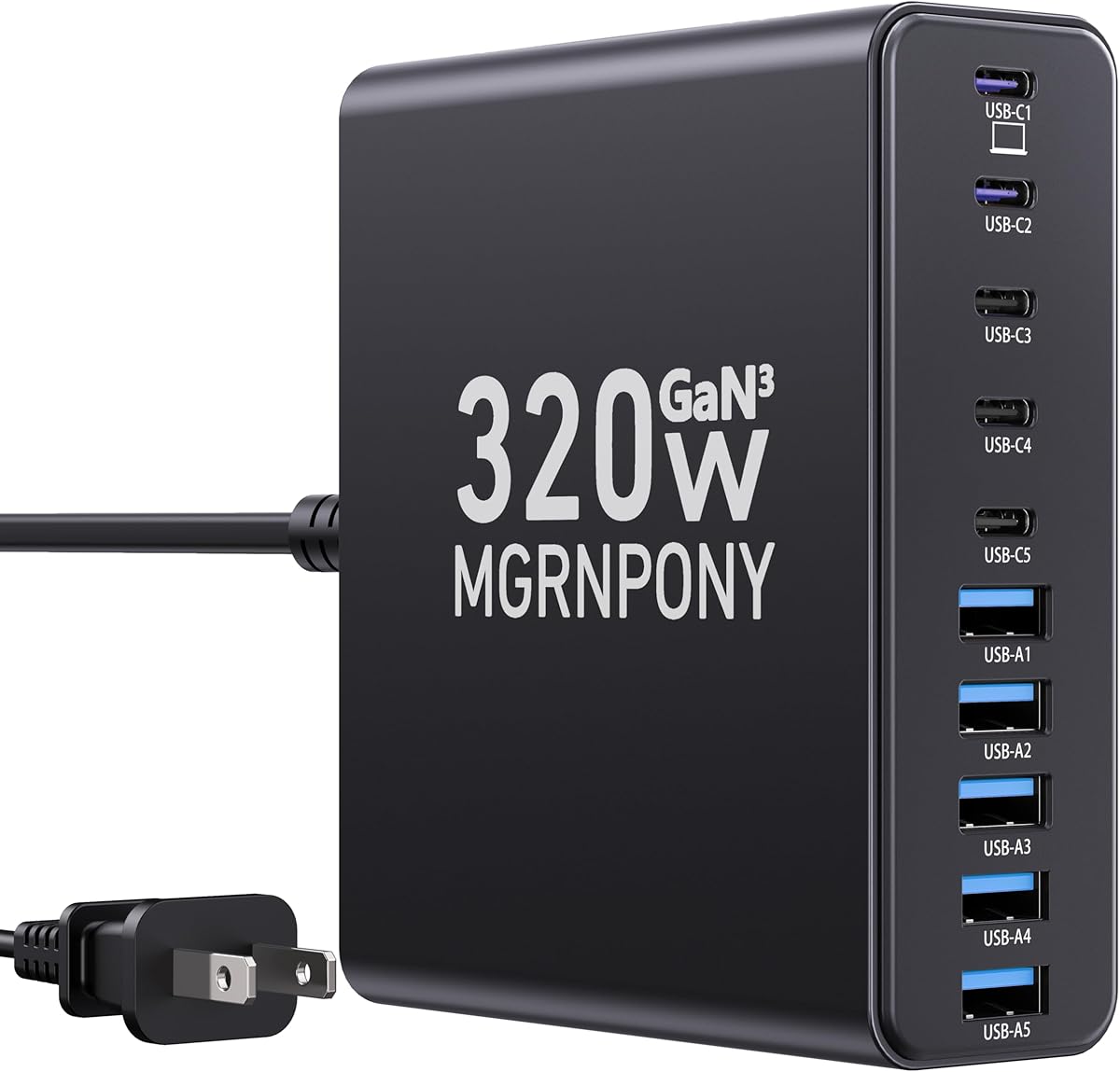


This Zobirez model ranks high for its 420W output across ten ports. It features 5 USB-C ports for modern high-power devices. The sturdy design ensures stability and organization on any desk surface.
We may earn a commission when you buy through this link, at no additional cost to you.
Its dual 65W GaN ports allow laptops to charge efficiently alongside phones. The included short cables reduce clutter significantly. Users appreciate the one-piece slots that hold devices securely without wobbling.
While the size is substantial, the power capacity justifies it for busy offices. Cable management might require attention to keep the look clean. However, the built-in safety features provide peace of mind.
Ideal for families or workspaces with many devices needing power daily. This unit delivers speed and organization effectively. Consider this if you need robust charging capacity in one location.
The 420W total output handles high demand devices without slowdown.
Eight short mixed cables cover most device types immediately.
We may earn a commission when you buy through this link, at no additional cost to you.
This unit offers an impressive 750W total output for heavy users. Each USB-C port supports up to 120W individually for laptops. The build uses flame-retardant material for added safety over time.
We may earn a commission when you buy through this link, at no additional cost to you.
Five USB-C and five USB-A ports cover almost every device type. The wide slots accommodate tablets with thick cases easily. A full cable kit ensures you can connect everything at once.
The size requires a significant desk footprint. It may not fit on smaller nightstands well. However, the power levels make it ideal for dedicated charging stations.
Best for offices or shared spaces with many high-power devices. It simplifies power management effectively. Prioritize this if maximum wattage is your main requirement.
750W total output handles the heaviest charging demands easily.
Wide slots and ports support almost all current devices.
We may earn a commission when you buy through this link, at no additional cost to you.
Anker Prime delivers 200W output across six ports for efficiency. Each USB-C port supports 100W for fast laptop charging. The design is compact yet sturdy on desk surfaces.
We may earn a commission when you buy through this link, at no additional cost to you.
Advanced monitoring helps protect against heat and over-voltage issues. The 1.24 lb weight ensures it stays stable during use. It balances power and size better than bulkier models.
Six ports may limit it for very large setups. It is not intended for travel due to its size. But for desktop use it is highly efficient.
Ideal for professionals needing fast laptop and phone charging. The active safety monitoring is a strong differentiator. Choose this for reliability and premium performance.
Proprietary system monitors temperature and voltage actively.
100W per port charges laptops quickly alongside other devices.
We may earn a commission when you buy through this link, at no additional cost to you.
This budget block provides 100W across six ports effectively. It measures 3.27 inches wide for compact spaces. The design fits easily into bags for travel.
We may earn a commission when you buy through this link, at no additional cost to you.
Three USB-C and three USB-A ports cover basic needs. Intelligent circuit management guards against over-current and short circuits. It is light and portable for daily use.
It is not intended for laptops due to port limits. USB-C power is lower than high-end models. But it is perfect for phones and tablets.
Best for travelers or small desks needing basic power. The price point makes it highly accessible. Choose this for convenience and cost savings.
Compact size fits easily into pockets or small bags.
Covers smartphones and accessories without bulk or cost.
We may earn a commission when you buy through this link, at no additional cost to you.
This dock supports MagSafe compatible devices with 15W wireless. It charges three devices at once including Apple Watch. The angle adjusts for optimal viewing during use.
We may earn a commission when you buy through this link, at no additional cost to you.
Official certification ensures safe fast charging for the Watch. The design fits well on desks without taking much space. StandBy mode works in landscape orientation nicely.
It is best for Apple users primarily. Android users may find limited utility. The wireless convenience outweighs the limitations for many.
Ideal for bedside tables or office desks with iPhones. The watch certification adds trust to safety. Choose this for a clean wireless setup.
15W full wireless power ensures rapid charging times.
Certified to charge Apple Watch efficiently without risk.
We may earn a commission when you buy through this link, at no additional cost to you.
This unit combines three AC outlets and four USB-C ports. It delivers up to 100W via USB-C1 or C2. The 300J surge protection adds safety for sensitive electronics.
We may earn a commission when you buy through this link, at no additional cost to you.
The design is stable at 19.75 oz. It offers zero restrictions on where you plug things in. The 8-point safety system is a strong trust feature.
AC ports make it useful for larger appliances too. The size takes space on crowded desks. It balances USB power with AC convenience well.
Best for home offices needing both wall power and USB. The surge protection is valuable for expensive gear. Choose this for versatile connectivity.
300J protection helps prevent damage from voltage spikes.
Three AC outlets allow for non-USB device plugging.
We may earn a commission when you buy through this link, at no additional cost to you.
This hub offers five USB-A ports for classic device charging. It includes seven short cables for immediate setup. The dividers hold large tablets even with cases.
We may earn a commission when you buy through this link, at no additional cost to you.
Universal compatibility covers almost all legacy devices. A power switch gives a visual indication of status. It is popular as a gift for families.
It lacks USB-C for modern high speed needs. Charging speeds are lower than GaN models. However, it is robust for basic daily tasks.
Ideal for households with mixed older devices. The included cables save money on accessories. Choose this for simplicity and reliability.
Seven included cables cover most common connector types.
Removable dividers allow flexible spacing for different sizes.
We may earn a commission when you buy through this link, at no additional cost to you.
This block features 5 USB-C and 5 USB-A ports. IceShield 3.0 GaN technology provides enhanced safety checks. It supports 65W on dedicated ports for laptops.
We may earn a commission when you buy through this link, at no additional cost to you.
It fits horizontally or vertically to save desk space. The lightweight design makes it easy to carry around. It is a solid balance of speed and capacity.
Cable management is not built into the unit. It requires external storage for cords. But the safety features are comprehensive and reliable.
Best for users needing 10 ports without high cost. The GaN tech ensures efficiency. Choose this for flexibility and value.
IceShield 3.0 performs millions of safety checks daily.
Vertical or horizontal placement adapts to your desk.
We may earn a commission when you buy through this link, at no additional cost to you.
This unit uses retractable cables up to 80cm long. It supports 105W total output across eight devices. GaN tech ensures fast charging for iPhones and Android.
We may earn a commission when you buy through this link, at no additional cost to you.
The retractable cords reduce clutter significantly on desks. It is useful for nightstands where cable length matters. The hub keeps everything together in one box.
80cm limits the reach for some wall outlets. The build relies on plastic which may feel less premium. But the organization benefit is clear and strong.
Best for keeping cords tidy without separate storage. The speed supports modern needs well. Choose this for clean desktop aesthetics.
Retractable cords keep excess cable length hidden away.
105W total ensures all devices charge quickly together.
We may earn a commission when you buy through this link, at no additional cost to you.
This station offers 300W total output with eight ports. Dual 65W ports handle laptops alongside 30W tablets. Sturdy slots prevent devices from sliding or wobbling.
We may earn a commission when you buy through this link, at no additional cost to you.
Six included cables support daily use immediately. Anti-slip pads protect surfaces from scratches effectively. It is designed for whole family charging needs.
It is smaller than 10 port models. The slots may not fit very wide cases. But it is robust enough for most tablets.
Best for homes needing reliable fast charging. The safety certification adds trust to the build. Choose this for organized family power.
Solid construction prevents devices from sliding around.
Six included cables mean ready to charge immediately.
We may earn a commission when you buy through this link, at no additional cost to you.
Selecting the right multi-device charging hub requires understanding port counts, output wattage, and safety standards. This guide outlines key factors to evaluate.
Total output wattage determines how many devices can charge at full speed simultaneously. Models range from 100W to 750W depending on design. Higher wattage supports laptops and tablets together effectively.
Prioritize units with 200W or more if you use high power devices daily.
Port count varies from 5 to 10 across different models. Ensure enough USB-C ports for modern devices like phones and laptops. USB-A remains useful for legacy gadgets.
Choose a mix of port types to cover all your device types completely.
Gallium Nitride technology allows smaller sizes and efficient charging. It reduces heat buildup compared to older silicon chargers. Most top picks now include GaN III versions.
Look for GaN branding to ensure compact and fast charging performance.
Over-voltage, over-current, and overheat protections are standard in quality hubs. These features prevent damage to your expensive electronics over time. Active monitoring systems add extra layers of safety.
Verify that the unit has certified safety protections built in.
Physical design includes footprint size and slot stability. Sturdy one-piece slots hold devices securely. Some models fit vertically or horizontally for flexibility.
Measure your desk space to ensure the unit fits comfortably.
Many hubs come with short mixed cables for immediate setup. This saves money and reduces clutter from extra wires. Check that cable types match your devices.
Ensure the included cables cover at least half your total device types.
Established brands often offer better warranties and support. Reputation indicates consistent quality control in manufacturing. Read user feedback for long term durability insights.
Prioritize well known brands to guarantee better support.
Some models are compact enough for travel bags. Lightweight designs with retractable cables suit frequent travelers. Verify input voltage for international trips.
Choose travel-ready models if portability is your main priority.
Place the station on a flat stable surface away from heat sources. Ensure the vents are not covered during operation to maintain airflow.
Plug the power cord securely into a working wall outlet before connecting devices. Use the included short cables for best stability and neat appearance.
Regularly check ports for dust and wipe with a dry cloth. Do not use water near the charging station to prevent damage to internal circuits.
Yes but you need a port with sufficient wattage. Most hubs offer 65W or 100W USB-C for laptops. Verify the output before purchase to ensure compatibility with your model.
Most modern hubs have safety features that stop charging when full. Overcharge protection prevents battery damage. It is generally safe but avoid covering the unit to ensure heat dissipation.
Yes most multi-device hubs support both via USB-A and USB-C. Cables vary but adapters are available if needed. Just ensure the ports match your device's requirements.
Check the port type and device connector. USB-C works for many modern devices while Micro-USB is for older models. The included kits usually cover the most common needs.
The hub distributes power across ports. If total demand exceeds total output charging slows for some devices. It will not damage devices but speeds may drop to manage load.
GaN models are generally more efficient than standard ones. They waste less energy as heat. Even when idle they draw low power. This saves electricity over time.
Our top picks range from compact budget units to high-power office hubs. Each model balances port count, wattage, and safety features differently. The right choice depends on your specific device mix and space.
Prioritize total output wattage and USB-C availability for future proofing. Safety certifications add peace of mind when charging expensive electronics daily. Keep your desk tidy with built-in organization features.
Always verify current offers before purchasing as prices change frequently. The models listed provide a strong starting point for your search. Select the option that fits your workflow best.