
ASRock Motherboard Micro ATX
4.0Editor score
Dual Core J1800 Processor
DDR3 Memory Support
Basic Connectivity Ports
This guide compares the top low power motherboard options for NAS, servers, and efficient builds based on performance, connectivity, and value.
Finding the right low power motherboard is essential for building energy efficient systems like NAS servers or home labs. These boards balance performance with minimal electricity usage for 24/7 operation.
We evaluated ten top models based on processor efficiency, network capabilities, storage options, and overall reliability. Our analysis covers various form factors and chipsets to suit different needs.
Each pick highlights specific strengths and ideal use cases. Note that pricing fluctuates frequently, so verify current costs before making your final purchase decision for your build.
4.0Editor score

4.5Editor score

4.1Editor score
The following table provides a side by side comparison of all ten selected low power motherboards. It highlights key specifications to help you quickly identify the best fit for your specific project requirements.




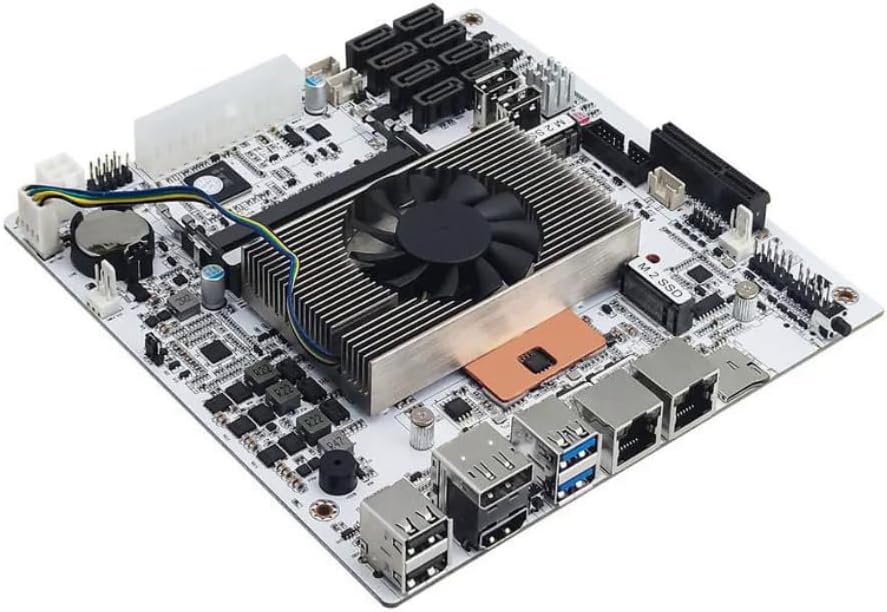
This industrial motherboard stands out for its powerful quad core processor and extensive networking capabilities. With a rating of 4.5 stars it delivers reliable performance for NAS and firewall tasks.
We may earn a commission when you buy through this link, at no additional cost to you.
The inclusion of four 2.5GbE network ports provides unmatched connectivity for high speed data transfer. Its low power processor ensures energy efficiency during continuous 24/7 operation.
Users should note a slight boot delay as the system reads memory information initially. Additionally it requires both 24PIN and 4PIN power connections which may need adapter planning.
Ideal for advanced users building professional network appliances or home labs this board offers the best balance of power and efficiency available in its class.
The four 2.5GbE ports allow for link aggregation and high throughput network designs essential for modern NAS setups.
The Celeron N5105 processor delivers strong multi-threaded performance while maintaining a low thermal design power profile.
We may earn a commission when you buy through this link, at no additional cost to you.
For those seeking the most cost effective entry into low power computing this ASRock board offers solid value. It features a dual core processor suitable for light office or media tasks.
We may earn a commission when you buy through this link, at no additional cost to you.
The board includes essential connectivity like USB 3.0 and Gigabit Ethernet ensuring basic needs are met without breaking the bank. Its Micro ATX form factor fits standard cases easily.
Limitations include reliance on older DDR3 memory which is no longer mainstream. Storage options are also restricted to just two SATA ports limiting expansion capabilities.
Best suited for simple home servers or retro builds this board provides a functional low power solution at a very competitive price point for budget conscious builders.
The low price point makes it accessible for hobbyists needing a simple system without compromising on core stability.
Despite older tech it still offers necessary ports like USB 3.0 and HDMI for basic peripheral and display connections.
We may earn a commission when you buy through this link, at no additional cost to you.
This motherboard supports modern AMD Ryzen processors allowing for flexible build options ranging from budget to mid-range performance. Its B550 chipset ensures compatibility with latest CPU generations.
We may earn a commission when you buy through this link, at no additional cost to you.
Features include PCIe 4.0 support for faster storage and graphics cards plus two M.2 slots for rapid data access. The digital power design ensures stable voltage delivery under load.
Audio quality is standard rather than high fidelity which may matter for audiophiles. The layout is functional but lacks extensive RGB headers for enthusiasts wanting custom lighting.
Recommended for users needing a reliable AMD platform with room for future CPU upgrades without sacrificing basic connectivity or storage speed capabilities.
Support for Ryzen 5000 series ensures users can upgrade processors without replacing the entire motherboard platform.
PCIe 4.0 M.2 slots enable high-speed NVMe drives which significantly improve system responsiveness and load times.
We may earn a commission when you buy through this link, at no additional cost to you.
Designed for stability this board offers excellent memory support and PCIe 4.0 connectivity for modern AMD systems. It handles Ryzen 5000 series CPUs efficiently with robust power delivery.
We may earn a commission when you buy through this link, at no additional cost to you.
The DDR4 memory boost allows for high speed overclocking which benefits content creation and gaming. Frozr AI cooling adjusts fan speeds automatically to maintain optimal temperatures.
Rear connectivity is somewhat limited compared to premium models with fewer USB ports available. The VRM cooling is adequate for stock usage but might be minimal for heavy overclocking.
Great for users needing a reliable workstation or gaming rig that balances cost with performance features like AI cooling and high-speed memory support.
Memory Boost technology helps achieve higher stability at faster speeds allowing for improved overall system responsiveness.
Frozr AI cooling monitors system temperatures to dynamically adjust fan profiles for noise reduction and efficiency.
We may earn a commission when you buy through this link, at no additional cost to you.
This board targets embedded applications and lightweight servers with an integrated quad core processor. It offers a compact footprint suitable for small form factor projects.
We may earn a commission when you buy through this link, at no additional cost to you.
The J4125 processor provides adequate performance for basic web serving or media playback tasks. It supports DDR4 memory which is a step up from older DDR3 models.
User ratings are lower which suggests potential issues with build quality or driver support compared to main stream boards. Connectivity options are also quite limited for expansion.
Best for specialized low-cost embedded deployments where power efficiency is prioritized over expandability or high performance computing needs.
The compact design and low power draw make it ideal for industrial or commercial kiosks and thin clients.
Support for DDR4 allows for better performance potential compared to older legacy systems using DDR3 memory.
We may earn a commission when you buy through this link, at no additional cost to you.
This model excels with high-speed memory support and multiple video outputs for versatile display setups. It supports a wide range of AMD Ryzen processors including the 5000 series.
We may earn a commission when you buy through this link, at no additional cost to you.
Memory speeds up to 4733MHz allow for improved bandwidth which benefits integrated graphics and general system throughput. The six power phase design ensures stable voltage for sustained loads.
While effective the B550 chipset lacks some newer features found in 600 series boards. RGB headers are minimal which might deter users focused on aesthetic customization.
Ideal for office or home systems requiring multiple displays and fast memory without paying for premium features not needed for daily tasks.
Support for DDR4 speeds up to 4733MHz helps maximize performance for CPUs with integrated graphics processors.
Three video output options including HDMI and VGA ensure compatibility with a wide range of monitor types.
We may earn a commission when you buy through this link, at no additional cost to you.
Perfect for small form factor builds this Mini-ITX board includes integrated WiFi and Bluetooth for convenience. It supports Ryzen 3rd gen processors and features a robust power delivery system.
We may earn a commission when you buy through this link, at no additional cost to you.
The six phase digital PWM provides stable power for CPUs which is rare in this price range. Q Flash Plus allows BIOS updates without needing a CPU installed for easy maintenance.
Limitations include PCIe 3.0 which is slower than Gen4 on other boards and only one M.2 slot for storage. Expansion is also limited by the Mini-ITX standard.
Best for compact builds like home theater PCs or small gaming rigs where space savings and wireless connectivity are primary priorities.
Dual band AC WiFi and Bluetooth eliminate the need for external adapters saving space and ensuring better stability.
Direct six phase digital PWM with DrMOS delivers stable power which helps maintain consistent performance under load.
We may earn a commission when you buy through this link, at no additional cost to you.
This board offers a premium experience with Wi-Fi 6E and high-quality audio making it stand out in its category. It supports Ryzen 5000 series CPUs with an 8-phase power design.
We may earn a commission when you buy through this link, at no additional cost to you.
The inclusion of Wi-Fi 6E ensures future-proof wireless connectivity with lower latency. Realtek ALC1220 audio provides immersive sound which is rare in budget to mid-range boards.
While excellent the price is higher than standard B550 boards which might affect value for cost-focused builders. USB-C availability is limited compared to newer Z-series boards.
Recommended for users seeking top-tier connectivity and audio quality in a compact ATX board without stepping up to flagship pricing.
Wi-Fi 6E support includes the 6GHz band which reduces interference for smoother online gaming and streaming experiences.
The ALC1220 codec with Nahimic provides rich detailed sound that enhances multimedia and gaming without external DACs.
We may earn a commission when you buy through this link, at no additional cost to you.
This specialized board is built for home servers and NAS systems with extensive storage and network needs. It features an 8-thread CPU that outperforms typical low power chips.
We may earn a commission when you buy through this link, at no additional cost to you.
Dual 2.5GbE LAN ports and eight SATA connections provide exceptional I/O capability for data intensive applications. The compact Mini-ITX form factor saves space in rack or desktop setups.
Users should be aware of known sleep mode bugs and potential cooling requirements for optimal stability. First boot times may be longer as memory information is read.
Best for enthusiasts building powerful home labs or firewalls that require more storage bays and network speed than standard consumer boards offer.
Eight SATA ports allow for large storage arrays without needing additional expansion cards which simplifies system design.
VT-x and VT-d support enables smooth virtual machine operation essential for homelab and server applications.
We may earn a commission when you buy through this link, at no additional cost to you.
This board is tailored for enterprise-level NAS deployments with high-end Intel Core i5 processing power. It supports eight SATA drives plus NVMe slots for caching to maximize throughput.
We may earn a commission when you buy through this link, at no additional cost to you.
Dual 2.5GbE network interfaces ensure fast data transfer speeds essential for multi-user environments. The M11 chassis design is optimized for 8-bay storage arrays specifically.
Note that sleep mode is not supported which is typical for 24/7 server hardware. There is also less review data available compared to consumer models so buyer caution is advised.
Best for serious NAS builders needing robust processing and maximum storage density for workgroups or media centers requiring high reliability.
The Core i5 8265U provides significantly more power than standard Celeron options for handling multiple VMs or tasks.
Eight SATA ports combined with NVMe slots allow for high capacity storage with fast caching for performance.
We may earn a commission when you buy through this link, at no additional cost to you.
Selecting the right low power motherboard requires balancing processor efficiency with feature requirements. This guide breaks down key factors to consider before purchasing.
The processor dictates the overall power consumption and capability of your system. Look for low TDP chips like Celeron or Intel U series for servers or Ryzen APUs for versatile tasks. Balance performance needs with heat dissipation requirements.
Focus on the TDP rating and core count to ensure the board matches your workload without excessive heat.
Motherboards come in sizes like Mini-ITX Micro ATX and standard ATX. Ensure your case supports the chosen size to avoid physical constraints during installation. Compact boards save space but offer fewer expansion slots.
Always verify case dimensions and clearance before buying to guarantee a proper fit.
If you are building a NAS or router prioritize boards with multiple Gigabit or 2.5GbE ports. Dedicated network controllers offer better stability and speed compared to integrated options. This impacts how much data your system can handle.
Choose at least two Ethernet ports if you plan to use link aggregation for higher throughput.
Consider the number of SATA ports and M.2 slots available for your drives. High capacity servers need eight or more SATA connections while PCs may only need two. NVMe slots provide faster access for operating systems.
Check if M.2 slots support NVMe or only SATA to match your drive types.
Memory type such as DDR3 or DDR4 affects cost and compatibility. Ensure the board supports the capacity you need for multitasking or virtualization. Higher speeds improve integrated graphics performance significantly.
Select DDR4 for future-proofing and better performance than older DDR3 standards.
Low power CPUs often rely on integrated graphics so video ports matter. Look for HDMI or DisplayPort to connect monitors directly without a graphics card. Multiple outputs are useful for multi-monitor setups.
Verify which video ports are supported to ensure they match your display needs.
Some industrial boards require specific power connectors like 24PIN plus 4PIN. Ensure your power supply has these connections or budget for adapters. Missing connectors can prevent the system from starting.
Review the power requirements carefully to avoid incompatibility with your PSU.
For home labs and virtual machines ensure the CPU and board support VT-x and VT-d features. These allow efficient management of multiple virtual systems without performance loss. Most modern boards include this by default.
Check BIOS settings to ensure virtualization features are enabled for optimal use.
Install the motherboard in a well-ventilated case to prevent heat buildup during long periods of operation. Ensure all screws are tightened gently to avoid cracking the PCB.
Update the BIOS regularly to the latest version from the manufacturer website. This often improves compatibility with newer CPUs and resolves stability issues.
Monitor system temperatures using software tools to ensure the cooling solution is effective. If fans are noisy or temps rise high consider upgrading airflow or thermal paste.
Low power motherboards are ideal for NAS servers home labs and media centers. They consume less electricity while running 24/7 which reduces energy costs significantly.
Yes many support recent AMD Ryzen and Intel Core U series chips. Always check the CPU support list before buying to ensure compatibility.
Most newer boards require DDR4 but some older budget models still use DDR3. Verify the memory type listed in specifications before purchasing RAM.
Yes if the board has enough SATA ports for all your drives. Ensure the case supports 3.5 inch hard drives as well for proper installation.
Not for most low power CPUs since they have integrated graphics. Dedicated cards are only needed for heavy gaming or video editing tasks.
Standard 24PIN ATX units work for most models but industrial boards may need extra connectors. Always match the PSU wattage to your component requirements.
Some models come with integrated WiFi but many require a separate card. Check the specs for included wireless connectivity to avoid extra purchases.
We reviewed ten top options ranging from budget-friendly models to enterprise-grade servers. Each offers unique strengths depending on whether you prioritize storage capacity or networking speed.
Prioritize your specific needs like the number of hard drives or network ports before deciding. A balanced choice ensures you get enough performance without unnecessary costs.
Remember that prices change often so verify current listings before completing your order. Check return policies to ensure flexibility if the board does not meet expectations.