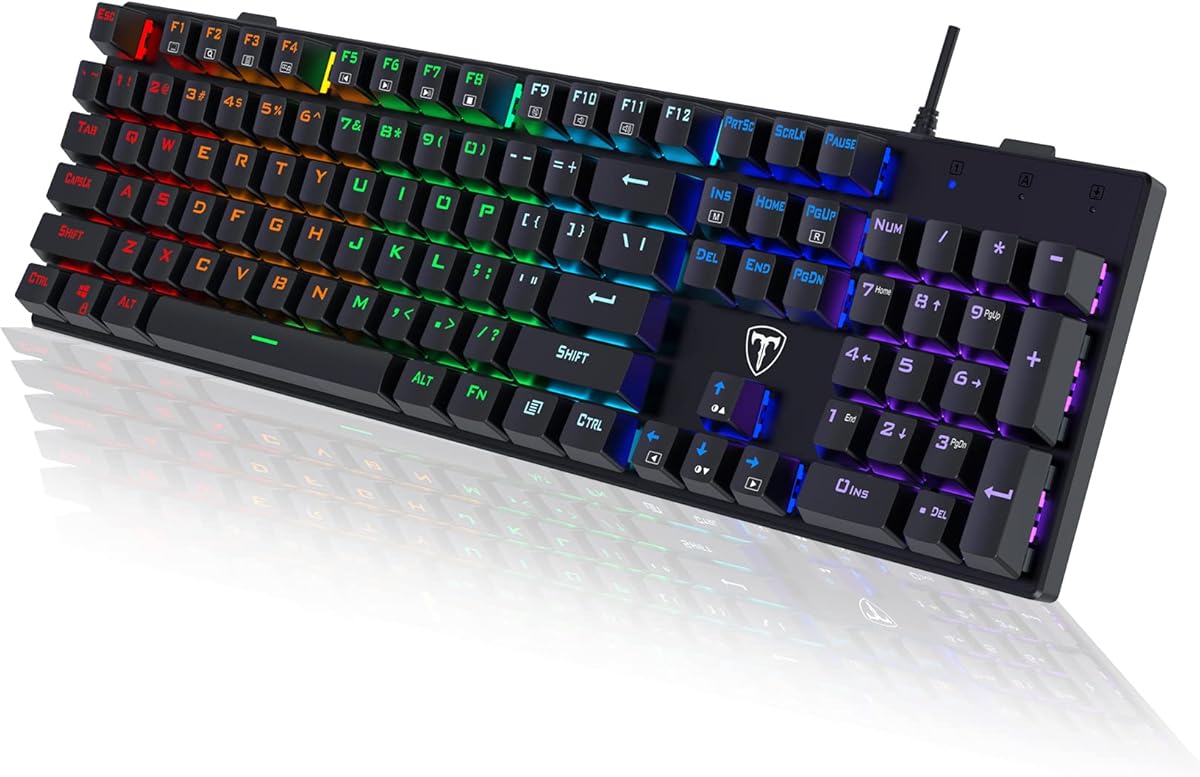
RisoPhy Mechanical Gaming Keyboard
4.5Editor score
Responsive Blue Switches
Full Size Layout
RGB Backlit Options
Discover the top loud mechanical keyboard models for gaming and typing. We compare clicky switches, build quality, and features to help you choose the right
Finding a loud mechanical keyboard means seeking the satisfying click that many enthusiasts crave. These keyboards use tactile switches that announce every keystroke with an audible tap. This feedback helps typists and gamers confirm their inputs instantly during intense sessions.
We evaluated ten top models based on switch type, build quality, and user feedback. Our team analyzed durability, customization options, and overall typing experience. Each product offers unique features ranging from retro styles to modern RGB lighting solutions.
Each pick below highlights specific strengths like hot-swappable switches or premium materials. Note that product availability and pricing can change frequently online. Always check the latest details before making your final purchase decision for your setup.
4.5Editor score

4.6Editor score

4.6Editor score
This side-by-side comparison highlights key specifications across all ten selected models. Focus on switch types, keycap materials, and extra features to find your match.




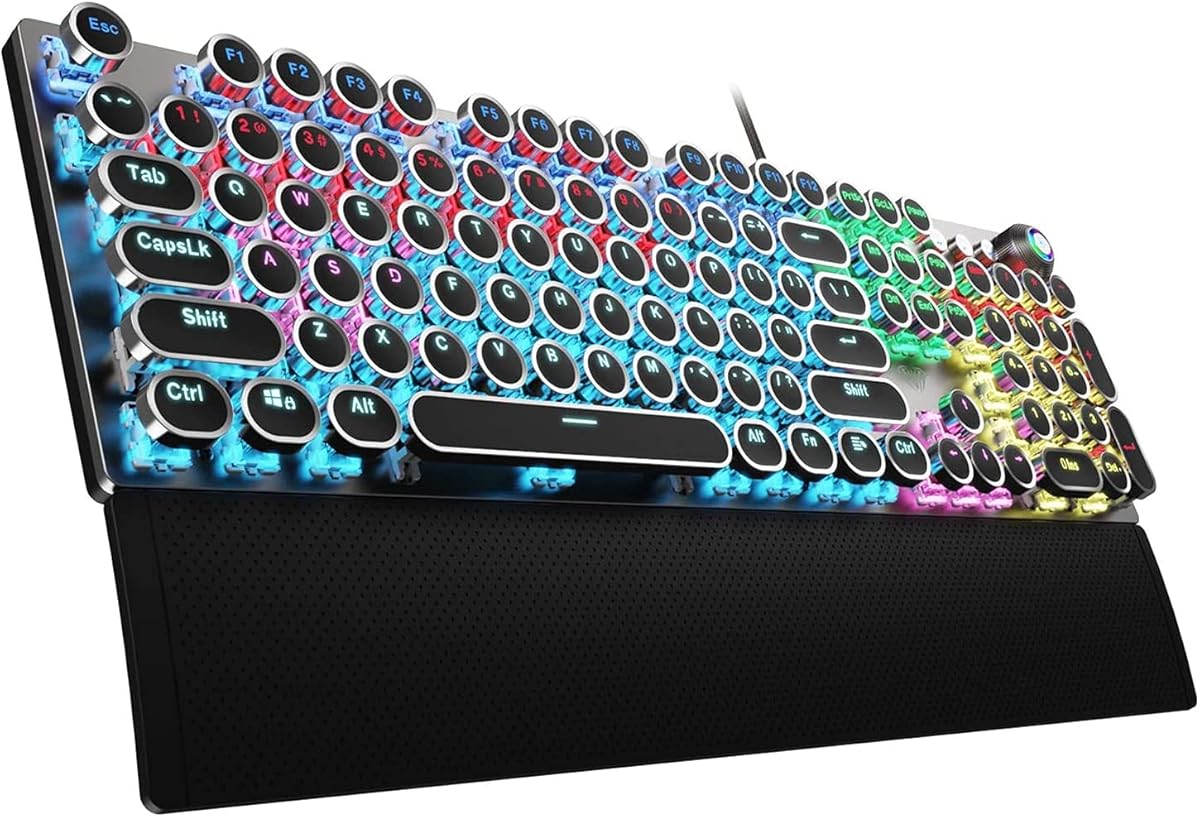

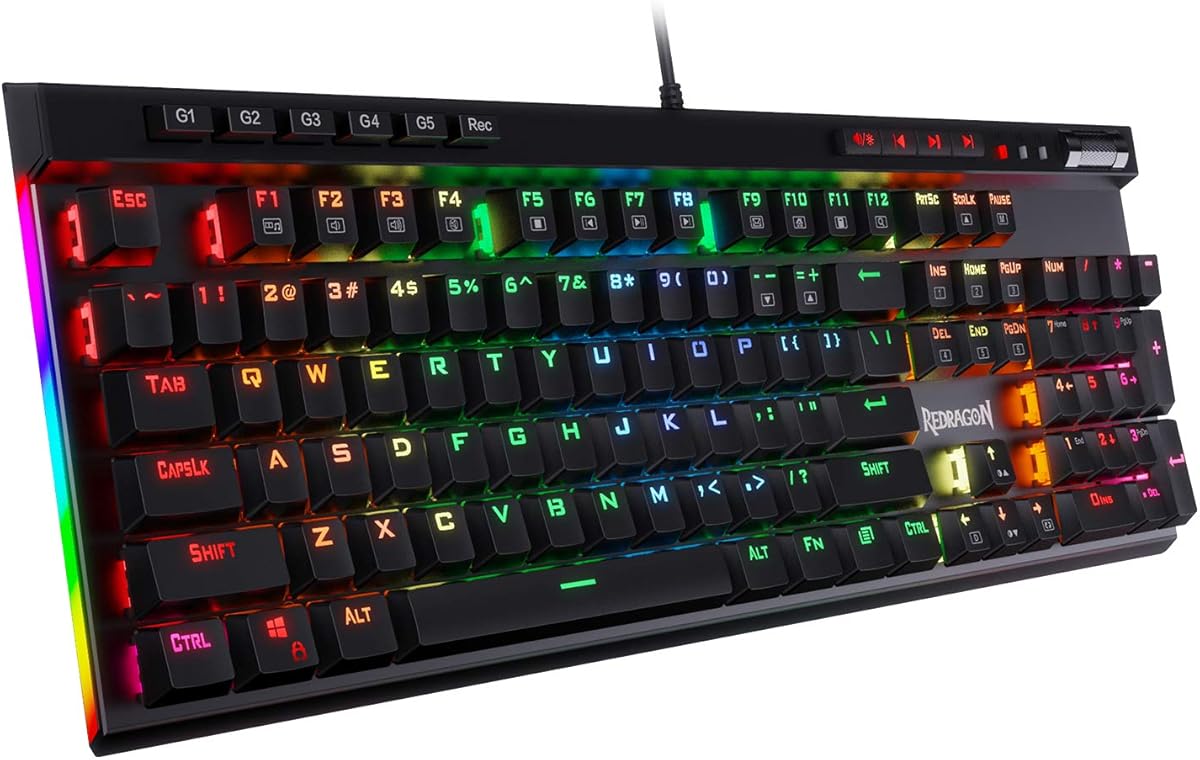
The RK ROYAL KLUDGE S108 stands out as a top choice for those wanting a loud mechanical keyboard with vintage appeal. It features clicky blue switches that provide a distinct tactile bump and audible click. The rating reflects strong user satisfaction regarding its unique design and typing feel.
We may earn a commission when you buy through this link, at no additional cost to you.
This keyboard is built with a sturdy aluminum alloy metal panel that resists scratches and adds stability. The retro round keycaps are inspired by classic typewriters, offering a comfortable typing experience. Users appreciate the full anti-ghosting feature ensuring accurate registration during fast gaming or work sessions.
While the sound is satisfying, the lack of hot-swappable switches limits future customization. Additionally, the software support is restricted to Windows users. These trade-offs are acceptable for those prioritizing style and immediate usability over deep modding potential.
Ideal for enthusiasts who value aesthetics alongside performance, this keyboard delivers a loud typing experience. It suits both gaming and office environments where the clicky sound enhances the workflow. We recommend it for those seeking a retro look with reliable switch performance.
The vintage steampunk keyboard features round keycaps for a unique look and stable clicking touch.
Built with a sturdy aluminum alloy metal panel with a matte finish for durability.
We may earn a commission when you buy through this link, at no additional cost to you.
The RisoPhy Mechanical Keyboard offers an accessible entry point for users seeking a loud mechanical keyboard. Its blue switches deliver a clicky sound and tactile feedback ideal for typing and gaming. The high rating indicates reliability and good value for the price.
We may earn a commission when you buy through this link, at no additional cost to you.
Constructed with durable ABS keycaps and hydrophobic holes, this keyboard handles spills effectively. The rainbow backlight enhances visibility and adds style to any desktop. Full-size layout ensures all function keys are available without compromise.
Users might find ABS keycaps less durable than PBT over time. Software customization is minimal compared to higher-end models. However, for budget-conscious buyers, these factors are minor compared to the cost savings and functional performance.
This model is perfect for gamers or typists needing a loud, responsive keyboard without breaking the bank. It provides necessary features like anti-ghosting and multimedia shortcuts. We suggest it for anyone starting their mechanical keyboard journey.
Features clicky keys that offer higher accuracy and quicker response with an enjoyable sound.
Includes 4 hydrophobic holes allowing water to flow away quickly to prevent damage.
We may earn a commission when you buy through this link, at no additional cost to you.
The SteelSeries Apex 5 delivers a premium loud mechanical keyboard experience with hybrid blue switches. These combine tactile click with smooth membrane action for a unique feel. The high rating confirms its quality and advanced features for dedicated users.
We may earn a commission when you buy through this link, at no additional cost to you.
Its aircraft-grade aluminum alloy frame ensures durability while the OLED display offers customizable info display. Dynamic RGB illumination and a magnetic wrist rest enhance both looks and comfort. This setup supports extensive customization through dedicated software.
The price is higher than standard mechanical options. Setting up the OLED display requires time but adds value. These costs are justified by the build quality and unique features that elevate the typing experience significantly.
Best for enthusiasts wanting top-tier features and a loud typing sound, this keyboard excels in performance and looks. It suits gamers needing detailed stats during play. We recommend it for those prioritizing innovation and premium build quality.
Customize with gifs, game info, discord messages, and more directly on the screen.
The tactile click of a blue switch plus a smooth membrane for long life.
We may earn a commission when you buy through this link, at no additional cost to you.
The Redragon K671 offers a unique twist by providing hot-swappable switches in a budget-friendly package. While it ships with red switches, the ability to swap makes it versatile for loud setups later. The rating reflects solid build quality and features.
We may earn a commission when you buy through this link, at no additional cost to you.
It features double-shot PBT keycaps ensuring clear backlight and precise typing. The 11 programmable backlit modes allow customization for any mood. Full anti-ghosting ensures reliable input during complex gaming combos.
Standard red switches may not provide the desired clicky sound initially. Software color adjustment is limited but functional for lighting effects. These minor points are easily managed by swapping switches for louder options if needed.
Ideal for tinkerers who want to upgrade switches later, this keyboard offers flexibility. It suits users seeking a loud mechanical keyboard path without immediate high costs. We recommend it for those planning future modifications.
Features red switch which requires less force but allows easy exchange of key switches.
11 unique backlights with adjustable speed and brightness for a comfortable environment.
We may earn a commission when you buy through this link, at no additional cost to you.
The AULA F2088 blends retro aesthetics with loud mechanical functionality effectively. Its blue switches deliver a crisp click sound and precise tactile feedback. The rating highlights its strong typing performance and distinctive style.
We may earn a commission when you buy through this link, at no additional cost to you.
Featuring double-shot injection molded vintage steampunk round keycaps, it ensures durability and clear backlight. The dedicated media control knob simplifies volume and lighting adjustments. A metal panel adds robustness to the overall structure.
Lack of software means limited macro programming capabilities. Wired connection restricts cable management flexibility. These limits are acceptable for users prioritizing immediate usability and style over advanced customization features.
Perfect for gamers and typists wanting a stylish loud mechanical keyboard out of the box. It works well across various systems without drivers. We suggest it for those who value simplicity and classic design.
Round keycaps offer a quicker response and precise positioning to prevent fatigue.
Dedicated knob controls media volume, backlight effect, and music play.
We may earn a commission when you buy through this link, at no additional cost to you.
The Redragon K580 focuses on productivity and sound with five dedicated macro keys and a media wheel. Blue switches provide distinct tactile feedback and audible clicks. The rating confirms its reliability for daily use and gaming.
We may earn a commission when you buy through this link, at no additional cost to you.
It features an upgraded socket accepting almost any switch for future upgrades. Double-shot keycaps resist fading ensuring long-term clarity. Full anti-ghosting ensures all inputs register accurately during rapid combos.
Software support is optional which keeps basic use simple but limits deep customization. Fixed layout means less flexibility for smaller desks. These are reasonable trade-offs for the feature set and price point.
Ideal for users needing a loud mechanical keyboard with macro capabilities without complex setup. It suits power users wanting quick shortcuts. We recommend it for those balancing functionality and audio feedback.
5 dedicated macro keys let you save complex combos or shortcuts directly on the board.
Upgraded socket accepts almost any switch for hype clicky feedback.
We may earn a commission when you buy through this link, at no additional cost to you.
The AULA F99 Wireless offers the versatility of wireless connectivity with a loud mechanical feel via customization. Though stock linear switches are smooth, the hot-swap feature allows clicky upgrades. The rating highlights its robust wireless performance.
We may earn a commission when you buy through this link, at no additional cost to you.
It supports three connection modes including Bluetooth and 2.4GHz for seamless device switching. The gasket mount and PCB slotting optimize resilience for a softer hand feel. Dual-shot PBT keycaps ensure durability and clarity.
Default linear switches do not provide clicky sound unless swapped. Wireless convenience adds to the cost. These factors are manageable for users wanting freedom of movement and customization potential.
Perfect for users needing a loud mechanical keyboard across multiple devices. It suits mobile workers and gamers alike. We recommend it for those prioritizing wireless freedom and build quality.
Provides three connection methods including BT5.0 and 2.4GHz to connect to up to five devices.
Advanced structure optimizes resilience and stability making the hand feel softer.
We may earn a commission when you buy through this link, at no additional cost to you.
The Logitech G413 SE provides a sturdy build with tactile mechanical switches for feedback. The rating reflects its durability and gaming-first features. While lighting is minimal, the focus remains on performance and longevity.
We may earn a commission when you buy through this link, at no additional cost to you.
It features heat- and wear-resistant PBT keycaps for long-term use. The brushed aluminum-magnesium alloy top case provides stability and style. 6-key rollover ensures reliable input during intense gaming scenarios.
Lighting is limited to white LED which limits visual customization. The cable is fixed reducing portability options. These are acceptable trade-offs for users prioritizing structural integrity over flash.
Ideal for gamers needing a reliable loud mechanical keyboard without excessive features. It suits users wanting a clean aesthetic. We recommend it for those valuing build quality and simplicity.
Uncompromising performance is always within reach with this wired gaming keyboard.
The brushed aluminum-magnesium alloy top case serves as the corded keyboard's backbone.
We may earn a commission when you buy through this link, at no additional cost to you.
The RK ROYAL KLUDGE R98 Pro offers a compact design retaining numpad and functionality. While stock linear switches are smooth, hot-swapping allows clicky sound. The rating highlights its sound-absorbing foam for a creamy typing experience.
We may earn a commission when you buy through this link, at no additional cost to you.
It features MDA profile PBT keycaps that fit fingers better for strong wrapping sensation. The detachable volume knob adds convenience for quick audio control. Gasket mount design ensures stability and reduced noise.
Default switches lack loud feedback unless upgraded. Software dependency for macros may deter minimalists. These are minor points compared to the space efficiency and build quality.
Best for users seeking a loud mechanical keyboard that saves desk space without losing features. It suits gamers wanting a numpad. We recommend it for those valuing compactness and modding options.
Five layers sound-absorbing foam to ensure thocky feeling and creamy sounding.
Popular choice because it fits fingers better and provides a stronger sense of wrapping.
We may earn a commission when you buy through this link, at no additional cost to you.
The Redragon K668 offers a full-size layout with four dedicated extra hotkeys for productivity. It features a hot-swap socket allowing switch upgrades for louder sound. The rating reflects solid performance and RGB capabilities.
We may earn a commission when you buy through this link, at no additional cost to you.
Vibrant RGB lighting includes a music-sync mode to match desktop audio. Two sets of mixed color keycaps let you swap looks easily. Ergonomic feet relax wrists during long sessions.
Stock linear switches do not provide clicky feedback out of box. RGB customization requires software. These are manageable for users wanting value and future-proofing options.
Ideal for budget-conscious users wanting a loud mechanical keyboard path. It suits gamers needing extra shortcuts. We recommend it for those seeking versatility and good looks.
Dedicated shortcut keys default to mute, calculator, screen lock and desktop.
Upgraded socket accepts almost any 3-pin or 5-pin switch.
We may earn a commission when you buy through this link, at no additional cost to you.
Selecting the right loud mechanical keyboard involves balancing sound, feel, and functionality. Consider these factors to find a model that matches your typing style and budget.
Mechanical switches vary in sound and tactile feedback. Blue switches offer a loud click while Red are quieter. For a loud keyboard, choose clicky switches specifically designed for audible feedback.
Always verify the switch type before purchasing to ensure it meets your noise preference.
Keycaps affect sound and durability. ABS is common but may shine over time. PBT is textured and resists wear better. Denser materials can amplify the sound of the switches below.
Prioritize PBT keycaps for a more consistent typing sound over years of use.
The frame material impacts overall stability and sound dampening. Aluminum plates are sturdy but can add resonance to clicks. Plastic cases often reduce noise transmission but feel lighter.
Look for solid construction to ensure the loud sound comes from switches not vibration.
Hot-swappable sockets allow changing switches without soldering. This feature is ideal for experimenting with louder or quieter switches later. It extends the keyboard's lifespan and versatility significantly.
Choose a hot-swap model if you want flexibility to upgrade to clicky switches later.
Lighting options enhance visibility and aesthetics. Single color LED is cost-effective while RGB allows personalization. Ensure transparency in keycaps for backlight effects to be visible.
Verify if backlighting meets your visual needs without distracting from typing.
Full size layouts include numpads useful for data entry. Compact sizes save desk space. Ensure the chosen layout fits your workspace and usage habits effectively.
Select the size that balances comfort and desk real estate for your tasks.
Software supports customization of lighting and macros. Some models require drivers while others are plug-and-play. Check compatibility with your operating system before buying.
Ensure the software supports your workflow needs for maximum productivity.
Reputable brands offer warranties for defects and issues. Long-term support ensures peace of mind after purchase. Check return policies for satisfaction guarantees.
Prioritize models with strong customer support to resolve potential issues easily.
Keep your keyboard clean by regularly removing dust from keycaps using a soft brush or compressed air. This prevents debris from affecting the loud switch sound and functionality.
Use the provided keycap puller to gently remove caps for deep cleaning. Avoid using excess water on the internal components to prevent electrical damage and loss of sound quality.
Adjust lighting and macros through the manufacturer software if available. This enhances your typing experience and maximizes the keyboard's features effectively.
Loud mechanical keyboards can be noisy due to clicky switches. In open offices this may disturb others. Consider quiet alternatives or use desk mats to dampen sound if noise is a concern.
Only hot-swappable keyboards allow changing switches without soldering. Standard models require soldering. Check specifications before buying to ensure you can swap switches for different sounds.
Clicky switches provide audible feedback confirming every keystroke. This helps with typing accuracy and rhythm. Users enjoy the satisfying sound during gaming and writing sessions.
Not necessarily. High-quality switches often last millions of keystrokes. Durability depends on build quality. Check ratings to ensure longevity alongside sound performance.
Use desk mats and wrist rests to dampen sound. Silicone O-rings on switches can also help. Regular cleaning prevents excess noise caused by debris accumulation.
Many gamers prefer loud keyboards for tactile confirmation of inputs. Clicky sound can enhance immersion. However ensure you are comfortable with the noise level during gameplay.
We highlighted ten top loud mechanical keyboards ranging from retro styles to modern gaming boards. Each option delivers distinct sound and features for different needs.
Prioritize switch type and build quality to ensure the loud feedback you desire. Consider hot-swap features for long-term flexibility and customization.
Always check current prices and availability before buying. Your ideal loud mechanical keyboard should enhance both your workspace and typing experience.