
Upgraded Watt Power Meter Plug
4.6Editor score
Seven display modes available
Adjustable backlight time settings
Overload protection warning system
This guide compares the top energy consumption monitors for PC and home use to help you track wattage, reduce bills, and optimize your power setup efficiently.
Understanding your computer energy usage is essential for reducing electricity costs and preventing overheating issues. Whether you run a gaming rig or a home office setup, monitoring power draw helps optimize efficiency. These devices provide real data insights into how much power your PC consumes under different loads.
We evaluated ten top-rated energy monitors based on accuracy, ease of use, and feature sets. Our comparison includes plug-in meters for single devices and whole-home systems for broader tracking. Each product offers unique capabilities for measuring voltage, current, and cumulative energy consumption over time.
Each pick below shows key specifications and ideal use cases for different user needs. Prices fluctuate regularly so always check current listings before purchasing your chosen model. Detailed reviews highlight pros and cons to guide your decision toward the right monitor for your specific setup requirements.
4.6Editor score

4.6Editor score

4.3Editor score
This side-by-side comparison highlights key specifications across all ten models to help you quickly identify the right energy monitor for your PC and home power tracking needs based on accuracy features and connectivity options.


The Emporia Vue 3 stands out as the top choice for comprehensive whole-home energy tracking with robust safety certifications. It monitors real-time electricity usage with high accuracy and integrates solar and net metering seamlessly into your home energy management strategy.
We may earn a commission when you buy through this link, at no additional cost to you.
Its standout quality lies in the detailed real-time data accessible via the Emporia Energy App which allows you to automate energy settings and view live spending instantly. You can configure time of use settings and receive automated notifications to reduce costs without constant manual oversight.
Trade-offs include reliance on 2.4GHz WiFi for full functionality and limited retention of one-second data to three hours unless you export cloud data. However these constraints are acceptable given the precision of minute and hour data retained indefinitely in the cloud for long-term analysis.
If you want to track every circuit including your PC power usage this monitor is ideal for tech-savvy homeowners or renters needing transparent energy allocation. Its UL certification provides peace of mind while the included sensors make setup straightforward for accurate appliance monitoring without guesswork.
UL listed status ensures every component is tested against rigorous safety standards to prevent hazards like overheating or fire.
The app automates energy management for peak demand and excess solar giving you actionable insights to cut bills instantly.
We may earn a commission when you buy through this link, at no additional cost to you.
This Upgraded Watt Power Meter Plug offers exceptional value for tracking individual PC components or household appliances without breaking the bank. It displays multiple electrical parameters including watts voltage and amps through seven switching modes to give you a clear view of consumption.
We may earn a commission when you buy through this link, at no additional cost to you.
Its upgraded LCD screen is large and backlit allowing easy reading in any lighting condition from any angle without bending over. You can also adjust the backlight time to save power or keep it on for constant visibility which is great for monitoring high-load PCs.
Since it lacks smart features or app connectivity you must manually read data which limits remote tracking capabilities. However for users focused on simple cost tracking and overload alerts this plug-in design is reliable and saves money on more complex monitoring systems.
Ideal for renters or those wanting to check the power draw of a specific PC setup this meter calculates cumulative electricity bill costs automatically. Its overload protection warns you when power exceeds safe limits making it a practical tool for managing appliance efficiency on a tight budget.
A large 2.36 inch screen with backlight ensures you can read voltage and wattage clearly even in dark conditions.
It calculates how much your appliance costs over time based on settings so you know exact bills for your PC usage.
We may earn a commission when you buy through this link, at no additional cost to you.
The Meross Smart Home Energy Monitor provides advanced features for users seeking privacy and integration with home automation systems. It tracks power usage with high accuracy and offers charts to visualize energy consumption patterns by minute hour or day to identify waste areas.
We may earn a commission when you buy through this link, at no additional cost to you.
Its standout quality is the ability to store data locally without cloud lock-in or subscriptions protecting your privacy while still delivering real-time alerts. You can integrate it with Home Assistant to detect solar surplus and automatically power high-use appliances like EV chargers or water heaters.
Trade-offs include a potentially complex initial setup process and a lower average rating compared to some competitors. However for power users prioritizing data security and automation capabilities these drawbacks are minor compared to the benefits of full local control and advanced reporting tools.
Choose this monitor if you want to maximize solar savings and keep your energy data private within your home network. Its no-subscription model ensures you own your data and the clear cost charts help you cut bills by spotting energy hogs without hidden recurring costs.
All data stays local with no cloud reliance ensuring your usage habits remain private and accessible only through local APIs.
Solar surplus detection lets you redirect excess energy to appliances reducing reliance on the grid and cutting electricity bills.
We may earn a commission when you buy through this link, at no additional cost to you.
SURAIELEC Outlet Watt Meter delivers high precision with Class 1.0 accuracy making it reliable for measuring even small PC power variations. Its wide voltage range from 90 to 250 volts ensures compatibility across different electrical standards and regions for universal monitoring.
We may earn a commission when you buy through this link, at no additional cost to you.
You can track cumulative energy and costs automatically based on set prices while the built-in rechargeable battery backup preserves data for up to 90 days during outages. This ensures your long-term usage history remains intact even if power is interrupted or the device is unplugged.
While it lacks smart connectivity the space-saving design leaves the lower wall outlet accessible which is practical for crowded power strips. The trade-off of manual data reading is balanced by the fire-resistant material and clear LCD display that makes daily checks easy and safe.
This meter suits users needing accurate measurements for specific devices without relying on apps or internet. Its precision and durable build make it an excellent choice for monitoring critical appliances or PCs where consistent and safe power tracking is essential.
Class 1.0 accuracy with 0.1W resolution ensures you capture even the smallest wattage changes accurately for precise budgeting.
The rechargeable backup saves data for 90 days so sudden outages won't erase your long-term consumption or cost records.
We may earn a commission when you buy through this link, at no additional cost to you.
This Smart Home Energy Monitor is uniquely designed for rental homes and shared apartments with customizable electricity rate templates for fair cost allocation. It supports multiple circuit monitoring so landlords or property managers can track usage for each bedroom or common area accurately.
We may earn a commission when you buy through this link, at no additional cost to you.
Its standout feature is the Super Privacy Mode allowing users to run on a local MQTT server without cloud access or app dependency. This ensures total data control while still providing real-time usage insights via Android or Apple software when cloud connectivity is available.
Installation might be complex for non-technical users due to panel access requirements but the branch lines automatically match phases simplifying setup. The trade-off is worth it for transparent billing and environmental awareness as it tracks where savings can be made effectively.
Ideal for multi-room properties this monitor helps you manage energy costs transparently without installing multiple meters. Whether you are a tenant or landlord the ability to track power usage by circuit makes billing fair and helps conserve resources efficiently.
Custom templates for peak and off-peak tariffs allow automatic cost calculation making shared apartment billing transparent and easy.
Run without cloud or app using your own MQTT server to ensure all usage data remains private and under your control.
We may earn a commission when you buy through this link, at no additional cost to you.
HBN Watt Meter Plug offers nine types of data display allowing you to monitor apparent power frequency and power factor alongside basic wattage. Its large 160 degree viewing angle ensures clear readings from any angle day or night without needing to bend over to see the numbers.
We may earn a commission when you buy through this link, at no additional cost to you.
Data storage ensures you retain non-real-time information even after a sudden power outage which helps track cumulative energy over longer periods. The backlight automatically turns off after fifteen seconds to conserve energy but can be activated again by pressing any button as needed.
While it lacks smart app connectivity the interface is user-friendly and simple to use for basic cost tracking. The trade-off of manual reading is acceptable for this price point and it includes a reset function to clear cumulative data easily for new monitoring sessions.
This plug is ideal for tracking individual devices like computers or refrigerators without complex setups. Its wide viewing angle and data backup features make it a practical and affordable tool for anyone wanting to understand their household electricity usage.
Nine modes including apparent power and power factor give detailed insights into device efficiency beyond just watts consumed.
A 160 degree wide angle lets you read wattage clearly from the side which is helpful when monitors are at odd angles.
We may earn a commission when you buy through this link, at no additional cost to you.
KETOTEK Watt Meter features a five-button one-click interface that quickly switches between KWH watt and voltage readings for intuitive navigation. Its wide viewing angles let you read data from any angle without bending over which is helpful if the outlet is below eye level.
We may earn a commission when you buy through this link, at no additional cost to you.
Overload protection warns you when power exceeds 1800W by default and adjustable limits prevent appliance damage or electrical hazards. The built-in chip stores data during outages ensuring you retain cumulative metrics even if the device is unplugged or power fails suddenly.
The reset function allows deleting measurement data while retaining settings for switching between multiple appliances without reconfiguration. Although it does not connect to apps the simplicity and clarity make it effective for household monitoring where immediate visual feedback is preferred.
Choose this meter if you want straightforward appliance monitoring with clear visual alerts. Its high rating and ease of use make it reliable for tracking PCs or routers where you need simple accurate data without complicated setup processes.
Five buttons allow one-click access to KWH and watts saving you time and effort when checking usage for devices.
Overload warnings flash LED lights when power exceeds limits protecting both your appliance and the meter from damage.
We may earn a commission when you buy through this link, at no additional cost to you.
This 2 Pack Watt Meter gives you two units for the price allowing simultaneous monitoring of multiple PC components or household appliances. Its ABS body is fireproof and anti-drop ensuring durability and safety during everyday use on power strips or outlets.
We may earn a commission when you buy through this link, at no additional cost to you.
Eight display modes let you switch between watts voltage and total cost while the backlight aids reading in dark conditions. If you press any button the backlight turns on and it saves data during power failures so you never lose cumulative usage records.
Resetting is tool-free with a simple five-second press on the M button clearing all settings data to defaults. The trade-off of manual reading is minimal given the value of having two meters for budgeting and tracking efficiency across different devices.
Ideal for households wanting to compare energy use between a gaming PC and a workstation this pack saves money and simplifies tracking. Its durable build and memory retention make it a practical choice for long-term appliance monitoring on a tight budget.
Two meters let you track a computer and a peripheral simultaneously helping you compare energy usage side by side easily.
High-quality ABS material ensures fireproof and drop-resistant protection extending the lifespan of your monitoring plugs safely.
We may earn a commission when you buy through this link, at no additional cost to you.
The P4400 Kill A Watt is a classic energy monitor that assesses appliance efficiency with a large LCD display counting consumption by kilowatt-hour. It lets you choose from four settings to monitor usage by day week or month giving a clear picture of long-term costs.
We may earn a commission when you buy through this link, at no additional cost to you.
Its simplicity and compatibility with inverters make it useful for monitoring AC 115-volt appliances like computers or routers without extra setup. The display calculates electricity expenses over different time periods helping you understand how much specific devices contribute to your total bill.
Trade-offs include lack of smart app integration or modern backlight features found in newer models. However its established reliability and ease of use keep it relevant for users who prefer analog-style tracking without relying on internet connectivity or complex software.
This monitor is ideal for those seeking a proven tool for basic energy tracking. Whether you are measuring a PC or a small appliance its straightforward interface provides essential data to help reduce electricity costs effectively.
Its simple design has been trusted for years providing clear consumption counts that are easy to read and understand.
Track usage by day or month to understand long-term patterns and adjust habits for better energy efficiency at home.
We may earn a commission when you buy through this link, at no additional cost to you.
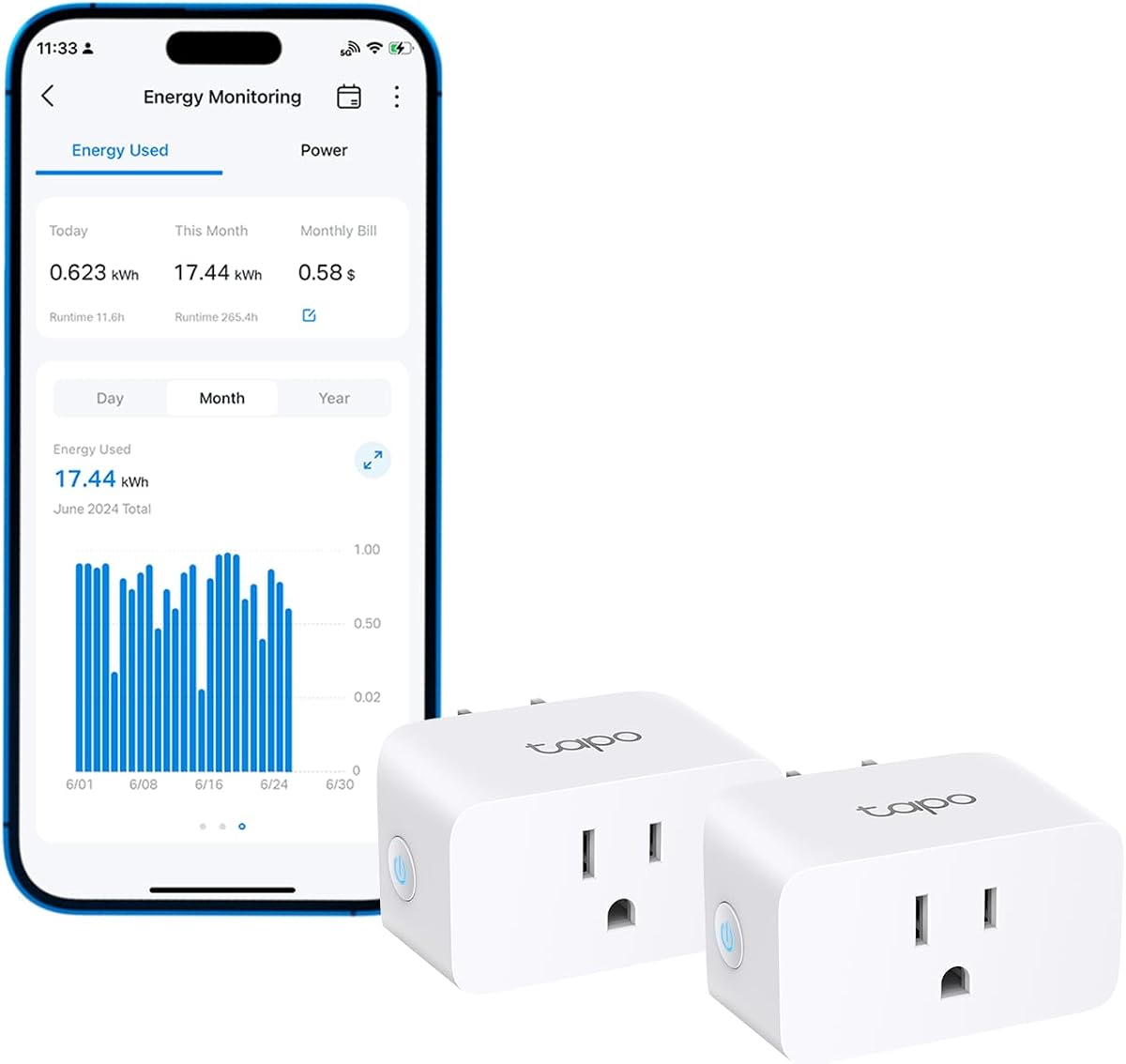
Tapo Smart Plug Wi-Fi offers insightful energy tracking with clear statistics and intuitive charts in the Tapo app to optimize power usage. It supports Alexa and Google Assistant for voice control and allows programmable scheduling for high-consumption devices during off-peak hours.
We may earn a commission when you buy through this link, at no additional cost to you.
Its Auto-Shutoff feature prevents electrical overload and Smart Charging cuts power once devices reach low-battery limits to avoid overcharging. This adds safety and automation to basic monitoring helping you save money without manually checking usage daily or adjusting settings manually.
Trade-offs include reliance on WiFi and the Tapo app which limits use in offline environments. However the convenience of remote control and automation makes it superior to plug-in meters for users who want to manage devices from anywhere.
Ideal for smart home enthusiasts this plug combines energy monitoring with automation features. Whether for PCs or home office gear the ability to schedule usage and control devices remotely helps maximize efficiency and reduce unnecessary power consumption.
Schedule high-consumption devices to run during off-peak hours automatically to save on electricity rates without manual changes.
Manage your plug from anywhere using the Tapo app or voice commands to adjust settings or turn devices on and off.
We may earn a commission when you buy through this link, at no additional cost to you.
Selecting the right energy monitor requires understanding your needs whether for single device tracking or whole-home optimization. Consider accuracy connectivity and features that match your setup before purchasing.
Accuracy determines how closely your monitor reflects real energy usage. Look for devices with tight error margins like 1 or 2 percent to ensure reliable data for billing or optimization.
Prioritize monitors with high accuracy ratings to trust your decisions on energy-saving measures and hardware upgrades.
Smart monitors connect via WiFi to apps offering remote access and historical data analysis. Plug-in meters often lack connectivity but provide immediate visual feedback for quick checks.
Choose smart options if you need automation and remote alerts or traditional plugs for simple local tracking.
Whole-home systems may require circuit panel installation and professional help while plug-in meters are user-friendly. Consider your comfort level with electrical work when selecting a system.
Simpler plug-in units are best for renters or those unwilling to modify electrical panels.
Monitor if data persists during power outages or unplugging. Some devices store cumulative energy locally to prevent data loss and support long-term tracking.
Opt for models with battery backup or cloud storage to ensure continuous and safe usage records.
Certifications like UL or ETL ensure the monitor meets safety standards against overheating or electrical hazards. Always choose certified devices for peace of mind.
Check for safety marks to prevent risks when monitoring high-power appliances like PCs or heaters.
Prices range from inexpensive plugs to whole-home systems. Determine your budget and balance cost with necessary features like accuracy and connectivity.
Invest in value over cheap options that compromise on reliability or safety.
Clear LCD screens with backlight help in various lighting conditions. Look for readable fonts and multiple modes for detailed parameters.
Ensure the display is easy to read without straining for accurate daily checks.
Smart monitors integrate with Home Assistant or cloud apps for automation. Check compatibility with your existing smart home ecosystem.
Choose systems that support APIs or platforms you already use for seamless integration.
For plug-in monitors insert the device between the outlet and your PC power cable. Wait for the display to load and toggle through modes to see real-time wattage and cost.
Install whole-home systems by attaching clamp sensors to breakers in your circuit panel. Ensure connections are secure and follow safety guidelines when working with electrical panels.
Regularly reset cumulative data to keep records accurate. Keep firmware updated for smart devices and store units in dry places to prevent moisture damage.
Most quality monitors offer accuracy within 1 to 2 percent which is sufficient for estimating electricity costs. To maximize accuracy calibrate settings with your local utility rate.
Yes these devices monitor any appliance connected to them. Plug your gaming PC into the monitor to see real power draw and energy usage patterns.
Many devices like Meross and SEM-Meter offer full tracking without subscriptions. Always check the product details to confirm no hidden fees or recurring costs.
Devices with built-in memory or batteries retain cumulative data. Check the specs for data retention features to ensure no loss during outages.
Yes certified monitors with overload protection are safe for continuous use. Always install them correctly and avoid exceeding the load limits listed.
Whole-home systems track multiple circuits while plugs track one device. Use multiple plug-in monitors or a panel system for simultaneous device tracking.
Smart monitors usually offer cloud exports or API access. Use the app settings to download reports or connect to Home Assistant for data export.
Plug-in monitors typically last several years. Whole-home systems have durable components but may need calibration. Maintain them by avoiding physical damage.
This guide highlights ten top options ranging from budget plugs to advanced whole-home systems for tracking PC energy. Each model offers unique benefits for different needs and technical comfort levels.
Prioritize accuracy and safety features when choosing to ensure reliable data for your decisions. Smart monitors add automation but traditional plugs suffice for basic usage insights.
Always verify current listings before purchase as prices and specs can change over time. Select the monitor that fits your setup and budget to maximize energy efficiency.