
Adesso AKB-132HB Multimedia USB Keyboard with 3 Hubs, Black
4.2Editor score
3 Built-In USB Ports
Multimedia Hotkeys Included
Quiet Membrane Switches
Discover the top ten keyboards with integrated USB ports for enhanced connectivity. We compare features, design, and compatibility to help you find the right
Finding a keyboard with USB port connectivity can streamline your workspace significantly. These devices allow you to connect peripherals directly through the keyboard, reducing cable clutter and improving efficiency. Whether you need extra hubs for flash drives or mice, this guide covers the best options available today.
We evaluated ten top-rated models based on build quality, hub functionality, and user feedback. Each product was analyzed for compatibility across operating systems and ease of setup. Our goal is to provide a comprehensive overview that helps you make an informed decision for your specific needs.
Every selection highlights key strengths and potential limitations found in real-world usage scenarios. You will see detailed breakdowns of specs, pros, and cons for each model. Please note that product availability and pricing can change frequently, so verify details before purchasing to ensure you get the best value.
4.2Editor score
4.4Editor score
4.3Editor score
This section provides a side-by-side look at the top ten keyboards with USB ports. We highlight key specifications and unique features for each model to help you compare them quickly. Use this overview to identify which device aligns best with your workflow requirements and budget constraints.






The Adesso AKB-132HB stands out as a practical choice for users needing basic USB connectivity without breaking the bank. With a rating of 4.2 stars, it offers reliable performance for everyday tasks. Its standout quality is the inclusion of three built-in USB hubs directly on the keyboard deck.
We may earn a commission when you buy through this link, at no additional cost to you.
This model features quiet membrane key switches that provide a comfortable typing experience with minimal noise. The multimedia hotkeys allow you to control media players and access common Windows applications instantly. These features make it ideal for office environments where noise reduction is appreciated.
While the build is primarily plastic and lacks the premium feel of higher-end models, it remains durable enough for daily use. The lack of backlighting and limited customization options are trade-offs that keep the price low. These compromises are acceptable given the functional value it provides.
Anyone looking for an inexpensive way to expand USB ports should consider this keyboard. It is perfect for home offices or shared workstations where budget is a primary concern. We recommend it for users who prioritize functionality over advanced aesthetic features.
The three USB hubs allow you to connect peripherals like flash drives and mice directly, saving ports on your computer.
Dedicated multimedia keys let you adjust volume or skip tracks without interrupting your workflow or opening separate apps.
We may earn a commission when you buy through this link, at no additional cost to you.
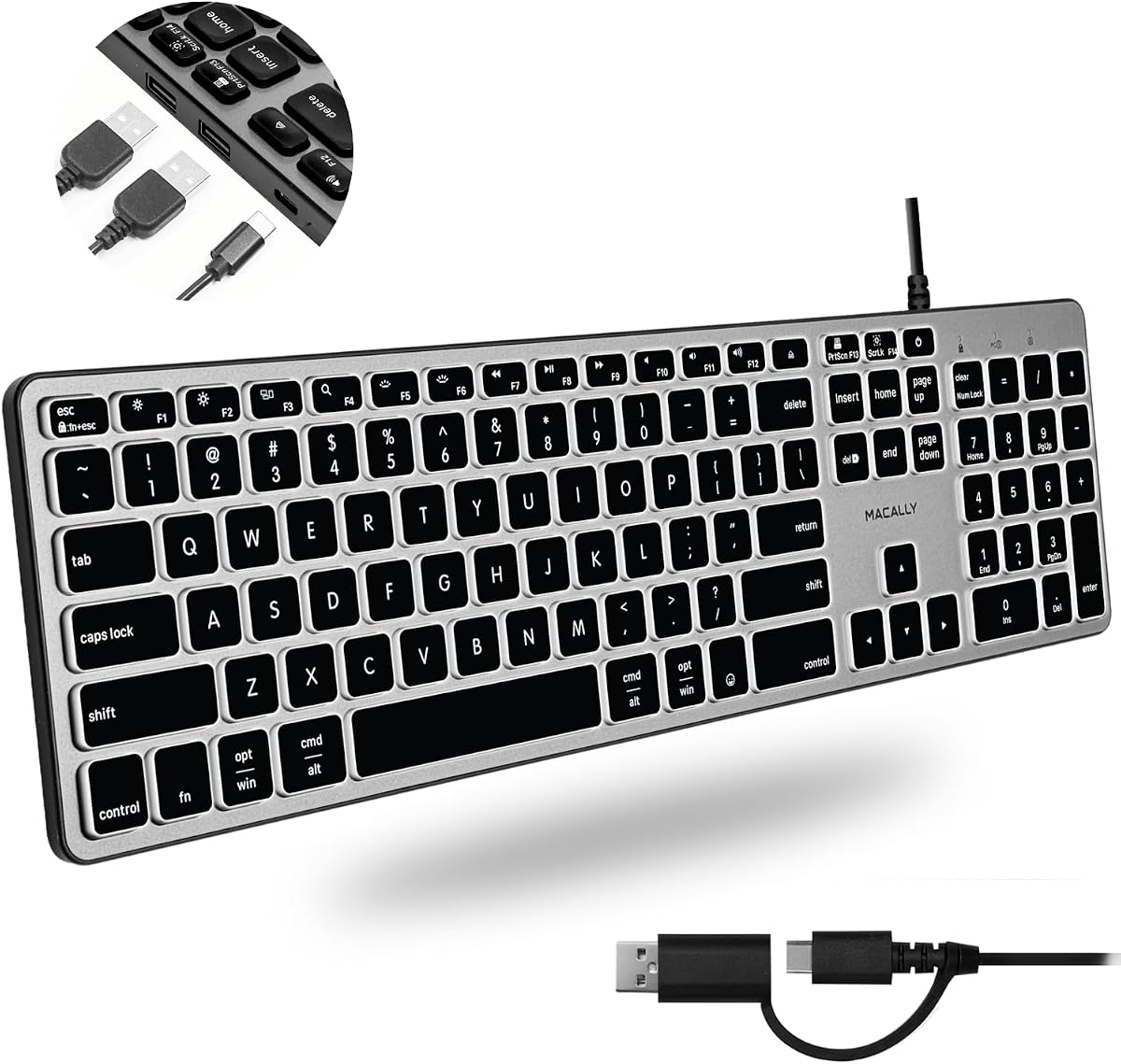
The Macally Wired Keyboard earns the Editor's Choice award for its exceptional versatility across multiple operating systems. With a rating of 4.4 stars, it delivers a balanced experience for both Mac and PC users. Its ability to automatically detect the OS makes it a seamless addition to any desk.
We may earn a commission when you buy through this link, at no additional cost to you.
Key strengths include the inclusion of both USB-A and USB-C ports, catering to modern device needs. The white LED backlit keys offer three adjustable brightness levels for optimal visibility in low-light conditions. This attention to detail ensures productivity regardless of your environment.
The main trade-off is a higher price compared to basic models, but the dual interface and warranty justify the cost. The fixed cable design might be inconvenient for users who prefer modular setups. However, the reliability and support provided by Macally mitigate this concern effectively.
This keyboard is best suited for professionals who switch between Mac and Windows systems frequently. It is also ideal for users needing USB-C connectivity on newer devices. We recommend it for those seeking a robust solution with strong manufacturer support.
Auto OS detection ensures all keys function correctly whether you connect to a Mac, PC, or Android device instantly.
With two USB-A ports and one USB-C port, you can connect legacy and modern peripherals simultaneously without adapters.
We may earn a commission when you buy through this link, at no additional cost to you.
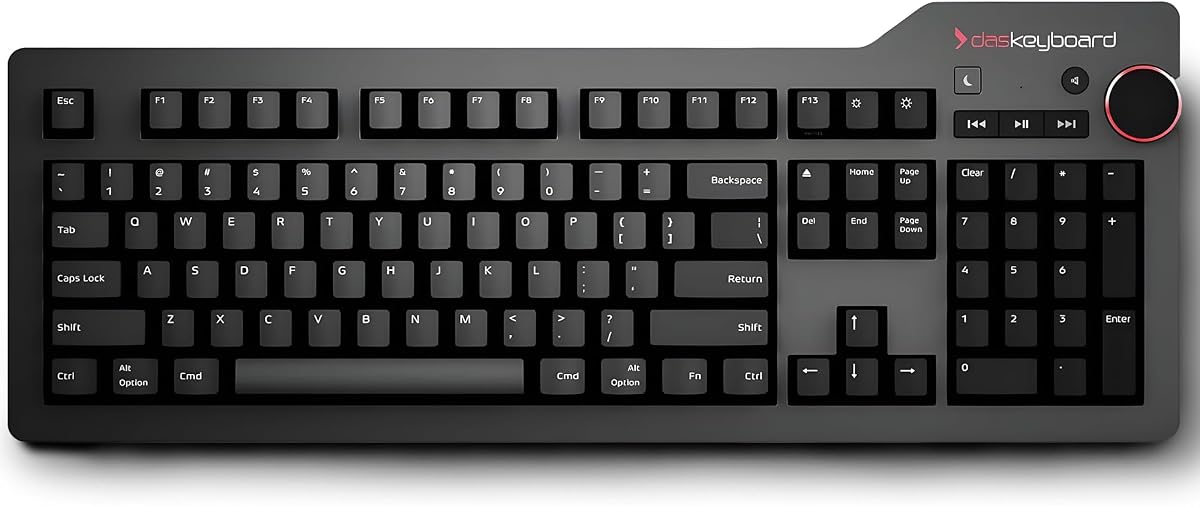
The Das Keyboard 4 Professional for Mac represents the pinnacle of typing performance in this guide. Rated at 4.3 stars, it delivers a premium mechanical experience with Cherry MX Blue switches. Its standout quality is the combination of tactile feedback and high-speed data transfer via USB 3.0.
We may earn a commission when you buy through this link, at no additional cost to you.
Features like the aluminum top plate and gold-plated switches ensure longevity and a luxurious feel. The USB 3.0 hub allows for rapid data transfers up to 5Gb per second, significantly faster than standard USB 2.0. This makes it excellent for users who work with large files regularly.
The clicky nature of the switches may be loud for quiet offices, which is a significant trade-off to consider. The price is also substantial, reflecting its high-end build and specific features. These factors are acceptable if you value tactile typing and durable materials over silence.
Professionals and typists seeking the best mechanical feel should look to this keyboard. It is perfect for creative workstations where data speed and build quality matter most. We recommend it for users willing to invest in a top-tier peripheral.
The USB 3.0 hub supports blazing-fast transfer speeds, allowing you to move large files without lag or waiting.
Laser-etched keycaps and a solid aluminum top provide durability and a sophisticated look that resists wear over time.
We may earn a commission when you buy through this link, at no additional cost to you.
The Logitech K120 is a highly rated option for users seeking a straightforward and durable keyboard experience. With a 4.6 star rating, it is known for reliability and comfort during extended typing sessions. Although it lacks a built-in USB hub, its design focuses on essential functionality.
We may earn a commission when you buy through this link, at no additional cost to you.
Its spill-resistant construction and deep-profile keys make it suitable for long hours of work without fatigue. The use of certified post-consumer recycled plastic aligns with eco-friendly preferences. Setup is incredibly simple as it requires no software installation to function correctly.
The absence of a USB hub means it does not fit the specific criteria of our main keyword as well as others. However, it remains a strong contender for basic typing needs. The trade-off is acceptable for users who do not require extra ports on the keyboard.
This model is ideal for home offices or shared spaces where durability is paramount. It is perfect for users who want a no-fuss keyboard that just works. We recommend it for anyone prioritizing comfort and sustainability over connectivity options.
The design prevents liquid damage from disrupting your work, allowing you to recover easily from accidental spills.
Over half of the plastic parts are made from recycled materials, reducing environmental impact without compromising durability.
We may earn a commission when you buy through this link, at no additional cost to you.
The Perixx PERIBOARD-409H is designed for users who need extra ports without taking up too much desk space. With a 4.4 star rating, it offers a compact solution that still includes two USB hubs on the side. This layout is perfect for laptops or small workstations.
We may earn a commission when you buy through this link, at no additional cost to you.
Features like the responsive membrane keys and durable UV coating ensure longevity and a smooth typing experience. The five-foot cable provides enough length to reach computers under desks comfortably. Setup is seamless with a plug-and-play design that requires no drivers.
The lack of a number pad is a significant limitation for those who use numeric data frequently. Additionally, the fixed cable length might not suit all desk configurations. These trade-offs are acceptable if saving space is your primary goal.
This keyboard is best for travelers or those with limited workspace. It is ideal for users who need to connect a mouse and a flash drive easily. We recommend it for compact setups where desk real estate is valuable.
The mini design removes the number pad to save space, making it easy to use even on small desks.
Two USB ports on the side let you connect extra devices like mice or drives directly from the keyboard.
We may earn a commission when you buy through this link, at no additional cost to you.
The KOPJIPPOM Large Print keyboard is an excellent choice for users who need enhanced visibility while typing. With a 4.5 star rating, it addresses accessibility needs with fonts that are four times larger than standard. This feature makes it highly usable for the visually impaired or elderly.
We may earn a commission when you buy through this link, at no additional cost to you.
White LED backlighting allows for clear typing in low-light environments without straining your eyes. The spill-resistant design ensures durability in daily use scenarios. Ergonomics are considered with fold-out feet to reduce hand fatigue during long sessions.
It lacks a built-in USB hub, which limits its classification as a hub-integrated model. Mac support is also limited regarding multimedia keys, so Windows users should prioritize it. These trade-offs are acceptable given the unique accessibility advantages it provides.
This keyboard is perfect for libraries, schools, or users with vision challenges. It is ideal for those who need high-contrast keys and a robust design. We recommend it for anyone needing a clear and accessible typing experience.
The extra large font makes keys easy to identify without eyestrain, benefiting older users or those with vision loss.
Evenly distributed LED backlighting ensures every key is visible even in dark rooms or offices with poor lighting.
We may earn a commission when you buy through this link, at no additional cost to you.
The Dell Wired Keyboard KB216 is a straightforward solution for everyday computing needs with multimedia support. With a 4.6 star rating, it offers a lightweight and portable design for casual use. While it does not include USB hubs, its simplicity is a key benefit.
We may earn a commission when you buy through this link, at no additional cost to you.
Features include chiclet-style keys and dedicated multimedia controls for quick access to functions like volume or internet browsing. The compact dimensions make it suitable for smaller desks or travel setups. It is designed to work seamlessly with various Dell systems.
The absence of a USB hub means it requires external connections for peripherals like drives. The lightweight construction might feel less stable to some users. These trade-offs are acceptable for users prioritizing cost and simplicity over advanced connectivity.
This model is best for home users or casual workers. It is ideal for those who want a plug-and-play solution without complex features. We recommend it for anyone needing a basic keyboard for daily tasks.
Quick access keys allow you to control media and launch browsers without navigating through menus on your screen.
Its slim profile and low weight make it easy to move around or pack for travel or temporary work setups.
We may earn a commission when you buy through this link, at no additional cost to you.
The Das Keyboard 4 Professional is a premium mechanical device designed for speed and durability. With a 4.3 star rating, it provides an unmatched typing experience for fast typists and professionals. Its standout quality includes full N-Key Rollover and a high-speed USB 3.0 hub.
We may earn a commission when you buy through this link, at no additional cost to you.
The gold-plated switches and laser-etched keycaps ensure the device lasts for up to 50 million keystrokes. The volume knob offers intuitive control over audio settings during work or play. This robust design makes it suitable for heavy daily usage without failure.
The clicky sound of the switches may not be ideal for quiet environments or open offices. The price point is also high, reflecting its premium materials and specific build quality. These trade-offs are acceptable if you value typing precision and durability.
This keyboard is best suited for power users who demand performance. It is ideal for developers or writers who type extensively. We recommend it for those seeking a high-quality mechanical solution.
Supports simultaneous key presses without ghosting, ensuring accuracy during intense typing sessions or gaming scenarios.
Gold-plated switches and aluminum top resist wear and tear, extending the lifespan of the keyboard significantly.
We may earn a commission when you buy through this link, at no additional cost to you.
The Dell Business Multimedia Keyboard is a rugged option for corporate environments needing reliable connectivity. With a 4.6 star rating, it includes two USB hubs and 14 hot keys for quick access to apps. Its standout quality is the spill-resistant design suitable for shared offices.
We may earn a commission when you buy through this link, at no additional cost to you.
It features a removable palm rest and USB connectivity for convenient peripheral management. The hot keys cover functions like sleep, internet browsing, and email. This level of utility is tailored for business users who need efficient workflow management.
The weight of the keyboard may make it less portable than lighter alternatives. The aesthetic is strictly functional and lacks modern styling. These trade-offs are acceptable for business settings prioritizing function over form.
This model is best for office environments or shared workspaces. It is ideal for businesses needing durable peripherals with built-in hubs. We recommend it for corporate IT setups and standard desks.
Fourteen dedicated keys allow quick access to common functions like email and search without navigating menus manually.
The spill-resistant build ensures the keyboard survives accidental liquid spills, protecting valuable data and hardware.
We may earn a commission when you buy through this link, at no additional cost to you.
The Macally Premium Wired USB C Keyboard is a modern full-size solution for Type-C devices. With a 4.2 star rating, it connects seamlessly to Mac and PC systems with a reliable wired link. Its standout quality is the integration of three extra USB ports directly on the deck.
We may earn a commission when you buy through this link, at no additional cost to you.
It features quiet scissor switches and a space gray finish that adds elegance to any setup. The layout supports full compatibility with Mac and Windows systems without software. This makes it ideal for users with newer devices relying on USB-C.
The price is higher than basic models, and multimedia features may vary by OS. However, the lifetime support and warranty provided by Macally add significant value. These trade-offs are acceptable for users seeking a premium USB-C experience.
This keyboard is best for users with USB-C laptops or desktops. It is ideal for those who want a full-size experience with modern connectivity. We recommend it for Mac users needing extra hubs without adapters.
Uses a Type-C connection to plug directly into modern devices, ensuring fast and stable data communication without adapters.
Scissor switches provide a low-profile and quiet typing feel, perfect for shared or quiet office environments.
We may earn a commission when you buy through this link, at no additional cost to you.
Choosing the right keyboard with USB ports requires evaluating several key factors to ensure it meets your specific needs.
Consider the number and type of USB ports available on the keyboard. Some models offer two USB-A ports, while others include USB-C for modern devices. Ensure the configuration matches your peripherals like mice, drives, or webcams.
Check that the keyboard has enough ports to avoid needing additional external hubs for daily tasks.
Verify that the keyboard is compatible with your operating system, such as Windows, macOS, or Linux. Some models feature auto-detection to switch layouts automatically, while others may require manual configuration. This ensures all keys function as intended.
Look for auto-OS detection features if you switch between computers frequently to save time.
Assess the materials used in the keyboard's construction, such as plastic or aluminum. Durable materials like metal tops and high-quality plastics ensure the keyboard lasts longer under daily use. This also affects the overall feel and stability of the device.
Prioritize keyboards with sturdy materials if you plan to use them extensively over several years.
Select a switch type that suits your typing preference, such as membrane, scissor, or mechanical. Mechanical switches offer tactile feedback but can be noisy, while membrane switches are quieter and softer. Consider your environment and noise sensitivity.
Choose mechanical switches for precision and durability or membrane for a quiet office environment.
Decide between wired and wireless connectivity based on your workflow. Wired models ensure stable connections without battery concerns, while wireless offers more flexibility. USB ports on wired keyboards often double as hubs, reducing cable clutter.
Opt for wired models with USB hubs if you want reliable connectivity and extra port expansion.
Look for ergonomic features like adjustable feet, wrist rests, or low-profile designs. These reduce strain during long typing sessions and improve comfort. Proper ergonomics help prevent fatigue and potential repetitive strain injuries.
Choose keyboards with adjustable height or wrist supports for comfort during extended use.
Identify any additional features that enhance usability, such as backlighting, multimedia keys, or spill resistance. Backlighting helps in low light, while multimedia keys provide quick access to controls. Spill resistance adds durability for shared workspaces.
Prioritize backlighting if you work in dark environments or spill resistance if you drink near your desk.
Determine a budget that balances cost with the features you need. While some models offer premium builds at higher prices, others provide solid performance at a lower cost. Evaluate whether additional hubs or special switches justify the expense.
Set a clear budget and compare models to find the best value within your price range.
To use your keyboard with USB ports effectively, plug the main USB connector into your computer first. Then connect any additional devices like flash drives or mice directly to the side or front ports on the keyboard. This setup centralizes your peripherals and keeps your desk organized.
Keep the keyboard clean by regularly wiping the surface with a damp cloth and using compressed air to remove dust from the keys. Avoid spilling liquids near the keyboard to prevent damage to the internal circuits even if spill resistance is claimed. Regular cleaning extends the device lifespan significantly.
For long-term maintenance, store the keyboard in a dry place when not in use to prevent humidity damage. Check cables periodically for signs of wear or fraying and replace the keyboard if connectivity issues arise. Proper care ensures stable performance and prevents unexpected hardware failures.
Most keyboards with USB ports are designed to work with standard Windows and Mac systems via a USB-A connector. Some models include USB-C adapters or native connections for modern devices. Always check the product specifications to confirm compatibility with your specific computer model.
The number of devices depends on the specific model, typically ranging from two to three USB ports. You can connect peripherals like mice, flash drives, or webcams directly to the keyboard. This setup helps reduce the number of cables connected directly to your computer.
Yes, USB hubs on keyboards usually support data transfer for connected devices like flash drives and external hard drives. Some models offer USB 3.0 speeds for faster file transfers while others are limited to USB 2.0 rates. Check the product details to confirm the transfer speed supported.
Most keyboards with USB ports are plug-and-play devices that require no special software installation. Simply connect the USB cable to your computer and the keyboard starts working immediately. Some models may require driver installation only if you need advanced features or specific customizations.
Many models with USB ports are suitable for gaming, but check for features like anti-ghosting or mechanical switches. Wired keyboards generally offer more stable connections for gaming compared to wireless options. Ensure the keyboard has the necessary durability and response times for your gaming needs.
A USB port on a keyboard acts as a convenient hub to connect additional devices without using your computer's ports. This reduces clutter and makes it easier to plug in and unplug peripherals like mice or flash drives frequently. It simplifies your workstation layout significantly.
We have reviewed ten excellent options ranging from affordable basics to premium mechanical keyboards with integrated USB ports. Each model offers unique strengths whether you prioritize connectivity, build quality, or special features. Choosing the right one depends on your specific workspace requirements and device ecosystem.
Focus on the number and type of USB ports needed as well as keyboard compatibility with your operating system. Consider switch type and ergonomics if you plan to use the keyboard for long hours daily. Balancing these factors with your budget will lead to the best long-term satisfaction.
Remember that prices and stock can vary over time so verify current availability before making a final decision. Check the latest product specifications to ensure they still meet your current needs and requirements. Investing in a quality keyboard with USB ports can enhance your daily workflow significantly.