
Logitech G305 Lightspeed Wireless Gaming Mouse – Black
4.6Editor score
Ultra fast LIGHTSPEED wireless
Up to 12000 DPI sensor
Only 3.4 oz weight
This guide compares the top ten lightweight mouse models for gaming and productivity, evaluating sensor accuracy, battery life, ergonomics, and build quality
Finding the right lightweight mouse can transform your daily computing experience by reducing hand strain and improving cursor precision. Whether you are an avid gamer seeking rapid flicks or a professional needing seamless navigation, a well-designed mouse ensures comfort during extended sessions.
We have carefully evaluated ten standout models based on sensor performance, wireless reliability, battery longevity, and ergonomic design. Our comparison covers a wide range of options from budget-friendly picks to premium esports-grade devices tailored for diverse user preferences and specific tasks.
Each selection highlights unique strengths such as advanced optical tracking, customizable buttons, or exceptional portability for travel. Please note that availability and stock levels may vary over time, so checking current listings ensures you find the best deal available when you decide to upgrade your setup.
4.6Editor score

4.5Editor score

4.6Editor score
This table provides a side by side overview of all ten selected models, highlighting key specifications such as sensor type, connectivity options, weight, and unique features to help you quickly identify which device aligns best with your performance needs and daily usage patterns.


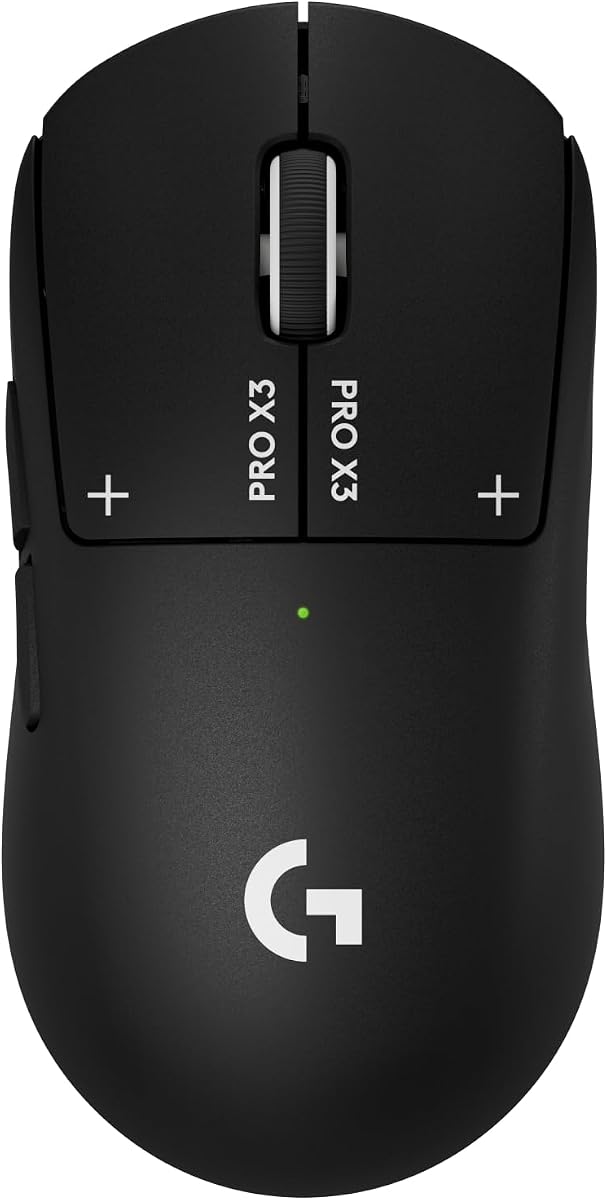



The Logitech G305 stands out as an exceptional entry point for those seeking a lightweight wireless gaming mouse without breaking the bank. It holds a solid 4.6 rating thanks to its reliable performance and efficient battery management system that supports extended play sessions.
We may earn a commission when you buy through this link, at no additional cost to you.
Its HERO sensor delivers precise tracking up to 12,000 DPI while the LIGHTSPEED wireless technology ensures a lag free experience comparable to wired peripherals. The mouse weighs only 3.4 ounces which enhances maneuverability during fast paced competitive games.
While it relies on a single AA battery instead of an internal rechargeable cell this design choice contributes to its low cost and long runtime. The lack of RGB lighting keeps the focus on performance rather than aesthetic customization options.
This model is ideal for casual gamers and professionals who prioritize portability and value. Its durable build and convenient nano receiver storage make it a trustworthy companion for laptops and desktop setups alike.
Endurance mode allows users to extend battery life significantly by adjusting performance settings through software.
The compact form factor and included receiver storage ensure you can easily take this mouse on travel.
We may earn a commission when you buy through this link, at no additional cost to you.
The white variant of the G305 offers the same impressive technical specifications as its black counterpart but with a fresh aesthetic appeal. It maintains the 4.6 rating due to identical internal components and wireless reliability.
We may earn a commission when you buy through this link, at no additional cost to you.
Users benefit from the same HERO sensor and LIGHTSPEED wireless connection ensuring precise tracking and minimal latency. The classic shape remains comfortable for long sessions while the white coating adds a clean look to modern desks.
Although the finish might require more frequent cleaning to maintain its pristine appearance the visual contrast it provides is worth the effort for many users. The mechanical design ensures consistent tactile feedback across all clicks.
This version suits those who want to match their setup with a lighter color palette without compromising on core performance. It remains a top choice for portable gaming and daily productivity tasks.
The white color option complements minimalist or light colored desk setups perfectly.
Internal specs match the black model so you get the same gaming benefits.
We may earn a commission when you buy through this link, at no additional cost to you.
This mouse represents a pinnacle of wireless gaming performance with its ultra light 60 gram build and next gen HERO 2 sensor. It consistently receives high praise for its precision and responsiveness making it a favorite among esports professionals.
We may earn a commission when you buy through this link, at no additional cost to you.
The ZERO add PTFE feet ensure smooth movement across any surface while the hybrid switches provide crisp tactile feedback. A full charge supports up to 95 hours of play and USB C charging offers modern convenience.
While the cost is higher than standard models the engineering behind this device justifies the investment for serious players. The lack of weight adjustment means it is optimized for a specific lightweight feel that cannot be customized further.
We recommend this to competitive gamers who demand top tier tracking and minimal mass for quick flicks. It excels in FPS titles where speed and accuracy are critical for success.
The HERO 2 sensor delivers over 888 IPS tracking and up to 44000 DPI for extreme precision.
Designed in collaboration with leading pros to meet the highest standards of competitive play.
We may earn a commission when you buy through this link, at no additional cost to you.
This model pushes the boundaries of wireless mouse technology with its Haptic Inductive Trigger System that replaces traditional mechanical switches. It scores a 4.6 rating for delivering the fastest clicks available on the market today.
We may earn a commission when you buy through this link, at no additional cost to you.
Users can fine tune actuation points and trigger reset levels to suit specific game needs. The 8 kHz polling rate ensures zero lag while the UHMWPE feet provide effortless gliding across any mouse pad.
The thin wall case construction reduces weight without sacrificing durability making it robust enough for intense matches. Battery life ranges from 60 to 90 hours depending on usage patterns and charging is handled via USB C.
Ideal for elite gamers who want the absolute cutting edge in response time and customization. Its compatibility with POWERPLAY adds convenience by allowing continuous wireless power without manual charging interruptions.
This system delivers real time feedback for an immersive gaming experience.
Clicks are 30 ms faster than standard models for peak performance in matches.
We may earn a commission when you buy through this link, at no additional cost to you.
For users who prefer a wired connection this mouse offers an excellent balance of features and cost. It maintains a 4.6 rating by delivering solid tracking and a comfortable grip design that reduces fatigue.
We may earn a commission when you buy through this link, at no additional cost to you.
The 11 programmable buttons provide extensive customization options for both gaming and productivity workflows. Five DPI levels allow quick switching between tasks while the RGB lighting adds a vibrant visual element to your desk.
Though it is heavier than modern wireless models the ergonomic design ensures that hand strain remains low. The frosted coating provides a tactile surface that improves control during intense gaming sessions.
This is a strong choice for budget conscious gamers who need multiple macro keys. Its reliable performance and solid build quality make it a practical option for long term daily use.
Side macro buttons and rapid fire options offer a better gaming experience.
Rubber texture on the left side strengthens friction for easier control.
We may earn a commission when you buy through this link, at no additional cost to you.
This classic model allows users to tailor the weight and balance to their exact preference using included weights. It earns a 4.6 rating for its robust build and highly versatile button layout.
We may earn a commission when you buy through this link, at no additional cost to you.
The HERO sensor tracks accurately up to 25,600 DPI while mechanical button tensioning ensures crisp clicks. Dual mode hyper fast scroll wheel enables quick document navigation in addition to gaming precision.
While it cannot be used wirelessly the wired connection guarantees consistent power and signal stability. The design focuses on control and durability making it suitable for users who prefer a heavier feel.
We suggest this for those who value customization and robust features over portability. It serves well for office work and gaming where precision and tactile feedback are prioritized.
Arrange up to five 3.6 g weights for a personalized weight configuration.
Metal spring tensioning provides a crisp clean click feel with rapid feedback.
We may earn a commission when you buy through this link, at no additional cost to you.
This iteration extends battery life to an impressive 135 hours on a single charge while maintaining top tier performance metrics. It achieves a 4.3 rating for its reliability and innovative haptic feedback system.
We may earn a commission when you buy through this link, at no additional cost to you.
The HERO 2 sensor tracks over 930 IPS ensuring smooth and accurate movements during fast gaming. The electromagnetic field trigger replaces standard switches for reduced latency and enhanced customization.
Although the price is high the features provided justify the cost for competitive players. USB C charging and POWERPLAY compatibility further enhance convenience and continuous usage capabilities.
It fits professionals who need a reliable tool for long sessions without frequent charging. The build quality ensures it withstands intense usage patterns over time.
Enjoy up to 135 hours of battery life on a single charge.
Haptic Inductive Trigger system replaces standard switches with electromagnetic field.
We may earn a commission when you buy through this link, at no additional cost to you.
This compact mouse is designed for portability and basic productivity tasks on the go. It holds a 4.4 rating for its simplicity and reliable wireless connection suitable for laptop users.
We may earn a commission when you buy through this link, at no additional cost to you.
The ambidextrous shape ensures comfort for both right and left handed users while the nano receiver stores conveniently. Battery life extends up to one year reducing the need for frequent replacements.
While it lacks advanced gaming features its design focuses on smooth cursor control and durability. The recycled plastic construction aligns with eco friendly manufacturing practices.
Ideal for travelers and office workers needing a spare or primary mouse for light tasks. Its plug and play functionality means no extra setup time is required.
Users who chose this mouse over a touchpad were 50% more productive.
Plastic parts include certified post consumer recycled plastic.
We may earn a commission when you buy through this link, at no additional cost to you.
The M330 Silent Plus is engineered for environments where noise reduction is essential. It scores a 4.5 rating for eliminating over 90 percent of clicking sounds without sacrificing performance.
We may earn a commission when you buy through this link, at no additional cost to you.
Its contoured shape provides a natural grip for extended use while the auto sleep mode conserves power. The battery lasts up to 18 months which means minimal hassle with replacements.
While it does not offer programmable buttons it delivers smooth cursor control and reliable wireless connectivity. The design ensures that clicking does not disturb colleagues in shared workspaces.
This model is perfect for office settings or quiet home offices where noise is a concern. It balances comfort and functionality to support focused work environments.
SilentTouch Technology reduces over 90 percent of clicking sounds.
18 month battery life allows you to focus on work without changing batteries.
We may earn a commission when you buy through this link, at no additional cost to you.
This mouse prioritizes productivity with unique haptic features and high speed scrolling technology. It earns a 4.2 rating for its ability to streamline workflows through customizable actions.
We may earn a commission when you buy through this link, at no additional cost to you.
The Actions Ring adapts to apps and the MagSpeed wheel scrolls 1000 lines per second for quick navigation. Its ergonomic design reduces hand stress during long work sessions.
While the cost is higher the efficiency gains it offers can save time over the long term. The quiet clicks ensure a distraction free environment even during busy work hours.
We recommend this for power users who manage multiple applications and files daily. It provides tools that enhance speed and ease of use across different software environments.
Customizable haptic feedback on specific actions enhances productivity.
Scroll 1000 lines per second and stop on a pixel.
We may earn a commission when you buy through this link, at no additional cost to you.
Selecting the right mouse involves weighing several critical factors to ensure it matches your usage style and performance needs.
A high quality optical sensor ensures precise tracking on various surfaces. Look for models with adjustable DPI settings to switch between different speeds seamlessly.
Higher DPI allows for faster cursor movement but accuracy at lower settings is key for detailed tasks.
Wireless mice offer freedom of movement and reduced desk clutter but require battery management. Wired options guarantee zero latency and constant power supply.
Choose wireless for portability and wired for competitive gaming stability.
Lighter mice reduce fatigue and enable quicker flicks during gaming. Some models allow weight adjustment to fine tune your grip feel.
Find a balance between lightness and stability based on your hand size.
Long battery life minimizes interruptions and charging needs for wireless models. Consider rechargeable options for convenience and environmental impact.
Check expected runtime under regular use to ensure it fits your schedule.
The shape of the mouse should support natural hand positioning to prevent strain. Contoured grips and textured surfaces enhance comfort and control.
Test different shapes to ensure a comfortable hold for long periods.
Programmable buttons can streamline workflows and improve efficiency in games or apps. Look for software support that allows easy remapping.
More buttons offer flexibility but ensure you do not need them all.
Durable materials and strong hinges extend the lifespan of your device. Quality construction ensures consistent performance over time.
Invest in a well built mouse to avoid frequent replacements.
Manufacturer software enables advanced feature access such as lighting and macro settings. Check compatibility with your operating system before buying.
Robust software enhances functionality and user control over device settings.
Keep the sensor lens clean from dust and debris to ensure accurate tracking across different surfaces. Use a soft cloth to wipe the surface gently without applying too much pressure.
Adjust DPI settings to match your preferred speed and screen resolution for optimal control. Experiment with different levels to find what feels most natural for your tasks.
For wireless models store spare batteries nearby if using AA power or charge fully before long sessions. This helps maintain consistent performance without unexpected interruptions.
A lightweight gaming mouse typically weighs under 70 grams and uses efficient materials to minimize mass. This design reduces hand fatigue and allows for faster movements during competitive play.
Yes modern wireless technology offers latency comparable to wired connections. High end models use advanced protocols to ensure real time responsiveness without delays.
Turn off lighting features when not needed and use power saving modes if available. Also avoid high DPI settings that might drain power faster if not necessary.
Programmable buttons allow you to assign specific commands or macros to physical clicks. This feature speeds up complex tasks and improves efficiency in work or games.
Symmetrical mice suit both hands and are great for travel while ergonomic shapes support natural hand posture. Choose based on your dominant hand and comfort preference.
Yes many lightweight models use reinforced materials and quality components to withstand daily use. Durable design does not always mean heavier build if engineering is optimized.
We have reviewed ten top performing models ranging from budget friendly options to premium esports devices. Each offers unique strengths that cater to different needs and preferences.
Consider your primary use case such as gaming or office work when making your decision. Balancing weight battery life and features will lead to the best match for you.
Remember to verify current availability and pricing before purchasing since deals can change frequently. We hope this guide helps you find a device that enhances your daily computing experience.