
EooCoo for MacBook Neo Case 13 inch 2026
4.7Editor score
Crystal clear design
Includes keyboard cover
Slim lightweight build
Explore our expert guide comparing the top 10 MacBook Neo protective cases for 2026 to find the perfect fit for your A18 Pro chip model today.
Protecting your new MacBook Neo is essential for maintaining its sleek appearance and functionality over time. A high-quality case shields the device from scratches, drops, and daily wear while preserving access to all ports and features.
We have evaluated ten leading protective solutions specifically designed for the 2026 MacBook Neo model A3404. Our comparison focuses on durability, material quality, ease of installation, and additional features like heat dissipation and included accessories.
Each pick in this list highlights unique strengths ranging from military-grade protection to crystal-clear aesthetics. Please note that product availability and pricing may change so verify current details before making your final purchase decision.
4.7Editor score

4.8Editor score

4.8Editor score
This table provides a quick side-by-side overview of the top protective options available for the 2026 MacBook Neo to help you identify the best match for your specific needs and preferences.




This SUPCASE offering stands out as a top choice for users seeking robust protection without sacrificing functionality. It holds a strong rating due to its military-grade certification and thoughtful design that addresses common user concerns like heat management.
We may earn a commission when you buy through this link, at no additional cost to you.
The combination of a hard PC shell and soft TPU frame creates a shock-absorbing wrap that safeguards your device from daily impacts. Additionally, the built-in heat dissipation vents ensure that your MacBook Neo maintains optimal performance during intensive tasks.
While the case adds a touch of bulk compared to ultra-slim options, this is a reasonable trade-off for the level of security it provides. The precise cutouts allow easy access to all ports and features without needing to remove the case.
This product is ideal for professionals or students who prioritize durability and peace of mind. If you need a reliable shield that keeps your MacBook Neo pristine through daily commuting or work environments, this is a highly recommended choice.
Certified to MIL-STD-810H standards, this case undergoes rigorous testing to ensure it can withstand accidental drops and shocks effectively.
Special vents on the bottom prevent heat buildup, ensuring your laptop performs efficiently even during long usage sessions.
We may earn a commission when you buy through this link, at no additional cost to you.
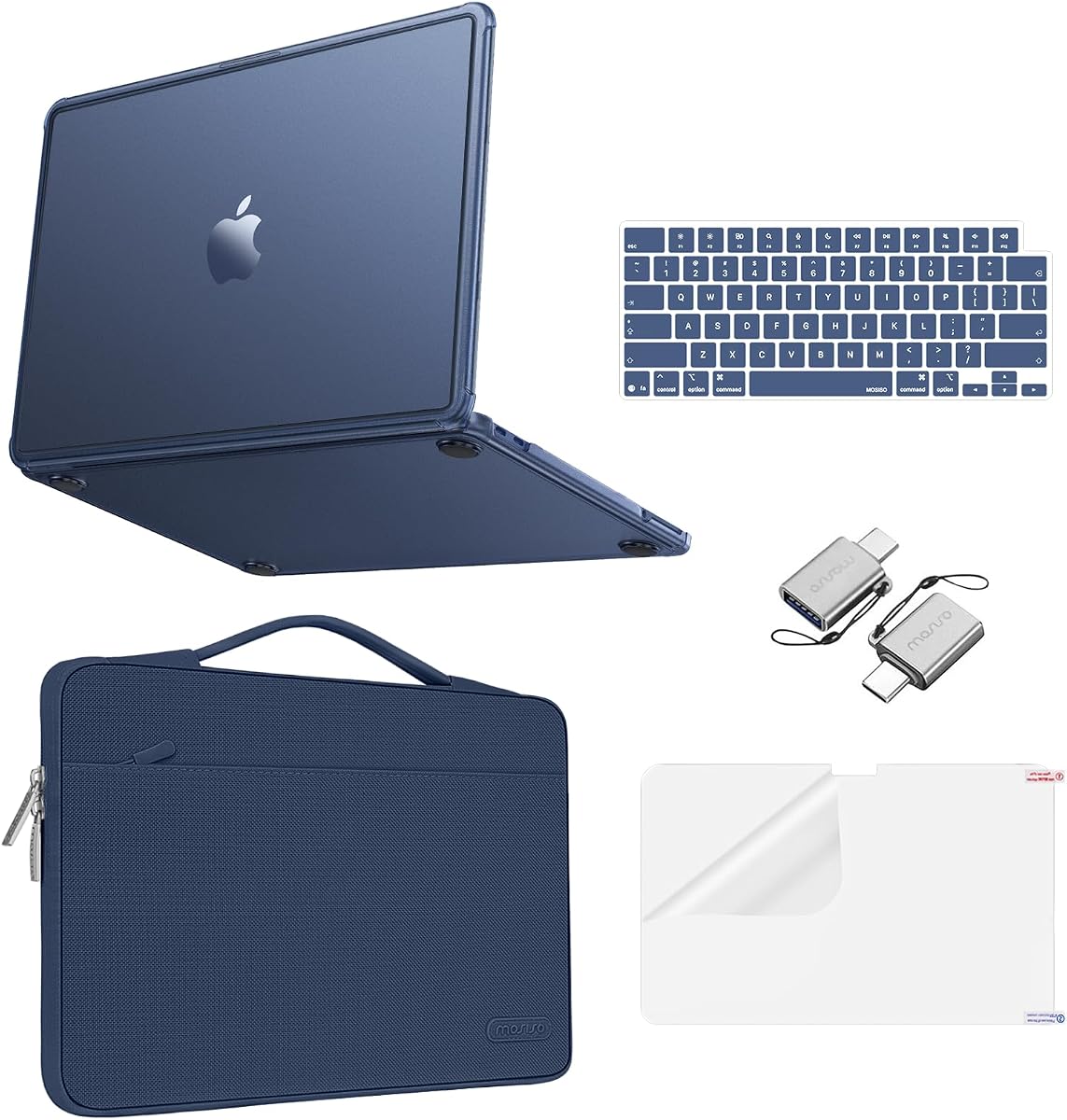
For those who want to show off the original color of their MacBook Neo, this MOSISO clear case is an excellent option. It offers a transparent shell that resists fingerprints and keeps your device looking new while providing basic scratch protection.
We may earn a commission when you buy through this link, at no additional cost to you.
The kit includes useful accessories like keyboard covers and a screen protector, adding value to the purchase. Installation is straightforward with a snap-on design that secures the cover firmly without tools.
While it is not as robust as a heavy-duty case, it is sufficient for indoor use and preventing minor scuffs. The material is engineered to resist cracking and fading, ensuring clarity remains over time.
This case is perfect for users who value aesthetics and convenience. If you want to maintain the sleek look of your laptop while still protecting it from daily dust and key friction, this is a solid selection.
The high-transparency shell ensures that the vibrant finish of your MacBook Neo remains visible and unobstructed at all times.
Included keyboard covers and a screen protector provide an all-in-one solution for full-device protection right out of the box.
We may earn a commission when you buy through this link, at no additional cost to you.
BlueSwan offers a case that balances style and utility with a frosted matte finish that resists fingerprints and smudges. This design not only looks premium but also provides a non-slip texture that improves grip during use.
We may earn a commission when you buy through this link, at no additional cost to you.
The dual-layer protection combines a hard PC shell with a soft TPU bumper to absorb shocks from daily bumps. It also includes practical accessories like a shortcuts sticker and keyboard cover to enhance your workflow.
Precision engineering ensures that side-firing speakers remain fully accessible without removing the case, preserving audio quality. The raised rubber feet help keep the laptop stable and assist with heat dissipation on flat surfaces.
This case is great for users who want a sleek look without the shine of a glossy finish. If you value a clean, professional appearance and need reliable protection against scratches and minor drops, this fits well.
The frosted coating gives the laptop a sophisticated look while actively repelling oils and prints that accumulate on daily use.
Aligned side-firing speaker cutouts ensure that sound is not muffled, maintaining the original Spatial Audio experience.
We may earn a commission when you buy through this link, at no additional cost to you.
This sleeve provides a different approach to protection focusing on cushioning and portability. It is ideal for users who carry their MacBook Neo in a backpack or briefcase and need a layer of padding against external impacts.
We may earn a commission when you buy through this link, at no additional cost to you.
The CornerArmor Technology and high-density soft padding create a 360-degree shield that absorbs shocks from drops or bumps. Made from recycled fabrics, it is an eco-conscious choice that does not compromise on quality or style.
A front pocket offers convenient storage for chargers and cables, reducing the need for separate organizers. The soft lining ensures that the laptop surface remains scratch-free even when stored alongside other items.
Choose this if you prefer a sleek carrying solution that integrates well with bags. It offers excellent protection for travel and commuting, making it a top pick for frequent movers who value organization and safety.
Reinforced corners protect the most vulnerable parts of your laptop, ensuring it survives accidental drops during transit.
The front pocket keeps your accessories organized and accessible, streamlining your daily carry routine effectively.
We may earn a commission when you buy through this link, at no additional cost to you.
This MOSISO variant focuses on a matte finish that actively repels fingerprints and scuffs. It is designed to keep the laptop looking pristine with minimal maintenance effort from the user.
We may earn a commission when you buy through this link, at no additional cost to you.
The bundle includes keyboard covers and a screen protector, ensuring that input and display areas are also protected from spills and scratches. It fits securely and is easy to install without any tools.
The precision-molded engineering ensures a snug fit that guards against daily wear without adding unnecessary bulk. It is particularly useful for users who work in environments where dust and grime are common.
If you want a case that requires little cleaning and comes with extra screen and keyboard protection, this is a practical choice. It maintains a clean look while offering reliable defense against common daily hazards.
The matte finish is engineered to resist oils, keeping the device looking clean even after hours of heavy use.
With included keyboard and screen protectors, you get a complete solution that covers every part of your laptop.
We may earn a commission when you buy through this link, at no additional cost to you.
For budget-conscious buyers, this case offers excellent value without compromising on essential protection features. It maintains the visibility of your MacBook Neo while adding a durable layer against scratches and dust.
We may earn a commission when you buy through this link, at no additional cost to you.
The ultra-slim design ensures that the laptop does not feel heavier or bulkier, making it comfortable to carry in any bag. It comes with a keyboard cover and adapter, adding extra utility to the purchase.
The durable hard plastic exterior wraps around the edges to shield against daily bumps and scuffs. It is designed to be lightweight yet robust enough for regular office or school use.
This is the best choice if you want a no-frills protective solution that does not cost much. It provides the basics you need to keep your device safe while keeping the overall weight and size low.
This case delivers a premium look at a budget price, making it accessible for everyone needing quick protection.
Its slim profile ensures that you barely notice it is there, maintaining the original feel of your MacBook Neo.
We may earn a commission when you buy through this link, at no additional cost to you.
This MOSISO kit combines a hard shell case with a protective sleeve and accessories for total care. The plush interior adds a layer of softness that cushions the laptop against scratches and bumps effectively.
We may earn a commission when you buy through this link, at no additional cost to you.
The smart front pocket is designed to keep essentials like chargers and cables neatly organized. It features a smudge-resistant surface that maintains a clean look even after daily handling and use.
With the indigo color match, it complements the laptop's aesthetic while ensuring the device looks sharp and professional. The kit includes keyboard covers and a screen protector to round out your defense strategy.
This option is best for users who want an organized approach to protection. If you value having everything in one place and need a case that supports a tidy workflow, this kit is a strong contender.
The dedicated pocket keeps your accessories handy and reduces clutter, making your daily carry much more efficient.
The plush lining adds an extra layer of safety that helps protect your device from minor bumps and scratches.
We may earn a commission when you buy through this link, at no additional cost to you.
This option pairs a hard shell case with a quilted puffy sleeve for added comfort and protection. The sleeve is made from durable fabric that guards against spills and rough handling in busy environments.
We may earn a commission when you buy through this link, at no additional cost to you.
The front storage pocket is handy for storing small items like cables and adapters keeping your desk tidy. It is designed to slide into other bags easily without adding too much weight to your load.
The case itself is engineered to resist cracking and slipping off, ensuring your device stays protected. It fits the model precisely and maintains a professional look suitable for business or school settings.
Choose this if you need a bit more cushioning for transit. It is a good choice for students or travelers who carry their laptop in a backpack and want extra padding against bumps and drops.
The quilted puffy sleeve provides extra softness that absorbs shocks and keeps your laptop comfortable to carry.
The durable fabric protects against accidental spills and moisture, giving you peace of mind in public spaces.
We may earn a commission when you buy through this link, at no additional cost to you.
This case adds a hidden foldable kickstand to the robust protection SUPCASE is known for. It helps create ergonomic typing angles which can significantly reduce neck fatigue during long work sessions.
We may earn a commission when you buy through this link, at no additional cost to you.
The military-grade construction ensures that your device is well-protected from drops and impacts. Combined with heat dissipation vents, it keeps the laptop cool and functional even under heavy loads.
The kickstand is integrated into the design so you do not need to carry a separate stand. It offers a better visual experience for watching videos or editing content without holding the screen.
This is ideal for users who use their laptop as a tablet or media station often. If you want to improve your viewing angles while keeping your device safe and cool, this case is a smart choice.
The kickstand helps you maintain a comfortable posture, reducing strain on your neck and back during extended use.
Adjusting the angle makes watching content or presenting much easier without needing an external stand or support.
We may earn a commission when you buy through this link, at no additional cost to you.
This SEYMAC case combines protection with a built-in stand and mouse pad to enhance versatility. It is designed to offer multiple functions in one unit, making it a practical choice for limited desk spaces.
We may earn a commission when you buy through this link, at no additional cost to you.
The thermoplastic polycarbonate material provides shock-absorbing protection that keeps your device safe from bumps. The foldable stand is easy to use and offers comfortable angles for typing and viewing.
The mouse pad feature on the back adds utility when you do not have a separate mouse pad available. It is a great way to maximize the utility of the case beyond just simple protection.
Choose this if you want a multi-purpose case that saves space. It is especially useful for travelers or mobile workers who need a complete workstation setup without carrying extra accessories or gear.
The back of the case doubles as a surface for your mouse, saving you from needing a separate pad.
By integrating the stand and pad into one unit, it helps reduce clutter and simplify your daily carry kit.
We may earn a commission when you buy through this link, at no additional cost to you.
Selecting the right protective case involves evaluating material quality, fit, and additional features that match your usage habits.
Look for cases made from high-grade polycarbonate or thermoplastic which offer superior scratch resistance and longevity. A combination of hard shells and soft TPU frames provides the best balance of rigidity and shock absorption.
Prioritize materials that are certified to military standards if you frequently transport your device in busy environments.
Ensure the case is specifically designed for model A3404 with the A18 Pro chip to avoid issues with port access. Precision cutouts are crucial for maintaining full functionality of speakers and charging ports without removing the case.
Check the product details to confirm that the case fits the 2026 release dimensions exactly for a secure hold.
Choose a case that includes bottom vents to prevent overheating during intensive tasks like video editing or gaming. Proper airflow ensures that your laptop maintains optimal performance without thermal throttling.
Rubber feet on the base can also help by lifting the device slightly to allow air to circulate underneath.
Many bundles include keyboard covers, screen protectors, and adapters which can save you money and effort. Consider whether these extras are useful for your workflow before deciding on a kit.
A complete package offers a convenient way to get full body protection in a single purchase without hunting for individual items.
Slimmer cases add minimal bulk but may offer less protection than thicker options. Decide if portability or maximum safety is your top priority based on where you plan to use your laptop.
Travelers might prefer lightweight shells while office workers can often tolerate more weight for better durability.
Matte finishes tend to resist fingerprints better than clear or glossy options. Consider whether you want to show off the original color or prefer a neutral look that hides smudges.
Some cases offer color matching to blend seamlessly with your device for a professional aesthetic.
Built-in kickstands can improve typing angles and reduce neck strain during long work sessions. If you use your laptop as a tablet or media center, this feature adds significant value.
Ensure the stand is sturdy and does not interfere with port access or closing the laptop securely.
Evaluate the cost relative to the features offered to find the best value for your needs. Sometimes a slightly higher price buys better protection and longer lifespan.
Compare different kits to see if the included accessories justify the investment before making a final decision.
Install your case by snapping it onto the top and bottom shells gently ensuring all corners are aligned properly before pressing down. Avoid using force to prevent warping or damaging the device during installation.
Clean the case regularly with a soft dry cloth to remove dust and grime. Use mild soap and water only if necessary and ensure the case is completely dry before reattaching it to your laptop.
Check your ports and buttons regularly to make sure the cutouts remain clear and unobstructed. If your case includes a kickstand ensure you extend and retract it carefully to avoid wear over time.
No high quality cases are designed with precise cutouts that do not block the charging port or interfere with the connection. You can use your charger normally without removing the case as long as the design is compatible with your model.
Check the model number on the back of your laptop which should read A3404 for the 2026 release. Ensure the product title explicitly states compatibility with this model number before purchasing to avoid fit issues.
Most recommended cases feature exact cutouts that allow easy access to all ports and buttons. You should be able to plug in cables or press buttons without having to remove the case from your device.
Yes cases with built-in kickstands are designed to provide ergonomic typing angles that are comfortable for use. They help reduce neck strain by positioning the screen at a more natural height for work.
Some clear cases may develop yellowing after extended exposure to sunlight or oils. Look for cases labeled as UV resistant or high transparency to minimize this effect and maintain clarity.
A hard shell snaps directly onto the laptop to protect against scratches while a sleeve slides over it for cushioning during transport. Some users prefer a combination of both for maximum protection in all scenarios.
Yes silicone keyboard covers are safe and protect against spills and dust. They allow you to type without removing them and fit snugly over the keys without affecting the trackpad or display.
You should clean your case at least once a week to prevent dust and grime from building up on the surface. Regular wiping with a soft cloth helps maintain the finish and prevents scratches over time.
We have reviewed ten top options ranging from durable hard shells to versatile kits with built-in stands and accessories. Each pick offers unique benefits tailored to different needs whether you prioritize protection or aesthetics.
Consider your daily habits and environment when selecting a case to ensure it matches your usage demands. If you travel often a sleeve might be best but for office use a hard shell works well.
Prices and availability can change quickly so be sure to check the latest details before completing your purchase. We hope this guide helps you find the perfect protection for your MacBook Neo today.