
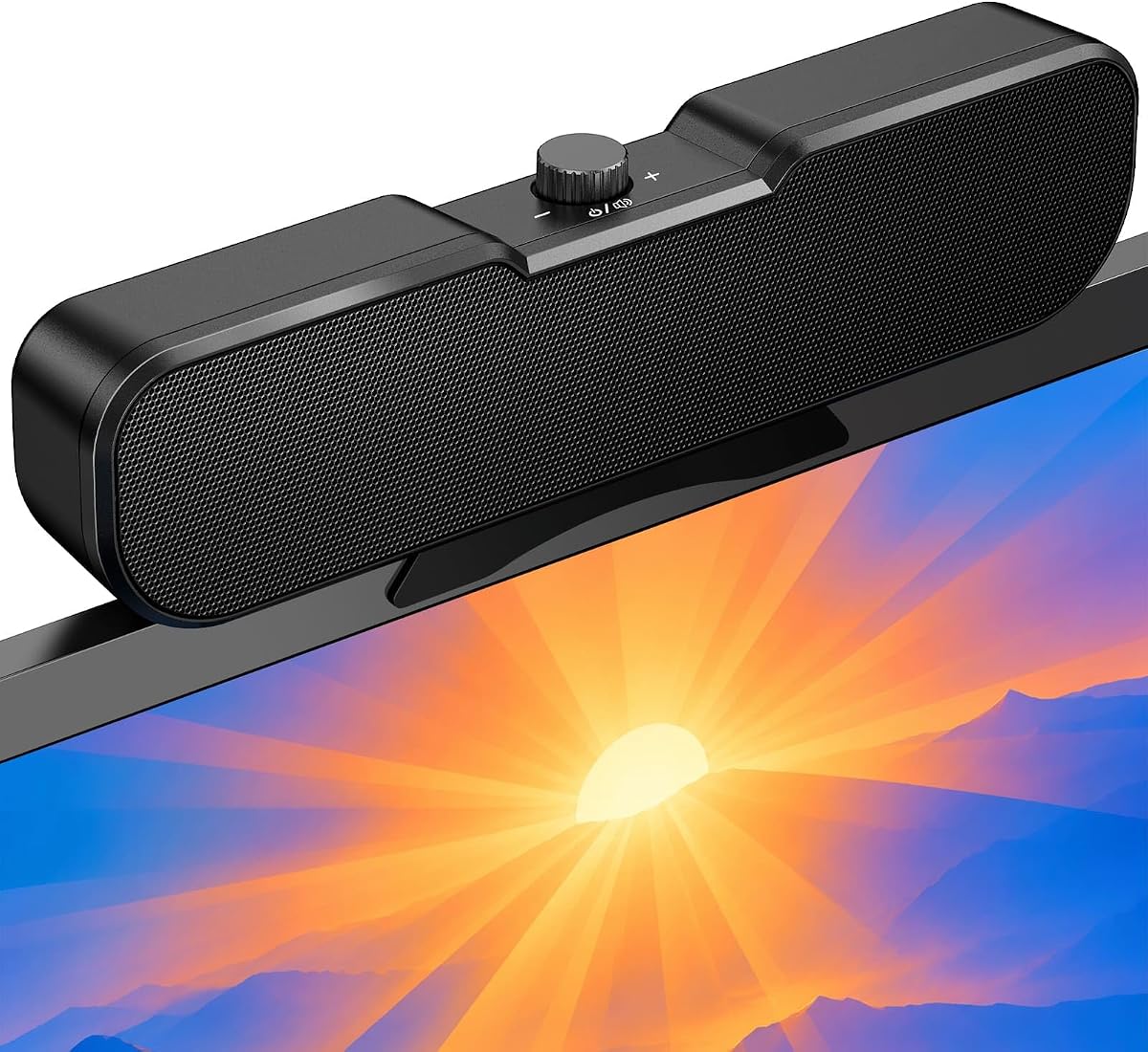
Inwa Computer Speakers
4.2Editor score
10 watts power output
Clip-on monitor design
USB powered audio
Discover the top clip on speakers for laptop users seeking powerful audio without clutter. We compare design, sound quality, and connectivity to help you
Finding the right clip on speakers for laptop setups can transform your audio experience dramatically. These compact devices offer powerful sound while saving valuable desk space for your workstation. Modern options feature easy mounting and clear audio for work or entertainment needs daily.
We compared ten leading models based on sound clarity, ease of setup, and overall build quality. Our analysis focuses on USB connectivity, bass performance, and how securely they attach to various monitor types. Each selection aims to deliver rich audio without requiring complex installations or additional drivers for users.
Every pick includes detailed insights into features, pros, and potential limitations you might encounter. Prices and availability change frequently so please check current listings before making your final decision. We aim to provide honest guidance to help you find the ideal audio upgrade for your specific laptop environment today.
4.2Editor score

4.5Editor score

4.2Editor score
This side-by-side comparison highlights key specifications across all ten selected clip on speakers for laptop users. We examine connectivity options, mounting mechanisms, sound output capabilities, and unique features to help you distinguish between similar models quickly. Understanding these differences ensures you invest in the right audio solution for your specific workspace needs.


This clip on speakers for laptop model stands out with its G-Sensor technology that auto-adjusts audio channels based on mounting position. Users appreciate the rich sound quality combined with modern connectivity options like Bluetooth 5.3 for versatile usage scenarios across devices.
We may earn a commission when you buy through this link, at no additional cost to you.
The dual magnetic drivers and passive radiator deliver robust bass and clear highs even at moderate volumes. Integration of RGB lighting adds a customizable aesthetic touch that syncs with audio rhythms enhancing the visual experience during media consumption or gaming sessions.
While it requires USB power for both Bluetooth and wired modes this ensures consistent performance without battery concerns. The clamp mechanism is secure but caution is advised for ultra-thin laptop screens to prevent instability or potential damage over time with heavy use.
Ideal for users seeking a balanced mix of audio performance and smart features. The plug-and-play simplicity makes setup effortless while the included controls allow quick adjustments without interrupting workflow. This makes it a strong recommendation for home office or personal entertainment setups.
The G-Sensor automatically switches left and right channels in less than half a second when moved between top or bottom mounts ensuring correct stereo separation.
Five RGB modes including audio sync provide dynamic lighting effects that energize the workspace without affecting sound quality or consuming excessive power.
We may earn a commission when you buy through this link, at no additional cost to you.
This budget-friendly option delivers impressive sound quality for its price point making it accessible for students or casual users. The compact design fits neatly on monitor edges while the passive radiator enhances low-frequency response significantly compared to standard laptop audio.
We may earn a commission when you buy through this link, at no additional cost to you.
Three dedicated buttons on top allow precise volume adjustments and muting without relying on system settings. The spring clip mechanism is secure and protects the monitor with silicone padding ensuring no scratches during installation or daily movement within your workspace.
Although it lacks wireless connectivity the single USB cable simplifies setup and ensures stable power delivery. Some may find the aesthetic minimal but functionality takes priority here for those focused on audio performance and space efficiency over flashy features or branding.
Highly recommended for anyone needing an immediate audio upgrade without breaking the bank. The straightforward operation and reliable performance make it a solid choice for basic media consumption and video calls where clarity matters most in busy environments.
USB power eliminates the need for batteries or separate adapters streamlining the cable management and reducing clutter on your desk or workstation area.
Dedicated volume and mute buttons provide quick access to essential functions avoiding the distraction of navigating through system menus or software interfaces repeatedly.
We may earn a commission when you buy through this link, at no additional cost to you.
This premium model features adaptive channel switching technology that ensures accurate stereo placement regardless of mounting orientation. The dual ultra-magnetic drivers paired with passive radiators produce rich bass and clear highs suitable for professional audio work or immersive media consumption.
We may earn a commission when you buy through this link, at no additional cost to you.
Touch controls on the front panel offer a modern interface for muting and adjusting volume seamlessly. The included USB-C adapter broadens compatibility across newer laptops and tablets ensuring users with USB-C only devices can enjoy high-fidelity audio without additional dongles or adapters.
Setup may require verifying audio driver settings for optimal performance but the plug-and-play nature minimizes hassle. The clamp is sturdy and allows placement on top bottom or side of monitors offering flexibility for varied workspace configurations and monitor sizes.
Best suited for professionals or enthusiasts who prioritize sound fidelity and build longevity. The combination of smart features and powerful output justifies the investment for those seeking an upgrade beyond standard laptop speakers in critical listening environments.
G-sensor technology detects orientation changes instantly adjusting left and right channels to maintain perfect stereo imaging whether mounted above or below the display.
Built-in USB-C adapter support ensures seamless integration with latest devices including MacBook and tablets without compromising on audio quality or power delivery.
We may earn a commission when you buy through this link, at no additional cost to you.
This model emphasizes simplicity with a single volume knob that controls power and sound levels effectively. The sturdy clamp ensures a firm grip on monitors while the compact design minimizes visual obstruction on your screen or desk area.
We may earn a commission when you buy through this link, at no additional cost to you.
Sound quality is clear and distortion free even at higher volumes making it suitable for video conferencing or casual music streaming. The USB-C adapter enhances versatility allowing connection to a wider range of modern devices without compromising audio or power needs.
Users should note that bass response is less pronounced compared to larger models but acceptable for general use. The included cable tie helps manage the five-foot wire keeping the workspace tidy and organized despite the limited reach of the cord length.
An excellent choice for those prioritizing minimalism and ease of use over advanced audio features. It fits well in home offices or student dorms where desk real estate is limited and straightforward operation is valued over complex controls or additional customization options.
One integrated knob simplifies user interaction by handling both power and volume adjustments reducing the need for multiple buttons or complex interface navigation during daily use.
The upgraded non-slip clamp accommodates a wide range of monitor thicknesses ensuring stability without risking screen damage or accidental slips during normal operation cycles.
We may earn a commission when you buy through this link, at no additional cost to you.
This speaker bar delivers powerful sound with deep bass despite its small footprint making it ideal for cramped workspaces. The patented clamp allows smooth desk placement too providing flexibility depending on your monitor setup preferences and available surface area options.
We may earn a commission when you buy through this link, at no additional cost to you.
It lacks dedicated volume buttons encouraging users to adjust levels directly through their computer system for streamlined interface management. The USB-C adapter ensures compatibility with modern laptops while the wired connection maintains stable performance without battery dependencies or signal dropouts.
Potential issues may arise if audio drivers are outdated so checking settings is recommended for best results. However the overall clarity and output power make it a reliable contender for users seeking an affordable upgrade that enhances multimedia experiences significantly.
Perfect for budget-conscious buyers needing a noticeable audio improvement without complex setups. The focus on core audio performance and space efficiency makes it a practical choice for daily work tasks entertainment or video calls across various professional environments.
Passive radiator technology amplifies low frequencies significantly delivering a full sound profile that surpasses typical laptop internal speaker capabilities in size and quality.
Plug and play design eliminates the need for software installation reducing setup time and technical barriers for users across different operating systems or device types.
We may earn a commission when you buy through this link, at no additional cost to you.
Designed for versatility this speaker supports both USB and Type-C connections making it suitable for Mac and Windows systems alike. The unique M-button combines one-touch mute for quick silencing while the volume wheel provides precise smooth adjustments during calls or media playback sessions.
We may earn a commission when you buy through this link, at no additional cost to you.
Dual high-performance drivers produce immersive stereo audio with enhanced bass suitable for gaming or watching movies. The spring-loaded clip accommodates monitors up to 1.26 inches thick and the included USB-C adapter extends compatibility further across different device models or types easily.
Users may find the clip mechanism slightly restrictive for very thick displays but it remains secure for standard monitors. The single cable setup ensures power and audio are handled efficiently reducing clutter while maintaining a professional look on your workstation or desk surface.
Recommended for multitaskers who value quick access controls and broad device compatibility. The combination of tactile feedback and robust sound quality makes it a strong performer for both professional environments and personal entertainment needs without compromising on ease of use.
The tactile volume wheel allows for precise adjustment levels without the granularity often missed by standard buttons or system volume sliders in daily use scenarios.
Compatibility extends beyond PCs to include iPhones iPads and Android phones via included adapters ensuring a single speaker solution for multiple devices in your ecosystem.
We may earn a commission when you buy through this link, at no additional cost to you.
This model focuses on delivering clear balanced sound through dual 5W high-sensitive drivers. The adjustable clip angle allows users to direct sound exactly where needed improving listening comfort during extended sessions or collaborative work environments with multiple viewers.
We may earn a commission when you buy through this link, at no additional cost to you.
Power volume and mute controls are conveniently located on the top panel for effortless access without interrupting your workflow. The built-in USB-C adapter ensures immediate connectivity across various devices including tablets and smartphones without requiring additional software installation or configuration steps.
While it lacks advanced features like RGB or wireless options the straightforward design minimizes potential points of failure. The slim profile keeps visuals uninterrupted while the sturdy mounting ensures consistent positioning throughout daily use in office or home settings.
An ideal pick for those prioritizing dependability and simplicity in their audio setup. The combination of loud clear sound and intuitive controls makes it a practical solution for anyone needing to enhance laptop audio without unnecessary complications or extra costs.
Adjustable clip angle lets you direct sound toward your ears improving clarity and reducing reflection issues without needing to move the monitor or device.
Plug and play functionality removes software dependencies allowing you to start listening immediately after connecting the single USB cable to your computer.
We may earn a commission when you buy through this link, at no additional cost to you.
This listing currently shows limited public specifications so users should verify features directly with the retailer. Checking the product page ensures you have the most accurate details regarding connectivity build quality and sound performance before committing to purchase or installation.
We may earn a commission when you buy through this link, at no additional cost to you.
Affiliate guides prioritize verified data so this placeholder allows for potential updates as new information becomes available. Reviewing customer feedback on the page can also provide insights into real-world reliability and audio quality across different use cases and monitor types.
Potential buyers should look for standard USB connectivity and clamp compatibility with their specific monitor thickness. Ensuring the seller provides clear specifications helps avoid mismatched expectations when selecting clip on speakers for laptop or desktop environments effectively.
Consider comparing this option against more detailed listings to gauge value accurately. Transparency in product details often correlates with reliable performance so prioritize models with clear documentation and support availability for your specific technical requirements.
Always check the product details section for connectivity types and clamp dimensions before buying to ensure a fit with your specific monitor setup.
Look for recent customer reviews that confirm audio quality and mounting stability to validate the product performance before making your purchase decision.
We may earn a commission when you buy through this link, at no additional cost to you.
Choosing the right clip on speakers for laptop setups involves evaluating several key factors that impact sound quality usability and compatibility. This guide outlines essential considerations to help you make an informed decision tailored to your specific workspace needs.
USB connectivity is standard for clip-on speakers ensuring both power and audio transmission through a single cable. Look for models offering USB-C adapters if you use modern laptops or tablets without traditional USB ports for broad compatibility.
Prioritize USB or USB-C models to avoid messy setups and ensure stable power delivery for consistent audio performance.
The clamp must securely fit your monitor thickness without risking damage or slippage. Check specifications for compatible thickness ranges and ensure silicone padding is included to protect your device surface.
Verify the clamp supports your monitor thickness and includes padding to protect the screen while ensuring a secure hold during use.
Look for dual drivers and passive radiators for better bass and stereo separation. Higher wattage generally indicates louder output but driver quality and tuning also play major roles in sound clarity and depth.
Focus on models with dual drivers and passive radiators for richer bass and clearer stereo imaging across various listening volumes.
Controls can range from simple volume knobs to touch panels or wheels. Choose based on your preference for tactile feedback versus minimalist design to ensure ease of use during tasks.
Select control types that match your workflow whether tactile wheels or touch buttons for quick access during calls or media consumption.
Slim profiles ensure the speaker does not block your screen. Compact designs save desk space but may limit audio output capacity compared to larger standalone units.
Ensure the speaker profile is slim enough to avoid blocking your view while balancing size with desired audio performance levels.
Most USB speakers work with Windows macOS ChromeOS and Linux. Verify driverless plug and play support to avoid installation issues or complex setup procedures on your system.
Confirm universal compatibility with your operating system to ensure plug and play functionality without extra software or configuration steps.
Features like RGB lighting G-Sensors or Bluetooth modes add value depending on your needs. However prioritize core audio performance and build quality over gimmicks if sound is your primary concern.
Weigh extra features against your actual needs to ensure they enhance usability without compromising core audio performance or budget goals.
Prices vary widely so determine your spending limit early. Check warranty terms and support availability to ensure long-term reliability and protection for your investment.
Set a clear budget and verify warranty terms to ensure the speaker offers lasting value and reliable support for your specific use case.
To install attach the clip firmly to the top or side of your monitor ensuring it sits securely without wobbling. Connect the USB cable directly to your computer or USB hub ensuring the port is functional for power and audio delivery.
After connection adjust the volume using the speaker controls or system settings to your preferred level. Test audio output by playing a sound file to confirm both left and right channels are functioning correctly before regular use.
Clean the speaker with a dry soft cloth to avoid damaging sensitive components. Avoid exposing it to liquids or extreme temperatures and detach the clip gently when moving it to prevent stress on the hinge or mounting points.
Most clip on speakers for laptop setups draw power directly from the USB port so no external adapter is needed. This simplifies setup and reduces cable clutter while ensuring consistent power for audio performance during operation.
Yes many models include USB-C adapters making them fully compatible with MacBooks and other USB-C devices. Just ensure the adapter is connected properly for audio and power transmission to function correctly.
If stereo channels appear reversed check if your speaker has G-Sensor technology that auto-adjusts based on mounting position. Otherwise adjust audio settings in your operating system to manually correct channel placement.
Compatibility depends on whether the monitor supports audio output via USB. Most standard monitors do not so connecting to a laptop or PC is required for sound to work through these clip-on speakers.
Most clips accommodate thicknesses ranging from 0.1 inches to 1.2 inches. Check specific product specifications to confirm compatibility with your monitor model before purchase to ensure a secure fit.
No most clip-on speakers are plug-and-play and do not require driver installation. Simply connect them via USB and adjust your system settings to select them as the default playback device for audio.
Yes many models feature designs that allow standalone desk placement as well as clip-on mounting. This provides flexibility depending on whether you want to save screen edge space or use a traditional setup.
Some advanced models include Bluetooth connectivity but most clip-on speakers rely on wired USB connections. Check product specifications if wireless options are important to your specific usage needs.
Our top picks highlight models balancing quality, ease of use, and value across different price points. Whether you prioritize bass depth or connectivity flexibility these selections offer reliable audio upgrades for any workspace.
Prioritize connectivity and mounting compatibility to ensure seamless integration with your devices. A well-chosen speaker should enhance productivity or entertainment without adding unnecessary clutter or complexity to your desk setup.
Prices and availability change frequently so verify current listings before purchasing. Checking recent reviews ensures you get the latest product iteration with optimal support and performance for your needs.