
V-one Wired USB Gaming Controller
4.2Editor score
Multi-mode compatibility support
Vibration feedback function
Plug and play setup
This guide compares the top 10 joysticks for Windows 11 to help you find the perfect flight or gaming controller for your setup.
Finding the right joystick for Windows 11 can transform your gaming experience significantly. Whether you are into flight simulators or general gaming, a quality controller offers precision and comfort that keyboards cannot match.
We evaluated ten popular joysticks based on compatibility, build quality, and features. Our analysis covers budget options to premium models ensuring you find a device that fits your specific needs and budget requirements.
Each pick highlights key strengths and potential limitations to guide your decision. Prices and availability change frequently so please verify current details on the product pages before making your final purchase decision today.
4.2Editor score

4.4Editor score

4.0Editor score
The following table provides a side-by-side comparison of all ten products. This overview highlights key specifications and features to help you quickly identify the model that best suits your gaming preferences.






The PXN 2113PRO stands out as an accessible option for those looking to enter flight simulation without a huge investment. With a rating that reflects mixed but generally positive feedback, it offers a solid entry point for casual simmers.
We may earn a commission when you buy through this link, at no additional cost to you.
Its standout feature is the 12 programmable buttons which allow for extensive customization of flight controls. The included vibration function adds immersion when enabled properly, though users must ensure settings are adjusted correctly for optimal feel.
Some users note that the vibration can feel underwhelming if not calibrated to high settings. Additionally while it works well on Windows 11 installing the driver is necessary for accessing all customization options effectively.
If you are on a budget and want a functional flight stick for titles like World of Tanks or Microsoft Flight Simulator this model provides good value and remains a strong contender in the entry-level market.
This joystick connects via USB and works directly with Windows 11. Most games recognize it automatically but installing the official driver unlocks full customization potential for your gaming sessions.
With 12 programmable buttons and a hat switch you can map complex flight commands easily. The software allows keyboard mapping so you can adapt controls to your preferred gaming style comfortably.
We may earn a commission when you buy through this link, at no additional cost to you.
Thrustmaster delivers a premium experience with the T-Flight Hotas One which earns its spot as a top pick for flight simulation enthusiasts. Its high rating reflects satisfaction with its realistic control feel and solid construction.
We may earn a commission when you buy through this link, at no additional cost to you.
The detachable throttle offers versatility allowing you to use the stick alone for casual play or attach the throttle for serious simulations. Adjustable resistance ensures the stick feels right for various aircraft types from commercial to combat.
While generally excellent some users find the buttons somewhat small for those with larger hands. However the ergonomic design and responsive controls make it a reliable choice for extended gaming sessions without excessive fatigue.
If you prioritize realism and versatility in a flight controller this model is highly recommended. It bridges the gap between budget options and high-end systems making it ideal for most Windows 11 users.
The throttle unit detaches from the stick allowing different configurations. Use it on your desk or lap depending on space and personal comfort preferences for a tailored cockpit setup.
Ergonomically placed buttons and a responsive trigger enhance aircraft control. The adjustable resistance helps simulate different aircraft behaviors making takeoffs and landings more intuitive and enjoyable.
We may earn a commission when you buy through this link, at no additional cost to you.
The V-one Wired USB Controller is an excellent choice for budget-conscious gamers needing a reliable stick for general use. With strong ratings it proves that affordability does not always mean sacrificing functionality or comfort.
We may earn a commission when you buy through this link, at no additional cost to you.
Its multi-mode support allows compatibility with PC Steam and even Android devices with OTG. This flexibility makes it a versatile option beyond just flight sims serving well for standard console-style games on PC too.
While it lacks the robustness of premium models it delivers vibration feedback and turbo functions effectively. Users should note it does not support Xbox One or Mac systems limiting its ecosystem reach slightly.
For casual players or those with limited budgets this controller provides solid performance. It works out of the box for most games making it an accessible entry point into physical controller gaming on Windows 11.
Supporting Windows XP through 11 and Android expands its utility. You can switch modes easily to match your device requirements without needing complex setup steps or drivers.
Vibration and turbo functions add to the gaming experience. The joystick responds quickly to inputs ensuring smooth control during fast-paced action sequences on compatible titles.
We may earn a commission when you buy through this link, at no additional cost to you.
Thrustmaster USB Joystick is a straightforward device designed for basic flight and action gameplay. It offers a unique point of view button that enhances immersion in games requiring frequent camera adjustments.
We may earn a commission when you buy through this link, at no additional cost to you.
The ergonomic handle provides comfort during extended sessions while the three-axis control offers enough freedom for standard flight maneuvers. Its simplicity appeals to those who prefer fewer buttons to manage on screen.
However the limited four-button setup may restrict complex simulations. While it works well on Windows 11 it lacks advanced features found in newer models making it better suited for casual rather than pro use.
If you need a simple reliable stick for specific titles requiring camera control this is a viable option. It remains a classic choice for users prioritizing ease of use over extensive customization features.
The dedicated point of view button makes camera control effortless. This feature is particularly useful in combat or flight games where quick camera changes are essential for situational awareness.
Designed with comfort in mind the handle fits naturally in hand. This design helps reduce strain during long gaming sessions allowing for more enjoyable gameplay experiences overall.
We may earn a commission when you buy through this link, at no additional cost to you.
The Microsoft Sidewinder Precision 2 is a robust controller known for its mechanical reliability and classic design. With a solid rating it continues to be appreciated by users who value tactile feedback and physical precision.
We may earn a commission when you buy through this link, at no additional cost to you.
Its rotating handle allows for independent rudder control which is crucial for realistic flight simulations. The integrated throttle adds convenience eliminating the need for a separate unit during standard flight sessions.
Some users report the throttle can be stiff to adjust initially. However once set it provides consistent control. The 16 programmable functions allow for extensive customization despite its age compared to modern sticks.
This model suits traditionalists who prefer mechanical durability over digital features. If you need reliable rudder control without extra pedals this joystick offers a practical solution for Windows 11 flight setups.
The rotating handle enables precise rudder management. This feature is vital for realistic flying without needing additional pedal hardware making the setup more compact and accessible for most users.
With 16 programmable functions you can map commands to suit any game. The controller supports game-specific profiles ensuring you maintain your settings across different flight or combat simulations.
We may earn a commission when you buy through this link, at no additional cost to you.
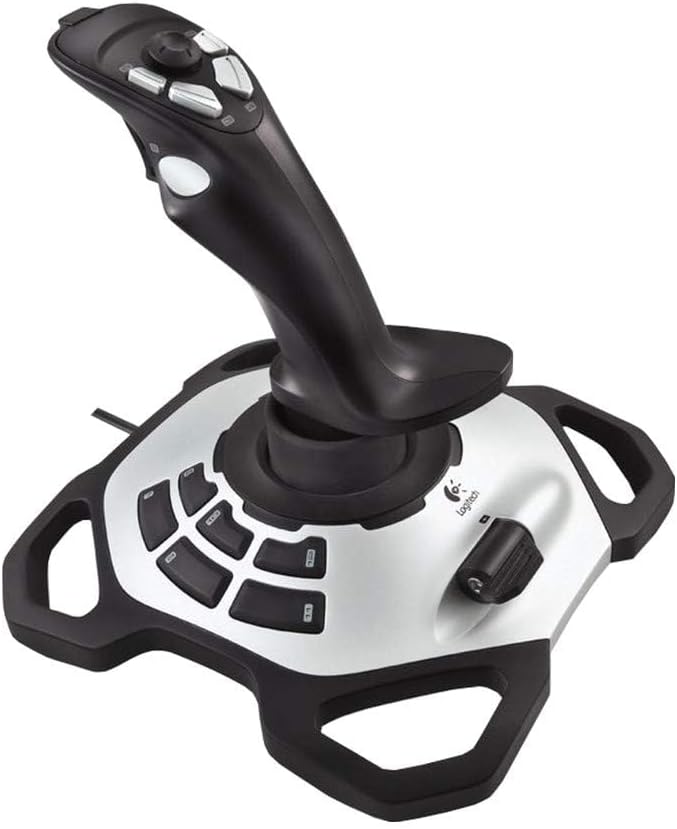
The Logitech Extreme 3D Pro is recognized for its durability and precise control making it a favorite among serious simmers. Its high rating reflects user satisfaction with the build quality and mechanical feel of the stick.
We may earn a commission when you buy through this link, at no additional cost to you.
Designed for fightstick use it offers smooth movement in multiple axes allowing for intricate maneuvers. The ergonomic grip ensures comfort during long sessions and the overall design minimizes fatigue over time.
While it lacks some advanced programmable buttons found in premium models it focuses on core functionality. The fixed throttle limits flexibility but ensures stability during intense flight simulation scenarios.
For those seeking a reliable and precise controller without complex setup this model is highly effective. It remains a staple in the gaming community for its dependability and straightforward operation on Windows 11.
Constructed to withstand heavy use the 3D Pro delivers consistent performance. Its durability ensures longevity even with frequent gaming sessions making it a cost-effective choice over time.
The stick moves smoothly across axes providing accurate input. This precision is essential for maintaining control during complex flight paths or combat maneuvers in simulation environments.
We may earn a commission when you buy through this link, at no additional cost to you.
VOYEE PC Controller mimics the familiar Xbox 360 layout making it an intuitive choice for console players switching to PC. With strong ratings it offers a reliable wired solution for general gaming on Windows 11.
We may earn a commission when you buy through this link, at no additional cost to you.
The enhanced triggers and joysticks respond quickly to player commands minimizing input lag. Vibration feedback enhances the gaming experience by providing haptic cues during critical game events.
Some limitations exist as it is not ideal for FPS games requiring precise stick movement. Additionally being wired limits mobility compared to wireless options but ensures stable connectivity without battery concerns.
If you prefer a traditional gamepad feel for action or racing games this controller is a solid pick. It balances affordability with performance making it accessible for casual gamers looking for quality.
Upgraded triggers and buttons ensure quick reactions during gameplay. This responsiveness is crucial for competitive titles where timing and accuracy define success in challenging scenarios.
Grip contours are designed to fit hands comfortably for long periods. This design helps prevent fatigue allowing you to focus on gameplay rather than hand strain during extended sessions.
We may earn a commission when you buy through this link, at no additional cost to you.
Thrustmaster SimTask FarmStick is designed specifically for players immersed in agricultural simulation. With high ratings it delivers precise control for operating heavy machinery effectively in titles like Farming Simulator 25.
We may earn a commission when you buy through this link, at no additional cost to you.
The H.E.A.R.T technology using magnetic sensors eliminates drift ensuring long-term accuracy. With up to 33 programmable inputs you can manage complex machinery functions without relying on keyboard shortcuts during play.
While it offers exceptional precision for its intended purpose it is specialized. If you are not interested in farming games the investment might not be justified compared to more general-purpose flight controllers.
For dedicated farming sim enthusiasts this joystick provides unmatched utility and comfort. Its ambidextrous design allows flexible setups making it suitable for various cockpit configurations on Windows 11 or Xbox.
Tailored for agricultural machinery control inputs include wheels and triggers. This setup makes operating tractors and loaders intuitive allowing players to focus on management rather than input mapping.
Hall effect magnetic sensors provide accurate and durable performance. This tech ensures that the joystick remains precise over years of use without mechanical wear affecting gameplay.
We may earn a commission when you buy through this link, at no additional cost to you.
The Logitech G X56 H.O.T.A.S represents a high-end flight system with extensive programmability. Its solid rating reflects user satisfaction with its comprehensive control layout and advanced sensor technology.
We may earn a commission when you buy through this link, at no additional cost to you.
With over 189 programmable controls it allows detailed mapping of complex aircraft systems. The Hall-effect sensors ensure high precision and durability providing accurate input for realistic flight simulation experiences.
The RGB lighting adds aesthetic appeal allowing customization to match your gaming setup. However the larger footprint and price point mean it is best suited for dedicated enthusiasts with space to spare.
If you seek professional-grade controls and full customization this system is unmatched. It transforms your setup into a virtual cockpit ideal for serious flight simulation on Windows 11 and VR environments.
Hall-effect sensors provide high precision without wear. This ensures that the stick remains accurate even after heavy use delivering reliable performance over years of simulation gaming.
RGB lighting allows visual personalization matching your rig setup. Use software to set colors that complement your gaming environment for a cohesive and immersive visual experience.
We may earn a commission when you buy through this link, at no additional cost to you.
Thrustmaster T.16000M FCS is a high-precision stick that combines entry-level accessibility with advanced sensor tech. Its excellent rating highlights its effectiveness and reliability for serious flight simulation enthusiasts.
We may earn a commission when you buy through this link, at no additional cost to you.
The H.E.A.R.T technology ensures that precision levels remain stable over time. With 16 action buttons and an 8-way hat switch you get ample control for complex maneuvers without needing extra hardware.
While it lacks an included throttle the precision of the stick itself is highly regarded. The ambidextrous design allows you to tailor the setup to your dominant hand for better comfort.
For those prioritizing accuracy and long-term durability this model is a top choice. It offers a robust foundation for building a realistic cockpit on Windows 11 without excessive cost or complexity.
H.E.A.R.T technology prevents drift and maintains accuracy. This ensures that your inputs remain consistent over time providing reliable performance for precise flight maneuver simulations.
Removable components allow left or right-handed use. This adaptability ensures comfort for all users allowing you to position controls to match your natural hand posture.
We may earn a commission when you buy through this link, at no additional cost to you.
Selecting the right joystick requires understanding your specific gaming needs and budget constraints. This guide outlines key factors to consider ensuring you find a controller that offers both value and performance.
Always check that the joystick explicitly supports Windows 11. While many devices work via legacy drivers specific compatibility ensures full feature access and stable operation on modern systems.
Verify support for your specific OS version to avoid connection issues during gameplay.
The number of programmable buttons determines how much you can control without a keyboard. Flight sims often require more inputs than casual games so choose a model with enough buttons for your needs.
Higher button counts allow for detailed mapping of complex aircraft systems.
Look for materials that feel sturdy and resist wear over time. Hall-effect sensors or high-quality mechanical parts often indicate a longer lifespan and better resistance to mechanical stress.
Investing in a durable build ensures the controller remains reliable for years.
Comfort is critical for long gaming sessions. Test the handle shape and grip if possible ensuring it fits your hand naturally without causing strain or fatigue during extended use.
An ergonomic design reduces physical stress and enhances overall gaming experience.
Vibration feedback adds immersion by providing haptic cues during critical game events. Ensure the device supports this feature and allows you to adjust intensity to your personal preference.
Adjustable vibration settings help balance realism with comfort for various game types.
Decide if you need a separate throttle unit or if the joystick includes one. Integrated throttles save desk space but might limit flexibility compared to detachable or separate units.
Separate throttles offer more customization for dedicated flight simulation setups.
Check the availability of official software for mapping and customization. User-friendly software makes it easier to configure complex commands and save profiles for different games or scenarios.
Robust driver support ensures you can fully utilize all joystick features effectively.
Determine your budget and find the best balance between cost and features. High-end models offer more precision and programmability while entry-level options provide basic functionality for casual play.
Choose a model that offers necessary features without overspending on unused capabilities.
Begin by connecting the joystick to a USB port and installing any necessary drivers. Allow Windows to recognize the device before launching games to ensure it appears in input settings.
Calibrate the device using the built-in Windows control panel or official software. This step ensures that axes map correctly to your games preventing drift or input lag during play.
Store the joystick in a cool dry place when not in use. Avoid excessive force on buttons and sticks to prolong the mechanical lifespan of the device and maintain consistent performance.
Most models support Windows 10 and 11 but compatibility with macOS or Linux varies. Check the product description for specific OS support. Some require manual driver installation for non-Windows systems.
Yes many flight sims allow single-stick setups with keyboard shortcuts for throttle control. However dedicated throttles improve realism and ease of use especially in complex simulation environments.
This list focuses on wired options for stability. Wireless joysticks exist but may introduce latency. Wired connections are generally preferred for flight simulation to ensure precise input response.
Drift often indicates worn sensors or calibration needs. Recalibrate the device via Windows settings or the manufacturer software. If issues persist the sensor hardware may need replacement.
Basic functionality works without drivers for many models. However official software enables advanced customization such as button mapping and vibration control for optimal performance.
Yes many joysticks work for driving or racing games. However general-purpose controllers may offer more ergonomic designs. Ensure the device supports your specific game genre properly.
With proper care a joystick lasts several years. Usage intensity and build quality affect longevity. High-end models often use durable components that resist wear during heavy gaming sessions.
Windows supports multiple USB devices but games may limit input sources. Some simulators allow dual-stick setups. Ensure your game supports multi-controller configurations properly.
We reviewed ten top joysticks ranging from budget-friendly controllers to premium systems. Each model offers unique strengths tailored to different flight or general gaming needs on Windows 11.
Prioritize features like sensor precision and build quality if you plan to simulate complex maneuvers. Casual players may find simpler controllers sufficient for basic gaming enjoyment and immersion.
Always verify current pricing and availability before purchasing as details change frequently. This ensures you get the best value for your money when setting up your gaming station.