
8 Bay NAS Case
5.0Editor score
Eight hot-swap 3.5 inch bays
Dual-chamber design layout
Fits Micro-ATX boards
Finding the right storage solution for your home network requires a case that balances capacity with performance. An ATX NAS Computer Case offers the space needed for multiple drives while supporting standard components for a reliable build.
We evaluated ten distinct models based on drive bay configurations, airflow design, and build quality. Each entry was reviewed for compatibility with common ATX motherboards and their ability to maintain thermal stability under load.
Every pick highlights unique strengths like hot-swap bays or premium materials. Remember that stock levels and availability can shift rapidly, so verify current listings before finalizing your purchase for your specific project needs.
5.0Editor score

4.7Editor score

4.6Editor score
As an Amazon Associate we earn from qualifying purchases.
This side-by-side comparison breaks down the key specifications of every model to help you quickly identify the chassis that fits your storage capacity and component compatibility requirements.

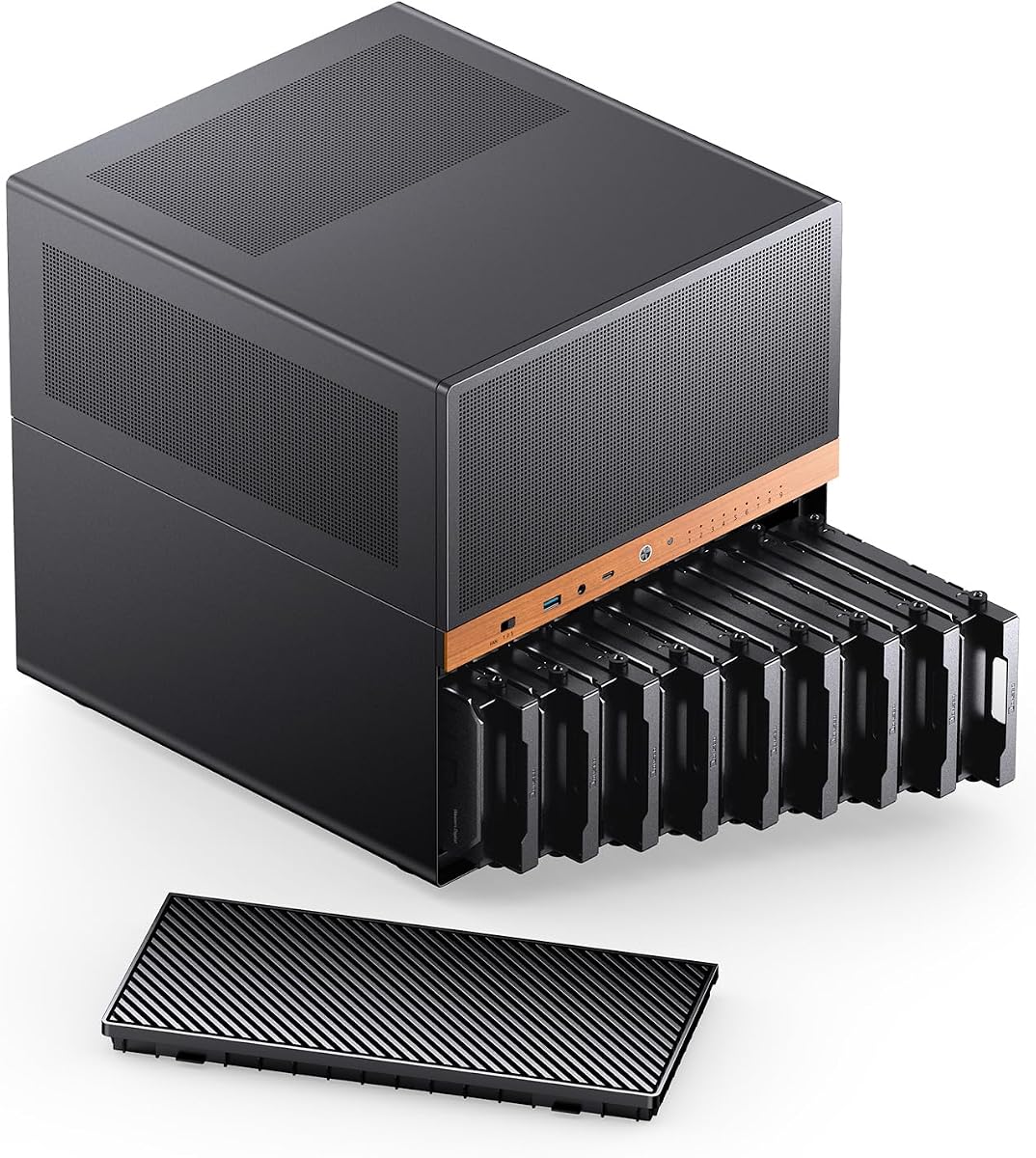


The JONSBO N5 stands out as a top contender for serious storage enthusiasts. With a rating of 4.7 stars, it delivers a rare combination of high-density storage and premium aesthetics suitable for a living room or office setup.
We may earn a commission when you buy through this link, at no additional cost to you.
Its primary strength lies in the 12 plus 4 drive bay configuration. You can install twelve 3.5 inch hard drives in the front cage and four 2.5 inch SSDs on the side. The solid wood veneer adds a distinct look that separates it from typical industrial chassis.
However, the build is quite large and requires careful planning for your workspace. The power supply condition note means you must ensure your PSU fits the length requirements to utilize the full 12 disk slots at the front.
This unit is ideal for users who need massive local storage without relying on cloud services. If you prioritize both capacity and visual appeal in your home server build, this chassis offers the best balance available today.
The 12 HDD plus 4 SSD layout provides extensive space for media libraries and critical data backups in a single unit.
The North American black walnut veneer offers a sophisticated look that blends well with modern home furniture and decor.
We may earn a commission when you buy through this link, at no additional cost to you.
This compact chassis achieves a perfect 5.0 rating from users who value simplicity and effective cooling. It is designed specifically for those who need eight hot-swappable drives without the bulk of a full tower.
We may earn a commission when you buy through this link, at no additional cost to you.
The dual-chamber design separates hot components from storage drives, which helps maintain lower temperatures. It supports Micro-ATX and Mini-ITX motherboards, making it an excellent choice for smaller home lab setups.
The main limitation is the motherboard support which stops at Micro-ATX. If you plan to use a full-size ATX board, this case will not fit. However, for NAS builds, smaller boards are often sufficient.
For DIYers looking for a reliable and budget-friendly entry into home servers, this unit is hard to beat. It offers the essential hot-swap feature at a price that fits most project budgets.
The dual-chamber layout keeps the CPU and PSU heat away from the hard drives to ensure consistent storage performance.
Hot-swap bays allow you to replace or add drives without shutting down the server, which is crucial for always-on systems.
We may earn a commission when you buy through this link, at no additional cost to you.
This massive chassis is built for enterprise-level storage needs in a home or small office environment. With fifteen hot-swappable drives and support for redundancy power supplies, it offers robust reliability for critical data.
We may earn a commission when you buy through this link, at no additional cost to you.
The support for EEB and E-ATX motherboards allows for serious compute power alongside the storage. You can install multiple GPUs or network cards via the eight full-height PCI slots for specialized workloads.
Be aware that shipping takes a long time due to sea freight. Also, the weight is significant at sixteen kilograms so you must ensure your floor or desk can handle the load without issues.
This is the ultimate choice for professionals who need maximum drive density and redundancy. If you require a workstation that can hold vast amounts of data and run heavy computations, this is the ideal pick.
Redundancy power supply support ensures that your data remains accessible even if one power source fails during operation.
Eight full-height PCI slots allow for multiple network cards or accelerators to be added to your storage server.
We may earn a commission when you buy through this link, at no additional cost to you.
The DARKROCK Classico focuses on cooling efficiency for systems with high thermal output. The mesh front and side panels ensure that air flows freely through the case, keeping components cool even under heavy loads.
We may earn a commission when you buy through this link, at no additional cost to you.
It supports thirteen hard drives which is an impressive number for a single unit. The vertical GPU mount helps prevent sagging and allows the graphics card to cool more effectively within the chassis.
A note is needed regarding the large dimensions of the case. It will take up significant desk space. Make sure your room can accommodate the footprint before purchasing this unit.
For users who need high capacity and excellent cooling for gaming or rendering tasks, this case is a strong choice. It balances storage needs with the airflow required for high-end components.
The mesh design maximizes air flow potentials to keep your system cool and performing at its best during intensive tasks.
Mounting your GPU vertically prevents sagging and allows for better airflow around the card for improved thermal performance.
We may earn a commission when you buy through this link, at no additional cost to you.
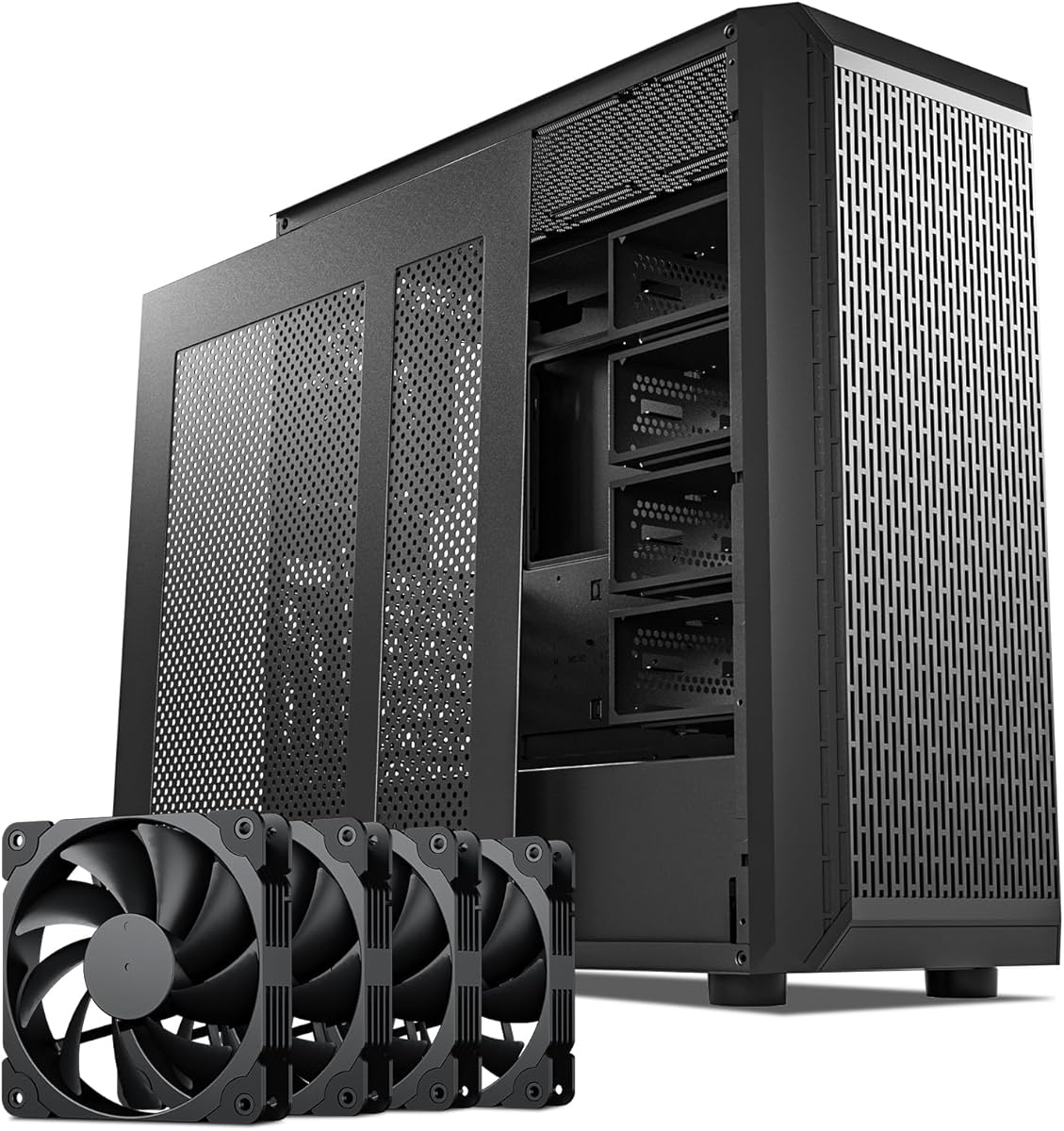
This unit is designed for DIY NAS builds and media servers with strong airflow features. It supports up to eight 3.5 inch hard drives and includes four 140mm PWM fans for consistent cooling throughout the system.
We may earn a commission when you buy through this link, at no additional cost to you.
Modern connectivity is a plus with the USB 3.2 Type-C front port which allows for fast data transfer with compatible devices. It also supports ATX and Micro ATX motherboards for flexible build options.
While the specs look good, the low user rating suggests potential issues with assembly or quality control. You should read recent reviews to ensure the unit you receive meets expectations for durability.
It remains a viable option for media server setups where airflow and connectivity are priorities. If you can navigate the potential assembly hurdles, the fan configuration offers good cooling for storage arrays.
The front USB 3.2 Type-C port provides fast and convenient data transfer for external drives or media connections.
Mesh panel design paired with 140mm PWM fans ensures optimal cooling and consistent airflow throughout the system.
We may earn a commission when you buy through this link, at no additional cost to you.
This case offers unique flexibility in how you install the power supply. It supports both ATX and SFX units in multiple positions which can help optimize internal airflow and space usage for your specific components.
We may earn a commission when you buy through this link, at no additional cost to you.
With nine drive bays and hot-swap functionality it provides significant storage capacity in a Micro ATX chassis. The solid wood decoration gives it a premium look that complements living room setups well.
The power setup requires some attention as you may need to connect multiple power interfaces for enterprise drives. Follow the manual carefully to ensure your drives get enough current to start properly.
For home users who want flexibility in power supply choice and high drive density, this case is a great fit. It balances build quality with practical storage features effectively.
Multiple installation positions supporting both ATX and SFX power supply units for versatile setup options in your chassis.
The 9 drive bay configuration allows for extensive storage options with convenient hot-swap functionality to add drives easily.
We may earn a commission when you buy through this link, at no additional cost to you.
The KM7B offers a rare combination of a magnetic front panel and massive storage capacity. This feature makes accessing the interior incredibly easy without tools which is useful for frequent maintenance.
We may earn a commission when you buy through this link, at no additional cost to you.
It supports 13 HDD bays along with Micro ATX and E-ATX motherboards. This allows for a wide range of build options from small home labs to powerful workstation servers in a single chassis.
The lack of user ratings makes it harder to judge long-term reliability. However, the specs suggest a robust build designed for serious storage needs and high-performance liquid cooling setups.
This case is recommended for users who value easy access and high drive counts. If you need a full tower that supports large motherboards and has convenient magnetic panels, consider this model.
The magnetic front panel enables easy access to the interior for maintenance and upgrades without the need for tools.
Supporting Micro ATX ATX and E-ATX motherboards offers versatile build options for various server configurations.
We may earn a commission when you buy through this link, at no additional cost to you.
This classic chassis is known for its premium build quality and attention to detail. The 7mm thick aluminum front panel provides a solid feel and a timeless look that stands out from modern plastic cases.
We may earn a commission when you buy through this link, at no additional cost to you.
It features a positive pressure design which helps reduce dust accumulation inside the case. The built-in innovative hard drive cooler ensures your storage devices stay at optimal temperatures for longevity.
The price point is high compared to other options in this category. You are paying for the brand reputation and the high quality of materials used in the construction of the unit.
For users who value aesthetics and build quality over raw drive capacity, this is an excellent choice. It is perfect for a high-end desktop that doubles as a modest storage server.
Positive pressure design for effective dust reduction keeps the internal components cleaner over long periods of operation.
Built-in innovative hard drive cooler helps maintain optimal temperatures for your storage drives to extend their lifespan.
We may earn a commission when you buy through this link, at no additional cost to you.
This unit brings a beautiful walnut wood finish to your desk without taking up much space. It is designed for Micro ATX builds that need a mix of style and storage in a small footprint.
We may earn a commission when you buy through this link, at no additional cost to you.
You get eight total drive bays with four hot-swap options. This allows you to add or remove specific drives easily while keeping the rest of your storage secure in the non-hot-swap bays.
The compact size limits the types of components you can install. Ensure your motherboard and GPU fit within the strict dimensions before buying. It is not suitable for full-size ATX boards.
For home office users who want a stylish server that blends into a living room or office setup, this case is a great option. It balances beauty and function in a compact package.
Adopt 8mm thickness North American black walnut solid wood with natural texture to fusion home environments seamlessly.
This NAS mini case supports ITX and Micro-ATX motherboards for a compact build that saves valuable desk space.
We may earn a commission when you buy through this link, at no additional cost to you.
This chassis stands out because it supports SAS drives in addition to standard SATA. This is useful for users who require enterprise-grade drives for high performance and reliability in their NAS.
We may earn a commission when you buy through this link, at no additional cost to you.
The eight hot-swappable trays include LED indicators to show drive status at a glance. It supports Micro-ATX motherboards and liquid cooling for a well balanced thermal management system.
Keep in mind that you will need a compatible SAS controller card to take advantage of the SAS support. If you only plan to use SATA drives, this might be an unnecessary expense for your setup.
For enterprise users or professionals needing SAS capabilities in a smaller chassis, this is a top-tier option. It offers reliable hardware with professional-grade features in a compact form factor.
Accommodates 2.5 or 3.5 inch SAS-12G and SATA-6G drives for high performance and reliability in your storage array.
LED indicators displaying drive operation status help you quickly identify any issues with specific drives in the array.
We may earn a commission when you buy through this link, at no additional cost to you.
Selecting the right NAS chassis requires careful evaluation of several factors to ensure it meets your storage and component needs.
The number of drives you need to store is the primary factor to consider. Some cases offer as few as six bays while others support up to fifteen. Make sure the case can hold your current drives and leave room for future expansion without overcrowding.
Always check the mix of 3.5 inch HDD bays and 2.5 inch SSD slots to ensure you have the right balance for your storage strategy.
Hot-swap bays allow you to add or remove drives without powering down the system. This is critical for servers that need to stay online at all times. Non-hot-swap bays are cheaper but require downtime to access the drives inside.
Prioritize cases with hot-swap trays if you need easy maintenance or frequent updates to your storage array.
Most NAS cases support Micro-ATX or ITX boards but some allow full ATX or E-ATX sizes. Check the maximum motherboard dimensions to avoid buying a case that is too small for your planned build. A larger board can offer more PCIe slots for expansion cards.
Ensure your chosen case explicitly lists the motherboard form factors you intend to use before making a purchase.
Internal space for the power supply varies significantly between models. Some cases have strict length limits or require downward compatibility with specific PSU types like SFX or ATX. Measure your PSU to ensure it will not block drive bays.
Look for cases that allow flexible PSU placement to optimize internal airflow and storage space.
Heat is a major concern for NAS builds with multiple drives. Look for mesh panels or dedicated fan mounts that keep air flowing through the drive cages. Good airflow prevents thermal throttling and extends the life of your hard drives.
Check the case fan support to ensure you can install enough intake and exhaust fans for your specific configuration.
Expansion slots allow you to add extra network cards or controllers for RAID setups. Full-height PCIe slots are preferable for enterprise components. If you need multiple network connections, ensure the case has enough available slots.
Review the total number of PCIe slots available to confirm your build can accommodate all necessary hardware.
The materials used for the chassis impact both durability and aesthetics. Steel is common but wood veneer or aluminum panels can add a premium look for home offices. Thicker steel resists dents and provides better structural integrity for heavy drive loads.
Select a material that suits your environment and ensures the chassis remains stable when fully loaded with drives.
Front ports like USB 3.0 or Type-C allow for easy data transfer without opening the case. These features are useful for temporary backups or connecting peripherals quickly. A mix of USB and audio ports is often found on higher-end cases.
Consider the types of ports you need for daily access and choose a case that provides convenient connectivity.
When installing drives ensure you follow the hot-swap or screw-down instructions carefully. Use anti-static measures when handling components to prevent damage to your hardware. Secure all cables neatly to avoid blocking airflow paths inside the chassis.
Regular cleaning is essential to keep dust from clogging filters or fan blades. Use compressed air to blow out dust from the front panels and drive bays every few months. Check fan operation to make sure they are running smoothly and quietly.
Ensure the case is placed on a stable surface with enough space around it for ventilation. Avoid stacking heavy items on top of the chassis which could damage the case or the drives inside. Proper placement helps maintain optimal internal temperatures for your NAS system.
No, you cannot install a full ATX motherboard in a Micro-ATX case because the mounting holes and physical dimensions will not align. You must choose a case that explicitly supports the larger ATX form factor if you plan to use that board.
Hot-swap bays allow you to add or remove drives without shutting down the server whereas non-hot-swap bays require the system to be powered off. Hot-swap is better for uptime while non-hot-swap is cheaper but less convenient.
Most cases use standard ATX power supplies but some require SFX units due to limited space. Always check the maximum PSU length supported by the case to ensure your power unit will fit properly.
Airflow is important because hard drives generate heat and excess heat can shorten their lifespan. Good airflow from mesh panels and fans helps keep temperatures low and ensures stable performance for your storage array.
A basic NAS needs at least one slot for the graphics card if used or one for a network card. If you plan on adding RAID controllers or multiple network cards, you will need more full-height slots for expansion.
Some cases support AIO liquid coolers up to 360mm or 280mm radiators. Check the specific radiator support listed in the product details to confirm if your preferred cooling solution fits the chassis.
We reviewed ten top options ranging from budget-friendly units to high-end enterprise models. Each case offers unique strengths like hot-swap bays or solid wood finishes depending on your priority for storage and style.
Prioritize capacity and airflow when making your decision. If you need massive storage the JONSBO N5 or ZhenLoong Full Tower are excellent choices. For budget builds the 8 Bay NAS Case offers great value.
Prices and availability change frequently so check current listings before you order. Ensure all your planned components fit the dimensions and specifications of your chosen case to avoid any build issues later.