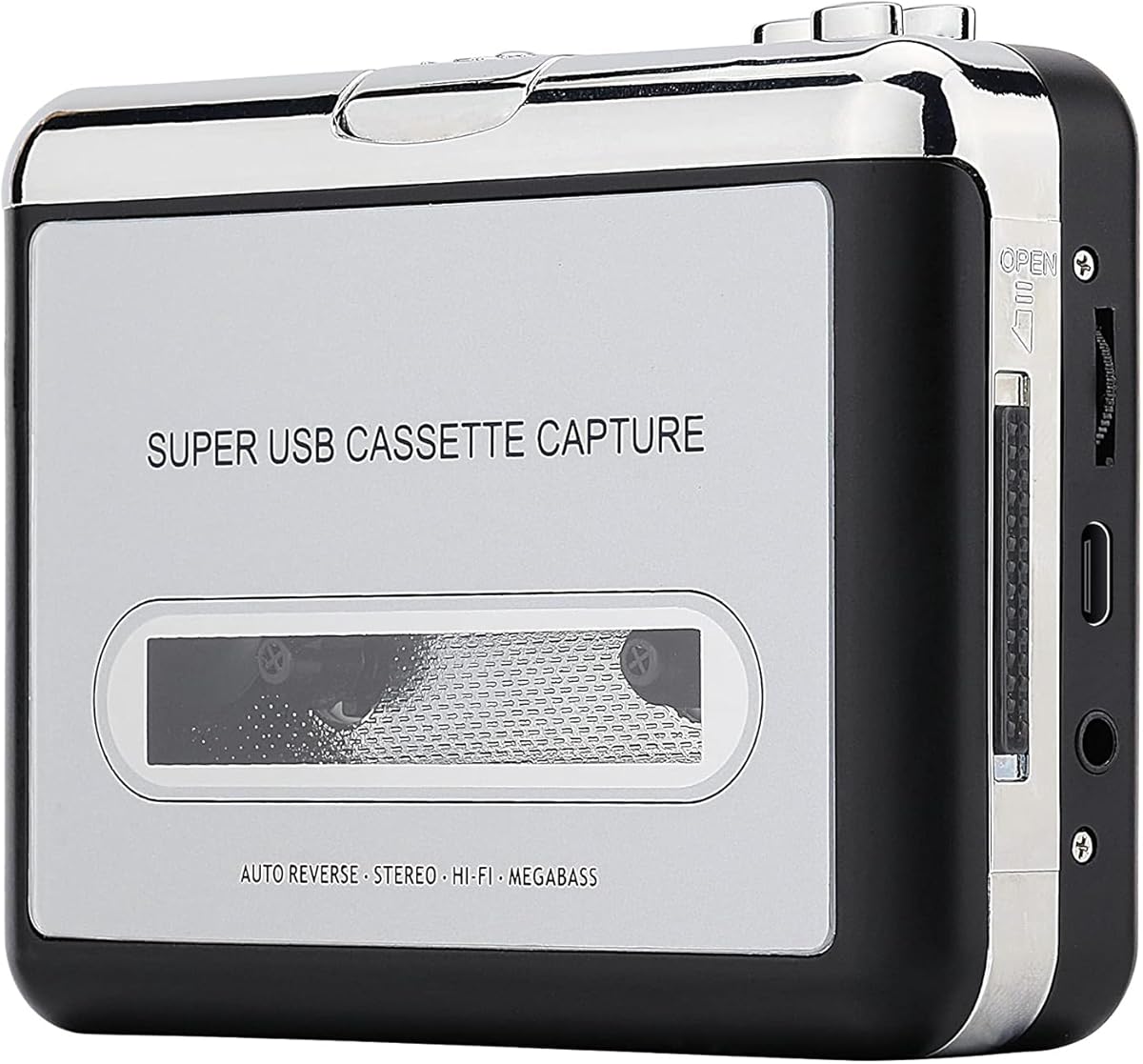
Reshow Cassette Tape Player Silver
3.8Editor score
Lightweight compact vintage design
Connects to laptop via USB
Includes conversion software and guide
This guide compares the top cassette to MP3 converters for digitizing tapes, featuring portable players, USB recorders, and Bluetooth models for easy music
Cassette tapes hold decades of cherished memories, but playing them requires obsolete hardware. A cassette to MP3 converter bridges this gap by digitizing analog audio into modern files you can stream anywhere without bulky decks.
We evaluated ten top-rated devices based on conversion quality, portability, and ease of use. Our analysis covers players that record to SD cards, USB drives, or computers, ensuring you find the right tool for your collection.
Each pick highlights key features, pros, and cons to help you decide quickly. Note that stock levels and availability fluctuate frequently, so check the current links for the latest updates before purchasing your ideal converter.
3.8Editor score

4.5Editor score

4.3Editor score
The following table provides a side-by-side comparison of all ten selected cassette to MP3 converters. Review the specifications to identify which device best matches your storage preferences and connectivity needs.


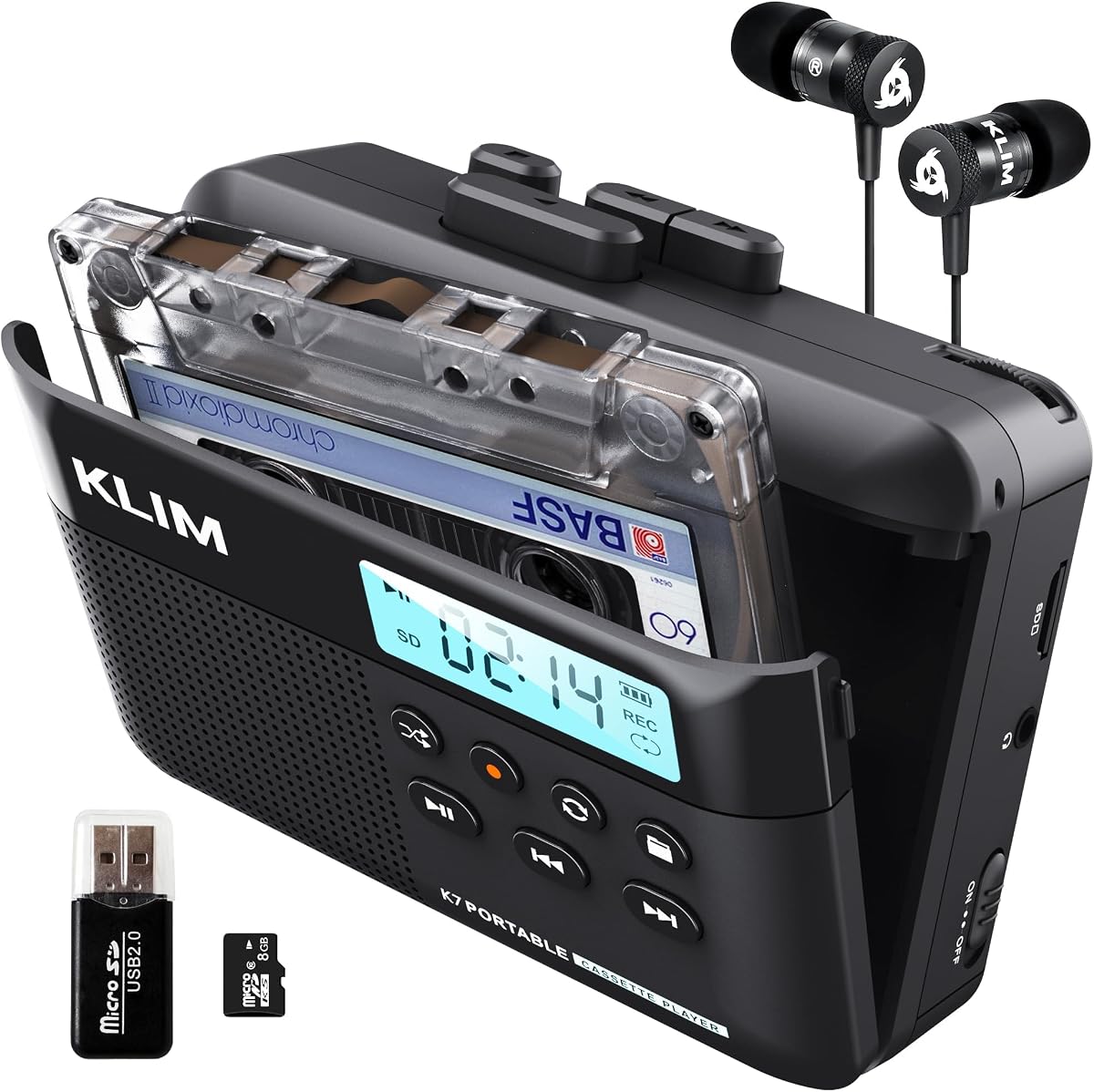


The K7 Cassette Player ranks as our top pick for its balance of features and ease of use. With a rating of 4.2 stars, users appreciate the straightforward process of converting tapes to MP3 files directly onto an SD card without needing a computer.
We may earn a commission when you buy through this link, at no additional cost to you.
This device stands out because it functions as a complete ecosystem. It includes a 16GB SD card, a card reader, and premium earphones in the package. The built-in microphone allows you to record thoughts or meetings, adding versatility beyond just tape conversion.
While it offers great portability with a rechargeable battery and lightweight build, there are trade-offs. You cannot record onto cassette tapes with this model, limiting it to playback and digital export. The audio fidelity is good for nostalgic listening but may lack audiophile clarity.
This player is ideal for anyone wanting a simple, all-in-one solution to digitize their collection quickly. Whether you are commuting or traveling, the included earphones and battery ensure you can enjoy your converted music anywhere without hassle.
Follow the user manual to convert tapes to MP3 format stored directly on the SD card without extra software.
Enjoy music on the move with a 3.5mm earphone jack and included premium quality earphones for private listening.
We may earn a commission when you buy through this link, at no additional cost to you.
The SEMIER Small Cassette Player offers versatile two-way conversion capabilities, allowing you to transfer tapes to SD cards or computers via USB. Rated at 4.0 stars, it is a solid choice for those who need flexibility in how they digitize their audio collections.
We may earn a commission when you buy through this link, at no additional cost to you.
A key strength is the inclusion of Audacity software for computer-based transfers, which provides more control over the conversion process. The device features an LCD for easy navigation and a loud speaker for sharing music. It also supports playback from SD cards, making it a dual-purpose device.
However, it does not support Type IV or metal tapes, which limits its compatibility with certain older recordings. The compact size is excellent for travel, but users should be aware of the power requirements when deciding between USB-C or AA batteries for operation.
Choose this player if you want a budget-friendly device that bridges the gap between analog and digital effectively. It is perfect for capturing old memories and creating new recordings while enjoying the convenience of an LCD screen for easy control.
Convert cassette music to MP3 onto an SD card or use USB cable with Audacity software for digital preservation.
Enjoy the convenience of an LCD display and choose between USB-C cable or AA batteries for power.
We may earn a commission when you buy through this link, at no additional cost to you.
The ClearClick Cassette Tape to USB converter earns high praise for its ease of use and automatic features. With a rating of 4.5 stars, it simplifies the digitization process by saving files directly to a USB flash drive without needing a computer or drivers.
We may earn a commission when you buy through this link, at no additional cost to you.
The standout feature is the automatic track splitting mode, which organizes your audio into individual MP3 files. This eliminates the tedious work of manually cutting files later. The device includes a 16 GB USB drive and doubles as a personal player with included earbuds.
While it commands a higher price compared to basic players, the convenience and time savings justify the cost for many users. The main trade-off is less manual control over file naming or splitting during the recording process compared to computer-based software solutions.
This converter is best for users who want a plug-and-play solution to preserve their music quickly. The USA-based tech support and two-year warranty provide additional peace of mind for long-term use and reliability.
Automatic track splitting mode splits tracks into individual MP3 files automatically for organized storage.
Portable design doubles as personal cassette tape player with earbuds included for immediate enjoyment.
We may earn a commission when you buy through this link, at no additional cost to you.
The Reshow Cassette Tape Player is an affordable entry point for digitizing old tapes. With a rating of 3.8 stars, it offers basic functionality for those who want to convert cassettes to MP3 format via a USB cable without spending much money.
We may earn a commission when you buy through this link, at no additional cost to you.
Its key strength lies in its standard compatibility with laptops and personal computers, using a 3.5mm AUX input for versatile connections. The package includes converter software and a USB power cord to ensure quick transfers. The vintage design appeals to users seeking a classic look.
However, the lower rating suggests potential issues with durability or sound quality compared to premium models. It functions best as a simple tool for basic transfers rather than a high-fidelity recording device. Users should manage expectations regarding audio clarity with older tapes.
Choose this player if budget is your primary concern and you need a basic converter to get started. It is suitable for casual users who want to revive dusty cassette tapes and enjoy favorite music on modern devices without complex setups.
Accommodates any standard 3.5mm AUX input for connecting earbuds headphones or car stereo.
Complete transfer kit includes converter software guide and USB power cord for convenient conversions.
We may earn a commission when you buy through this link, at no additional cost to you.
The K7 Cassette Player with 8GB storage offers a reliable way to convert tapes to digital files. Rated at 4.3 stars, it is similar to the 16GB version but comes with slightly less storage space, making it a cost-effective alternative for smaller collections.
We may earn a commission when you buy through this link, at no additional cost to you.
Users appreciate the portability and the inclusion of premium quality earphones and a Type-C USB cable. The built-in microphone adds utility for recording meetings or thoughts directly onto the SD card. No additional apps are needed, simplifying the workflow significantly.
The trade-off is the 8GB capacity which may fill up quickly with large collections compared to larger models. Also, like other K7 models, it cannot record onto cassette tapes. Despite this, the battery life and lightweight design make it great for travel.
This model is ideal for those who want the core features of the K7 series without paying for extra storage. It ensures you can stay connected to your music anywhere with a rechargeable battery that only needs two hours of charging time.
Included 8GB SD card and card reader allow for seamless storage and transfer of converted files.
Enjoy music on the move with a lightweight design and rechargeable battery for long listening sessions.
We may earn a commission when you buy through this link, at no additional cost to you.
The K7 Cassette Player with 32GB storage is designed for users with extensive cassette collections. It shares the same core features as other K7 models, such as the built-in microphone and rechargeable battery, but provides significantly more space for your digital files.
We may earn a commission when you buy through this link, at no additional cost to you.
Converting tapes to MP3 is effortless without app downloads. The package includes Type-C cable, earphones, and a card reader for easy transfer. The integrated speaker allows you to share music with friends or enjoy an immersive listening experience without headphones.
While the 32GB capacity is a major plus, the price is slightly higher than the smaller versions. Also, remember that it does not support recording onto cassette tapes. However, the 5-year assurance offers strong backing for the product's durability over time.
This player is perfect for collectors who want to digitize large volumes of music without worrying about running out of space. Its lightweight build ensures you can take your digital collection anywhere, making it a practical choice for music lovers.
Included 32GB SD card allows for extensive storage of your converted MP3 files without frequent emptying.
Built to last with higher quality components and covered by a 5-year assurance for peace of mind.
We may earn a commission when you buy through this link, at no additional cost to you.
The Reshow Cassette Tape Player in black offers a stylish alternative to the silver model with similar functionality. With a rating of 3.9 stars, it serves as a reliable tool for converting old tapes to digital MP3 formats using a standard USB connection.
We may earn a commission when you buy through this link, at no additional cost to you.
This device is compatible with laptops and personal computers, making it easy to transfer files to your system. It supports standard 3.5mm AUX inputs for connecting headphones or car stereos. The included conversion software helps streamline the process for digital enjoyment.
Although it is compact and lightweight, the build quality is basic and may not withstand heavy daily use. The sound quality can be clear in quiet rooms, but external noise might affect recordings. It is best suited for occasional use rather than professional archiving.
Choose this player if you prefer a darker aesthetic and need a budget-friendly solution for basic conversion tasks. It allows you to fall in love with the sound of your favorite tapes again and enjoy them on modern devices with minimal fuss.
This vintage-style cassette tape player works seamlessly with any standard headphones for private listening.
Enjoy crystal clear sound quality with even the oldest bands by transferring in a quiet room.
We may earn a commission when you buy through this link, at no additional cost to you.
The USB Cassette to MP3 Converter focuses on simplicity by recording directly to a USB flash drive without a PC. It has a rating of 3.8 stars and appeals to users who want a standalone device for quick conversions without complex setups or extra hardware.
We may earn a commission when you buy through this link, at no additional cost to you.
Key features include an auto-reverse function that switches tape sides automatically during conversion. You can adjust the volume button while recording to optimize levels. The default manual mode allows you to save songs or sentences into separate files easily.
Performance depends on using a fast USB drive with higher read rates to prevent skipping during playback. The walkman style design is nostalgic but the build is basic. A carry bag is included for protection, making it suitable for travel or storage.
This device is best for those who want a dedicated converter that operates independently of a computer. It offers a practical solution for organizing tapes into individual files, provided you use a compatible high-speed USB drive for optimal results.
The cassette converter can automatically switch sides of tape while a conversion is underway for continuous recording.
This user-friendly MP3 converter features a classic look with headphones and carry bag for basic protection.
We may earn a commission when you buy through this link, at no additional cost to you.
The Gracioso Bluetooth Cassette to MP3 Converter stands out with advanced connectivity options that bridge vintage tapes and modern devices. With a rating of 4.3 stars, it offers dual Bluetooth modes for streaming or receiving music, plus a large battery for extended use.
We may earn a commission when you buy through this link, at no additional cost to you.
A unique feature is the ability to record music from your phone onto blank cassette tapes via Bluetooth receiver mode. It also supports USB direct recording without software, making it versatile. The 6W speaker delivers clear and deep sound for an immersive experience.
The main trade-off is the higher price compared to basic converters. The feature set can be complex for simple tasks, but it provides unmatched flexibility. The 2000mAh battery ensures uninterrupted enjoyment for hours whether you are streaming or playing tapes.
This device is perfect for enthusiasts who want to create mixtapes or listen wirelessly. It is a premium choice for anyone looking to maximize the utility of their cassette player in a modern digital environment.
Transmitter Mode streams tape audio to Bluetooth headphones; Receiver Mode plays phone music through the speaker.
Record music from your phone or audio sources onto blank cassette tapes via Bluetooth receiver mode easily.
We may earn a commission when you buy through this link, at no additional cost to you.
The K7 Cassette Tape Player with MP3 Converter provides a straightforward way to manage old tapes digitally. Rated at 4.2 stars, it shares the familiar K7 design and includes a 16GB SD card for storage, making it a repeat choice for many reliable users.
We may earn a commission when you buy through this link, at no additional cost to you.
It features a built-in microphone for recording thoughts or meetings and a speaker for sharing. The package comes with premium quality earphones and a Type-C USB cable for easy connectivity. No app downloads are required, simplifying the conversion process significantly.
Users should note that this model does not support recording onto cassette tapes, limiting its use to playback and export. However, the lightweight build and rechargeable battery make it ideal for travel. The 5-year assurance adds value to its reliability over time.
This player is a solid everyday option for those who want a balance of features and ease of use. Whether you are commuting or traveling, it ensures your music collection is always accessible in digital format without complex setup steps.
The integrated speaker allows you to share music with friends for an immersive listening experience.
You will find everything needed in the package including cable earphones SD card and card reader.
We may earn a commission when you buy through this link, at no additional cost to you.
Selecting the right cassette to MP3 converter involves evaluating storage methods, connectivity options, and sound quality to match your specific needs.
Consider whether you prefer converting to SD cards, USB drives, or computers. SD card models are great for portable devices that allow on-the-go digitization without a laptop. USB drives are excellent for direct transfers without software. Computer-based converters offer more editing control but require a PC.
Choose SD card models for standalone convenience and USB models for direct file access without additional hardware dependencies.
Portable converters allow you to digitize tapes anywhere without being tethered to a wall outlet. Look for rechargeable batteries that offer long life, typically around 6 to 10 hours. Lightweight designs are essential for travel or use in different rooms.
Prioritize battery life and lightweight construction if you plan to use the device outside your home office or living room.
Built-in microphones and speakers add versatility by allowing you to record notes or play music without headphones. Speakers are helpful for group listening or sharing music with others. Microphones can be used for voice memos in addition to tape conversion.
Ensure the device includes a mic and speaker if you want multi-functional use beyond simple digital file creation.
Check for 3.5mm earphone jacks and USB ports for connecting headphones or computers. Some models support Bluetooth, which enables wireless streaming to modern speakers or headphones. Compatibility with different USB speeds ensures smooth data transfer during conversion.
Look for standard 3.5mm jacks and USB-C ports to guarantee compatibility with modern audio accessories and power sources.
Automatic track splitting helps organize your audio by breaking long cassette sides into individual songs. This feature saves time during post-processing and avoids having to manually cut files later. Devices with this capability often use magnetic sensors to detect pauses.
Select a model with auto-splitting if you want an organized library immediately after conversion without manual editing.
Audio quality can vary depending on the head and mechanics of the device. High-quality converters reduce hiss and distortion during playback. Read reviews to see if users report clear sound for older tapes that may have degraded over time.
Focus on models with positive feedback regarding sound clarity to ensure your digital files sound as good as possible.
Converters range from budget options with basic features to premium models with advanced connectivity and durability. Determine your budget based on how many tapes you plan to convert. A higher price often includes better build quality and longer warranties.
Balance your budget against features like warranty coverage and included accessories to find the best long-term value.
Some models require software installation while others are plug-and-play. If you prefer simplicity, choose a device that works without drivers or complex programs. Clear manuals and intuitive controls make the conversion process smoother for non-tech-savvy users.
Pick a device that offers a simple manual or no software requirements to minimize setup time and confusion.
Insert your cassette tape into the player and ensure it is seated properly. Connect the device to your computer or insert an SD or USB drive as required. Follow the manufacturer's guide to start the conversion process and adjust volume levels for clear recording.
Monitor the conversion progress and ensure the tape does not jam or loop unexpectedly. If using software, allow the process to complete before disconnecting the device. For battery-operated models, charge fully before starting long conversion sessions to avoid interruptions.
After use, clean the tape head with a soft cloth to prevent dust buildup that affects sound quality. Store the device in a dry place away from direct sunlight to maintain battery health. Regular maintenance extends the lifespan of the mechanical parts.
Not all converters require a computer. Many modern players allow you to record directly onto an SD card or USB drive without a PC. These standalone units make it easy to digitize your collection anywhere without needing extra hardware or software installations.
SD recording uses a memory card that can be read by many devices and computers via a card reader. USB recording saves files directly to a flash drive, which is often more universal but may require a specific drive format. Both methods work similarly for saving MP3 files.
Yes, most cassette to MP3 converters function as standard tape players first. You can use them to listen to your tapes with headphones or a speaker before or after converting them to digital files for broader access and archiving purposes.
Most converters support Type I and Type II tapes which cover standard music tapes. Some models may not support Type IV or metal tapes. Always check the product specifications to confirm compatibility with the specific tape types you own before purchasing.
There is no hard limit on the number of tapes you can convert as long as you have storage space on your SD card or USB drive. If you fill up the drive, you can transfer files to a computer and empty it to continue converting more tapes easily.
Battery life varies by model but typically ranges from 6 to 10 hours on a full charge. Some premium models offer longer endurance. If you plan to convert many tapes, ensure you choose a device with a rechargeable battery or bring extra AA batteries as backup.
We reviewed ten converters ranging from simple budget players to advanced Bluetooth models with auto-splitting features. The ClearClick stands out for ease of use while the Gracioso offers modern wireless capabilities for tech-savvy users.
Prioritize storage options and battery life based on your usage habits. If you want simplicity, choose an SD card or USB drive model. For versatility, look for speakers and microphones that expand the device's functionality beyond just conversion.
Check current availability and features before purchasing since options change often. Whether you need a portable player or a desktop converter, these tools help you preserve your favorite memories in digital format for years to come.