
PlayVital Hard Case for Nintendo Switch 2
4.4Editor score
Slim and durable shell
Split grip design
Full access cutouts
This guide compares the top dockable Switch 2 cases for protection and play modes. Find the right hard shell or grip to protect your console while docking
Protecting your new console requires the right gear. A good case must shield against drops and scratches while allowing easy access to ports. It should also support tabletop and docked modes without removal. This ensures your device stays safe during travel and daily use.
We evaluated ten leading options based on protection, design, and compatibility. Each product was reviewed for its ability to fit the official dock securely. We looked at grip comfort, stand functionality, and overall build quality. Our goal is to help you find the perfect match for your needs.
Each pick highlights specific strengths like quick release buttons or integrated stands. You will see ratings and key features for every model listed. Prices can change frequently so check current listings before buying. This guide helps you make an informed decision for your setup.
4.4Editor score

4.6Editor score

5.0Editor score
This table offers a side-by-side look at all ten options. You can see key specs and ratings at a glance. Compare features like stand type and material to find your best fit.




This case leads our list with top notch protection and docking ease. It received a high rating for its durable build. The hinge system makes controller removal simple. You can enjoy full protection without taking it off.
We may earn a commission when you buy through this link, at no additional cost to you.
The design features a specific mechanism that allows Joy Cons to be removed quickly. This is vital for multiplayer sessions. The material resists yellowing and scratches over time. It also adds a nice grip to prevent slips.
One trade-off is the lack of kickstand compatibility. You must remove the case to use the built-in stand. This is a minor issue given the solid docking fit. Most users prefer the extra protection during travel.
If you want reliability and a good grip this is the top pick. It protects against drops and scratches well. The design is sleek and modern. We recommend this for daily commuters and travelers.
The precision cutouts ensure the console slides into the dock without resistance. Ports remain fully accessible for charging and video output.
Made with German sourced eco friendly polycarbonate this case stands up to daily wear. It resists fingerprints and keeps the console looking new.
We may earn a commission when you buy through this link, at no additional cost to you.
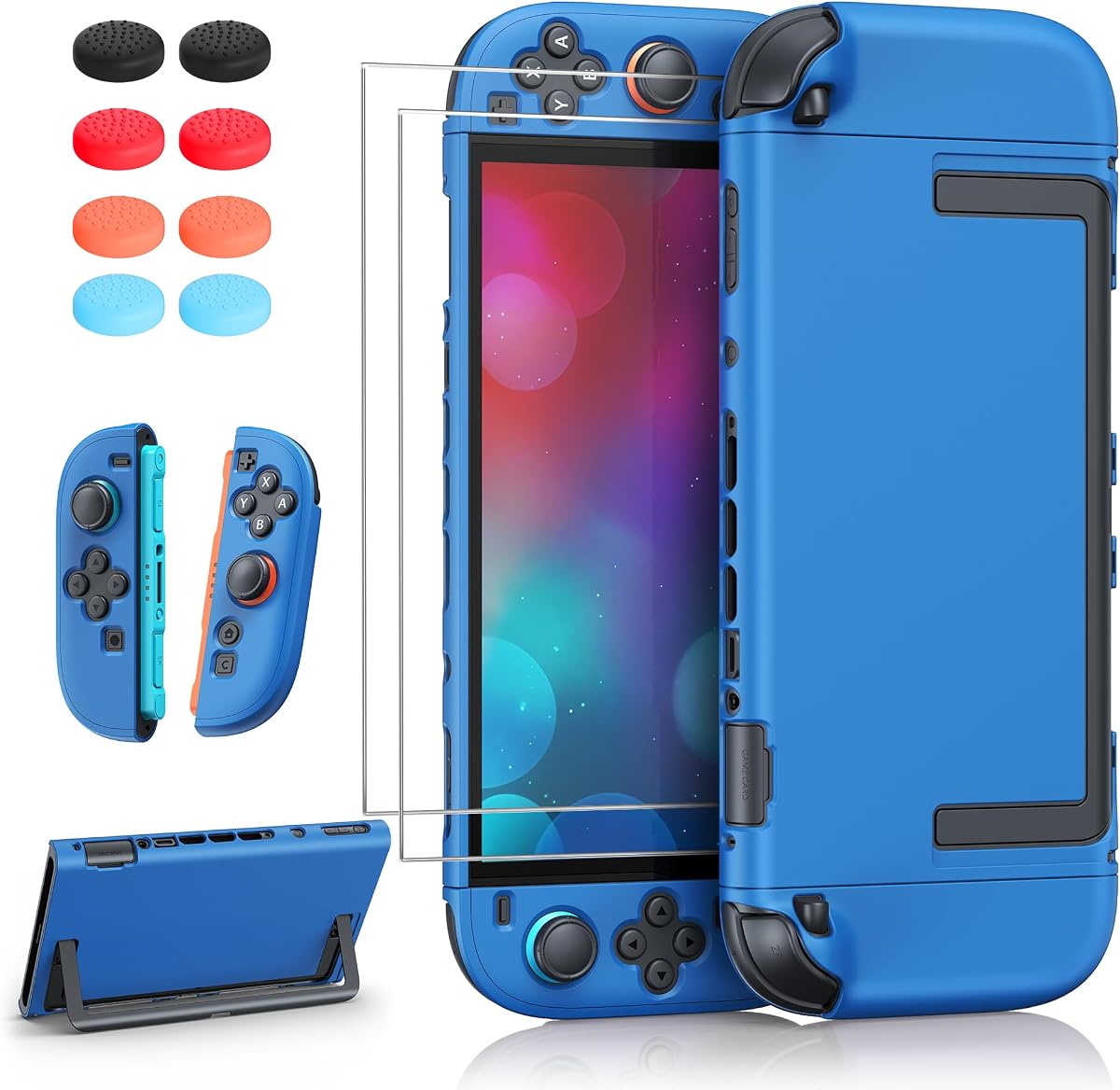
This blue case offers a unique release mechanism for controllers. It allows quick detachment without removing the shell. The rating shows users appreciate the convenience. It also keeps the stand functional for tabletop play.
We may earn a commission when you buy through this link, at no additional cost to you.
The carbon fiber texture gives it a premium mechanical feel. This helps with grip during intense gaming. The shockproof design handles drops well. Ports are aligned perfectly for dock usage.
Some users note the release button can be stiff at first. It may need a few presses to work smoothly. However once broken in it performs very well. This is great for frequent multiplayer users.
Buy this if you value speed and stand compatibility. It balances protection with usability perfectly. The look is distinct and modern. It is a strong choice for home and travel use.
A hidden spring latch lets you pop controllers off in seconds. This avoids scratches from forcing them out manually.
Unlike many cases this one leaves room for the built-in stand. You can prop up the console without removing protection.
We may earn a commission when you buy through this link, at no additional cost to you.
This case stands out for its integrated aluminum stand. It provides a stable surface for tabletop play. The dock fit is precise allowing you to keep the case on. It is a solid choice for mixed mode gaming.
We may earn a commission when you buy through this link, at no additional cost to you.
The stand folds flush when not in use. It supports various angles for comfortable viewing. The grips are textured for better control. It adds a bit of weight but stays balanced.
The stand is firm but not fully adjustable like a separate one. It works well for most setups though. The hinge covers keep Joy Cons secure during play. This adds peace of mind for active users.
Ideal for those who play often in tabletop mode. It removes the need for a separate stand. The protection level is high with screen protection. We suggest this for home gamers.
The hollow aluminum alloy stand opens to various angles. It folds flat for travel when you are done playing.
Flip-out hinge covers keep controllers connected firmly. You can release them easily without pulling hard.
We may earn a commission when you buy through this link, at no additional cost to you.
Belkin brings trusted quality to the Switch 2 lineup. This grip focuses on comfort and handling. It works with the dock easily. The rating reflects steady performance without fancy add-ons.
We may earn a commission when you buy through this link, at no additional cost to you.
The non-slip texture helps you hold the console better. It reduces fatigue during long sessions. It is made with recycled materials which is eco friendly. The coverage offers extra assurance for buyers.
It lacks some advanced features like stands or card slots. This keeps it simple and affordable though. Some may find it basic compared to others. But for pure grip it is very effective.
Choose this if you value brand name and comfort. It is a no-fuss protective shell. The dock fit is reliable for TV mode. We recommend it for conservative buyers.
Textured non-slip grip supports all-day play without fatigue. This helps you focus on the game.
Made with minimum 75 percent recycled plastic. This reduces environmental impact significantly.
We may earn a commission when you buy through this link, at no additional cost to you.
This case solves battery anxiety with a large power bank. You can game on the go without outlets. It also holds game cards which is very useful. The design is robust for travel needs.
We may earn a commission when you buy through this link, at no additional cost to you.
The power bank attaches magnetically to the back. It holds securely during play. The dual layer design absorbs shocks well. Card slots keep your library organized in the case.
Note that you must remove the front cover and power bank to dock. This adds steps before TV mode. The case also needs a cable for charging the console. It is best for handheld use.
Get this if you play outside often. It extends battery life significantly. The card slots are a nice bonus. We recommend for long trips without plugs.
The 10000mAh power bank supports marathon gaming. It attaches magnetically for easy removal when needed.
Twelve built-in slots hold your game library. You do not need a separate card holder anymore.
We may earn a commission when you buy through this link, at no additional cost to you.
This bundle offers great value with multiple accessories. You get a case stand and thumb grips. The rating shows satisfaction with the package. It keeps the console safe in a light shell.
We may earn a commission when you buy through this link, at no additional cost to you.
The split design makes installation fast and easy. You do not need to force parts on. The stand replaces the built-in one for better angles. It is a practical set for new owners.
Some users note it does not fit the charging grip. This is normal for this type of shell. The cutouts are precise for all ports. The price point is very competitive.
Select this for a complete starter kit. It covers most needs at a low cost. The grip caps add comfort immediately. We suggest for budget-conscious buyers.
Separate covers allow fast installation and removal. Raised supports improve handheld comfort during play.
Includes stand and thumb grips right out of the box. You get everything needed to start playing safely.
We may earn a commission when you buy through this link, at no additional cost to you.
This set includes screen protectors for total defense. It is slim enough for travel bags. The dock fit is precise for easy TV mode. It is a great starter kit for new users.
We may earn a commission when you buy through this link, at no additional cost to you.
The matte finish resists fingerprints well. The cutouts match all ports perfectly. It adds minimal bulk to the console. The grip caps improve control during games.
It is basic compared to feature-rich cases. But it covers the essentials well. The price is low for the included items. Some may want more color options.
Buy this if you want screen protection too. It offers full coverage without bulk. We recommend for first time buyers seeking value.
Includes two tempered glass protectors. They offer clarity and scratch resistance for your display.
Ultra-slim separable case fits in most pouches. Perfect for taking on the go easily.
We may earn a commission when you buy through this link, at no additional cost to you.
This case is affordable and includes screen protection. The dock design lets you slide in directly. It supports the built-in stand for tabletop use. It is a good budget option.
We may earn a commission when you buy through this link, at no additional cost to you.
The TPU and PC mix gives good shock absorption. It is slim and stylish. The thumb caps add comfort right away. The stand cutout is large for full access.
It may feel tight in the dock at first. This ensures a secure hold without wobble. Some may prefer softer materials. But the value here is high.
Choose this for low cost entry protection. It has the basics covered well. The bundle saves money on accessories. We suggest for casual players.
Precise design allows direct docking without removal. It feels tight to prevent wobbling in the dock.
Package includes screen protectors and thumb caps. It offers full coverage protection at a low cost.
We may earn a commission when you buy through this link, at no additional cost to you.
This case brings a playful design to protection. The colors are fun and coordinated. It fits all ports and the stand perfectly. The grip helps with secure handling.
We may earn a commission when you buy through this link, at no additional cost to you.
The set includes button toppers for a custom look. They match the case for a clean aesthetic. It is easy to clean and reassemble. The raised grips prevent slipping in hands.
It is not for extreme rough use but protects well. The color limits means you must pick your shade. But it offers a unique style. Not all cases can match this look.
Select this for style and solid basic protection. It stands out visually. The set is practical for daily use. We recommend for personalization lovers.
Multiple solid colors with matching silicone toppers. Creates a clean mix and match look for your console.
Easy to clean and reassemble parts. Ideal for playful daily protection without damage.
We may earn a commission when you buy through this link, at no additional cost to you.
This case leads with true 360 protection. It covers the front fully which is rare. The metal stand is sturdy and adjustable. It is the highest rated option available.
We may earn a commission when you buy through this link, at no additional cost to you.
Detaching the front cover lets you dock. This keeps the back safe at all times. The card slots are secure with locking clips. The Joy-Con design prevents accidental wobble.
It is heavier and costs more than others. But the protection is unmatched. Some may dislike removing the cover. It is worth it for safety.
Buy this if total protection is your goal. It is great for travel and kids. The metal stand is a bonus. We suggest for long-term durability.
High-strength PC front cover shields the screen and buttons. Prevents drops and dust effectively.
Stepless adjustment range from 0 to 120 degrees. Holds steady without wobble for better viewing.
We may earn a commission when you buy through this link, at no additional cost to you.
Choosing a case depends on your play style and needs. Consider factors like protection level and dock fit carefully.
Ensure the case allows the console to slide into the official dock. Look for precise cutouts that do not block ports. Some cases require removing parts to dock which adds steps. Check if it fits third-party docks too.
Always check dock compatibility before buying to avoid issues.
Determine how much impact protection you need. Military-grade cases handle drops better than soft covers. Front covers are useful for screen protection too. Balance bulk with safety for your habits.
Higher protection usually means more weight to consider.
Textured grips help prevent slips during long sessions. Look for raised edges that match your palms. This reduces fatigue for extended play. Comfort is key for handheld use.
Test the shape in your hands if possible.
Some cases come with screen protectors or card slots. These add value to the base case. Check what is included in the package. It can save you from buying extra items later.
Bundles offer better overall value for new users.
Quality materials resist yellowing and scratches. Polycarbonate and TPU combos are common for durability. Anti-fingerprint coatings keep the look clean. Avoid cheap plastics that crack easily.
Good materials ensure the case lasts over time.
If you play on a desk check stand support. Some have built-in stands others need extras. Built-in metal stands offer more stability. Ensure the case does not block the kickstand.
Stable stands improve the tabletop experience.
Lighter cases are easier to carry. Heavy ones might cause hand strain. Balance the weight with protection needs. Consider how you travel with the console.
Lighter weight is better for mobile use.
Choose a style that suits your taste. Some offer solid colors others have patterns. Button toppers can match the case theme. Customization makes the device feel personal.
Pick a color that matches your setup.
Install the case by aligning the ports first then pressing gently. Ensure all edges snap into place securely. Do not force parts that do not fit. If removing parts to dock do so gently to avoid scratches.
Clean the case with a soft cloth regularly to remove dust. Avoid harsh chemicals that may damage the material. Check joints and hinges for wear over time. Store it in a cool dry place when not in use.
If you notice loose buttons or cracks inspect the fit. Remove the case periodically to clean the console surface. Keep thumbscrews or locks tight if your model has them. Maintain the case to ensure long-term protection.
No most dockable cases are designed with precise cutouts. Ports remain open for easy cable access. This allows you to charge without removing the shell. Always check the product details for port access.
Many modern cases are designed to allow kickstand use. Look for models that list stand compatibility. Some have cutouts so the built-in stand can open. Others include a separate stand to replace the original.
A combination of hard PC and soft TPU works best. The hard shell resists scratches while the soft layer absorbs impact. This dual layer design offers high durability. It is common in top rated cases.
Yes some cases include built-in game card storage. Look for models that list card slots in specs. These help keep your library organized on the go. It is a useful feature for collectors.
Most do not support wireless charging for the console. They are for protection and grip. You still need a cable to charge the device. Check the product notes for any charging features.
Front covers add screen and button protection. They are ideal for travel and rough handling. Not all cases include them so check details. This adds to the total protection of the console.
Use a damp cloth to wipe away dirt and oils. Soft brushes can help remove dust from grooves. Avoid harsh soaps that might ruin the texture. Regular cleaning keeps the grip effective and clean.
No you can update the system with the case on. Ports remain accessible for cables. Dockable cases do not block the update process. Just ensure ports are not covered during updates.
We reviewed ten top cases each offering different benefits. SUPCASE leads with balanced protection and docking. PlayVital offers great value bundles for starters.
Prioritize what matters most such as stand function or power banks. If you travel often look for card slots and durability. For home play a comfortable grip may be best.
Prices change often so check current listings before you buy. Always compare features to match your play style. This guide helps you find the right protection.