
E1000 Heat Shrink Label Maker
4.4Editor score
Heat shrink and flexible ID tapes included
Three cable modes for versatile labeling
USB C or AAA battery power options
This comprehensive guide compares the top label maker for network cables options for 2026 to help you choose the perfect tool for professional or home
Finding the right label maker for network cables is essential for anyone managing complex wiring systems. Proper labeling ensures safety, efficiency, and easier troubleshooting in both professional data centers and home offices. A good device offers durability, clear printing, and versatility across different cable types.
We compared ten top-rated products based on print quality, battery life, tape compatibility, and user interface. Each model was evaluated for its ability to handle heat shrink tubing, wrap labels, and standard tape formats. Our analysis focuses on features that matter most to network technicians and DIY enthusiasts alike.
Each pick highlights key strengths and ideal use cases for distinct workflows and budgets. Prices and availability change frequently, so verify current details before purchasing. This guide empowers you to select a reliable tool that meets your specific labeling requirements effectively.
4.4Editor score

4.6Editor score
4.3Editor score
The following table provides a side-by-side comparison of all ten selected label makers. Review each model's core specifications to determine which device aligns best with your network cable labeling projects and operational requirements.


The E1000 Heat Shrink Label Maker offers an affordable entry point for network cable labeling tasks. With a 4.4 rating it delivers reliable performance for home and light professional use. Its standout quality lies in the included heat shrink tapes that ensure durable identification.
We may earn a commission when you buy through this link, at no additional cost to you.
This device features a familiar QWERTY keyboard for fast typing without learning complex shortcuts. It supports two power modes via AAA batteries or USB C for flexibility on job sites. The 20 label batch printing significantly reduces material waste during large projects.
While the print resolution is standard it provides clear text for most network identification needs. The lack of included batteries is a minor inconvenience but common at this price tier. Overall it balances cost and functionality effectively for budget conscious buyers.
Ideal for DIYers or small businesses needing basic labeling without overspending. It excels at marking cables and wires where extreme durability is not the primary concern. We recommend this for those prioritizing value and ease of use.
The device accepts both six AAA dry cells and a USB C cable for charging. This dual capability ensures you can keep working even if one power source fails.
By printing twenty labels at a time the machine saves over twenty inches of tape per batch. This efficiency lowers long term costs for frequent users.
We may earn a commission when you buy through this link, at no additional cost to you.
This VolenGo H1100 model focuses on ease of use with a backlit LCD for low light conditions. It holds a 4.3 rating among users who value straightforward operation over advanced features. The included tapes are waterproof and resistant to oil and abrasion.
We may earn a commission when you buy through this link, at no additional cost to you.
Setup is intuitive with menus designed for quick navigation during labeling tasks. The device supports sixteen fonts and over three hundred symbols for customization. Its lightweight build makes it comfortable to hold during extended sessions.
While it lacks deep industrial capabilities it handles home office needs well. The screen brightness is a plus for dark basements or server rooms. It is a solid choice for users needing reliable text without complexity.
Best for home organization or small office cable management. The waterproof tapes ensure labels last in varied environments. We suggest this for those who prioritize readability and portability.
The backlit LCD screen ensures you can see your work even in dimly lit areas. This prevents errors when labeling in server closets or attics.
Included tapes are laminated to withstand water and oil exposure. They resist fading in extreme temperatures ensuring long term legibility.
We may earn a commission when you buy through this link, at no additional cost to you.
The Makeid P31S stands out as a professional tool with 300 DPI thermal transfer printing. It has earned a 4.6 rating for its ability to meet strict ANSI and TIA labeling standards. This model is built for jobsites where durability and compliance are non-negotiable.
We may earn a commission when you buy through this link, at no additional cost to you.
A rechargeable battery provides up to ninety days of standby use for extended projects. It prints up to one hundred labels per minute with sharp smudge proof text. PC software allows bulk data import for large scale asset tracking.
While pricier than basic models the build quality justifies the investment for pros. The three year support plan adds value for business users. It handles vinyl heat shrink and nylon tapes seamlessly for various applications.
Ideal for network engineers and data center technicians. The high resolution barcodes ensure scanning accuracy. We recommend this for those needing reliable compliance and speed.
Meets ANSI and TIA/EIA 606 A standards for datacom and IT labeling. This ensures your network documentation meets professional and regulatory requirements.
Delivers up to one hundred labels per minute with sharp text quality. This speed boosts productivity during large installation or maintenance projects.
We may earn a commission when you buy through this link, at no additional cost to you.
Brother P touch devices are renowned for workspace labeling and this model continues that legacy. With a 4.6 rating it offers durable laminated labels suitable for electrical panels and cables. The one-touch keys simplify cable wrap and flag creation significantly.
We may earn a commission when you buy through this link, at no additional cost to you.
The graphical LCD allows you to preview labels before printing to avoid costly errors. It supports three fonts and over three hundred symbols for detailed customization. A detachable wrist strap ensures easy portability around the job site.
While limited to two lines per label it handles most electrical identification needs. The TZe tapes are high quality but can be pricey compared to generics. It remains a top choice for those valuing brand support.
Best for office managers and electricians needing consistent results. The preview function reduces waste on mistakes. We suggest this for users who want simplicity and reliability.
Dedicated keys for cable wrap and flag simplify electrical identification tasks. This reduces setup time when labeling complex wiring systems quickly.
View your label on the graphical screen before printing to catch errors. This helps avoid wasting expensive tape on misspelled or misformatted text.
We may earn a commission when you buy through this link, at no additional cost to you.
The BRADY M210 is designed for industrial environments where labeling standards are high. It holds a 4.6 rating for robust performance and clear text output. This handheld machine simplifies complex network cable identification tasks effectively.
We may earn a commission when you buy through this link, at no additional cost to you.
Its construction ensures it can withstand the rigors of daily field use. While specific specs vary the brand reputation supports long term reliability. It is built for professionals who need a no-compromise tool.
The price reflects its industrial positioning compared to consumer options. However the durability reduces long term replacement costs. It is a serious tool for serious labeling demands.
Ideal for facilities managers and heavy industrial users. The machine prioritizes function over flashy extras. We recommend this for those requiring proven industrial reliability.
Constructed to withstand daily wear in demanding environments. This ensures consistent performance over years of service without degradation.
Offers consistent output for critical asset identification. This reduces downtime caused by unreadable or incorrect labeling on sites.
We may earn a commission when you buy through this link, at no additional cost to you.
The Epson LW-PX700 offers unique value with a full service lifetime warranty in North America. It has a 4.4 rating for versatility across heat shrink and standard industrial tapes. The large preview screen saves time by showing labels before printing.
We may earn a commission when you buy through this link, at no additional cost to you.
With an auto rewind feature it manages tape efficiently during large batches. It supports up to one inch width for substantial identification labels. The included kit has an adapter and guide for immediate use.
The warranty alone makes it a low risk investment for businesses. While larger than mini devices it provides industrial strength performance. It is suited for environments where equipment longevity matters.
Best for operations managers needing long term support. The auto rewind prevents tape jams and frustration. We suggest this for users prioritizing warranty and tape handling.
Epson replaces the device no questions asked if it breaks. This unmatched support protects your investment in critical labeling equipment.
Automatically rewinds tape after printing to save time and money. This feature streamlines workflows when producing many labels in sequence.
We may earn a commission when you buy through this link, at no additional cost to you.
The Brady M211 connects to phones via Bluetooth for label creation on the go. It holds a 4.3 rating for its ruggedness and app flexibility. The kit includes a hard case and magnet for hands-free use in tight spaces.
We may earn a commission when you buy through this link, at no additional cost to you.
It resists drops and crushes meeting military grade standards for tough conditions. This makes it ideal for remote sites or harsh environments. The magnetic attachment allows you to focus on wiring while the printer stays in place.
While expensive the convenience of mobile editing is unmatched. You do not need a physical keyboard on the device itself. This is a premium solution for tech-savvy field workers.
Best for contractors needing mobility and durability. The app allows complex layouts without manual entry. We recommend this for those valuing wireless connectivity.
Use your smartphone to design labels without the device keypad. This streamlines complex edits using a familiar touch interface.
Attachable magnet allows for hands free operation during tasks. You can focus on cable routing while the printer stays fixed.
We may earn a commission when you buy through this link, at no additional cost to you.
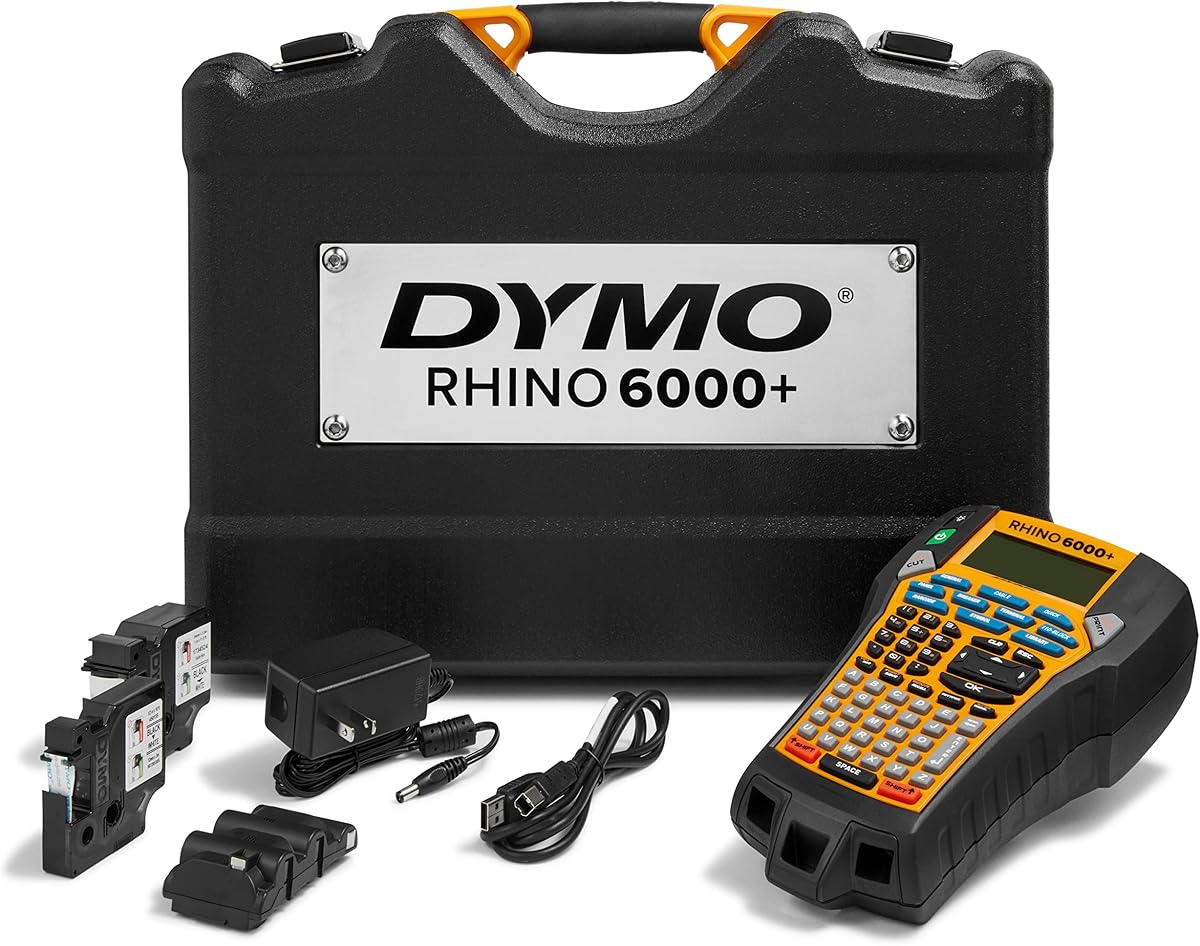
The DYMO Rhino 6000 is a top tier choice for complex network labeling needs. It has a 4.3 rating and integrates with computer software for advanced layouts. It meets TIA EIA 606 B standards for industry compliance.
We may earn a commission when you buy through this link, at no additional cost to you.
One-touch hot keys automatically size and space text for professional results. The rechargeable battery offers freedom from disposable cells. It includes a hard case and tape cassettes for immediate setup.
The price reflects its advanced software capabilities. While heavy it delivers precision for asset tracking. This is a workstation grade tool for serious professionals.
Ideal for IT admins managing large data centers. The software support handles bulk labeling efficiently. We suggest this for those needing high end features.
Connects to PC via software for complex label designs. This enables bulk edits and professional formatting without manual typing.
Automatically size and format text to save time. These dedicated keys streamline workflows for repetitive labeling tasks.
We may earn a commission when you buy through this link, at no additional cost to you.
The DYMO Rhino 5200 holds a 4.8 rating for its simple but powerful interface. It supports five lines of text which is rare at this size. The backlit display ensures visibility in darker work areas.
We may earn a commission when you buy through this link, at no additional cost to you.
Exclusive hot keys automatically format labels to meet industrial standards. It includes a pre-programmed symbol library for common technical icons. This makes it a strong tool for users who want simplicity.
While it lacks computer connectivity the on-device tools are robust. The high rating suggests users love the usability and reliability. It is a workhorse for consistent daily tasks.
Best for technicians needing quick five line labels. The hot keys prevent formatting errors. We recommend this for those prioritizing ease and speed.
Supports up to five lines of text on standard tapes. This allows detailed information without splitting labels across multiple tapes.
Exclusive keys handle spacing and sizing automatically. This ensures professional consistency without manual adjustment steps.
We may earn a commission when you buy through this link, at no additional cost to you.
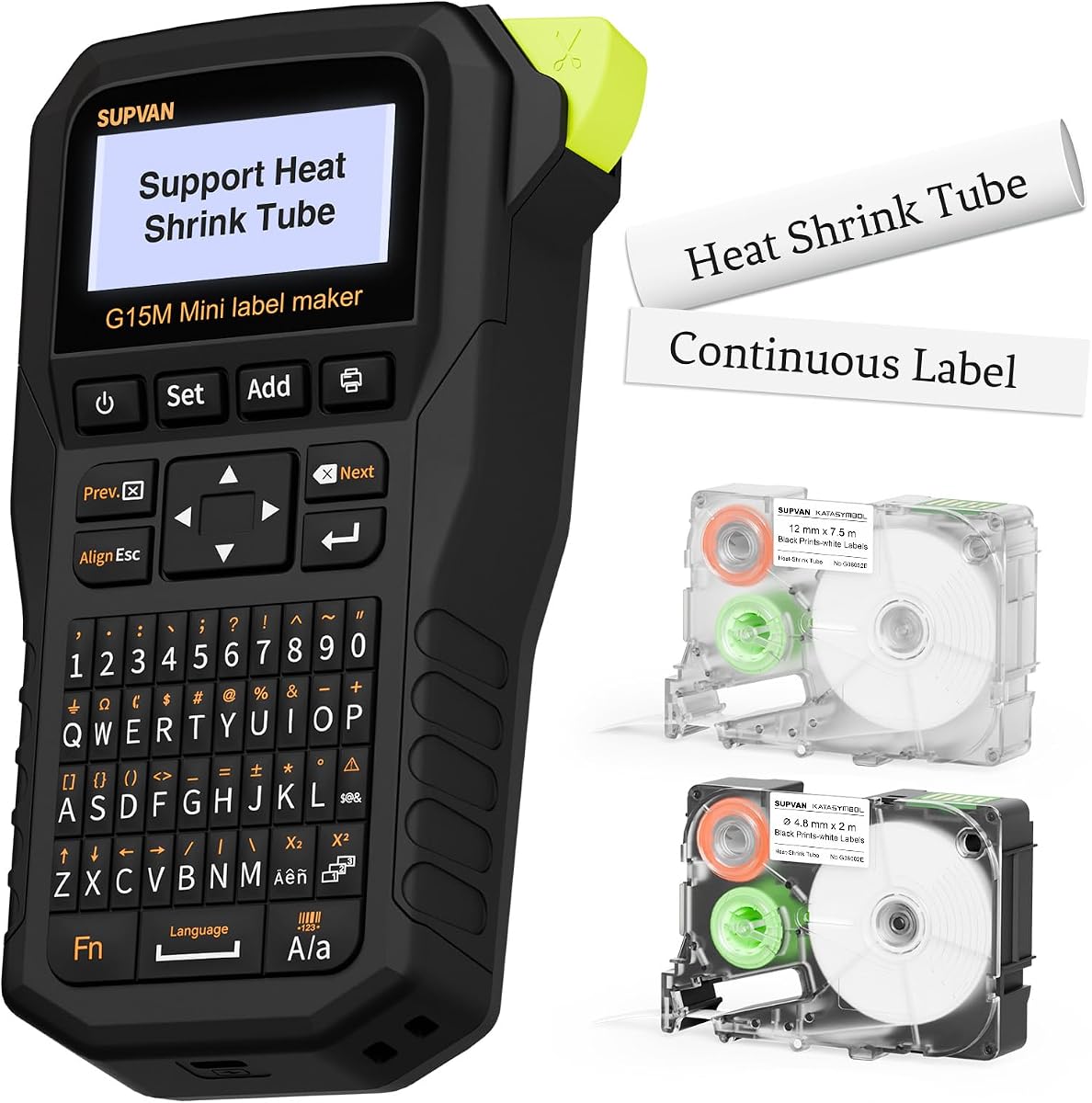
The SUPVAN G15M is a compact solution for home and garage organization. It holds a 4.3 rating for portability and support for heat shrink tubes. With only zero point eight eight pounds it is easy to carry anywhere.
We may earn a commission when you buy through this link, at no additional cost to you.
Minimal margin printing saves material by reducing unused tape space. The rechargeable battery lasts up to three months on a single charge. It supports multiple font styles and icons for personalization.
While not industrial grade it covers home network needs well. The heat shrink support ensures wires are identified safely. It is a smart pick for small scale projects.
Ideal for hobbyists and home office users. The long battery life reduces charging hassles. We suggest this for those needing a portable tool.
Built-in 1200 mAh battery provides up to three months of use. This reduces interruptions from frequent charging on job sites.
Prints labels with a small zero point nineteen inch margin. This saves material and improves efficiency on large batches.
We may earn a commission when you buy through this link, at no additional cost to you.
Selecting the right label maker involves evaluating print technology compatibility battery life and compliance standards. This section breaks down the critical factors to consider.
Thermal transfer printers produce durable labels that resist fading in harsh conditions compared to direct thermal models. Look for devices that support 300 DPI resolution for sharp barcodes and text. Higher resolution ensures labels remain legible over many years.
Prioritize thermal transfer technology for network cables exposed to heat or chemicals.
Ensure the device supports heat shrink tubing and self-laminating wraps for wire wraps. Some models only accept standard flat tapes which may not survive outdoor exposure. Check the width range to match your cable diameters effectively.
Choose a machine compatible with heat shrink and self-laminating tapes for durability.
For professional IT networks verify ANSI and TIA EIA 606 compliance standards. These standards ensure labels meet industry requirements for data centers and wiring closets. Compliance avoids regulatory issues during inspections or audits.
Select a model that meets ANSI TIA 606 standards for professional installations.
Rechargeable batteries reduce ongoing costs compared to disposable AAA cells. Look for standby times exceeding thirty days for intermittent use. If you work remotely ensure the device can connect to portable power sources.
Opt for rechargeable batteries to minimize waste and ensure consistent power.
QWERTY keyboards speed up typing for complex network identifiers. Devices with hot keys or mobile apps allow for faster formatting of common labels. A clear preview screen helps prevent errors before printing tape.
Choose a device with a full keyboard or app support for faster editing.
Industrial devices often have rugged housings that resist drops and crushes. Check for certifications like MIL-STD 810G if working on construction sites. Durable build quality protects your investment from accidental damage.
Prioritize rugged construction for job sites with potential physical hazards.
Models with PC software allow bulk label creation and barcode generation. This is essential for large scale asset tracking projects. Ensure compatibility with your operating system before purchase.
Select a model with PC software for large scale data entry needs.
Manufacturers often provide warranties ranging from one year to lifetime for industrial units. A lifetime warranty can save money if the device fails during daily use. Verify the terms to ensure they cover accidental damage.
Look for extended warranties to protect your purchase from defects.
Start by inserting the correct tape cartridge and ensuring the print head is clean. Test a sample label to verify alignment before starting your project.
Keep the device away from excessive dust or moisture when not in use. Wipe the exterior with a dry cloth to prevent grime buildup on buttons.
Store the machine in a protective case to avoid accidental drops or damage during transport. This maintains the mechanical integrity of the internal components.
Yes but you must choose a device that supports waterproof or UV resistant tape. Standard indoor tapes may fade quickly under direct sunlight or rain. Always check the tape specifications for weather resistance before buying.
Thermal labels use heat sensitive paper that fades over time while thermal transfer uses ink ribbon for durability. Thermal transfer is better for network cables that need long term legibility. Choose thermal transfer for outdoor or harsh environments.
You should clean the print head every few months or after using dusty tape. Use a lint free cloth with isopropyl alcohol to remove residue. Regular cleaning ensures consistent print quality and prevents smudges.
Most professional models like the Makeid and DYMO series support barcode printing. Ensure the software or device firmware includes barcode generation features. Barcodes help automate asset tracking in large networks.
Half inch or six millimeter tape is standard for most cable labels. Larger wires may require wider tapes like one inch. Verify the maximum width supported by your specific device model.
High end models like the DYMO Rhino 6000 allow computer connection for editing. This feature helps create complex labels from spreadsheets. Check the product details for USB or serial port support.
Use the preview screen feature to check content before printing. Batch print multiple labels at once to minimize the start and stop waste. Some models have auto-cut settings that reduce margin waste.
Yes ANSI and TIA EIA 606 standards provide guidelines for structured cabling. These standards ensure labels are consistent and readable for technicians. Following them helps with troubleshooting and maintenance efficiency.
We have reviewed the top ten label makers for network cables ranging from budget friendly models to industrial grade tools. Each option offers distinct advantages depending on your specific labeling needs and environment.
Prioritize thermal transfer printing and industry compliance for professional setups. For home use focus on battery life and ease of operation to streamline your tasks.
Always check current pricing and availability before purchasing. Deals change frequently so verify the model details to ensure you get the best value for your needs.