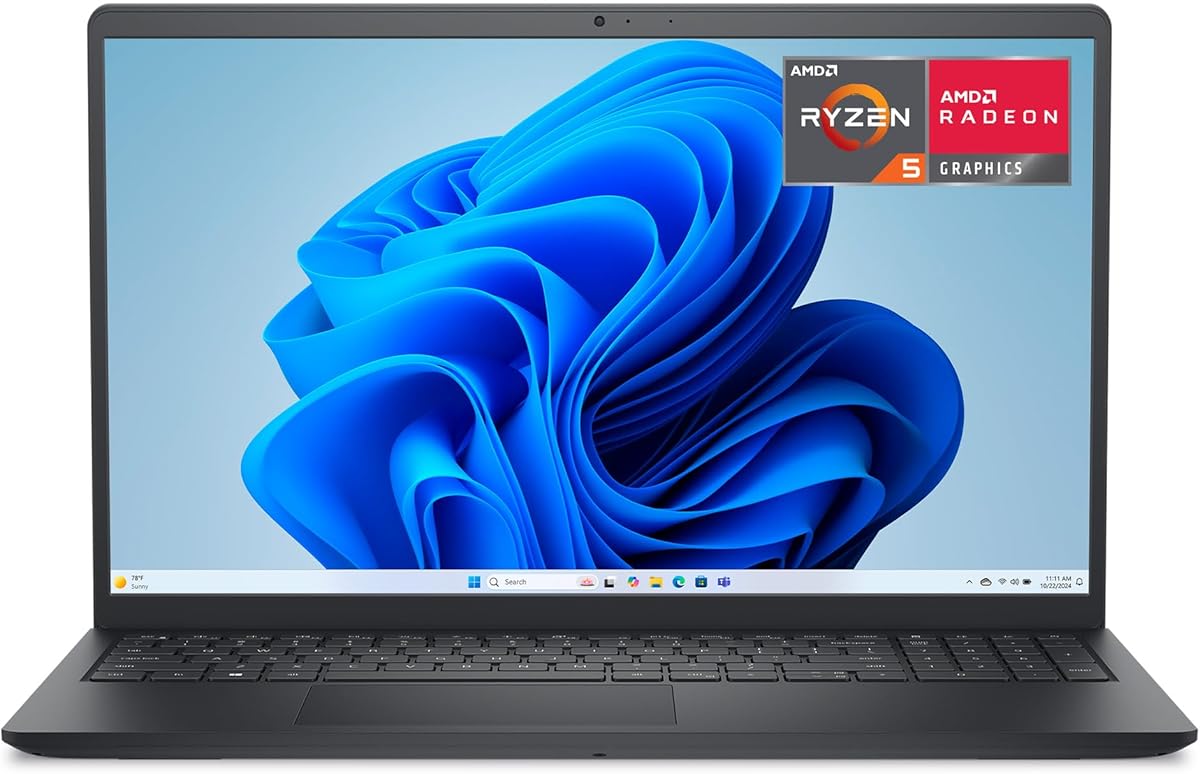
Dell 15.6 Laptop
4.3Editor score
AMD Ryzen 5 CPU
Radeon 610M GPU
Ergonomic Design
Choosing the right laptop for Enscape requires balancing rendering power, display quality, and portability. Architects and designers need machines that handle real-time 3D visualization smoothly without lag during client presentations.
We evaluated ten leading laptops based on processor speed, graphics capabilities, memory capacity, and screen fidelity. Our comparison focuses on devices that meet the demanding requirements of architectural visualization software like Enscape.
Each pick highlights key strengths and potential limitations to help you find your ideal match. Note that pricing and availability change frequently so always verify current deals before purchasing your new workstation.
4.3Editor score

4.1Editor score

4.4Editor score
As an Amazon Associate we earn from qualifying purchases.
This side-by-side comparison highlights the core specifications of all ten laptops to help you quickly identify which device offers the performance and features you need for professional rendering work.





The HP 17 inch Business Laptop stands out as a top choice for professionals needing a spacious workspace. With a 4.5 star rating it offers reliable daily performance for architectural tasks and general productivity alike.
We may earn a commission when you buy through this link, at no additional cost to you.
Its 17.3 inch FHD display provides ample screen real estate for comparing Enscape models alongside reference documents. The AMD Ryzen 5 processor paired with 16GB RAM ensures smooth multitasking when running multiple design tools simultaneously.
While it lacks high-end discrete graphics, the integrated solution handles lighter rendering previews well enough for initial concept checks. The numeric keypad is a rare find that speeds up data entry for cost estimation spreadsheets.
This laptop is ideal for consultants who prioritize screen size and input comfort over raw 3D rendering horsepower. It balances portability with workstation features making it a versatile companion for hybrid work environments.
The 17.3 inch FHD anti-glare display offers sharp details and vivid colors perfect for reviewing floor plans and elevation drawings without eye strain.
A full-size keyboard with a dedicated numeric keypad streamlines data entry tasks allowing you to manage budgets and schedules efficiently while working on designs.
We may earn a commission when you buy through this link, at no additional cost to you.
The Light Gaming Laptop offers exceptional value with its AMD Ryzen 7 processor and 16GB RAM configuration. Rated 4.6 stars it delivers robust multitasking capabilities that suit entry-level architectural visualization workflows effectively.
We may earn a commission when you buy through this link, at no additional cost to you.
Its 512GB NVMe SSD ensures rapid boot times and quick application loading which is crucial when switching between CAD software and rendering engines. The integrated graphics card handles smooth image processing for photo editing and light rendering.
While not a dedicated workstation, this machine provides enough horsepower for students or freelancers starting their practice. The thin-bezel design maximizes screen space creating a truly immersive viewing experience for client presentations on a budget.
Investors seeking a cost-effective solution without sacrificing core performance will find this model compelling. It balances price and specs well making it accessible for those needing reliable tools for daily design tasks.
Powered by a high-frequency Ryzen 7 processor this laptop outperforms standard entry-level chips delivering reliable speed for rendering previews and complex calculations.
The M.2 NVMe SSD ensures lightning-fast boot speeds and rapid application loading so you spend less time waiting and more time designing projects efficiently.
We may earn a commission when you buy through this link, at no additional cost to you.
The HP Laptop 14 Computer is designed for mobility with its compact 14-inch form factor. With a 4.3 rating it handles everyday tasks well though heavy rendering work may struggle due to limited memory resources.
We may earn a commission when you buy through this link, at no additional cost to you.
Its Intel N150 processor provides reliable performance for web browsing and streaming which is helpful during client meetings where you present finished renders from the cloud. The 128GB UFS storage is minimal but sufficient for active project files.
Ideal for architects on the go who primarily view designs rather than create them locally. The HD display offers clear visuals for presentations though color accuracy might be lower than premium alternatives for precise material selection.
Students or contractors needing a secondary device for email and document review will appreciate its portability. The included Office 365 ensures you stay productive anywhere without needing extra subscriptions for daily administrative tasks.
The slim design and lightweight build make it easy to carry to site visits while the full-size keyboard supports comfortable typing for long periods.
Wi-Fi 6 connectivity ensures fast reliable wireless connections so you can upload large files to servers quickly without worrying about network bottlenecks.
We may earn a commission when you buy through this link, at no additional cost to you.
The HP OmniBook 3 14 inch redefines mobile productivity with its Snapdragon processor and remarkable battery life. Rated 4.1 stars it offers essential performance for architects needing to work uninterrupted away from power outlets.
We may earn a commission when you buy through this link, at no additional cost to you.
Its 2K OLED display delivers rich colors and crisp visuals which are excellent for reviewing texture quality and lighting effects in Enscape. The 16GB RAM supports smooth multitasking while the fast charge feature restores half battery in just 45 minutes.
This model is best suited for professionals who prioritize endurance and display quality over raw processing power. While it handles everyday design tasks well, users should verify software compatibility before committing to the Snapdragon architecture.
If you frequently travel to client sites or remote locations, the all-day battery life ensures you stay productive without hunting for outlets. The AI features and Copilot+ PC experiences add value by automating routine administrative tasks.
Enjoy up to 41 hours of battery life keeping you efficient and connected all day so you can focus on design work without interruptions.
The 2K OLED display provides rich colors and crisp visuals essential for reviewing detailed project models and client presentations accurately.
We may earn a commission when you buy through this link, at no additional cost to you.
The Lenovo V15 Gen 4 Business Laptop offers robust specs tailored for professional environments. With a 4.3 rating it delivers reliable performance for architectural workflows thanks to its Intel Core i5 processor and 16GB RAM configuration.
We may earn a commission when you buy through this link, at no additional cost to you.
Its Windows 11 Pro operating system provides advanced security and productivity tools beneficial for firms handling sensitive client data. The numeric keypad and RJ45 port offer connectivity options often missing in modern thin laptops for legacy peripherals.
Ideal for office workers needing a stable machine for complex calculations and file management. The high-speed RAM supports smooth multitasking while the 512GB SSD ensures enough space for project archives and system updates.
This model is a practical choice for businesses requiring standard corporate features without extra cost. It balances performance and input functionality making it suitable for daily administrative and design coordination tasks.
Windows 11 Pro offers organized app layouts and intuitive navigation helping teams collaborate more effectively and get things done faster.
Ports like HDMI RJ45 and USB-C allow versatile connections to monitors and projectors ensuring you can present your work anywhere.
We may earn a commission when you buy through this link, at no additional cost to you.
The HP 2025 New 17 inch Laptop stands out with its massive 32GB RAM and 1.5TB storage bundle. Rated 4.2 stars it provides ample resources for handling large architectural datasets and keeping files organized efficiently.
We may earn a commission when you buy through this link, at no additional cost to you.
Its AMD Ryzen 5 processor ensures smooth multitasking allowing you to run design software alongside communication tools without slowdowns. The included portable SSD offers extra backup space which is vital for securing critical project files during travel.
While the chassis is heavy, the large display makes it a decent desktop replacement for home offices. The vibrant FHD screen supports clear viewing of detailed plans though color accuracy might vary across different viewing angles.
Architects needing significant local storage and memory for multiple open projects will appreciate this configuration. The bundle ensures you have enough space for years of archives without relying heavily on cloud storage solutions.
Up to 64GB DDR4 RAM enables seamless computing letting you run multiple apps simultaneously without worrying about system slowdowns.
The massive storage capacity ensures you have enough space for all your files photos and videos without needing external drives constantly.
We may earn a commission when you buy through this link, at no additional cost to you.
The HP OmniBook 3 16 inch offers a unique combination of touchscreen and performance at an accessible price. Rated 4.5 stars it handles everyday tasks well though heavy rendering work may require closing background applications.
We may earn a commission when you buy through this link, at no additional cost to you.
Its 2K IPS touchscreen delivers incredible detail and wide viewing angles ideal for navigating complex models with touch gestures. The AMD Ryzen 3 processor provides responsive power for casual editing and streaming without lag.
The 14-hour battery life ensures you stay productive throughout meetings without frequent charging. Advanced noise reduction technology filters out background chatter during video calls ensuring clear communication with clients remote teams.
This model is best for students or designers needing a versatile device for presentations and light design work. The touch interface adds convenience when sketching ideas or reviewing annotated drawings directly on screen.
The 2K IPS touchscreen delivers incredible detail and wide viewing angles making it easy to navigate projects using direct touch gestures.
Advanced AI noise reduction tracks your voice during calls filtering out distractions so you maintain distinctively focused communications with colleagues.
We may earn a commission when you buy through this link, at no additional cost to you.
The Dell 15.6 Laptop emphasizes user comfort with its ergonomic hinge design and adaptive thermals. Rated 4.3 stars it keeps wrists comfortable during long drafting sessions while maintaining efficient performance under varying workloads.
We may earn a commission when you buy through this link, at no additional cost to you.
Its AMD Ryzen 5 processor ensures smooth multitasking allowing you to run design software alongside communication tools without slowdowns. The built-in HD webcam with auto-adjustment ensures you look your best during virtual meetings with clients and colleagues.
Ideal for office workers prioritizing comfort over raw power. The numeric keypad is separated for convenience allowing fast calculation entry. One year onsite service provides peace of mind for users needing quick support if issues arise.
This model is a practical choice for small businesses seeking reliable equipment without high costs. Its focus on ergonomics ensures you stay comfortable throughout the day reducing fatigue during extended work periods.
Lifted hinges provide a comfortable typing angle helping keep your wrists relaxed during extended drafting sessions without causing strain.
Adaptive thermals intelligently adjust power and heat keeping the PC running smoothly whether you are at your desk or working from your lap.
We may earn a commission when you buy through this link, at no additional cost to you.
The Dell 16 Laptop DC16251 delivers an immersive viewing experience with its FHD+ screen and Intel Core 7 processor. Rated 4.4 stars it offers crisp visuals essential for reviewing detailed architectural models and high-resolution textures.
We may earn a commission when you buy through this link, at no additional cost to you.
Its 16:10 aspect ratio maximizes vertical space allowing you to see more of your design canvas without scrolling. ComfortView Plus helps reduce harmful blue light emissions preserving true-to-life color while keeping your eyes comfortable during long work hours.
The wide dynamic range camera ensures sharp video calls in any lighting condition. This machine is perfect for professionals needing high-quality visuals for client presentations and reliable performance for daily productivity tasks.
Investing in this model ensures you have a screen that matches the quality of your work. The premium features justify the cost for users prioritizing display accuracy and comfort.
Edge-to-edge clarity on the 16 inch screen with a 16:10 aspect ratio delivers a wide immersive viewing experience for detailed projects.
ComfortView Plus reduces harmful blue light emissions while preserving true-to-life color keeping your eyes comfortable even during prolonged screen time.
We may earn a commission when you buy through this link, at no additional cost to you.
The HP OmniBook 3 17.3 inch brings a large screen to a competitive price point. With a 4.5 rating it delivers vibrant crystal-clear images suitable for presentations and general design review tasks.
We may earn a commission when you buy through this link, at no additional cost to you.
Its AMD Ryzen 3 processor supports multitasking and streaming smoothly while the 512GB SSD ensures fast boot speeds and efficient storage. The 14-hour battery life allows you to work from coffee shops or client offices without needing power.
Ideal for those needing extra screen real estate without paying premium workstation prices. The Copilot key lets you access AI features instantly for quick summaries of meeting notes or documents during your day.
This model is best suited for viewing and reviewing rather than heavy creation. It balances size and battery well making it a solid choice for presentations and administrative design work.
Full HD IPS display with 178-degree viewing angles ensures vibrant crystal-clear images from any position during client reviews.
512GB PCIe NVMe SSD offers fast speed and efficient storage so you can access your project files quickly.
We may earn a commission when you buy through this link, at no additional cost to you.
Selecting the right machine requires balancing budget with technical needs. Consider these factors to ensure your device meets professional visualization demands.
Choose a CPU with high core counts to handle complex calculations during rendering previews efficiently. Look for modern Ryzen or Intel Core models that support multitasking without slowing down.
Prioritize processors with strong single-thread performance to ensure smooth viewport navigation while working.
Dedicated graphics cards are ideal for heavy rendering but integrated options work for lighter tasks. Ensure the GPU supports real-time ray tracing features found in modern visualization engines.
Verify compatibility with your preferred software to avoid display issues during client presentations.
16GB is the minimum recommendation for architectural workloads to ensure smooth multitasking. More memory allows you to keep more applications open without system slowdowns.
Consider machines with upgradeable RAM slots for future-proofing your investment as software demands grow.
Solid State Drives are essential for quick boot times and rapid file loading. Ensure at least 512GB capacity to store project files locally without needing external drives.
Look for NVMe SSDs which offer faster data transfer speeds compared to older SATA drives.
Choose screens with accurate color reproduction to ensure designs match final outputs. Higher resolution displays help you see fine details in models and plans clearly.
Anti-glare coatings reduce eye strain during long work sessions in bright environments.
Lightweight laptops make traveling to site visits or client meetings easier. Consider weight and size if you often work from different locations throughout the day.
Ensure battery life is sufficient for a full workday away from power outlets.
Multiple ports like HDMI and USB-C allow easy connection to projectors and external monitors. Reliable Wi-Fi 6 ensures fast uploads of large design files to cloud servers.
Check for Ethernet ports if your office requires stable wired network connections.
Windows 11 Pro offers advanced security and management features for business users. Ensure your choice supports all necessary architectural and rendering applications efficiently.
Verify compatibility with enterprise security policies before purchasing for work environments.
Set your display resolution to match native settings for the sharpest visuals. Adjust brightness to reduce eye strain during long working hours in varying light conditions.
Keep your system cool by using a flat surface or laptop stand. Avoid blocking air vents to prevent overheating during intensive rendering tasks.
Update drivers regularly to ensure optimal performance with architectural software. Back up your project files to an external drive or cloud storage frequently to prevent data loss.
You need at least an Intel Core i5 or AMD Ryzen 5 processor with 16GB RAM for smooth performance. A dedicated graphics card or strong integrated GPU ensures real-time rendering does not lag during design work.
Budget laptops can handle light rendering and viewing but may struggle with complex models. Look for modern CPUs and SSDs to maintain speed while keeping costs reasonable.
Screen size impacts how much detail you can see without zooming constantly. Larger screens help compare multiple windows but smaller portable ones suffice for basic tasks.
Touchscreens offer convenience for navigation and markup during presentations. However they can drain battery faster so weigh this benefit against power needs.
Most modern architectural tools support Windows 11 natively for better compatibility. Using the latest OS ensures security updates and stable performance for critical work.
Lower screen brightness and close unused apps to conserve power. Using battery saver modes helps when unplugged but may reduce rendering performance.
Many laptops allow upgrades but thin models often have soldered components. Check specifications before purchasing if you plan to expand storage or memory later.
Ensure HDMI or USB-C with video output support. Connecting to projectors is essential for client reviews so verify port availability before buying.
The HP OmniBook 3 and Dell models offer strong balances of portability and power. Your choice depends on whether you prioritize display quality or battery endurance for travel.
Focus on getting enough RAM and fast storage to handle growing project sizes. A solid machine saves time during rendering and prevents frustration during deadlines.
Always check current pricing and availability before finalizing your purchase. Deals change frequently so act quickly when you find the right fit for your needs.