
Thermalright Assassin X120 Refined SE
4.7Editor score
Four heat pipes with AGHP technology
TL-C12C PWM fan included
Compatible with AMD AM4 AM5 Intel
This guide compares the top ten CPU Air Cooler Fan Heatsink models to help you find the best cooling performance and compatibility for your build.
Keeping your processor cool is essential for stability and longevity. A good CPU Air Cooler Fan Heatsink removes heat efficiently while staying quiet. Choosing the right model depends on your case size and budget.
We evaluated ten top rated models based on cooling capacity noise levels and build quality. Each option offers unique features like heat pipe designs and fan control for different needs.
Every pick highlights key strengths and real world performance. Remember that prices and availability change often so check current listings before making your final decision for your system.
4.7Editor score

4.8Editor score
4.7Editor score
Here is a side-by-side look at all ten models we reviewed. Each entry lists key specs and links to current product details for easy comparison.


This model from Thermalright offers solid cooling performance at an affordable price. It holds a high rating for reliability and quiet operation in standard setups.
We may earn a commission when you buy through this link, at no additional cost to you.
The four heat pipes use AGHP technology to handle different orientations effectively. The TL-C12C PWM fan ensures efficient airflow while keeping noise levels low for daily use.
While it lacks dual tower design, it fits most medium cases without issues. Installation is straightforward with included fasteners for Intel and AMD platforms.
Buyers seeking affordable reliability will appreciate this choice. It delivers strong thermal performance without breaking the bank for mid range builds.
AGHP solves inverse gravity issues allowing flexible installation in different case orientations.
The fan operates below 26 decibels ensuring a quiet environment even under moderate load.
We may earn a commission when you buy through this link, at no additional cost to you.
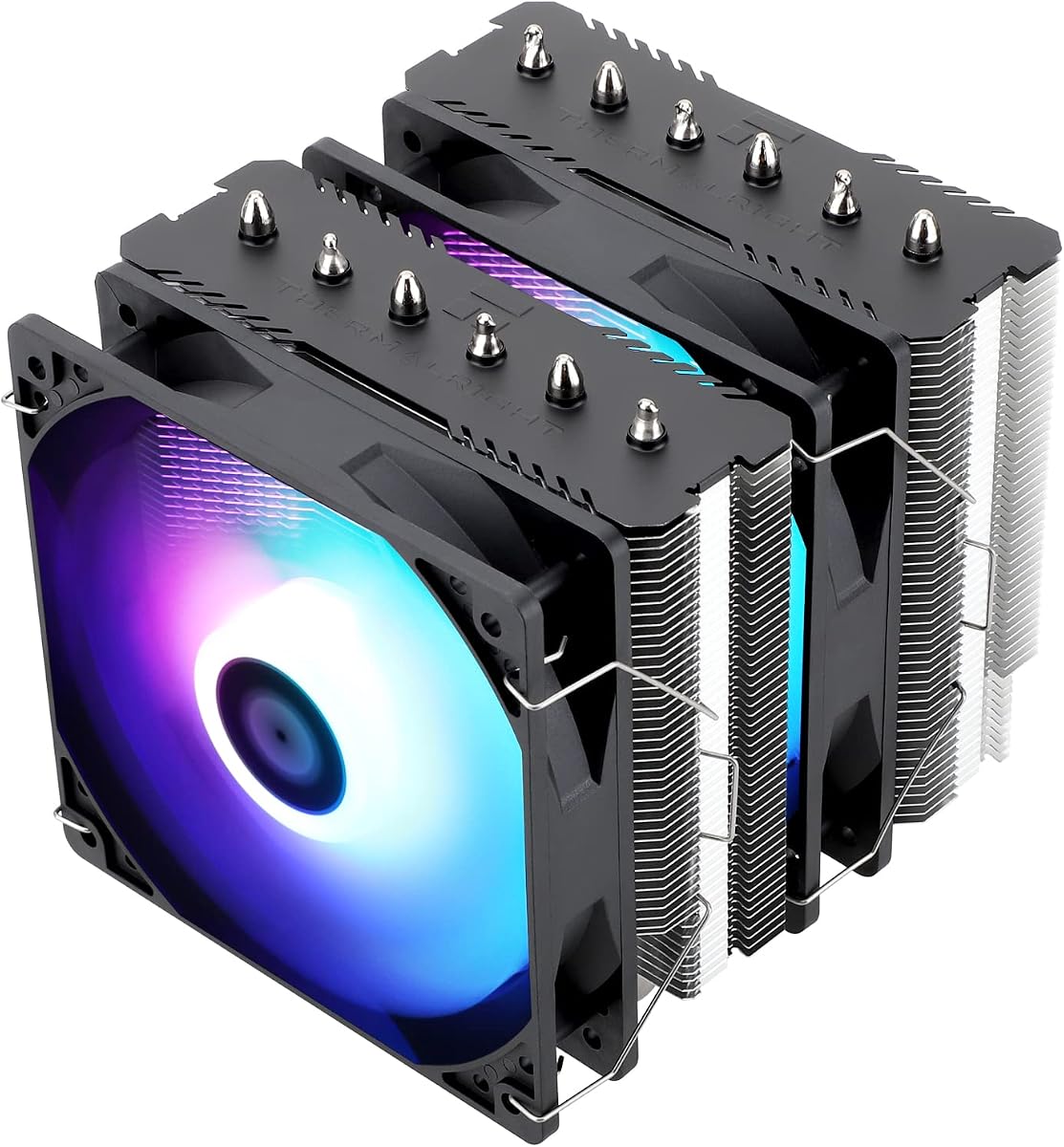
The dual tower design provides exceptional thermal headroom for demanding processors. Users appreciate the balance between performance and visual customization through ARGB lighting.
We may earn a commission when you buy through this link, at no additional cost to you.
Six copper heat pipes ensure rapid heat transfer from the base to the fins. The dual TL-C12C-S fans deliver ample airflow while maintaining low noise levels.
This cooler may be tall so verify case clearance before purchase. The offset layout helps avoid conflicts with taller RAM modules or GPU cards.
Enthusiasts wanting high performance without liquid cooling should consider this. It handles heat well while adding style to your system interior.
Two fans increase surface area contact improving heat dissipation during heavy workloads.
ARGB lights sync with motherboard headers for cohesive system lighting aesthetics.
We may earn a commission when you buy through this link, at no additional cost to you.
Noctua delivers flagship performance with this all black dual tower model. It stands out for reliability and whisper quiet operation even under full CPU load.
We may earn a commission when you buy through this link, at no additional cost to you.
The NF-A15 fans feature advanced aerodynamic designs for maximum efficiency. Six heatpipes work with pure copper bases to pull heat away quickly and consistently.
Its size can limit RAM compatibility in some boards. Offset mounting options help improve airflow efficiency for your specific processor type.
Builders prioritizing silence and long term durability will value this pick. It remains a benchmark for high end air cooling solutions in 2026.
Low noise adaptors allow the fans to run silently at lower speeds when idle.
SecuFirm2 ensures secure attachment without damaging the motherboard during installation.
We may earn a commission when you buy through this link, at no additional cost to you.
This compact tower cooler offers high performance in a smaller footprint. It avoids blocking RAM slots making it ideal for motherboards with tall memory.
We may earn a commission when you buy through this link, at no additional cost to you.
Dual NF-A12x25 fans ensure efficient cooling without sacrificing silence. The 158mm height fits most standard cases without requiring major case swaps.
It balances size and performance well for mainstream gaming systems. While pricier than budget options quality remains consistent with Noctua standards.
Users needing reliable cooling that avoids RAM conflicts will find it useful. It delivers consistent performance across a wide range of processor types.
Design ensures high memory modules do not interfere with cooler installation or airflow.
120mm fans provide optimized airflow for thermal dissipation while staying quiet.
We may earn a commission when you buy through this link, at no additional cost to you.
This model stands out with a built in digital screen on top. It displays real time CPU usage and temperature for quick system monitoring.
We may earn a commission when you buy through this link, at no additional cost to you.
The TL-P12-S fan runs at high speed to ensure effective heat removal. It supports ARGB synchronization for a cohesive visual look within your PC.
Software control allows customization of the display content and lighting effects. Ensure your system supports the software requirements before installation.
Those wanting modern tech integrated into cooling hardware will enjoy this. It combines performance with an innovative monitoring feature for tech enthusiasts.
Display shows instant temperature and usage data without opening system monitors.
High speed fan ensures heat dissipation matches the visual sophistication.
We may earn a commission when you buy through this link, at no additional cost to you.
A classic among enthusiasts this model continues to set benchmarks for cooling. It delivers near silent operation even when pushing processors to their limits.
We may earn a commission when you buy through this link, at no additional cost to you.
Dual fans work with optimized airflow to maximize heat dissipation. The six heatpipes ensure consistent thermal transfer across the entire heatsink surface.
Mounting is simple with detailed instructions and secure fasteners. Some users might prefer black finishes but performance remains top notch.
Reliability seekers will value the consistent track record of this unit. It remains a top choice for those prioritizing function over form.
Decades of reviews confirm this unit performs well in varied conditions.
Optimized blades reduce turbulence for quieter airflow at any speed.
We may earn a commission when you buy through this link, at no additional cost to you.
This asymmetrical design allows better clearance for tall RAM sticks. It fits more motherboards without blocking PCIe slots due to its unique layout.
We may earn a commission when you buy through this link, at no additional cost to you.
Despite a single fan it maintains high performance thanks to advanced fin design. The NF-A15 ensures efficient cooling without excessive noise during gaming.
The offset layout improves airflow around memory modules. Installation remains straightforward with the familiar SecuFirm2 mounting system.
Those needing dual tower performance without RAM conflicts should consider this. It balances space constraints with high end cooling needs effectively.
Asymmetrical shape provides room for high profile memory without removal.
Dual tower fins with one fan optimize airflow for better heat transfer.
We may earn a commission when you buy through this link, at no additional cost to you.
Ideal for small form factor builds this cooler saves space without sacrificing too much performance. It fits ITX and HTPC builds easily.
We may earn a commission when you buy through this link, at no additional cost to you.
The dual tower design still offers solid thermal dissipation for standard CPUs. The 92mm fan maintains low noise while moving enough air for daily use.
Installation is compatible with most small cases but verify dimensions first. It avoids blocking slots keeping your build clean and functional.
Users building mini PCs will appreciate the compact footprint. It offers reliable cooling where space is tight and style matters.
Compact height allows installation in tight chassis without cutting parts.
High density fins increase surface area for better cooling efficiency.
We may earn a commission when you buy through this link, at no additional cost to you.
A slim tower that saves case space while delivering solid cooling. It fits most systems without blocking RAM slots due to its narrow profile.
We may earn a commission when you buy through this link, at no additional cost to you.
The NF-F12 fan focuses airflow directly onto the fins for efficiency. This reduces noise while maintaining effective heat removal during standard usage.
Installation remains straightforward with the familiar Noctua mounting system. It avoids PCIe interference making it a safe choice for ATX boards.
Users wanting a reliable slim solution will find it practical. It balances size and function well for mid range systems.
Narrow width ensures room for other components inside the PC case.
Focused flow fan directs air to maximize heat exchange efficiency.
We may earn a commission when you buy through this link, at no additional cost to you.
This dual tower cooler offers high airflow for a competitive price. It matches top tier cooling without the premium cost of other brands.
We may earn a commission when you buy through this link, at no additional cost to you.
Six heatpipes and dual fans ensure rapid heat transfer. The nickel plated pipes protect against corrosion for long term durability.
The offset layout improves clearance for tall GPUs. It supports all major sockets making it versatile for system upgrades.
Value buyers seeking maximum cooling will appreciate this balance. It delivers reliable performance for daily and gaming loads.
Nickel plating resists corrosion maintaining thermal efficiency over time.
Offset fins ensure taller graphics cards do not interfere with airflow.
We may earn a commission when you buy through this link, at no additional cost to you.
Selecting the right CPU Air Cooler Fan Heatsink requires considering size performance and compatibility. Follow these factors to make an informed decision.
Check your PC case's maximum CPU cooler height before buying. Standard towers reach 160mm so measure space carefully.
Ensure the cooler fits without blocking cables or case fans.
Verify support for your motherboard socket such as LGA1700 or AM5. Some older models may lack newer mount kits.
Look for kits included in the box to avoid extra costs.
Consider the Thermal Design Power TDP rating of your CPU. Higher TDP needs require more heat pipes and larger fins.
Dual tower designs generally offer better dissipation than single towers.
Listen to reviews about noise at max fan speed. Quieter fans use better bearings and blade designs.
Choose models with PWM support for automatic quiet speeds.
Ensure the cooler does not overhang RAM slots on your board. Asymmetrical designs help with high profile memory.
Check dimensions for clearance above the motherboard slots.
Look for aluminum fins with copper cores for efficiency. Soldered joints improve heat transfer over clips.
High quality materials ensure durability over years of use.
Consider black or RGB options to match your build theme. ARGB fans add style but may increase cost.
Choose finishes that complement your PC case and lighting.
Check manufacturer warranty length before purchase. Longer coverage often signals better reliability and support.
Ensure customer service is responsive for part replacements.
Apply thermal paste evenly on the CPU before mounting the base. A pea sized amount works best without gaps.
Clean dust from the fins every few months to maintain airflow. Use compressed air gently without spinning the fan.
Recheck mounting pressure after a few weeks of use to ensure stability. Loosen bolts slightly to verify torque settings.
Air coolers are simpler to install and maintain with less leak risk. They work well for most users unless extreme overclocking is required.
Use compressed air to blow dust out from between fins. Hold fans still to avoid spinning them at high speed.
Use the included paste for best results with most coolers. High quality pastes like NT-H1 are included with many models.
Yes fans spin at low speed or full speed based on BIOS settings. Some systems spin them to check functionality before boot.
Check height limits before buying. Low profile models like the NH-D9L fit compact builds without clearance issues.
Yes standard 120mm or 140mm fans fit most coolers. Ensure PWM headers are available on your motherboard for control.
Verify paste application and mounting pressure first. Clean dust and ensure case airflow is not restricted by dust.
Repaste every two years or if temps rise significantly. Dry paste loses conductivity and increases thermal resistance over time.
These ten models cover most needs from budget to premium performance. The Thermalright Assassin X120 Refined SE offers value while Noctua leads in silence.
Prioritize case clearance and socket compatibility to avoid return costs. Noise levels and build quality matter for long term satisfaction.
Prices change regularly so check current listings before finalizing your choice. Ensure your system benefits from the cooling power you select.