
Cable Matters Punch Down Tool with 110 Blade for Cat 8/7/6A/6/5e Network
4.3Editor score
110 blade compatible
Adjustable impact settings
Spring-action mechanism
This comprehensive guide compares the top ten Ethernet Punch Down Tool options available today helping you select the perfect tool for reliable network cable
Finding the right Ethernet Punch Down Tool is crucial for anyone looking to install reliable network connections. A quality tool ensures clean terminations and minimizes the risk of connection failures over time. You need a tool that handles various cable types with ease and precision every single time you use it.
We evaluated ten leading Ethernet Punch Down Tool models based on durability, ease of use, and termination quality. Each product was reviewed for its blade compatibility, ergonomic design, and impact settings to give you a clear comparison. This list covers options ranging from budget-friendly choices to professional-grade equipment.
Each pick highlights specific strengths so you can find the best fit for your networking projects. Keep in mind that availability and features may change over time as manufacturers update their lines. Always verify current details before making your final purchase decision to ensure you get exactly what you need.
4.3Editor score

4.8Editor score

4.7Editor score
This side-by-side comparison highlights the key specifications and features of the top ten Ethernet Punch Down Tool models available on the market.


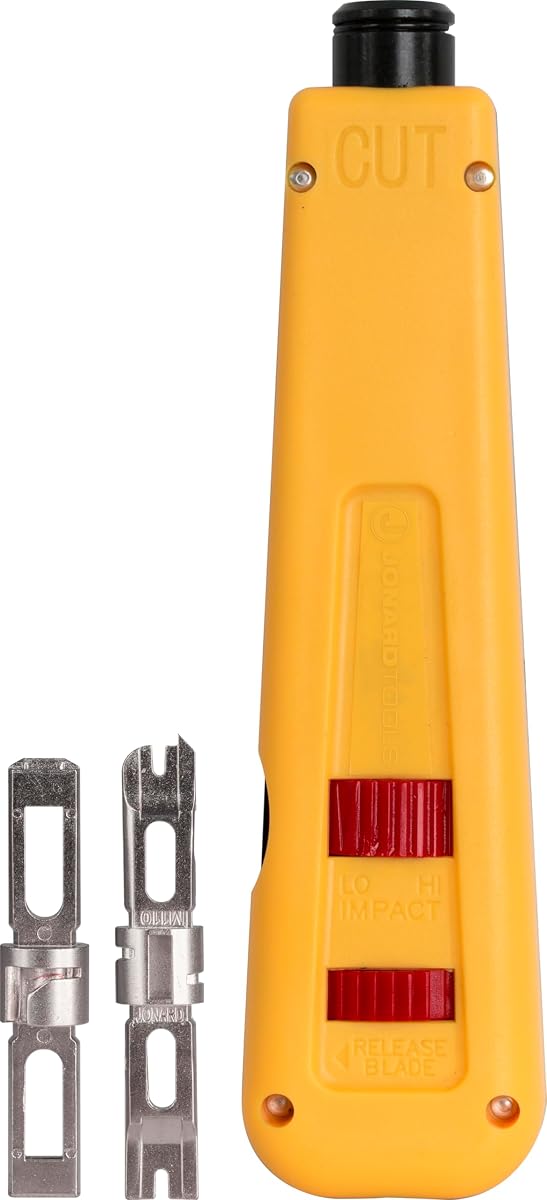
The Cable Matters Punch Down Tool is an excellent entry-level option for network installation tasks. With a solid rating of 4.3 stars it delivers reliable performance for home and office cabling projects. Its spring-action design ensures low-effort terminations without sacrificing accuracy.
We may earn a commission when you buy through this link, at no additional cost to you.
This tool features a removable 110 blade with a twist-and-lock mechanism for secure retention during use. The adjustable impact settings allow users to fine-tune force for different cable types including Cat 5e through Cat 8. The reversible cut/punch blade extends its utility and ensures long-lasting precision.
While it excels at 110 block terminations it lacks compatibility with 66-style blocks which limits versatility in some older setups. The lightweight design is comfortable but may feel less robust compared to heavy-duty professional tools. Still it is a cost-effective choice for most Ethernet wiring needs.
Homeowners and DIY enthusiasts should consider this tool for its balance of affordability and functionality. It handles structured cabling installations efficiently and is ideal for those needing a reliable tool without a high price tag.
This tool cuts and terminates cables into patch panels or keystone jacks in one smooth step for faster workflow.
Fine-tuning force with low and high settings ensures precise cable seating across various jack and block types.
We may earn a commission when you buy through this link, at no additional cost to you.
The Klein Tools VDV427-300 stands out as a top performer for professional network installers. Boasting a 4.8 rating this tool offers reliable CAT cable connections with consistent results. Its design focuses on efficiency and comfort for high-volume termination tasks.
We may earn a commission when you buy through this link, at no additional cost to you.
Equipped with a metal injection molding blade this tool ensures enhanced durability and long-lasting performance. The spring-loaded mechanism enables fast and effortless seating of wires in both 66 and 110 panels. An ergonomic handle with a non-slip grip adds convenience during extended use.
The inclusion of a pick and spudger enhances versatility for various termination tasks beyond simple punching. However the higher cost may be a consideration for casual users. The traditional style design might also feel less compact than newer streamlined tools on the market.
Professionals and serious DIYers will appreciate this tool for its robust construction and precise results. It is well-suited for those who require a dependable tool that handles diverse networking setups with ease and confidence.
Punches and cuts wires in one step to save time and effort during network installations.
Works with 66 and 110 panels ensuring broad support for different networking block types.
We may earn a commission when you buy through this link, at no additional cost to you.
The TRENDnet TC-PDT is a specialized tool designed for users requiring compliance with strict government standards. With NDAA and TAA compliance it meets demands for networking solutions in U.S. and Canada sectors. Its reliability is backed by a strong 4.7 rating.
We may earn a commission when you buy through this link, at no additional cost to you.
This tool features interchangeable blades that switch between 110 and Krone standards for versatile installations. The twist and lock holder securely stores spare blades to prevent loss during transport. An ergonomic design ensures comfortable handling during repeated use.
While it offers great support and protection the higher price point may not suit all budgets. The twist and lock mechanism is secure but requires careful handling to avoid accidental blade pullout. Overall it is a strong choice for compliance-heavy environments.
Government contractors and IT specialists needing compliant tools will find this model highly reliable. The precision and support ensure it meets professional requirements for structured cabling installations without compromising on quality or safety.
Inserts and cuts terminations in one operation for various network and telephone socket types.
Backed by three years of manufacturer protection ensuring long-term support and quality assurance.
We may earn a commission when you buy through this link, at no additional cost to you.
The second Cable Matters tool expands on the brand's offerings by including both 110 and 66 blades. With a rating of 4.4 it provides versatile cable management for diverse cabling needs. Its design emphasizes efficiency and safety during transport.
We may earn a commission when you buy through this link, at no additional cost to you.
This tool features removable blades with twist and lock sockets that secure within the tool body. The spring-action mechanism enables fast low-effort seating of wires for jacks and patch panels. Adjustable impact settings accommodate different termination needs across 66 and 110 IDC terminals.
While versatile the tool may not match the rugged durability of higher-end professional models. Users focused on 66-style blocks will find this a strong budget choice compared to tools that only support 110. It is ideal for general structured cabling tasks.
DIYers and small office installers seeking a dual-blade tool at an accessible price will benefit most. The combination of precision and versatility makes it a practical addition to any basic network wiring toolkit.
Supports both 110 and 66 styles making it ideal for mixed networking environments.
Twist and lock sockets keep blades secure inside the tool body during transport and storage.
We may earn a commission when you buy through this link, at no additional cost to you.
The VCELINK Punch Down Impact Tool offers a multi-feature solution for network wire tasks. Rating 4.3 it combines cutting and punching functions with additional tools to simplify workflow. The design focuses on completeness in a single package.
We may earn a commission when you buy through this link, at no additional cost to you.
A double cutter head design cuts excess cables while punching down for streamlined termination. The tool includes a wirepuller and flat blade pull outs to clean up extra wires efficiently. A handy hole at the bottom stores an extra blade for quick access.
The added accessories like a mini wire stripper increase its utility but may add to the weight. The 18-month assistance window is shorter than some competitors which could be a factor for long-term support needs. Still it remains a strong value choice.
Installers wanting a all-in-one solution without buying separate tools will find this appealing. Its functional design and extra components make it suitable for various small to medium network cabling projects.
Includes wirepuller and flat blade pull outs to clean up extra cables quickly.
Adjustable impact settings and comfortable handling ensure ease of use during installations.
We may earn a commission when you buy through this link, at no additional cost to you.
The VCELINK Speed Punch Down Tool is designed for speed and efficiency with specific keystone jacks. With a 4.6 rating it enables single-action operations that can be up to eight times faster than traditional tools. It is ideal for users with compatible hardware.
We may earn a commission when you buy through this link, at no additional cost to you.
This tool allows termination of eight wires in one smooth operation without needing a separate stand. The blade is made of SK5 steel for hardness and rust resistance ensuring long life. You can replace just the blade head if worn instead of the whole tool.
Its limitation to VCE keystone jacks means it is not versatile for other brands which restricts its use case. However for those investing in VCE systems it offers unmatched speed and convenience. The no platform design simplifies direct wall plate use.
Professionals using VCE keystone jacks will find this tool a significant time-saver. The quick single-action method and replaceable blade ensure high efficiency during large-scale network installations.
Punches and cuts eight wires in one motion to drastically reduce installation time.
The SK5 steel blade can be replaced independently to extend the tool's usable lifespan.
We may earn a commission when you buy through this link, at no additional cost to you.
The Rapink Speed Keystone Jack Tool is built to streamline Ethernet keystone installations for specific jacks. Rating 4.2 it emphasizes speed and safety to reduce hand fatigue and injury risks. It is a specialized tool for Rapink-compatible hardware.
We may earn a commission when you buy through this link, at no additional cost to you.
This tool combines punching and cutting into one step to save time and effort. The built-in housing keeps jacks in place for precise crimping especially in tight spaces. It is made of durable carbon steel to withstand over 10000 press cycles.
Its limitation to Rapink keystone jacks means it is not a universal tool which could be a drawback. The adjustable trimming depth is useful but requires tweaking for clean cuts on different wires. Still it significantly lowers physical strain.
Users with Rapink equipment will find this tool efficient and ergonomic for repetitive tasks. The finger-hurt-free design and quick termination capability make it valuable for installers seeking comfort and speed.
Combines punching and cutting into one step to reduce install time by up to eight times.
Prevents finger injuries by keeping keystone in place and reducing repetitive crimping strain.
We may earn a commission when you buy through this link, at no additional cost to you.
The Fluke Networks D914S represents a premium option for professional network installation tasks. With a 4.7 rating and lifetime warranty it offers long-term reliability and quality. This tool is built for precision and user comfort during extensive use.
We may earn a commission when you buy through this link, at no additional cost to you.
It features a soft touch impact tool with ergonomic design to reduce hand fatigue. The automatic spring handle selects low impact for 24/26 gauge wire and high impact for 22 gauge wire. A hook and spudger are built into the handle for added convenience.
While the lifetime warranty and quality are exceptional the price is notably higher than most options. Replacement blades must be purchased separately which adds to long-term costs. Still the engineering and durability justify the investment for pros.
Professional installers needing top-tier reliability and warranty support will find this tool unmatched. Its ergonomic features and blade quality make it a reliable companion for daily network termination work.
Backed by a lifetime warranty ensuring long-term confidence and support for the tool.
Automatically selects impact settings based on wire gauge to ensure precise termination.
We may earn a commission when you buy through this link, at no additional cost to you.
The Klein Tools VDV026-212 Coax Installation Kit includes a full set of tools for modular and coax tasks. With a 4.8 rating it provides reliable stripping crimping and termination tools in one zippered pouch. It is a comprehensive solution for mixed cable needs.
We may earn a commission when you buy through this link, at no additional cost to you.
The kit includes a precision punchdown tool with DuraBlade cutting edge for clean wire termination. A ratcheting modular crimper handles data cables while a radial stripper protects conductors during cable prep. It also includes RJ45 Cat5e plugs for convenience.
While it has a strong punchdown component the set is designed more for coax and general tasks. Those focused solely on Ethernet punch down tools may prefer a dedicated model. However the organization and versatility make it great for contractors.
Installers managing multiple cable types will appreciate the all-in-one convenience of this kit. The precision tools and storage bag ensure you have what you need for various termination and connection projects.
Includes all necessary tools for stripping crimping and punching down modular cables in one pouch.
Features exclusive DuraBlade edge for clean and accurate wire termination.
We may earn a commission when you buy through this link, at no additional cost to you.
The Jonard Tools EPD-91461 is a manual punchdown tool built for high durability and precision. With a 4.5 rating it is tested up to 100000 cycles ensuring long life. Its design emphasizes ease of use and sturdy construction.
We may earn a commission when you buy through this link, at no additional cost to you.
This tool includes both 66 and 110 blades for versatile use across different block types. The blades are made of hardened alloy steel and nickel plated to resist wear and corrosion. A sleek ergonomic design and color coded body improve handling and efficiency.
The manual operation might require more physical effort compared to impact tools for some users. Blades are sold separately which is a consideration for long-term replacement needs. Still the build quality is robust for daily tasks.
Users seeking a durable manual option with long life cycles will find this tool reliable. The ergonomic features and versatility make it a strong choice for general network cabling and wiring needs.
Tested up to 100000 cycles and made with hardened alloy steel for long life.
Half yellow and half blue body helps distinguish cut and punch sides quickly.
We may earn a commission when you buy through this link, at no additional cost to you.
Selecting the right Ethernet Punch Down Tool depends on several key factors that influence performance and ease of use.
Ensure the tool includes blades that match your specific patch panels or keystone jacks. Most tools support 110 standards but some offer 66 or Krone blades as well.
Check blade interchangeability to future-proof your investments for different block types.
Adjustable impact settings allow you to fine-tune force based on cable gauge and type. Low impact works for thinner wires while high impact suits thicker cables.
Look for clear labeling of settings to avoid damaging sensitive components during termination.
Reversible cut/punch blades extend tool life and versatility by serving dual functions. Quality materials like hardened alloy steel resist wear and rust for consistent performance.
Sharp blade edges ensure clean cuts without fraying wires which is crucial for signal integrity.
Comfortable handles with cushioned or rubber grips reduce hand fatigue during long installation sessions. Weight balance and non-slip textures improve control and safety during use.
A lightweight design aids quick work but heavy-duty tools may feel more stable for precision tasks.
Built-in storage for blades or spudgers keeps tools organized and prevents loss on the job. Some models include additional features like wirepullers or trimmers for added convenience.
Single-action mechanisms can significantly speed up termination for specific keystone jacks when available.
Look for tools tested for high cycle counts to ensure longevity over repeated use. Warranty terms vary widely with some professional tools offering lifetime coverage.
A strong warranty reflects manufacturer confidence and protects your investment from defects.
For government or secure projects ensure tools meet NDAA and TAA compliance standards. Certifications ensure products are sourced and manufactured according to strict regulatory requirements.
Always verify compliance before purchasing if your job requires specific regulatory adherence.
Higher-priced tools often offer better durability and warranties but may not be necessary for all users. Budget options can be sufficient for occasional DIY installations with proper care.
Evaluate long-term needs to balance upfront cost with expected lifespan and usage frequency.
To use an Ethernet Punch Down Tool start by selecting the correct blade for your cable type and panel. Insert the blade securely into the tool ensuring it locks in place before you begin termination.
Place the wire into the designated slot on the panel or jack then press the tool firmly to seat and cut the wire. If your tool has adjustable impact settings choose low for thin wires and high for thicker ones.
After use store the blades in the built-in compartment if available to prevent loss or damage. Keep the tool clean and free of debris to ensure smooth operation over time.
The main difference lies in the blade design and the type of wiring block they terminate. 66 blades are typically used for older telephone and low-speed data setups while 110 blades are standard for modern Ethernet and structured cabling. Some tools come with interchangeable blades to support both types.
Yes most punch down tools are compatible with Cat6 and Cat8 cables as long as they support the corresponding keystone jacks or patch panels. Ensure the blade is sharp and the impact setting is appropriate to avoid damaging the cables.
It depends on the tool model. Some include blades in the box while others sell them separately. Check the product details carefully before purchasing to know if replacement blades are included or an additional cost.
Adjustable impact settings allow you to customize force based on cable thickness and block type. This precision helps prevent under or over-punching which can cause connection issues or damage to the terminals.
Always ensure the tool is secure before pressing to avoid slipping. Wear gloves if needed to protect hands from sharp wires or pinch points. Also store blades properly to prevent accidental injuries.
Replace the blade when it becomes dull or shows signs of wear such as uneven cuts. Frequency depends on usage but inspect blades regularly after every project to maintain performance.
Choosing the right Ethernet Punch Down Tool depends on balancing your specific needs with available features and durability. The top picks offer reliable performance across a range of budgets and project types.
Prioritize blade compatibility and ergonomics to ensure smooth and efficient installations. Consider professional-grade options for frequent use or government projects requiring compliance.
Prices and availability can change so verify current details before making your final purchase decision. Always check the latest reviews to ensure the tool meets your current expectations.