
Thermalright Trofeo Vision LCD AIO Display
4.3Editor score
9.16 Wide LCD Screen
USB-C Plug Play
TRCC Software DIY
Modern PC builds have evolved beyond simple aesthetics to include functional displays that show real-time system data. An LCD Screen for PC Case allows enthusiasts to monitor temperatures, fan speeds, and custom media directly on their chassis. This integration enhances both the visual appeal and the utility of your gaming or workstation setup significantly.
To create this comprehensive list, we evaluated ten distinct models based on screen quality, software ecosystem, and ease of installation. We considered factors such as resolution, connectivity options like USB or HDMI, and the flexibility of mounting solutions. Each product was analyzed for its ability to integrate smoothly with common PC cases and monitoring tools.
Each pick below highlights specific strengths, whether you need a budget-friendly option or a premium display with advanced features. Note that availability and specific product details can change over time. Always verify current specifications and compatibility with your system before making a final purchase decision to ensure satisfaction.
4.3Editor score

4.5Editor score

4.2Editor score
As an Amazon Associate we earn from qualifying purchases.
This side-by-side comparison highlights the key specifications and capabilities of each LCD Screen for PC Case model available today. By reviewing screen sizes, resolutions, and connectivity options, you can quickly identify which device fits your specific case and software requirements without needing to dig through dense manuals.




The WOWNOVA 8 Inch LCD Screen stands out as the top choice for enthusiasts seeking versatility and ease of use. With a strong rating of 4.5 stars, this product offers a unique blend of functionality and aesthetic appeal that fits well into modern PC builds. Its standout quality lies in the ability to function as a secondary monitor while simultaneously displaying hardware stats.
We may earn a commission when you buy through this link, at no additional cost to you.
Key strengths include the upgraded software that allows for a desktop mode, effectively turning the internal screen into an extended display. The single cable connection simplifies installation significantly, reducing cable clutter inside the case. The IPS panel ensures vibrant colors and wide viewing angles, making it easy to read system information from different positions.
While the software must remain running in the background to function, this is a minor trade-off for the feature set provided. The requirement for specific software can be a slight hurdle for users who prefer standalone hardware solutions. However, the constant updates and support from the manufacturer help mitigate potential issues effectively.
This screen is ideal for gamers and builders who want a highly customizable display without sacrificing internal space. Whether you need to watch videos or monitor temperatures, this unit delivers reliable performance. We recommend it for those looking for a balance between premium features and user-friendly operation.
The ability to switch to desktop mode allows this screen to act as a secondary monitor, providing extra workspace for multitasking or media consumption without using GPU ports.
With just one USB-C or 9-pin cable required, setup is quick and clean, eliminating the need for complex wiring or external power adapters inside the PC chassis.
We may earn a commission when you buy through this link, at no additional cost to you.
The Lian Li SM088X offers a sleek and cohesive look that complements modern PC builds exceptionally well. Rated at 4.4 stars, it is designed to integrate perfectly with Lian Li cases but can also be mounted elsewhere with the right bracket. Its standout quality is the stunning diffused ARGB lighting that enhances the visual impact of the screen.
We may earn a commission when you buy through this link, at no additional cost to you.
Key strengths include the L-Connect 3 software which provides extensive customization for viewing experiences and lighting effects. The flexible mounting options allow users to position the screen securely on fan frames or case panels. Additionally, the USB-powered design means you do not need to dedicate valuable GPU ports for connectivity.
Installation requires careful attention to the specific screws provided to avoid damaging the stand or screen. Users must ensure they use the correct (H) screws and avoid longer ones that might interfere with components. This caution adds a slight complexity to the setup process compared to more universal solutions.
This product is best suited for users already invested in the Lian Li ecosystem or those who prioritize integrated lighting aesthetics. It provides a polished look and reliable performance for monitoring hardware stats. We recommend it for builders who want a unified visual style across their system components.
The built-in diffused ARGB strip creates a cohesive lighting effect across the system, allowing for color synchronization with other peripherals and case fans.
Access preset themes and modular information through dedicated software, allowing you to upload custom videos and photos for a truly personalized display experience.
We may earn a commission when you buy through this link, at no additional cost to you.
The wisecoco 12.6 Inch Bar LCD Screen is a standout choice for users with the Hyte Y60 case who want a large, immersive display. With a rating of 4.2 stars, it offers impressive resolution and built-in audio capabilities that set it apart from standard sensor panels. Its standout quality is the sheer size and inclusion of speakers.
We may earn a commission when you buy through this link, at no additional cost to you.
Key strengths include the 1920×515 resolution which provides sharp and detailed visuals for both static images and videos. The built-in speakers eliminate the need for external audio output on the case, simplifying the setup. The HDMI interface ensures compatibility with various devices, making it versatile for more than just PC monitoring.
The requirement for both an HDMI connection and a separate DC power source can complicate internal cable management. Users with limited space might find the two-cable setup challenging to route neatly. Additionally, while it is optimized for the Y60, it may not fit other case models without significant modification.
This premium option is ideal for those seeking a media center experience within their PC chassis. The combination of a large screen and audio makes it perfect for displaying dynamic content alongside system stats. We recommend it for Hyte Y60 owners looking for a high-end, multimedia-focused solution.
Dual built-in speakers provide clear audio output directly from the screen, removing the need for external speakers or headphone jacks for media playback.
The 12.6 inch bar design offers ample space for detailed monitoring data and custom wallpapers, enhancing the overall aesthetic impact of the build.
We may earn a commission when you buy through this link, at no additional cost to you.
The darkFlash V92 brings an ultra-wide form factor to the category of LCD Screens for PC Case, offering a unique viewing experience. Rated at 4.1 stars, it focuses on providing a wide panel that fits well in horizontal slots. Its standout quality is the combination of a slim aluminum body and a high-resolution wide display.
We may earn a commission when you buy through this link, at no additional cost to you.
Key strengths include the 1920×462 resolution which ensures text and images remain sharp even on the wide aspect ratio. The included Station Space software allows for extensive customization without requiring additional tools like AIDA64. This simplifies the monitoring setup for users who prefer an all-in-one solution.
The software must remain running in the background to function, which uses some system resources. Additionally, the software is limited to Windows 10/11 and does not support macOS or Linux systems. This restricts its usability for users with non-Windows setups or those who prefer standalone monitoring tools.
This screen is a great choice for those looking to maximize horizontal space in their case or desk. The slim profile ensures it does not protrude too much, maintaining a sleek appearance. We recommend it for Windows users who want a visually striking wide display for system stats.
The 9.2-inch wide panel provides an immersive viewing area that is perfect for horizontal mounting, allowing for more data to be displayed side-by-side.
Free software includes plugins, weather widgets, and dynamic themes, offering flexibility without needing to pay for third-party monitoring tools.
We may earn a commission when you buy through this link, at no additional cost to you.
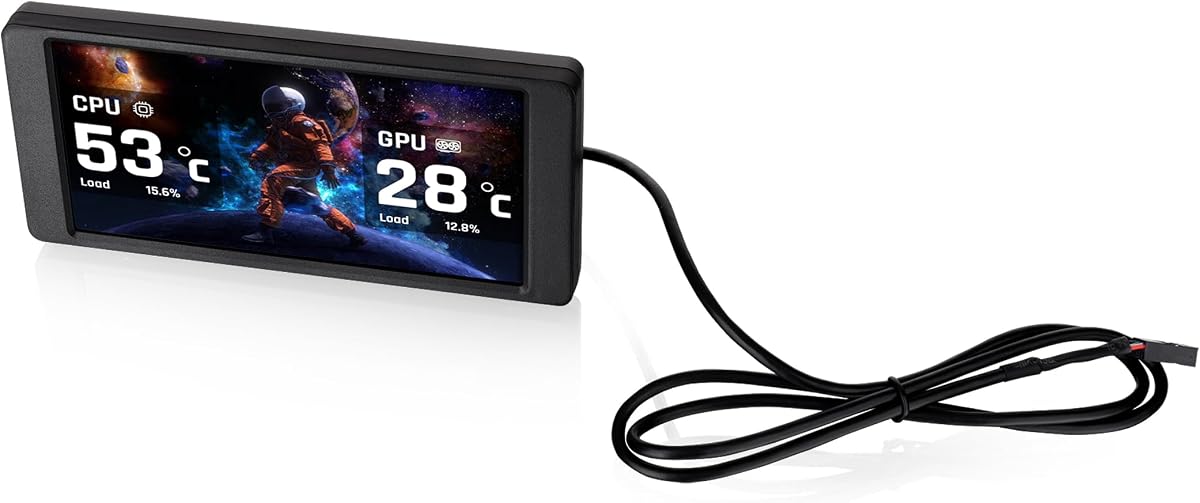
The Thermalright Trofeo Vision LCD AIO Display is an excellent option for builders seeking a compact yet functional screen. With a rating of 4.3 stars, it strikes a good balance between size and features. Its standout quality is the plug-and-play USB-C connection which makes installation remarkably straightforward.
We may earn a commission when you buy through this link, at no additional cost to you.
Key strengths include the TRCC software which provides multiple preset themes and DIY options for customization. The slim build allows it to fit into tight spaces without obstructing airflow or other components. Real-time hardware monitoring is reliable, giving users a clear view of system health at a glance.
While the software works well, it requires a specific setup to function correctly for system stats. It does not include built-in speakers or advanced audio features, keeping the focus purely on visual display. Users looking for media playback capabilities might need to look elsewhere for audio integration.
This product is ideal for users who want a simple, effective solution for displaying system metrics. It is particularly suitable for smaller cases where space is at a premium. We recommend it for those who prioritize ease of setup and a clean, unobtrusive design.
The USB-C interface ensures quick setup and compatibility with most systems, eliminating the need for complex driver installations or additional cables.
Design your own unique interface with preset themes and DIY options, allowing you to tailor the display to match your specific preferences and style.
We may earn a commission when you buy through this link, at no additional cost to you.
The Hosyond 8.8 Inch Touchscreen offers a unique interactive element with its capacitive touch functionality. Rated at 4.0 stars, it appeals to users who want to touch the display directly. Its standout quality is the versatility in multi-system support including Raspberry Pi and various OS options.
We may earn a commission when you buy through this link, at no additional cost to you.
Key strengths include the HDMI input and driver-free design which make it easy to set up for different devices. The low power consumption ensures it does not add significant load to your PSU. The sharp 480×1920 resolution delivers crisp visuals suitable for both stats and media.
The touchscreen feature, while convenient, may not be as sensitive as dedicated tablets. Also, the requirement to download AIDA64 separately can be a minor hurdle for users unfamiliar with it. These factors do not outweigh the benefits but are worth noting before purchasing.
This screen is perfect for tech enthusiasts who want a flexible secondary display beyond just PC case usage. It serves well as a small control panel for home media systems. We recommend it for users seeking a responsive touch interface with broad system compatibility.
The capacitive touchscreen allows for smooth control and interaction, making it easy to navigate menus or pause media without reaching for a keyboard.
Works seamlessly with Raspberry Pi, Ubuntu, and Windows, making it a versatile option for various computing projects and setups.
We may earn a commission when you buy through this link, at no additional cost to you.
The Thermaltake 6.0 Inch LCD Screen Kit is designed specifically to complement Thermaltake View series cases. With a rating of 3.8 stars, it is a niche product for specific users. Its standout quality is the seamless integration with Thermaltake's RGB ecosystem and chassis designs.
We may earn a commission when you buy through this link, at no additional cost to you.
Key strengths include the TT RGB PLUS 3.0 software which offers improved compatibility and system monitoring features. The screen supports multiple file formats for background graphics and videos, allowing for good personalization. Real-time data on key components is displayed clearly for monitoring purposes.
The resolution is lower than many wider modern panels, which may impact text clarity. Additionally, compatibility is largely limited to Thermaltake View 370 and 390 series cases. This restricts its appeal to those who already own these specific chassis models.
This kit is the clear choice for Thermaltake View case owners looking to add functionality. It enhances the build with real-time data without requiring complex setups. We recommend it for users invested in the Thermaltake ecosystem who want a tailored experience.
The upgraded software suite provides better control over RGB lighting and monitoring, ensuring a unified look across your Thermaltake components.
Upload custom graphics in various formats like JPG and MP4 to personalize the screen with your favorite images or animations.
We may earn a commission when you buy through this link, at no additional cost to you.
The GeeekPi 12.6 Inch IPS LCD Touch Screen delivers a large and responsive display for those with compatible cases. Rated at 4.0 stars, it focuses on user interaction and visual quality. Its standout quality is the combination of a large touch panel and built-in audio.
We may earn a commission when you buy through this link, at no additional cost to you.
Key strengths include the up to 10-points of multi-touch which provides a highly interactive experience. The plug and play design means no additional software is required to get started, simplifying setup. The built-in speakers add value for media playback without external hardware.
The screen can be heavy for internal mounting, requiring secure placement to avoid vibration issues. Power requirements via HDMI or DC can also add cabling complexity inside the case. These considerations are important for users planning an internal installation.
This model is perfect for users wanting a large, interactive interface in their PC or on a desk. It serves well as a secondary monitor or media player. We recommend it for those who prioritize size and touch functionality in their display setup.
Up to 10 points of touch allow for gesture-based control, making the screen feel like a small interactive tablet within your system.
Ready to use out of the box without extra software ensures immediate functionality and reduces the time spent on configuration.
We may earn a commission when you buy through this link, at no additional cost to you.
The Thermalright TV 9.16 LCD Black Display offers a unique magnetic suction design for flexible placement. With a rating of 4.3 stars, it appeals to those who like to reconfigure their setup often. Its standout quality is the ability to attach and remove the screen without screws.
We may earn a commission when you buy through this link, at no additional cost to you.
Key strengths include the full color IPS panel which provides stable viewing angles and true colors. The USB Type-C connector simplifies connection to the motherboard or power source. The TRCC software allows for personalized themes and system monitoring with ease.
The magnetic design requires specific metal surfaces or a compatible panel for effective attachment. If the surface is not magnetic, additional accessories might be needed to secure the screen. This limitation can affect compatibility with non-magnetic cases.
This screen is ideal for modders who want to swap displays frequently without tools. It is also great for users who like to clean or access the case often. We recommend it for those seeking a flexible and tool-free mounting solution.
The magnetic screen design eliminates the need for screws, making it incredibly easy to install and remove for maintenance or aesthetic changes.
Monitor system parameters and switch between dynamic images easily using the dedicated software, allowing for a personalized experience.
We may earn a commission when you buy through this link, at no additional cost to you.
The Thermalrlght Trofeo Vision 6.86 is a small magnetic display designed for flexible integration into PC builds. With a rating of 3.4 stars, it is best for those needing a compact solution. Its standout quality is the magnetic compatibility with the Trofeo Vision water cooling series.
We may earn a commission when you buy through this link, at no additional cost to you.
Key strengths include the ability to move freely in various positions of the chassis without fixed mounting. The DIY theme support allows for custom static and dynamic images to match your style. It is a good choice for adding a small visual accent to a cooler or case.
The resolution is lower than larger models which may limit text readability. Reliance on magnetic attachment means it may not hold as firmly as screw-mounted screens in high vibration environments. These factors should be considered for long-term stability.
This screen is perfect for users who want a small accent display on a cooler or specific case panel. It adds a touch of tech flair without overwhelming the build. We recommend it for those who prioritize flexibility and compact design.
The magnetic attraction allows you to move the screen freely to various positions of the chassis, finding the perfect viewing angle without screws.
Pairs well with Trofeo Vision water cooling radiators, creating a cohesive look across your cooling system and display.
We may earn a commission when you buy through this link, at no additional cost to you.
Choosing the right LCD Screen for PC Case involves considering several key factors to ensure compatibility and satisfaction. Below are the most important aspects to evaluate before making a purchase.
Screen sizes for PC cases typically range from 6 inches to 13 inches. Larger screens provide better visibility but take up more space. Resolution impacts clarity, with Full HD options offering sharper text and images compared to lower resolutions. Consider where the screen will be placed and how much detail you need.
Choose a size that fits your case without blocking airflow. Aim for higher resolutions if you plan to display text-heavy data or complex visuals.
Mounting can be achieved via brackets, magnetic suction, or direct adhesive. Brackets are sturdy but may require drilling or screws. Magnetic options offer flexibility for repositioning but need a compatible surface. Adhesive pads are simple but may not hold as securely on rough surfaces.
Select a mounting method that aligns with your case material and your preference for flexibility versus stability.
Most screens connect via USB, HDMI, or internal 9-pin headers. USB options are often plug-and-play and draw power directly. HDMI requires video output ports which may be limited. Internal headers save external ports but require opening the case for installation.
Verify your available ports and internal space before buying. USB-C and 9-pin connections are often the most versatile for internal case integration.
Many screens rely on specific software to display system stats and themes. Some offer built-in widgets while others integrate with tools like AIDA64. Ensure the software is compatible with your operating system and supports the customization you desire.
Check for active software support and ease of use. A robust software ecosystem allows for dynamic themes and real-time monitoring without extra tools.
IPS panels are preferred for their wide viewing angles and color accuracy compared to TN panels. Brightness and contrast ratios affect visibility in different lighting conditions. High-quality panels ensure the screen looks good even from awkward angles.
Prioritize IPS technology for the best visual experience. Look for brightness ratings that suit your room's lighting environment.
Low power consumption is vital for efficiency and heat management. Most screens draw minimal power via USB, but some may require external adapters. Consider how much load you can afford on your power supply or USB headers.
Opt for screens that draw power directly from the motherboard USB header when possible to keep your setup clean and efficient.
Some models include built-in speakers, which is rare but convenient for media playback. If you plan to watch videos, audio capabilities add significant value. Otherwise, rely on your PC's audio output.
Decide if integrated audio is necessary for your use case to avoid paying for unused features.
Not all screens fit all cases. Check dimensions and mounting holes against your case manual. Some products are optimized for specific models like the Hyte Y60 or Lian Li series.
Ensure the physical dimensions and mounting points match your specific case model to avoid installation issues later.
Install the screen according to the manufacturer's guidelines, ensuring all screws or magnetic attachments are secure. Connect the necessary USB or HDMI cables to the appropriate ports on your motherboard or power supply. Verify that the display powers on and communicates with your system properly before closing the case.
Use the provided software to set up your preferred widgets and themes. Customize the layout to prioritize critical information such as CPU temperature or fan speed. Keep the software updated to access new features and ensure compatibility with system monitoring tools.
Clean the screen regularly with a soft, dry cloth to avoid smudges. Avoid using harsh chemicals that may damage the anti-glare coating. Periodically check cable connections to prevent loose contacts that could interrupt the display feed.
While many are universal, specific mounting points may vary. Check dimensions and bracket compatibility with your case before purchase. Some models are designed for specific case brands like Hyte or Lian Li.
Most models draw power via USB or 9-pin headers directly from the motherboard. Some large displays may need separate HDMI and DC power sources for full functionality.
Yes, many supports support video playback and custom themes. However, performance may vary depending on the software and hardware capabilities of your system.
No, some have their own software like Station Space or TRCC. Others may require third-party tools to display hardware statistics effectively.
Most units come with custom software or support tools like AIDA64. Check the product specs to see which monitoring suite is compatible with your chosen screen.
Yes, several models allow desktop mode or extended screen functionality. This requires proper configuration in Windows display settings and compatible software.
The WOWNOVA 8 Inch LCD, Thermalright Trofeo, and wisecoco 12.6 Inch models offer excellent value and versatility for most users. Each provides unique benefits ranging from desktop mode support to large screen real estate.
Prioritize screen resolution and software compatibility to ensure you get the features you need. Choosing the right connectivity option will save you from installation headaches down the line.
Remember that product availability and details can change. Always check current specs and reviews before finalizing your purchase to ensure the best fit for your build.