
Arsvita CD Laser Lens Cleaner Disc Cleaning Set
4.2Editor score
Includes cleaning disc and cloth
Removes dirt and dust deposits
Works with CD VCD DVD players
This guide compares the best CD and DVD Player Cleaner options available in October 2026 to help you restore playback quality and extend device lifespan
Keeping your media players in top condition is essential for enjoying uninterrupted entertainment at home. Dust and debris can accumulate on laser lenses over time causing skipping issues and poor performance. Using a dedicated cleaner helps maintain optimal function and protects your investment in optical drives.
We have evaluated a wide range of cleaning solutions designed for various optical devices. Our selection includes brush based discs spray kits and wipes that target different types of contamination. Each product was chosen based on compatibility effectiveness and user feedback regarding ease of use.
Each pick in this list highlights specific strengths and ideal use cases for different needs. You will find options for budget conscious shoppers as well as those seeking premium cleaning performance. Please note that product details and availability may change so verify current information before purchasing.
4.2Editor score

4.3Editor score
4.2Editor score
The following table provides a side by side overview of all ten products included in this guide. It highlights key specifications and features to help you make an informed decision based on your specific cleaning needs and device types.





This cleaning set offers an effective solution for restoring playback quality in standard optical drives. It features a two brush process designed to remove dust and dirt that cause audio video dropouts during use.
We may earn a commission when you buy through this link, at no additional cost to you.
The inclusion of a glasses cloth adds value for general disc maintenance beyond just the lens. It is particularly useful for households with multiple CD or DVD players that require regular attention to function smoothly.
While it does not include liquid cleaning fluid this kit focuses on the mechanical removal of debris. Users should ensure the player is powered on during the cleaning cycle for the brushes to rotate correctly.
Ideal for budget conscious users who need a reliable cleaner for home audio systems. It provides a simple way to extend the life of older players without needing professional service.
The two brush system targets deposits that often lead to freezing or slow loading issues.
Regular cleaning helps maintain laser sensitivity and prevents unnecessary wear on internal components.
We may earn a commission when you buy through this link, at no additional cost to you.
This variant includes additional cleaning fluid packets to ensure a thorough cleaning experience. It is designed to tackle dirt and dust deposits that cause audio and video dropouts in players.
We may earn a commission when you buy through this link, at no additional cost to you.
The kit comes with an after sales card and support contact for any issues that may arise. This adds a layer of confidence for buyers who are new to using lens cleaning discs.
Users should follow the manual carefully to insert the disc correctly for optimal brush contact. The fluid helps loosen stubborn particles that dry brushing alone might not remove effectively.
A solid choice for those who want a bit more than a basic dry cleaner disc. It balances cost with added utility for maintaining older optical drives at home.
The included fluid helps loosen stubborn debris for a deeper clean than dry brushes alone.
Twenty four hour standby service ensures help is available if you encounter issues.
We may earn a commission when you buy through this link, at no additional cost to you.
This version offers a balance between dry and wet cleaning with one fluid packet included. It targets slow loading and skipping issues by removing dirt from the laser lens effectively.
We may earn a commission when you buy through this link, at no additional cost to you.
The presence of a glasses cloth allows for wiping the disc surface before or after cleaning. This helps prevent external grime from affecting the cleaning process or the playback quality.
It is important to note that this kit is not compatible with modern gaming consoles. It is tailored for traditional standalone CD VCD and DVD players found in home entertainment systems.
A straightforward option for maintaining standard optical drives without unnecessary complexity. It provides essential tools to keep playback smooth and reliable for everyday use.
Combining a brush disc with fluid offers a middle ground for effective maintenance.
The included cloth helps maintain disc integrity alongside the lens cleaning process.
We may earn a commission when you buy through this link, at no additional cost to you.
Endust is a well known brand in electronics care and this lens cleaner reflects that reputation. It safely cleans lenses of any device that is CD DVD compatible without risking damage to delicate parts.
We may earn a commission when you buy through this link, at no additional cost to you.
The design ensures that dust and dirt are removed efficiently to restore playback performance. It is a practical choice for office desktops and home setups where reliability is paramount.
Users must remember to turn audio on for the instructions to play as the disc runs. This step ensures the cleaning mechanism activates correctly to reach the laser lens properly.
Highly recommended for those seeking a trusted solution for maintaining their optical drives. It offers peace of mind with a reliable clean that fits various professional and home environments.
Endust products are known for safety and effectiveness in electronic maintenance across many sectors.
Works with any CD DVD compatible device ensuring versatility across different hardware.
We may earn a commission when you buy through this link, at no additional cost to you.
This cleaner is notable for its compatibility with older gaming systems like PS1 and PS2. The brush system uses copper impregnated fibers to remove dirt and reduce static build up effectively.
We may earn a commission when you buy through this link, at no additional cost to you.
It is recommended to replace the product after twenty usages to ensure optimal cleaning performance. This maintenance tip helps prevent ineffective cleaning or potential damage to the laser lens over time.
The copper fibers help with demagnetization which can improve overall signal quality during playback. This feature is particularly beneficial for discs that suffer from interference or read errors.
A strong option for gamers and enthusiasts who want to protect their older consoles. It addresses specific needs beyond standard players ensuring a cleaner lens for better game loads.
Supports older gaming consoles which many cleaners exclude for safety reasons.
Copper fibers help remove static that can interfere with reading data accurately.
We may earn a commission when you buy through this link, at no additional cost to you.
This kit stands out with voice guidance to help you through the cleaning process. It includes a liquid solution to aid in removing stubborn dirt from the lens surface effectively.
We may earn a commission when you buy through this link, at no additional cost to you.
The entire process takes only three minutes making it quick and convenient for regular maintenance. It is designed to improve playback effects if your player has not been cleaned in a while.
The inclusion of a microfiber cloth allows for cleaning the discs as well as the lens. This dual approach ensures that both the player and the media are free from dust and debris.
Good for users who want clear instructions and a complete cleaning package. It simplifies the task and provides tools for both lens and disc maintenance.
Guided instructions ensure you use the cleaner correctly without reading a manual.
Includes liquid and cloth for a comprehensive cleaning solution for your setup.
We may earn a commission when you buy through this link, at no additional cost to you.
This version is optimized for speed with a cleaning process that takes just ninety seconds. It still includes voice guidance to ensure you follow the correct steps for best results.
We may earn a commission when you buy through this link, at no additional cost to you.
Without liquid the focus is on mechanical cleaning which is effective for routine maintenance. It helps resolve issues like slow loading or unclear pictures by removing dust from the lens.
A microfiber cloth is included to clean the discs themselves and ensure smooth playback. This is a useful addition for keeping your media in good condition between cleanings.
Perfect for quick maintenance when you need a fast fix for a problematic player. It balances speed with essential features to restore performance efficiently.
Designed for quick maintenance to minimize downtime during use.
Ideal for regular dusting to prevent buildup before issues arise.
We may earn a commission when you buy through this link, at no additional cost to you.
These wipes are designed for routine disc maintenance rather than laser lens cleaning. They remove dirt dust smudges and fingerprints that can impact playback quality significantly during use.
We may earn a commission when you buy through this link, at no additional cost to you.
Each pack contains twenty individual soft wipes that are safe to use on optical discs. They are ideal for preventing skipping and ensuring a smooth experience while enjoying your media.
Using these wipes regularly helps maintain the longevity and optimal function of your discs. It is a simple way to keep your media clean and playable without complex tools.
Great for users who want a quick and easy solution for disc maintenance. They complement lens cleaning products by keeping the media itself free from debris.
Focuses on keeping the media surface clean to prevent read errors during playback.
Non abrasive materials ensure no scratches or damage occur during cleaning.
We may earn a commission when you buy through this link, at no additional cost to you.
This cleaner features an eight brush carbon system designed to remove static build up effectively. It prevents skipping and ensures smooth playback for drives and game players alike.
We may earn a commission when you buy through this link, at no additional cost to you.
The carbon system helps to neutralize static which can attract dust and cause read errors. This makes it a valuable tool for environments where static electricity is a common issue.
Users should follow the instructions to use the disc correctly for optimal cleaning results. It is designed to integrate well with standard players to maintain consistent performance levels.
A solid option for those dealing with static related issues in their optical drives. It offers a specialized approach to cleaning that targets less visible contaminants like static.
Carbon brushes help neutralize static that often attracts dust to the lens.
Ensures reliable playback by addressing static and dust effectively.
We may earn a commission when you buy through this link, at no additional cost to you.
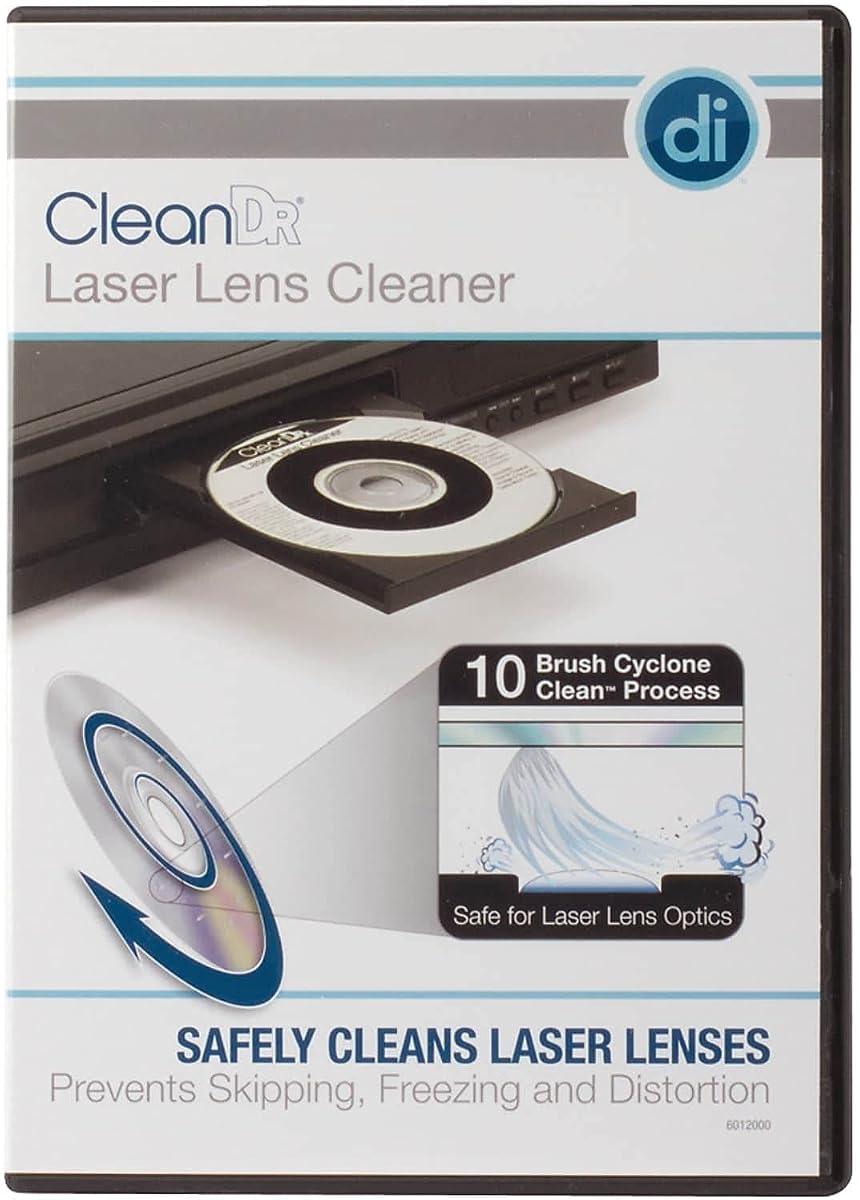
This premium option features an exclusive ten brush cyclone clean process for deep cleaning. It removes dust dirt and debris while demagnetizing the lens for optimal performance.
We may earn a commission when you buy through this link, at no additional cost to you.
The three stage process ensures thorough cleaning that addresses multiple types of contamination. It is safe for most CD DVD players and computers but not for Blu ray systems.
Users should note it is not intended for multi disc players or newer consoles. This targeted approach ensures safety and effectiveness for the drives it is designed to support.
Best for users seeking a robust solution for challenging dust or magnetization issues. It offers a high level of cleaning precision for maintaining peak performance.
The cyclone process ensures a thorough clean that reaches more of the lens surface.
Removes magnetic interference that can affect how the laser reads data.
We may earn a commission when you buy through this link, at no additional cost to you.
Selecting the right cleaner depends on your specific device type and the nature of the dirt. This guide outlines key factors to consider for effective maintenance.
Ensure the cleaner is compatible with your specific optical drive model. Some products are designed for standard players while others may include or exclude gaming consoles like Xbox or PlayStation. Always check the manufacturer's list to avoid damage to unsupported devices.
Verify device compatibility before purchasing to ensure safe and effective cleaning results.
Look for products with durable and fine brushes that can reach the lens without scratching it. High quality brushes remove dust effectively while minimizing the risk of leaving fibers behind. A ten brush system or similar may offer better coverage than basic two brush options.
Prioritize brushes that are designed to be safe for delicate laser components.
Decide if you need a dry brush disc or one that includes cleaning fluid. Wet kits often handle stubborn dirt better but require more care during use. Dry kits are simpler and less prone to spills but may be less effective for heavy buildup.
Choose wet kits for heavy dirt and dry kits for routine maintenance.
Some cleaners come with voice guidance or simple instructions to help you use them correctly. This feature is helpful if you are not familiar with how lens cleaning discs work. A straightforward process reduces the chance of user error during the cleaning cycle.
Look for guided instructions to make the cleaning process simple and safe.
Check if the kit includes items like microfiber cloths or extra cleaning fluid. These accessories add value by allowing you to clean discs as well as the lens. Having a complete set can reduce the need for additional purchases later.
Select kits with extra tools for a more comprehensive cleaning experience.
Choosing a well known brand can provide peace of mind regarding safety and effectiveness. Established brands often have more research and development behind their products. Look for reviews and ratings to confirm reliability before making your final decision.
Opt for reputable brands to ensure consistent cleaning quality and safety.
Consider the cost relative to the features and accessories included in the kit. Higher priced models may offer more brushes or fluid but basic options can work well for light use. Balance your budget with the level of cleaning power you require.
Compare features against price to find the best value for your needs.
Some manufacturers offer after sales support or warranties if you encounter issues. This can be important if the product fails to work as expected. Check for contact information or support policies when you purchase online.
Verify support options to protect your purchase and ensure satisfaction.
Insert the cleaning disc into the player with the printed side facing up. Ensure the player is turned on so the lens can activate and interact with the brushes. Follow any voice instructions or on screen prompts to start the cleaning process.
Allow the disc to run through its full cycle without ejecting it manually. The cleaning action typically takes a few minutes to complete effectively. Eject the disc once the cycle finishes and return it to its case for storage.
Store the cleaner in a cool dry place to avoid damage to the brushes. For wet kits make sure the fluid is tightly sealed to prevent evaporation. Regular use every few months can keep your player running smoothly and prevent issues.
It is recommended to clean the lens every ten to twenty hours of use. If you notice skipping or slow loading more frequent cleaning may be necessary. Regular maintenance helps extend the life of your device and ensures consistent playback.
Many CD cleaners are not safe for game consoles unless specified. Always check the compatibility list on the product packaging. Using the wrong cleaner can damage sensitive laser components in gaming systems.
Common signs include slow loading times skipping tracks or freezing during playback. If your player fails to read discs that work on other devices cleaning may help. Dust and debris buildup usually causes these performance issues over time.
Properly designed cleaners with soft brushes are safe for laser lenses. However using damaged or worn brushes can cause scratches. Always inspect the cleaning disc before use and replace it if it shows signs of wear.
Fluid helps remove stubborn dirt but dry brushes work well for routine dusting. Wet kits are better for heavy buildup while dry kits are simpler for regular care. Choose based on the level of dirt your player typically collects.
Many players only activate the laser when audio is playing. The cleaning disc uses the laser to spin the brushes and clean the lens. Without audio the player may not engage the mechanism needed for cleaning.
This guide has explored ten effective options for maintaining your optical drives. Whether you need a budget friendly set or a premium solution with fluid there is a match for your needs. Each product offers a unique balance of features and ease of use.
When making your choice consider compatibility and the level of cleaning power required for your devices. Regular maintenance with the right tools ensures your players last longer and perform better over time. Prioritize safety and support when selecting your final product.
Prices and availability can change so please check current listings before you buy. You can find these options at major retailers or online stores for convenience. Stay informed to ensure you get the best value for your purchase.