
QUI Presentation Clicker with Volume Control
4.3Editor score
Long wireless range up to 328 ft
Bright red pointer light for visibility
Volume control and hyperlink navigation
This guide compares the top laser pointers for presentations to help you choose the right wireless clicker for your teaching or business needs.
Presentations require clear communication and the right tools to engage your audience effectively. A reliable laser pointer for presentations ensures you can highlight key points without distraction or technical issues during critical moments.
We evaluated ten top-rated wireless presenters based on laser visibility, battery life, connectivity options, and ergonomic design. Our analysis focuses on real-world performance across various environments like classrooms and conference halls.
Each pick highlights specific strengths to help you match a device to your unique presentation style. Keep in mind that availability and terms may change, so verify details before making your final purchase decision.
4.3Editor score

4.6Editor score

4.6Editor score
This side-by-side comparison highlights the key specifications and features of each model to help you quickly identify the right fit for your professional or educational needs.


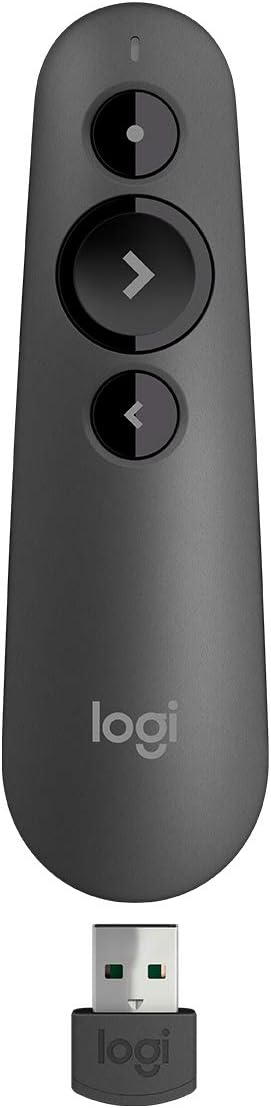


This green light presentation clicker stands out with its highly visible 532nm green laser that performs well even on bright projection screens and whiteboards. It offers a rechargeable battery system that eliminates the need for constant battery replacements.
We may earn a commission when you buy through this link, at no additional cost to you.
The device features a robust set of controls including dedicated buttons for hyperlinks, volume adjustment, and screen toggles. Its plug and play functionality ensures instant compatibility with Mac, Windows, and Chromebook systems without requiring software installation.
While the initial cost is higher than standard red laser pointers, the convenience of USB-C charging and the superior visibility of the green light justify the investment for frequent presenters. Users appreciate the magnetic receiver storage that keeps the dongle secure.
Educators and professionals who need reliable performance in large lecture halls or conference rooms will find this clicker essential. Its intuitive design allows for seamless transitions between slides and media without distracting technical issues.
The 532nm green laser cuts through ambient light better than standard red lasers, ensuring your points are visible from the front row to the back of the room.
A single hour charge via USB-C provides weeks of usage, reducing waste and saving money compared to models that rely on disposable AAA batteries.
We may earn a commission when you buy through this link, at no additional cost to you.
The Logitech R400 is a classic choice for presenters who need a straightforward tool without unnecessary complexity. Its bright red laser is effective for most standard presentation environments and indoor lighting conditions.
We may earn a commission when you buy through this link, at no additional cost to you.
Built with intuitive touch keys, this device allows for easy navigation through slides and supports common presentation software like PowerPoint and Keynote. The wireless range of up to 50 feet provides enough freedom to move around a typical meeting room.
One minor drawback is the reliance on AAA batteries, which may need replacement after extended use. However, the ability to store the receiver inside the clicker prevents loss and keeps the device compact for travel.
This model is ideal for users who prefer simplicity and brand reliability over advanced features. It serves well as a dependable backup or primary tool for routine business presentations and classroom lectures.
With no software to install and simple touch keys, you can start presenting immediately after plugging in the USB receiver.
The receiver docks neatly into the body of the presenter, ensuring you always have the necessary hardware when you need it.
We may earn a commission when you buy through this link, at no additional cost to you.
This wireless presenter offers a robust set of features at a competitive price point, making it accessible for budget-conscious educators and professionals. It supports volume control and hyperlinks which adds flexibility to interactive presentations.
We may earn a commission when you buy through this link, at no additional cost to you.
The device boasts a wireless range of up to 100 feet allowing you to roam a large room or auditorium while maintaining control. Its compact design fits comfortably in the hand and the rubber buttons provide a secure grip during use.
While the red laser is bright for standard backgrounds, users should note it may struggle on LCD or LED screens. Additionally the need to purchase AAA batteries separately is a minor inconvenience but common in this price range.
For those needing extensive range and extra control options without breaking the bank, this model delivers excellent value. It is a practical choice for daily classroom use or frequent business meetings where reliability is key.
Move freely around large spaces with a reliable connection that reaches up to 100 feet away from your computer source.
Adjust audio levels directly from the clicker which is useful for multimedia presentations where sound synchronization is needed.
We may earn a commission when you buy through this link, at no additional cost to you.
The Logitech R800 is a high-end option designed for professional speakers who need precise time management and superior visibility. Its green laser performs exceptionally well even in brightly lit environments and on modern display screens.
We may earn a commission when you buy through this link, at no additional cost to you.
A standout feature is the built-in LCD display that allows you to track time and set silent vibrating alerts. This ensures you stay on schedule without drawing attention to the clock during critical presentations.
While the price is higher than average the added functionality justifies the cost for frequent users. The wireless range extends up to 100 feet giving you the freedom to engage with your audience across the room.
This clicker is best suited for keynote speakers and executives who demand reliability and advanced features. It combines ergonomic design with practical tools to make high-stakes presentations smoother and more professional.
The LCD timer and silent vibration alerts help you manage your speaking time effectively without distracting your audience.
Smooth contours and a comfortable grip ensure that the device feels premium and is easy to hold for long periods.
We may earn a commission when you buy through this link, at no additional cost to you.
The R500s offers unique dual connectivity options supporting both USB receiver and Bluetooth low energy. This makes it highly versatile for use with a wide range of devices including tablets and smartphones.
We may earn a commission when you buy through this link, at no additional cost to you.
It integrates with the Logitech Presentation App allowing users to customize button functions and monitor battery life. This level of control is beneficial for speakers who have specific workflow preferences.
The smart battery management system helps extend usage time by disabling the laser when not in use. A single AAA battery can last for over a year which is impressive for this class of device.
This model is ideal for tech-savvy users who work across multiple platforms. It provides the flexibility to switch between devices easily while maintaining a reliable connection for your presentation needs.
Connect via USB or Bluetooth to work seamlessly with Mac, Windows, iOS, and Android devices without needing adapters.
Advanced power-saving modes ensure your device lasts longer between battery changes so you never run out of power.
We may earn a commission when you buy through this link, at no additional cost to you.
This QUI presentation clicker stands out for its exceptionally long wireless range of up to 328 feet which is rare at this price point. It includes volume control and hyperlink support adding value to a budget-friendly device.
We may earn a commission when you buy through this link, at no additional cost to you.
The red laser is bright enough for most indoor presentations and the device is plug and play for immediate use. A convenient clip attaches to your notebook or pocket making it easy to carry to different locations.
While the build is basic it is sufficient for standard classroom or meeting use. Users should note that the battery is not included so you will need to purchase AAA batteries separately to start.
For those looking for an economical solution that does not compromise on range or essential features this clicker is a strong contender. It is perfect for occasional presenters who need a reliable tool without extra expense.
Roam the entire hall without signal loss thanks to a wireless connection that reaches up to 328 feet.
Get essential features like volume control and long range at a price that is accessible for any budget.
We may earn a commission when you buy through this link, at no additional cost to you.
The Norwii N95 combines a bright green laser with a rechargeable battery system for consistent performance. It features a USB receiver that supports both USB-A and USB-C making it compatible with modern laptops and older PCs.
We may earn a commission when you buy through this link, at no additional cost to you.
You can reprogram the buttons using the Norwii Presenter app to suit your specific workflow needs. This flexibility allows you to customize how the forward and backward buttons function for different presentation scenarios.
The device uses a 300mAh battery that charges via USB-C providing weeks of usage on a single charge. This reduces waste and saves money over time compared to disposable battery models.
This clicker is well suited for users who want modern connectivity and customization options. Its green laser and rechargeable design make it a strong choice for daily presenters in educational or corporate settings.
With both USB-A and USB-C support this clicker works with virtually any computer or tablet without adapters.
Reprogram the buttons to match your presentation flow and reduce confusion during live talks.
We may earn a commission when you buy through this link, at no additional cost to you.
This presentation remote supports both USB-A and USB-C connections making it suitable for a wide range of devices including modern laptops and Macs. It features a bright red laser that is easy to see on standard backgrounds.
We may earn a commission when you buy through this link, at no additional cost to you.
The ergonomic design ensures the clicker is comfortable to hold in your hand for extended periods. Its compact size allows it to fit easily into a pocket or laptop bag for portability.
While the wireless range is up to 49 feet which is shorter than some high-end models it is sufficient for most conference rooms. The plug and play setup means you can start presenting immediately without drivers.
Ideal for users who need a simple and modern clicker for daily use. It offers a balance of portability and functionality for professionals who move between different meeting spaces regularly.
Support for both USB-A and USB-C ensures you can use this device with legacy and modern computers effortlessly.
The ergonomic shape and rubber feel provide a secure grip reducing hand strain during long presentation sessions.
We may earn a commission when you buy through this link, at no additional cost to you.
This clicker features a unique built-in receiver with both USB-A and USB-C connectors eliminating the need for separate adapters. It also includes volume control and magnetic storage for the receiver to prevent loss.
We may earn a commission when you buy through this link, at no additional cost to you.
The device is lightweight and portable weighing only 55 grams which makes it easy to carry in a bag. It supports a wide range of software including PowerPoint and Keynote for seamless compatibility.
Powered by two AAA batteries it uses low power consumption technology to extend standby time. However using two batteries is less convenient than single battery models and requires more frequent replacements.
A good choice for professionals who value connectivity and compact design. It offers a practical solution for those who frequently switch between different computers and need a reliable tool.
The integrated USB-A and USB-C receiver means you never need to hunt for adapters for your computer.
A magnetic slot securely holds the receiver so it is always with the clicker when you need to present.
We may earn a commission when you buy through this link, at no additional cost to you.
This presentation clicker is designed for simplicity and portability making it a great choice for users on the go. It fits comfortably in your pocket and weighs only 38 grams when the battery is installed.
We may earn a commission when you buy through this link, at no additional cost to you.
The ergonomic design ensures a comfortable grip during use and the dark gray buttons blend well with the black body. It supports a wide range of systems and software for versatile compatibility.
While it uses only one AAA battery which simplifies power management the receiver is stored inside the battery compartment. This might be inconvenient but it ensures you never lose the dongle when storing the device.
Perfect for teachers and professionals who need a simple tool for everyday presentations. It offers a balance of performance and portability at a price that is easy to justify.
At just 38 grams this clicker is one of the lightest options available ensuring it never feels like a burden to carry.
Plug and play functionality means no setup is required allowing you to focus entirely on your presentation content.
We may earn a commission when you buy through this link, at no additional cost to you.
Selecting the right laser pointer for presentations involves considering factors like laser visibility, battery life, and connectivity to ensure seamless delivery of your message.
The color of the laser pointer significantly impacts how visible it is against different backgrounds and lighting conditions. Green lasers generally offer better visibility on bright screens and in well-lit rooms compared to red lasers which may struggle in these environments.
Choose a green laser if you often present in large halls or use modern projection systems. Otherwise a bright red laser is sufficient for standard office or classroom settings.
Wireless range determines how far you can move away from your computer while maintaining a stable connection. Ranges typically vary from 50 feet to over 300 feet depending on the model and technology used.
For small meeting rooms a range of 50 feet is adequate but for large auditoriums you should look for models offering 100 feet or more to allow full mobility during your presentation.
Presenters come with either disposable batteries or rechargeable options. Disposable models use AAA batteries which are easy to replace but create waste and can run out unexpectedly if not monitored.
Rechargeable models with USB-C charging offer convenience and cost savings over time. They eliminate the need to keep spare batteries on hand and ensure you are always ready to present.
Modern laptops increasingly use USB-C ports whereas older systems rely on USB-A. A versatile presenter supports both or includes adapters to ensure compatibility with all devices.
Bluetooth connectivity is another option that allows you to connect without a receiver but requires software installation on some systems. Consider your device ecosystem when selecting a connectivity method.
An intuitive button layout is essential for seamless presentations. Look for clearly labeled buttons for advance and backward as well as dedicated keys for volume or hyperlink navigation.
Ergonomic design ensures the device is comfortable to hold for long periods. Soft rubber buttons and a contoured shape can improve grip and reduce hand fatigue during extended use.
Losing the USB receiver is a common frustration that can ruin a presentation. Many models include a built-in docking bay or magnetic storage to keep the receiver secure inside the clicker.
Ensure the device you choose has a reliable storage mechanism. This small feature can save significant stress when packing up after a presentation.
Most wireless presenters work with standard software like PowerPoint Keynote and Google Slides without requiring additional drivers. Check the specifications to confirm compatibility with your preferred tools.
Advanced features like timer alerts or custom button mapping may require specific software. Consider whether you are willing to install extra applications to access these features.
A sturdy build ensures the clicker can withstand daily use and travel. Look for models made from high-quality materials that resist wear and tear.
Reviews and brand reputation can offer insights into longevity. Investing in a reliable brand may save money in the long run by reducing the need for replacements.
To begin using your wireless presenter plug the USB receiver into an available port on your computer and wait for the device to be recognized by the operating system. If your clicker requires batteries insert them according to the orientation guide in the manual.
Once the hardware is set up open your presentation software and start the slideshow mode. Press the forward or backward buttons on the clicker to navigate through slides and use the laser button to highlight specific points for your audience.
Store the device in a cool dry place when not in use to prolong battery life and prevent damage. If your clicker is rechargeable ensure it is fully charged before major presentations to avoid unexpected power loss.
Most wireless presenters are designed to work with standard presentation software like PowerPoint Keynote and Google Slides. They function as keyboard commands so compatibility is widespread. However some advanced features may require specific software support.
Using a green laser pointer provides better visibility on bright screens compared to red lasers. Additionally dimming the room lights or adjusting the projector brightness can improve contrast. Positioning yourself closer to the screen may also help.
Yes many modern clickers support Bluetooth or USB-C connectivity which allows them to work with tablets and phones. You may need specific apps or adapters depending on the device. Always check the compatibility list before purchasing.
Wireless presenters typically offer a range between 50 feet and 100 feet in standard environments. Some models advertise ranges up to 300 feet for large halls. Actual performance depends on interference and obstacles in the room.
Locate the battery compartment usually on the back or bottom of the device. Open the cover and replace the old batteries with new AAA cells ensuring correct polarity. If it is rechargeable use the included cable to charge the unit.
Class 2 laser pointers are safe for occasional use but you should never look directly into the beam or point it at eyes. Keep the device away from children and use it responsibly during presentations to ensure safety for all attendees.
Check if the batteries are charged or replace them if needed. Ensure the USB receiver is securely plugged in and try moving it to a different port. Restarting your computer can also resolve temporary connectivity issues.
Some models allow customization through dedicated apps where you can remap functions like volume or hyperlink navigation. Basic models may not offer this feature. Check the product specifications if customization is important for your workflow.
We reviewed ten top laser pointers for presentations to help you find the right tool for your needs. The Green Light Presentation Clicker stands out for its rechargeable design and visibility while the Logitech R800 offers premium features for professionals.
When choosing a clicker consider your specific environment and how often you present. Durability and ease of use are just as important as laser color and range. Prioritize a model that matches your workflow to ensure smooth delivery.
Keep in mind that product availability and features can change over time. Always verify the latest specifications and user reviews before purchasing to confirm it meets your requirements for your upcoming presentations.