
Switch Cooling Fan with Bottom Cooling
4.5Editor score
Universal dock compatibility
Adjustable USB power speed
Includes joystick caps
This guide compares the top external cooling fan options for Nintendo Switch docks to prevent overheating and extend console life during long gaming sessions.
Gaming for extended hours can cause your Nintendo Switch to overheat, leading to performance throttling or unexpected shutdowns. A reliable external cooling fan helps maintain optimal temperatures and ensures smooth gameplay. We have evaluated the market to find the most effective solutions for your setup.
Our comparison covers a wide range of options including dock attachments, standalone stands, and universal coolers. We looked at build quality, fan speed control, noise levels, and compatibility with different Switch models. Each product was assessed based on user feedback and technical specifications.
Each pick below highlights key features and real-world performance data to help you decide. Note that product availability and pricing can change frequently on retail platforms. Check the latest listings before making your final purchase to ensure you get the best deal.
4.5Editor score

4.6Editor score
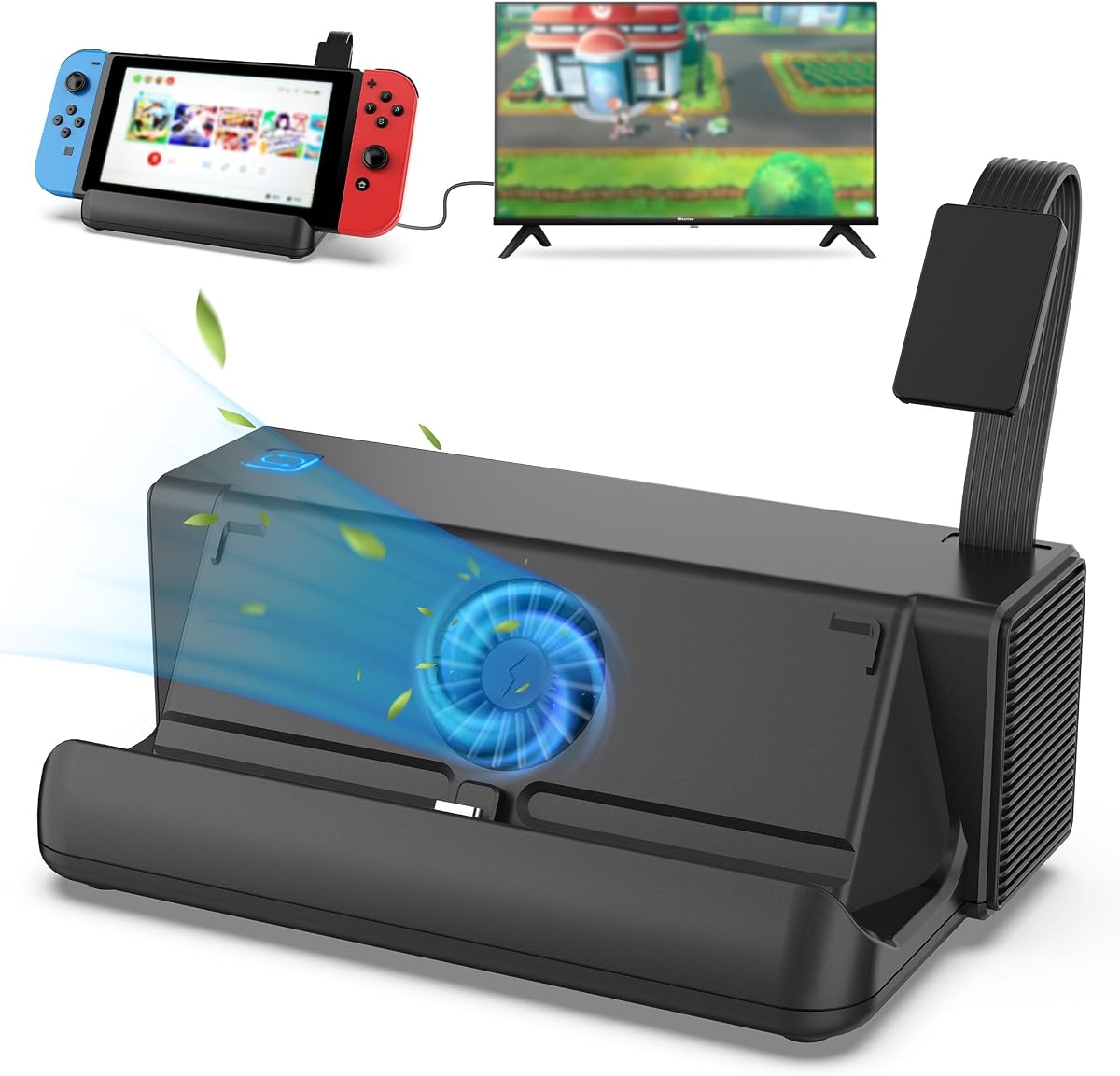
4.4Editor score
This side-by-side comparison summarizes the key specifications and features of the top ten external cooling solutions for Nintendo Switch docks to help you choose the right one.


This cooling fan for the Nintendo Switch 1/2 stands out as a top choice for maintaining console performance during long sessions. With a solid rating of 4.6 stars users praise its ability to keep temperatures down effectively.
We may earn a commission when you buy through this link, at no additional cost to you.
The digital LED display is a standout feature showing real time RPM and temperature readings. You can control the fan speed using three intuitive buttons ranging from silent operation to powerful turbo cooling.
While it runs quietly below 2400 RPM higher speeds do produce some noise which is expected for the performance. The included fixed pad ensures the fan stays stable and protects your switch from scratches.
If you want reliable cooling with precise control this kit offers excellent value. It is ideal for gamers who play for hours and want to avoid overheating pauses without compromising on features.
The LED display lets you see exactly how hot your console gets so you can adjust cooling before issues arise.
With adjustable speeds you can choose between quiet operation for light gaming or high power for demanding titles.
We may earn a commission when you buy through this link, at no additional cost to you.
The TNP Cooling Fan offers a straightforward solution for original Nintendo Switch docks using three built-in fans to improve heat dissipation. It is designed to prevent system malfunctions caused by overheating during extended play.
We may earn a commission when you buy through this link, at no additional cost to you.
Installation is simple as you just insert the product on the back of the dock and connect to the USB port for power. The adjustable speed switch lets you toggle between Turbo Normal and Off modes as needed.
While the performance is strong the rating is lower than some competitors which may indicate durability or noise concerns for some users. It remains a viable option for those who need a quick cooling boost.
This cooler works well for keeping the system in good shape during heavy gaming sessions. Consider it if you want a dedicated dock attachment without extra cables or complex setups.
Three fans work together to lower the console temperature fast and effectively preventing overheating over time.
The precise compact design allows it to save up room for your TV stand or entertainment cabinet closet.
We may earn a commission when you buy through this link, at no additional cost to you.
This dual-fan cooling stand is designed specifically for the Nintendo Switch 2 dock offering automatic operation when connected to the charging dock. It features a 3-stage cooling level adjustment to match your gaming needs.
We may earn a commission when you buy through this link, at no additional cost to you.
Beyond cooling the stand includes a 6-card game slot for easy access to your favorite titles without swapping physical cards. It also adds two USB-A and one USB-C output port for charging controllers or other accessories.
The 9 RGB light modes allow you to customize the look of your setup to match the game scenes or personal preference. You can turn off the lights if you prefer a cleaner setup during night gaming.
Ideal for Switch 2 owners this accessory extends the lifespan of the console by promoting effective heat dissipation. It combines practical cooling with extra utility like storage and ports in a single unit.
With 6 game card slots you can insert cards into the slots and play different games immediately without swapping.
This Switch 2 cooling station provides 3 USB expansion ports to easily connect and charge your various accessories.
We may earn a commission when you buy through this link, at no additional cost to you.
The Bewinner USB Cooling Fan Base Stand Dock provides a reliable cooling solution for game consoles including the Switch. It is equipped with three cooling fans inside to effectively dissipate heat during gameplay.
We may earn a commission when you buy through this link, at no additional cost to you.
Its small and compact design makes it easy to set up and use without taking up much space in your gaming area. There is a switch on the side allowing you to adjust the cooling speed or turn it off.
Made from superior material the unit is built to last while keeping the console cool. It offers a straightforward way to maintain performance without needing complex configurations or software.
This option is great for gamers who want a no-fuss cooling bracket that works well with standard dock setups. It balances performance and simplicity for daily use.
You can adjust the cooling speed to Turbo or Normal or simply turn it off as needed during breaks.
Made from superior material it ensures durability while providing effective cooling for your console over time.
We may earn a commission when you buy through this link, at no additional cost to you.
The ZMBESUP Switch Dock Station combines a cooling fan with a full-featured docking solution for Nintendo Switch and OLED models. It features one-key game card switching technology to swap between 4 active cards effortlessly.
We may earn a commission when you buy through this link, at no additional cost to you.
The built-in cooling fan maintains optimal performance during extended sessions while independent power switches let you turn off unused features to save energy. It includes three USB ports and an HDMI output for versatile connectivity.
Supporting both desktop and TV dual mode this dock eliminates the need for multiple accessories. However it requires the original Switch AC adapter which adds to the overall setup cost for some users.
This is an all-in-one portable docking solution ideal for home and travel use. If you want a comprehensive upgrade with cooling and storage features this station delivers high functionality.
Seamlessly switch between 4 active game cards with a single button press without physical card swapping or wear.
Independent power control switches for the fan and card reader let you turn off unused features to reduce noise.
We may earn a commission when you buy through this link, at no additional cost to you.
This cooler replacement is designed specifically for the 2021 OLED dock HEG-007 providing targeted cooling for the Switch OLED model. The high efficiency fan blows inward to speed up air circulation and dissipate heat faster.
We may earn a commission when you buy through this link, at no additional cost to you.
It comes with 14 game card slots on top to store cards you use often avoiding loss and making them easy to take. The fan is made of ABS material which is light and durable in size.
The Type-C data cable supports plug and play power connection following the design of the official dock base. The tech-inspired blue light adds a cool look and syncs with the fan operation.
If you own the OLED dock this fan helps avoid overheating and reduces input delay during long gaming sessions. It is a convenient add-on to enhance your current setup with cooling and storage.
Designed for the latest 2021 OLED dock to fit perfectly and blow directly onto the base surface.
There are 14 game card slots on the top to store cards you often use avoiding loss and easy access.
We may earn a commission when you buy through this link, at no additional cost to you.
This cooling fan is used specifically for the Switch OLED model base offering a high-speed fan to speed up air circulation inside the host. It connects via a Type-C power supply cable included with the product.
We may earn a commission when you buy through this link, at no additional cost to you.
Installation involves placing the product on the base properly and pressing the switch to turn on the fan and lighting effect. The blue LED inside the fan creates a synchronized lighting effect when powered.
It provides effective heat dissipation for the OLED host while remaining quiet enough not to disturb gameplay. The design fits the standard OLED dock structure well for a clean look.
Ideal for Switch OLED owners this fan helps keep the console cool during extended play. It balances performance and visual appeal with the integrated blue lighting feature.
A high speed fan speeds up air circulation inside the base of the host to achieve heat dissipation quickly.
The blue LED inside the fan turns on and off at the same time as the fan for a cohesive look.
We may earn a commission when you buy through this link, at no additional cost to you.
This cooling fan features 3-speed adjustable cooling with low medium and max speeds up to 6000 RPM. It uses a high-performance 45mm turbine fan to generate ample airflow for effective heat dissipation.
We may earn a commission when you buy through this link, at no additional cost to you.
The vertical air duct design aligns perfectly with the console air inlet for efficient cooling. It also includes a smart auto on off function so the fan starts and stops along with your Switch 2 automatically.
Installation is supported by a wide base and residue-free nano tape for stable placement. You can choose to use the tape or place it on the dock directly for frequent repositioning.
This unit delivers powerful cooling performance without loud sounds allowing you to focus on the game. It is designed for users who want hands-free cooling for their Switch 2 setup.
The fan automatically starts and stops along with your Switch 2 requiring no manual operation for hands-free use.
Built with a vertical air duct that aligns with the console air inlet delivering powerful and efficient cooling.
We may earn a commission when you buy through this link, at no additional cost to you.
This cooling stand offers a fanless silent cooling solution for the Nintendo Switch 2 dock. The elevated hollowed-out structure boosts airflow circulation around the dock to effectively reduce overheating risks.
We may earn a commission when you buy through this link, at no additional cost to you.
Built with sturdy black acrylic construction it locks the dock in place with non-slip silicone pads to prevent slips and scratches. Installation is effortless as you just place the dock onto the stand without tools.
While it does not use fans its passive cooling design ensures zero noise and zero power required. This makes it an ideal choice for users who prioritize a quiet environment.
Perfect for gamers seeking a clean and silent setup this stand helps prolong dock lifespan during extended play sessions. It is a great gift for enthusiasts who want protection without added noise.
Fanless silent cooling ensures zero noise and zero power required while still reducing overheating risks.
Sturdy acrylic construction paired with non-slip silicone pads locks your dock in place preventing slips and scratches.
We may earn a commission when you buy through this link, at no additional cost to you.
This cooling fan fits perfectly with the Switch original dock station and also supports Steam Deck for versatile cooling. It features an LED display to show real-time fan speed RPM and exhaust temperature clearly.
We may earn a commission when you buy through this link, at no additional cost to you.
Supporting speed adjustment from 510RPM to 6000RPM it meets different heat dissipation needs while running nearly silent below 2400RPM. The package includes a Micro USB cable fixed stabilizer pad and joystick caps.
The sponge pad is anti-slip and prevents the console from being scratched during use. It effectively lowers operating temperature to avoid unexpected game pauses caused by overheating.
For a budget-friendly option this fan balances strong cooling performance with low noise. It is a solid choice for those who want reliable cooling with useful extras included in the box.
Compatible with Switch OLED and Steam Deck preventing overheating for long gaming sessions across multiple consoles.
Equipped with LED display to show real-time fan speed RPM and exhaust temperature clearly for easy monitoring.
We may earn a commission when you buy through this link, at no additional cost to you.
Choosing the right external cooling fan depends on your specific needs and console model. Below are key factors to consider when comparing options.
Ensure the fan supports your specific Switch model such as original OLED or Switch 2. Some fans are designed exclusively for certain docks and may not fit others properly.
Always check product listings to confirm your console type matches the fan specifications before purchasing.
Look for adjustable fan speeds to balance cooling power with noise levels. Some units offer turbo modes while others have multiple stages like low medium and high.
Manual controls or auto sync features allow you to manage airflow based on your gaming intensity.
Most fans connect via USB power either directly to the dock or a separate port. Verify if a cable is included and if the connection method fits your setup.
Some fans use internal batteries but most rely on a stable USB power source for continuous operation.
Noise can be distracting during gameplay so check for silent or quiet modes in the product description. Fans with larger blades often run quieter at higher speeds.
If you game in a quiet room prioritize fans that stay under a certain decibel threshold during normal operation.
High-quality materials like ABS plastic or acrylic ensure durability and stability on your desk. Check reviews for any reports of plastic cracking or wobbling.
Non-slip pads or secure mounting mechanisms prevent the fan from moving or scratching your console.
Some fans come with extras like game card slots USB ports or LED displays for temperature monitoring. These add convenience but may increase cost.
Decide which extra features you actually need to avoid paying for unnecessary components.
A lifetime or multi-year warranty can give peace of mind regarding product longevity and defects. Check if customer support is responsive to inquiries.
Vendors who offer quick resolution for problems are preferable for long-term satisfaction and reliability.
Compare prices against the features offered to ensure you get fair value. Some budget fans perform well while others may lack critical controls.
Set a budget that aligns with your priorities and look for sales or bundle deals to maximize savings.
Start by reading the instruction manual to understand the power requirements and installation steps. Most fans connect via USB so plug the cable into the dock port or a powered USB hub before turning the unit on.
Adjust the fan speed based on your gaming session length and room temperature. For short casual play low speed may suffice but for hours of gaming max out the cooling to prevent overheating.
Regularly clean dust from the fan blades using compressed air to maintain airflow efficiency. Ensure the fan remains stable on your desk and that cables do not obstruct ventilation channels for optimal performance.
Many fans are designed specifically for the original Switch dock or OLED dock. Always check the product compatibility list. Most universal options work with standard USB powered docks.
While the Switch has built-in cooling external fans help prevent overheating during long sessions. They reduce thermal throttling and keep performance consistent for demanding games.
Most fans are designed to fit without blocking HDMI or power ports. However some dock mounts may obscure certain sides. Review the product images to confirm clear access.
Yes several fans in this list are made for the Switch OLED dock. Ensure you pick a model that supports the OLED version for proper fit and power connectivity.
Noise levels vary by model and speed setting. Most have quiet modes under 2400 RPM that are barely audible while turbo modes may be louder but effective for cooling.
Most fans draw power from a USB connection such as a dock port or external hub. Some may come with a Micro USB or Type-C cable for direct power to the dock.
To maintain performance clean the fan every few weeks depending on usage. Dust buildup can reduce airflow so a quick blowout with compressed air helps keep it running well.
Some fanless cooling stands use passive airflow and are silent but active fans always produce some noise. Look for models rated for low decibel output if silence is a priority.
Selecting a cooling fan depends on your console model and specific needs like noise or speed control. We recommended the LED display model for precision and the OLED-specific options for tailored support.
Consider features like adjustable speed and USB compatibility to ensure the fan fits seamlessly into your setup. Balancing cost and performance will help you get the most value for your investment.
Remember to check current prices and availability as they can change frequently. Visit the product links for the latest details and to confirm the model suits your Switch setup.