
Razer Laptop Cooling Pad Adaptive Smart
4.4Editor score
Adaptive intelligent fan control
Airtight pressure chamber design
Multi function USB hub included
Overheating can severely limit your MSI gaming laptop performance during intense sessions. A dedicated cooling fan or pad helps manage internal temperatures and maintain consistent frame rates for smooth gameplay experiences.
We analyzed ten top rated cooling solutions designed for MSI laptops ranging from portable models to powerful desktop replacements. Each product was evaluated based on cooling efficiency noise levels build quality and compatibility with various laptop sizes.
Each pick includes detailed specifications pros and cons to help you decide what fits your setup best. Remember that prices and availability change frequently so verify current details before making your final purchase decision today.
4.4Editor score

4.5Editor score

4.4Editor score
As an Amazon Associate we earn from qualifying purchases.
Below you will find a detailed side-by-side comparison of all ten cooling solutions evaluated for MSI gaming laptops. This table highlights key specifications to help you quickly identify which model matches your specific requirements and budget constraints.

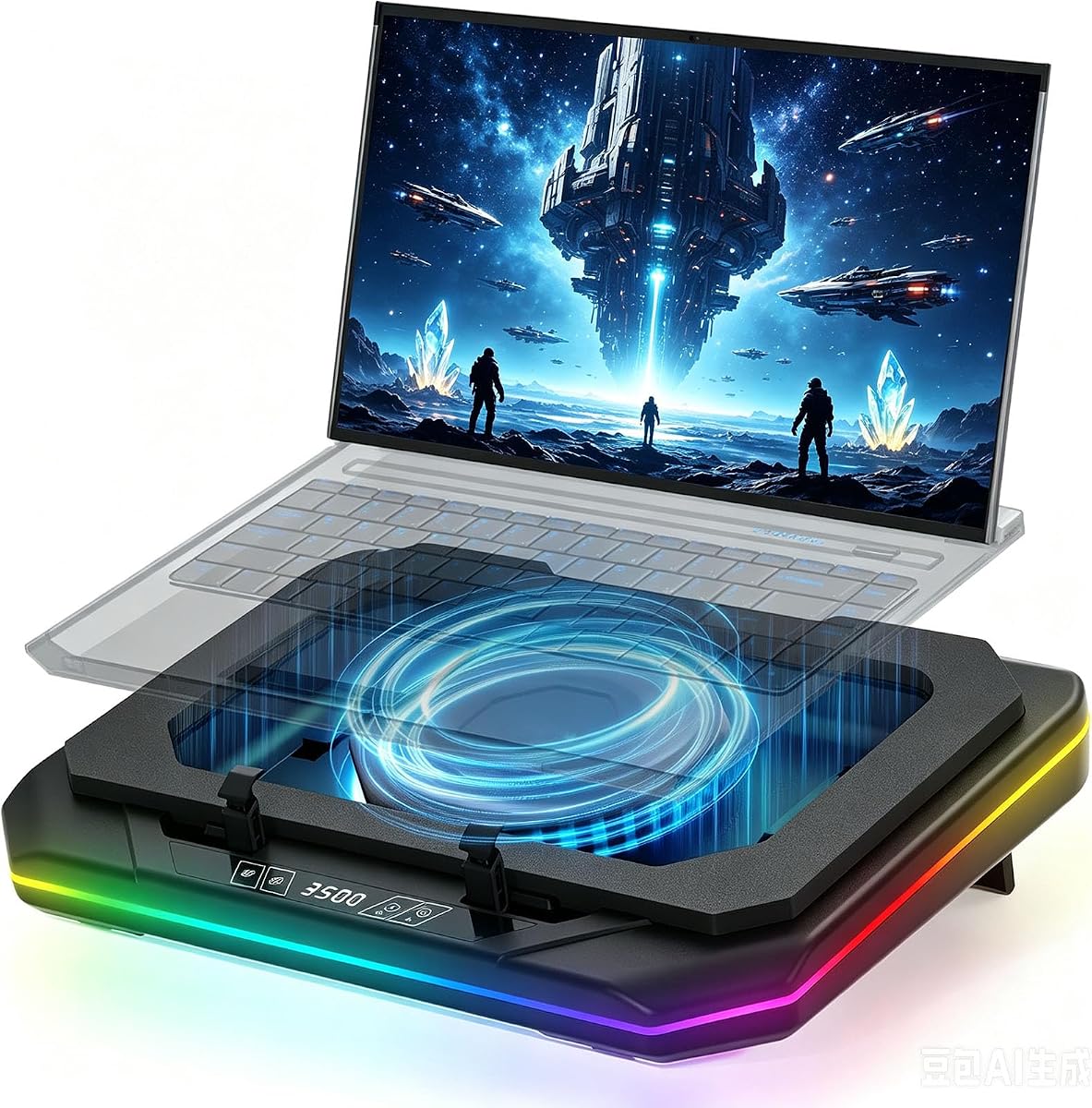


The Razer Laptop Cooling Pad Adaptive Smart offers intelligent thermal management that adjusts fan speeds automatically based on system load. With a 4.4 rating this premium cooling pad stands out for its ability to maintain consistent performance during extended gaming sessions.
We may earn a commission when you buy through this link, at no additional cost to you.
Its airtight pressure chamber ensures cool air reaches your laptop efficiently while the 140 mm brushless fan spins up to 3000 RPM. Three magnetic frames allow compatibility with laptops ranging from 14 to 18 inches and you can customize fan curves via Razer Synapse.
While the price is higher than many alternatives the build quality and smart features justify the investment. Some users may find the software dependency limiting if they prefer simple hardware controls.
This cooling pad is ideal for MSI gaming laptop owners who want precise thermal control and premium design. If you value intelligent features and reliable performance the Razer Adaptive Smart is a top choice.
The intelligent fan control automatically adjusts speeds based on system load to reduce noise while maintaining performance.
Durable construction with magnetic frames ensures stability and compatibility across various laptop sizes.
We may earn a commission when you buy through this link, at no additional cost to you.
The llano V12 Ultra delivers exceptional cooling performance through its Myth.cool software that adjusts fan speeds based on workload. With a 4.5 rating this cooling pad is a favorite for MSI gaming laptop owners who want both automation and manual control options.
We may earn a commission when you buy through this link, at no additional cost to you.
Its 5.5 inch turbo fan pushes up to 2800 RPM through a memory foam edge seal to pressurize airflow into your laptop intake. Lab tests show this can reduce CPU and GPU temps by up to 22 degrees Celsius in just 90 seconds.
While the software dependency may be a minor hurdle the cooling performance is outstanding. The removable dust filter makes maintenance easy and the RGB lighting adds a nice aesthetic touch to your gaming setup.
This cooling pad is perfect for MSI gaming laptop owners who prioritize performance and flexibility. If you want a balance of smart features and powerful cooling the llano V12 Ultra is highly recommended.
Three smart modes automatically adjust fan speeds to match your laptop workload for optimal efficiency.
The memory foam seal ensures all airflow is directed into your laptop intake for maximum cooling effect.
We may earn a commission when you buy through this link, at no additional cost to you.
The havit HV-F2056 offers solid cooling performance at an affordable price making it a top budget pick for MSI gaming laptop owners. With a 4.4 rating this pad is known for its quiet operation and reliable build quality.
We may earn a commission when you buy through this link, at no additional cost to you.
Three ultra-quiet fans create a noise-free environment while the metal mesh provides a stable surface for your laptop. The dual height adjustable stand improves ergonomics and the extra USB port allows you to connect more devices easily.
While it may not match premium models for cooling power it delivers excellent value for the price. Some users may find the fan controls basic compared to more advanced options on the market.
This cooling pad is ideal for budget-conscious MSI gaming laptop owners who need reliable thermal management. If you want quiet cooling without breaking the bank the havit HV-F2056 is a great choice.
Three fans are designed to run quietly so you can focus on gaming without distracting noise.
The adjustable height stand helps reduce strain on your neck and back during long gaming sessions.
We may earn a commission when you buy through this link, at no additional cost to you.
The Cooling Pad for MSI Raider 18 HX is a dedicated thermal solution built for MSI gaming laptops. With a perfect 5.0 rating this cooling pad delivers rapid heat dissipation and robust build quality for demanding gaming workloads.
We may earn a commission when you buy through this link, at no additional cost to you.
Its powerful turbofan spins between 800 and 3500 RPM to reduce CPU and GPU temperatures by up to 40 degrees in 90 seconds. The RGB lighting modes and USB Type-C data input add functionality for your desk setup.
While the cooling performance is excellent the noise at maximum speed can reach 60 dB which may be distracting for quiet environments. The design is optimized for specific MSI models so compatibility should be verified before purchase.
This cooling pad is best for MSI gaming laptop owners who need maximum cooling power. If you want high performance and a stylish RGB design this pad is a strong contender.
The powerful turbofan can reduce CPU and GPU temperatures significantly in just 90 seconds.
Six adjustable lighting modes create a cool gaming atmosphere to match your MSI laptop.
We may earn a commission when you buy through this link, at no additional cost to you.
The Cooling Pad for MSI Vector A18 HX is a dedicated thermal solution built for MSI gaming laptops. With a perfect 5.0 rating this cooling pad delivers rapid heat dissipation and robust build quality for demanding gaming workloads.
We may earn a commission when you buy through this link, at no additional cost to you.
Its powerful turbofan spins between 800 and 3500 RPM to reduce CPU and GPU temperatures by up to 40 degrees in 90 seconds. The RGB lighting modes and USB Type-C data input add functionality for your desk setup.
While the cooling performance is excellent the noise at maximum speed can reach 60 dB which may be distracting for quiet environments. The design is optimized for specific MSI models so compatibility should be verified before purchase.
This cooling pad is best for MSI gaming laptop owners who need maximum cooling power. If you want high performance and a stylish RGB design this pad is a strong contender.
The powerful turbofan can reduce CPU and GPU temperatures significantly in just 90 seconds.
Six adjustable lighting modes create a cool gaming atmosphere to match your MSI laptop.
We may earn a commission when you buy through this link, at no additional cost to you.
The Kootek Laptop Cooling Pad features five quiet fans that provide flexible cooling control for MSI gaming laptops. With a 4.4 rating this pad is known for its versatile fan configuration and ergonomic design.
We may earn a commission when you buy through this link, at no additional cost to you.
You can control fans individually using the on-off switches to select one four or all five fans working together. The dual USB hub allows for more connectivity options and the six height adjustable stand ensures comfortable viewing angles.
While the five fan setup offers great control it may require more cable management and space on your desk. The heavier build adds stability but reduces portability for frequent travelers.
This cooling pad is ideal for MSI gaming laptop owners who want customizable cooling options. If you need a balance of performance and ergonomics the Kootek cooling pad is a solid choice.
The dual switches allow you to control individual fans for customized cooling performance.
Six height adjustable stand helps reduce neck strain during long gaming or work sessions.
We may earn a commission when you buy through this link, at no additional cost to you.
The ChillCore Laptop Cooling Pad features nine cooling fans that provide extensive airflow coverage for large MSI gaming laptops. With a 4.2 rating this pad stands out for its high fan count and customizable RGB lighting options.
We may earn a commission when you buy through this link, at no additional cost to you.
The LCD display shows real-time fan speeds while the 10 RGB light modes allow you to match your desk aesthetics. The eight height stands give you plenty of ergonomic adjustment options and the whisper quiet fans ensure minimal noise.
While the nine fan setup provides great cooling it requires significant power and desk space. The large footprint may not fit well on smaller desks or in compact workspaces.
This cooling pad is best for MSI gaming laptop owners with large laptops who need maximum airflow. If you want extensive fan coverage and RGB customization the ChillCore pad is worth considering.
The LCD readout shows current fan speeds for precise control over cooling performance.
Ten lighting modes allow you to customize the look of your cooling pad to match your setup.
We may earn a commission when you buy through this link, at no additional cost to you.
The llano V12 Gaming Cooling Pad offers a turbo booster fan that provides robust cooling for MSI gaming laptops. With a 4.4 rating this pad is praised for its powerful performance and integrated workstation hub functionality.
We may earn a commission when you buy through this link, at no additional cost to you.
The 5.5 inch turbo booster fan can reduce laptop temperatures by up to 44 degrees Celsius in 90 seconds. The three port USB hub turns your cooling pad into a central hub while the touch mute button allows RGB lighting control.
While the cooling performance is powerful the noise at maximum speed may be noticeable in quiet environments. The 36W power adapter ensures consistent fan performance without draining your laptop battery.
This cooling pad is ideal for MSI gaming laptop owners who want a powerful turbo cooling solution. If you need a balance of cooling power and hub functionality the llano V12 Gaming is recommended.
The 5.5 inch turbo booster provides powerful airflow to reduce laptop temperatures quickly.
The intuitive touch mute button allows you to control RGB lighting without distraction.
We may earn a commission when you buy through this link, at no additional cost to you.
The Laptop Cooling Pad Quiet Turbo Fan delivers quiet thermal management with a patented fan design for MSI gaming laptops. With a 4.5 rating this cooling pad is praised for its low noise operation and efficient airflow.
We may earn a commission when you buy through this link, at no additional cost to you.
The fan runs as low as 35 dBA while still reducing CPU and GPU temperatures by up to 20 degrees. The spring loaded bracket auto-grips your laptop and the RGB modes add a nice aesthetic touch to your desk.
While the low noise is great the fan speed range is limited compared to turbo fans. The USB powered design requires a 3.0 port for full turbo power which may limit some setups.
This cooling pad is ideal for MSI gaming laptop owners who prioritize quiet operation. If you want a balance of cooling and minimal noise the Quiet Turbo Fan cooling pad is a great choice.
The patented design allows for cooling with noise as low as 35 dBA for quiet gaming.
The bracket auto-grips your laptop to prevent slipping and ensure stability during use.
We may earn a commission when you buy through this link, at no additional cost to you.
The llano Gaming Laptop Cooler offers a powerful turbo fan and LED display for precise thermal control on MSI gaming laptops. With a 4.4 rating this cooler is known for its high performance and included mouse pad.
We may earn a commission when you buy through this link, at no additional cost to you.
The 5.5 inch turbo fan can reduce CPU and GPU temperatures by 44 degrees in just 90 seconds. The LED display shows real-time fan speeds and the double non-slip baffles ensure your laptop stays secure during use.
While the cooling performance is excellent the larger footprint may take up significant desk space. The included mouse pad is a nice bonus but adds to the overall dimensions of the product.
This cooling pad is best for MSI gaming laptop owners who need powerful cooling and a complete setup. If you want high performance and value the llano Gaming Laptop Cooler is a strong option.
The LED display shows real-time fan speeds so you can adjust cooling performance easily.
The package includes a large mouse pad to complement your cooling setup and save money.
We may earn a commission when you buy through this link, at no additional cost to you.
Choosing the right cooling fan requires understanding your laptop model needs and environment. Use this guide to focus on the most important factors for your MSI gaming setup.
Ensure the cooling fan supports your MSI laptop size. Most pads cover 14 to 19 inch models. Check specifications to confirm fit and airflow alignment with intake vents.
Choose a cooling fan that matches your laptop dimensions for optimal performance.
Look for fans with high RPM and sealed airflow designs. Turbo fans with memory foam seals direct air efficiently into your laptop intake for better thermal management.
Prioritize cooling fans with turbo fans and sealed designs for maximum heat reduction.
Consider noise ratings especially if you game in quiet environments. Fans with multiple speed settings allow you to balance cooling and noise. Some models operate as low as 35 dBA.
Select cooling fans with adjustable speeds to manage noise during long sessions.
An ergonomic stand with multiple height settings reduces neck strain. Adjustable angles help you find a comfortable viewing position during extended gaming or work.
Choose fans with multiple height and angle settings for comfortable long term use.
Many cooling fans include USB hubs for additional device connectivity. Check if your fan supports Type-C and has enough ports for your peripherals.
Pick fans with sufficient USB ports to connect your essential peripherals.
Filters help prevent dust buildup inside your laptop. Removable filters make maintenance easier and extend the lifespan of your cooling system.
Opt for cooling fans with removable dust filters to keep your system clean.
Durable materials ensure long term reliability. Check for sturdy chassis and anti-slip baffles to keep your laptop secure during intense gaming.
Invest in fans with sturdy construction to protect your laptop investment.
Balance cost with features. High performance fans cost more but often include software control and better materials. Budget models offer reliable cooling at a lower price.
Choose a fan that fits your budget while meeting your cooling needs.
Place the cooling fan on a flat stable surface. Align your laptop intake vents with the fan airflow. Connect to a USB port or wall adapter and ensure the laptop sits securely on the mesh surface.
Adjust the height and angle settings for comfort. Use multiple height options to reduce neck strain. If the fan has multiple modes select the setting that matches your gaming intensity.
Clean the dust filters regularly to maintain performance. Use compressed air to clear debris from vents. Check fan blades for dust buildup every few months. Replace filters if they become clogged or damaged.
Yes cooling fans improve airflow to internal components and reduce temperatures. Lower heat prevents throttling and helps maintain higher frame rates during gaming. Proper use extends the lifespan of your laptop by reducing thermal stress.
Choose a fan that matches your laptop screen size. Most pads support 14 to 19 inch models. Check product specifications to confirm it fits your specific MSI laptop model and covers the intake vents.
Noise varies by model and fan speed. Many fans offer quiet modes that operate below 40 dBA. Some turbo fans can reach 60 dB at max speed. Check decibel ratings before purchasing.
Clean your cooling fan every one to three months depending on your environment. Remove dust filters and use compressed air to clear vents. Frequent cleaning maintains cooling performance and prevents overheating.
Yes cooling fans work for any laptop task that generates heat. They are useful for video editing software rendering or running multiple applications. Adjust fan speed to balance cooling and noise needs.
Some fans offer software for advanced control while others use manual switches. Software fans allow precise adjustments. Manual fans are simpler to use. Choose based on your preference for control complexity.
If overheating persists check your laptop vents for dust blockages. Ensure the cooling fan aligns properly with your intake vents. Consider repasting the thermal compound or contacting support if problems continue.
For MSI gaming laptops cooling fans are valuable. They improve performance and extend hardware lifespan. The investment protects your laptop from overheating damage and helps maintain consistent gaming experiences.
We reviewed ten top cooling fans designed for MSI gaming laptops. The Razer Adaptive Smart offers premium smart features while the llano V12 Ultra provides strong thermal control. Budget options like the havit HV-F2056 deliver reliable cooling at lower prices.
Prioritize cooling performance noise levels and compatibility with your laptop model. Consider ergonomics and USB hubs for your desk setup. Choose a fan that fits your budget and gaming habits.
Prices and availability change frequently so check current listings before purchase. Review customer feedback and confirm specifications match your MSI laptop model. Find the right cooling fan to keep your laptop running smoothly.