
RCA to HDMI Converter
4.4Editor score
Affordable price point
Plug-and-play setup
Supports NTSC formats
Discover the top HDMI to Component Converter models for connecting modern sources to legacy displays. This guide compares features, compatibility, and
Finding the right HDMI to Component Converter is essential for connecting modern devices to older TVs. These adapters ensure compatibility between new HDMI sources and legacy component displays.
We evaluated ten top-rated converters based on resolution support, audio handling, and build quality. Each product was assessed for ease of use and signal integrity.
Our list highlights standout options for budget shoppers and premium users. Prices and availability may change, so check current listings before purchasing your adapter.
4.4Editor score

4.0Editor score

4.3Editor score
The following table compares key specifications across all ten converters to help you choose the right model for your setup needs.


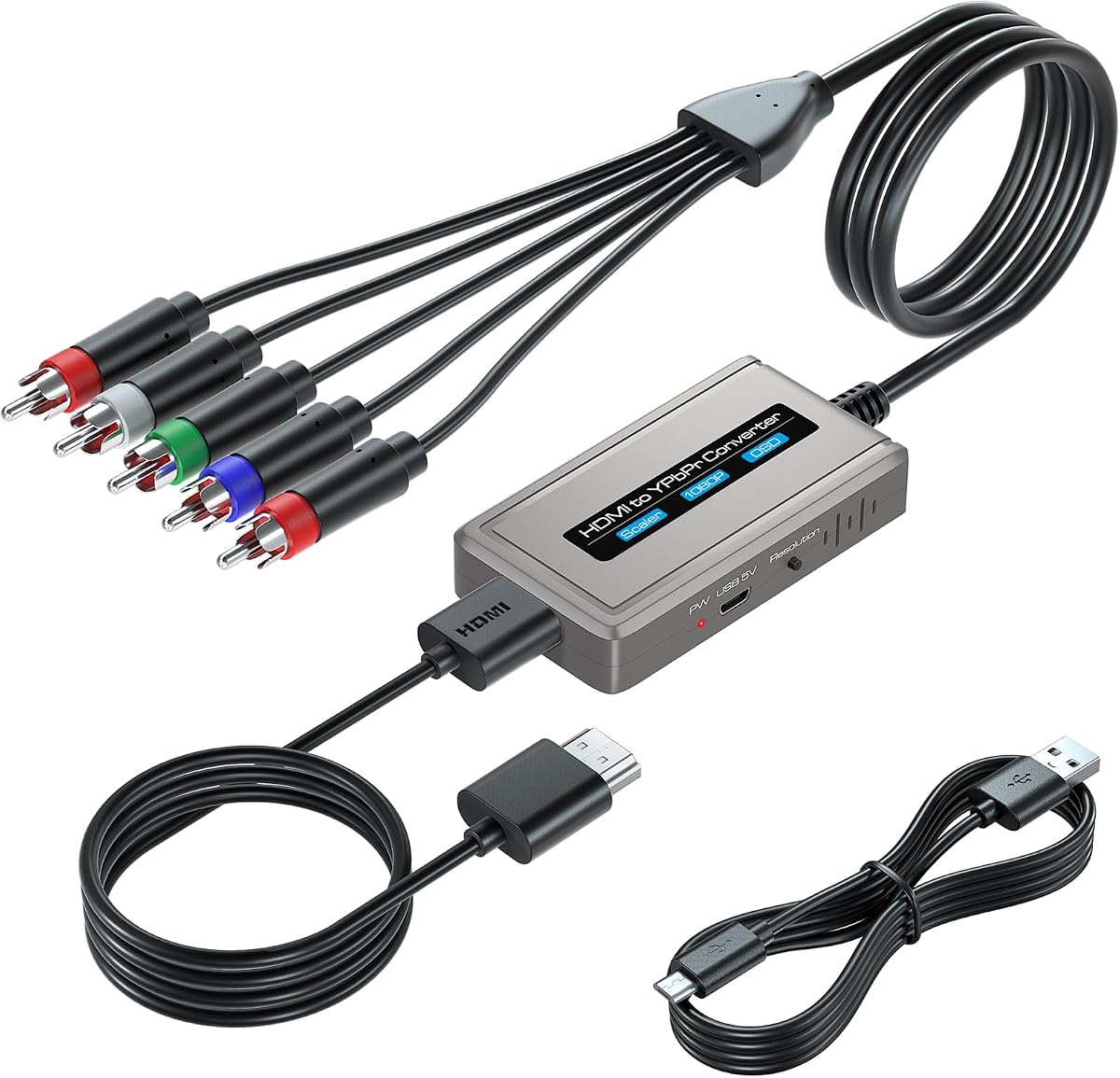

This HDMI to Component Converter is ideal for users needing to connect modern HDMI sources to legacy component displays. With support for 1080P input, it ensures high-definition signal transmission where supported.
We may earn a commission when you buy through this link, at no additional cost to you.
The device features an On-Screen Display (OSD) to show input and output resolutions. This helps users confirm settings quickly without guessing. It supports HDMI V1.4 and delivers uncompressed 2-channel audio.
While it lacks scaling functionality, it maintains original resolution fidelity. This is beneficial for users with compatible component TVs that support 1080P. The unit is compact and easy to install without software.
If you need to connect a laptop or console to an older monitor, this adapter works reliably. Always verify your display supports the output resolution to avoid signal issues.
Ensure your display supports the output resolution to prevent signal loss or degradation during playback.
The R/L audio output provides separate analog audio connectivity for enhanced sound system integration.
We may earn a commission when you buy through this link, at no additional cost to you.
This RCA to HDMI Converter provides an affordable way to connect legacy AV devices to modern HDMI displays. It supports multiple TV formats like NTSC and PAL for global compatibility.
We may earn a commission when you buy through this link, at no additional cost to you.
The package includes an HDMI cable, USB power cable, and user manual. This makes installation straightforward without needing extra accessories. It converts composite input to 1080P output effectively.
Note that this unit requires external USB power during operation. While simple, this means you need a power source nearby. However, it works well for VHS, DVD players, and older consoles.
For budget-conscious buyers, this adapter delivers reliable performance. It is best suited for basic video playback rather than high-frame-rate gaming.
Compatible with PAL and NTSC formats to handle various regional video standards effectively.
Requires a 5V 1A USB power source for stable operation during video conversion.
We may earn a commission when you buy through this link, at no additional cost to you.
This HDMI to Component Converter offers advanced scaling capabilities for better compatibility with older displays. Its built-in scaler engine allows adjustment of resolution to fit various outputs.
We may earn a commission when you buy through this link, at no additional cost to you.
The aluminum housing provides durability and heat dissipation. Users can select resolutions via a switch button. The OSD shows current input and output settings for easy monitoring.
Although pricier than basic adapters, the flexibility is worth it for complex setups. It solves display problems when source resolution exceeds display capabilities.
Ideal for corporate or school environments, this converter ensures seamless presentation. Always check resolution compatibility before purchase for optimal results.
The scaler engine adjusts resolutions to match display capabilities, preventing signal issues with mismatched outputs.
The aluminum housing ensures longevity and stable performance during extended use in professional settings.
We may earn a commission when you buy through this link, at no additional cost to you.
This YPbPr to HDMI Converter bridges older component devices with modern HDMI displays. It supports high resolution including 1080P for enhanced viewing quality.
We may earn a commission when you buy through this link, at no additional cost to you.
Compatible with devices like Xbox 360 and DVD players, it converts analog signals to digital output. HDMI V1.4 compliance ensures secure and stable transmission for HD content.
The unit supports HDCP 1.4 for protected content. However, it cannot be reversed to convert HDMI to component. Ensure your source has YPbPr output for proper use.
For retro gaming enthusiasts, this adapter is a practical tool. It brings older hardware to contemporary TVs without sacrificing video clarity.
HDCP 1.4 compliance ensures secure transmission of protected content on supported displays.
Designed to work with legacy consoles like Xbox 360 and PS2 for improved viewing experiences.
We may earn a commission when you buy through this link, at no additional cost to you.
This Portta Component to HDMI Converter offers a five-year warranty for peace of mind. It supports wide resolutions including 1080P for crisp visuals.
We may earn a commission when you buy through this link, at no additional cost to you.
Uncompressed 2-channel LPCM audio ensures high-quality sound transmission. The unit adheres to HDMI 1.3 standards for reliable performance across devices.
With no signal distortion or delay, it provides a seamless viewing experience. The warranty reflects the manufacturer's confidence in durability.
It suits users prioritizing longevity and audio fidelity. Check your display support for 1080P to fully utilize this adapter's capabilities.
Supports uncompressed LPCM audio for clear, high-quality sound output during playback.
A five-year warranty ensures long-term protection and customer support for your purchase.
We may earn a commission when you buy through this link, at no additional cost to you.
This HDMI to Component Converter is excellent for connecting devices like MacBooks to older TVs. It supports input up to 1080P for sharp image output.
We may earn a commission when you buy through this link, at no additional cost to you.
The OSD feature displays input and output resolutions, helping users verify settings quickly. Audio is transmitted via R/L analog output for stereo sound.
Note that it does not support scaling. If your source resolution exceeds display capability, adjust the input settings manually. It is a straightforward plug and play solution.
Ideal for presentations or media viewing on legacy hardware, this adapter maintains video clarity. Ensure your TV supports the required resolution for best results.
On-Screen Display provides real-time input and output resolution information for easy troubleshooting.
Confirm your display supports 1080P before use to avoid signal compatibility issues.
We may earn a commission when you buy through this link, at no additional cost to you.
This Portta Component to HDMI Converter comes with an HDMI cable for a complete setup experience. It supports 1080P at 60Hz for smooth video playback.
We may earn a commission when you buy through this link, at no additional cost to you.
Compatible with PS2, PS3, and Xbox 360, it brings retro gaming to modern displays. The included cables reduce extra purchases and simplify installation.
Supporting 5-year warranty ensures reliability. However, audio handling may require separate connections. It is suitable for users prioritizing video integrity.
For gamers looking to connect old consoles, this kit is convenient. Verify your display's component port configuration before connection.
The included HDMI cable ensures you can set up immediately without additional purchases.
Ideal for connecting retro consoles like PS2 and PS3 to high-definition displays.
We may earn a commission when you buy through this link, at no additional cost to you.
This 1080P Component to HDMI Adapter is compact and portable for on-the-go setups. It features a male YPbPr connector for easy connection to female component outputs.
We may earn a commission when you buy through this link, at no additional cost to you.
The design supports 1080P output for high-quality visuals. It maintains original resolution without scaling, ensuring authentic video playback. Setup is straightforward without software.
It works with set-top boxes and DVD players efficiently. The compact form factor makes it ideal for travel or tight spaces.
Best for users needing a lightweight solution, this adapter is reliable. Ensure your source device has compatible ports before purchasing.
The compact design allows for easy transport and fits into small carrying bags.
Uses a male YPbPr connector that plugs into female component ports on source devices.
We may earn a commission when you buy through this link, at no additional cost to you.
This HDMI to Component Scaler Converter solves resolution mismatches on older TVs. It includes HDMI and component cables for a complete package.
We may earn a commission when you buy through this link, at no additional cost to you.
The built-in scaler allows up-scaling and down-scaling of HDMI signals. Users can select resolutions via a switch button. OSD shows current input and output settings.
Plug and play functionality ensures minimal setup hassle. USB power is required for operation. It is ideal for displays lacking HDMI inputs.
For retro viewing needs, this adapter provides necessary flexibility. Check power availability for smooth use.
The scaler engine adapts signal resolution to match older display capabilities accurately.
Included HDMI and component cables eliminate the need for separate purchases.
We may earn a commission when you buy through this link, at no additional cost to you.
This HDMI to Component Aluminum Converter combines premium build with scaling features. It supports 1080P input with resolution adjustment capabilities.
We may earn a commission when you buy through this link, at no additional cost to you.
The aluminum housing offers durability and heat resistance. OSD displays resolution settings clearly. Switch buttons allow easy selection of output modes.
Setup is simple without drivers. It handles signal mismatches effectively. Ideal for users who value aesthetics and performance.
For professional use or home theater, this adapter delivers stability. Verify resolution needs before purchase for best results.
The aluminum construction ensures durability and better thermal management during operation.
Users can manually select output resolutions to match their display capabilities.
We may earn a commission when you buy through this link, at no additional cost to you.
Selecting the right converter requires understanding your devices' ports and resolution needs. This guide outlines key factors to consider.
Ensure the converter matches your signal flow. HDMI to Component adapters convert HDMI inputs to Component outputs. Component to HDMI converters do the opposite.
Verify your source and display ports before purchasing to avoid compatibility issues.
Check if the adapter supports your source and display resolution. Most support 1080P, but some are limited to 720P.
Choose a model that matches your highest resolution requirement for optimal clarity.
Converters with built-in scalers adjust resolution to match display capabilities. This prevents signal loss on older screens.
Prioritize scaler-enabled adapters if connecting high-def sources to lower resolution displays.
Verify audio output options. Some converters include R/L audio ports for analog sound connections.
Select a model with proper audio support for integrated sound systems.
Aluminum housing models provide better durability and heat management than plastic ones.
Invest in robust construction for long-term reliability in frequent use.
Some kits include HDMI and Component cables for convenience. Others require separate purchases.
Consider bundled options to save time and ensure proper cable length.
Some adapters require external USB power for stable operation. Others are bus-powered via HDMI.
Check power needs and ensure you have a suitable source for connection.
Look for converters with generous warranty periods. Brands offering five-year support indicate product confidence.
Prioritize models with accessible customer service for troubleshooting assistance.
Connect the source device to the converter using the appropriate cables. Ensure ports are aligned correctly before tightening.
Plug the converter into power if required. Use a 5V USB power source for units that need external power.
Connect the output to the display. Check settings like resolution on the display to ensure matching.
Most adapters require external USB power for stable signal processing. Some may work without, but performance varies.
No, conversion direction is fixed. Using it in reverse will not transmit signals properly due to architecture.
Most support 1080P, but check specs. Some models limit to 720P or 576i depending on features.
Many models output analog stereo R/L audio. Ensure your setup has compatible audio connections.
Verify HDMI or Component ports. Some adapters require female component outputs or male HDMI inputs.
No, most adapters are plug and play. They work without installing additional software on devices.
Yes, it adjusts resolution to match displays. This is vital for connecting HD sources to older screens.
Choose based on resolution needs and scaling. Premium models with aluminum housings offer better durability.
We reviewed ten top adapters ranging from budget to premium. Each serves specific needs for connecting modern sources to legacy displays.
Prioritize resolution support and scaler features for compatibility. Check port requirements before finalizing your purchase decision.
Prices vary based on features. Always check current listings for availability and updated pricing before buying.