
Switch Dock for Nintendo Switch/Switch OLED
4.2Editor score
100W PD Input
4K@60Hz HDMI
USB 3.0 Port
Discover the top 10 best dock for Nintendo Switch Portable Play options for 2026. We compare features, compatibility, and performance to help you choose the
Finding the right dock for Nintendo Switch Portable Play can transform your gaming experience. Whether you travel often or want a lighter home setup, a portable dock offers flexibility without sacrificing video quality or charging capabilities.
We evaluated ten top-rated models based on build quality, video output, and compatibility. Our list includes options for Switch, Switch OLED, and emerging hardware. Each pick balances portability with performance to suit different gaming needs.
Each section highlights key features, pros, and cons to guide your decision. Prices and availability change frequently so check current listings before buying. This guide ensures you select a reliable dock that enhances your portable gaming sessions.
4.2Editor score

4.4Editor score

4.4Editor score
This comparison table lists all ten products side by side. It highlights core specifications like video output, charging speed, and compatibility to help you quickly identify the model that fits your specific gaming setup and travel requirements.

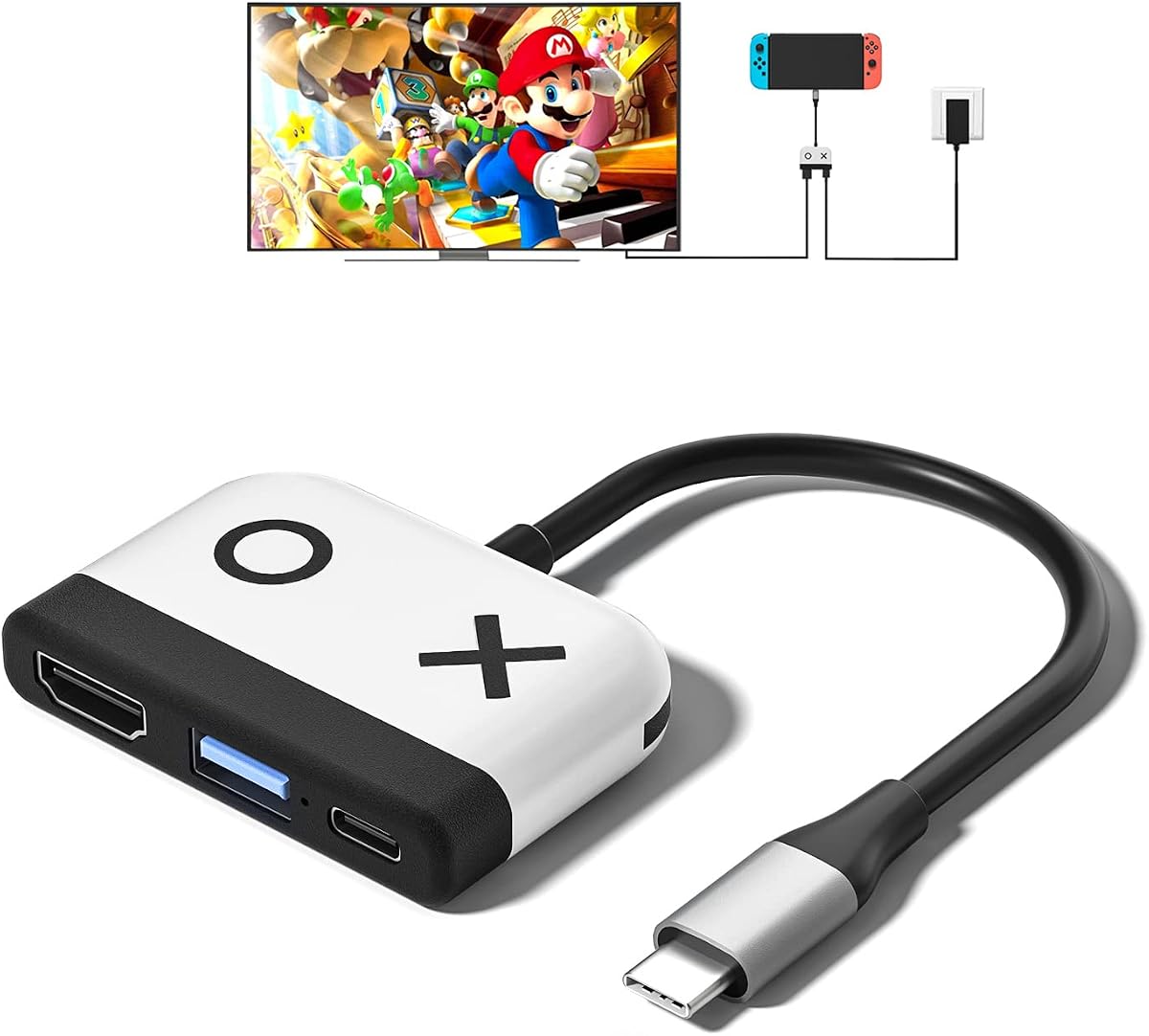


The RREAKA TV Dock ranks highest for its balance of performance and portability. With a 4.4 rating it stands out as a reliable travel companion for Nintendo Switch owners. It supports 4K@60Hz video output and offers 100W power delivery.
We may earn a commission when you buy through this link, at no additional cost to you.
Its aluminium alloy construction ensures durability while keeping weight down to 1.5oz. The four-port design includes USB 3.0 for peripherals and a dedicated PD charging port. This allows simultaneous gaming and charging without overheating or power loss.
While it requires separate HDMI and power cables it offers great flexibility for users who already own quality cables. The compact form factor fits easily into backpacks. Some users may prefer a larger base but this model prioritizes travel convenience.
This dock is ideal for travelers and commuters who need a lightweight solution. It replaces the official dock effectively and supports various USB-C devices like laptops. We recommend it for those seeking top-tier specs in a minimal package.
Supports 4K@60Hz HDMI output for crisp visuals on modern TVs and monitors.
Constructed from lightweight aluminium alloy to resist wear during travel.
We may earn a commission when you buy through this link, at no additional cost to you.
This Switch Dock offers exceptional value for budget-conscious gamers. It supports 4K@60Hz output and includes a 100W PD input port. This means you can charge your device quickly while playing on a big screen.
We may earn a commission when you buy through this link, at no additional cost to you.
The 3-in-1 design includes a USB 3.0 port for connecting accessories like controllers or flash drives. It works seamlessly with Switch and Switch OLED as well as other USB-C devices. The slim profile makes it easy to carry.
While it lacks the premium feel of metal docks it functions reliably. Users note that it requires external cables which adds to the total setup cost. However performance remains strong for the price paid.
Choose this dock if you want high specs without spending extra. It delivers on power and video quality. It is perfect for students or casual travelers who need a functional upgrade over bulky official kits.
100W pass-through charging ensures your device stays powered during long sessions.
Compatible with Steam Deck and other USB-C devices beyond Switch consoles.
We may earn a commission when you buy through this link, at no additional cost to you.
This Travel Portable Switch 2 Dock is tailored for users planning for next-gen consoles. It explicitly supports Switch 2 hardware released in 2025 while maintaining compatibility with Switch 1 and OLED. This future-proofing adds significant value.
We may earn a commission when you buy through this link, at no additional cost to you.
The package includes an HDMI cable which simplifies setup for travelers. It supports 4K@60Hz video and 100W PD charging for robust performance. The instructions are clear about needing a 20V3A adapter for proper activation.
It does not include the power adapter itself so users must supply their own. This keeps the weight down but adds a step to the purchase. However the included cable and Switch 2 readiness justify the extra expense.
This dock is perfect for early adopters and tech enthusiasts. It ensures you are ready for new hardware without buying new accessories. We highly recommend it for anyone invested in the Nintendo ecosystem.
Explicitly compatible with Switch 2 models released in 2025.
Includes HDMI cable to reduce accessory hunting during travel.
We may earn a commission when you buy through this link, at no additional cost to you.
The pdobq Switch Dock is a strong contender for portable gaming setups. It supports Switch 1 2 and OLED models along with the Steam Deck. This broad compatibility makes it useful for multi-console users.
We may earn a commission when you buy through this link, at no additional cost to you.
It features a USB 3.0 port for fast data transfer and HDMI 2.0 for high-resolution output. The design is lightweight and fits comfortably in a backpack. Setup involves connecting power and HDMI before waking the console.
One limitation is the need for a specific PD wall charger to activate TV mode. Also the number of USB ports is lower compared to hub models. Yet performance remains stable for most gaming scenarios.
This dock suits users who want a simple and lightweight replacement. It works well for occasional TV play and travel. Check charger compatibility before buying to ensure smooth operation with your existing setup.
Works with Switch models and Steam Deck for versatile use.
Includes USB 3.0 for rapid peripheral connections.
We may earn a commission when you buy through this link, at no additional cost to you.
The Kstkry Switch Dock uses high-quality silicone for protection. This material resists scratches and damage during transport. Its design is compact enough to fit in a pocket or small bag.
We may earn a commission when you buy through this link, at no additional cost to you.
It supports 1080P video output which is sufficient for most portable TVs. The dock includes a USB 3.0 port for accessories. You can charge your Switch while playing to avoid battery drain.
The trade-off is lack of 4K support and fewer ports. Some users may prefer metal builds for durability. However the silicone offers unique shock resistance that plastic lacks. It is a great alternative for rough handling.
This dock is ideal for those prioritizing portability and protection. It is perfect for commutes or short trips. If you do not need 4K video this model saves space and weight.
Silicone material protects against drops and abrasion during travel.
Compact size allows storage in small bags or coat pockets.
We may earn a commission when you buy through this link, at no additional cost to you.
This iPLYGAM Switch Dock features a 6-in-1 design. It includes multiple USB ports and HDMI 2.0 output. The LED light provides visual feedback when the dock is active. A physical button allows switching between TV and handheld modes.
We may earn a commission when you buy through this link, at no additional cost to you.
The anti-skid pads on the bottom prevent slipping during use. It supports 4K output for high-quality visuals. However it requires you to provide your own HDMI and power cables. This adds weight to your travel kit.
Weighing 2.6oz it is heavier than some competitors but offers more utility. The chip inside provides overheat protection for safety. It is a robust option for home use or stationary setups.
Choose this dock if you need multiple ports and clear status lights. It fits well in home gaming rooms. For frequent travelers the weight and lack of cables might be a drawback.
Includes multiple USB ports for simultaneous device connections.
LED light indicates power status for easy monitoring.
We may earn a commission when you buy through this link, at no additional cost to you.
This Switch 2 Dock features a classic black and white design. It weighs only 45g making it highly portable. The HDMI 2.0 port supports 4K@60Hz output for crisp visuals. The USB 3.0 port offers fast data transfer.
We may earn a commission when you buy through this link, at no additional cost to you.
It supports Nintendo Switch 2 1 and OLED models. The 100W PD charging ensures your device stays powered during gaming. Instructions are included to help with setup. It functions identically to the official standard.
The main downside is the lack of included charger and HDMI cable. You must use an original adapter for stable power. Despite this the build quality is solid and fits easily in a storage bag.
This dock is a great choice for travelers who value simplicity. It offers strong performance with a minimal footprint. Ensure you have compatible adapters before travel to avoid delays.
Weighs only 45g for easy carrying in any bag.
Supports 4K@60Hz for high-definition gaming.
We may earn a commission when you buy through this link, at no additional cost to you.
The BIYTC Switch Dock is a pocket-size adapter. It works with both Switch 1 and Switch 2 consoles. The design includes USB 3.0 and HDMI output for basic needs. It is lightweight and fits in handbags or backpacks.
We may earn a commission when you buy through this link, at no additional cost to you.
Setup involves connecting power and HDMI before waking the switch. The 1080P video output is standard for most portable TVs. It is a straightforward solution without unnecessary features. Perfect for simple travel needs.
While it lacks advanced 4K support it covers essential functionality. The port selection is minimal compared to hubs. This keeps the unit simple and small. It is reliable for basic TV mirroring.
Select this dock if you need a basic and small adapter. It is great for casual users who do not require high specs. Check compatibility with your console to ensure smooth operation.
Simple 3-port design covers HDMI and charging needs.
Pocket size allows easy transport in small bags.
We may earn a commission when you buy through this link, at no additional cost to you.
This AHGEIIY Switch 2 Dock weighs only 39g. It supports 4K@60Hz output and 100W charging. The four ports include HDMI and USB 3.0 for versatility. It fits in pockets and saves space for travel.
We may earn a commission when you buy through this link, at no additional cost to you.
The dock works with Switch 2 OLED MacBook and Steam Deck. It requires DP Alt Mode support on USB-C devices. It does not include wall chargers or HDMI cables. You must provide external power for operation.
The small footprint makes it ideal for tight spaces. It delivers stable performance for video and power. Users should note the lack of accessories. This model prioritizes minimalism and weight savings over bundle value.
Choose this dock if you value low weight above all else. It is perfect for business travelers or students. Verify your device supports DP Alt Mode to ensure video works.
Weighs only 39g for maximum portability.
Supports 4K@60Hz for high-resolution displays.
We may earn a commission when you buy through this link, at no additional cost to you.
This dock features multiple ventilation openings to improve heat dissipation. It allows play while charging in tabletop mode. The spring stand reduces pressure on the charging port. It includes anti-slip pads for stability.
We may earn a commission when you buy through this link, at no additional cost to you.
Video output supports 4K but limits Switch to 1080P. The button on top allows easy switching between modes. It sits on top instead of sliding in. This design offers convenience but may be less secure.
The smart protection chip guards against overheat and short circuits. Users report mixed feedback on stability. The design is functional but has lower customer ratings. It prioritizes safety features over form.
Select this dock if you play for long hours and need cooling. It is a good option for home use. Check user reviews carefully before buying to confirm reliability.
Built-in vents prevent overheating during intense sessions.
Spring stand protects charging port from strain.
We may earn a commission when you buy through this link, at no additional cost to you.
Choosing the right dock requires analyzing several factors. Below are key aspects to consider when selecting a portable dock for your console.
Check the maximum resolution supported. Some docks offer 4K@60Hz while others max out at 1080P. For the best visual experience on modern TVs aim for higher resolutions.
Prioritize docks with 4K support if you own a compatible TV.
Look for a 100W PD input port. This ensures your console stays charged while playing. Insufficient power can prevent TV mode from activating.
Choose docks that support high wattage charging for stability.
Aluminium alloy builds offer better heat dissipation than plastic. Check the weight to ensure it fits in your bag easily. Portability is key for travelers.
Select lightweight metal models for durability and ease of transport.
Count the USB ports available. A 3.0 port allows for fast data transfer. More ports mean you can connect controllers or drives simultaneously.
Pick docks with sufficient USB ports for your peripherals.
Ensure the dock works with your console model. Some docks support Switch 1 OLED and Switch 2. Always check the product details for specific compatibility.
Confirm model support before purchasing to avoid issues.
Some docks include HDMI cables while others do not. Check the packing list to see what is provided. Missing cables mean extra cost.
Look for bundles that include essential cables for convenience.
A smart chip with overheat protection is vital. This prevents damage during long gaming sessions. Safety ensures longevity of your device.
Choose docks with built-in safety chips for protection.
Check customer reviews for real-world performance. High ratings indicate reliability. Look for feedback on stability and video quality.
Trust user feedback to validate the product claims.
Connect the HDMI cable to the dock and your TV before plugging in power. Ensure the dock is connected to a wall charger with sufficient wattage to activate TV mode. Wait for the indicator light if present to confirm activity.
Insert the Switch console securely into the dock slot. Press the wake button if required. If the screen does not turn on check the HDMI port and power source for loose connections.
Keep the dock in a cool dry place when not in use. Avoid bending cables and clean ports with compressed air regularly to maintain performance. Check for dust buildup inside the vents for cooling.
Yes many modern docks support 4K@60Hz video output. This depends on the console hardware. While Switch 1 caps at 1080P newer models or adapters enable 4K.
Most docks require a USB-C Power Delivery charger. A 100W adapter is recommended for stable TV mode. Using a low wattage charger may prevent the console from switching to TV mode.
Yes many docks are designed to be compatible with Switch OLED. Always check the product specifications. Look for labels confirming Switch OLED support to avoid issues.
It varies by manufacturer. Some include an HDMI cable while others sell it separately. Check the product description carefully before purchasing to know what you receive.
Yes docks with pass-through charging allow this. Ensure the charger provides enough power to handle both the dock and the console. This prevents battery drain during gameplay.
Most docks have smart chips for overheat protection. Look for models with ventilation or cooling features. Avoid blocking vents to ensure safe operation.
USB 3.0 offers faster data transfer speeds than 2.0. Use USB 3.0 for peripherals like drives. It ensures smooth performance without lag.
Yes many docks support Steam Deck and other USB-C devices. Check the compatibility list. Docks with DP Alt Mode support work best with laptops and handhelds.
We reviewed ten top portable docks for Switch in 2026. Each offers unique features like 4K support or compact designs. The RREAKA and Switch 2 Docks lead in performance and compatibility.
Prioritize build quality and power delivery for stability. Ensure the dock fits your travel needs and device model. Check if cables are included before buying.
Prices change often so verify current listings before purchase. Use this guide to find a reliable dock that enhances your portable gaming sessions.