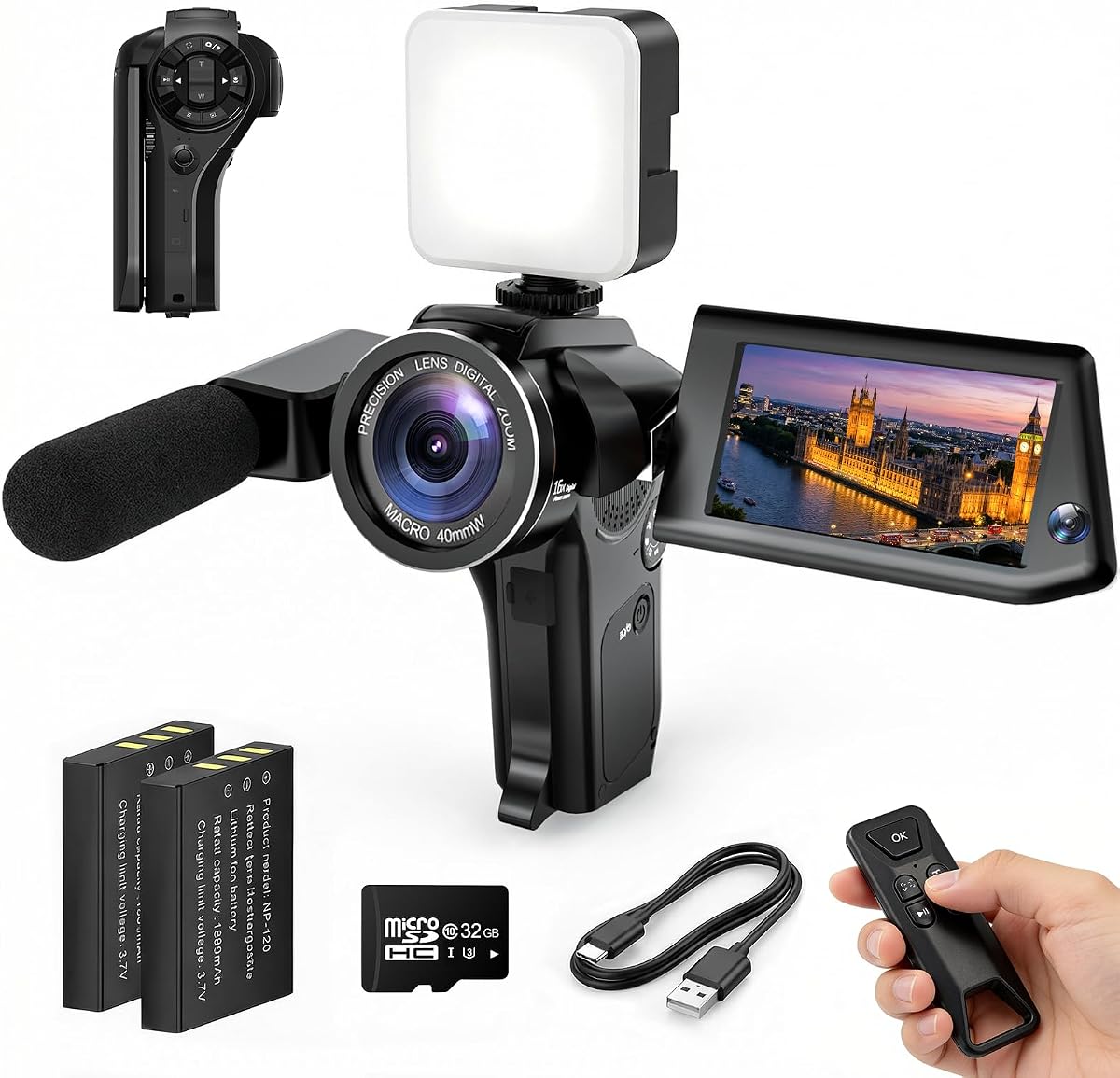
Vlogging Camera with Picture-in-Picture
5.0Editor score
Picture-in-Picture mode
WiFi Flip Screen
Dual-view recording
Discover the top cameras for social media content creators. This guide compares 10 models based on video quality, portability, and features for platforms like
Creating engaging content for social media requires reliable tools that capture high-quality video and images. Whether you are filming for TikTok, YouTube, or Instagram, choosing the right camera can significantly impact your audience engagement and production value.
We have analyzed ten top-rated cameras and kits available this month to help you find the perfect fit for your creative needs. Our comparison covers everything from pocket-sized vloggers to advanced kits with microphones and tripods designed for seamless shooting.
Each selection in this guide highlights specific strengths like portability, resolution, and ease of use. Please note that product availability and pricing may change frequently, so always check the latest details before making your final purchase decision.
5.0Editor score

4.5Editor score

4.4Editor score
This side-by-side comparison evaluates the key specifications and unique features of each camera option to help you make an informed decision based on your specific content creation needs and budget constraints.


This 4K vlogging camera is designed specifically for beginners who want to start creating content without a steep learning curve. With a solid rating, it offers a balance of quality and simplicity that appeals to first-time creators.
We may earn a commission when you buy through this link, at no additional cost to you.
The standout feature is the unique 330° rotating lens which allows for seamless framing without adjusting your body position. It records 4K video and 75MP photos ensuring your content looks sharp across all social media platforms.
While it lacks advanced low-light performance found in higher-end models, it performs well in typical indoor and outdoor lighting conditions. The included accessories like the mini tripod and TF card make it ready to use out of the box.
If you are looking for a reliable starter kit that covers all the basics of vlogging and social media posting this camera is an excellent choice. It simplifies the process so you can focus on your message rather than settings.
The rotating lens allows you to flip the view to yourself easily which is perfect for talking head videos and travel vlogs where you are often alone.
Built-in WiFi connectivity lets you transfer footage directly to your smartphone for immediate editing and posting on apps like Instagram and TikTok.
We may earn a commission when you buy through this link, at no additional cost to you.
The DJI Osmo Pocket 3 is a powerhouse for content creators who demand professional quality in a compact form factor. Its large sensor and advanced stabilization make it a top choice for high-end video production.
We may earn a commission when you buy through this link, at no additional cost to you.
Key strengths include the 1-inch CMOS sensor which captures stunning detail and dynamic range especially in challenging lighting conditions like sunsets or night views. The 3-axis mechanical stabilization ensures smooth footage even while moving.
While it is more expensive than standard vlogging cameras the investment pays off in the quality of output and the versatility it offers for complex shoots. The included microphone transmitter also enhances audio quality significantly.
For serious creators who want to elevate their production value and have the budget for top-tier gear this camera is unmatched. It is ideal for YouTubers and filmmakers who need reliable performance on the go.
The mechanical gimbal keeps your video steady even when you are walking or running which is crucial for dynamic vlogs and action shots.
With D-Log M and 10-bit color depth you have extensive flexibility to color grade your footage during post-production to match your style.
We may earn a commission when you buy through this link, at no additional cost to you.
This camera stands out due to its innovative Picture-in-Picture feature which allows you to record both the scene and your reaction simultaneously. It has received a perfect rating making it a reliable choice for family and lifestyle content.
We may earn a commission when you buy through this link, at no additional cost to you.
The ability to capture your expressions alongside the action makes it perfect for tutorials reviews and family memories. This unique perspective adds a personal touch that traditional cameras cannot easily achieve without complex editing.
While it may not be the go-to for traditional travel vlogs its strengths in reaction videos and storytelling are unmatched in this price range. The WiFi flip screen also facilitates easy framing and sharing to your phone.
If you create content that relies heavily on engagement and personal connection this camera offers a fun and effective tool. It simplifies the process of making your audience feel included in your moments.
Capture the moment and your face at the same time which is ideal for review videos where your opinion matters as much as the product.
Perfect for recording kids events or family gatherings where you want to be part of the video instead of hiding behind a lens.
We may earn a commission when you buy through this link, at no additional cost to you.
This camera offers impressive specifications including 8K video recording and 88MP photo capabilities which are attractive for users seeking high definition footage. It includes a range of accessories like a microphone and stabilizer to get you started quickly.
We may earn a commission when you buy through this link, at no additional cost to you.
The infrared night vision feature is particularly useful for filming in low-light environments without needing extra lighting. The included microphone helps reduce wind noise ensuring clear audio for your vlogs and recordings.
However the 8K resolution is limited to 15FPS which may not be suitable for smooth motion video but works well for static shots and detailed photography. The interface requires some learning to maximize all the features available.
For those who prioritize resolution and want a kit that comes with necessary gear like tripods and remotes this is a strong contender. It serves well for general recording and specific use cases like surveillance or night shoots.
The IR night vision allows you to capture black and white footage in the dark which is great for security or creative night vlogs.
It functions as a webcam via USB connection making it a versatile tool for online teaching or live streaming on social platforms.
We may earn a commission when you buy through this link, at no additional cost to you.
This camera is designed to handle both high-resolution photography and vlogging needs effectively. With 96MP photo capture and 8K video modes it aims to provide a versatile option for creators who do both still and motion media.
We may earn a commission when you buy through this link, at no additional cost to you.
The 3.5-inch flip screen is larger than most in this category offering better visibility when framing shots or checking settings. It supports HDR imaging which helps in capturing balanced exposures in high contrast environments.
Although it includes features like anti-shake and two batteries for extended shooting the image quality is optimized for social media rather than cinema production. It is user-friendly and suitable for beginners needing a compact solution.
If you want a single device that can take sharp photos and decent video without carrying multiple gadgets this camera is a practical choice. The included SD card and batteries make it ready to use right away.
From 96MP photos to 8K video it covers a wide range of media types making it a flexible tool for various content creation tasks.
The intuitive controls and large screen make it easy to navigate menus and start recording without technical hassle for beginners.
We may earn a commission when you buy through this link, at no additional cost to you.
This mini camcorder is built for maximum portability and ease of use making it perfect for spontaneous recording and casual vlogging. Its pocket-sized design means you can carry it everywhere without weighing down your bag.
We may earn a commission when you buy through this link, at no additional cost to you.
With a battery life of up to seven hours it ensures you can record long trips or events without worrying about running out of power. The one-button recording function removes the need for complex setups or app downloads.
While the image quality is not on the level of DSLRs or professional cameras it serves well for quick social clips and memories. The rotating lens allows for some flexibility in framing although it requires manual adjustment.
For travelers and everyday users who want a simple backup camera to capture moments without fuss this is an ideal choice. It focuses on convenience and reliability for daily life recording.
Includes a memory card and requires no apps allowing you to start recording immediately after unboxing without any setup steps.
The built-in battery supports hours of continuous use making it reliable for travel days or long events where charging is difficult.
We may earn a commission when you buy through this link, at no additional cost to you.
Similar to the first option this camera focuses on providing a complete package for vloggers at a reasonable price point. It supports 4K recording and includes a rotating lens for easier self-filming which is essential for solo creators.
We may earn a commission when you buy through this link, at no additional cost to you.
The build is lightweight and compact allowing it to fit easily into pockets for travel. It comes with accessories like a mini tripod and carrying bag which adds value to the purchase and saves money on extras.
Users appreciate the WiFi feature for quick transfers to phones for editing on social apps. While it may struggle slightly in very dark conditions it performs adequately for most outdoor and well-lit indoor scenarios.
If you are looking for a dedicated device for daily vlogging without the complexity of advanced gear this camera is a solid option. It balances cost and functionality well for regular content creators.
Includes a tripod and bag so you have everything needed to start filming immediately upon unboxing for convenience.
Built-in WiFi enables fast file transfers to your smartphone streamlining the process of editing and posting content online.
We may earn a commission when you buy through this link, at no additional cost to you.
This kit is designed to turn your existing smartphone into a professional vlogging setup by adding essential accessories like a wireless microphone and RGB lighting. It is perfect for creators who already have a good phone camera.
We may earn a commission when you buy through this link, at no additional cost to you.
The wireless microphone ensures your voice is heard clearly even in noisy environments while the RGB light allows you to adjust the mood of your video. The flexible tripod adds creative angles for unique shots.
It includes a phone clamp and storage bag making it a convenient and portable solution for social media production. While it requires some setup compared to a standalone camera it offers great flexibility and audio quality.
If you prefer using your phone for editing and storage but want better audio and stability this kit is an excellent investment. It elevates your mobile content production without requiring a dedicated video camera.
The wireless microphone captures clear sound without cables giving you the freedom to move while recording your vlogs.
Adjustable RGB lighting helps fix poor room lighting ensuring your video looks professional and well-lit every time.
We may earn a commission when you buy through this link, at no additional cost to you.
This kit stands out for its auto face tracking tripod which keeps you in focus without needing a camera operator. It includes dual wireless microphones and LED lights ensuring high-quality audio and video for your streams.
We may earn a commission when you buy through this link, at no additional cost to you.
The gesture control feature allows you to start or pause tracking with hand signals making it easy to operate alone. It supports both Lightning and Type-C devices so it works with most modern smartphones.
Ideal for livestreamers and solo vloggers who need to move around while keeping the camera locked on their face. The dual mics ensure you and your guest are heard clearly during interviews or discussions.
If you want to automate your framing and focus for consistent video quality this kit provides a smart solution for mobile content. It saves time during production and ensures you are always centered in the frame.
Use simple hand gestures to control tracking which simplifies operation when you are moving around during a recording session.
Dual microphones capture audio from multiple sources allowing for better interviews and group content without complex setups.
We may earn a commission when you buy through this link, at no additional cost to you.
This webcam is optimized for streaming and online meetings providing a reliable plug-and-play solution for desktop content creators. It features RightLight technology to boost brightness and reduce shadows for a clear image.
We may earn a commission when you buy through this link, at no additional cost to you.
With a privacy cover integrated into the design you can ensure security when not in use which is a thoughtful touch for streamers. The built-in microphone ensures audio is clear without needing extra hardware for basic calls.
It works with most video calling platforms and gaming chat modes making it versatile for various content types. While it lacks autofocus and optical zoom it maintains a stable and clear image for static setups.
If you stream from a desk or host online classes this webcam offers a hassle-free experience with good image quality. It is a reliable choice for creators who need consistent performance for live broadcasting.
RightLight technology adjusts brightness automatically so you look clear even in dimly lit rooms without extra lighting.
The slide cover lets you physically close the lens when not streaming ensuring your privacy and security at home.
We may earn a commission when you buy through this link, at no additional cost to you.
Choosing the right camera involves balancing resolution, portability, and specific features that suit your content style and platform requirements.
Higher resolutions like 4K or 8K provide sharper details which are beneficial for platforms that support high-definition streaming. However consider that higher quality often requires more storage and processing power for editing.
Look for models that offer 4K or higher resolution to ensure your content remains crisp on various screen sizes and future-proofs your investment.
If you travel frequently or shoot on the go a compact and lightweight design is essential. Cameras that fit in a pocket or small bag allow you to capture spontaneous moments without burdening yourself.
Prioritize lightweight models with carrying cases if you plan to shoot outdoors or during long travel days to ensure ease of use.
Clear audio is often more important than video quality for retaining viewer attention. Check if the camera has a built-in microphone or supports external mics for better sound recording in noisy environments.
Ensure the camera supports external audio input or has a reliable built-in mic to avoid poor sound quality that can ruin your videos.
Shaky footage can distract viewers and reduce production value. Optical or mechanical stabilization helps keep your shots smooth especially when you are moving while recording.
Look for built-in stabilization or gimbal support to maintain steady shots during active recording sessions without needing extra gear.
Long recording sessions require a battery that lasts. Extended battery life means less downtime for charging and more time capturing content on location.
Choose cameras with high capacity batteries or options to swap batteries easily to keep your workflow uninterrupted.
Fast transfer of files to your phone or computer is crucial for timely posting. WiFi and Bluetooth features allow for wireless transfers which streamline your editing process.
Select models with reliable WiFi or app connectivity to quickly move files to your editing device without cables.
User-friendly interfaces with flip screens and intuitive menus help beginners start creating immediately. Complicated settings can slow down your creative process.
Opt for cameras with flip screens and simple controls to make framing and operating the device easy during shoots.
Kits that come with tripods, cards, or lenses offer better value and save you from buying separate items. Check what is included in the box before purchasing.
Verify if the package includes essential accessories like memory cards or mounts to get started right away.
Always clean your lens with a soft cloth before filming to ensure the clearest image possible. Dust and fingerprints can significantly reduce video quality even on high-end sensors.
Charge your batteries fully before recording sessions and keep spare cards ready to avoid interruptions. Proper power management ensures you capture every moment without technical issues.
Store your camera in a protective case when not in use to prevent damage from drops or moisture. Regular maintenance helps extend the lifespan of your equipment significantly.
1080p is standard for TikTok but 4K is recommended for future-proofing and better cropping options. Most platforms now support 4K which ensures your videos look sharp on high-resolution phones.
A tripod is highly recommended for static shots and interviews to ensure stability. It allows you to frame shots consistently and frees up your hands for other tasks during recording.
Audio is critical as poor sound can cause viewers to leave quickly. Invest in a good microphone or camera with excellent audio features to ensure your voice is clear and engaging.
Yes webcams are great for desk-based streaming and static content. They are convenient and plug-and-play but may lack mobility for on-the-go filming.
A flip screen allows you to see yourself while recording which is essential for talking head videos. It helps you frame your shots accurately without looking at a viewfinder.
Ideally batteries should last at least 2 hours for continuous recording. Carry spare batteries for longer shoots to avoid running out of power mid-session.
The top picks in this guide offer a range of options from budget-friendly kits to professional-grade cameras for every type of creator. Whether you prioritize portability or image quality there is a fit for your specific needs.
Consider what matters most to your content style such as audio stability or ease of transfer. Investing in the right tools will help you create consistent high-quality videos that engage your audience effectively.
Always check current availability and pricing before purchasing as these details can change frequently. Ensure you have all necessary accessories ready to start creating immediately.