
SUPVAN E10
4.3Editor score
Bluetooth app editing
Rechargeable battery
Laminated waterproof tape
This expert guide compares the top ten handheld label makers for home and office organization based on features, portability, and printing quality to help you
Finding the right handheld label maker can transform how you organize your space. A good device offers portability, ease of use, and durable print quality that lasts through daily wear and tear in various environments.
We compared ten top-rated models based on keyboard layout, display size, battery life, and tape compatibility. Our analysis focuses on real-world usability for students, homeowners, and professionals needing quick identification solutions.
Each pick highlights key strengths and ideal use cases for different labeling needs. Remember that prices and availability change frequently so check current listings before making your final purchase decision for your specific project requirements.
4.3Editor score

4.7Editor score

4.4Editor score
The following table provides a side-by-side look at all ten models reviewed in this guide. Compare their core specifications and key features to find the device that aligns best with your organizational goals and budget constraints.





The Brother P-Touch PTH110BP stands out as the top pick for users seeking reliability and professional results. With a high rating of 4.7 stars, it combines ease of use with robust features that cater to both home and office environments effectively.
We may earn a commission when you buy through this link, at no additional cost to you.
Its standout quality lies in the support for Brother Genuine P-Touch TZe tapes which are laminated and resistant to fading and water. This ensures your labels remain legible even in harsh conditions like kitchens or garages where moisture and wear are common.
The device includes a full QWERTY keyboard making text input fast and accurate. One-touch keys simplify common tasks while the preview display allows you to check your work before printing to avoid wasting tape and reducing errors.
While the AC adapter is sold separately and the unit is slightly larger than ultra-compact models these trade-offs are acceptable for the durability and print quality offered. It is ideal for anyone needing a versatile and long-term labeling solution.
The TZe tapes used by this model offer a laminated finish that protects text from scratches, water, and fading ensuring your labels look professional for years.
With one-touch keys and a preview display you can create and print labels quickly without needing to check every character before sending the print command.
We may earn a commission when you buy through this link, at no additional cost to you.
The SUPVAN E10 offers an excellent entry point for those wanting modern features without a high cost. Its 4.3 rating reflects solid performance for basic labeling tasks in homes schools and small offices where budget is a primary concern.
We may earn a commission when you buy through this link, at no additional cost to you.
This device relies on a Bluetooth connection to a smartphone app for editing which opens up a world of fonts frames and icons. The app is free with no registration required making it accessible for all users regardless of technical skill.
It comes with three rolls of laminated tape that are waterproof oil-proof and scratch-resistant. This makes it suitable for labeling kitchen containers bathroom items or outdoor gear where durability against elements is necessary for long-term use.
While manual typing options are limited compared to dedicated keyboards the app interface compensates with versatility. If you value cost efficiency and smart features over standalone typing this is the best value option available today.
You can choose from 40 fonts and over 450 icons to create custom labels that match your style or organizational system without any software subscription fees.
The built-in battery lasts up to a month on a single charge reducing waste from disposable batteries and lowering long-term operating costs for frequent users.
We may earn a commission when you buy through this link, at no additional cost to you.
The DYMO LabelManager 160 is designed for users who want a seamless and professional labeling experience. Its 4.4 rating indicates strong reliability and functionality making it a top choice for businesses and organized households alike.
We may earn a commission when you buy through this link, at no additional cost to you.
This model features a large display that shows your text clearly before printing. The QWERTY keyboard allows for rapid typing which is essential for labeling many items in a short amount of time during busy inventory or moving projects.
It supports over 200 symbols and 20 text formats allowing for high customization. The bundle includes three label cassettes so you can start labeling immediately without needing to buy extra supplies right away upon delivery.
Although the device is more expensive and replacement tapes can cost more than budget brands the build quality and feature set justify the investment. It is perfect for office environments where consistency and durability are highly valued priorities.
Typing names or addresses is significantly faster compared to navigational keys saving you time when labeling large numbers of files or storage bins quickly.
The large screen lets you review text and formatting changes instantly reducing errors and ensuring your labels look neat and organized before they are printed.
We may earn a commission when you buy through this link, at no additional cost to you.
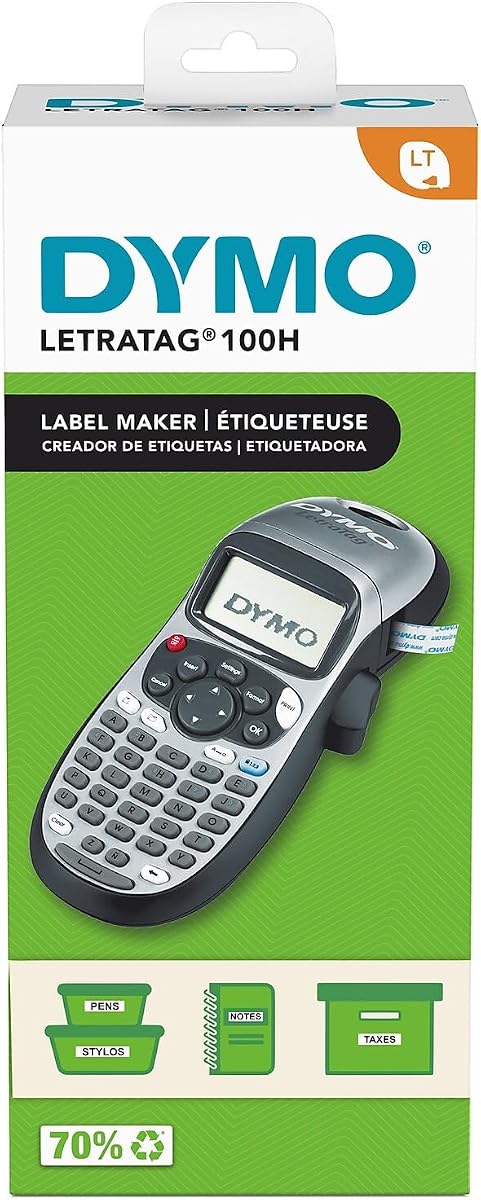
The DYMO LetraTag 100H Plus is an excellent option for those who prioritize portability and ease of use. With a strong 4.6 rating it is perfect for quick labeling tasks around the house or in small office spaces.
We may earn a commission when you buy through this link, at no additional cost to you.
Its graphical display allows you to see how fonts and styles will look before printing. This feature helps in visualizing the final product which is useful when matching labels to existing organizational systems or color schemes.
The device includes a magnetic holder which is a unique addition for storing the device when not in use. It also saves power with an auto-off function extending battery life for times when you are using it sporadically over days.
While it offers less customization than full keyboard models its simplicity is a benefit for users who want straight answers labeling. The included plastic and paper tapes give a good start for diverse labeling needs immediately.
The screen shows font effects and box styles clearly so you can make informed design choices without guessing how the final label will appear.
The included magnetic holder lets you store the device on a metal surface like a fridge or filing cabinet keeping it accessible and safe when idle.
We may earn a commission when you buy through this link, at no additional cost to you.
The SUPVAN E11 provides a flexible approach by offering both keyboard and Bluetooth app printing options. Its 4.5 rating suggests that users appreciate this versatility for different types of labeling tasks ranging from quick notes to complex designs.
We may earn a commission when you buy through this link, at no additional cost to you.
The minimal margin printing feature allows for labels that take up less space which is efficient for small items or when space is limited on a surface. This reduces material waste and allows for more text on smaller labels.
You can use the device standalone with its keyboard or connect to the app for advanced editing. The app supports multiple languages and templates which is beneficial for multilingual households or businesses with diverse needs.
While Bluetooth connectivity can sometimes be finicky the overall value is high given the rechargeable battery and included tapes. It is a smart choice for users who want smart features without paying premium prices for brand names.
This feature prints with only a 0.2 inch margin allowing your labels to be smaller and more efficient which saves tape and improves aesthetics on small items.
Having both keyboard and app options means you can choose the fastest method depending on your task whether it is quick manual entry or detailed design work.
We may earn a commission when you buy through this link, at no additional cost to you.
The DYMO LetraTag 100H Silver is a classic choice for simple and effective labeling. It holds a solid 4.6 rating thanks to its thermal printing technology which means you do not need to worry about ink cartridges or messy refills.
We may earn a commission when you buy through this link, at no additional cost to you.
Its lightweight design makes it easy to carry around the house or office. You can label anything from files to food containers without needing a bulky device which is great for on-the-go organization tasks in various rooms.
The preview screen helps ensure accuracy before you print which saves tape in the long run. It is straightforward to use with intuitive buttons that anyone can learn quickly without needing a manual or tutorial guide.
While the tapes may curl slightly over time this is a common issue with thermal paper. For basic indoor use this model is reliable and affordable making it a favorite for those who need simple organization tools.
The device uses heat to create images on the tape meaning no ink or toner is required which simplifies maintenance and ensures print quality remains consistent.
The simple button layout allows users to navigate menus and print labels quickly without getting lost in complex settings or confusing configurations.
We may earn a commission when you buy through this link, at no additional cost to you.
The SUPVAN E12 improves on the E11 model with an LCD backlit display that is easier to read in any lighting condition. Its 4.4 rating reflects a balanced experience for users who want both manual typing and app connectivity options.
We may earn a commission when you buy through this link, at no additional cost to you.
The backlit screen is particularly useful for working in dimly lit areas like basements or pantries where light might be scarce. This ensures you can always see what you are typing and editing without straining your eyes significantly.
Like its sibling model it supports minimal margin printing and a long-lasting rechargeable battery. The app offers hundreds of icons and templates which allows for creative labeling projects that go beyond simple text identification tasks.
The device is compact and easy to carry making it suitable for students or renters who move frequently. While it requires an app for design it offers good value for the features provided compared to similarly priced competitors.
The LCD screen lights up making it easy to view labels and text in low light conditions which is helpful for labeling items in dark storage areas.
The rechargeable battery eliminates the need for constant battery replacements saving money and reducing waste over the life of the labeling device.
We may earn a commission when you buy through this link, at no additional cost to you.
The Brother P-Touch PT-N10 is designed for personalization and fun labeling projects. It has a 4.3 rating for users who want colorful expressive labels for dorm rooms travel and everyday organization tasks around the home.
We may earn a commission when you buy through this link, at no additional cost to you.
It uses exclusive Btag tapes that come in many colors and feature easy peel backings. This makes the labeling process quick and damage-free which is ideal for labeling belongings that you might want to remove later without residue.
The device includes a full QWERTY keyboard and a built-in cutter for clean edges. It also saves frequently used labels for quick reprinting which helps when you need to make multiple copies of the same label efficiently.
While it is limited to Btag tapes which may cost more than standard options the unique aesthetic is worth it for creative projects. It is perfect for students or anyone who wants to add style to their organizational system.
The variety of colorful tapes and frames allows you to create unique labels that stand out and make organizing fun rather than just a functional chore.
The split easy peel backing makes it simple to separate the backing from the tape and apply the label smoothly without crumpling or air bubbles.
We may earn a commission when you buy through this link, at no additional cost to you.
The Brother P-Touch PT-N20 builds on the PT-N10 with a larger display and more font options. It shares the 4.3 rating by maintaining the fun and functional design that appeals to users who want to express creativity in labeling.
We may earn a commission when you buy through this link, at no additional cost to you.
The 16-character display gives you more room to preview your text which helps in catching mistakes before they are printed. This is particularly helpful when creating longer labels or using special characters and symbols extensively.
It supports the same Btag tapes as the PT-N10 offering vibrant colors and easy application. The device includes memory to save up to 10 labels which is useful for recurring tasks like labeling storage bins or pantry items.
Although it lacks app connectivity the on-device features are robust for manual design. It is a solid choice for those who prefer standalone devices and want more screen space for better visibility during text input tasks.
The 16-character display allows for better text preview and easier editing which reduces errors and ensures your labels look exactly as intended.
Saving up to 10 labels for quick re-printing helps with recurring projects where you need to print multiple copies of the same information.
We may earn a commission when you buy through this link, at no additional cost to you.
The Brother P-Touch PTH111 is tailored for technical and industrial labeling needs with specific one-touch keys for cables and plates. Its 4.6 rating highlights its reliability and specialized features for workshops garages and office wiring tasks.
We may earn a commission when you buy through this link, at no additional cost to you.
It supports four tape widths including narrow cables which is essential for organizing electrical panels and wires. The one-touch keys simplify common electrical identification tasks making it a favorite for electricians and tech professionals.
The device is lightweight and includes a detachable wrist strap for portability. It works with durable laminated tapes that can withstand harsh conditions and chemicals found in workshops and industrial environments over long periods.
While it may be more than a typical home user needs its capabilities are unmatched for professional tasks. If you are labeling equipment or infrastructure this model provides the precision and durability required for tough environments.
Dedicated keys for cable wrap and flag make labeling wires faster and easier without needing to manually select shapes for common electrical projects.
Support for multiple tape widths allows you to use the same device for various labeling needs from thin wires to broad surface identification tasks.
We may earn a commission when you buy through this link, at no additional cost to you.
Choosing the right label maker involves balancing features budget and specific use cases. Consider the following factors to ensure you select a device that fits your organizational needs.
The type of tape a device uses is critical because it affects label longevity and cost. Some models like Brother use laminated TZe tapes that resist water and chemicals while others like DYMO or budget brands use thermal paper which may fade over time.
Manual keyboards offer speed and independence while app-connected models provide design flexibility. Decide if you need quick text input or want creative design options with fonts and icons available on a smartphone.
A larger screen helps preview text and reduces errors before printing. If you work in low light look for backlit displays or screens with high contrast to ensure readability.
Devices may run on disposable batteries or built-in rechargeable packs. Rechargeable models save money long-term but disposable battery models are useful if you need immediate availability without charging.
Check the maximum tape width supported as this determines how much text fits on a label. Narrow tapes save space but wider tapes are better for larger identifiers.
Consider the weight and size if you plan to carry the device around. Compact and lightweight models are ideal for students while heavier ones may offer more durability for industrial use.
Memory allows you to save frequently used labels for quick reprinting. This feature is useful for businesses or homes that reuse the same labels regularly for bins or files.
Some models come with tapes or holders while others require separate purchases. Bundles can offer better value initially so check what is included with the device before buying.
Start by loading the tape cassette correctly ensuring the tape feeds smoothly through the printing mechanism. Most devices have clear guides or arrows to help position the cassette properly before closing the cover securely.
Type your desired text using the keypad or app interface and use the preview function to check for errors. Adjust fonts or spacing if needed before pressing the print button to create the label.
To maintain your device keep the printing head clean by gently wiping it with a soft cloth. Store the label maker in a dry place away from direct sunlight to preserve battery life and plastic components.
Thermal labels use heat to print and are often cheaper but may fade over time. Laminated labels have a protective layer that makes them durable against water and chemicals making them ideal for harsh environments.
No different brands use proprietary tapes that fit only their specific models. It is important to check compatibility before buying tapes to ensure they fit your device properly.
Use a soft dry cloth to gently wipe the print head. Avoid using harsh chemicals that could damage the component and always turn off the device before cleaning to ensure safety.
Common reasons include empty batteries a jammed tape or incorrect cassette installation. Check the battery level and ensure the tape is loaded correctly according to the user manual instructions.
Third party tapes are available but may not print as well or stick as long as original brand tapes. Using authentic tapes ensures the best performance and protects your device warranty.
Battery life depends on usage and model. Rechargeable batteries can last weeks on a single charge while disposable batteries vary but generally last for hundreds of labels depending on print density.
For home use models like the Brother P-Touch PTH110BP offer a balance of durability and features. Budget options like SUPVAN are also excellent for occasional labeling needs.
The Brother P-Touch PTH110BP leads as the top choice for reliability while the SUPVAN E10 offers great value for budget-conscious users. The DYMO LabelManager 160 stands out for office environments needing large displays.
Prioritize tape durability and input method based on your specific needs to ensure satisfaction. Investing in a quality device saves time and reduces waste in the long run for your organizational tasks.
Prices and availability change frequently so check current listings before finalizing your purchase. Regular updates may affect bundle inclusions or discounts so staying informed helps you get the best deal.