
SCRIB3D P1 3D Printing Pen with Display
4.4Editor score
Stepless speed control slider
Temperature adjustable for PLA ABS
Includes starter colors stencils
This guide compares the top 3D printing pens for kids based on safety, ease of use, and creative features to help parents choose the right tool.
3D printing pens allow children to draw in three dimensions using heated plastic filament. These tools transform flat sketches into tangible objects, fostering creativity and spatial understanding in a fun and interactive way for young artists.
We evaluated ten leading models focusing on safety features, temperature control, filament compatibility, and included accessories. Our analysis highlights pens suitable for beginners as well as those offering advanced controls for growing creative skills and independent project building.
Each selection showcases specific strengths like child-safe nozzles, display screens, or bundle kits. Prices and availability change frequently so check current listings before purchasing to ensure you get the best value and latest product version for your child.
4.4Editor score
4.4Editor score
4.5Editor score
The following table provides a side-by-side comparison of the ten selected 3D printing pens. Review key specifications like filament type, speed control, and included accessories to find the best match for your child's skill level and interests.


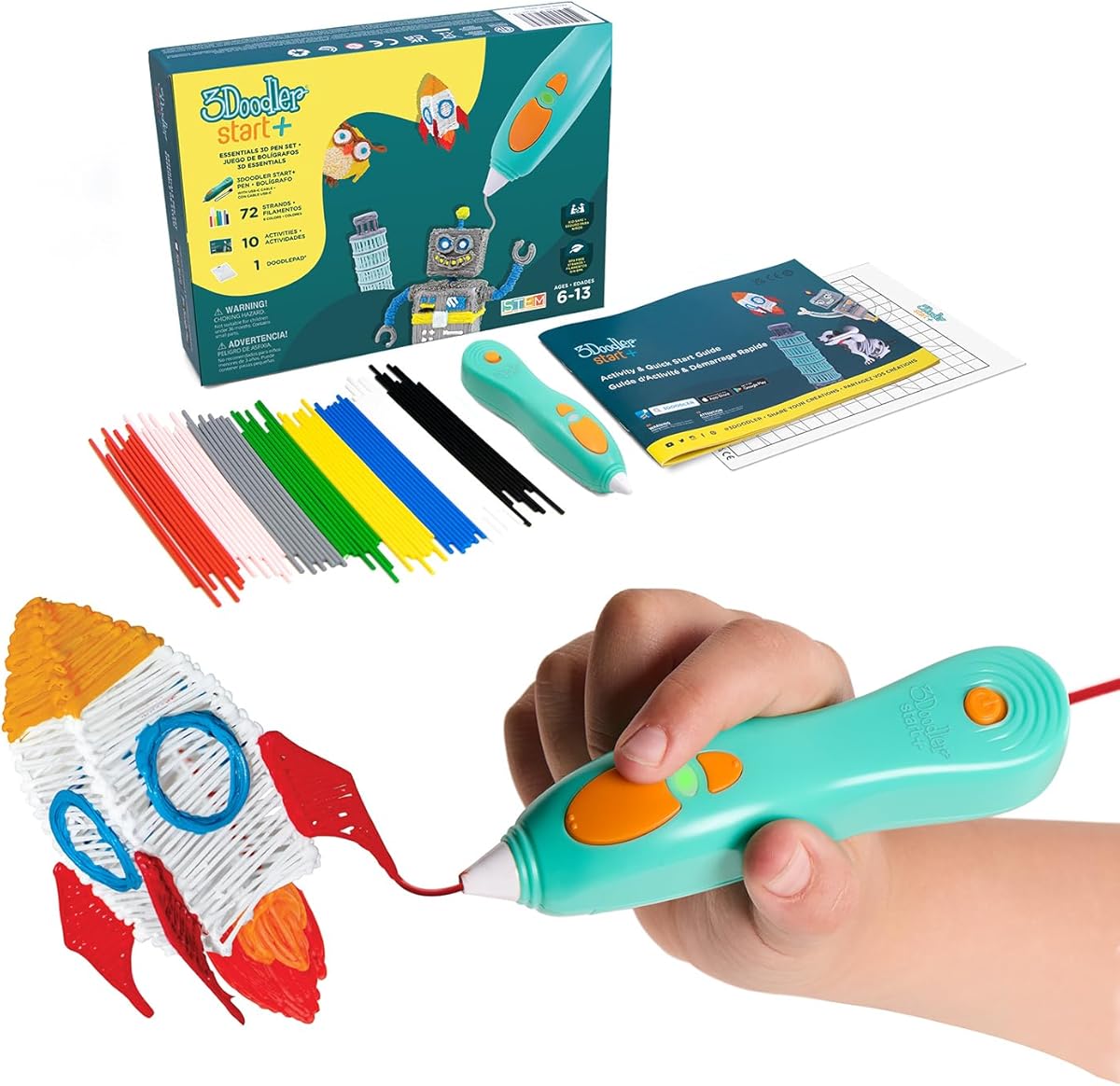
The 3Doodler Start+ Essentials set holds the top spot for safety and ease of use. With a rating of 4.4 stars it stands out as the ideal choice for children aged six and above who are new to 3D drawing.
We may earn a commission when you buy through this link, at no additional cost to you.
Its standout feature is the completely safe nozzle design that eliminates burn risks. The kit includes 72 strands of mixed-color Start+ plastics and 10 new stencils allowing immediate creative play without needing extra purchases.
While the filament is proprietary and limits color variety compared to open systems the safety benefits outweigh this trade-off for young users. The included DoodlePad and activity guide provide structured learning to help kids master basic techniques quickly.
Parents seeking a worry-free introduction to 3D art should prioritize this model. It combines robust safety standards with educational value making it the most reliable option for fostering creativity in early learners.
The nozzle and plastic can be touched with no burn risks ensuring parents can relax while children explore their creativity freely.
Included stencils and activity guides help children connect their drawings to STEM concepts encouraging both artistic and scientific growth.
We may earn a commission when you buy through this link, at no additional cost to you.
The SCRIB3D P1 offers exceptional value for families wanting to try 3D printing without a high investment. Its 4.4 star rating reflects consistent performance and reliability for users of various skill levels.
We may earn a commission when you buy through this link, at no additional cost to you.
A key strength is the stepless speed slider which allows optimal control from slow intricate projects to faster infill work. The display shows temperature settings clearly helping users avoid errors during creation.
The P1 works with both PLA and ABS filament providing flexibility as children grow their skills. While it requires a warm up period of two to three minutes the anti clogging features ensure smooth operation once ready.
For budget conscious shoppers the P1 delivers high grade performance. It is an excellent gateway pen for beginners who want quality controls and versatility without paying premium prices for advanced features.
The stepless speed function lets you adjust flow for optimal control no matter the task whether intricate details or large structures.
Support for both PLA and ABS means you can choose materials based on project needs or skill progression over time.
We may earn a commission when you buy through this link, at no additional cost to you.
The MYNT3D Professional pen is designed for users who need precise control over their 3D creations. With a 4.4 star rating it is praised for its high quality build and advanced temperature management features.
We may earn a commission when you buy through this link, at no additional cost to you.
Its OLED display provides real time temperature monitoring which helps achieve consistent material flow. The temperature can be adjusted in single degree increments allowing for fine-tuning to suit different filament types.
The adjustable feed mechanism gives you total control over material flow while drawing. This makes it suitable for detailed artistic work where consistency is key though it may require more practice than simpler pens.
Artists or older kids seeking professional grade tools will appreciate this model. It balances advanced features with an ergonomic design making extended use comfortable for detailed projects.
The OLED display lets you monitor temperature of material to help you achieve a wide variety of effects during creation.
Adjustable feed rate and 1-degree temperature steps ensure optimal control of material while you are drawing intricate designs.
We may earn a commission when you buy through this link, at no additional cost to you.
The MYNT3D Super pen is built for durability and smooth operation. Rated 4.3 stars it is noted for its unique ultrasonic sealed nozzle which helps prevent clogs and ensures reliable performance.
We may earn a commission when you buy through this link, at no additional cost to you.
This pen offers market leading durability thanks to its advanced nozzle technology. The stepless speed slider allows you to regulate flow for optimal control of material while you are drawing precise lines.
It supports both ABS and PLA filaments offering flexibility for various project types. The slim ergonomic touch pen design makes it comfortable to hold during long creative sessions reducing hand fatigue.
Ideal for users who prioritize reliability over flashy features the Super pen delivers consistent results. Its robust build ensures it lasts through regular use in active creative environments.
The ultrasonic sealed nozzle is nearly clog-proof and provides market leading durability for trouble-free doodling.
Stepless speed slider lets you regulate flow for optimal control of material while you are drawing complex structures.
We may earn a commission when you buy through this link, at no additional cost to you.
The SCRIB3D Advanced pen is designed for a smooth and accurate doodling experience. With a 4.3 star rating it combines engineering enhancements with a focus on user comfort and control.
We may earn a commission when you buy through this link, at no additional cost to you.
Its ergonomic design features a soft touch surface intended to fit your hand comfortably. The LCD screen helps monitor heat and ensure you have the correct settings for consistent results during use.
You can choose from 8 different speed options to regulate flow for optimal control of line thickness. The kit includes 5 colors of PLA plastic totaling about 50 feet of material for immediate use.
For users valuing comfort and visual feedback this model is a strong contender. It offers enough features to support creative growth without overwhelming the user with complex settings.
Sleek and ergonomic design with curvature intended to fit your hand for the most comfortable 3D drawing experience on the market.
Large LCD screen helps monitor heat and ensure you have the correct settings for consistent drawing results.
We may earn a commission when you buy through this link, at no additional cost to you.
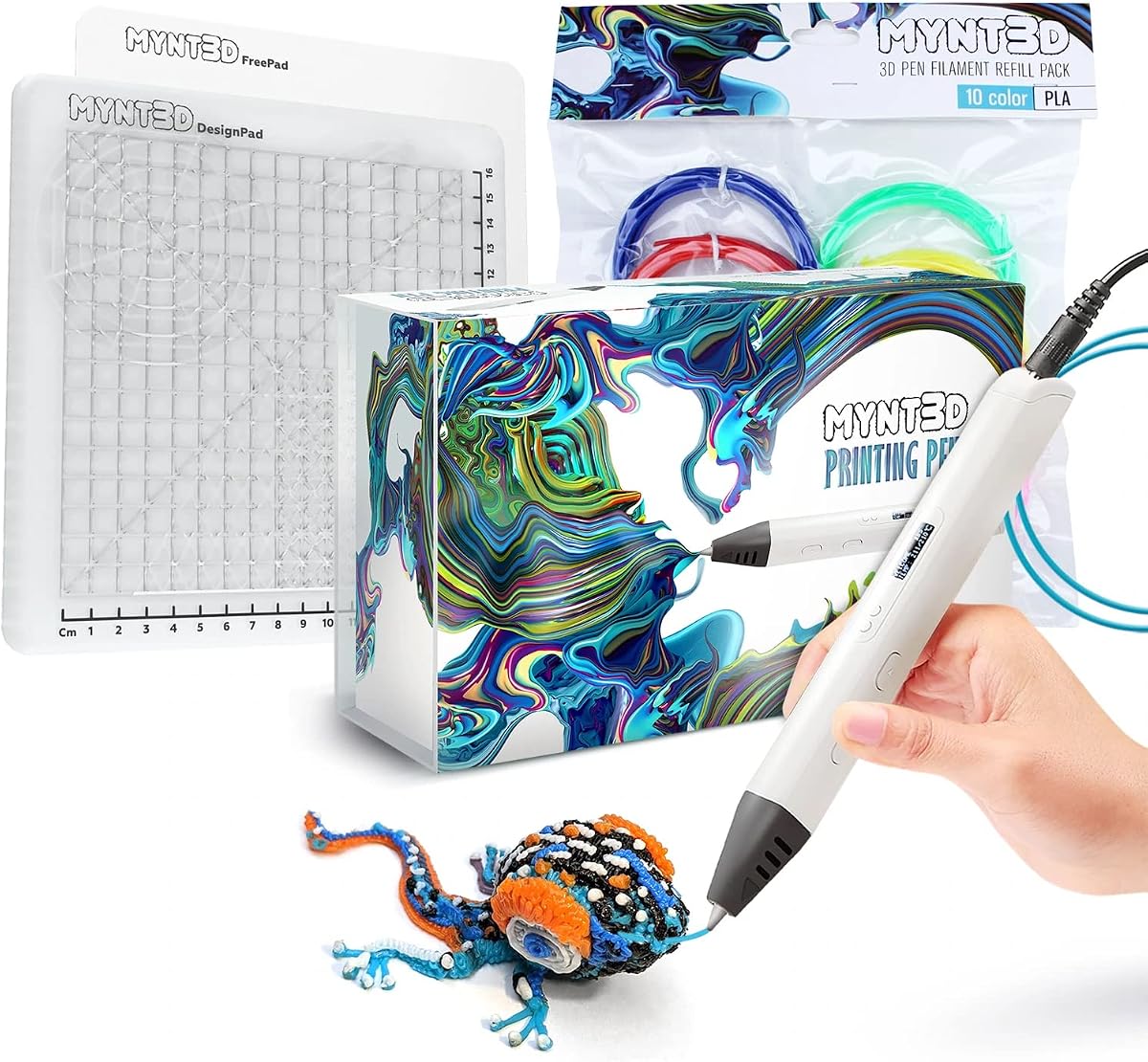
The MYNT3D Pro bundle stands out as a premium choice for serious creators. With a 4.5 star rating it is the highest rated model in this list offering extensive features and accessories.
We may earn a commission when you buy through this link, at no additional cost to you.
This kit includes 10 colors of vacuum sealed PLA filament giving you immediate color variety. The DesignPad and FreePad mats provide specialized surfaces for tracing and creating geometric shapes.
The pen features stepless speed control and replaceable sealed nozzle for long lasting operation. The high quality filament ensures smooth extrusion reducing frustration during detailed projects.
Ideal for those wanting a complete creative solution this bundle removes the need for additional purchases. It delivers professional level features in an accessible package for dedicated hobbyists.
Everything you need to create like a pro: bundle complete with PRO 3D Pen, PLA filament refills and DesignPad mat kit.
Highest quality vacuum sealed PLA in ten different colors ensures consistent performance and vibrant results.
We may earn a commission when you buy through this link, at no additional cost to you.
The MYNT3D Super bundle combines versatility with robust features for creative projects. With a 4.4 star rating it balances performance and usability for various crafting needs and skill levels.
We may earn a commission when you buy through this link, at no additional cost to you.
This kit includes 10 colors of vacuum sealed PLA filament giving you immediate color variety for any design. The DesignPad mat helps create perfect geometric shapes and tracing projects effectively.
The Super pen supports both ABS and PLA materials offering flexibility for durable and decorative items. The stepless speed control provides enhanced flow regulation for consistent drawing results.
For users seeking a balance of features and value this bundle is a strong choice. It provides everything needed for immediate creative work while allowing room for skill development.
Features temperature adjustability for ABS or PLA so you can choose the right material for your project needs.
Includes DesignPad and FreePad to help trace favorite patterns or create your own designs with ideal adhesion.
We may earn a commission when you buy through this link, at no additional cost to you.
The 3Doodler Flow is designed for teens and adults looking for reliable performance. With a 4.1 star rating it offers multi-functional compatibility and an integrated LCD for temperature monitoring.
We may earn a commission when you buy through this link, at no additional cost to you.
It works with 1.75 plastic filaments such as PLA, ABS, and wood giving you material diversity. The integrated LCD provides real-time temperature monitoring to ensure smooth 3D printing without overheating.
The kit includes 8 different colors of plastic spools totaling 80 feet of material. Its compact and light-weight design makes it easy to take on the-go for creative sessions anywhere.
For older kids or adults wanting professional capabilities this pen fits well. It combines reliability with ease of use making it a practical tool for various DIY and creative projects.
Compatible with 1.75 plastic filaments such as PLA, ABS, and wood for diverse project possibilities.
It is compact and light-weight so you can take your Flow on-the-go for creative projects anywhere.
We may earn a commission when you buy through this link, at no additional cost to you.
The SCRIB3D P1 Bundle is a complete creative kit designed for beginners. It adds a silicone mat to the standard P1 pen for easier practice and cleaner projects.
We may earn a commission when you buy through this link, at no additional cost to you.
The flexible practice surface features built-in shapes and patterns to help guide designs. This heat-resistant mat is durable and easy to wipe clean after creative sessions.
The bundle includes starter PLA filament and a stencil book for immediate use. The P1 pen itself is beginner-friendly with simple controls for loading and adjusting settings.
Parents looking for an all-in-one starter pack will find this bundle convenient. It provides everything needed for a child to begin creating right out of the box.
Smooth silicone mat features built-in shapes and patterns to help guide designs and support more consistent 3D pen work.
Comes with starter PLA filament, stencil book, project guide, and power adapter so you can begin creating right out of the box.
We may earn a commission when you buy through this link, at no additional cost to you.
This extended bundle offers over 1250 feet of additional plastic filament for long-lasting creativity. It retains the core safety features of the Start+ set while providing massive refill volume.
We may earn a commission when you buy through this link, at no additional cost to you.
The pen is completely child-safe with no hot parts making it suitable for young users. The bundle includes the DoodlePad, USB-C cable, and 10 new stencils for structured learning.
It is compatible with the free 3Doodler app providing stencils templates and instructions. This encourages screen-free play while offering digital support for projects.
For families wanting a long-term supply this value pack is practical. It ensures kids can explore 3D drawing extensively without needing frequent filament replacements.
Over 1250 ft. of additional plastic filament in this bundle for more 3D doodling fun and creativity.
Compatible with the free 3Doodler app which provides stencils templates step-by-step instructions and more.
We may earn a commission when you buy through this link, at no additional cost to you.
Selecting the right 3D printing pen involves balancing safety, ease of use, and creative potential. This guide outlines key factors to consider when choosing a model for children.
Safety is paramount when selecting a 3D printing pen for children. Look for pens with cool-touch nozzles or enclosed heating elements that prevent burns during use. Some models are specifically designed for kids aged six and above with materials that can be safely handled.
Prioritize pens with built-in safety stands or auto-sleep functions that prevent overheating when left unattended.
Consider the type of filament the pen uses. Some pens accept standard PLA or ABS filaments which are widely available and affordable. Others use proprietary plastics that ensure safety but limit color options and may cost more over time.
Choose a compatible filament type that balances safety with long-term supply availability and variety.
For younger users or beginners, look for pens with intuitive controls such as single-button operation or clear indicator lights. Features like quick heating times and simple loading mechanisms help children start creating without frustration.
Models with step-by-step guides or included activity books support independent learning and confidence building.
Advanced users may benefit from pens with adjustable speed and temperature settings. These features allow for more precise control over line thickness and flow which is useful for detailed projects.
Pens with LED or OLED displays make monitoring settings easier and help prevent clogging or overheating issues.
Check what comes in the box. Essential accessories include stencils, mats for safe drawing, and extra filament. A well-rounded kit helps you start using the pen immediately without needing additional purchases.
Accessories like DoodlePads or design mats provide a safe surface for practice and project cleanup.
Since 3D drawing can take time, a comfortable grip is important. Look for ergonomic designs that fit naturally in a child's hand to reduce strain during extended use.
Pens with soft-touch surfaces or balanced weight distributions offer better comfort for young hands.
Children may drop or mishandle devices, so robust build quality is a plus. Look for pens with sealed nozzles or durable materials that resist clogging and wear over time.
Check warranty terms and customer support availability to ensure long-term reliability and help if issues arise.
Some pens are marketed as STEM tools with apps or guides that teach design concepts. If educational content is important, consider models that offer structured activities or digital integration.
Look for pens that encourage problem-solving and spatial reasoning through hands-on projects.
To begin using your 3D printing pen, plug it into a power source and insert the filament from the back. Wait for the indicator light to signal that the nozzle is ready, which typically takes a few minutes. Then press the forward button to feed the plastic through the nozzle.
Draw your design on a clean surface such as a mat or paper. Keep your hand steady and apply even pressure to the button for consistent lines. If the flow slows down, press the button again to feed more plastic without stopping the motion.
After finishing a project, press the reverse button to retract the filament. Allow the pen to cool before touching the nozzle or storing it. Clean any residue from the mat regularly to maintain a smooth surface for future projects.
Many 3D printing pens are designed with child safety in mind using cool-touch nozzles and heat-resistant materials. Always check the recommended age range and safety features before purchasing to ensure the pen is appropriate for your child.
Most pens use 1.75mm PLA or ABS filament. Some models accept both types while others are designed for proprietary plastics. PLA is generally safer and easier to use for beginners.
No, 3D printing pens are standalone tools that do not need a computer to function. They are designed for freehand drawing and can be used directly with a power source and filament.
Most pens take between two to five minutes to reach the correct temperature. The display or indicator light will show when the pen is ready to draw.
If a clog occurs, allow the pen to cool then gently push out the filament using the reverse button. Some models allow replacing the nozzle. Avoid touching hot parts directly during cleaning.
Kids can make jewelry, sculptures, bookmarks, and decorative items. Stencils and templates help create geometric shapes while freehand drawing allows for custom designs.
Most kits include starter filament but you will need to buy refills over time. Check the product details to see how much filament is included and which type is compatible.
Store the pen in a cool dry place away from direct sunlight. Use the included stand or protective case if provided to prevent accidental damage.
Choosing the right 3D printing pen depends on balancing safety features ease of use and creative potential. Top models like the 3Doodler Start+ offer safe nozzles for young artists while pens like the MYNT3D Pro provide advanced controls for older users.
Prioritize pens that match your child's skill level and interests. Consider the included accessories filament options and comfort features to ensure long-term enjoyment and learning.
Always check current product listings for availability and updates. Prices and specifications may change so review the latest details before purchasing to get the best value for your creative needs.