
SABRENT USB 3.0 to 2.5in SATA Adapter
4.7Editor score
Bus-powered for most drives
USB 3.0 with UASP
Plug and play design
Choosing the right laptop hard drive adapter kit is essential for anyone needing to access legacy storage or migrate data efficiently. These tools bridge the gap between internal drives and modern external ports. A quality kit ensures stable power, fast transfer speeds, and broad compatibility across different drive interfaces.
We evaluated ten leading adapter kits based on connectivity options, power delivery, build quality, and user feedback. Our analysis covers both universal solutions supporting IDE and SATA drives and specialized dock-style units for frequent access. Each product was scrutinized for reliability and ease of use in real-world scenarios.
Every selection highlights specific strengths such as dual-drive support or USB-C connectivity. While each kit serves a unique purpose, all aim to simplify data recovery and backup tasks. Please note that pricing and availability change frequently, so verify current details before purchasing to ensure you get the best value.
4.7Editor score

4.4Editor score
4.6Editor score
As an Amazon Associate we earn from qualifying purchases.
This table provides a side-by-side overview of all ten adapter kits, highlighting key specifications and compatibility details to help you compare features quickly.


The Unitek USB 3.0 IDE/SATA Adapter stands out as a robust solution for accessing legacy storage devices. With a 4.4 rating, it consistently delivers reliable performance for data migration and recovery tasks. Its ability to connect multiple drives simultaneously makes it a favorite among IT professionals and home users alike.
We may earn a commission when you buy through this link, at no additional cost to you.
This adapter excels in compatibility, supporting both IDE and SATA interfaces across 2.5 and 3.5 inch drives. The inclusion of a dedicated 12V power adapter ensures stable operation even when powering energy-intensive mechanical drives. High-speed USB 3.0 and SATA III interfaces facilitate quick data transfers up to 6Gbps.
While highly versatile, users must ensure their computer has a USB-A port since this model does not include native USB-C connectivity. Additionally, the power adapter is mandatory for 3.5 inch drives, which can be a minor inconvenience for portable setups. These trade-offs are acceptable given the unit's robust feature set.
Ideal for anyone needing to recover data from old desktop hard drives or laptops, this kit offers comprehensive support. Whether you are archiving media or cloning drives, the Unitek adapter provides the necessary tools for success without requiring complex technical knowledge or additional hardware purchases.
Connect one IDE and one SATA drive simultaneously for efficient bulk data transfers.
The included 12V adapter ensures 3.5 inch drives spin up reliably every time.
We may earn a commission when you buy through this link, at no additional cost to you.
This Hard Drive Reader offers a modern twist with both USB 3.0 and USB-C connectivity options. While it holds a slightly lower rating of 4.1, it remains a solid choice for users with newer laptops lacking traditional USB-A ports. The kit is designed to simplify access to old IDE and SATA drives effortlessly.
We may earn a commission when you buy through this link, at no additional cost to you.
The primary strength lies in its dual interface support, allowing users to connect via the most convenient port available. It supports drives up to 20TB in capacity, making it future-proof for large storage needs. Detailed instructions and dedicated technical support further enhance the user experience for complex data recovery tasks.
However, some users report challenges with cable flexibility and managing the various connectors during setup. The performance can vary based on the specific drive and host system configuration. These issues are minor but worth noting if you require a seamless plug-and-play experience every single time.
Best suited for tech-savvy users with modern computers who need to access legacy storage, this adapter provides necessary versatility. The inclusion of both port types ensures compatibility with a wide range of systems, reducing the need for additional dongles or adapters for connectivity.
Works with USB 3.0 and USB-C devices via included adapter for maximum flexibility.
Handles drives up to 20TB, ensuring compatibility with high-capacity storage devices.
We may earn a commission when you buy through this link, at no additional cost to you.
The YINNCEEN USB 3.0 to SATA IDE Reader is designed specifically for data recovery scenarios where reliability is paramount. With a 4.3 rating, it offers consistent performance across various drive types. The inclusion of a robust 12V power supply ensures that even stubborn 3.5 inch drives will spin up without issues.
We may earn a commission when you buy through this link, at no additional cost to you.
This unit supports both 2.5 and 3.5 inch IDE and SATA drives, making it a versatile tool for accessing old hardware. It features dual IDE connectors to handle different pin configurations. Transfer speeds are optimized for fast data migration, and it works across Windows, Mac, and Linux operating systems.
One potential drawback is the need to manually set jumpers on older IDE drives, which can be confusing for casual users. The design is also somewhat bulky compared to simpler SATA-only adapters. Despite these minor inconveniences, its robust build and comprehensive connectivity make it a dependable choice for critical data tasks.
This reader is perfect for IT professionals or anyone needing to extract data from a failing drive. Its compatibility with multiple operating systems and drive types ensures you can recover important files regardless of the source hardware. The reliable power delivery adds an extra layer of security during operation.
Includes a 12V/2A power adapter to ensure 3.5 inch drives power on reliably.
Compatible with Windows, Mac, and Linux for maximum versatility in any environment.
We may earn a commission when you buy through this link, at no additional cost to you.
The FEMORO Hard Drive Reader boasts an impressive 4.6 rating due to its user-friendly design and reliable performance. It supports both USB 3.0 and USB-C connections, ensuring compatibility with modern laptops. The kit is tailored for data recovery, offering tools to retrieve files from obsolete drives effectively.
We may earn a commission when you buy through this link, at no additional cost to you.
Key features include a flexible soft cable design that prevents connection issues with older IDE ports. The included 12V power adapter supports 3.5 inch drives, while the on/off switch protects drives from electrical damage during operation. This thoughtful design minimizes risks associated with handling fragile legacy hardware.
While the unit is highly rated, users should be prepared to follow setup instructions carefully to avoid connectivity issues. The price point is competitive but may vary depending on current promotions. These minor considerations do not detract from its overall value as a comprehensive recovery kit for general users.
Ideal for office workers or home users looking to access old hard drives, this kit balances performance with ease of use. The inclusion of essential accessories like the power adapter and USB-C adapter ensures you can start working immediately. It is a reliable companion for backing up important data.
Soft 4-pin cable makes connecting to fragile IDE ports easier and safer.
On/Off switch prevents accidental power surges that could damage your hard drive.
We may earn a commission when you buy through this link, at no additional cost to you.
The SABRENT USB 3.0 to SATA Docking Station is the top choice for users who need to swap drives frequently without hassle. With a 4.4 rating, it simplifies the process of connecting SATA drives via a tool-free bay. The design allows you to insert and remove drives quickly without rebooting your system.
We may earn a commission when you buy through this link, at no additional cost to you.
This station supports 2.5 and 3.5 inch SATA drives including SSDs, utilizing USB 3.0 with UASP support for optimized transfer speeds. A 12V power adapter is included to ensure 3.5 inch drives operate stably. The LED indicator provides clear visual feedback on power and activity status.
While it excels for SATA drives, it does not support legacy IDE interfaces which limits its scope. Users with only USB-C ports will need an adapter since the host cable is USB Type-A only. Despite these limitations, it remains a premier solution for high-speed SATA drive management.
This docking station is perfect for photographers or video editors who need to move large amounts of data between drives. The hot-swap feature and UASP support ensure efficient workflows. It is a durable and well-built option for anyone needing a dedicated external SATA access point.
Insert drives without tools for quick access and easy swapping between tasks.
USB Attached SCSI Protocol improves transfer speeds for better performance.
We may earn a commission when you buy through this link, at no additional cost to you.
The SABRENT 2.5in SATA Adapter is the most affordable option on this list with a 4.7 rating. It is designed specifically for 2.5 inch laptop drives and SSDs. Its bus-powered design means you do not need a separate power brick for most drives, making it incredibly portable.
We may earn a commission when you buy through this link, at no additional cost to you.
This cable supports USB 3.0 with UASP for fast transfer speeds directly from your USB port. It is plug-and-play compatible with Windows, Mac, and Linux systems. The high user satisfaction stems from its simplicity and effectiveness for accessing laptop drives quickly.
Since it only supports 2.5 inch drives, it is not suitable for larger 3.5 inch desktop drives. It also requires a USB-A port so you may need an adapter for newer computers with only USB-C. These limitations are acceptable considering the extremely low cost and portability it offers.
Ideal for users who need a quick and cheap way to access a laptop SSD or HDD this adapter delivers. It is perfect for emergency backups or temporary access to data. If you only need to access smaller drives this cable provides everything you need without extra clutter.
Draws power directly from USB so no external adapter is required for most drives.
Small cable design fits easily in a bag for on-the-go data access.
We may earn a commission when you buy through this link, at no additional cost to you.
The BENFEI 2.5 Inch SATA to USB Enclosure transforms a bare drive into a protected external drive. With a 4.6 rating it offers both USB-C and Type-A connectivity. The tool-free design allows you to install a drive in seconds without needing any additional tools.
We may earn a commission when you buy through this link, at no additional cost to you.
This enclosure supports 2.5 inch SATA SSDs and HDDs with UASP for high-speed data transfers. It comes with a solid 18-month warranty and friendly customer service. The compact design makes it a great permanent solution for using old laptop drives as portable storage.
While it does not support IDE or 3.5 inch drives its focus on 2.5 inch units ensures optimized performance. The added bulk of the enclosure might be less ideal for those seeking a bare cable adapter. However for most users the added protection is a significant benefit over bare cables.
This enclosure is perfect for turning old laptop SSDs into external backups easily. It offers durability and convenience making it suitable for daily use. The dual interface connectivity ensures you can connect it to almost any computer without needing dongles or adapters for access.
Enclosure provides physical protection for your drive during transport and daily use.
Includes both USB-C and Type-A plugs for maximum compatibility across devices.
We may earn a commission when you buy through this link, at no additional cost to you.
This HDD Reader provides a strong mix of connectivity options including USB 3.0 and Type-C. With a 4.3 rating it allows you to connect two drives at once one IDE and one SATA. This feature makes it incredibly efficient for cloning data from an old drive to a new one.
We may earn a commission when you buy through this link, at no additional cost to you.
The kit includes a 12V power adapter which is essential for operating 3.5 inch drives properly. Transfer speeds are optimized up to 5Gbps ensuring fast data movement. The LED indicator helps you monitor activity status clearly during use.
Users should note that simultaneous support is limited to one IDE and one SATA drive at a time. Also the power adapter is mandatory for stable operation with larger drives. These are minor limitations given the value of having dual drive connectivity for efficient workflows.
This adapter is ideal for users needing to migrate data quickly between different drive types. The included power supply simplifies the setup process. Whether you are upgrading your system or recovering files this kit provides the versatility needed for complex data tasks.
Connect one IDE and one SATA drive simultaneously for direct data cloning.
Supports up to 5Gbps for efficient bulk data transfers between systems.
We may earn a commission when you buy through this link, at no additional cost to you.
This Hard Drive Reader stands out with its ability to support optical drives like DVD-ROMs alongside standard HDDs. With a 4.5 rating it offers comprehensive coverage for old computer peripherals. The USB 3.0 and Type-C dual interface ensures you can connect it to most modern systems.
We may earn a commission when you buy through this link, at no additional cost to you.
The kit includes a 12V power adapter to support 3.5 inch drives and optical units that require external power. Hot swap capability allows you to disconnect drives without restarting your computer. It features an On/Off switch to protect hardware from electrical damage.
While highly versatile users must follow instructions carefully to initialize new drives correctly. The power adapter is essential for any non-bus-powered device. These requirements add a step to the process but ensure reliable operation and data integrity for sensitive recovery tasks.
This adapter is perfect for archivists or anyone with a collection of old optical media and hard drives. It simplifies the retrieval of data from multiple legacy sources. The dual interface support adds extra flexibility making it a reliable all-in-one recovery solution.
Supports CD-ROM and DVD drives for accessing data from old media discs.
On/Off switch and power adapter protect your drives from potential damage.
We may earn a commission when you buy through this link, at no additional cost to you.
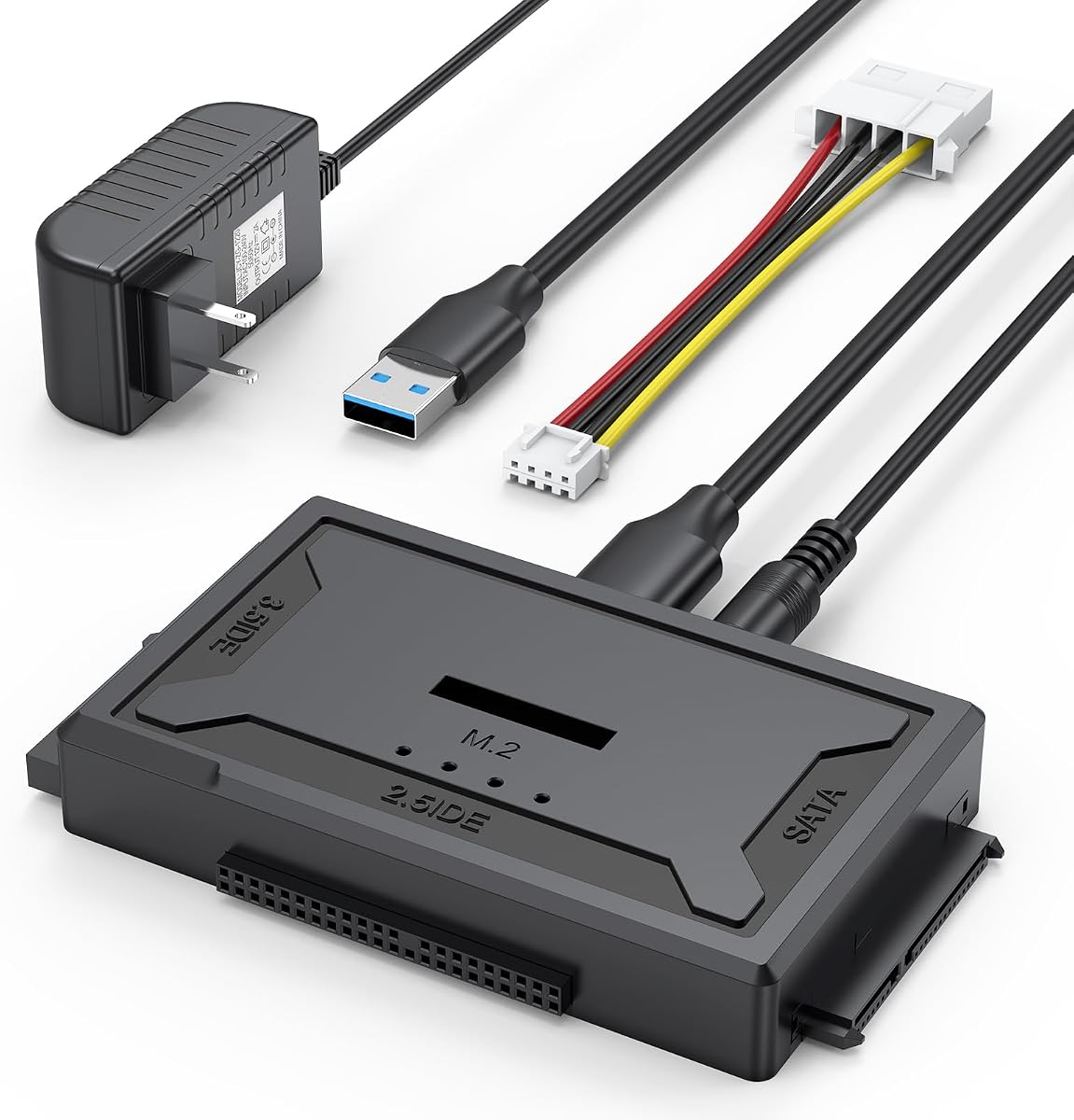
The Hard Drive Reader 4-in-1 is the only option on this list supporting M.2 NVMe drives in addition to SATA and IDE. With a 4.6 rating it delivers exceptional speed with 10Gbps transfer rates for M.2. This makes it the ultimate tool for modern and legacy drive access.
We may earn a commission when you buy through this link, at no additional cost to you.
Its universal design supports almost any internal drive type including 2.5 and 3.5 inch SATA drives. The included 4-pin cable is soft and flexible to prevent damage to old connectors. The dock design makes it easier to use than traditional ribbon cable adapters.
The higher price point reflects the advanced capabilities including NVMe support. The power adapter is required for most drives which adds to the setup footprint. These factors are worth considering if you need to access very old IDE drives alongside modern NVMe storage.
This reader is best for IT professionals who deal with a wide range of storage devices. It future-proofs your toolkit by supporting the latest M.2 standards. If you need maximum versatility and speed this kit provides unparalleled access to all internal drive formats.
Reads M.2 NVMe drives at up to 10Gbps for next-gen speed.
Flexible 4-pin cable ensures safe connection to fragile IDE ports.
We may earn a commission when you buy through this link, at no additional cost to you.
Selecting the right adapter depends on your specific drive types and computer ports. Use this guide to understand the critical factors for a reliable purchase.
Check if your drive uses SATA or IDE connectors. Modern kits often support both while some only support SATA. Ensure the kit matches your specific drive type to avoid purchase errors.
Verify your drive's connector before buying to ensure compatibility.
Newer laptops may only have USB-C ports so you will need an adapter or a kit with native USB-C support. Most kits use USB-A so confirm your system has the right ports.
Confirm your laptop has the necessary USB-A ports or include USB-C adapters.
3.5 inch desktop drives need external power adapters often included in the kit. 2.5 inch drives are usually bus-powered but might need a hub if they draw too much power.
Always check if an external power adapter is included and required for your drives.
USB 3.0 speeds up to 5Gbps are standard but some kits offer USB 3.1 or 10Gbps M.2 support. Faster speeds reduce wait times for large file transfers.
Look for USB 3.0 or higher for the best transfer speeds.
If you need to clone data from one drive to another choose a kit that supports two drives simultaneously. This saves time compared to swapping drives manually.
Choose a dual-drive kit if you need to copy data between drives directly.
Most adapters are plug-and-play for Windows Mac and Linux. Verify compatibility with your system before purchase to avoid driver issues.
Confirm the adapter works with your operating system for seamless use.
Look for flexible cables and sturdy connectors to prevent damage to old drives. A solid plastic housing protects the internal electronics of the adapter.
Choose kits with durable cables and housing for longevity.
Data recovery can be tricky so look for kits with good technical support and warranties. Some vendors offer software like disk imaging tools to help recover data.
Prioritize brands that offer solid warranties and support resources.
Start by connecting the power adapter to your adapter kit and the wall outlet. Plug the USB cable into your computer and ensure the drive is fully inserted into the connector ports.
Wait for your computer to recognize the drive as an external storage device. If it does not appear check the power connections and try a different USB port or restart your computer.
After using the drive use the safe eject function in your operating system before unplugging. Store the cables and adapter in a dry safe place to prevent damage to the connectors.
Yes most adapters support 3.5 inch drives but they require an external 12V power adapter to operate. Without the external power the drive will not spin up properly. Check the product specs to confirm the power adapter is included.
Most adapters are compatible with Mac OS 10 and higher. However older mechanical drives may need to be formatted in ExFAT or APFS to be fully writable on a Mac. Always initialize the drive in Disk Management or Disk Utility before first use.
IDE drives use a wide ribbon cable connector while SATA drives use a smaller flat connector. Modern laptops mostly use SATA or M.2 while older desktops used IDE. Ensure your adapter kit supports the correct connector type for your drive.
No most adapters are plug-and-play and do not require driver installation. They should be recognized automatically by Windows Mac and Linux. If they are not recognized check that the device is properly powered and connected.
Generally adapters are not designed for booting the operating system from them. They are best used for data access and transfer. Some BIOS settings may allow booting but it is not guaranteed for all systems.
This could be due to missing power or incorrect cable connections. Ensure the drive is powered correctly and try a different USB port. If it is an old IDE drive check the jumper settings on the drive itself.
USB 3.0 adapters can reach speeds up to 5Gbps which is fast enough for most mechanical drives. SSDs may reach higher speeds depending on the port and cable quality. Real-world speeds often depend on the drive itself rather than the adapter.
Yes but you must handle the drives gently as mechanical parts are fragile. Using the correct power adapter prevents electrical damage. Always safely eject drives before unplugging to avoid data corruption.
We reviewed ten adapter kits ranging from budget-friendly cables to premium docks. Each offers unique strengths whether you need IDE support or modern USB-C connectivity.
Prioritize compatibility with your specific drives and your computer's ports. Power delivery and transfer speed are also critical factors to consider before you buy.
Prices and availability change often so check the current listings for the best deals today. Ensure you have the right cables and accessories for a smooth setup experience.