
10Gtek 10Gb Dual RJ45 Port Network Card
4.1Editor score
Intel X540 controller chip
Dual RJ45 ports included
Low-profile bracket available
This guide compares the top 10GB Ethernet Card models for speed, compatibility, and value to help you upgrade your network connection today.
Upgrading your network connection is essential for modern computing needs like gaming, video editing, and large file transfers. A 10GB Ethernet Card provides the bandwidth required to handle demanding tasks without bottlenecks or latency issues affecting your workflow.
We evaluated ten top-rated network adapters based on chipset performance, compatibility with operating systems, and physical build quality. Our analysis focuses on real-world throughput, heat management, and the flexibility offered by different PCIe slot configurations.
Each pick highlights key features and potential trade-offs to help you find the right fit for your setup. Please note that prices and availability fluctuate frequently, so verify current details before making your final purchase decision.
4.1Editor score

4.2Editor score

4.6Editor score
The following table provides a side-by-side comparison of all ten network adapters examined in this guide. Use this reference to quickly identify specifications like chipset type, port count, and operating system support.




The TP-Link TX401 stands out as a reliable option for users seeking a straightforward upgrade to 10Gbps networking. With a solid rating and robust feature set, it balances performance and ease of use effectively.
We may earn a commission when you buy through this link, at no additional cost to you.
Its 10GBase-T technology ensures smooth data transmission while maintaining compatibility with lower speeds. The inclusion of a high-quality cable and flexible bracket options makes installation hassle-free for most desktop cases.
Users should note that Linux users may need to manually install drivers for full functionality. However, the Quality of Service feature prioritizes traffic, which is beneficial for gaming and critical tasks.
This card is ideal for home users and small offices needing faster local transfers. It offers a great balance of cost and performance for general networking needs without excessive complexity.
The low-profile bracket allows this card to fit into smaller cases that standard cards cannot accommodate.
Receiving a CAT6A cable in the box saves money and ensures optimal performance right out of the package.
We may earn a commission when you buy through this link, at no additional cost to you.
For budget-conscious buyers, the 10Gtek X540 offers exceptional value with dual ports and a proven Intel controller. It is a strong candidate for servers or workstations requiring reliable connectivity.
We may earn a commission when you buy through this link, at no additional cost to you.
The dual RJ45 ports allow for link aggregation or failover setups, enhancing network stability. It supports various operating systems including Linux and Windows Server environments effectively.
Potential buyers should be aware that Windows 11 may require manual driver configuration. Additionally, the X540 chipset is known for higher heat output compared to newer models.
This adapter is perfect for small businesses or homelabs needing robust connectivity. It delivers stable performance at a competitive price point for those who need multiple ports.
Having two ports means you can set up failover connections to keep your network running even if one cable fails.
Built to handle heavy server loads, it supports protocols like iSCSI and NFS for storage over Ethernet environments.
We may earn a commission when you buy through this link, at no additional cost to you.
The Synology E10G20-T2 is a purpose-built adapter designed specifically for Synology NAS units. It ensures maximum compatibility and performance when integrated into Synology DiskStation systems.
We may earn a commission when you buy through this link, at no additional cost to you.
With two 10GbE ports, it supports link aggregation and failover out of the box. The five-year warranty provides peace of mind for critical storage infrastructure investments.
While the price is higher than generic alternatives, the specialized optimization justifies the cost for Synology users. It removes the guesswork from hardware compatibility lists.
This is the ideal choice for professionals managing Synology NAS environments. It offers seamless integration and robust features that match the quality of the storage units themselves.
Drivers and firmware are tailored specifically for Synology DSM to ensure zero conflicts during installation and use.
The extended warranty period reflects confidence in the hardware quality and supports long-term deployment strategies.
We may earn a commission when you buy through this link, at no additional cost to you.
The VIMIN 10G offers dual 10Gbps ports with an Intel X540-T2 chipset for high-speed data transmission. It targets users needing multiple connections on a single adapter.
We may earn a commission when you buy through this link, at no additional cost to you.
It supports both standard and slim brackets to fit diverse server heights. The heat sink design ensures the device remains stable even under heavy network loads.
A limitation is the lack of support for 2.5G and 5G speeds, which forces negotiation to 1G if lower speeds are detected. Users must ensure their switch matches the supported rates.
This card is well-suited for virtualization hosts and servers requiring dual connections. It provides flexibility and robust performance for those needing dual ports in a compact form.
A well-designed heat sink maintains optimal temperatures during heavy data transfers to prevent throttling or instability.
Compatible with VMware and Windows Server, making it a solid choice for virtual machine networking environments.
We may earn a commission when you buy through this link, at no additional cost to you.
Asus provides a robust single-port adapter with full backward compatibility across common network speeds. Its reputation for hardware quality adds value to this networking solution.
We may earn a commission when you buy through this link, at no additional cost to you.
Quality-of-Service technology allows users to prioritize bandwidth for specific tasks. This ensures that critical data transfers are not interrupted by background activity.
The higher price point compared to generic alternatives may deter budget buyers. However, the build quality and brand support justify the investment for professional environments.
Ideal for desktop users needing a reliable upgrade without complex configurations. It offers seamless integration with Windows and Linux systems for stable performance.
Built-in QoS lets you direct network traffic to gaming or streaming apps for smoother experiences during congestion.
Compatible with various Linux kernel versions ensuring flexibility for open-source environments.
We may earn a commission when you buy through this link, at no additional cost to you.
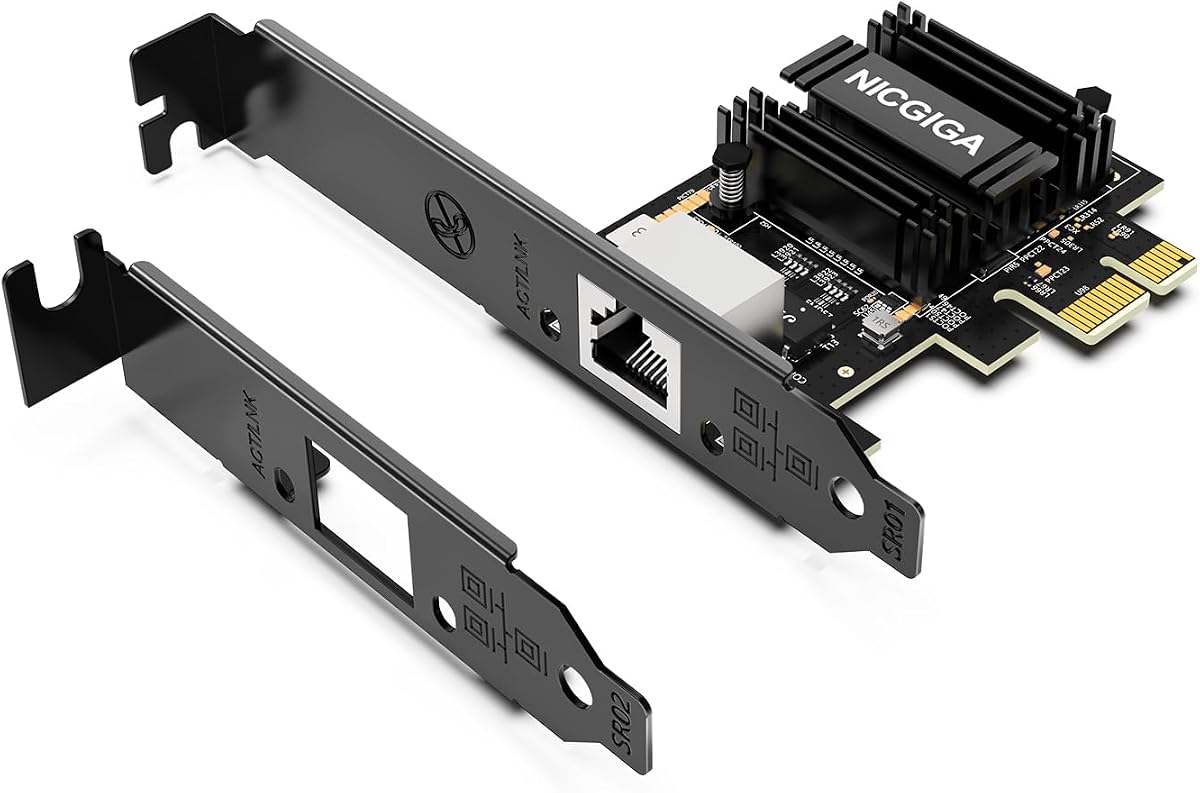
The NICGIGA card leverages the latest Realtek RTL8127 for low power consumption and high efficiency. It is specifically designed for compact systems needing 10Gbps speeds.
We may earn a commission when you buy through this link, at no additional cost to you.
Using a PCIe 4.0 x1 interface allows it to fit into minimal slot configurations without consuming GPU lanes. This makes it perfect for ITX builds or Mini PCs.
Performance depends on having a compatible PCIe 4.0 x1 slot available. Users with older motherboards may still use it but could see reduced throughput potential.
This is an excellent choice for compact workstation upgrades. It brings high-speed connectivity to small form factors without compromising on energy efficiency or heat output.
The x1 design means it does not block adjacent slots so you can use multiple devices simultaneously.
Newer chipset technology ensures less heat and power usage compared to older 10G solutions.
We may earn a commission when you buy through this link, at no additional cost to you.
The VunLink adapter uses a modern Realtek chipset to deliver flexible auto-negotiation across multiple speeds. It is designed to work seamlessly with current routers and switches.
We may earn a commission when you buy through this link, at no additional cost to you.
It includes both standard and low-profile brackets to fit different case sizes. The energy-efficient design helps reduce overall power usage in desktop systems.
Compatibility with older Linux kernels or specific NAS platforms may require driver adjustments. Users should check their system requirements before purchasing.
This adapter is a solid choice for modern desktops and home labs. It balances cost and features well for users seeking multi-gigabit support in a single card.
Auto-negotiation ensures the card connects at the highest possible speed your network hardware supports.
Low-profile options make it suitable for small cases where space is at a premium.
We may earn a commission when you buy through this link, at no additional cost to you.
The Asus XG-C100F utilizes SFP+ technology for fiber optic connections. This enables significantly longer transmission distances compared to standard copper cabling.
We may earn a commission when you buy through this link, at no additional cost to you.
Its aluminum heatsink keeps the card cool during intense network tasks. This active cooling feature ensures stability in environments with high ambient temperatures.
Users must purchase separate SFP+ transceivers to use this card which adds to the total cost. It is less convenient for simple desktop upgrades.
This card is ideal for industrial or server setups needing fiber connectivity. It offers high performance and reliability for professional network infrastructure requirements.
SFP+ cages allow you to connect via fiber for distances beyond 100 meters easily.
The aluminum heatsink dissipates heat efficiently so the card stays cool under load.
We may earn a commission when you buy through this link, at no additional cost to you.
The TRENDnet TEG-10GECTX meets NDAA and TAA compliance standards for government and enterprise buyers. It provides secure networking with reliable performance over PCIe 3.0 x4.
We may earn a commission when you buy through this link, at no additional cost to you.
With broad OS support and LED indicators for status monitoring it simplifies installation. The three-year protection plan adds value for commercial deployments.
This card is specifically targeted at North American government and business sectors. It may not be the best option for general consumer use due to compliance focus.
Ideal for organizations requiring secure and compliant networking hardware. It offers stable performance and professional support for critical infrastructure needs.
NDAA and TAA compliance ensure the product meets strict government requirements for procurement and security.
Manufacturer protection plans include English-speaking technical support during business hours for quick resolution.
We may earn a commission when you buy through this link, at no additional cost to you.
This adapter offers a non-PCIe alternative for laptops and devices with USB-C ports. It provides a quick way to add 10Gbps connectivity without opening a desktop case.
We may earn a commission when you buy through this link, at no additional cost to you.
Its compact design and aluminum heat sink ensure stable operation during file transfers. It supports both macOS and Windows with plug-and-play functionality for most systems.
Real-world throughput may not reach theoretical maximums due to USB port limitations. Users must ensure their device has a high-speed USB 3.2 Gen 2×2 port.
This is ideal for mobile professionals and laptop users needing high-speed connections. It bridges the gap between modern laptops and high-performance networking hardware.
Perfect for travel kits and mobile workstations requiring high-speed wired connections on the go.
The aluminum housing protects the internal components from physical damage and aids heat dissipation.
We may earn a commission when you buy through this link, at no additional cost to you.
Selecting the right network adapter requires understanding several key factors that impact performance and compatibility. This section outlines the essential considerations for making an informed decision.
The internal chipset determines how efficiently your computer processes data. Realtek and Intel chips are common; Intel chips often offer better stability for servers while Realtek provides excellent efficiency for desktops.
Always check chipset reviews before purchasing to ensure your specific OS works smoothly.
Choose between single or dual ports based on your needs. Dual ports allow for link aggregation or redundancy which is vital for servers requiring high availability.
For standard desktop users, a single port is usually sufficient and more cost-effective.
Ensure the driver support matches your OS version. Windows 10 and 11 are widely supported but Linux support varies by kernel version and manufacturer.
Check the manufacturer's website for specific driver downloads before you buy.
Verify the PCIe slot type on your motherboard matches the card requirements. PCIe 3.0 x4 slots offer higher bandwidth than PCIe 3.0 x1 which affects theoretical max speeds.
Most 10G cards fit x1 slots but use more bandwidth than lower speed cards.
Cat6a or Cat7 cables are generally recommended for full 10Gbps speeds over standard copper. Cat6 cables may work but are limited to 55 meters for 10Gbps.
Ensure you have the right cabling to avoid bottlenecks in your setup.
Check if the card includes both standard and low-profile brackets. This is essential if you have a small form factor desktop or mini-tower case.
Missing brackets can make installation impossible without buying additional parts separately.
Newer chips like Realtek RTL8127 consume significantly less power than older Intel X540 models. Lower power means less heat generation and quieter system operation.
For compact builds, prioritize low-power options to avoid overheating.
Look for warranties that last at least two years. Premium brands often offer better technical support which is crucial if you face driver issues.
Check return policies in case the card is incompatible with your hardware.
Install the card into an open PCIe slot after powering down your system. Secure the bracket screws and ensure the card is fully seated before connecting the Ethernet cable.
Install drivers from the manufacturer's website before powering on your system if automatic detection fails. Windows 10 and 11 often detect the device automatically but manual installation ensures full functionality.
Maintain your card by keeping dust away from the heatsink using compressed air. Monitor temperatures using system tools to ensure the card stays within safe operating limits.
You can connect to any router or switch but the speed will match the lowest device on the line. For full 10Gbps performance, your switch and router must also support 10GbE standards.
Yes, these cards provide low latency and stable connections ideal for gaming. Features like Quality of Service help prioritize game traffic to reduce lag during peak internet use.
Cat6a or Cat7 cables are recommended for reliable 10Gbps speeds up to 100 meters. Cat6 works for distances up to 55 meters but may not sustain full speeds consistently.
Compatibility depends on having a PCIe slot available. Most cards work on PCIe 2.0 or 3.0 slots but throughput may vary based on bandwidth availability.
Most modern cards support macOS but driver installation may be required depending on your OS version. Apple Silicon Macs may require additional configuration for full compatibility.
Installation is straightforward for desktop PCs. You will need to open your case secure the card and install drivers. Most packages include instructions and necessary brackets.
Choosing the right network adapter depends on your specific needs and budget. The TP-Link TX401 stands out for general users while the Synology adapter serves specialized NAS environments effectively.
Prioritize compatibility with your operating system and PCIe slot type to avoid issues. Ensure you have the correct cabling to achieve the speeds you pay for.
Prices change frequently so always check current listings before buying. Investing in a quality adapter ensures your network setup is ready for future bandwidth demands.