
D-Link 28-Port Gigabit Smart Managed Switch
4.4Editor score
24 GbE ports
4 SFP Combo ports
Lifetime Warranty
Compare the top 25GbE Switches with SFP28 Ports for 2026. We review enterprise and managed switches featuring high-speed fiber connectivity and advanced
Finding the right network infrastructure is critical for modern businesses relying on high-speed data transfer. 25GbE switches with SFP28 ports offer a perfect balance of performance and cost efficiency for growing networks.
We analyzed ten top-rated models based on port configurations, management features, and throughput capabilities. Our review covers options ranging from entry-level smart switches to fully managed layer 3 solutions.
Each pick highlights specific strengths like PoE support or low latency. Please note that prices and availability can change frequently, so verify current details before purchasing your new switch.
4.4Editor score

5.0Editor score

4.6Editor score
This table provides a side-by-side comparison of the ten best switches reviewed. It highlights key port counts, switching capacities, and management features to help you decide quickly.





The QNAP QSW-M7230 is a specialized Layer 3 Lite switch designed for high-bandwidth environments. It combines 24 10GbE ports with 4 25GbE SFP28 ports and 2 100GbE ports. This unique configuration makes it perfect for AI clustering and large NAS deployments.
We may earn a commission when you buy through this link, at no additional cost to you.
Its non-blocking throughput ensures data moves quickly between devices without bottlenecks. Features like Priority Flow Control and Explicit Congestion Notification help maintain lossless performance critical for RoCEv2. The web GUI offers essential routing and VLAN management tools for IT admins.
While powerful, this switch is not a general-purpose enterprise router. It lacks some advanced Layer 3 capabilities found in higher-end models. However, for specific high-speed storage and server rooms, its performance is unmatched in its class.
Businesses building dedicated storage networks or AI labs should strongly consider this model. It bridges modern fiber backbones with existing copper setups effectively. Its Top-Of-Rack design ensures low latency connectivity for intensive virtualization tasks.
With 100G and 25G ports, this switch handles massive data transfers required for modern workloads.
Built-in PFC and ECN technologies minimize packet loss ensuring smooth data transmission.
We may earn a commission when you buy through this link, at no additional cost to you.
The TRENDnet TEG-S50284 offers an accessible entry into multi-gigabit networking. It provides 24 ports capable of 2.5G speeds over standard cabling and 4 10G SFP+ ports for uplinks. This makes it a cost-effective solution for small to medium businesses.
We may earn a commission when you buy through this link, at no additional cost to you.
Its lifetime manufacturer protection provides peace of mind for long-term deployment. The smart fan system adjusts cooling based on usage, saving energy. It also supports VLAN passthrough and is compliant with NDAA and TAA standards for government projects.
While it lacks true 25GbE SFP28 ports, it serves well for networks transitioning from 1G. Users needing higher fiber speeds may need to look elsewhere. However, for desktop upgrades and basic aggregation, it delivers reliable performance.
IT managers looking to upgrade existing networks without rewiring should find this switch ideal. It simplifies the transition to higher speeds while maintaining budget efficiency. The included rackmount kit ensures easy installation in standard enclosures.
24 ports support speeds up to 2.5Gbps allowing faster file transfers on current cabling.
TRENDnet stands by this product with a lifetime manufacturer protection policy.
We may earn a commission when you buy through this link, at no additional cost to you.
This renewed Cisco Nexus switch brings enterprise-grade density to data centers. It features 48 ports of 25GbE SFP28 connectivity alongside 6 QSFP+/QSFP28 uplinks. The renewed status offers significant cost savings for buyers requiring high port counts.
We may earn a commission when you buy through this link, at no additional cost to you.
Designed for high performance, this switch supports massive throughput requirements. The dual AC power setup ensures redundancy and uptime. It is an excellent choice for server rooms needing to connect multiple high-speed compute nodes.
Buyers should be aware that renewed products may come in generic boxes. Accessories might not be original but are tested for compatibility. While risk is involved, the value proposition is strong for cost-conscious infrastructure builds.
Network architects needing 48 25G ports at a lower price point will appreciate this unit. It fits well into standard 1U racks and supports modern high-speed networking standards. Ensure compatibility with your existing management systems before purchasing.
With 48 25GbE ports, this switch maximizes server connectivity in limited space.
Professionally inspected units offer enterprise features at a fraction of new prices.
We may earn a commission when you buy through this link, at no additional cost to you.
The Mikrotik CRS520 stands out for its powerful CPU and high-speed port mix. It offers 28 ports of 25GbE SFP28 and 100GbE QSFP28 uplinks. The included quad-core ARM processor running at 2 GHz handles complex routing tasks efficiently.
We may earn a commission when you buy through this link, at no additional cost to you.
Equipped with 4GB of DDR4 RAM, this switch supports extensive routing tables and firewall rules. It is an ultra-fast enterprise switch capable of handling demanding network loads. The hardware power distinguishes it from many competitor models in this category.
Managing this switch requires familiarity with Mikrotik's RouterOS which can be complex. New users might find the configuration challenging compared to simpler web GUI interfaces. However, advanced users will appreciate the deep control and flexibility it offers.
For those needing heavy lifting in software-defined networking or routing, this is a top choice. The combination of raw power and port versatility makes it ideal for ISPs and large enterprises. Invest time in learning the OS to unlock its full potential.
The quad-core CPU ensures complex routing tasks are handled without lag.
100GbE ports provide ample bandwidth for aggregating high-speed connections.
We may earn a commission when you buy through this link, at no additional cost to you.
The UniFi Aggregation Switch Pro enhances network capacity with 28 10G and 4 25G SFP28 ports. It integrates seamlessly with the UniFi ecosystem for centralized management. The built-in 1.3 inch touchscreen provides immediate visual feedback on connection status.
We may earn a commission when you buy through this link, at no additional cost to you.
With 760 Gbps switching capacity, it handles heavy traffic loads effectively. Layer 3 features enable efficient routing and segmentation within the network. This switch is ideal for businesses already using Ubiquiti hardware for unified control.
Managing this device outside the UniFi app can be less intuitive. The ecosystem lock-in means you must stay within their product family for full functionality. For standalone needs, this might limit flexibility compared to generic enterprise switches.
Businesses seeking a polished, all-in-one network management experience will love this switch. The visual display and mobile app make monitoring effortless. Ensure your existing infrastructure supports UniFi to maximize its benefits.
The color touchscreen displays key system insights without needing external tools.
Control via the powerful UniFi Network app for streamlined administration.
We may earn a commission when you buy through this link, at no additional cost to you.
This Dell switch supports PoE++ alongside 25GbE SFP28 ports. It allows powering high-wattage devices like PTZ cameras while connecting to high-speed fiber networks. The combination of PoE and high-speed uplinks is rare and valuable.
We may earn a commission when you buy through this link, at no additional cost to you.
It supports Layer 3 routing and offers a modular design for flexibility. The high power consumption reflects its ability to deliver significant power to connected devices. It is suited for environments needing both advanced and robust network management.
Power planning is crucial when deploying this switch due to high requirements. Ensure your facility can handle the load without tripping circuits. The modular nature allows upgrades but requires careful configuration to optimize performance.
Organizations deploying advanced video or IoT devices need robust power delivery. This switch meets that need while maintaining 25G fiber backbone connectivity. It bridges the gap between edge power and core speed effectively.
Delivers high power to devices while maintaining fiber connectivity.
Flexible architecture allows for future upgrades and customization.
We may earn a commission when you buy through this link, at no additional cost to you.
The TEG-3284WS introduces cloud management capabilities to TRENDnet switches. It features 24 2.5G ports and 4 10G SFP+ ports. The Hive enabled cloud service allows remote configuration and diagnostics without direct network access.
We may earn a commission when you buy through this link, at no additional cost to you.
Its web smart GUI simplifies setup for small businesses lacking dedicated IT staff. Users can manage access control lists and VLANs easily. Lifetime manufacturer protection remains a strong selling point for reliability.
The cloud service may require additional fees which affects long-term cost. Some users report mixed reliability with the cloud connection. For purely local networks, this extra feature might be unnecessary complexity.
Businesses with distributed locations will find the remote access beneficial. The ability to diagnose issues from anywhere saves time and money. However, weigh the benefits against the potential costs and connectivity requirements carefully.
Use the cloud service to configure and monitor switches remotely.
The intuitive web-based interface simplifies network configuration tasks.
We may earn a commission when you buy through this link, at no additional cost to you.
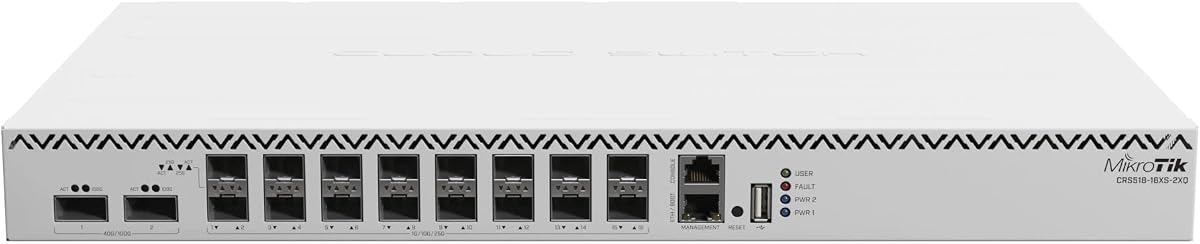
This compact switch provides 16 10G ports and 2 100G QSFP28 ports. It is designed for high-speed aggregation in limited physical spaces. The Cloud Router Switch series allows deep software customization for advanced users.
We may earn a commission when you buy through this link, at no additional cost to you.
With 64MB RAM, it handles routing tasks efficiently but may struggle with heavy tables. The 650MHz CPU provides solid performance for standard operations. It fits well in branch offices needing high-speed uplinks.
The low memory might limit advanced feature usage like extensive firewall rules. It is best suited for straightforward high-speed switching and basic routing. Users needing extensive stateful firewalling should consider higher memory models.
For tight spaces requiring 100G connectivity, this unit is a great fit. Its small footprint maximizes rack space efficiency. Ensure your network design aligns with its capabilities before purchasing.
Compact form factor fits easily into crowded server racks.
Two 100G ports provide massive aggregation bandwidth.
We may earn a commission when you buy through this link, at no additional cost to you.
This renewed Cisco switch offers unmatched connectivity with 48 25GbE and 6 100GbE ports. It uses cut-through switching to minimize latency below 1 microsecond. This is critical for big data processing and high-performance computing.
We may earn a commission when you buy through this link, at no additional cost to you.
The switch supports VXLAN for scalable virtualization and ACI for network automation. Hot-swappable power supplies ensure 24/7 availability. Despite being renewed, it offers robust features for large-scale deployments.
Configuration requires familiarity with Cisco NX-OS which has a steep learning curve. Renewed units vary in condition but are tested by qualified vendors. The potential for high availability makes this a strong candidate for core networks.
Data centers needing maximum flexibility and bandwidth will find this ideal. The 3.6 Tbps switching capacity handles massive workloads. Ensure your team is trained on Cisco systems to leverage these advanced features.
Cut-through switching reduces latency for time-critical applications.
Hot-swappable components ensure continuous uptime without downtime.
We may earn a commission when you buy through this link, at no additional cost to you.
The D-Link DGS-1210-28 is a reliable fanless switch for quieter environments. It offers 24 Gigabit ports and 4 combo SFP ports for fiber. While not 25G native, it provides robust Layer 2+ features for small networks.
We may earn a commission when you buy through this link, at no additional cost to you.
Its silent operation makes it suitable for offices where noise is a concern. NDAA compliance ensures it meets strict regulatory standards for government projects. The lifetime warranty adds significant value to the purchase.
This switch lacks 25G speeds but serves well for standard 1G needs. If upgrading to 25G later, plan for future expansion. For now, it delivers cost-effective performance without compromising on essential management tools.
Small businesses needing a quiet, reliable switch with solid warranty support will love this. It keeps costs low while providing professional features like VLANs and security. An excellent entry point into managed networking.
Fanless design reduces noise and increases longevity.
D-Link provides a lifetime warranty for long-term confidence.
We may earn a commission when you buy through this link, at no additional cost to you.
Selecting the right switch involves considering port density, speed, and management features. This guide breaks down the key factors to help you make an informed decision.
Evaluate how many ports you need and their speed requirements. 25GbE switches typically come with SFP28 ports which can often downgrade to 10G or 1G. Ensure the switch supports your current and future devices.
Look for switches with adequate uplink capacity to avoid bottlenecks. Aggregation switches often have higher speed ports like 100G to handle total throughput efficiently.
Decide between managed, smart managed, or unmanaged switches. Managed switches offer VLAN, QoS, and routing features essential for complex networks. Smart managed switches provide simplified web interfaces for easier control.
Unmanaged switches are plug-and-play but lack configuration options. If network segmentation is needed, ensure the switch supports VLAN tagging and traffic management tools.
Check the switching capacity and forwarding rate to ensure data moves fast. High throughput is critical for data centers handling large file transfers or video streams. Latency should be minimized for real-time applications.
Cut-through switching architecture helps reduce latency significantly. For high-performance computing, aim for switches explicitly designed for low latency operations.
Consider the power consumption and cooling mechanisms. Active fans provide better cooling but add noise. Fanless designs are silent but may have lower power limits.
Ensure your rack can handle the power requirements. Some switches offer redundant power supplies for critical uptime needs. Verify compatibility with your existing power infrastructure.
Check for NDAA or TAA compliance if working with government contracts. These standards ensure the equipment meets specific security requirements. Lifetime warranties offer long-term support and peace of mind.
Manufacturer protection plans are valuable for expensive hardware. Verify what the warranty covers, including hardware defects or support services. Reliable support is crucial for troubleshooting complex issues.
Choose a switch that allows for growth without replacing the whole unit. Look for modular options or stacksable switches to expand port counts later. Future-proofing prevents costly upgrades in a short time.
Ensure the switch supports upcoming standards like PoE++ or higher speeds. Investing in flexible hardware ensures your network grows with your business needs effectively.
Consider how the switch fits into your current network ecosystem. Proprietary software like UniFi offers easy management but lock-in. Enterprise systems like Cisco NX-OS offer power but complexity.
Select a system that matches your team's expertise. A steep learning curve might delay deployment or cause configuration errors. Balance features with ease of use.
Always install fiber transceivers gently to avoid damage to the connectors. Ensure the correct module type is used for the port speed to maintain optimal performance. Regularly check cable cleanliness to prevent connection issues.
Configure your network settings using the provided management interface. Set up VLANs and QoS rules to prioritize critical traffic like voice or video. Regularly update firmware to patch security vulnerabilities and improve stability.
Keep the switch in a well-ventilated area to prevent overheating. If using a rack, ensure proper spacing for airflow. Monitor temperature readings via the management console to catch potential cooling issues early.
Yes, most 25GbE SFP28 ports are backward compatible with 10G SFP+ modules. This allows you to use existing optics during a transition period. Ensure your switch firmware supports the mixed speeds for stable operation.
SFP28 ports are single lane 25G ports while QSFP28 ports have four lanes allowing 100G speeds. QSFP28 is typically used for uplinks to aggregate traffic from many SFP28 ports. Both use similar form factors but handle different speeds.
For SFP28 fiber connections, you generally use SR4 or LR4 optic modules with duplex or MPO cabling. For DAC cables, ensure they are rated for 25G speed. Using 10G cables might limit performance or cause connection failures.
Renewed switches are inspected and tested by qualified vendors and are generally safe. They offer significant cost savings but may come in generic packaging. Check the seller's warranty policy before purchasing for added security.
Most modern switches offer web GUI or SSH access for remote management. Cloud-enabled switches like TRENDnet or Ubiquiti allow management via external apps. Ensure your network has secure remote access protocols in place.
PoE++ delivers high power to devices like cameras or access points. Some 25G switches combine PoE++ on copper ports with 25G fiber uplinks. This allows powering edge devices while maintaining high-speed connectivity to the core.
Layer 3 switches allow routing between different network segments without an external router. This reduces latency and offloads traffic processing. For complex networks with VLANs, Layer 3 provides better performance and segmentation.
Ensure proper airflow spacing between devices in the rack. Use rack fans if the switch lacks active cooling. Monitor system temperature via the switch dashboard and replace thermal pads if performance drops.
Choosing the right 25GbE switch depends on your specific needs for speed, density, and management. The models reviewed range from budget-friendly options to premium high-performance solutions. Each offers unique strengths tailored to different network environments.
For high-end data centers, options like the Cisco Nexus or Mikrotik models provide unparalleled throughput and routing power. Smaller offices might prefer the D-Link or TRENDnet switches for cost-effective multi-gigabit solutions. Consider your current infrastructure when deciding.
Remember to verify port speeds and compatibility before making a final purchase. Prices can change quickly, so check current availability on the provided links. Investing in the right switch ensures your network supports future growth and performance demands.