
M-AUDIO Keystation 49 MK3
4.5Editor score
Plug-and-play USB connection
Velocity-sensitive keys
Free software suite included
Compare the top 49 Key MIDI Keyboards for 2026. This guide reviews features, integration, and value to help you choose the perfect controller for your music
Finding the right 49 Key MIDI Keyboard can transform your music production workflow. These controllers balance portability with enough keys for complex melodies and chords. Whether you are a beginner or a professional, selecting the right model ensures seamless integration with your digital audio workstation.
We have analyzed ten top-rated models based on user feedback, feature sets, and build quality. Our comparison covers key action, software bundles, and DAW integration capabilities. This list helps you identify which controller offers the best value and performance for your specific studio setup and creative goals.
Each pick highlights unique strengths, from budget-friendly options to premium controllers with advanced features. You will see detailed specs and pros cons to make an informed decision. Please note that availability and promotional offers may change frequently, so check current listings before purchasing your new equipment.
4.5Editor score

4.7Editor score

4.4Editor score
This side-by-side comparison outlines the core specifications of each model. You can quickly assess key types, control layouts, and software inclusions to find the controller that matches your production style and budget requirements.




The Novation Launchkey 49 MK4 stands out as a top choice for producers seeking deep integration with their digital audio workstation. With a high user rating, this controller delivers a versatile interface for composing and recording music efficiently.
We may earn a commission when you buy through this link, at no additional cost to you.
Its 16 responsive FSR pads are perfect for drumming and clip launching, while the dedicated transport and mixer controls keep your hands on the hardware. The Scale and Chord modes allow you to play complex harmonies without worrying about wrong notes, enhancing creativity for musicians at any skill level.
While the price is higher than budget options, the robust feature set justifies the investment for serious creators. The size is substantial, requiring ample desk space, but the control layout ensures you can manage complex sessions without reaching for the mouse constantly.
We recommend this controller for professionals and enthusiasts who prioritize workflow efficiency and hands-on control. It is an excellent choice for anyone looking to upgrade their studio setup with a reliable and feature-rich MIDI keyboard.
Custom scripts for major DAWs ensure seamless control over mixing and automation without manual mapping.
Scale and Chord modes enable quick melody creation and complex chord progressions for beginners and pros alike.
We may earn a commission when you buy through this link, at no additional cost to you.
The M-AUDIO Keystation 49 MK3 offers an accessible entry point for musicians seeking quality keybed performance without breaking the bank. Rated highly by users, it focuses on core functionality to ensure reliable performance for home studios.
We may earn a commission when you buy through this link, at no additional cost to you.
Its 49 velocity-sensitive keys provide a natural feel that captures nuanced performances. The plug-and-play connectivity works effortlessly with Mac and PC systems without requiring drivers. Essential transport controls and octave buttons allow basic software interaction without needing to touch your computer.
The lack of faders and knobs means you might rely on software controls for parameter adjustments. However, the included software suite adds significant value for those starting their production journey. The compact design fits well in smaller rooms where space is at a premium.
This controller is ideal for beginners or those needing a secondary keyboard for live performances. It balances cost and functionality well, making it a strong contender for anyone prioritizing key feel and simplicity over advanced automation features.
Velocity sensitivity allows expressive playing dynamics while the compact form factor ensures easy portability.
MPC Beats and other tools provide immediate recording capabilities for new users to start creating music right away.
We may earn a commission when you buy through this link, at no additional cost to you.
The Arturia KeyLab mk3 White represents a premium option in the MIDI keyboard market, combining elegant design with professional-grade performance. Its high rating reflects user satisfaction with both its tactile feedback and extensive connectivity options for modern studios.
We may earn a commission when you buy through this link, at no additional cost to you.
With 49 keys featuring aftertouch, this controller allows for expressive modulation and vibrato. The 12 pressure-sensitive performance pads offer dynamic control for drum patterns or triggers. Nine encoders provide precise mapping for parameter changes, while the USB-C power connection ensures stable operation.
The aesthetic appeal of the white finish complements modern studio setups. However, the higher cost may be a consideration for budget-conscious buyers. The requirement for external power adds slight setup complexity but ensures consistent voltage delivery for optimal performance.
This model suits advanced users who need detailed control over their virtual instruments. If you prioritize key feel and a polished look, the KeyLab mk3 offers a premium experience that justifies its place in a high-end workstation setup.
Pressure sensitivity on keys allows for real-time modulation during performance for dynamic musical expression.
The premium materials and robust construction ensure durability for professional use in live or recording environments.
We may earn a commission when you buy through this link, at no additional cost to you.
The Nektar SE49 provides a straightforward and cost-effective solution for those entering the world of digital music creation. With solid ratings, this controller focuses on providing essential functionality that works across major operating systems seamlessly.
We may earn a commission when you buy through this link, at no additional cost to you.
It features comprehensive MIDI functionality that ensures compatibility with nearly all software applications. The integration with popular DAWs helps streamline basic workflows like transport control. Users appreciate its compatibility with Mac, PC, and iOS devices, making it versatile for mobile setups.
While the build is practical rather than luxurious, it delivers reliable performance for the price. The included studio software offers a starting point for recording, though it is not as comprehensive as higher-end bundles. This makes it a practical choice for learning basics.
We suggest this controller for students or hobbyists who need a simple interface to start composing. It removes technical barriers, allowing you to focus on creativity rather than complex configuration. It is a solid stepping stone into the world of MIDI production.
Basic controls are easy to understand, allowing new musicians to focus on learning music theory and composition.
Works seamlessly across multiple platforms ensuring you can use it with your preferred recording software system.
We may earn a commission when you buy through this link, at no additional cost to you.
The M-AUDIO Oxygen 49 MKV offers a balanced mix of keys and physical controls for those who want hands-on tweaking of their tracks. With a high rating, it is known for its practical layout and user-friendly software mapping features.
We may earn a commission when you buy through this link, at no additional cost to you.
Eight assignable knobs and nine assignable faders allow you to control mix levels and synth parameters without touching the screen. The auto-mapping feature simplifies the setup process significantly. Smart Chord and Smart Scale modes help in creating harmonically correct music easily.
While the casing is functional, it feels more practical than premium. The price sits comfortably between budget and high-end models. The included software bundle is robust, giving you tools for sound design and beat production out of the box.
This model is ideal for intermediate producers who need faders for mixing tasks. It offers a comprehensive toolkit without overwhelming complexity. It is a reliable choice for those who want control over their sound design parameters physically.
Multiple faders and knobs give you direct access to volume and pan controls for efficient mixing workflows.
Smart Chord modes assist beginners in creating complex chord progressions without advanced music theory knowledge.
We may earn a commission when you buy through this link, at no additional cost to you.
The Arturia KeyLab Essential mk3 shines due to its exceptional software bundle, making it a value-packed option for sound creators. Rated well by users, it combines essential hardware features with high-quality virtual instruments like Analog Lab V.
We may earn a commission when you buy through this link, at no additional cost to you.
The 2000 presets available give you immediate access to diverse sounds ranging from vintage to modern. The bright 2.5 inch LCD screen provides real-time feedback on parameters, reducing guesswork during live performances. RGB-backlit pads add visual appeal and functionality.
The price reflects the value of the included software and hardware quality. While the screen is useful, it may be hard to read in bright lighting conditions. However, the custom DAW integration ensures you can control your projects efficiently without menu diving.
This controller is recommended for producers who want a rich sonic palette ready to go. The ease of use and visual feedback make it appealing for both beginners and advanced users. It is a strong contender if software quality is a top priority.
The LCD screen displays parameter values clearly helping you adjust effects and instruments with precision.
With thousands of presets, you can find sounds for almost any genre without spending extra on plugins.
We may earn a commission when you buy through this link, at no additional cost to you.
The Generic ABS Compact Keyboard is designed for users with limited space who need basic MIDI functionality. It serves as a simple tool for composing and arrangement without complex features that might clutter a small desk.
We may earn a commission when you buy through this link, at no additional cost to you.
Constructed from ABS material, it is structured for regular handling and storage. The compact profile makes it easy to fit into any music room or workspace. The simple black finish allows it to blend naturally into home studios or office setups.
As a basic model, it lacks advanced controls like velocity or faders. The price reflects this simplicity, making it accessible for students or those needing a travel keyboard. It focuses on being a practical tool for daily creative sessions.
This keyboard is suitable for those who prioritize space-saving design. It works well for writing music or simple practice where high-end features are not needed. It is a practical choice for small studios needing a reliable entry-level unit.
Its narrow width ensures it fits easily into cramped desk spaces or small practice rooms without obstruction.
Provides essential MIDI control for recording simple melodies and arrangements without unnecessary complications.
We may earn a commission when you buy through this link, at no additional cost to you.
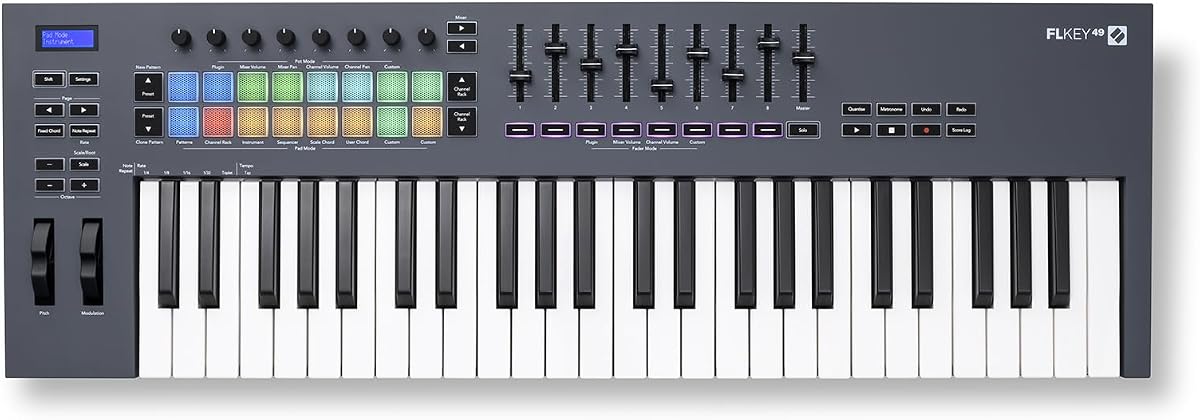
The Novation FLkey 49 is tailored specifically for producers using FL Studio, offering seamless control over mixing and sequencing. Rated highly, it brings essential software controls into the physical realm to enhance productivity and creative flow.
We may earn a commission when you buy through this link, at no additional cost to you.
Its dedicated mapping allows immediate control over mixer volumes and pan settings without mouse use. The Sequencer Mode pads let you program beats directly and adjust patterns. Essential buttons for transport and undo ensure you stay in the flow during creative sessions.
For users of other DAWs, some features might not be as impactful. The price is competitive but tailored for the FL Studio ecosystem. It is a powerful tool for those who want to speed up their workflow in this specific environment.
We recommend this controller specifically for FL Studio producers. It removes friction from the production process and allows for more natural recording. It is a specialized tool that pays off for users deeply invested in the FL ecosystem.
Mapping to FL Studio mixer channels allows you to adjust tracks and automations hands-on instantly.
Sequencer Mode pads make creating and modifying drum patterns intuitive without relying on the step sequencer screen.
We may earn a commission when you buy through this link, at no additional cost to you.
The M-AUDIO Oxygen Pro 49 offers advanced control features for serious producers looking to master their sound. With a strong user rating, it provides semi-weighted keys and extensive mapping options that suit complex studio environments and live setups.
We may earn a commission when you buy through this link, at no additional cost to you.
Sixteen RGB backlit pads offer visual feedback and dynamic performance options. The inclusion of a 5-pin MIDI output ensures compatibility with older hardware gear. Smart Chord and Scale modes help avoid wrong notes during improvisation or songwriting.
The semi-weighted keys provide a heavier feel preferred by piano players. The price is higher than entry-level options, reflecting the robust build and feature set. It is a comprehensive tool for those who need maximum control over their production environment.
This controller is best for professionals requiring detailed mapping and hardware connectivity. If you value physical feedback and extensive control surfaces, it delivers a premium experience. It is a top choice for those expanding their studio capabilities significantly.
MIDI out ports allow connection to external hardware synths ensuring you can integrate with existing gear.
RGB backlit pads offer clear visual cues and sensitivity for complex drum programming and trigger tasks.
We may earn a commission when you buy through this link, at no additional cost to you.
The midiplus AK490 serves as a reliable budget option for those needing a simple keyboard to input notes into their software. With decent ratings, it offers the essential tools for composing and practicing without unnecessary features or complexity.
We may earn a commission when you buy through this link, at no additional cost to you.
It features velocity-sensitive keys and standard MIDI connectivity including a Din Jack. Pitch and mod wheels are included to allow basic expression. The sustain pedal input ensures you can play expressive chords, essential for classical or electronic music.
The key action is basic, suitable for simple input rather than expressive performance. The lack of advanced software mapping means you might need to configure controls manually. However, the low price makes it accessible for many students and hobbyists.
We recommend this for users on a tight budget who need a functional MIDI interface. It is a practical tool for entry-level work and basic composing. If you need a simple and affordable solution for MIDI input, this unit delivers the basics.
Basic inputs like sustain and modulation allow for fundamental expression without needing complex software setup.
Affordable pricing makes it an accessible entry point for new musicians starting to explore digital music creation.
We may earn a commission when you buy through this link, at no additional cost to you.
Selecting the right MIDI controller involves evaluating your workflow needs, budget, and software ecosystem. This guide breaks down the critical factors to ensure you choose a device that enhances your music production process effectively.
Key action determines how the keys respond when you press them. Velocity-sensitive keys are standard and allow you to control volume and tone based on touch intensity. Semi-weighted keys offer a piano-like feel which is preferred by pianists, while synth-action keys are lighter and faster for playing rapid lines. Consider your playing style and whether you prioritize expressiveness or speed when making your choice.
Look for velocity sensitivity as a minimum requirement for professional expression.
Physical controls such as knobs, faders, and pads significantly enhance your workflow. Faders are essential for adjusting mixer levels and automation. Knobs allow you to tweak synth parameters without reaching for the mouse. Pads are ideal for drum programming and clip launching. Evaluate how many controls you need based on your typical production tasks.
Ensure the layout has enough faders and knobs for your mixing needs.
Deep integration with your Digital Audio Workstation (DAW) streamlines the production process. Controllers often come with scripts that map buttons to specific functions in software like Logic, Cubase, or Ableton Live. This reduces the need for manual mapping and makes the device feel like a natural extension of your software. Check compatibility with your primary DAW to ensure seamless operation.
Choose a controller that has dedicated scripts for your specific DAW software.
Portability is important if you plan to take your setup to different locations. Lightweight materials like plastic reduce weight but might feel less durable. Metal chassis offer sturdiness but add weight. Measure your workspace to ensure the controller fits comfortably. A compact design is crucial for home studios with limited desk space.
Check the dimensions and weight to ensure it fits your studio environment.
Most MIDI controllers come with software packages including DAWs and virtual instruments. Some offer extensive suites with synthesizers and drum machines, while others provide basic versions. This can save you money and time setting up your station. Review the included software to see if it offers tools that will help you start producing immediately.
Verify that the included software includes the DAW or tools you need.
Modern controllers usually connect via USB, which is simple and effective. However, some models include MIDI DIN ports for connecting external hardware synthesizers. USB-C is becoming the standard for newer models offering faster data transfer. Ensure the controller supports your computer's ports and any external gear you plan to use.
Confirm if you need MIDI out ports for hardware integration.
Prices vary widely from budget-friendly to high-end professional models. Higher costs often reflect better build quality, more features, and superior key beds. Determine what features are essential for you versus nice-to-haves. A budget model might lack faders but still provide great key quality. Focus on getting the best value for your specific needs.
Balance the cost against the features that matter most to your workflow.
Connect your controller to your computer using a standard USB cable. If your keyboard requires external power, plug it into a wall outlet to ensure stable performance. Most devices are plug-and-play, meaning they should be recognized immediately by your operating system without additional drivers.
Open your digital audio workstation and ensure the MIDI settings are configured to recognize the new device. You may need to enable MIDI inputs and outputs in the preferences menu. If your controller has specific DAW scripts, install the software provided to access advanced control mapping features.
To extend the life of your keyboard, keep it away from direct sunlight and moisture. Dust the keys and controls regularly with a dry cloth. Store it in a protective case if you transport it frequently to prevent damage to the keys and internal electronics.
No, a MIDI keyboard only sends performance data to your computer and does not produce sound on its own. Your computer's sound card or an external audio interface handles the audio output. You only need an audio interface if you plan to connect microphones or external instruments to record into your DAW.
Velocity sensitivity measures how hard you press a key and translates that into volume or tone. This allows for expressive performances where notes can be louder or softer depending on your touch. It is a crucial feature for realistic sounding piano and instrumental tracks in your productions.
Many modern MIDI controllers support iOS devices, often requiring a USB to Lightning adapter. Always check the manufacturer's specifications for iOS compatibility before purchasing. Some models are designed specifically for mobile use, offering better battery support or compact designs.
Most 49-key keyboards use semi-weighted or unweighted keys to keep the unit portable. Fully weighted keys are typically found on larger 61 or 88-key models. If you are a pianist, semi-weighted keys are a good compromise between travelability and playing feel.
Visit the manufacturer's official website and locate the support or downloads section for your specific model. Download the firmware update tool and follow the provided instructions to connect the device and apply the update. Always ensure the device is connected via USB and powered on during the process.
Most manufacturers include a 'Lite' version of a popular DAW like Ableton Live or Logic Pro with the purchase. These versions usually have limited features but are sufficient for learning and starting production. Check the product details to see exactly which software is included in the box.
We have explored ten top models that cater to different needs, from budget-friendly entry points to premium controllers with advanced features. The Novation Launchkey 49 MK4 and M-AUDIO Keystation 49 MK3 stood out as top picks for their respective categories, offering distinct advantages in control and value.
When making your final decision, prioritize the features that align with your workflow. If you need hands-on mixing, ensure faders and knobs are included. If you focus on melodies, check the key action and software integration. Matching these elements to your goals will enhance your creative process.
Remember that product availability and offers change regularly. Always verify the current pricing and software bundle details before purchasing. Selecting the right 49 Key MIDI Keyboard is an investment in your creative future, so choose the one that best supports your musical journey.