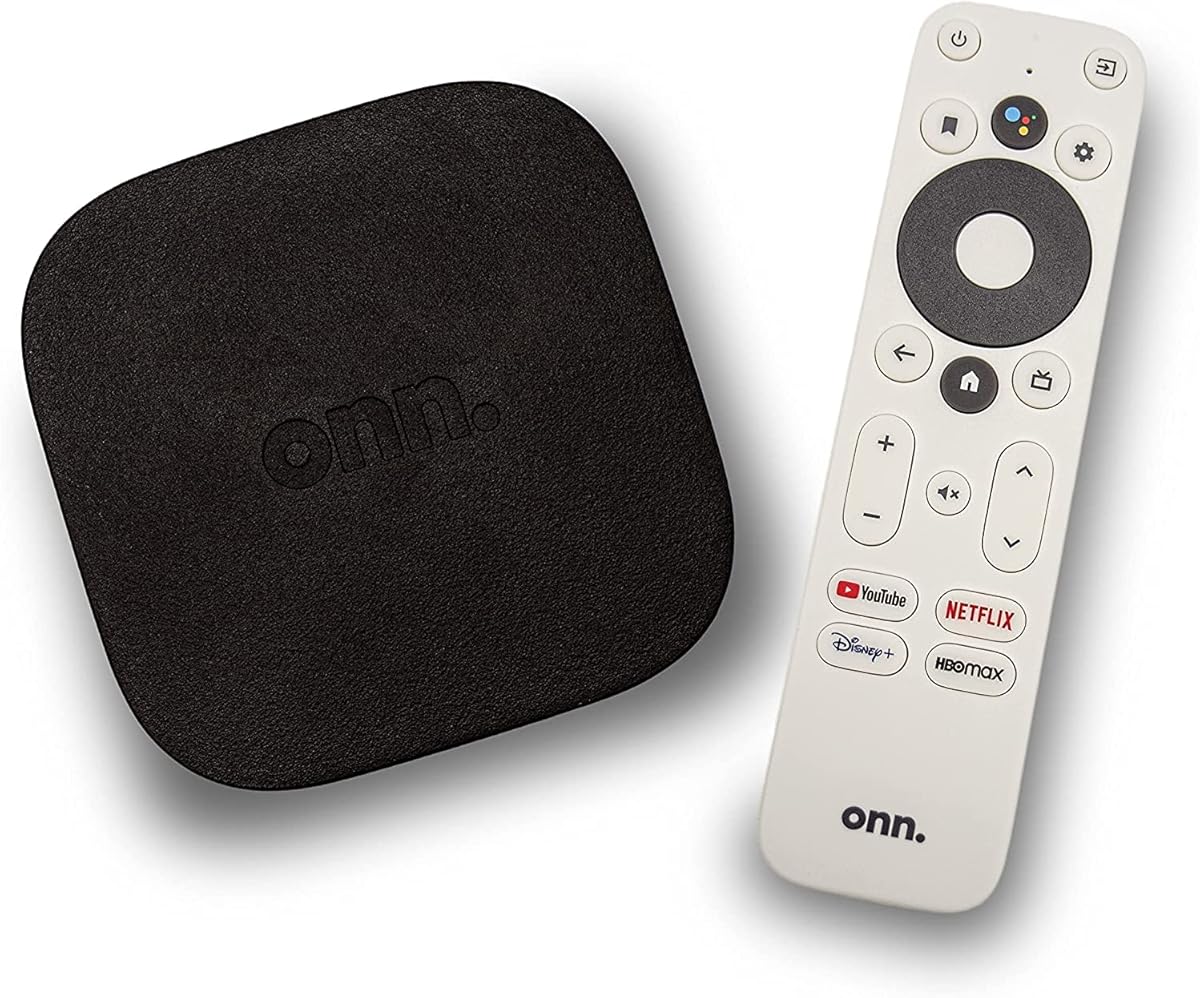
ONN Android TV 4K UHD Streaming Device
4.4Editor score
4K Ultra HD Resolution
Voice Remote Control
Chromecast Built-in
This expert guide compares the top 4K Kodi Box options available in October 2026, focusing on performance, compatibility, and streaming features.
Finding the right streaming device can transform your home entertainment setup significantly. A good 4K Kodi Box offers high-resolution playback, smooth navigation, and access to countless apps for a complete media experience.
We compared ten leading models based on their hardware capabilities, operating system features, and connectivity options. Each product was evaluated for its ability to handle high bitrate content without buffering or lag during playback.
Every pick highlights specific strengths to help you match a device to your needs. Note that availability and pricing may fluctuate, so verify current details before making your final purchase decision online.
4.4Editor score

4.4Editor score

4.2Editor score
The following table provides a side-by-side look at the key specifications for each model to help you identify the best fit for your streaming needs.


This ONN Android TV streaming device is a fantastic entry point for those seeking a reliable 4K Kodi Box experience. It comes with a 4.4 rating from users who appreciate its straightforward operation and clear image quality output.
We may earn a commission when you buy through this link, at no additional cost to you.
The device runs on the Android TV operating system, giving you direct access to the Google Play Store. You can download your preferred streaming apps and use the voice remote to control content playback effortlessly.
While it offers solid performance for most users, it may struggle with extremely heavy multitasking due to limited memory resources. However, for standard streaming and media consumption, it provides excellent value and clarity.
Ideal for budget-conscious buyers, this box delivers crystal clear audio and easy setup via HDMI. It is a smart choice if you want Google Assistant features without breaking the bank.
Use the Google Assistant button on the remote to find content quickly using voice commands.
Chromecast Built-in allows you to mirror photos and videos from your phone directly to the TV.
We may earn a commission when you buy through this link, at no additional cost to you.
The R69 Max Android TV Box stands out for its generous storage capacity and latest operating system version. It is designed to run smoothly with ample room for apps and media files.
We may earn a commission when you buy through this link, at no additional cost to you.
Equipped with 4GB RAM and 64GB ROM, this device supports fast operation and includes WiFi 6 for stable connections. The 8K decoding capability ensures future-proofing for high-resolution content playback.
Despite its strong hardware specs, some users report a lower rating score possibly due to interface nuances or initial setup hurdles. It requires some technical familiarity to get the most out of it.
This box is best suited for tech-savvy users who need high storage and want the latest Android features. It is a robust option for those who plan to store many files locally.
WiFi 6 and Bluetooth 5.0 provide faster downloads and easy peripheral pairing.
Support for 8K decoding ensures you can play upcoming high-resolution video files smoothly.
We may earn a commission when you buy through this link, at no additional cost to you.
This Android 13.0 TV Box offers a balanced mix of performance and efficiency for general home entertainment. It runs on the stable Android 13.0 OS with a quad-core processor for smooth operation.
We may earn a commission when you buy through this link, at no additional cost to you.
The device features H.265 technology which improves network speed efficiency by compressing video sizes effectively. It also includes WiFi 6 for reliable wireless connectivity and plenty of room for your favorite apps.
While it supports 8K decoding and 3D visuals, the Bluetooth version is slightly older compared to newer models. This may limit compatibility with the very latest wireless accessories like headphones or controllers.
Choose this box if you want a reliable Android experience with efficient video playback capabilities. It works well for families looking for a dedicated streaming player at home.
H.265 technology increases network speed efficiency by up to fifty percent.
USB 3.0 and 2.0 ports support mouse and keyboard for easy navigation.
We may earn a commission when you buy through this link, at no additional cost to you.
The Xiaomi TV Box S 3rd Gen is a premium choice that brings cinematic visuals and sound to your living room. It scores a 4.4 rating thanks to its high-performance hardware and immersive audio features.
We may earn a commission when you buy through this link, at no additional cost to you.
Running on the Google TV smart platform, it offers personalized content recommendations and seamless voice control via Google Assistant. The box supports 4K resolution with Dolby Vision for enhanced contrast and brightness.
Its compact design allows for discreet placement while powerful quad-core CPU ensures smooth navigation. However, it uses 2GB RAM which is standard but may be less ideal for heavy multitasking.
This box is ideal for movie enthusiasts who value high-quality audio and video standards. It is a top-tier option for upgrading your entertainment setup with advanced smart features.
Dolby Atmos and DTS:X surround sound deliver theater-quality multidimensional audio.
Google TV integrates personalized recommendations from various apps and subscriptions.
We may earn a commission when you buy through this link, at no additional cost to you.
This onn Google TV 4K Pro Streaming Device delivers uncompromising performance with a unique backlight remote feature. It earns a 4.3 rating for its ability to transform your TV into a premium entertainment hub.
We may earn a commission when you buy through this link, at no additional cost to you.
It includes 3GB RAM which is significantly more than many standard models ensuring super smooth app performance. The device supports stunning 4K UHD and Dolby Vision for vivid color and sharp contrast.
While the Ethernet port offers reliability it is optional if you rely on WiFi 6 connectivity. The Find My Remote feature is a standout benefit for those who frequently lose their remote control.
Ideal for users seeking a robust Google TV experience with extra memory headroom. It is a great pick for gaming and streaming high definition content without lag.
The Find My Remote feature with backlight helps you locate the device quickly.
Enjoy incredibly smooth buffer-free streaming and gaming with blazing fast WiFi 6.
We may earn a commission when you buy through this link, at no additional cost to you.
This Xiaomi 4K UHD TV Box serves as a smart entertainment center with integrated personalized recommendations. It supports exceptional clarity and cinematic picture quality with HDR10+ and Dolby Vision.
We may earn a commission when you buy through this link, at no additional cost to you.
Powered by a high-performance platform it ensures smooth operation with 2GB RAM and 32GB storage. Wi-Fi 6 connectivity utilizes OFDMA and MU-MIMO technologies to provide greater bandwidth and speeds.
The device supports instant playback of online content and cross-app search for a customized experience. Be aware that the seller warns against unauthorized modifications to ensure safety and performance.
Choose this box for a user-friendly Google TV experience with powerful voice control features. It is perfect for households wanting easy access to multiple streaming services on one screen.
Smart Google TV integrates personalized recommendations for movies and shows from various apps.
Wi-Fi 6 with OFDMA and MU-MIMO ensures improved transmission speeds for instant playback.
We may earn a commission when you buy through this link, at no additional cost to you.
The MAG544w3 set-top box delivers stunning visuals with AV1 and HEVC codecs for seamless 4K playback. It achieves a 4.2 rating for its high-performance chipset that surpasses predecessors in UI speed.
We may earn a commission when you buy through this link, at no additional cost to you.
Equipped with an advanced Amlogic S905Y4 chipset this device supports 4K HDR and Dolby Digital Plus sound. It offers a flexible wireless module and an Ethernet port for stable connection choices.
Note that this is a Linux-based device which means it does not run standard Android apps directly. Users need compatible third-party providers to access services and cannot install APK files freely.
This box is perfect for IPTV users who want reliable hardware and excellent audio fidelity. It is a premium hardware choice for those who value sound quality and stability over Android flexibility.
Dolby Digital Plus surround sound allows connecting up to seven speakers and a subwoofer.
Choose between a 100 Mbps Ethernet port for stability or flexible Wi-Fi module.
We may earn a commission when you buy through this link, at no additional cost to you.
The HK1 Android TV Box offers a solid platform with 4GB RAM for speed and stability. It runs on Android 12.0 with a quad-core CPU that ensures smooth loading of movies and games.
We may earn a commission when you buy through this link, at no additional cost to you.
Its H.265 technology increases network speed efficiency by compressing video sizes effectively. This creates a faster and stunning visual experience without needing huge bandwidth for every stream.
While the interface is slick and lag-free the operating system is not the absolute latest version available. This might mean slightly less access to newest features but maintains high stability for daily use.
Ideal for users who prioritize memory stability over the newest OS updates. It is a great option for home entertainment with friends without any buffering.
H.265 increases network speed efficiency by 30% to 50% for better streaming.
4GB RAM ensures speed and stability of the operation system without buffering.
We may earn a commission when you buy through this link, at no additional cost to you.
This Google Certified device provides access to over 700,000 movies and shows across major apps. It is rated 4.1 for its powerful quad-core performance and built-in Chromecast features.
We may earn a commission when you buy through this link, at no additional cost to you.
The remote includes Google Assistant for instant voice search and smart home control. It runs on Android TV 14 for enhanced stability and privacy protection during your viewing sessions.
With only 16GB of internal storage you might need to use USB expansion for more files. However the system includes OTA updates to keep your device future-ready for new features.
Choose this for reliable certified streaming with easy voice interaction. It is a practical choice for casual users who want seamless access to popular streaming apps.
Access over 700,000 movies and shows across Netflix, Prime Video, and more.
Built-in Google Chromecast lets you cast entertainment from your phone to TV directly.
We may earn a commission when you buy through this link, at no additional cost to you.
This LEFFOT M2 Plus runs on the latest Android 14.0 operating system ensuring great compatibility and security. It supports 4K Ultra HD streaming and light office tasks out of the box.
We may earn a commission when you buy through this link, at no additional cost to you.
With 4GB RAM and 32GB ROM it provides smooth performance and room for many apps. Dual-band Wi-Fi 6 ensures buffer-free streaming and reliable connections throughout the home.
The device includes Bluetooth 5.4 for rich peripheral use and DLNA support for screen mirroring. Some users report a lower rating score but the hardware specs are solid for the price.
This box is ideal if you want the newest OS features and flexible networking. It serves well as a versatile home entertainment solution for daily streaming needs.
Running Android 14 OS gives you enhanced security for your entertainment experience.
Dual-band Wi-Fi 6 and 100M LAN offer flexible options for stable internet access.
We may earn a commission when you buy through this link, at no additional cost to you.
Selecting the right 4K Kodi Box depends on several technical factors that affect your viewing experience and ease of use.
The operating system determines app availability and user interface. Android TV and Google TV offer wide app support while Linux-based systems rely on third-party providers.
Choose an OS that supports your preferred streaming apps and provides a smooth interface.
Ensure the device supports 4K Ultra HD to match your television. Look for HDR support like Dolby Vision or HDR10 for better color and contrast.
Higher resolution standards ensure you get the best picture quality from your hardware.
A strong processor ensures smooth navigation and quick app loading. Quad-core CPUs are recommended for handling high-bitrate content without buffering.
Prioritize models with robust processing power to avoid lag during peak usage.
RAM affects multitasking while storage holds your apps. At least 2GB of RAM and 16GB of storage are common but more helps performance.
Check expandability options like micro SD slots if you plan to store media locally.
Modern Wi-Fi 6 improves speed and stability. Ethernet ports are valuable for consistent connections especially during 4K streaming.
Ensure the box has the latest connectivity standards to handle high speed data.
Audio standards like Dolby Atmos or Dolby Digital Plus enhance sound immersion. Check your receiver supports the audio formats the box outputs.
Good audio specs are vital for a complete cinema experience at home.
Voice remote control allows hands-free operation. Backlit remotes and Find My Remote features add convenience for low-light viewing.
Look for remotes that offer easy navigation and voice search capabilities.
Google Certified devices guarantee app compatibility and security. Unverified boxes may have limited access to major streaming services.
Opt for certified models to ensure reliable service access and system updates.
Start by connecting the HDMI cable from the box to your TV and power up the device. Follow the on-screen setup to connect to your Wi-Fi network and sign in to your account.
Download your preferred streaming apps from the Play Store and configure your remote controls. Use voice commands to search for content quickly and efficiently.
Keep the device in a well-ventilated area to prevent overheating and restart it occasionally to clear cache. This maintenance helps maintain smooth performance over time.
Most Android TV and Google TV based boxes can run major streaming apps like Netflix and YouTube. However specific models may have licensing restrictions that limit certain apps depending on certification.
While older WiFi standards work WiFi 6 offers better stability and speed which is helpful for high bitrate 4K streams. It is not strictly necessary but improves reliability in congested networks.
Yes most of these boxes support local media playback via USB or network shares. You can play stored videos and audio files directly using built-in media players.
You can install apps directly from the Google Play Store on supported devices. Some models allow side-loading APKs but this should be done carefully to avoid security issues.
Google TV is a newer layer built on top of Android TV that offers more personalized content discovery. Both allow app access but Google TV focuses more on curated feeds.
Streaming services require internet but local playback can work offline. System updates and voice control features depend on having an active internet connection.
Most modern boxes support Bluetooth game controllers for compatible games. Check device specs for Bluetooth version to ensure it works with your preferred controller.
Our top picks cover a range of needs from budget-friendly entry points to premium cinematic setups. Each device offers distinct advantages in performance and features to suit different households.
When making your decision prioritize video standards and app support to ensure longevity. A balance of RAM and storage will keep your device running smoothly as apps grow.
Always verify current availability and pricing before purchasing as offers can change quickly. Enjoy your upgraded viewing experience with the right 4K Kodi Box.