
CERRXIAN SCSI HPDB 68 Pin Male to IDE 50 Pin Male Adapter
3.7Editor score
High-thickness gold-plated connector layer
Converts 68-pin HPDB to 50-pin IDE
Ideal for industrial server applications
This guide compares the top 50 Pin Scsi Adapter options for connecting legacy devices to modern systems with precision and reliability.
Finding the right adapter for legacy storage hardware is crucial for maintaining data integrity in industrial environments. A reliable connection ensures smooth operations without signal loss or unexpected downtime during critical tasks.
We evaluated each product based on build quality, connector types, and compatibility with various SCSI standards. Our analysis focuses on durability and performance to help you choose the most effective solution.
Each selection highlights specific strengths like gold plating or precise pin alignment. Prices and availability may change, so verify current details before purchasing to ensure you get the best value for your setup.
3.7Editor score

4.8Editor score

5.0Editor score
This section provides a detailed side-by-side comparison of all ten products to help you identify the best fit for your specific hardware requirements.

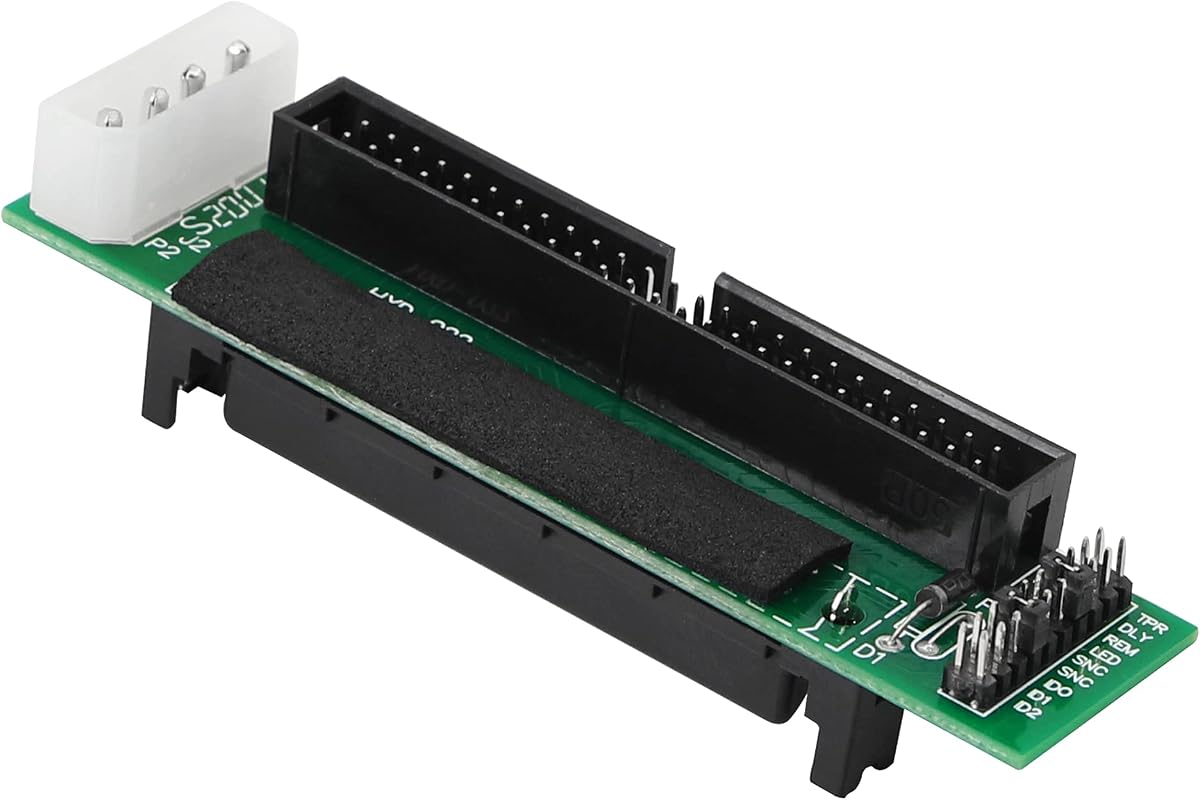


This adapter is a solid choice for connecting legacy SCSI devices to systems with 50-pin IDE interfaces. It earns a moderate rating but stands out for its build quality and specific industrial focus.
We may earn a commission when you buy through this link, at no additional cost to you.
The high-thickness gold-plated connector layer enhances conductivity and reduces signal loss. This feature ensures a stable, corrosion-resistant connection which is critical for long-term reliability in server environments.
While it works well for hard disks, tape drives, and optical drives, it is not compatible with ordinary computers. Users must confirm they have the correct industrial server IDE 50-pin interface before purchase.
This adapter is ideal for IT professionals maintaining legacy server infrastructure. It provides a reliable bridge for old hardware without significant investment, making it a practical solution for specific industrial tasks.
The precision conversion from 68-pin HPDB to 50-pin IDE allows seamless integration of older SCSI storage into modern industrial setups.
Gold plating protects against corrosion, ensuring that signal integrity remains intact even in demanding server room conditions over time.
We may earn a commission when you buy through this link, at no additional cost to you.
This converter is highly rated for its ability to connect old HDDs with SCSI interfaces to newer devices. Its female-to-female design is useful for specific cabling needs in server environments.
We may earn a commission when you buy through this link, at no additional cost to you.
The IDE connector seat uses a high-thickness gold-plated layer to ensure better conductivity and stability. This design choice minimizes connection failures and supports a wide array of communication equipment.
Users should note this is a 50-pin IDE adapter not for ordinary computers. It is strictly for industrial server IDE 50-pin interface motherboards to function correctly with legacy hardware.
Choose this adapter if you need to extend connections for disks, tapes, or communication gear. It offers a reliable pathway for older data storage devices in professional setups.
Designed specifically for industrial server IDE 50-pin interface motherboards, ensuring compatibility where standard computer adapters fail.
Suitable for disks, tapes, CD-ROMs, printers, and scanners, making it a versatile tool for diverse legacy hardware integration.
We may earn a commission when you buy through this link, at no additional cost to you.
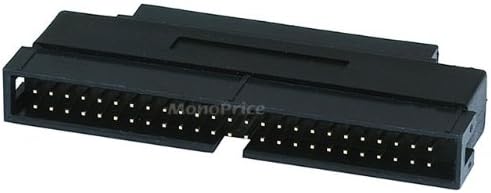
This internal SCSI adapter provides a straightforward way to connect devices with different pin counts. It is a basic solution for converting 50 Pin to 68 Pin Male to Male configurations.
We may earn a commission when you buy through this link, at no additional cost to you.
Monoprice is known for reliable cabling and adapter products, making this a decent option for server maintenance. The adapter handles standard internal SCSI connections effectively.
Potential buyers should note that the item received may not match the photo or specs shown exactly. It is manufactured in China and may have minor variations in packaging.
If you need a simple male to male conversion for internal SCSI tasks, this adapter serves well. It is a practical choice for maintaining older storage systems.
This adapter converts 50 Pin to 68 Pin Male to Male allowing quick compatibility changes for internal hardware connections.
Designed for internal SCSI tasks, it offers a solid bridge for legacy storage devices needing different connector types.
We may earn a commission when you buy through this link, at no additional cost to you.
This Belkin internal adapter is a top-rated choice for those seeking reliable SCSI connectivity. Its perfect rating highlights its consistent quality and user satisfaction.
We may earn a commission when you buy through this link, at no additional cost to you.
The product is described as offering premium quality at an outstanding saving which suggests good value for money. It is an excellent product for maintaining internal connections without issues.
While specific technical details are sparse, the 100% satisfaction claim and excellent reviews point to a robust and durable component. Belkin is a trusted name in computer peripherals.
If you need an internal SCSI adapter with a proven track record, this is a safe pick. It ensures a solid connection for your hardware with minimal risk of failure.
Belkin is well-known for reliable computing accessories, making this adapter a secure choice for internal hardware connections.
The 100% satisfaction guarantee reinforces confidence in the product's quality and performance over time.
We may earn a commission when you buy through this link, at no additional cost to you.
This adapter converts 50-pin interface to 80-pin allowing low-speed SCSI devices to connect to modern interfaces. It is useful for specific backup or data transfer tasks.
We may earn a commission when you buy through this link, at no additional cost to you.
You need to connect a molex 4 pin power connector to power the hard drive. It is recommended for direct data transfers or backups, not for continuous high-performance use.
The adapter is not for ordinary computers and only works on industrial server IDE 50-pin interface motherboards. Ensure your system matches this requirement to avoid compatibility issues.
Choose this if you need to interface SCA 80 Pin devices with a 50-pin setup. It is a specialized tool for specific legacy hardware maintenance in professional environments.
Converts 50-pin interface to 80-pin allowing low-speed SCSI devices to connect to newer 80-pin SCSI interfaces.
Requires connecting a molex 4 pin power connector to power the hard drive, ensuring stable operation during transfers.
We may earn a commission when you buy through this link, at no additional cost to you.
This adapter offers advanced features like jumper settings for 16 SCSI IDs which is critical for complex SCSI bus configurations. It converts SCA 80 Pin to 68/50 Pin seamlessly.
We may earn a commission when you buy through this link, at no additional cost to you.
It includes status LED connector pins and supports remote start and spindle synchronous delay. This makes it suitable for professional setups requiring precise control over device startup.
The adapter 80 Pin connector is female, matching standard SCA drive interfaces. It works with SCA & SCA-2 80 Pin drives for flexible internal or external connections.
Use this for managing multiple SCSI devices with specific ID requirements. It is a robust solution for technical environments needing detailed control over SCSI bus parameters.
Jumper settings allow configuration for 16 SCSI IDs helping you organize multiple devices on the same SCSI bus.
Status LED connector pins and remote start support provide detailed monitoring and control for professional applications.
We may earn a commission when you buy through this link, at no additional cost to you.
This mini adapter solves connectivity issues by acting as a compact port extender and gender changer for professional setups. It ensures secure locking for vibration-proof connections.
We may earn a commission when you buy through this link, at no additional cost to you.
Built with durable housing and gold-plated contacts it offers superior signal integrity and corrosion resistance. Each unit is individually tested to meet strict performance standards before shipping.
It is plug-and-play compatible with standard 50-pin HPCN ports requiring no drivers for instant connectivity. This makes it easy to use in various professional equipment racks.
Choose this if you need a gender changer or extender for 50-pin HPCN50 devices. It keeps your setup clean and organized while maintaining a reliable connection.
This compact design acts as a versatile problem-solver for extending cable length or changing genders in tight equipment racks.
Gold-plated contacts ensure superior signal integrity and corrosion resistance protecting your data during critical operations.
We may earn a commission when you buy through this link, at no additional cost to you.
This adapter is an ideal choice for internal SCSI connections requiring a shift from 68-pin to 50-pin formats. Its 4.8 rating reflects high reliability and consistent performance.
We may earn a commission when you buy through this link, at no additional cost to you.
It uses a 50-pin 8-bit SCSI header connector known for internal type ribbon cables. The HPDB 68 connector is a 16-bit SCSI-2 connector suitable for both internal and external connections.
Note that the HPDB 68 connector has pins much closer together than IDC 50 making it narrower. This physical difference is crucial for proper fit and connection security.
Opt for this if you are working with legacy storage devices needing internal header adapters. It is a robust component for maintaining older SCSI systems effectively.
The HPDB 68 connector is narrower with pins closer together than IDC 50 ensuring correct fit and secure data transfer.
Designed for internal type ribbon cables, it ensures stable connections for legacy storage devices requiring reliable data paths.
We may earn a commission when you buy through this link, at no additional cost to you.
This passive terminator is essential for ensuring stable performance on 50-pin SCSI buses. It prevents signal reflection that can cause data corruption in storage systems.
We may earn a commission when you buy through this link, at no additional cost to you.
It supports the CEN50M/F standard and works with hard drives and tape drives. The male-to-female design allows easy installation at the end of a SCSI chain.
While simple in design, a proper terminator is critical for legacy SCSI setups to function correctly. Its white indoor design blends well into standard rack equipment.
If you are building or maintaining a SCSI bus, this terminator is a must-have accessory. It ensures your legacy devices communicate reliably without electrical interference.
Proper termination prevents signal reflection on SCSI buses ensuring reliable data transfer and preventing system errors.
Supports the CEN50M/F standard making it compatible with most 50-pin SCSI storage devices and infrastructure.
We may earn a commission when you buy through this link, at no additional cost to you.
This bidirectional adapter converts Internal IDC50 SCSI Male to External HPDB50 Female allowing flexible connections for SCSI cards. It uses a nickel-plated bracket for durability.
We may earn a commission when you buy through this link, at no additional cost to you.
The PCB SCSI-2 with IDC50 Male Connector provides a secure and reliable connection for high-speed data transfer. This feature ensures robust performance for demanding data tasks.
It is designed to bridge internal slots to external ports seamlessly. This is useful for systems requiring external SCSI access from an internal interface slot.
Choose this if you need to adapt internal SCSI slots to external ports. It offers a stable bridge for legacy hardware maintaining reliable data flow between devices.
This bi-directional adapter allows seamless data transfer between internal IDC50 SCSI Male and external HPDB50 Female ports.
Nickel-Plated HPDB50 Bracket Connector ensures a durable and reliable connection protecting against physical wear and corrosion.
We may earn a commission when you buy through this link, at no additional cost to you.
Selecting the right SCSI adapter involves several factors to ensure compatibility and performance in your specific hardware setup.
Ensure the adapter matches the physical connector of your devices. Common types include IDC50 HPDB68 and HPCN50. Using the wrong type can damage hardware or prevent connection entirely.
Always verify the gender and pin count before buying. Mismatched connectors lead to failed installations and potential data loss.
Some adapters convert 68-pin to 50-pin while others maintain the same pin count. Check if your source and target devices support the specific pin arrangement.
Incorrect pin mapping can result in signal loss or hardware failure. Confirm pin layout diagrams to match your system requirements.
Determine if you need an adapter for internal or external connections. Internal adapters often have different brackets or form factors than external ones.
Select a model designed for your specific use case to ensure proper fit and signal shielding in your setup.
Look for adapters with gold-plated contacts which resist corrosion and improve conductivity. Durability is key for long-term reliability in server environments.
High-quality housing prevents physical damage and ensures secure locking of cables during operation.
Many SCSI adapters are designed specifically for industrial servers not ordinary computers. Verify the intended application to avoid incompatibility issues.
Choose adapters certified for server use to guarantee stability and support for legacy industrial hardware.
Adapters should minimize signal loss and interference. Look for features like shielding or high-thickness plating that support clear data transmission.
Poor signal integrity can lead to data corruption or slow transfer speeds. Prioritize quality to maintain data safety.
Some adapters require additional power connectors like molex 4 pin to function correctly. Check if your setup can support these power needs.
Without proper power, connected drives may not spin up or maintain operation. Verify power compatibility before installation.
Choose products from trusted brands known for quality computing accessories. Established manufacturers often provide better warranties and customer support.
A strong reputation indicates consistent performance and reliability for critical infrastructure hardware.
Start by powering down your system and unplugging it from the power source to prevent electrical damage. Handle the adapter carefully by its housing to avoid bending pins or stressing connectors.
Align the adapter ports correctly with your cable and device connectors ensuring pins match perfectly before pressing them together. Use gentle pressure to snap the connectors in place without forcing them.
After connection secure the adapter and cables to prevent movement that might loosen pins or cause wear. Regularly inspect connectors for signs of dust or corrosion and clean them if necessary.
A 50 pin adapter uses 50 conductors for data transfer while a 68 pin adapter uses 68 conductors. The 68 pin version supports wider data paths and higher speeds on SCSI-2 standards. Choosing the right adapter depends on your device and host port specifications.
Most SCSI adapters are designed for industrial server motherboards not ordinary computers. Standard PCs typically lack the specific 50 pin IDE interface needed for these adapters. Verify your system specs to confirm compatibility before purchasing.
Gold-plated contacts resist corrosion and provide better conductivity than standard metal contacts. This improves signal stability and reduces resistance over time. It is essential for maintaining data integrity in legacy server environments.
Some SCSI adapters like those connecting SCA drives require additional power such as a molex 4 pin connector. Others pass through power from the host system. Check the specific adapter documentation for power requirements.
Check the gender of the ports on your device and cable. If your device has a male port you will need a female adapter and vice versa. Matching genders ensures a secure and functional connection.
A SCSI terminator sits at the end of a SCSI chain to prevent signal reflection and ensure stable communication. Yes you need one if your SCSI bus is not terminated by the last device. It prevents data errors and system crashes.
We reviewed ten adapters ranging from basic internal conversion to advanced bidirectional solutions. Top picks like the Belkin and Monoprice models stand out for reliability and quality construction.
When choosing prioritize build quality and pin configuration to match your hardware. Industrial server compatibility is critical to ensure the adapter works with your specific system.
Prices and availability may change so check current listings for the best options. Investing in the right adapter ensures your legacy storage hardware continues to function reliably.