
TP-Link Nano AC600
4.5Editor score
Nano size design
Dual band support
Strong connection
This guide compares the top 5GHz WiFi dongles for speed and range, helping you choose the best USB adapter for gaming and streaming needs.
Finding a reliable 5GHz WiFi dongle is essential for modern computing. These adapters boost wireless performance, offering faster speeds and reduced lag. A good dongle ensures seamless streaming and gaming on desktops.
We compared ten top-rated models based on speed, range, and compatibility. Each product was evaluated for real-world performance and ease of use. Our list covers various price points to suit every user.
Each pick highlights key features like antenna gain and USB standards. Remember that prices and availability change frequently. Check current listings before purchasing to ensure you get the best deal.
4.5Editor score

4.4Editor score

4.1Editor score
This table provides a quick side-by-side view of all ten models. Compare their key specs like speed bands and antenna types to find the right fit.


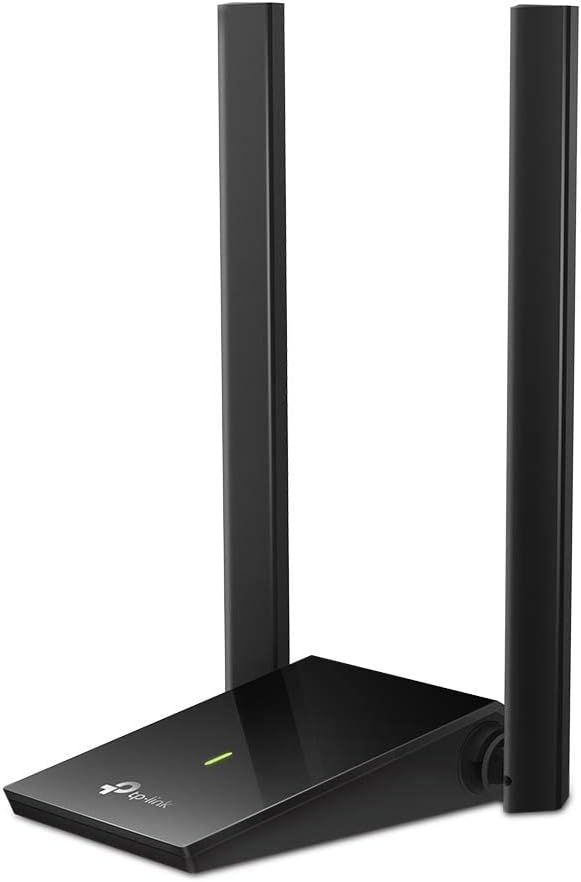


The TP-Link AC600 USB adapter is a top choice for desktop users seeking reliable range. It boasts a 4.4 rating and features a high-gain antenna for stable connections.
We may earn a commission when you buy through this link, at no additional cost to you.
Its standout quality is the 5dBi adjustable antenna which significantly boosts signal strength. This allows for lag-free surfing and streaming even in rooms far from the router.
Trade-offs include Windows-only compatibility and the need for driver downloads on some systems. These are acceptable given the strong performance and affordable price point.
Buy this if you need extended range and flexible antenna positioning. It is ideal for desktops where portability is less critical than signal strength.
The high-gain antenna enhances transmission and reception, ensuring stable Wi-Fi even through walls.
Rotate the multi-directional antenna to face your router for optimal performance in any room.
We may earn a commission when you buy through this link, at no additional cost to you.
This nano adapter delivers impressive performance in a tiny package. With a 4.5 rating, it is perfect for users who want a discreet solution without sacrificing dual-band speed.
We may earn a commission when you buy through this link, at no additional cost to you.
Its small size allows it to stay plugged in without blocking other ports. The 5GHz band ensures fast streaming and gaming with minimal lag.
Some users may need to install drivers manually on older systems. However, the compact design and cost-effectiveness make it a smart budget choice.
Choose this for laptops or tight desktop spaces. It offers the best value for those prioritizing size and basic dual-band connectivity.
The sleek miniature design allows you to leave the device plugged in permanently.
Access both 2.4G and 5G bands for flexible and lag-free internet usage.
We may earn a commission when you buy through this link, at no additional cost to you.
The Archer T3U offers top-tier speed with AC1300 capabilities. Rated at 4.4, it uses MU-MIMO to deliver beamforming for a lag-free experience.
We may earn a commission when you buy through this link, at no additional cost to you.
It supports USB 3.0 which is ten times faster than USB 2.0. This ensures that the adapter keeps up with high-speed network demands.
The main trade-off is the price compared to basic models. However, the performance gain and reliability justify the investment for power users.
Get this if you need maximum speed and modern tech. It is perfect for streaming HD content and heavy gaming on desktops.
Delivers beamforming connections for a smoother Wi-Fi experience across multiple devices.
Provides data transfer speeds up to 10x faster than standard USB 2.0 ports.
We may earn a commission when you buy through this link, at no additional cost to you.
This adapter brings dual high-gain antennas to the table for better signal capture. It achieves 1300Mbps speeds which are great for streaming and online meetings.
We may earn a commission when you buy through this link, at no additional cost to you.
The two 5dBi antennas ensure a stable connection even at greater distances. USB 3.0 support adds to the reliability of the data transfer.
While it lacks Mac support, the online technical setup support helps users troubleshoot. This makes it accessible even for less tech-savvy individuals.
Choose this if you need strong signal penetration in larger homes. It balances speed and range well for a reasonable price.
Equipped with two high-gain antennas to capture signals accurately and ensure stable connections.
Connects via Super Speed USB 3.0 for faster data transfer and improved compatibility.
We may earn a commission when you buy through this link, at no additional cost to you.
UGREEN offers a WiFi 6 adapter with built-in drivers for easy setup. It supports speeds up to 600Mbps on 5GHz for fast video transmission.
We may earn a commission when you buy through this link, at no additional cost to you.
The built-in drivers eliminate the need for manual downloads on Windows 10 and 11. This simplifies the installation process significantly for users.
It requires a WiFi 6 router to achieve full speeds which may limit older setups. However, future-proofing your device is a good strategic move.
Buy this for modern Windows systems wanting next-gen speeds. It is efficient for sharing internet via AP mode as well.
Built-in drivers for Windows 10/11 save time by allowing CD-free installation.
Supports new WiFi 6 tech for lightning-fast transmission and low latency streaming.
We may earn a commission when you buy through this link, at no additional cost to you.
This model offers 38% faster 5GHz speeds compared to older AC600 adapters. It has a 4.3 rating and uses an external 6dBi antenna for better signal.
We may earn a commission when you buy through this link, at no additional cost to you.
Preloaded drivers let you get online in 20 seconds on Windows systems. The high-gain antenna improves reception in environments with significant interference.
AP mode allows you to turn your PC into a hotspot for up to 8 devices. This versatility is useful for sharing internet connections efficiently.
Select this if you need quick setup and broad coverage. The external antenna design makes a noticeable difference in signal strength.
Preloaded drivers enable instant setup on Windows 11/10/7 without needing technical skills.
External 6dBi omnidirectional antenna provides multi-dimensional rotation for weak signal reception.
We may earn a commission when you buy through this link, at no additional cost to you.
Boasting 1800Mbps speeds this adapter is designed for high-performance needs. It includes a desktop design with an extension cable for flexible placement.
We may earn a commission when you buy through this link, at no additional cost to you.
Two 5dBi high-gain antennas ensure strong signal reception through multiple walls. Beamforming technology delivers targeted signals for reliable connections.
Linux is not supported so ensure your OS is compatible before buying. The speed gains however are substantial for modern gaming.
Buy this for large homes needing robust range and speed. The USB 3.0 extension cable adds significant flexibility.
Comes with a 3.3-foot USB 3.0 extension cable to place your adapter optimally.
Delivers targeted signals and reliable connections no matter where your PC is located.
We may earn a commission when you buy through this link, at no additional cost to you.
This adapter combines dual high-gain antennas for improved signal quality and range. It achieves AC1300 speeds for gaming and streaming needs.
We may earn a commission when you buy through this link, at no additional cost to you.
Adjustable multi-directional antennas let you deploy for the best reception. It also supports Mac X 10.9 to 10.14 which broadens its user base.
The USB 3.0 port ensures super-fast transfer speeds compared to older standards. Desktop design makes it stable and easy to position on a desk.
Choose this if you use Mac or need better range than mini adapters. The dual setup provides reliable performance.
Improved range and signal quality make this ideal for desktop PC Wi-Fi.
Enable flexible deployment for the best reception with adjustable multi-directional antennas.
We may earn a commission when you buy through this link, at no additional cost to you.
Experience blazing-fast dual-band performance with speeds up to 1201 Mbps on 5GHz. It uses WPA3 encryption for secure browsing.
We may earn a commission when you buy through this link, at no additional cost to you.
Advanced WiFi 6 features like MU-MIMO reduce latency in crowded environments. Back ventilation holes provide superior heat dissipation for reliable performance.
AP mode allows you to use it as a mobile hotspot. Setup is easy with built-in drivers for Windows 10 and 11.
Buy this if you value security and heat management. It balances performance with safety features well.
Supports WPA3-SAE encryption to ensure secure browsing during online sessions.
Back ventilation holes provide superior heat dissipation for reliable long sessions.
We may earn a commission when you buy through this link, at no additional cost to you.
This mini dongle offers 38% faster 5GHz speeds than AC600 adapters. It fits into small spaces without cluttering the workspace.
We may earn a commission when you buy through this link, at no additional cost to you.
A pre-loaded driver for Windows 11/10/7 eliminates the need for CD installation. It is tiny at 1.4 inches in length.
Using USB 2.0 may limit max throughput compared to USB 3.0 models. But for typical browsing it delivers efficient performance.
Choose this for portability and speed in a small form factor. It is great for laptops and limited desk space.
Measures 1.4 by 0.7 by 0.3 inches for portability and a clutter-free workspace.
Comes with a pre-loaded driver for Windows 11/10/7 eliminating the need for CD installation.
We may earn a commission when you buy through this link, at no additional cost to you.
Selecting the right adapter depends on several factors. Consider speed standards, compatibility, and antenna design.
Look for adapters supporting AC or AX standards for modern speed and compatibility. AC1300 offers good performance while AX WiFi 6 is future-proof.
Choose AX if you have a new router; AC is still reliable for most tasks.
High-gain antennas like 5dBi or 6dBi improve signal range significantly. Adjustable antennas allow you to direct signal towards your router.
External antennas are better for desktops while internal suit laptops.
USB 3.0 ports provide faster data transfer and better power for the adapter. Ensure your PC has a USB 3.0 port for best performance.
USB 3.0 is preferred; USB 2.0 is acceptable for budget models.
Check that the adapter supports your specific OS version. Some adapters only work with Windows 10/11 while others support Mac.
Verify OS compatibility on the product page to avoid installation issues.
Modern adapters should support WPA3 encryption for secure browsing. This is crucial for protecting data on public or private networks.
Look for WPA3 support if available for enhanced security.
Nano adapters stay plugged in but may have less range. Desktop adapters with cables offer more placement flexibility for better signal.
Decide based on space constraints and port needs.
Prices range from budget friendly to premium depending on features. Determine your required speed and features to find a good value.
Higher cost often means better build and faster speeds.
Plug the adapter into an available USB port on your computer. If drivers are not automatic, download them from the manufacturer's site.
Install the software and select the 5GHz network from your settings for faster speeds. Place it where it has a clear view of your router.
Avoid exposing the adapter to excessive heat or dust. Keep ports clean and handle the cable gently to prevent damage over time.
5GHz offers faster speeds with less interference but has shorter range. 2.4GHz travels farther through walls but is slower and more congested.
Most modern adapters support Windows 11. Check the product specs to confirm OS compatibility before purchasing to ensure it works.
Many adapters come with built-in drivers. If not, download from the manufacturer's website and run the installer on your computer.
Not all adapters support Mac. Some do so check the product description for Mac OS compatibility requirements specifically.
External antennas provide better range and signal strength than built-in ones. They allow for adjustable positioning for optimal reception.
USB 3.0 ports support faster data transfer which helps the adapter run at full speed. USB 2.0 can limit performance on newer adapters.
Some adapters offer AP Mode which lets your PC share internet with other devices. Check if the specific model supports AP Mode.
WiFi 6 is the latest standard offering faster speeds and better efficiency in crowded areas. It requires a compatible router to fully utilize.
This guide covered ten reliable options ranging from budget nano models to premium high-gain adapters. Your choice depends on your specific needs and setup.
Prioritize speed, OS compatibility, and antenna gain when selecting. USB 3.0 support is a key factor for performance.
Remember to verify current listings before buying to ensure the latest drivers and pricing are available for your system.