
Samsung Galaxy Tab S11
4.6Editor score
Galaxy AI Note and Drawing Assist
IP68 Water and Dust Resistance
11 Inch Dynamic AMOLED Display
The landscape of portable computing has evolved dramatically with the integration of artificial intelligence into modern tablets. These devices now offer smart features that assist with creativity, productivity, and daily tasks in ways previously unseen. Choosing the right model requires understanding how these AI capabilities enhance your specific workflow.
We have analyzed a wide range of tablets featuring advanced processors, intelligent assistants, and specialized software tools. Our comparison focuses on real-world performance, display quality, battery endurance, and the practicality of included accessories. This list helps you navigate the options to find the best fit for your needs.
Each selection highlights unique strengths, whether it is superior creative tools, robust multitasking, or exceptional value for students. We have ensured every product meets high standards for build quality and user experience. Keep in mind that prices and availability can change frequently, so verify details before purchasing.
4.6Editor score

5.0Editor score

4.7Editor score
As an Amazon Associate we earn from qualifying purchases.
The following table provides a side-by-side comparison of all ten top-rated AI tablets available in November 2026. It highlights key specifications such as processor type, RAM, storage capacity, and unique AI features to help you make an informed decision quickly.





The Lenovo Yoga Tab AI Tablet stands out as the top choice for creative professionals and power users in November 2026. With a perfect rating of 5.0, it delivers exceptional performance driven by the Qualcomm Snapdragon 8 Gen 3 processor. This device is designed to streamline workflows with intelligent AI tools that enhance productivity and creativity.
We may earn a commission when you buy through this link, at no additional cost to you.
Its 11.1-inch 3K display offers stunning clarity and smooth motion thanks to the 144Hz refresh rate. The included Lenovo Tab Pen Pro allows for precise writing and sketching, while AI features like live transcription and smart writing assistance make note-taking effortless. The tablet is also incredibly portable at just 1.01 lbs, making it ideal for on-the-go work.
While the price is higher than some competitors, the value provided by the included accessories and premium hardware justifies the investment. The IP53 rating adds durability for daily use, and the 8860mAh battery ensures you can work all day without interruption. It is a comprehensive solution for those who need a reliable AI tablet.
This tablet is best suited for creators, students, and professionals who demand top-tier performance and versatility. Whether you are editing videos, taking notes, or sketching concepts, this device handles it all with ease. We highly recommend it as the definitive choice for a premium AI experience.
The included AI tools help streamline creative workflows with features like AI-enhanced photo editing and instant translation.
The 11.1-inch 3.2K LTPS IPS touchscreen delivers true-to-life color accuracy and ultra-smooth motion.
We may earn a commission when you buy through this link, at no additional cost to you.
The Samsung Galaxy Tab S11 offers an affordable entry into the world of AI tablets without sacrificing core performance. Rated at 4.6, it features a large 11-inch Dynamic AMOLED 2X display that provides vibrant colors and sharp text for comfortable long sessions. The included S Pen ensures you can take notes and sketch directly on the screen with precision.
We may earn a commission when you buy through this link, at no additional cost to you.
What makes this model particularly appealing is the integration of Galaxy AI tools that enhance daily tasks. Features like Note Assist keep your ideas organized, while Drawing Assist helps turn sketches into shareable mock-ups. The IP68 rating gives you peace of mind when using the tablet in various environments, from rainy commutes to dusty workplaces.
Although the base storage is 128GB, the microSD slot allows for expansion if you need more space for media and apps. The 12GB RAM ensures smooth switching between Android apps, making multitasking seamless. This combination of durability, screen quality, and smart features makes it a standout budget option.
Students and casual users will find this tablet to be an excellent balance of cost and capability. It is perfect for those who want a reliable device for work, entertainment, and creative tasks without breaking the bank. We recommend it as the best budget pick for AI functionality.
Quickly capture ideas with the pen-on-paper precision of the included Galaxy Tab S Pen and let Note Assist keep them tidy.
This 5.5mm thin, durable tablet with an IP68 rating makes it easy to carry with the peace of mind it is protected.
We may earn a commission when you buy through this link, at no additional cost to you.
The Samsung Galaxy Tab S10+ is a premium powerhouse designed for users who want a large screen and advanced AI capabilities. With a rating of 4.7, it offers a 12.4-inch display that provides breathtaking brilliance and reduced glare from any angle. This makes it ideal for watching movies, reading documents, or reviewing design drafts.
We may earn a commission when you buy through this link, at no additional cost to you.
One of the standout features is the Sketch to Image capability powered by Galaxy AI. This tool allows you to turn simple sketches into works of art instantly, adding a creative layer to your workflow. Additionally, Note Assist helps summarize lectures and meetings, saving you time on organization and note-taking.
The tablet also integrates seamlessly with your home through the SmartThings Home Insight Widget, letting you automate controls and view your home at a glance. The S Pen is included, ensuring you can utilize all the AI drawing and note-taking features right out of the box. It is a comprehensive device for both work and play.
For professionals and media enthusiasts who need a larger canvas and smart integration, this is the top choice. The build quality is robust, and the battery life ensures you can work all day without hunting for a charger. We recommend it for those seeking a premium, feature-rich experience.
Turn your simple sketches into works of art instantly using Sketch to Image with Galaxy AI.
Enhance your home life using the SmartThings Home Insight Widget to conveniently automate home controls.
We may earn a commission when you buy through this link, at no additional cost to you.
The TCL NXTPAPER 14 is a unique device designed for users who prioritize eye comfort and a natural writing experience. It features a massive 14.3-inch 2.4K display that uses NXTPAPER 3.0 technology to reduce glare and filter blue light. This makes it an excellent choice for students and professionals who spend long hours reading or taking notes.
We may earn a commission when you buy through this link, at no additional cost to you.
The device comes with a 4096-level T-PEN stylus, allowing for precise drawing and note-taking. The Eye Care Assistant adjusts brightness and color temperature automatically to reduce strain during extended use. Additionally, the tablet supports reverse charging, enabling you to power your phone or earbuds directly from the tablet's battery.
Performance is driven by a MediaTek Helio G99 processor with 8GB RAM and 256GB storage, which is expandable via cloud services or internal memory. The battery is large at 10,000mAh, ensuring you can work through the day without interruption. It is a specialized tool for those who want a paper-like feel on a digital device.
This tablet is best suited for artists, students, and readers who need a large, comfortable display. While it lacks microSD support, the included storage is sufficient for most users. We recommend it for anyone looking to reduce eye strain while maintaining productivity and creativity.
NXTPAPER 3.0 technology reduces glare, filters blue light, and supports DC dimming for comfortable extended viewing.
Reverse charging lets you power your phone or earbuds anytime without needing a separate power bank.
We may earn a commission when you buy through this link, at no additional cost to you.
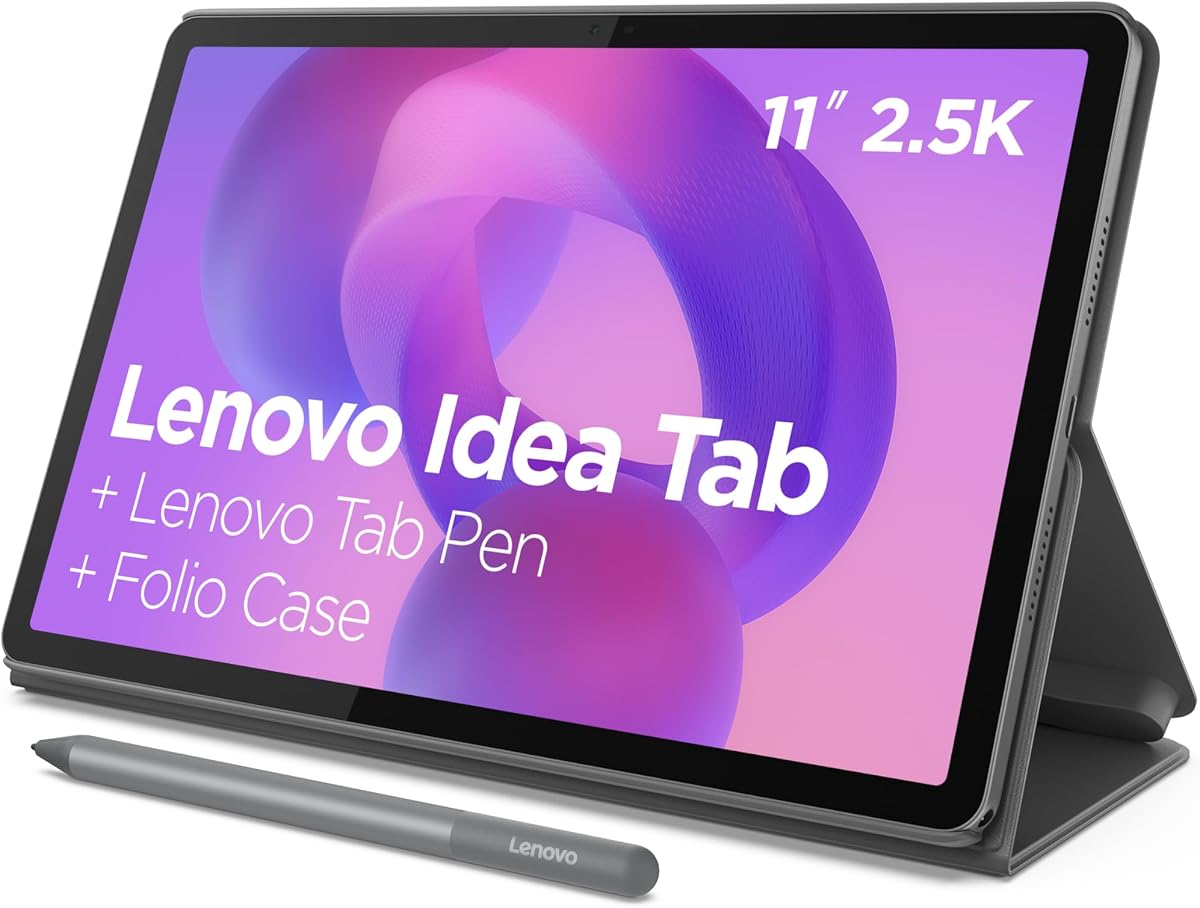
The Lenovo Idea Tab is tailored specifically for students and those needing a reliable device for study and play. Rated at 4.6, it features a MediaTek Dimensity 6300 processor that handles AI-enhanced multitasking effectively. The 11-inch 2.5K IPS display provides sharp visuals, while the TÜV Low Blue Light certification ensures comfortable viewing during long study sessions.
We may earn a commission when you buy through this link, at no additional cost to you.
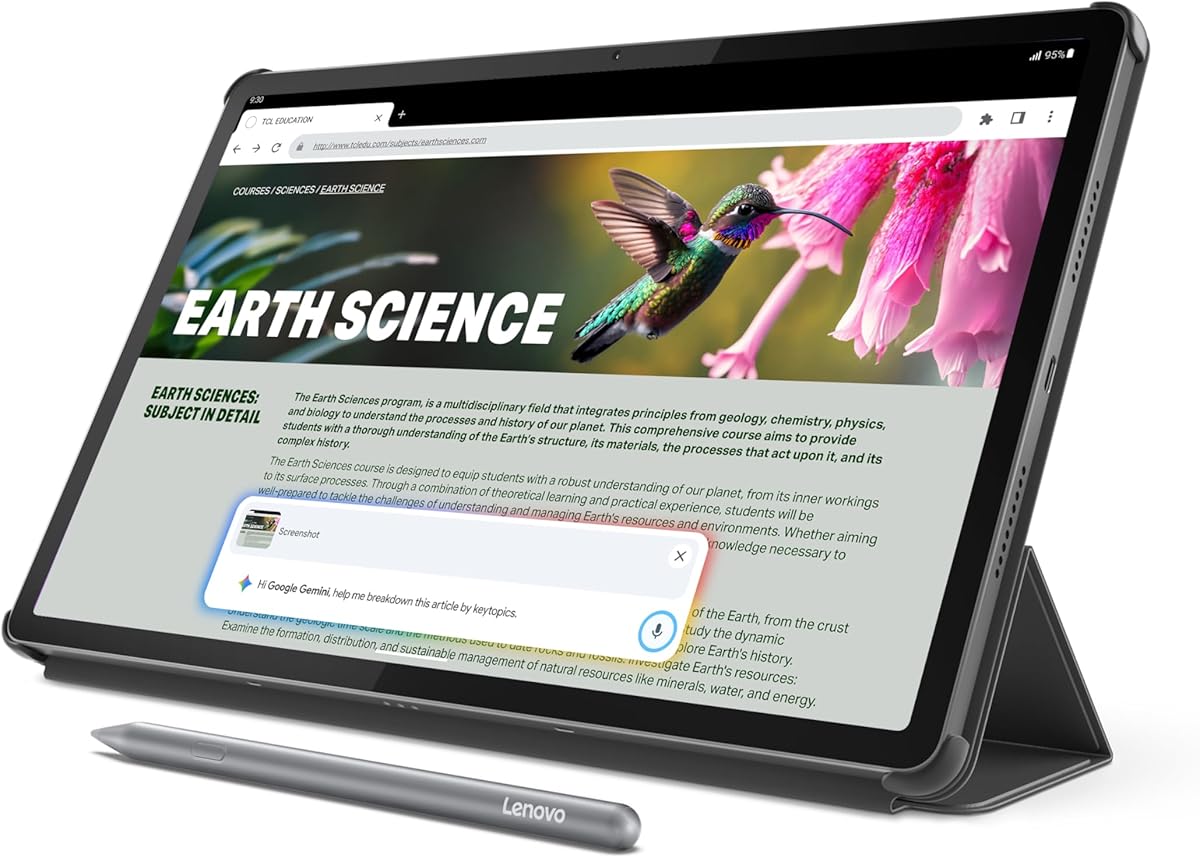
One of the key selling points is the integration of Circle to Search with Google, allowing you to look up items instantly by circling them on screen. This tablet also includes apps like Lenovo AI Note and MyScript Calculator to help you stay organized and focused. The battery life is strong, offering up to 12 hours of YouTube playback.
The device comes with a Tab Pen and a folio case, making it ready to use for note-taking immediately. The Smart Connect feature lets you transition tasks across devices, creating a unified digital ecosystem. It is a practical tool for managing coursework and staying productive throughout the day.
For students on a budget, this tablet offers excellent value with the right features for learning. It is lightweight enough to carry to class and robust enough to handle daily assignments. We recommend it for college students and lifelong learners who need a smart study companion.
Four learning apps built to match your flow help you stay clear, focused, and ready for every study session.
Use your Lenovo Tab Pen or fingertip to circle items for instant search results or to translate other languages.
We may earn a commission when you buy through this link, at no additional cost to you.
The TCL NXTPAPER 11 Gen 2 is a versatile device designed to serve as a tablet, drawing pad, and digital notebook. It features a 11-inch 2K display with NXTPAPER 4.0 technology that offers a realistic paper-like experience. This makes it perfect for reading ebooks, comics, or digital notes without straining your eyes during long periods of use.
We may earn a commission when you buy through this link, at no additional cost to you.
The device includes a T-PEN stylus with 4096 pressure levels, allowing for precise input for digital drawing and note-taking. AI features like real-time bilingual subtitles and a smart translator help break down language barriers during conversations. The 8000mAh battery ensures you can read for hours without needing to recharge frequently.
With three display modes including Ink Paper Mode for reading and Color Paper Mode for art, you can switch between tasks easily. The reverse charging feature allows you to power other devices, making it a practical travel companion. The slim metal body is durable yet lightweight at just 1.1 lbs.
This tablet is ideal for readers and artists who want a device that mimics the feel of paper. It is affordable enough for students while providing the tools needed for creative projects. We recommend it for those who prioritize eye comfort and portability in their daily device.
Switch between three display modes directly in Settings to match your specific task or preference.
Smart translator easily converts speech to text and translates conversations to break down language barriers.
We may earn a commission when you buy through this link, at no additional cost to you.
The CHUWI Hi10 Max AI Tablet is designed as a full-featured productivity tool that combines the portability of a tablet with the power of a laptop. Powered by an Intel Core Ultra 5 125U processor, it delivers high-performance computing for office software and design programs. The 12.96-inch display offers a 3:2 aspect ratio, providing more vertical space for documents and web browsing.
We may earn a commission when you buy through this link, at no additional cost to you.
It includes comprehensive connectivity options with multiple USB-C ports and Micro HDMI, making it easy to connect external monitors and peripherals. The built-in Intel AI Boost NPU reaches 11 TOPS peak AI computing power for fast local content generation and smart image editing. The tablet supports manual SSD upgrades up to 1TB for extensive storage needs.
The kickstand case allows for hands-free use, switching between tablet and laptop modes as needed. While the stylus is sold separately, the 10-point multi-touch screen supports active stylus inputs for precise writing. This makes it a versatile choice for professionals who need a secondary device for travel or fieldwork.
This tablet is best suited for professionals who need a lightweight computer alternative. It handles multitasking smoothly with 12GB LPDDR5 RAM and offers robust connectivity for various work setups. We recommend it for those seeking a Windows-based tablet with powerful AI capabilities.
Built-in Intel AI Boost NPU reaches 11 TOPS peak AI computing power enabling fast local AI content generation.
Packed with comprehensive ports including USB-C and Micro HDMI to meet diverse daily expansion needs.
We may earn a commission when you buy through this link, at no additional cost to you.
The Lenovo Idea Tab Pro is a powerful device tailored for students and gamers who need performance and AI support. It features a MediaTek Dimensity 8300 processor that provides next-gen efficiency and lightning-quick downloads. The 12.7-inch 3K LCD display offers immersive visuals, making it great for streaming lectures and media.
We may earn a commission when you buy through this link, at no additional cost to you.
Google Gemini is integrated as an AI super-assistant, helping you pick your brain for late-night assignments. Circle to Search works seamlessly with the Tab Pen Plus to find answers instantly without switching apps. The 360Hz touch sampling rate ensures responsive gaming, and the PUBG certification confirms its capability for FPS excellence.
Battery anxiety is minimized with 11 hours of video streaming and a 45W quick charge that gets you back in action fast. The Low Blue Light certified display makes reading and studying comfortable for long periods. It is a well-rounded device that balances work and play effectively.
For students who want a fast, smart tablet with good gaming capabilities, this is a solid choice. The large screen and AI features make studying easier, while the performance handles demanding games. We recommend it for those who want an all-in-one device for learning and entertainment.
Let Google Gemini, an AI super-assistant pick your brain so you can get back to chasing your passion.
PUBG certified for FPS excellence with a super-responsive 360Hz touch sampling rate and lightning-fast 90fps.
We may earn a commission when you buy through this link, at no additional cost to you.
The Android 16 Tablet with Gemini AI is an accessible option for those seeking a budget-friendly device with smart features. It features an Octa Core processor and a massive 32GB RAM configuration to ensure smooth multitasking. The 11-inch HD display offers a comfortable viewing experience for videos and reading, while the anti-blue light design protects your eyes.
We may earn a commission when you buy through this link, at no additional cost to you.
Storage is a highlight with 128GB internal memory expandable up to 2TB via TF card, providing a vast digital vault for files. The 8000mAh battery provides exceptional endurance for long days of work or travel. GPS and Face ID add convenience for navigation and secure access to your apps.
This device is designed for general use, offering WiFi 6 for stable internet connections and Widevine L1 for high-quality streaming. The two-year warranty reflects a commitment to quality and support, ensuring reliability. It is a practical choice for households looking for a secondary or entertainment device.
For families on a budget, this tablet provides essential smart capabilities without a high price tag. It handles everyday tasks well and offers the flexibility of expandable storage. We recommend it for casual users who need a reliable entertainment and browsing tablet.
With 128GB internal ROM expandable up to 2TB via TF card you have a vast digital vault for all your files.
The massive 8000mAh battery is the heart of it all providing exceptional battery life to power you through long days.
We may earn a commission when you buy through this link, at no additional cost to you.
The Samsung Galaxy Tab A11+ is a family-oriented tablet that offers optimal performance for day-to-day activities. Rated at 4.6, it features an 11-inch screen with a 90Hz refresh rate that delivers natural motion for streaming and gaming. The included AI Assist helps simplify tasks, making it easy for everyone to use the device.
We may earn a commission when you buy through this link, at no additional cost to you.
With 8GB of memory and 256GB of storage, this tablet provides plenty of space and speed to multitask seamlessly. The battery is long-lasting and supports fast charging to get you back to 100% quickly. The quad speakers powered by Dolby Atmos offer a cinema-like audio experience for movies and music.
The slim and lightweight design makes it easy to carry around the house or take on trips. It is designed to keep families going with reliable performance for browsing and play. This model strikes a good balance between features and cost for household use.
For families looking for a reliable tablet for entertainment and light productivity, this is an excellent choice. It offers a smooth user experience and enough power to handle multiple apps. We recommend it for parents who need a dependable device for kids and adults alike.
Galaxy Tab A11+ gives your family the optimal performance they need for all their day-to-day activities.
Immerse yourself in a cinema-like audio experience with quad speakers powered by Dolby Atmos.
We may earn a commission when you buy through this link, at no additional cost to you.
Selecting the right AI tablet involves considering various factors beyond just the brand or price. This section outlines the key elements you should evaluate to ensure the device meets your specific needs.
The processor is the brain of your tablet and determines how fast it runs apps and handles AI tasks. For AI features, look for models with NPUs or dedicated AI cores that accelerate local computing.
Choose a processor that matches your workload whether it is casual browsing or professional creative work to ensure smooth performance.
The screen is what you interact with most often so resolution and refresh rate are critical for clarity and smoothness. Higher refresh rates like 90Hz or 144Hz provide better motion handling for gaming and video.
Consider eye comfort features such as low blue light certification if you plan to use the tablet for long reading sessions.
RAM affects how many apps you can run simultaneously while storage determines how much media and data you can keep on the device. AI models often require significant local storage and RAM to function effectively.
Opt for at least 8GB of RAM and 128GB of storage to ensure the device remains responsive over time.
A tablet is only as good as its battery life so look for models that promise at least 10 hours of mixed usage. Fast charging capabilities can significantly reduce downtime during busy days.
Check battery capacity and real-world reviews to confirm the device can last through your typical work or school day.
Different tablets offer different AI tools ranging from note-taking assistance to image generation. Assess which features align with your specific productivity or creative goals.
Ensure the AI features are accessible and useful for your daily tasks rather than just marketing gimmicks.
If you plan to travel with your tablet, durability features like water and dust resistance are valuable. A sturdy build ensures the device can withstand accidental drops and spills.
Look for IP ratings like IP68 if you need a device that can handle tough environments.
Accessories like keyboards and styluses can turn a tablet into a productivity powerhouse. Check if these are included or sold separately to factor into your total cost.
Consider how well the tablet integrates with other devices you own for seamless task transitions.
Determine your budget and find the device that offers the best value within that range. Higher prices usually correlate with better materials and performance but may not be necessary for all users.
Balance the features you need against what you are willing to pay to make a smart purchase decision.
To get the most out of your AI tablet, familiarize yourself with the settings menu where you can customize AI tools and display modes. Adjusting brightness and color temperature can significantly improve comfort during extended use.
Keep the device clean by using a microfiber cloth to wipe the screen and avoid abrasive materials that could scratch the display. Regularly updating the software ensures you have the latest security patches and AI improvements.
Use a protective case and screen protector to guard against accidental drops and scratches. Proper care will extend the lifespan of your tablet and maintain its performance over time.
An AI tablet integrates artificial intelligence processors and software that allow for advanced tasks like local content generation, real-time translation, and smart note organization. These features enhance productivity and creativity by automating routine tasks and providing context-aware assistance without needing cloud connectivity.
Most AI features are included in the purchase price of the tablet, but some advanced services or cloud-based AI tools may require a subscription. Always check the device specifications to see which capabilities are available locally versus those that need a paid plan.
AI models can require significant storage space so having at least 256GB is recommended for a smooth experience. If you plan to store large media files alongside AI tools, consider a model with expandable storage or cloud integration options.
Many AI tablets with keyboard accessories can replace laptops for general productivity and creative work. However, for heavy software development or specialized PC-only applications, a traditional laptop may still be necessary depending on your needs.
Many modern AI tablets support offline processing for tasks like transcription and translation thanks to built-in NPUs. This allows you to use smart features even without an internet connection ensuring privacy and convenience while traveling.
Check the manufacturer's estimated usage time and reviews from other users for real-world battery performance. Look for features like fast charging to ensure you can quickly top up the battery during breaks if needed.
For digital art, tablets with high-pressure sensitivity styluses and large screens are ideal. Models like the TCL NXTPAPER series or Lenovo Yoga Tab with Pro Pen are excellent choices due to their precision tools and color accuracy.
Expensive AI tablets often offer better build quality, faster processors, and more advanced features that benefit power users. For casual users, mid-range models may suffice, but professionals will find the investment worthwhile for efficiency and reliability.
Choosing the right AI tablet depends on your specific needs whether you are a student, professional, or casual user. The Lenovo Yoga Tab AI Tablet leads as our top pick for its overall performance and included accessories.
Prioritize features like display quality and battery life to ensure the device fits your daily routine. Consider how AI tools can enhance your workflow before making a decision to get the most value.
Prices and availability are subject to change so be sure to check the latest listings on our site for the current deals. We hope this guide helps you find the perfect device to enhance your digital life.