
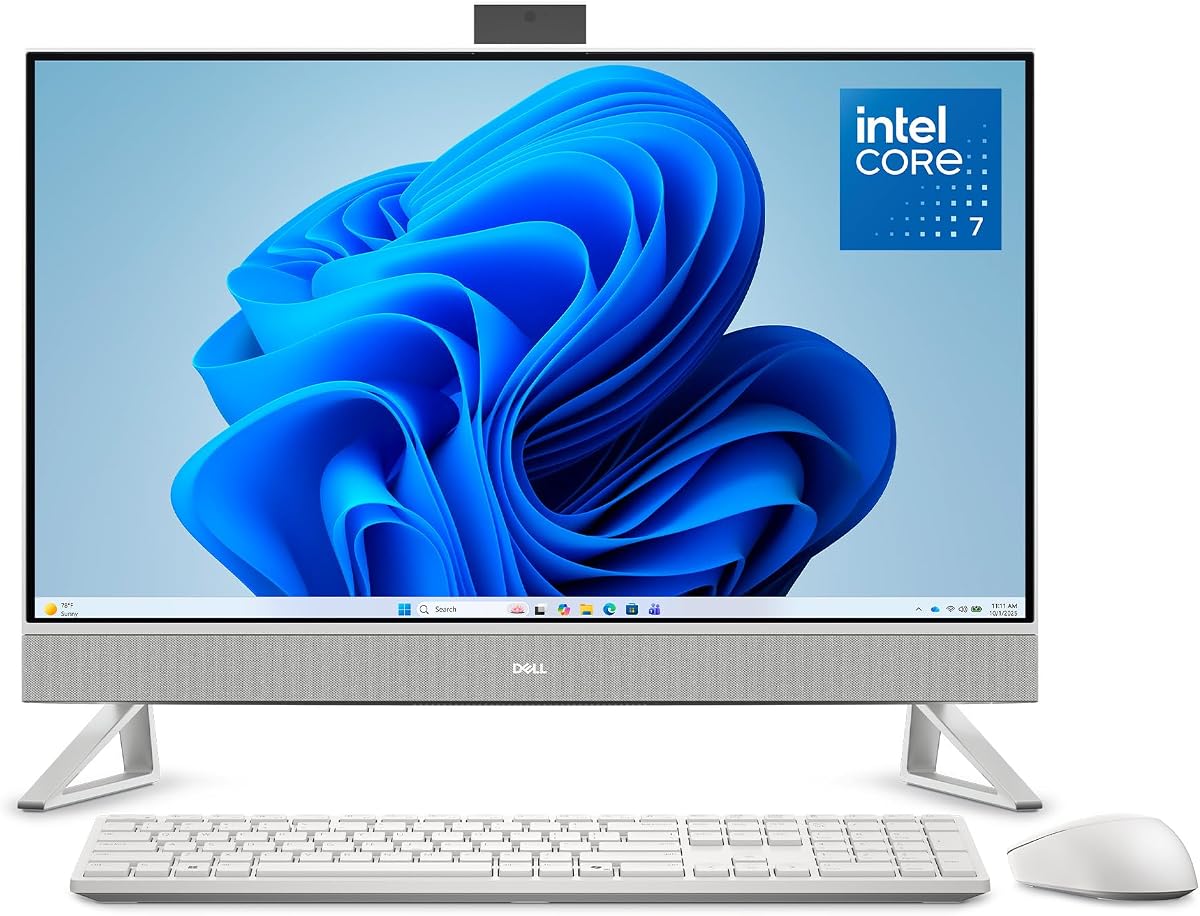
Dell 24 All-in-One Desktop Computer Touchscreen
5.0Editor score
Intel Ultra 7 355 processor
32GB DDR5 5600MT/s RAM
Wi-Fi 7 and Bluetooth 6 support
Discover the top all in one desktop pc with touchscreen models for 2026. This guide compares performance, display quality, and features to help you choose.
Finding the right all in one desktop pc with touchscreen can transform your workspace into a sleek, efficient hub. These devices combine power and simplicity, offering intuitive touch interactions that streamline daily tasks. Whether for business or home use, the right model enhances productivity significantly.
We compared ten leading models based on processing speed, display clarity, and user feedback. Our analysis focuses on real-world performance, build quality, and essential features like connectivity and camera systems. This list ensures you see the best options available right now.
Each pick highlights specific strengths, from budget-friendly choices to premium workstations. You will find detailed reviews covering specs, pros, and cons for every device. Note that prices change frequently, so check current listings before deciding on your final purchase.
5.0Editor score

4.7Editor score

4.0Editor score
This side-by-side comparison highlights key specifications across all ten models. It helps you quickly identify which device meets your specific needs for speed, screen size, and connectivity options.




The HP 27 All in One Desktop is our top pick for productivity. It features an AI-powered AMD Ryzen processor and a dedicated Copilot key for smart assistance. Users report smooth performance for multitasking and creative workloads easily.
We may earn a commission when you buy through this link, at no additional cost to you.
This model stands out with its 16GB DDR5 RAM and 1TB SSD. These specs ensure fast boot times and ample space for large files. The 27-inch touchscreen display offers vibrant visuals and ergonomic tilt adjustments for comfort.
While the price is higher than average, the included accessories like a pen and USB drive add significant value. The AI Companion software helps streamline daily tasks effectively without needing complex setup steps.
It is ideal for business professionals seeking speed and AI tools. If you need a reliable all in one desktop pc with touchscreen for demanding apps, this HP model delivers excellent results consistently.
The dedicated Copilot key provides instant access to AI tools for summarizing documents or drafting emails quickly.
The anti-glare 27-inch screen ensures clear visuals even in bright office environments without eye strain.
We may earn a commission when you buy through this link, at no additional cost to you.
The Dell 24 All-in-One represents the peak of business hardware. It runs on the new Intel Ultra 7 processor with 32GB DDR5 RAM. This configuration handles heavy workloads like video editing and virtualization without lag issues.
We may earn a commission when you buy through this link, at no additional cost to you.
Key strengths include its future-proof Wi-Fi 7 support and Pen input capability. The 1TB SSD provides rapid access to large datasets. The light ash finish looks professional in any office setting or home environment.
The only trade-off is the slightly smaller screen compared to 27-inch models. However, the high pixel density ensures text remains crisp. This is acceptable for users prioritizing performance over massive screen real estate.
Choose this if you need the best all in one desktop pc with touchscreen for serious business tasks. Its robust specs and modern connectivity make it a long-term investment for professionals.
Wi-Fi 7 ensures ultra-fast internet speeds for cloud computing and large file transfers today.
Pen support allows for precise annotations during meetings or creative design work.
We may earn a commission when you buy through this link, at no additional cost to you.
The msi Touch Screen All-in-One offers exceptional value for budget-conscious buyers. It features the powerful Intel Core 7 processor and supports dual external monitors. This flexibility lets users extend their workspace easily on a budget.
We may earn a commission when you buy through this link, at no additional cost to you.
Strengths include its solid processing power and upgradable memory options. The storage capacity is generous for documents and media. Users can upgrade the RAM later to handle more complex applications as needs grow.
The base 8GB RAM might feel tight for heavy multitasking immediately. However, the upgrade path resolves this concern effectively. This trade-off keeps the initial cost low while maintaining high performance potential.
Pick this model if you want a versatile all in one desktop pc with touchscreen at a lower cost. It balances performance and price better than many competitors in this price range.
Users can upgrade RAM to 64GB and storage to 4TB for future needs.
Support for two external monitors boosts productivity for data entry or coding.
We may earn a commission when you buy through this link, at no additional cost to you.
The ASUS VM670 is a powerhouse for creators. It uses the AMD Ryzen AI 7 processor with a 50-TOPS NPU for local AI acceleration. This ensures smooth performance during complex rendering or AI tasks.
We may earn a commission when you buy through this link, at no additional cost to you.
Key features include 32GB DDR5 RAM and a fast PCIe 4.0 SSD. The HDMI-In port allows it to double as a monitor for gaming consoles. This versatility makes it great for home office or entertainment centers.
Security is robust with Microsoft Pluton and BIOS protection. The only minor drawback is the stand footprint. However, the performance and connectivity options outweigh this physical footprint limitation.
It is perfect for users needing the best all in one desktop pc with touchscreen for creative tasks. Its speed and AI features support demanding workflows efficiently.
The dedicated NPU speeds up AI applications without needing cloud connections.
A 93% screen-to-body ratio maximizes viewable area in a compact chassis.
We may earn a commission when you buy through this link, at no additional cost to you.
The Dell 24 All-in-One is a compact workstation ideal for small offices. It runs on the Intel Core 7 processor with 16GB RAM. This setup handles daily business apps and video calls with ease.
We may earn a commission when you buy through this link, at no additional cost to you.
It features a privacy shutter on the camera for secure calls. The ComfortView Plus screen reduces blue light for eye comfort. These details show a strong focus on user well-being and security.
Storage is limited to 512GB which may require external drives for large archives. The port selection is standard but functional. This is acceptable for users focused on productivity over media storage.
Choose this for a reliable all in one desktop pc with touchscreen in tight spaces. Its security features and solid build make it a top pick for professionals.
ComfortView Plus technology reduces harmful blue light for long work hours.
Physical camera shutter provides complete privacy when the webcam is not in use.
We may earn a commission when you buy through this link, at no additional cost to you.
The HP 27 inch All-in-One offers a balanced mix of size and power. It features a 27-inch display and AMD Ryzen 5 processor. This combination is great for general office work and streaming content comfortably.
We may earn a commission when you buy through this link, at no additional cost to you.
The 16GB RAM and 1TB SSD ensure smooth operation for multiple apps. The wireless keyboard and mouse keep the desk clean. These accessories add convenience right out of the box.
Onboard memory limits future upgrades but saves space and power. Audio quality is decent but speakers could be louder. These trade-offs are minor for typical daily usage scenarios.
This is a solid all in one desktop pc with touchscreen for home and office use. It delivers consistent performance without complex setup steps.
The 27-inch screen offers ample space for multitasking with multiple windows.
Wireless accessories reduce cable clutter for a neat professional look.
We may earn a commission when you buy through this link, at no additional cost to you.
The Dell 27 All-in-One focuses on comfort and support. It has 32GB RAM for heavy multitasking and a large 27-inch screen. This setup is perfect for long work sessions with clear visuals.
We may earn a commission when you buy through this link, at no additional cost to you.
It includes 1 Year Onsite Service which means Dell visits your location for repairs. The Dolby Atmos speakers enhance media consumption significantly. These features add value beyond standard hardware specs.
The higher price reflects the included service and RAM. Windows 11 Home lacks some business tools. This is acceptable if you prioritize comfort and peace of mind over enterprise features.
Select this for a relaxing all in one desktop pc with touchscreen experience. Its support network and screen quality make it a safe choice.
Onsite service ensures quick resolution without shipping the device away.
Dolby Atmos provides immersive sound for meetings and entertainment.
We may earn a commission when you buy through this link, at no additional cost to you.
The HP 24 Touchscreen is designed for education and home use. It has a capable Intel processor and 16GB RAM. This combination ensures smooth browsing and document editing for students.
We may earn a commission when you buy through this link, at no additional cost to you.
It includes 1TB storage for all assignments and photos. The compact design fits easily in dorms or small rooms. WiFi 6 provides stable internet for online classes without lag.
The N100 processor handles light tasks well but struggles with heavy loads. Audio is basic for music. These limits are acceptable given the lower price point and target use cases.
It is a great affordable all in one desktop pc with touchscreen for learners. The specs cover essential school needs efficiently.
1TB SSD offers plenty of space for projects and media files.
WiFi 6 ensures fast and reliable connections for video lectures.
We may earn a commission when you buy through this link, at no additional cost to you.
The ASUS 27 FHD Touchscreen delivers strong AI features. It uses the Ryzen AI 7 processor with a Copilot Key. This allows quick access to generative AI tools for writing or data analysis.
We may earn a commission when you buy through this link, at no additional cost to you.
32GB RAM and a 1TB SSD ensure high performance and storage. The anti-glare display reduces reflections for better visibility. These specs support demanding creative and business workflows smoothly.
The price is higher than standard models. The Copilot Key is useful but takes up keyboard space. This is acceptable for users who prioritize speed and AI tools daily.
Choose this if you want the best all in one desktop pc with touchscreen with AI. Its performance and integration make it stand out.
Dedicated hardware key launches AI assistant instantly for faster workflows.
IPS panel with anti-glare coating ensures clear viewing in bright rooms.
We may earn a commission when you buy through this link, at no additional cost to you.
The Dell 23.8 All-in-One is a reliable entry-level option. It features the Intel Core 5 processor and FHD IPS display. This setup handles everyday tasks like web browsing and documents comfortably.
We may earn a commission when you buy through this link, at no additional cost to you.
It includes ComfortView Plus to reduce eye strain and a high-quality 5MP IR camera. Dolby Atmos sound enhances media playback. These features improve quality of life during daily use.
Processing power is less than high-end models for heavy tasks. Storage might need expansion. These trade-offs fit the lower price and target casual users.
This is a solid all in one desktop pc with touchscreen for basic needs. It balances cost and features effectively.
ComfortView Plus adjusts blue light levels to reduce fatigue over time.
5MP+IR camera ensures clear video even in dimly lit rooms.
We may earn a commission when you buy through this link, at no additional cost to you.
Choosing the right touchscreen desktop requires evaluating several key factors. This section breaks down the essential features to consider before you buy.
The CPU determines how fast your computer runs. Look for Intel Core i5/i7 or AMD Ryzen 5/7 processors. These chips handle multitasking and apps smoothly.
Prioritize newer generations like Intel 14th Gen for better efficiency and speed.
RAM affects how many programs you can run at once. 16GB is standard for most users. 32GB is best for heavy tasks like video editing.
Ensure the RAM is upgradeable if you plan to use the machine long term.
Storage holds your files and software. SSDs are faster than traditional hard drives. Aim for 1TB to avoid constant space issues.
Check if the SSD allows expansion for future needs.
Screen size impacts your workspace. 23 to 24 inches save desk space. 27 inches offer more room for windows and tools.
Consider your room size and how close you sit to the screen.
Look for IPS panels with 99% sRGB coverage. This ensures accurate colors for work or media. Anti-glare coatings reduce eye strain.
High resolution like Full HD keeps text sharp and readable.
Modern devices need strong wireless and wired options. WiFi 6 and Bluetooth 5.3 are standard now. Check for USB-C ports for faster data transfer.
HDMI In/Out ports add flexibility for connecting other screens.
Built-in cameras should support HD video calls. Look for IR cameras for facial recognition. Good speakers with Dolby Atmos enhance meetings.
Privacy shutters are vital for security during idle times.
Windows 11 Pro offers better security features than Home. It is ideal for business environments. Home versions suit casual users well.
Check for included trial software like antivirus protection.
Position your touchscreen PC at arm's length to maintain ergonomic posture. Tilt the screen slightly to reduce glare during long sessions. This helps prevent eye strain and back pain.
Clean the display regularly with a soft microfiber cloth. Use mild screen cleaner and avoid harsh chemicals that damage coatings. Wipe the frame and base to remove dust accumulation.
Install software updates promptly to keep the system secure. Use the included keyboard shortcuts to maximize productivity. Proper care extends the lifespan of your hardware significantly.
Yes, touchscreens make navigation intuitive for presentations and media. They streamline workflows by letting you interact directly with content. However, they add cost and weight to the unit.
Many models allow RAM upgrades via accessible slots. Some have onboard memory that cannot be changed. Check the manual to see if your specific model supports future expansion.
Windows 11 Pro is the standard for business needs. It includes features like BitLocker and Remote Desktop. Home OS is suitable for personal or light office tasks.
Use a screen protector film to guard against accidental contact. Keep pens and sharp objects away from the glass surface. Regular cleaning prevents micro-scratches from dust.
Many models feature HDMI-out or USB-C for external displays. This lets you extend your workspace beyond the built-in screen. Check ports to confirm your specific capability.
Most come with a 1-year limited hardware warranty. Some brands like Dell offer onsite service options for extra cost. Always review warranty terms before purchasing.
The best all in one desktop pc with touchscreen depends on your workflow. The HP Copilot PC leads for AI tools. The Dell 24 Premium is perfect for business pros.
Prioritize speed and storage to ensure long-term performance. A larger screen can boost your daily productivity significantly. Ensure connectivity meets your current peripheral needs.
Remember that prices fluctuate regularly. Check current listings to find the best deal available today. This guide helps you make a smart and informed investment.