
X9 Large Print Backlit Computer Keyboard
4.5Editor score
Bold large print letters
7-color backlight options
Full-size 107-key layout
This guide compares ten top-rated backlit illuminated keyboards for visibility, comfort, and durability across home, office, and gaming setups in October 2026.
Finding the right keyboard can transform your daily computing experience especially when visibility matters. Backlit illuminated keyboards offer essential lighting for dim environments ensuring you never miss a keystroke again.
We evaluated ten distinct models focusing on key clarity lighting options and build quality. Our comparison covers wired and wireless options suitable for seniors students and professionals needing reliable input devices.
Each pick highlights specific strengths like large print or RGB effects. Prices fluctuate often so check current listings before buying to ensure you get the best value available today.
4.5Editor score

4.9Editor score

4.1Editor score
The following table offers a side-by-side overview of key specifications for all ten models reviewed in this guide to help you quickly identify the best fit for your needs.



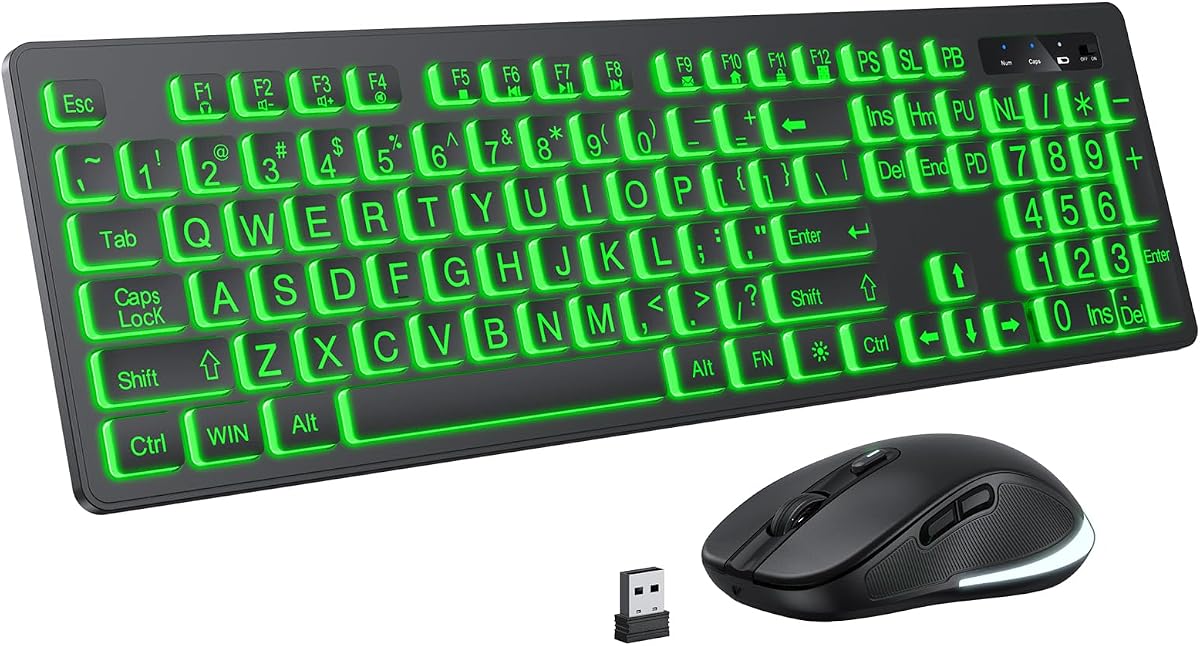


This keyboard stands out as the top choice for its exceptional clarity and robust design. With a 4.9 rating it offers oversized keys that make typing easy even in low light.
We may earn a commission when you buy through this link, at no additional cost to you.
The 2-in-1 connector supports modern USB Type C devices alongside traditional USB A ensuring broad compatibility. Dedicated multimedia keys allow quick control over audio and video playback without switching apps.
While it lacks wireless freedom the wired connection ensures zero latency for consistent performance. The membrane structure keeps noise low making it ideal for shared offices or study rooms.
Buyers seeking reliability and visibility will find this model hard to beat. Its combination of ergonomic design and clear backlighting makes it the best overall choice in this category.
The oversized letters are four times larger than standard keys helping seniors and visually impaired users type with confidence.
Included Type C and USB A connectors mean this keyboard works with laptops desktops and tablets without needing extra adapters.
We may earn a commission when you buy through this link, at no additional cost to you.
The X9 keyboard delivers essential features without extra cost making it perfect for budget-conscious buyers. It features large bold print that ensures every character is visible even from a distance.
We may earn a commission when you buy through this link, at no additional cost to you.
With 7-color backlighting and adjustable brightness users can customize the look to suit their room lighting. The full size layout includes a number pad which is crucial for data entry tasks.
It does not offer wireless connectivity or software customization but these omissions keep the price low. The simple USB connection means no drivers are needed to start typing immediately.
For those needing a reliable accessible keyboard at a low price this is the top pick. It balances visibility and functionality effectively for home or office use.
This keyboard provides large keys and backlighting at a price point that makes it accessible for students and seniors alike.
The inclusion of a full number pad and 12 shortcut keys supports faster navigation and efficient data entry workflows.
We may earn a commission when you buy through this link, at no additional cost to you.
The HP 400 offers a sleek professional look that suits corporate environments well. Its warm white LED illumination reduces eye strain during long working hours without overwhelming brightness.
We may earn a commission when you buy through this link, at no additional cost to you.
Customization is a strong point with 12 programmable keys that let you assign frequently used commands for faster workflow. The slim design saves desk space while maintaining full functionality including a numpad.
Although it is pricier than other options the build quality and unique features like sanitizable surfaces justify the investment. The USB-C connection ensures compatibility with modern laptops without bulky adapters.
Business users or professionals seeking a refined reliable input device will appreciate this model. It combines style and utility for a premium typing experience in any office.
Programmed shortcut keys allow you to automate tasks or launch applications quickly boosting your daily efficiency.
The portable slim design makes it easy to pack for commuting or travel while keeping a familiar full-size layout.
We may earn a commission when you buy through this link, at no additional cost to you.
Arteck brings ergonomic comfort with its scissors X structure keys that offer a low-profile smooth typing experience. This model is particularly suitable for those who type for long periods.
We may earn a commission when you buy through this link, at no additional cost to you.
Its ultra thin lightweight design saves desk space and makes it easy to move around. The backlight offers 7 elegant colors and 3 brightness levels to create a pleasing atmosphere.
While the build feels lightweight compared to heavier options the quiet typing experience and 24-month warranty provide peace of mind. Media hotkeys allow easy control of multimedia without leaving your document.
If you prioritize comfort and portability this keyboard is a strong contender. It balances style and function well for general daily use in home offices.
The scissors structure provides a low-profile key action that reduces finger fatigue during extensive typing sessions.
Multiple backlight colors and brightness settings allow you to match your desk setup or mood easily.
We may earn a commission when you buy through this link, at no additional cost to you.
This keyboard is designed with durability in mind featuring a spill-proof construction that protects against accidental liquid spills. The white LED backlight is bright enough for dark rooms without being distracting.
We may earn a commission when you buy through this link, at no additional cost to you.
The large print keys are four times larger than standard which makes identification effortless for users with vision challenges. Its full size layout ensures you don't lose functionality like the number pad.
While it lacks colorful lighting options the focus on resilience and readability makes it ideal for kitchens classrooms or busy environments. The ergonomic adjustable feet help reduce wrist strain during use.
Users needing a reliable workhorse in a high-traffic area should consider this model. It offers solid performance and protection at a reasonable price point.
The spill-proof design adds an extra layer of protection ensuring longevity even in environments prone to accidents.
Large clear fonts paired with bright white LEDs ensure keys are visible even in dim lighting conditions.
We may earn a commission when you buy through this link, at no additional cost to you.
TECKNET focuses on creating a quiet workspace with low-profile membrane keys that significantly reduce typing noise. This makes it perfect for libraries shared offices or late-night work sessions.
We may earn a commission when you buy through this link, at no additional cost to you.
The RGB lighting adds a modern touch with 7 colors and adjustable brightness levels. You can switch between static or breathing modes to customize the look of your setup.
While the RGB might be unnecessary for some users it adds value for those who enjoy customization. The lifetime warranty offers significant confidence in the product's longevity and support.
Anyone seeking a silent durable keyboard with a bit of style will enjoy this model. It balances quiet operation with visual flair effectively.
Low-profile membrane keys are engineered to minimize sound creating a peaceful environment for focused work.
Registration required but the lifetime warranty ensures long-term support and peace of mind for your purchase.
We may earn a commission when you buy through this link, at no additional cost to you.
This wireless combo provides freedom of movement with a reliable 2.4GHz connection reaching up to 33 feet. Both the keyboard and mouse are rechargeable eliminating the need for constant battery replacements.
We may earn a commission when you buy through this link, at no additional cost to you.
The large print keys are bright and easy to read making it accessible for seniors or those with low vision. The backlight offers 7 colors to add visual appeal to your desk.
Charging is necessary but the smart energy-saving feature turns off lights after inactivity to preserve battery life. This balance of convenience and accessibility makes it a strong wireless option.
Users who prefer a clutter-free desk will find this set valuable. It simplifies setup with one USB receiver for both devices.
Both devices share a single receiver simplifying your desktop setup and reducing cable clutter.
Built-in rechargeable batteries reduce waste and save money over time compared to disposable battery models.
We may earn a commission when you buy through this link, at no additional cost to you.
Perixx delivers a classic full-size slim keyboard that fits standard desks well. The large print keys ensure visibility and the white LED backlight aids typing in dim environments.
We may earn a commission when you buy through this link, at no additional cost to you.
Low-profile keys with larger surfaces offer accurate responsive typing without excessive noise. The five-point-two-five-foot cable allows flexible placement on large desks without needing extenders.
It lacks advanced features like RGB but focuses on core functions that work reliably. The 12-month warranty covers manufacturing defects providing standard support for daily use.
For those wanting a no-fuss accessible keyboard this model is a practical choice. It offers reliable performance without unnecessary complexity or cost.
The slim profile saves space and keeps the keyboard close to the body for better posture.
A long USB cable ensures you can place the keyboard comfortably without stretching your cables.
We may earn a commission when you buy through this link, at no additional cost to you.
This keyboard includes an original cover that protects against dust and splashes extending the device's life significantly. The large print design helps users find keys quickly reducing typing errors.
We may earn a commission when you buy through this link, at no additional cost to you.
White LED lighting provides even illumination which is essential for late night work. The keyboard also offers a foldable tripod and wrist support to reduce hand fatigue over long sessions.
It is a straightforward plug and play device with no software required. The focus on protection and accessibility makes it ideal for elderly users or students.
Buyers looking for extra protection in the box will appreciate this model. It combines visibility and durability with thoughtful accessories for better usability.
The included cover shields the keys from dust and spills keeping the device clean longer.
Foldable tripod legs and wrist rest options allow you to adjust the angle for reduced strain.
We may earn a commission when you buy through this link, at no additional cost to you.
This keyboard combines large print visibility with a comfortable wrist rest to support healthy typing posture. The 7-color backlight allows you to choose your favorite hue for a personalized setup.
We may earn a commission when you buy through this link, at no additional cost to you.
Silent keys ensure quiet operation suitable for shared spaces or late work hours. The ergonomic seven-degree angle is designed to keep hands in a natural position during long typing sessions.
It offers a soft touch feel that reduces finger fatigue compared to standard membranes. The plug and play setup means you can start using it immediately without installing drivers.
If comfort and customization are priorities this model provides a solid mix of features. It is a practical solution for users seeking both visibility and ergonomic support.
The wrist rest and angled design work together to minimize strain and improve typing comfort.
Choose from seven colors to match your style or mood for a more enjoyable typing experience.
We may earn a commission when you buy through this link, at no additional cost to you.
Selecting the right keyboard involves considering factors like lighting color layout and connectivity that match your specific needs and environment.
Backlight options range from single-color white to customizable RGB. White is best for office work as it mimics paper and reduces glare. RGB is better for personal setups where aesthetics matter. Look for adjustable brightness levels to suit dim rooms.
Large print keyboards are essential for seniors or low-vision users. Check if the font is significantly larger than standard to ensure legibility. Some models offer bold print while others use oversized legends. Clear visibility reduces typing errors significantly.
Full-size layouts include a number pad which is crucial for data entry. Compact models save space but lack numpads. Ensure the keyboard fits your desk dimensions. A 104 or 107-key layout is standard for most users.
Wired keyboards offer zero latency and no battery concerns. Wireless models provide mobility and reduce cable clutter. Some models use USB-C or dual connectors for modern devices. Consider your device ports and movement needs.
Spill-resistant designs protect against accidental liquid damage. Check the estimated keystroke life for long-term reliability. Covered models add an extra layer of dust protection. A sturdy build ensures the keyboard lasts through daily wear.
Look for adjustable feet or wrist rests to maintain a neutral hand position. Scissors structure keys offer quieter and smoother typing. Anti-slip pads keep the keyboard steady during use. Comfort features reduce fatigue during long sessions.
Ensure the keyboard works with your operating system like Windows or Mac. Some multimedia keys may not function on macOS. Check for USB-C compatibility if you have newer devices. Universal compatibility prevents setup issues.
A warranty indicates manufacturer confidence. Some offer one year while others provide lifetime coverage. Check return policies for defective units. Strong customer service ensures you get help if issues arise.
Plug the USB cable into your computer and wait for automatic driver installation. Most keyboards work instantly without extra software. Ensure your ports are clean for a stable connection.
Adjust brightness using the dedicated keys usually marked with sun icons. This helps save power and reduce eye strain. If using wireless turn on the switch before pairing.
Clean keys regularly with a soft dry cloth to prevent buildup. For spills invert the keyboard and wipe immediately. Store covered if unused for long periods to avoid dust accumulation.
Many modern backlit keyboards include power-saving features like auto-off timers. Using lower brightness levels also extends battery life for wireless models. Wired models consume minimal power regardless of settings.
Most keyboards are compatible with macOS but some multimedia keys may not work fully. Check product descriptions for specific Mac support. Basic typing functions usually work out of the box.
Look for Fn keys combined with arrow keys or dedicated brightness icons on the keyboard. Some models have cycle buttons that toggle between light levels. Refer to the manual for specific shortcuts.
Membrane keyboards are generally quieter than mechanical ones. Silent models further reduce noise for better focus. Check product descriptions for specific noise levels or quiet claims.
White is often best for offices as it reduces glare. RGB is better for personal gaming setups. Choose based on your environment and preference.
Yes most standard keyboards accept silicone covers. Ensure it does not interfere with backlighting or key travel. Some models come with built-in covers.
We explored ten top keyboards ranging from budget options to premium models. The TECURS Large Print stands out for visibility while HP 400 offers professional features.
Prioritize your main needs like quiet operation or wireless freedom when buying. Ensure the size and connectivity match your workspace. Comfort should never be compromised for style.
Prices change frequently so verify the latest deals before purchasing. Check current listings for any discounts or bundles. Your perfect keyboard awaits with the right choice.