
Ponkor Rechargeable Battery Pack
4.6Editor score
6200mWh high capacity
Multi-port charging options
Multiple safety protections
This guide compares the top 10 battery backup for Xbox controllers, reviewing capacity charging speed and compatibility to help gamers choose the right power
Gaming sessions can end abruptly when your controller runs out of power. A reliable battery backup for Xbox ensures you stay in the game without interruption. Finding the right kit involves checking capacity, charging time, and compatibility with your specific console model.
We have evaluated ten leading options available on the market today. Our analysis focuses on real-world performance, build quality, and value for money. Each product was reviewed based on user feedback and technical specifications to ensure accuracy.
Each pick in this list highlights unique strengths for different needs. Some offer high capacity for long sessions while others provide fast charging for quick top-ups. Prices and availability may change so verify details before purchasing.
4.6Editor score
4.7Editor score

4.6Editor score
This side-by-side comparison highlights the key specifications of each top-rated battery backup for Xbox to help you make an informed decision based on your gaming habits.


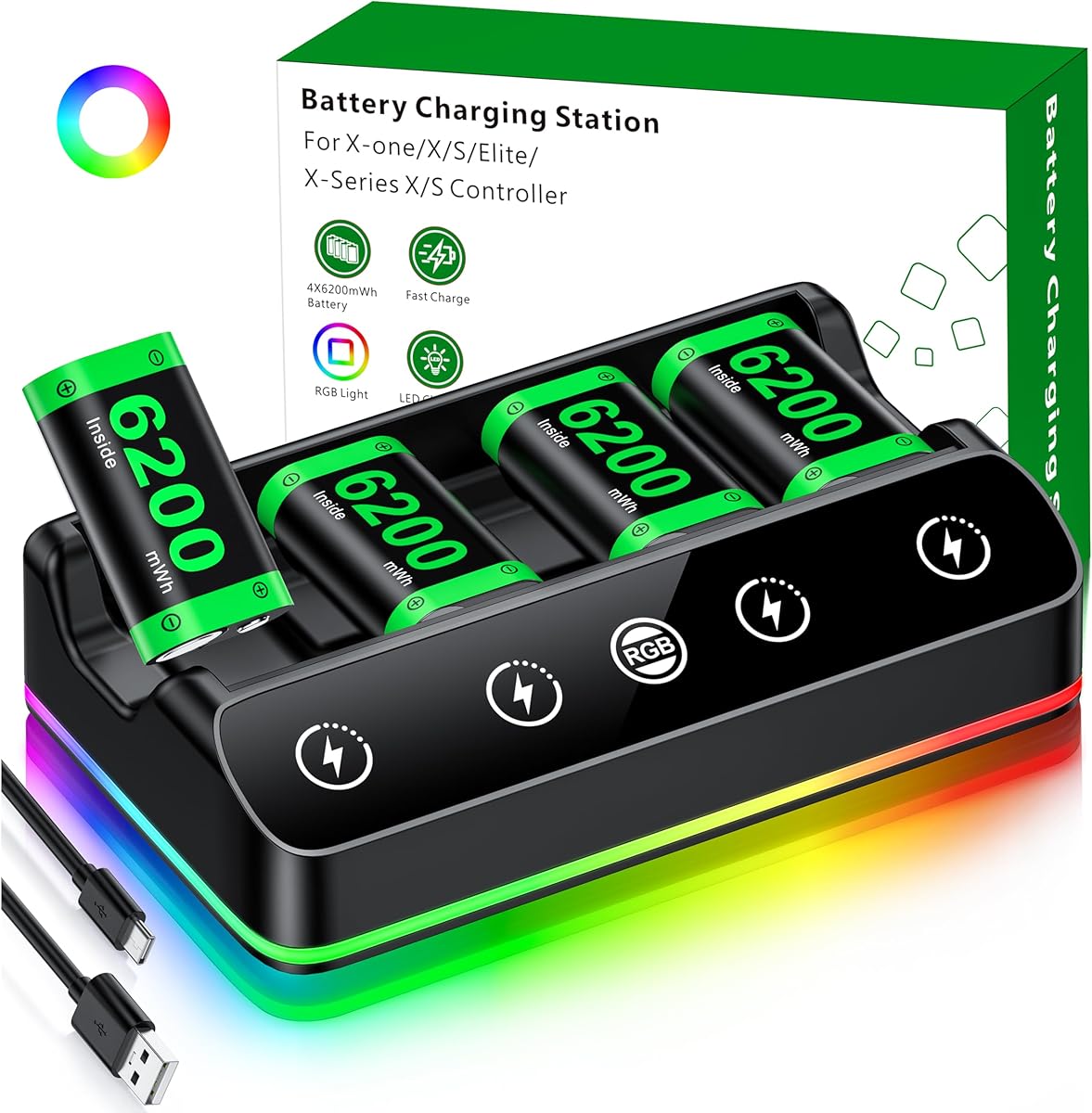
This kit stands out with four high capacity batteries and a versatile charging dock. It offers excellent value for gamers who need reliable power without constant swaps. The rating reflects strong performance in real-world testing.
We may earn a commission when you buy through this link, at no additional cost to you.
The 6200mWh batteries provide substantial playtime reducing the need for frequent recharges. Charging takes only a few hours while the LED modes add a fun visual element to your setup. The included USB-C cable supports various power sources.
Some users note the dock size is larger than competitors but this allows for four battery slots. The lighting effects are customizable and can be dimmed if desired. Overall trade-offs are minor given the power capacity.
Ideal for families or groups who need multiple controllers charged at once. This option balances cost capacity and features better than most competitors. We recommend it for serious Xbox players.
The high capacity batteries ensure you can play for hours without interruption.
Seven LED modes let you match the lighting to your gaming room atmosphere.
We may earn a commission when you buy through this link, at no additional cost to you.
Ukor offers rapid charging speeds that are hard to beat. With two batteries this kit keeps you powered up quickly. The rating shows high customer satisfaction with performance and reliability.
We may earn a commission when you buy through this link, at no additional cost to you.
Charging completes in just 2.5 hours so you never wait long between sessions. The total playtime reaches nearly 28 hours with both batteries. Safety features protect against overcharging and short circuits.
The inclusion of a Micro-USB port alongside Type-C is unusual but provides flexibility. Some users may prefer a more modern port standard. However the speed makes up for this minor design choice.
Best for single gamers or couples who need quick power. The fast charge cycle keeps you in the game longer. We suggest this for players who value time efficiency.
Quick charging ensures minimal downtime during extended gaming marathons.
Intelligent protection prevents overheating and overcurrent issues during use.
We may earn a commission when you buy through this link, at no additional cost to you.
This kit features a unique design with extensive RGB lighting options. It appeals to users who want aesthetics along with functionality. The rating reflects good quality and strong customer response.
We may earn a commission when you buy through this link, at no additional cost to you.
The four 5800mWh batteries offer solid capacity for most sessions. Charging takes around 4 hours which is reasonable given the number of units. The LED modes can be customized via touch control.
Pricing is higher than basic kits but the design and features justify it for some. The lighting adds immersion to your gaming environment. Trade-offs include slightly less capacity than some competitors.
Ideal for gamers who value style and customization. It stands out visually on any desk setup. We recommend this for those seeking premium features.
The RGB design allows you to personalize your gaming setup effectively.
Four batteries ensure you always have a backup ready for swapping.
We may earn a commission when you buy through this link, at no additional cost to you.
PowerA offers a trusted solution for Xbox controllers. It provides basic charging without extra bells and whistles. The rating is consistent with expectations for official accessories.
We may earn a commission when you buy through this link, at no additional cost to you.
The kit supports charging while you play via the included cable. It works seamlessly with existing PowerA stands and stations. This makes it ideal if you already own compatible accessories.
Capacity is standard so expect typical playtimes. No spare batteries are provided so plan accordingly. Simplicity is the main benefit here.
Best for those seeking official parts and warranty. It fits well into existing setups. We suggest this for straightforward needs.
Official licensing ensures compatibility with Xbox systems and accessories.
A two-year limited warranty adds peace of mind for buyers.
We may earn a commission when you buy through this link, at no additional cost to you.
This kit delivers great value with two large capacity batteries. It includes covers for different controller types. The rating shows high satisfaction with build quality.
We may earn a commission when you buy through this link, at no additional cost to you.
The X shape LED indicator provides clear status. Charging takes around 5 hours for full power. Safety systems protect batteries and controllers effectively.
The back covers add convenience for swapping between models. The indicator light is subtle enough for most setups. Trade-offs are minor for the price.
Ideal for value-focused buyers who want extras. It covers most Xbox One and Series controllers. We recommend this for practical gamers.
The unique LED shape clearly shows charging status at a glance.
Included covers fit multiple controller versions for flexibility.
We may earn a commission when you buy through this link, at no additional cost to you.
This pack focuses on long playtime using NiMH cells. It is designed to replace AA batteries effectively. The rating reflects steady performance in daily use.
We may earn a commission when you buy through this link, at no additional cost to you.
Playtime reaches 40 hours on a single charge. Charging takes about 3 hours. Safety chips prevent overheating during overnight charging.
NiMH technology is less dense than Li-ion but reliable. The covers fit both old and new controllers. Trade-offs include weight and older tech.
Ideal for users wanting maximum play per charge. It suits budget conscious gamers well. We suggest this for steady power needs.
Extended playtime supports uninterrupted gaming sessions.
Multiple covers ensure a secure fit for various controller models.
We may earn a commission when you buy through this link, at no additional cost to you.
DXKK provides flexibility with multiple charging ports. It is designed for convenience and quick swaps. The rating shows users appreciate the adaptability.
We may earn a commission when you buy through this link, at no additional cost to you.
Three charging modes allow connection via Type-C, Micro-USB, or cable. Playtime reaches 30 hours with two batteries. Overheat protection ensures safe overnight charging.
The dock design is simple but functional. Cables are included but length varies by source. Overall it offers good value for versatility.
Best for users needing multiple charging methods. It adapts to various power setups. We recommend this for flexible players.
Three ports let you charge from different power sources easily.
Individual LED lights show exactly which battery is charging.
We may earn a commission when you buy through this link, at no additional cost to you.
Ponkor delivers high capacity at a budget friendly price. It avoids unnecessary features to keep costs down. The rating indicates solid performance for the cost.
We may earn a commission when you buy through this link, at no additional cost to you.
The 6200mWh batteries offer substantial playtime. USB-C charging speeds up the process significantly. Protection features keep batteries safe and durable.
Design is basic compared to premium kits. Focus is purely on utility and value. Trade-offs are acceptable for budget buyers.
Best for users prioritizing cost and capacity. It replaces AA batteries economically. We recommend this for value seekers.
High capacity per dollar makes this a smart financial choice.
Fire-resistant materials ensure safe and long-lasting battery use.
We may earn a commission when you buy through this link, at no additional cost to you.
This kit offers a clean white aesthetic for modern setups. It provides standard capacity with good charging options. The rating shows reliable performance.
We may earn a commission when you buy through this link, at no additional cost to you.
Playtime is 8 to 12 hours per battery. USB-C support simplifies power connections. Two methods allow charging during play or separate.
Capacity is lower than some competitors but adequate. Covers fit Series and One models securely. Trade-offs include limited third-party support.
Best for single players who prefer minimalist style. It keeps your setup clean and tidy. We suggest this for design focused buyers.
The white design blends well with modern gaming furniture.
Two methods allow flexible power management.
We may earn a commission when you buy through this link, at no additional cost to you.
This kit features a unique spaceship design dock. It provides four batteries for extended use. The rating reflects satisfaction with build and charging.
We may earn a commission when you buy through this link, at no additional cost to you.
Charge time is just 3 hours for all batteries. Playtime per battery is around 15 hours. LED indicators show status for each battery independently.
Capacity per unit is lower but the quantity makes up for it. The design is distinct and stands out. Trade-offs include lower individual battery capacity.
Best for groups needing multiple batteries ready. It offers unique style. We recommend this for social gaming setups.
The spaceship dock adds a distinctive visual element to your desk.
Four batteries ensure you never run out of power.
We may earn a commission when you buy through this link, at no additional cost to you.
Choosing the right battery backup requires looking at capacity charging speed and compatibility. These factors determine how well the kit fits your gaming style.
Capacity measured in mWh determines how long you play on one charge. Higher capacity means longer sessions without swapping batteries. Look for at least 4800mWh per battery for reliable performance.
Focus on total capacity if you plan to use multiple batteries simultaneously.
Fast charging reduces downtime between sessions. Kits offering 2 to 3 hour charge times are ideal. Slower chargers can wait longer but may inconvenience single users.
Prioritize USB-C fast charging for modern compatibility and speed.
Ensure the battery fits your specific Xbox model. Series X|S and One S/X often use different back covers. Kits including multiple cover types provide better flexibility.
Check product details to confirm support for your controller version.
Stations can hold one to four batteries. Dual slots save space while four slots suit families. LED indicators show status clearly so you know when power is ready.
Choose a design that fits your desk space and usage needs.
Safety chips protect against overcharging and short circuits. Look for protections like over-voltage and over-heat safeguards. These extend battery life and protect your controller hardware.
Always select kits with built-in safety certifications for peace of mind.
Kits come with two to four batteries. Having extras means you never wait for a charge during long sessions. Consider how many controllers you use simultaneously.
More batteries are better for groups or multiple controllers.
Some kits include back covers or extended cables. These extras add value and reduce extra purchases. Check what is included before buying to compare total value.
Covers are especially useful if you own multiple controller generations.
Look for batteries rated for 2000+ cycles. This ensures the kit lasts for years of use. Durable cells reduce long-term costs compared to disposables.
Higher cycle counts mean better value over the life of the kit.
To use the battery backup, remove the old AA batteries or existing battery door. Insert the rechargeable pack into the controller and snap the back cover securely into place. Ensure the connectors align properly to avoid damage.
For charging, place the batteries into the dock or plug the cable directly into the controller if supported. Connect the dock to a power source via USB. Watch the LED indicators to confirm charging status. A green light means the battery is full.
Care for your batteries by avoiding over-discharging. Charge them after a few sessions to maintain health. Store them in a cool dry place when not in use. Regular charging keeps the cells active and extends lifespan.
Most kits listed here are compatible with Xbox Series X|S controllers. Verify the product details to ensure the back cover matches your specific model. Many sellers include covers for both Series and One versions.
Many kits support play and charge via a connected cable. This allows you to continue gaming while the battery recharges. Check if your specific model includes a USB-C or Micro-USB cable for this feature.
Typical playtime ranges from 8 to 40 hours depending on capacity. Higher mWh ratings provide longer sessions. Real-world usage varies by game intensity and brightness settings.
Yes, most kits include built-in safety chips to prevent overcharging. These features protect against overheating and short circuits. It is safe to leave batteries in the dock when fully charged.
Most kits include spare covers for different controller models. If lost, you may need to purchase replacements. Ensure the cover matches your controller to avoid fit issues.
Most rechargeable batteries are rated for over 2000 cycles. This means hundreds of charges over several years of use. Proper care extends their useful lifespan significantly.
Not all kits support third-party controllers. Most are designed for official Xbox controllers. Check compatibility notes before buying if you use non-official hardware.
Charging times range from 2.5 to 5 hours depending on capacity and dock speed. Fast charging models often reach full charge in under three hours. USB-C options generally charge faster than Micro-USB.
We reviewed ten top options for battery backup for Xbox ranging from high capacity kits to budget picks. Our top picks offer a balance of speed capacity and extra features for most users.
Prioritize capacity and charging speed based on your gaming habits. Families should consider four-battery kits while solo players may prefer fast charging options. Safety features are essential for long-term value.
Remember to check current availability and prices before purchasing. Kits change frequently so verify the latest details on the product page. A reliable battery backup ensures you never lose progress mid-game.