
LG 24U411A-B
4.5Editor score
Full HD IPS Panel
120Hz Refresh Rate
Slim Borderless Design
Finding a display that remains visible under harsh lighting conditions is essential for outdoor professionals and bright room users. High brightness panels prevent washout and maintain color fidelity even when direct sunlight hits the screen.
We evaluated ten top-rated models focusing on nits output, color accuracy, and connectivity options. Each product was selected for its ability to deliver clear visuals in challenging environments while maintaining performance for daily tasks.
Every pick highlights key specs, pros, and cons to help you decide quickly. Note that prices and availability change frequently so check current listings before purchasing to ensure you get the best deal available today.
4.5Editor score
4.8Editor score

4.2Editor score
As an Amazon Associate we earn from qualifying purchases.
The following table provides a side-by-side overview of key specifications for all ten monitors reviewed in this guide to help you compare features at a glance.




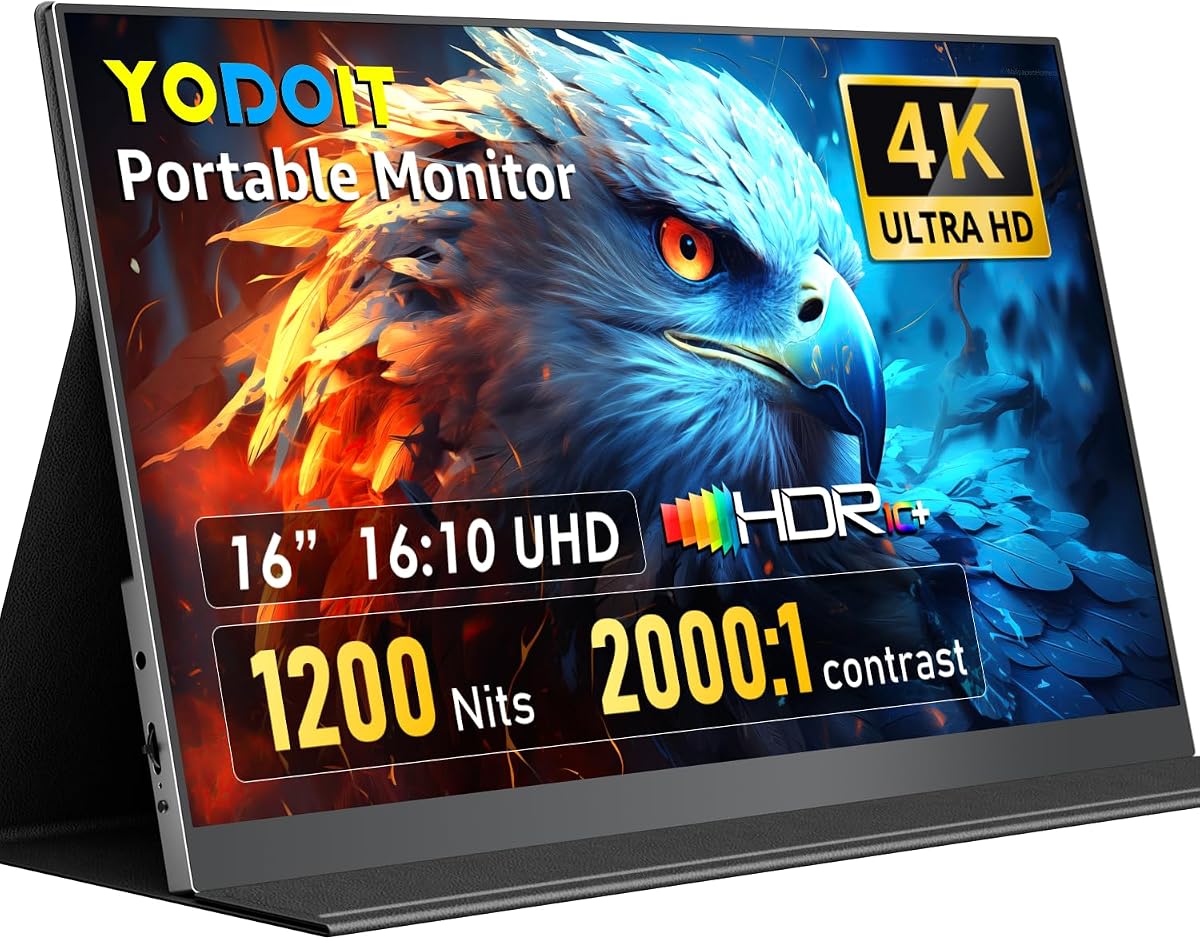
The Yodoit 4K Portable Monitor stands out as the top choice for users needing visibility in bright conditions. With a peak brightness of 1200 nits, it easily overcomes glare from direct sunlight or strong overhead lighting. This model is specifically engineered for outdoor professionals who need reliable visuals anywhere.
We may earn a commission when you buy through this link, at no additional cost to you.
Its true 4K resolution ensures that fine details remain sharp whether you are editing photos or reviewing documents. The 145% sRGB color gamut provides accurate color reproduction essential for creative work. Additionally the matte anti-glare coating reduces reflections significantly compared to glossy panels found on standard portable screens.
While the high brightness requires an external power source to reach peak performance this is a minor trade-off for the visibility gains. The included magnetic cover adds versatility by acting as a stand and protective case. It might cost more than basic models but the professional features justify the investment.
This monitor is ideal for photographers field inspectors and digital nomads who work outside traditional offices. If your priority is screen clarity in challenging light environments this model delivers unmatched performance. We recommend it for anyone needing a portable secondary screen that performs under the sun.
The 1200 nits peak brightness ensures content remains legible even in direct sunlight where standard 250 nit screens would wash out completely.
With 145% sRGB coverage and 2000:1 contrast ratio this display supports professional tasks like color grading and print proofing with high fidelity.
We may earn a commission when you buy through this link, at no additional cost to you.
The Dell 24 Monitor SE2426H offers a solid balance of performance and affordability for general desktop use. While it does not match the extreme brightness of outdoor monitors it provides clear visuals with an IPS panel that maintains color consistency across wide angles. The 144Hz refresh rate adds fluidity to scrolling and video playback.
We may earn a commission when you buy through this link, at no additional cost to you.
Its TÜV Rheinland 3-star eye comfort certification makes it suitable for long working sessions without excessive strain. The thin bezels allow for a clean aesthetic that blends well in modern office setups. Users benefit from AMD FreeSync technology which helps reduce tearing during dynamic content consumption.
The main limitation is its standard brightness level which may struggle in extremely bright environments without curtains or blinds. However for indoor office environments this model performs reliably. The tilt adjustment is basic but functional for most desk heights.
This monitor is best suited for budget conscious buyers needing a reliable daily driver for office tasks or casual gaming. If you prioritize eye comfort and smooth motion over extreme outdoor visibility this Dell model delivers excellent value for the price.
The 144Hz refresh rate combined with 1ms MPRT ensures fluid visuals that reduce motion blur during fast-paced activities like gaming or video editing.
TÜV Rheinland certification indicates reduced harmful blue light emissions helping to minimize eye fatigue during extended usage periods.
We may earn a commission when you buy through this link, at no additional cost to you.
The Dell 27 Monitor S2725QS provides a substantial workspace with its 4K UHD resolution making it ideal for multitasking and detailed creative work. The 27 inch screen offers ample room for multiple windows while maintaining sharp text clarity. Enhanced ComfortView Plus reduces blue light without compromising color accuracy for better long-term usability.
We may earn a commission when you buy through this link, at no additional cost to you.
With a 120Hz refresh rate and AMD FreeSync Premium this monitor delivers smooth performance suitable for both professional applications and entertainment. HDR readiness enhances depth in content that supports it adding a richer visual experience. The re-engineered audio system offers better sound than typical thin monitors.
While it excels in resolution and refresh rate the brightness levels remain standard for indoor use. It may require lighting control for direct sunlight exposure. The ash white finish offers a modern look that suits contemporary workspaces but adds to the cost.
This display is perfect for professionals who need high resolution for design or coding within a well-lit room. If you want a large high quality screen for productivity and media consumption without extreme outdoor brightness needs this model is a strong choice.
The 27 inch 4K panel provides significantly more screen real estate allowing users to organize complex workflows with greater efficiency.
ComfortView Plus technology reduces harmful blue light emissions to under 35 percent ensuring safer viewing during extended work sessions.
We may earn a commission when you buy through this link, at no additional cost to you.
The Dell 24 Plus S2425HSM prioritizes ergonomics with a stand that allows full adjustment for height tilt pivot and swivel. This flexibility ensures users can find the most comfortable viewing angle reducing neck strain during long hours. The integrated 3W speakers provide basic audio without cluttering the desk with external devices.
We may earn a commission when you buy through this link, at no additional cost to you.
Its TÜV 4-star eye comfort certification offers robust protection against blue light which is vital for daily office work. The 144Hz refresh rate ensures smooth motion which is a nice bonus even for non-gaming tasks like scrolling through long documents. The design features a clean aesthetic with thin bezels.
While the full HD resolution is adequate for general office work it may lack sharpness for high-end design tasks. The brightness remains standard which might not suffice for bright direct sunlight areas. However the adjustability is a strong selling point for ergonomics.
This monitor is highly recommended for office workers who spend significant time at their desks and need a customizable setup. If ergonomics and eye comfort are your top priorities this model offers excellent flexibility at a reasonable price point.
Full height tilt pivot and swivel adjustability allows users to position the screen perfectly for their specific posture and desk setup.
Dual 3W speakers deliver clear sound for video calls and media playback eliminating the immediate need for external speaker systems.
We may earn a commission when you buy through this link, at no additional cost to you.
The LG 24U411A-B offers a compelling package for those seeking high performance at an entry-level price. Its 120Hz refresh rate is rare in this price range providing smooth motion for both work and casual gaming. The virtually borderless design creates a sleek look that fits well in dual monitor setups.
We may earn a commission when you buy through this link, at no additional cost to you.
Support for HDR10 adds depth to compatible content enhancing the viewing experience for movies and games. Reader Mode helps adjust the screen for comfortable reading of text heavy documents reducing eye strain during long sessions. The slim stand base minimizes desk footprint effectively.
While it lacks the extreme brightness of outdoor monitors it serves well in controlled indoor lighting. The stand allows only tilt adjustment which might limit ergonomic flexibility compared to adjustable stands. However the price point makes it accessible for many users.
This model is perfect for budget conscious shoppers needing a fast responsive screen for general computing and entertainment. If you want a modern monitor with good motion handling without breaking the bank this LG option is a top pick.
The 120Hz refresh rate and 1ms motion blur reduction keep fast moving content sharp and responsive for improved visual clarity.
Reader Mode reduces blue light levels to create a warmer tone that is easier on the eyes during extended document reading sessions.
We may earn a commission when you buy through this link, at no additional cost to you.
The Acer SB273 G0bi provides a generous 27 inch screen that enhances productivity by allowing larger spreadsheets or wider timelines. The zero frame design maximizes the visible area giving an immersive edge to edge viewing experience. It supports Adaptive Sync which matches the graphics card rate to prevent tearing during video playback.
We may earn a commission when you buy through this link, at no additional cost to you.
Its 120Hz refresh rate ensures that movement on the screen remains fluid and responsive. This is beneficial for scrolling long lists or viewing animated data without lag. The 1ms VRB response time further reduces ghosting in dynamic scenes making it suitable for casual gaming.
While the brightness is standard for indoor use it may struggle in very bright environments without lighting control. The stand offers basic tilt adjustments but lacks height or pivot options found on premium models. However the size and motion performance are strong points.
This monitor is best for professionals needing a large workspace without spending a fortune on high resolution panels. If you prioritize screen real estate and smooth motion for office tasks this Acer model is a practical and cost-effective choice.
The zero frame design provides maximum visibility from edge to edge reducing visual distractions and improving focus on content.
With a 120Hz refresh rate and 1ms response time the monitor delivers fluid visuals that reduce motion blur in dynamic applications.
We may earn a commission when you buy through this link, at no additional cost to you.
The LG 32 inch QHD Monitor delivers vibrant true-to-life color reproduction ideal for creatives needing accurate visuals. Its 32 inch size offers ample room for detailed work while the QHD resolution provides sharp text and images. The USB-C port allows video transmission and device charging reducing cable clutter on the desk.
We may earn a commission when you buy through this link, at no additional cost to you.
With 99% sRGB color gamut this monitor ensures that colors remain vivid and accurate for photos and media editing. HDR10 support enhances the contrast between light and dark areas adding depth to content. Reader Mode reduces eye strain making it comfortable for long creative sessions.
While the 100Hz refresh rate is decent it is lower than some competitors focused on gaming. The stand only offers tilt adjustment which limits ergonomic customization compared to full motion stands. However the color accuracy and USB-C connectivity are strong professional features.
This display is perfect for content creators and designers who need a large accurate screen without investing in expensive pro monitors. If color fidelity and a clean cable setup are priorities this LG model provides excellent performance.
The 99% sRGB coverage ensures that creative work like photo editing produces results that match final output across devices.
USB-C multi-device connection supports video and power transmission through a single cable reducing desk clutter and improving organization.
We may earn a commission when you buy through this link, at no additional cost to you.
The Dell 27 Plus S2725DSM combines high resolution with high refresh rates offering a versatile tool for office and creative tasks. The QHD resolution provides clear text and detailed visuals beneficial for design work. Its stand allows height tilt pivot and swivel adjustments enabling users to customize ergonomics to their preference.
We may earn a commission when you buy through this link, at no additional cost to you.
Integrated dual 3W speakers provide a wider audio range than typical thin monitors. This feature reduces the need for external audio devices during video calls or media consumption. TÜV 4-star eye comfort certification protects against harmful blue light for safer long-term viewing.
The 144Hz refresh rate ensures smooth motion which is a bonus for fluid interaction with complex software. However the brightness remains standard which may not be sufficient for outdoor use. The ash white finish enhances the modern look of the setup.
This monitor is ideal for professionals seeking a balance between resolution performance and ergonomic comfort. If you need a high-quality display for multitasking and content creation with good sound and adjustable stand this Dell model is a strong recommendation.
The 27 inch QHD resolution provides sharper text and finer detail compared to Full HD making it excellent for professional design tasks.
Height tilt pivot and swivel adjustments allow users to position the screen optimally for comfort and accessibility throughout the day.
We may earn a commission when you buy through this link, at no additional cost to you.
The Acer KB242Y G0bi offers a compact solution for users with limited desk space who still want high refresh performance. Its 23.8 inch screen fits easily into smaller setups while maintaining a zero frame design for a modern look. The 120Hz refresh rate ensures smooth visuals which is beneficial for both work and gaming.
We may earn a commission when you buy through this link, at no additional cost to you.
With Adaptive Sync support this monitor reduces tearing during video playback and gaming. The IPS panel delivers consistent colors across wide viewing angles ensuring accurate visuals for collaborative work. It provides a reliable performance for daily office tasks without demanding high budgets.
The main limitation is the standard brightness which may require dimming lights in very bright rooms. The stand offers basic tilt adjustment which might not suit all ergonomic needs. However the price and performance balance are strong for this class.
This monitor is recommended for small offices or home workspaces where space is at a premium. If you need a responsive and reliable display for general tasks without extensive adjustability this Acer model is a solid choice.
The 23.8 inch footprint with slim bezels minimizes desk usage allowing for more room for peripherals and documents.
With a 120Hz refresh rate and 1ms response time the monitor minimizes lag and ghosting for a smoother visual experience.
We may earn a commission when you buy through this link, at no additional cost to you.
The Newsoul 4K Portable Monitor is a high-end portable option that combines brightness and resolution for demanding mobile use. With a peak brightness of 1200 nits it delivers clear visibility even under strong light conditions. The matte anti-glare screen reduces reflections which is crucial for accurate viewing in diverse lighting.
We may earn a commission when you buy through this link, at no additional cost to you.
Its 4K resolution provides sharp images and fine detail beneficial for photo editing and detailed design work. The 145% sRGB coverage ensures accurate color reproduction for professional creative tasks. USB-C and HDMI connectivity makes it versatile with laptops phones and game consoles.
To achieve peak brightness an external power connection is necessary which reduces some portability convenience. The screen size is compact at 16 inches which is great for travel but less ideal for expansive desktop setups. However the build quality is solid with an aluminum alloy shell.
This monitor is perfect for professionals needing a high performance portable screen for on-site work. If you require bright clear visuals on the go this model offers premium features that justify its higher price point and power needs.
The 1200 nits brightness ensures that content remains legible in strong light conditions where typical portable screens would wash out.
The 145% sRGB color gamut and matte screen provide accurate color reproduction and minimal glare for professional creative workflows.
We may earn a commission when you buy through this link, at no additional cost to you.
Selecting a monitor for bright conditions involves balancing nits output resolution and connectivity to ensure clear visibility in challenging environments.
Brightness is the most critical factor for visibility in direct sunlight or high ambient light. Monitors rated at 1000 nits or higher ensure content remains legible outdoors whereas standard indoor panels often top out at 250 to 400 nits.
Look for models specifying peak brightness capabilities and ensure they meet your specific environmental needs for clarity.
IPS panels are generally preferred for bright sunlight monitors because they offer wider viewing angles and better color consistency compared to TN panels. This ensures colors do not shift when viewing from different positions or under strong light sources.
An IPS panel helps maintain color accuracy which is vital for tasks like photo editing or graphic design in various lighting conditions.
A matte anti-glare coating reduces reflections that can wash out screen content and cause eye strain under bright lights. Glossy screens often struggle in direct sunlight as they act like mirrors reflecting surroundings rather than displaying images clearly.
Always choose a matte screen option if your workspace is prone to glare from windows or overhead lights.
Resolution determines how sharp text and images appear on the screen. Higher resolutions like 4K provide more detail which is essential for professional work and precise viewing in bright environments where pixel edges might become visible.
For productivity tasks prioritize high pixel counts to ensure text remains crisp and readable even under harsh lighting conditions.
Color gamut coverage like sRGB ensures that images and videos retain accurate hues even in challenging light. Higher coverage percentages help professionals verify colors correctly without being misled by ambient lighting conditions.
Aim for monitors with wide color gamuts if you require precise color matching for design or photography work.
Modern monitors offer various ports such as USB-C HDMI and DisplayPort to connect with laptops and other devices. USB-C is especially convenient for portable monitors as it can provide both video and power through a single cable.
Check that the monitor supports the ports your devices use to simplify setup and reduce cable clutter on your desk.
If you need to carry your monitor between locations choose a lightweight design with durable materials like aluminum. Portable monitors often include protective covers or cases to prevent damage during transit and maintain screen integrity.
Consider the weight and included accessories like cases to ensure the monitor fits your travel needs and usage style.
Desktop monitors benefit from adjustable stands that allow height tilt and swivel changes. This helps you position the screen to avoid glare and reduce neck strain during long work sessions.
Adjustable stands are vital for optimizing viewing angles in office environments where lighting conditions may change throughout the day.
Connect the monitor using high-quality HDMI or USB-C cables to ensure stable signal transmission. If using high brightness features ensure power requirements are met by connecting the included adapter or a compatible power source.
To maximize visibility tilt the screen slightly away from direct sunlight sources to reduce glare. Adjust your desktop brightness settings to balance output with ambient light conditions to prevent eye fatigue.
Clean the screen regularly with a microfiber cloth and avoid chemical cleaners that may damage the anti-glare coating. Protect portable monitors with their included cases during transport to maintain screen integrity over time.
To be visible in direct sunlight a monitor typically needs at least 1000 nits brightness. Standard indoor monitors around 250 to 400 nits often wash out outdoors so look for models specifically rated for high brightness conditions.
Matte screens reduce glare but slightly diffuse the image compared to glossy screens. However the reduction in reflections usually outweighs this minor effect in bright environments making them the preferred choice for outdoor or high-light work.
Yes modern portable monitors can reach 1000 to 1200 nits peak brightness. These models often require external power to achieve maximum output but offer clear visibility even under direct sunlight.
IPS panels are generally better for sunlight use due to wider viewing angles and consistent color performance. TN panels may show color shifts at angles which can be problematic when working in bright conditions.
Connect your laptop to the monitor using a USB-C or HDMI cable ensuring power needs are met. For high brightness outputs use the power adapter to avoid battery drain and ensure stable performance.
Look for monitors with blue light reduction certifications and adjustable brightness. Anti-glare coatings also help minimize reflections that can strain eyes during extended use in well-lit areas.
This guide reviewed ten top monitors offering high brightness and clarity for challenging light environments. Models like the Yodoit and Newsoul 4K monitors excel in outdoor visibility while Dell and LG options provide solid indoor performance.
Prioritize brightness nits and matte coating if you work outdoors regularly. For office settings focus on ergonomic adjustability and resolution to maximize productivity without eye strain.
Remember that prices fluctuate so verify current listings before purchasing. With the right monitor you can ensure clear comfortable visuals no matter the lighting conditions.