
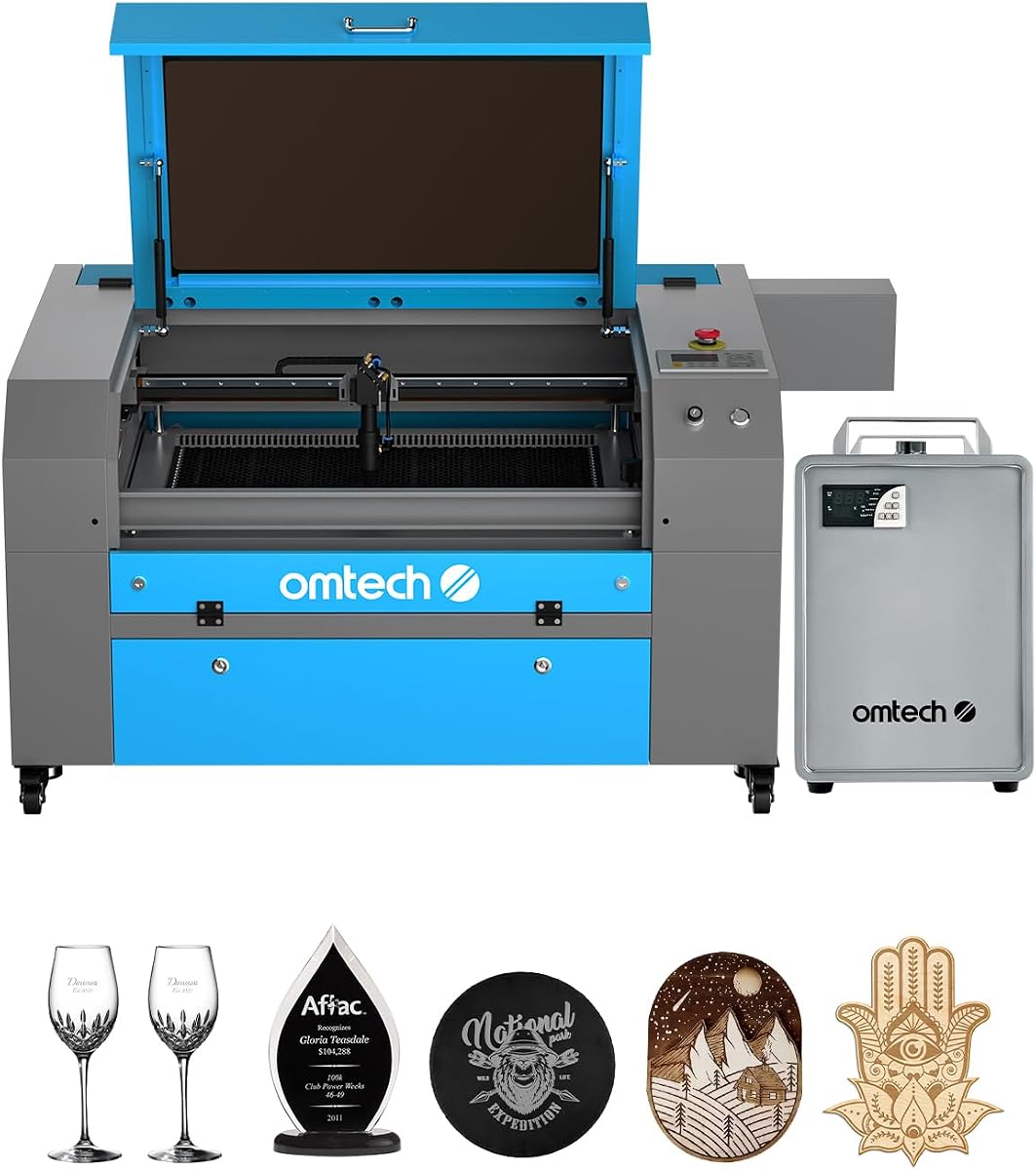
OMTech K40+ 45W Desktop CO2 Laser Engraver & Cutter
4.4Editor score
45W Laser Power
12×8 Inch Workspace
Integrated Air Assist
This guide compares the top 10 CO2 Laser Cutters for 2026, evaluating power, precision, and safety features to help you choose the perfect machine for your
CO2 Laser Cutters have revolutionized how makers and businesses approach fabrication by delivering precision cutting and engraving on various non-metallic materials. These machines use a gas laser to vaporize material along a programmed path, allowing for intricate designs that would be impossible with traditional tools. Choosing the right unit depends on your workspace, budget, and the specific materials you plan to work with regularly.
To compile this list, we analyzed technical specifications, user feedback, and manufacturer support records to identify the most reliable options available today. We focused on key performance indicators like laser power, cutting speed, and safety features to ensure a comprehensive overview. Our goal is to provide an objective comparison that helps you navigate the complex market of industrial and desktop laser cutting systems.
Each pick below highlights unique strengths tailored to different user profiles, from hobbyists seeking affordability to professionals needing industrial-grade output. We include detailed breakdowns of capabilities, safety protocols, and software compatibility to give you a clear picture of what each model offers. Please note that product specifications and pricing can change over time, so always verify current details before making a final purchase decision.
4.4Editor score

4.5Editor score

4.8Editor score
The following table provides a side-by-side comparison of all ten selected CO2 Laser Cutters to help you quickly identify key differences in power, workspace size, and specific features.



The xTool P3 stands out as a flagship machine that redefines desktop CO2 Laser cutting capabilities with its powerful 80W output and intelligent automation. Its Class 1 safety rating ensures secure operation while delivering industrial grade performance suitable for professional workflows. Users will appreciate the seamless integration of LiDAR ranging and dual cameras for precise setup without manual guesswork.
We may earn a commission when you buy through this link, at no additional cost to you.
Its Revolutionary Automated Creation System streamlines production by allowing users to simply place materials and let the machine handle autofocus and positioning. The Evolved Dual HD Camera system provides microscopic alignment accuracy ensuring every cut meets strict tolerance requirements. This level of automation significantly reduces downtime and enhances repeatability for batch production projects.
While the investment is higher than entry level options the efficiency gains and material utilization justify the cost for serious makers and small businesses. The smart nesting feature maximizes material usage reducing waste and improving overall project economics. However some users may find the need to purchase accessories like conveyors separately increases the total initial cost.
Ideal for professionals requiring precision speed and safety the xTool P3 is the top recommendation for those building a scalable laser workflow. It bridges the gap between hobbyist machines and industrial cabinets delivering versatility without sacrificing security. If you prioritize consistent results and advanced features this model is the clear leader in the current market.
The ACS system integrates LiDAR and dual cameras to automate setup allowing users to focus on design rather than calibration.
Class 1 safety with interlocks and active suppression ensures safe operation even during high power cutting tasks without enclosure concerns.
We may earn a commission when you buy through this link, at no additional cost to you.
The OMTech K40+ offers an excellent entry point into CO2 Laser cutting with its upgraded 45W power and robust support infrastructure. Its compact design fits well in home workshops while still delivering professional results for personal projects and small commercial orders. The inclusion of global 24/7 support provides peace of mind for new users navigating the learning curve.
We may earn a commission when you buy through this link, at no additional cost to you.
This machine significantly boosts cutting speed compared to older K40 models allowing it to slice through acrylic and wood with ease. The integrated air assist system helps clear debris and reduce carbonization ensuring cleaner edges on every cut. Software compatibility with LightBurn and LaserGRBL makes it accessible to both beginners and experienced designers.
The workspace size is a tradeoff for the low price point limiting larger projects or batch operations. However for small parts and personalized items the 12×8 area is sufficient and manageable. Users should also ensure they have adequate ventilation as the exhaust fan while efficient may not be enough for heavy continuous use.
Best suited for hobbyists and startups this model delivers the best balance of cost and capability in the budget segment. Its comprehensive safety features and flexible design options like the rotary axis expand creative possibilities without breaking the bank. If you need a reliable starter machine this K40+ variant is highly recommended for value.
The upgrade to 45W increases depth by 20 and speed by 2x making it capable of handling thicker non metallic materials efficiently.
Safety features like door protection emergency stop and flame retardant panels ensure safe operation during high power jobs.
We may earn a commission when you buy through this link, at no additional cost to you.
VEVOR delivers a powerful 100W laser solution with a generous workspace that accommodates larger projects without needing multiple passes. Its intuitive digital control panel integrates seamlessly with major design software offering flexibility for Windows Mac and Linux users. The transparent tinted window ensures eye safety while allowing visual monitoring of the engraving process.
We may earn a commission when you buy through this link, at no additional cost to you.
The 24×35 inch bed provides ample space for cutting larger materials or multiple items at once increasing productivity. Intelligent laser head technology ensures smooth incisions without burrs while the red dot pointer helps with accurate positioning. Movable wheels make it easier to relocate the machine within a workshop environment reducing strain on the user.
While the size requires a dedicated workspace the benefits of throughput and capacity are clear for growing businesses. The pass-through doors allow for handling longer items which expands the range of possible projects significantly. Users should note that setup can take time but the long term gains justify the initial effort.
For those needing more space and power than desktop units provide this VEVOR model offers exceptional value. It balances high performance with user friendly features making it ideal for medium sized shops. If your work involves larger materials this machine is a top contender for capacity and speed.
Compatibility with LightBurn CorelDRAW and AutoCAD allows users to use their preferred design tools without restrictions.
Features like power cut off on opening and emergency stops ensure safe operation during extended engraving sessions.
We may earn a commission when you buy through this link, at no additional cost to you.
The OMTech Maker 90W combines commercial power with essential cooling through its bundled water chiller ensuring stable performance during long sessions. It handles non metallic materials like wood and acrylic with deep engraving capability up to 0.4 inches in a single pass. The 20×28 workspace strikes a balance between portability and production capacity for small businesses.
We may earn a commission when you buy through this link, at no additional cost to you.
High performance Yongli H2 tube provides up to 8000 hours of usage extending the life of the machine under consistent lower settings. Four way pass-through doors simplify loading of larger items making it versatile for varied project types. The widened viewing window adds safety while maintaining visibility of the laser path.
Users should note that while it includes hardware for cooling software is not bundled requiring separate purchase or use of open source options. However the air assist system efficiently removes smoke protecting optics and keeping the lens clean for better results. This model is well suited for shops needing reliable daily operation without industrial size.
For consistent high quality engraving this machine offers strong features at a competitive price point. The inclusion of a chiller saves additional setup costs ensuring readiness out of the box. If you need a robust mid size cutter with proven reliability this OMTech model is a solid choice.
The H2 tube is designed for up to 8000 hours ensuring long term durability and lower replacement costs for users.
Cover interlocks cut the beam instantly if opened preventing accidental exposure and ensuring user safety.
We may earn a commission when you buy through this link, at no additional cost to you.
This OMTech Maker 60W model stands out by including LightBurn software and an autofocus system to streamline the workflow for users. It handles engraving and cutting tasks consistently with the bundled water chiller maintaining temperature stability during operation. The bed adjusts up and down at the touch of a button reducing manual alignment effort.
We may earn a commission when you buy through this link, at no additional cost to you.
Safety features like the flame retardant window and air assist ensure clean engraving while protecting the lens from smoke and dust. It fits well in workshops needing precision rather than raw power since 60W is sufficient for most non metallic applications. The 20×28 workspace is versatile enough for standard projects and small batch orders.
While not ideal for very thick materials the convenience of autofocus and software saves time on repetitive jobs. Users will appreciate the clean engraving process that minimizes cleanup and maximizes material quality. This setup is perfect for those who value workflow efficiency over maximum power output.
For makers and small businesses prioritizing ease of use and software integration this bundle is a strong option. It reduces setup friction allowing you to focus on design and production immediately. If you want a hassle free experience with professional results this Maker series is worth considering.
Autofocus and included LightBurn software remove the guesswork from setup letting you start cutting immediately.
The built-in air assist efficiently removes smoke and dust ensuring high quality cuts and protecting optics.
We may earn a commission when you buy through this link, at no additional cost to you.
Another variant of the popular K40+ series this model emphasizes flexibility for makers needing a compact solution without sacrificing performance. It supports high speed engraving up to 300 mm/s making it great for bulk orders and complex designs. Global support and local demos provide accessible help for troubleshooting and learning.
We may earn a commission when you buy through this link, at no additional cost to you.
The honeycomb bed handles flat items while the detachable base allows for engraving on cylindrical objects with an optional axis. This versatility expands creative potential beyond flat sheets and into personalized items like mugs and bottles. The integrated air assist auto-adjusts airflow to reduce wood carbonization and protect the lens.
Users focused on small parts will find the 12×8 workspace sufficient and easy to maintain in smaller spaces. Software compatibility with LightBurn and LaserGRBL ensures seamless control regardless of experience level. Safety features like the emergency stop and fire retardant panel prioritize user well-being.
Best for personal projects and small businesses needing a reliable portable machine this option is highly practical. It balances cost functionality and support in a way that appeals to DIY enthusiasts and professionals alike. If you need a dedicated compact cutter this K40+ delivers consistent performance.
24/7 global support and local demos by appointment ensure help is always available when you need it.
The detachable base and optional rotary axis allow engraving on both flat and cylindrical materials easily.
We may earn a commission when you buy through this link, at no additional cost to you.
The OMTech Pronto 100W brings revolutionary engraving speeds of up to 39.4 inches per second transforming production efficiency. Its powerful tube handles wood and acrylic with high precision while the autofocus system eliminates manual adjustments. The spacious 40×24 workspace accommodates most standard projects without needing to split files.
We may earn a commission when you buy through this link, at no additional cost to you.
Advanced airflow with a 4.4 CFM pump ensures precise clean cuts and reduces material burn significantly. This feature enhances the quality of work and maintains the health of the machine over time. Comprehensive protection features including water protection and temperature alarms prioritize safety during high power operations.
While the price is higher than entry level units the speed and efficiency gains are significant for professional use. The long tube life up to 12000 hours ensures durability reducing maintenance costs in the long run. Users will appreciate the ability to handle a variety of non metal materials effortlessly.
Ideal for makers and small businesses needing speed this Pronto model offers a competitive edge in production times. It transforms visions into reality quickly while maintaining high quality standards. If you value efficiency and large workspace this model is a top choice for performance.
Autofocus technology takes the guesswork out of setup ensuring consistent high-quality results with minimal effort.
A powerful air pump and fan remove smoke efficiently enhancing cut quality and reducing burn marks.
We may earn a commission when you buy through this link, at no additional cost to you.
The OMTech Pronto 130W features a massive 51×35 workspace perfect for large industrial projects and batch production. It engraves deeply up to 0.4 inches on non metallic materials with high speed output reaching 1000 mm/s. The preinstalled autofocus simplifies setup allowing immediate work without manual calibration steps.
We may earn a commission when you buy through this link, at no additional cost to you.
High power laser tube delivers up to 12000 hours of usage extending lifespan when used consistently at lower settings. Two-way pass-through doors make accommodating larger items effortless and flexible for various material sizes. Comprehensive protection features like water protection and temperature alarms ensure safe operation during long runs.
Users will appreciate the combination of size and power that allows for complex large scale projects in one session. The global support and local demos provide reliable help for setup and ongoing maintenance. This model is built to impress with professional results that turn artistic visions into reality.
Best for professionals needing large scale capacity and speed this model is a standout in the premium category. It offers unparalleled versatility for makers and businesses aiming to expand their capabilities. If you require a large workspace with high power this Pronto is an excellent investment.
The 51×35 work area allows handling of large items easily with two-way pass-through doors for flexibility.
24/7 global support and local demos ensure peace of mind and personalized care wherever you are.
We may earn a commission when you buy through this link, at no additional cost to you.
This standard OMTech K40+ offers a reliable basic option for those entering the world of laser engraving with essential features. It delivers 45W power suitable for common non metallic materials and comes with integrated air assist for cleaner cuts. The compact design fits comfortably in typical workshop environments.
We may earn a commission when you buy through this link, at no additional cost to you.
Safety features like Class 2 compliance ensure secure operation while the basic controls make it easy for beginners to learn. It is a straightforward machine designed to perform without unnecessary complexity. Users can rely on the brand's reputation for durability and support.
While it lacks advanced automation or large workspace it serves well for simple and educational projects. It provides the core functionality needed to produce quality results without a high learning curve. This makes it a safe choice for those new to laser cutting.
For budget conscious users seeking a solid start this model delivers dependable performance. It meets the needs of DIYers looking for a primary tool without advanced features. If you need a basic reliable cutter this option provides the fundamentals.
Class 2 laser safety ensures standard safe operation for general engraving and cutting tasks.
The machine focuses on delivering essential laser power and control for standard materials and tasks.
We may earn a commission when you buy through this link, at no additional cost to you.
The OMTech Pro 130W represents the premium end of the market with industrial features for professional use. It offers a large 35×55 workspace and built-in chiller for consistent temperature control during extensive sessions. Servo motors allow for high speed precision engraving up to 1200 mm/s.
We may earn a commission when you buy through this link, at no additional cost to you.
Control is handled via the Ruida 6445G touchscreen with WiFi connectivity for remote management. The futuristic design includes a widened tempered glass window for enhanced safety and visibility during engraving. This model is designed to handle heavy duty tasks with high reliability and speed.
Users get access to advanced technology that minimizes wear and maximizes output quality. The four-way pass-through doors accommodate massive materials making it suitable for large scale industrial projects. It is a complete package for businesses needing maximum capability.
Best for industrial environments and high volume production this machine is the top tier choice. It combines power speed and smart features into a professional solution. If you need premium capacity this Pro model is unmatched in performance.
Upgraded servo motors and ball-bearing rails allow for precise rapid engraving and cutting up to 1200 mm/s.
The Ruida 6445G touchscreen and WiFi enable effortless control and remote management for efficient workflow.
We may earn a commission when you buy through this link, at no additional cost to you.
Selecting the right CO2 Laser Cutter involves understanding specific features that match your production needs and budget constraints.
Laser power measured in watts determines the thickness of materials you can cut and the speed at which you can work. Higher wattage like 100W to 130W allows for thicker cuts and faster production but requires more power and safety measures.
Choose a power level that matches your typical material thickness and batch sizes to ensure efficient performance.
The workspace area defines the maximum size of materials you can engrave or cut in a single operation. Desktop units like the K40+ offer compact spaces while industrial units provide larger beds for massive projects.
Ensure your chosen workspace accommodates your most frequent project dimensions to avoid unnecessary cropping or splitting.
CO2 Laser Cutters primarily work with non-metallic materials such as wood acrylic leather and cardboard. Some models are optimized for specific materials like acrylic which may require specific lenses or settings.
Verify that the machine supports the specific materials you plan to use to avoid issues with cutting or engraving quality.
Safety features such as interlocks emergency stops and fire retardant panels protect users from potential hazards. Class 1 machines are enclosed and safer for home environments while Class 2 may require more caution.
Prioritize models with comprehensive safety protocols to ensure secure operation especially if used in shared or public spaces.
Compatible software like LightBurn or LaserGRBL allows you to design and control the machine effectively. Some machines come bundled with software while others require separate purchase or open source options.
Check that the machine supports your preferred design software to streamline your workflow and reduce learning time.
Regular maintenance like cleaning lenses and checking tubes ensures longevity and consistent performance. Support from the manufacturer can be crucial for troubleshooting and getting replacement parts.
Choose brands with a reputation for reliable customer support to minimize downtime when issues arise.
Air assist systems clear debris from the cut area improving edge quality and protecting the lens. Cooling systems like water chillers maintain stable temperatures for longer engraving sessions.
Look for models with efficient air assist and cooling options to ensure clean cuts and machine durability.
The initial price often excludes accessories like chiller lenses or software which can add to the total cost. Consider the long term value and potential upgrades when comparing prices.
Set a clear budget that includes all necessary components to avoid unexpected expenses after purchase.
To use your CO2 Laser Cutter start by preparing your material ensuring it is clean and properly sized for the workspace. Load the design file into the compatible software and adjust settings like power and speed based on material thickness.
Always engage safety features and perform a test run on scrap material to verify alignment and settings before starting the full cut. Monitor the machine during operation to ensure the air assist is active and the path is clear.
For care regularly clean the lenses and mirrors to maintain focus and power efficiency. Check water levels in the chiller and ensure the exhaust system is clear to prevent overheating or fire hazards.
For beginners a 45W to 60W laser is generally sufficient to handle common materials like wood and acrylic. This power level allows for precise cuts without requiring extensive safety measures or high electricity bills. It is also more affordable which suits those just starting to explore laser fabrication.
Standard CO2 Laser Cutters are designed for non-metallic materials such as wood acrylic and leather. Metals generally require fiber lasers which operate at different wavelengths. Some coated metals may be engraved but pure metal cutting is outside the scope of typical CO2 models.
You should clean the lenses every few weeks or after every few hours of intensive use. Dirt and smoke residue can block the laser beam and reduce cutting quality. Using a soft microfiber cloth and appropriate lens cleaner ensures optimal performance and extends the lifespan.
Most machines support LightBurn and LaserGRBL which are popular and intuitive choices. Some also work with Inkscape and CorelDRAW for design preparation. Check the product specifications to confirm which software options are fully supported by your specific model.
A water chiller is highly recommended for models with high wattage or for extended engraving sessions. It keeps the laser tube at a stable temperature preventing overheating and extending tube life. Entry level machines may survive without one but a chiller ensures consistent performance and durability.
Modern CO2 Laser Cutters come with safety features like interlocks and emergency stops to ensure safe home use. Class 1 models are enclosed making them safer than Class 2 units that expose the beam. Always use proper ventilation and wear eye protection to mitigate risks.
A typical laser tube lasts between 8000 to 12000 hours of usage depending on maintenance and usage habits. Consistent use at lower settings and proper cooling can extend this lifespan significantly. Regular alignment and cleaning also help maintain power output over time.
Using a CO2 Laser Cutter in an apartment requires careful consideration of ventilation and safety regulations. Ensure you have a proper fume extraction system to avoid smoke accumulation and check local zoning laws. Desktop models are easier to manage but always prioritize safety in shared living spaces.
The ten CO2 Laser Cutters reviewed here offer a range of options from budget friendly desktop units to industrial grade machines. Each model brings unique strengths whether you need speed precision or a large workspace for your projects.
When choosing prioritize the factors that matter most to your workflow such as power material compatibility and safety features. Balancing cost with necessary capabilities will ensure you get the best return on investment for your fabrication needs.
Remember that product specifications and prices may change so verify current details before making your final decision. We hope this guide helps you select the perfect CO2 Laser Cutter for your creative or professional pursuits.