
Thames & Kosmos My Robotic Pet
4.1Editor score
Screen-free coding with action cards
Color-sensing robotic reptile
Three unique play modes included
This guide compares the top 10 coding toys for kids in 2026, evaluating screen-free options, app-based robots, and STEM kits to help you choose the best
Coding toys have become essential tools for fostering logical thinking and creativity in children. These interactive devices teach programming fundamentals through hands-on play without requiring traditional screen time for many models.
We evaluated ten leading coding toys based on educational value, ease of use, durability, and age appropriateness. Each product was assessed for its ability to engage young minds in STEM concepts effectively.
Every pick highlights unique features and learning outcomes for different age groups. Please note that prices and availability change frequently, so check current listings before making your final purchase decision.
4.1Editor score
4.6Editor score

4.6Editor score
The following table provides a side-by-side comparison of all ten selected coding toys, highlighting key specifications and features to help you make an informed decision quickly.




This robotic chameleon offers an affordable entry point into coding without needing tablets or phones. With a strong rating for its engaging design, it teaches sequencing through physical cards.
We may earn a commission when you buy through this link, at no additional cost to you.
The color-sensing capability allows kids to program reactions based on environmental cues. Its articulated joints mimic real movements while the RGB LEDs provide visual feedback on commands.
While assembly takes time, the hands-on building reinforces engineering concepts. The manual guides users through nature-inspired design principles effectively.
Best for families seeking a screen-free STEM toy on a budget. It combines play with learning through interactive gesture recognition and color matching.
Kids use physical cards to program movements, removing screen reliance entirely.
The guide explains how reptiles inspired the robot's color changing features.
We may earn a commission when you buy through this link, at no additional cost to you.
Designed for older kids ready to explore real robotics, this kit bridges simple coding and hardware engineering. Its metal frame ensures durability during active play sessions.
We may earn a commission when you buy through this link, at no additional cost to you.
The mBlock software supports multiple programming languages, growing with the child. It allows for complex projects like obstacle avoidance and line following easily.
Users need to buy batteries separately, which adds minor cost. The initial setup requires patience but pays off in educational value.
Ideal for hobbyists who want expandable robot components. It supports future learning in electronics through modular expansion packs.
Compatible with hundreds of modules allowing endless creative configurations.
Supports Scratch block coding and C language for advanced students.
We may earn a commission when you buy through this link, at no additional cost to you.
This tiny robot packs serious functionality into a ball smaller than a hand. It uses Bluetooth to connect to phones for coding and driving control.
We may earn a commission when you buy through this link, at no additional cost to you.
Kids can draw paths on the screen or use blocks to write logic. The built-in sensors allow for tilt steering and arcade game modes.
Charging is via micro USB which may be outdated for some users. The small size makes it easy to misplace if not stored well.
Best for tech savvy kids wanting a personal companion robot. It offers a fun mix of gaming and actual coding challenges.
Kids can drive by tilting their device rather than using buttons.
Acts as a controller for arcade style games in the app.
We may earn a commission when you buy through this link, at no additional cost to you.
A perfect introduction to programming logic for preschoolers, this mouse teaches sequencing without screens. Kids press buttons to plan a path before sending the mouse.
We may earn a commission when you buy through this link, at no additional cost to you.
The bright colors and cheese target motivate kids to solve puzzles. It fits well on tables for quick educational play breaks.
Limitations include no sensors to detect walls. Users must manually set up the maze using the provided grid pieces.
Recommended for toddlers transitioning to structured play. It builds foundational logic skills through tactile interaction and fun.
Buttons represent directions making coding intuitive for young minds.
Using cards and grids helps physical understanding of algorithms.
We may earn a commission when you buy through this link, at no additional cost to you.
This kit demands assembly but rewards users with a robust mechanical machine. It focuses on how physical mechanisms work alongside basic coding logic.
We may earn a commission when you buy through this link, at no additional cost to you.
Kids rotate coding knobs to set sequences like lifting or kicking. The tactile feedback makes the connection between code and movement clear.
Assembly is detailed and requires focus. Younger kids might need help with small screws and tight fits.
Ideal for those interested in mechanics and robotics. It bridges the gap between manual builds and automated tasks.
The robot physically performs complex tasks like throwing or drawing.
Knobs allow easy adjustment of coding steps without apps.
We may earn a commission when you buy through this link, at no additional cost to you.
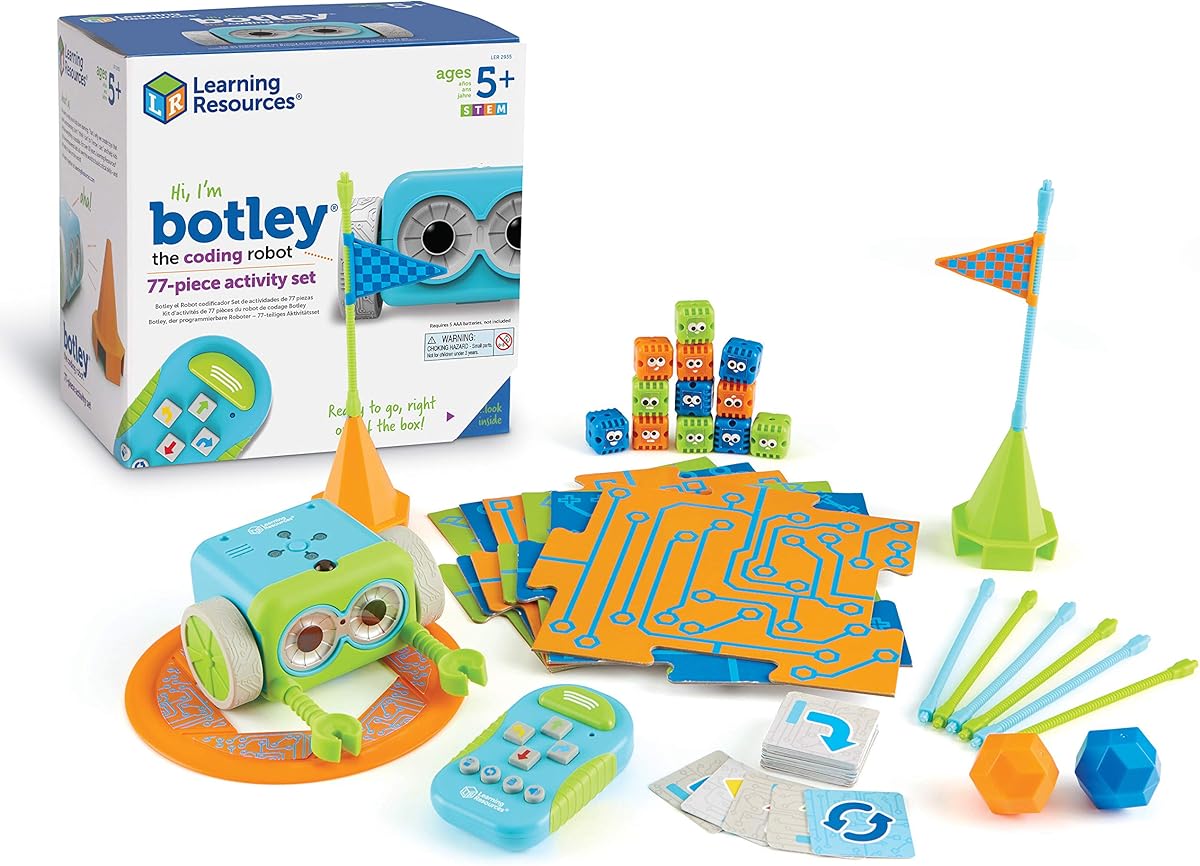
Botley stands out as a complete package for introducing logic. It works entirely without phones making it ideal for classrooms or home learning.
We may earn a commission when you buy through this link, at no additional cost to you.
Kids use a remote to input codes and watch the robot execute loops. The object sensor lets it avoid walls automatically.
Setup needs batteries and a screwdriver which are not provided. This adds minor friction to the experience but ensures security.
Top pick for reliable screen-free play. It offers deep learning potential through looping and pathfinding challenges.
Kids can program repeating actions to simplify complex sequences.
Sensors help the robot sense obstacles and stop automatically.
We may earn a commission when you buy through this link, at no additional cost to you.
This kit provides extensive resources for long term learning through coding. It combines physical line drawing with digital app interfaces seamlessly.
We may earn a commission when you buy through this link, at no additional cost to you.
Using color codes on paper makes coding visible and physical. The app layer supports complex block coding for advanced users.
The price reflects the comprehensive lesson plan included. Markers might need replacing after heavy use.
Perfect for schools or families wanting structured curriculum. It supports a wide age range from early childhood to teens.
Colored lines drawn on paper control robot speed and direction.
Hundreds of lessons align with standard education requirements.
We may earn a commission when you buy through this link, at no additional cost to you.
An updated version of the classic bot, this model adds sensing capabilities. It allows for more dynamic interaction with the environment.
We may earn a commission when you buy through this link, at no additional cost to you.
Music and lights make coding more engaging for younger users. The stackable obstacles encourage building complex courses.
It feels like a refined version of the original. The main upgrade is the added responsiveness to surroundings.
Great for families who want an enhanced experience. It maintains simplicity while adding depth through new features.
Music and noises provide auditory feedback on actions.
Sensors allow the robot to react to its environment.
We may earn a commission when you buy through this link, at no additional cost to you.
Dash is a polished robot designed for maximum playability. It requires no assembly and can start coding immediately via app.
We may earn a commission when you buy through this link, at no additional cost to you.
It dances and speaks creating a personality that engages kids. The battery lasts hours of continuous use.
The need for a device might limit screen-free options. However the app experience is highly refined.
Best for families willing to invest in premium tools. It offers a seamless introduction to app-based coding.
The robot has expressive lights and sounds for personality.
Five different apps cover coding and creative challenges.
We may earn a commission when you buy through this link, at no additional cost to you.
This robot combines coding with creative storytelling for young children. It records voice commands and plays them back on the map.
We may earn a commission when you buy through this link, at no additional cost to you.
The interactive surface helps visualize movement paths. It supports multiple languages for diverse learners.
It requires the physical map to function fully. Without it the features are limited.
Ideal for toddlers interested in stories and sounds. It blends logic with creativity in a safe way.
Kids record voices to control the robot along paths.
Supports ten languages to help diverse classrooms.
We may earn a commission when you buy through this link, at no additional cost to you.
Choosing the right coding toy involves considering age, screen usage, and long-term educational goals.
Age ranges indicate developmental readiness for logical tasks. Younger kids need simple buttons and colors, while older kids handle apps.
Match the toy to your child's current skill level to keep them engaged.
Screen-free toys use buttons and cards for programming. App-based models use phones or tablets for coding blocks.
Screen-free options are better for focused learning, while app models offer more advanced logic.
Metal and thick plastic components ensure longevity. Check if parts are replaceable in case of breakage.
Durable builds protect your investment and survive active play sessions.
Kits with guides or online lessons extend play value. Look for step-by-step manuals and coding challenges.
Strong resources help parents and kids learn together without confusion.
Rechargeable models reduce waste and ongoing costs. Check play times to ensure long sessions.
Adequate battery life ensures the robot keeps playing without interruption.
Modular systems allow you to add sensors or parts. This keeps the toy relevant as skills grow.
Select toys that grow with the child to avoid outgrowing them quickly.
Ensure all parts are non-toxic and free of sharp edges. Small batteries should be secure.
Safe materials protect your child during hands-on exploration.
Budget options provide basic logic while premium ones offer complex features. Consider value over total price.
A balance of cost and features ensures satisfaction without overspending.
Always read the manual before assembly. This ensures you understand the coding logic and safety warnings.
Store batteries properly when not in use to prevent leakage. Keep the toy in a dry place.
Clean surfaces gently with a soft cloth. Avoid water or harsh chemicals on electronic parts.
Yes, many toys are designed specifically for those new to logic. They use simple interfaces to teach basics without frustration.
Not always. Screen-free models work independently. App-based robots require a tablet for coding control.
They support logic skills useful in math and science. They make abstract concepts like loops tangible and fun.
Most offer one to five hours. Rechargeable ones reduce waste and save money over time.
Yes, they teach sequencing and problem solving. They prepare children for future technical skills effectively.
Some kits require building and provide parts. This adds engineering skills alongside basic programming.
The top picks offer a range of options for different ages and budgets. From simple mice to advanced robots, there is something for everyone.
Prioritize educational value and safety when making your choice. A good toy grows with your child's skills.
Check current prices before buying to ensure you get the best deal. Availability changes frequently.