
Anker Nano Power Strip
4.8Editor score
Desk clamp mounting
70W USB-C
Dual-zone layout
This guide compares the top 10 desk mounted outlet towers for power, safety, and organization to help you choose the right charging station.
Desk mounted outlet towers transform cluttered workspaces into organized hubs by consolidating power and charging needs into a single vertical unit. These devices offer multiple outlets and USB ports to handle laptops, phones, and accessories simultaneously without cable chaos.
We evaluated leading models based on outlet capacity, charging speed, safety features, and build quality. Each product was assessed for real-world usability in offices, dorms, and homes to ensure reliable performance under daily stress.
Our picks highlight specific strengths like surge protection, retractable cords, and compact designs. Prices and availability change frequently, so verify current offers before purchasing to get the best value for your specific setup.
4.8Editor score

4.5Editor score

5.0Editor score
This side-by-side comparison highlights key specifications for every model to help you find the right balance of ports and performance for your needs.


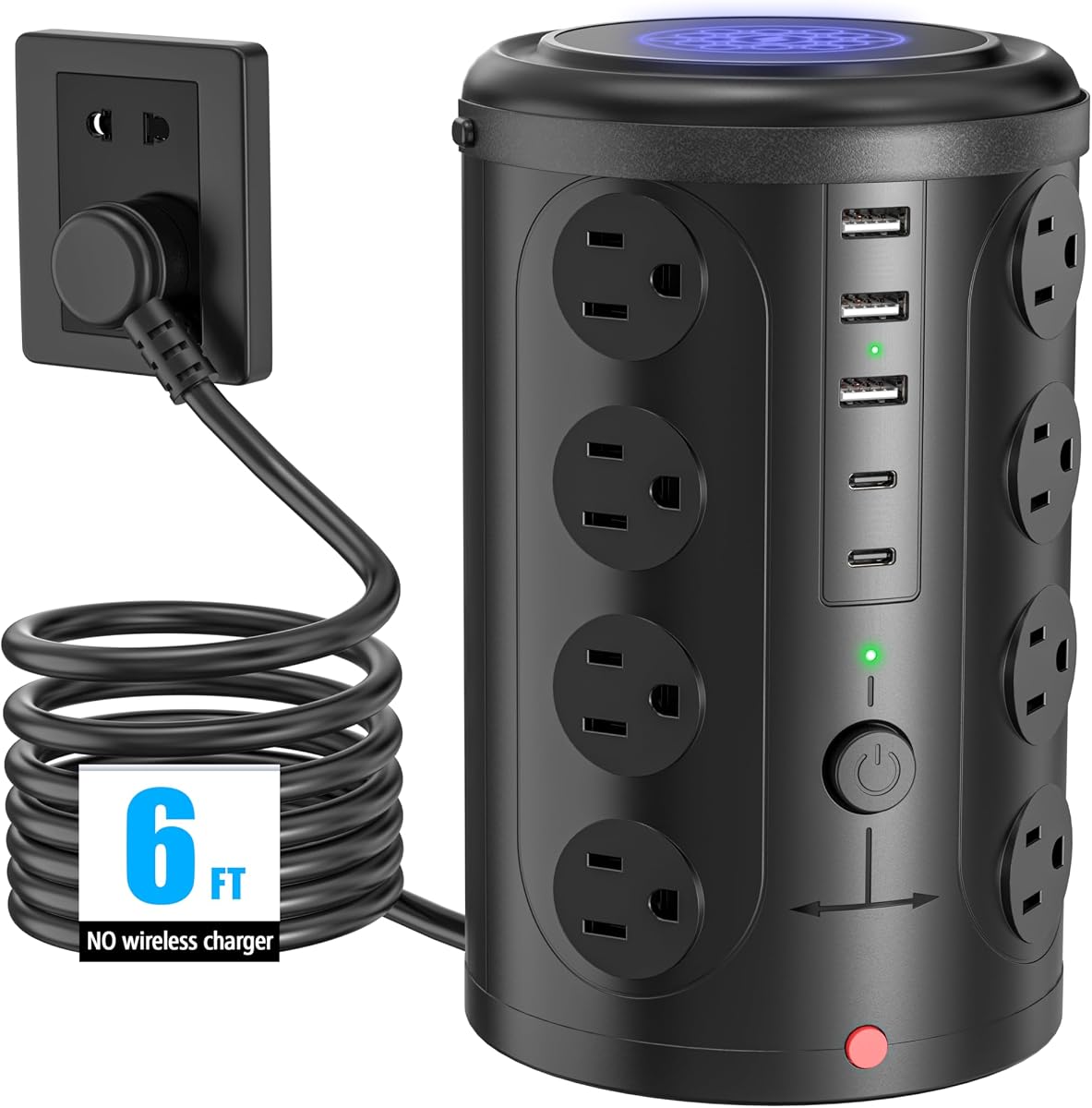


The TenTrend Power Strip Tower delivers robust charging capabilities for busy desks with a 14-in-1 layout that supports up to 14 devices simultaneously. Its rating of 4.5 stars reflects strong user satisfaction regarding versatility and compact footprint.
We may earn a commission when you buy through this link, at no additional cost to you.
Key strengths include the mix of AC and USB ports including two 65W USB-C ports for laptops. The flat plug ensures it fits neatly against walls without blocking adjacent sockets while the 5ft cord offers decent reach.
Trade-offs include a relatively modest surge rating compared to higher-end models and a shorter cord than some competitors. These are acceptable for standard office or home use where extreme power demands are rare.
Anyone needing an all-in-one solution for phones, tablets, and laptops in limited space will find this model highly effective. It balances capacity and size well for most daily scenarios.
Two orange USB-C ports deliver up to 65W enabling direct laptop charging without bulky wall adapters.
The ultra-slim plug sits flush against the wall preventing interference with other outlets or furniture.
We may earn a commission when you buy through this link, at no additional cost to you.
Uncaged Ergonomics offers a unique retractable cord system that eliminates clutter by winding the extension cord back into the base automatically. A perfect 5.0 rating highlights exceptional user experience and build quality.
We may earn a commission when you buy through this link, at no additional cost to you.
The retractable mechanism keeps cords tidy and prevents tripping hazards on busy floors. It supports wall mounting to free up desk space and includes surge protection to safeguard electronics from voltage spikes.
Fewer AC outlets limit simultaneous plug use compared to larger towers and the price is higher than basic models. These constraints are minor for users prioritizing cord management and premium features.
Ideal for environments where neatness is paramount like executive offices or shared workspaces. It provides a polished look with functional versatility for various setups.
Pull the cord to desired length and release to let it retract automatically without manual coiling.
Mountable feet allow secure attachment to walls or under-desk surfaces to reclaim valuable desk space.
We may earn a commission when you buy through this link, at no additional cost to you.
This SMALLRT tower packs an impressive 16 in 1 layout with 12 AC outlets and 4 USB ports making it ideal for powering multiple devices. It maintains a strong 4.7 rating for reliability and capacity.
We may earn a commission when you buy through this link, at no additional cost to you.
The 6.5ft cord reaches further than many standard models while the 4 separate switches allow independent control of outlet groups. Overload protection ensures safety by cutting power when irregularities occur.
USB ports offer standard speeds without advanced fast charging features and the unit may feel heavy due to its size. These are reasonable trade-offs given the extensive outlet count and control options.
Best suited for dorm rooms or shared offices needing many outlets in one place. It delivers high capacity at a competitive value for power-intensive setups.
Four separate switches let you turn off specific groups of outlets without unplugging devices to save energy.
The 6.5ft extension cord provides flexibility to position the tower where needed without stretching outlets.
We may earn a commission when you buy through this link, at no additional cost to you.
Anker Nano Power Strip features a desk clamp design that keeps power accessible without using surface space. It holds a 4.8 rating and boasts fast charging capabilities via high-wattage USB-C ports.
We may earn a commission when you buy through this link, at no additional cost to you.
The 70W USB-C port supports laptops using GaN technology while the dual-zone layout organizes plugs logically. A 1500J surge protector adds robust safety for connected devices against power spikes.
It only fits desks up to 1.8 inches thick and excludes curved edges which limits compatibility. The price is also higher reflecting premium build and fast charging tech.
Perfect for modern desk setups with thick edges needing organized cable management. It offers top-tier performance and convenience for power users.
GaN technology enables 70W delivery from USB-C for quick laptop charging without extra adapters.
The adjustable clamp holds the strip securely allowing one-hand operation without shifting the unit.
We may earn a commission when you buy through this link, at no additional cost to you.
This SMALLRT model combines pure copper wiring with flame retardant materials for enhanced safety and durability. A 4.8 rating confirms user confidence in its build quality and charging performance.
We may earn a commission when you buy through this link, at no additional cost to you.
Internal smart technology optimizes charging speeds across USB ports while wide AC spacing prevents adapter interference. The anti-slip mat keeps the tower stable on smooth surfaces like desks.
USB-A ports offer standard speeds without max fast charging and the design is simple without advanced features. These are acceptable for general use given the safety focus.
Best for budget-conscious buyers seeking reliable power with robust materials. It offers strong safety features at a lower price point.
Internal pure copper wiring ensures efficient power transmission and reduces heat buildup during use.
The PC shell resists fire up to 1382°F providing added safety during electrical irregularities.
We may earn a commission when you buy through this link, at no additional cost to you.
This 6FT tower offers the highest AC outlet count at 16 allowing massive device charging without adapters. It carries a 4.6 rating highlighting reliable performance and organization capabilities.
We may earn a commission when you buy through this link, at no additional cost to you.
Wide-spaced outlets prevent bulky adapters from blocking adjacent ports while the compact vertical design saves floor space. Overload and short-circuit protections ensure safety for connected devices.
The surge rating is less detailed than other models and the cord length is shorter. These are minor issues given the sheer number of available power sources.
Ideal for studios or labs needing many outlets in one place. It maximizes plug availability while maintaining a tidy profile.
Outlets are spaced to allow large adapters to plug in without blocking neighboring sockets.
Sixteen AC sockets provide extensive power capacity for multiple devices and accessories.
We may earn a commission when you buy through this link, at no additional cost to you.
TESSAN Tower features a flat plug and compact design ideal for tight spaces behind furniture. It holds a 4.8 rating for safety and usability in various indoor environments.
We may earn a commission when you buy through this link, at no additional cost to you.
The 45° right-angle design allows access to wall sockets without blocking other outlets. Surge protection covers 1050J offering good security against voltage spikes for electronics.
It has fewer AC outlets than larger towers and the cord is shorter. These constraints suit smaller desks or bedside setups where space is premium.
Perfect for tight setups needing organized charging without bulk. It balances compactness with essential safety features.
The angled plug creates extra space for other sockets while maintaining flush wall contact.
At 0.31 inches thick the plug fits snugly against walls preventing protrusion and interference.
We may earn a commission when you buy through this link, at no additional cost to you.
VILONG Dual Layer offers a unique dual-layer design enabling under-desk mounting to free up surface space. A 4.4 rating reflects functional performance with moderate safety features.
We may earn a commission when you buy through this link, at no additional cost to you.
The 700J surge protection and fire-resistant ABS plastic offer basic safety for everyday use. Independent switches control outlets while the clamp fits desks up to 1.6 inches thick.
Lower rating suggests less consistent quality compared to competitors and the cord is shorter. These are manageable for focused under-desk installations.
Best for setups needing power under the desk without clutter. It provides vertical flexibility and decent capacity.
The dual-layer design supports under-desk and desktop charging options for flexible access.
Installation requires no tools or drilling simply clamp and twist to secure to the desk.
We may earn a commission when you buy through this link, at no additional cost to you.
This 6FT tower delivers 12 AC outlets with wide spacing to accommodate large adapters without blocking ports. A 4.7 rating underscores reliable safety with strong surge protection.
We may earn a commission when you buy through this link, at no additional cost to you.
The 1800J protection rating offers robust shielding against voltage spikes while the flat plug fits tight wall spaces. Rubber feet ensure the tower remains stable during daily use.
USB ports lack advanced fast charging speeds and the cord is shorter than some rivals. These are acceptable given the focus on plug capacity and safety.
Ideal for desks needing many outlets with strong safety features. It balances capacity and surge protection effectively.
The 1800J rating provides strong protection against power surges from storms or grid switching.
Outlets are spaced widely to prevent adapters from interfering with each other during use.
We may earn a commission when you buy through this link, at no additional cost to you.
This tower delivers 12 AC outlets and 4 USB ports in a compact vertical format ideal for saving space. A 4.8 rating reflects solid value and performance for general use.
We may earn a commission when you buy through this link, at no additional cost to you.
1080J surge protection covers standard electronics while the flat plug fits behind furniture easily. The design prevents adapters from blocking each other due to wide spacing.
It lacks advanced charging speeds and has a shorter cord than premium models. These are minor for basic power needs in small spaces.
Perfect for dorm rooms or home offices needing simple organization. It provides reliable power without extra cost.
Wide spacing between outlets allows using large adapters without blocking neighboring ports.
The 1080J protection rating safeguards electronics from common voltage spikes and fluctuations.
We may earn a commission when you buy through this link, at no additional cost to you.
Choosing the right desk mounted outlet tower requires balancing outlet count, charging speeds, and safety features to match your workspace demands.
Consider how many devices you need to plug in simultaneously. Look for towers offering enough AC outlets and USB ports to handle your entire setup without daisy-chaining.
Prioritize models with at least 10 ports if you run multiple monitors and laptops daily.
USB-C ports vary in wattage from standard 5W to fast charging 65W or more. Ensure the tower supports enough high-wattage ports for your laptops.
Check for smart chips that optimize power delivery across multiple USB connections.
Surge protection ratings measured in joules protect electronics from voltage spikes. Aim for at least 1000J for reliable safety against power fluctuations.
Higher joule ratings indicate better defense against storm-related surges.
Decide between a free-standing tower or a clamp-on model based on your desk space. Clamps save surface area while standing towers offer flexibility.
Ensure the clamp fits your desk thickness if choosing a mounted option.
Extension cords should be long enough to reach your outlet without stretching. Standard lengths range from 5ft to 6.5ft to cover typical desk depths.
Opt for cords longer than 6ft if your outlet is distant from your desk.
Flat plugs save space on crowded walls while wide-spaced outlets prevent adapter blocking. A compact vertical footprint helps maintain an organized workspace.
Look for rubber feet to ensure the tower stays stable on smooth desks.
Place the tower on a flat, stable surface near your desk to prevent tipping. If using a clamp model ensure the desk edge is flat and clean before tightening the clamp.
Plug devices into the tower in groups to manage power load. Use independent switches if available to turn off unused outlets and save energy.
Regularly inspect cords for damage and avoid overloading the tower beyond rated capacity. Clean the surface with a dry cloth to prevent dust buildup.
Yes, many models offer USB-C ports capable of delivering 65W or more for laptop charging. Verify the wattage matches your laptop requirements before purchasing.
They are safe when equipped with surge protection and automatic shut-off features. However unplugging non-essential devices when not in use is recommended for energy safety.
Most modern towers include built-in surge protection making extra devices unnecessary. Check the joule rating to ensure it meets your safety needs.
Some models include wall mountable feet allowing you to attach the tower to walls or under-desk surfaces. Check product specs for mounting compatibility.
Most towers support 10 to 16 devices simultaneously via AC and USB ports. Avoid exceeding the rated wattage to prevent overloads.
Flat plugs sit flush against walls reducing interference. The 45-degree right-angle designs further prevent blocking adjacent sockets.
The TenTrend and Uncaged Ergonomics models stand out for versatility and design. Anker Nano offers premium features for those needing fast charging and clamp mounting.
Prioritize surge protection and outlet count when selecting a tower for long-term reliability. Match the charging speeds to your devices for optimal performance.
Check current availability and prices before purchasing as offers change frequently. Ensure the final choice meets your specific desk layout and power needs.