
Ethernet Adapter for Fire TV Stick
4.7Editor score
Affordable pricing option
Universal Micro USB compatibility
Built-in LED status indicator
This guide compares ten top Ethernet adapters for Fire TV devices to help you find the best wired connection solution for stable streaming performance.
Streaming devices often struggle with weak WiFi signals causing buffering and lag. A reliable Ethernet adapter provides a stable wired connection ensuring smooth playback for all your favorite shows and games.
We evaluated ten popular adapters based on compatibility speed and build quality. Our comparison focuses on models that work seamlessly with various Fire TV generations to eliminate connectivity issues effectively.
Each pick highlights key features and potential limitations for informed decisions. Remember that prices fluctuate regularly so always check current listings before purchasing to secure the best value available today.
4.7Editor score

4.5Editor score

4.1Editor score
The following table provides a side-by-side overview of all ten adapters highlighting their core specifications and compatibility notes to help you compare key differences quickly.


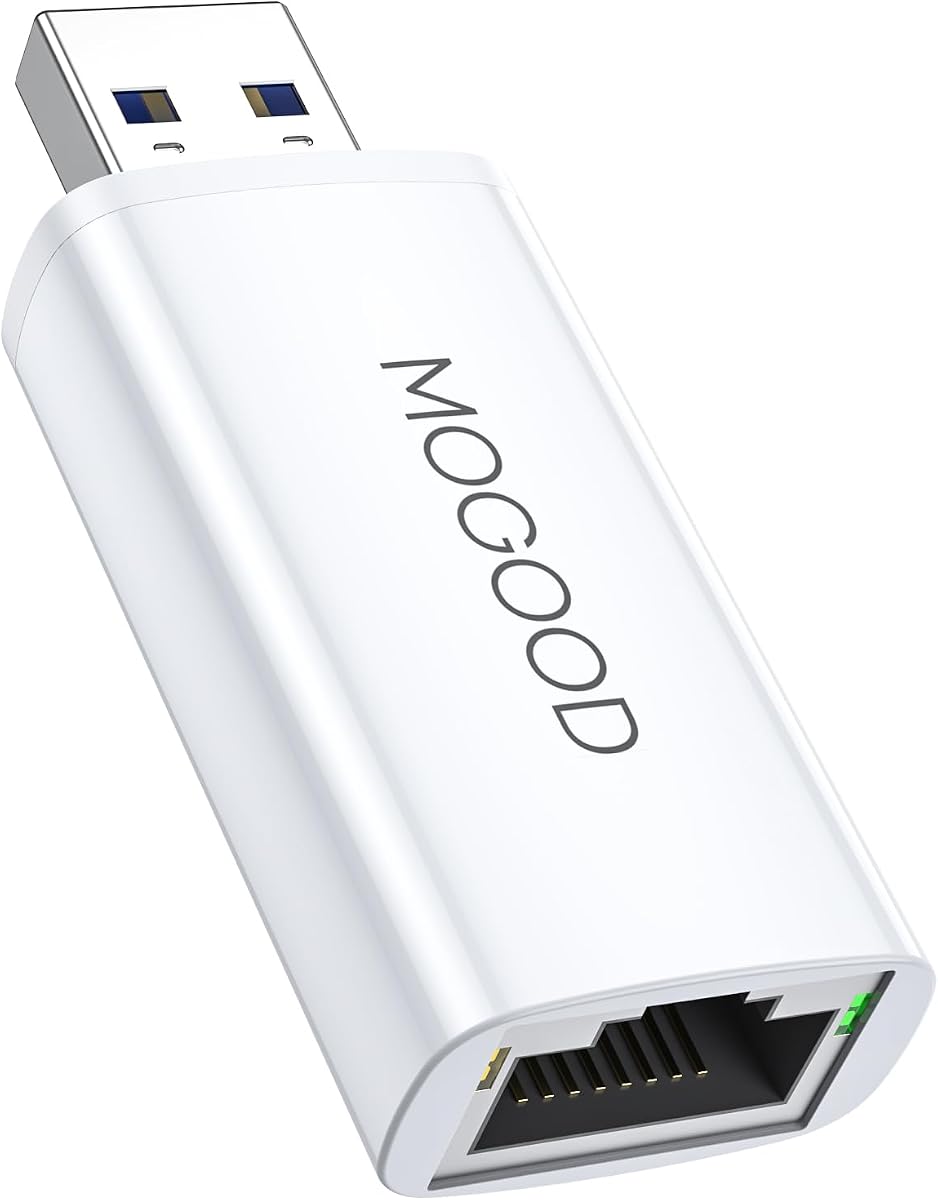
This adapter stands out as a reliable choice for Fire TV users needing a stable wired connection. It supports multiple Fire TV generations ensuring broad usability across different device models.
We may earn a commission when you buy through this link, at no additional cost to you.
Its main strength lies in the direct connection to the router which eliminates WiFi interference. The setup is straightforward requiring only a micro USB port and an Ethernet cable to establish connectivity.
While it lacks gigabit speeds the 10/100 Ethernet provides sufficient bandwidth for HD and 4K streaming. The limitation to micro USB means newer USB-C devices need an alternative solution.
Ideal for Fire Stick and Cube owners this adapter delivers consistent performance without complex configuration. It is a practical upgrade for anyone tired of buffering interruptions during streaming.
Connecting directly to your router ensures stable speeds unaffected by WiFi congestion or signal strength issues.
Compatible with Fire TV Stick Lite 4K and Cube models making it versatile for many existing setups.
We may earn a commission when you buy through this link, at no additional cost to you.
Designed specifically for the newest Fire TV Stick HD this adapter addresses the USB-C port requirement. It ensures compatibility with the latest hardware generations without needing extra adapters.
We may earn a commission when you buy through this link, at no additional cost to you.
The right angle design prevents cable strain and keeps the setup neat behind the TV. This thoughtful form factor makes it easier to mount the adapter securely without loose cables.
Speeds up to 480 Mbps are adequate for most streaming needs though not ideal for heavy gaming. Users must verify their device port type to avoid purchasing the wrong connector.
If you own a Fire TV Stick HD with USB-C this adapter provides a direct wired solution. It simplifies connectivity and enhances stability for smooth video playback and browsing.
This model is essential for users with Fire TV Stick HD 2nd Gen devices that require USB-C connectivity.
The angled connector reduces clutter and helps manage cables in tight spaces behind entertainment units.
We may earn a commission when you buy through this link, at no additional cost to you.
This adapter offers high-speed gigabit connectivity ideal for users needing maximum bandwidth. It supports various streaming devices beyond Fire TV including Chromecast and Raspberry Pi.
We may earn a commission when you buy through this link, at no additional cost to you.
The aluminum alloy construction helps dissipate heat effectively ensuring stable performance during long sessions. An LED indicator provides immediate visual confirmation of the connection status.
Users should note it works only with micro USB ports excluding newer USB-C devices. Additional power may be required via a separate cable to maintain consistent operation.
For power users prioritizing speed this adapter delivers superior network performance. It is a solid choice for gaming or 4K streaming where latency and stability matter most.
Supporting 1000 Mbps ensures fast data transfer and smooth playback even with high bandwidth demands.
The aluminum housing not only looks premium but also protects internal components and manages heat well.
We may earn a commission when you buy through this link, at no additional cost to you.
This adapter provides a straightforward solution for eliminating WiFi buffering and lag issues. It connects directly to the router via Ethernet ensuring a stable wired network connection.
We may earn a commission when you buy through this link, at no additional cost to you.
The aluminum casing is sleek and helps with heat dissipation during extended use. Adhesive tapes are included to secure the adapter in place preventing loose connections.
While limited to 100 Mbps it is sufficient for most HD streaming needs. Compatibility is restricted to micro USB models excluding USB-C devices which users must check before buying.
A practical upgrade for Fire TV Stick owners this adapter enhances streaming reliability significantly. It requires no drivers and setup is quick for immediate improvement in performance.
By connecting via Ethernet users avoid WiFi congestion and experience fewer interruptions during video playback.
Included tapes help position the adapter safely avoiding dangling cables that might cause connection drops.
We may earn a commission when you buy through this link, at no additional cost to you.
This adapter offers a budget friendly option without compromising on essential features. It works with Fire TV Stick models including 4K and Max ensuring broad usability.
We may earn a commission when you buy through this link, at no additional cost to you.
The aluminum casing keeps the device cool during long streaming sessions which enhances longevity. Smart status lights give instant feedback on whether the connection is active.
Users need to supply power via a separate cable as the adapter may require extra energy. Speeds are capped at 100 Mbps which is sufficient for standard streaming needs.
For those seeking a simple reliable upgrade this adapter is a great choice. It removes WiFi dependency and delivers consistent internet speeds for a better viewing experience.
Priced competitively this adapter provides excellent value for users looking to upgrade connectivity affordably.
Status lights make it easy to confirm connectivity at a glance without navigating complex menus.
We may earn a commission when you buy through this link, at no additional cost to you.
This adapter is highly rated for its simplicity and reliability across various TV sticks. It works with Fire TV 4K Chromecast and other devices supporting micro USB Ethernet.
We may earn a commission when you buy through this link, at no additional cost to you.
Setup takes seconds with no drivers needed. Just plug into the port and router for instant activation. The aluminum build ensures durability during regular use.
While speeds are limited to 100 Mbps this is enough for most streaming tasks. The LED indicator helps confirm connection status quickly without troubleshooting.
A straightforward choice for users needing a stable wired link this adapter delivers consistent results. It is perfect for households looking to eliminate WiFi interference easily.
No software installation is required allowing users to get online immediately after physical connection.
Works with multiple streaming devices providing flexibility for homes with different hardware setups.
We may earn a commission when you buy through this link, at no additional cost to you.
UGREEN adapter is notable for its extended cable length which helps reach outlets easily behind TVs. It supports Fire TV Stick and Chromecast devices with micro USB ports.
We may earn a commission when you buy through this link, at no additional cost to you.
The included USB-A power cord ensures stable operation when connected to a wall charger. A 3.3 foot length provides flexibility for cable management and placement.
Speeds are capped at 100 Mbps which is reliable for streaming. Users need a dedicated power source as the TV port may not supply enough energy alone.
This adapter is ideal for setups where router proximity is difficult. The longer cable makes wiring easier without needing extension accessories or complex setups.
A 3.3 foot power cable offers enough reach to connect to a wall outlet without additional extensions.
Using a wall charger ensures the adapter and stick receive consistent power preventing disconnections.
We may earn a commission when you buy through this link, at no additional cost to you.
This adapter supports speeds up to 300+ Mbps offering faster connections than standard fast Ethernet. It is designed to provide stable wired internet for streaming devices.
We may earn a commission when you buy through this link, at no additional cost to you.
The 3-foot power cable ensures easy connection to a wall charger for reliable operation. Users can power their Fire Stick or Chromecast while maintaining a wired link.
Setup is hassle-free with no drivers required. It works well with Fire TV Cube and various Chromecast models ensuring broad usability across devices.
For those needing higher speeds than 100 Mbps this adapter provides a solid upgrade. It helps maintain consistent streaming quality without dropping signal during peak times.
Supporting over 300 Mbps allows smoother streaming and faster downloads compared to standard adapters.
A dedicated power cable ensures stable connectivity without relying solely on the TV device's port.
We may earn a commission when you buy through this link, at no additional cost to you.
This adapter addresses common streaming issues like buffering and lag by providing a wired alternative. It fits Fire Stick models with micro USB Type B ports securely.
We may earn a commission when you buy through this link, at no additional cost to you.
No drivers are required for installation which simplifies the setup process for all users. A steady internet stream is delivered reducing interruptions caused by WiFi fluctuations.
Speeds are limited to 100 Mbps which is sufficient for most streaming services. Users with newer USB-C devices should note this model will not work with them.
An economical choice for improving stream quality this adapter delivers consistent performance. It helps eliminate WiFi congestion and provides a more reliable connection for gaming.
Wired connections remove signal variability reducing the frequency of pauses during video playback.
Plug and play functionality means no complex software setup is required for immediate use.
We may earn a commission when you buy through this link, at no additional cost to you.
This adapter delivers gigabit speeds ideal for high bandwidth activities like online gaming. It works with Fire TV Cube and laptops ensuring versatility beyond just streaming sticks.
We may earn a commission when you buy through this link, at no additional cost to you.
USB 3.0 provides high speed data transfer and backward compatibility with USB 2.0. Plug and play support means no driver installation on most systems.
Users should verify USB port availability on their devices as Fire Stick models vary. This adapter is best for Fire TV Cube or desktop setups needing faster wired internet.
For advanced users requiring maximum speed this adapter is a strong option. It replaces unreliable WiFi with a stable and fast network link for daily use.
Supporting 1000 Mbps ensures fast transfers and minimal latency for demanding network applications.
Compatible with laptops PCs and Fire TV Cube providing a universal solution for many devices.
We may earn a commission when you buy through this link, at no additional cost to you.
Selecting the right adapter requires considering compatibility speed and build quality to ensure a stable and lasting connection.
Check whether your Fire TV device uses micro USB or USB-C as adapters are specific to one type. Using the wrong connector will prevent the adapter from working at all.
Verify the exact model of your Fire TV Stick or Cube before purchasing to ensure the adapter matches the port correctly.
Adapters come with 100 Mbps or gigabit 1000 Mbps speeds depending on the model and connector type. Consider your internet plan and streaming quality needs.
Higher speeds are better for gaming or multiple devices but 100 Mbps is sufficient for most HD streaming tasks.
Aluminum alloy casings are common in higher-end adapters offering better heat dissipation during prolonged use. This helps maintain consistent performance without overheating.
Look for sturdy construction that can withstand daily handling and cable movement to prevent connection drops.
Many adapters require a separate power cable connected to a wall charger for stable operation. Relying only on the Fire TV port may lead to intermittent connectivity.
Ensure you have access to a USB power source or choose an adapter that includes a power cable in the box.
Longer USB power cables can make installation easier when outlets are far from your TV. Short cables may limit placement options and cause strain.
Consider the distance between your router and TV to avoid needing additional Ethernet extension cables.
LED indicators provide instant visual feedback on network status helping you troubleshoot connection issues quickly. This feature is especially useful for less technical users.
Adapters with status lights simplify setup and allow you to confirm the link is active without navigating menus.
Prices range widely from budget options to premium models with gigabit speeds. Balance cost against features you actually need for your usage.
Cheaper adapters can perform well but check reviews to ensure reliability before committing to a purchase.
Ideally the adapter should not require drivers or software installation on your device. This simplifies setup and reduces potential technical issues.
Choose products marketed as plug and play for immediate connectivity without extra configuration steps.
Start by connecting one end of the Ethernet cable to your router and the other to the adapter's RJ45 port. Ensure the cable is securely clicked into place to prevent loose connections.
Plug the adapter into the Fire TV device's micro USB or USB-C port and connect the power cable to a wall charger. Turn on the device and wait for the network to initialize.
Periodically check the LED indicator to confirm the connection remains active. If issues arise try reseating the cables or restarting your router to refresh the signal.
No special router is required as long as it has a standard Ethernet port. Any router with an available LAN port will work with these adapters without additional configuration.
Check that the Ethernet cable is fully inserted and the power cable is connected to a wall outlet. Sometimes restarting the Fire TV device resolves connectivity glitches.
No adapters are specific to port types so a USB-C adapter will not fit a micro USB device. You must choose the correct connector based on your Fire TV model.
Many adapters require extra power to operate reliably especially during high bandwidth use. Using a wall charger ensures stable performance and prevents disconnection issues.
Compatibility varies by model so check the product details for supported devices. Older models with micro USB ports are usually supported while USB-C ones need specific adapters.
Look for the LED indicator light on the adapter showing a solid or blinking green. You can also check network settings on your Fire TV to confirm the wired connection.
The Micro-USB Ethernet Adapter stands out as the best overall choice for its wide compatibility and reliable performance. It is a solid pick for most Fire TV users seeking stability.
Prioritize adapters with proper port compatibility and sufficient power options to ensure a seamless setup. Aluminum builds and status lights add value by improving longevity and ease of use.
Remember that pricing fluctuates so check current listings before buying. Verify your device model to select the right adapter for uninterrupted streaming and gaming.