
StarTech 10/100 Ethernet Extender
4.8Editor score
Up to 0.5 mile range
IEEE 802.1q VLAN support
TAA compliant for government use
This guide compares the top ten Ethernet Line Extender models for reliable network expansion across large homes, offices, and industrial environments in 2026.
Finding the right Ethernet Line Extender is crucial for maintaining stable connectivity in large spaces. These devices help you overcome physical barriers and distance limitations inherent in standard networking setups.
We have evaluated ten top-rated solutions based on performance, range, and ease of use. Our analysis covers powerline adapters, VDSL extenders, and coaxial cable options to suit various needs.
Each pick highlights key features and real-world applications to help you decide. Please note that product availability and pricing may change frequently, so check current listings before purchasing.
4.8Editor score

4.2Editor score

4.7Editor score
The following table provides a side-by-side comparison of the ten selected Ethernet Line Extender models, highlighting their maximum range, supported speeds, and key connectivity features.



The TP-Link AV1000 Powerline Ethernet Adapter KIT stands out as a reliable choice for extending your network through existing electrical wiring. With a rating of 4.2 stars, users appreciate its ability to overcome thick walls that typically block wireless signals.
We may earn a commission when you buy through this link, at no additional cost to you.
Powered by HomePlug AV2 technology, this kit delivers AV1000 speeds up to 750 feet. It includes a Gigabit port for desktops and smart TVs, ensuring high-bandwidth devices get a wired connection without running new cables.
While it requires a direct wall outlet and cannot work with power strips, the performance is consistent in most homes. The secure-by-design pledge adds a layer of trust for users concerned about network safety.
This kit is ideal for homeowners who need a stable connection in basements or attics. It offers a balance of speed, ease of use, and security that makes it our top pick for general household use.
This adapter uses the latest HomePlug AV2 standard to maximize data transfer rates over your home's electrical system, ensuring smooth HD streaming and gaming.
The built-in power saving mode automatically reduces consumption when idle, helping you save on electricity costs without impacting performance.
We may earn a commission when you buy through this link, at no additional cost to you.
NETGEAR offers a powerful solution with the PLP2000 kit, promising speeds up to 2000 Mbps. This is excellent for users with high-speed internet plans who want to utilize the full capacity of their connection.
We may earn a commission when you buy through this link, at no additional cost to you.
The use of MIMO and Beamforming technology helps direct the signal efficiently through your wiring. This can result in better coverage and stability compared to older powerline models.
One unique feature is the built-in noise filtered power outlet. This allows you to plug your device directly into the adapter, reducing clutter and potential interference from other power sources.
While it is pricier than some competitors, the performance justifies the cost for power users. It is a robust choice for those needing reliable high bandwidth for work or entertainment.
Multiple data streams ensure that data travels efficiently across your home wiring, reducing latency and improving overall connection stability.
You can set up this kit in minutes without configuring any software, making it accessible for users of all technical levels.
We may earn a commission when you buy through this link, at no additional cost to you.
This VDSL kit offers an impressive reach of up to 7000 feet, vastly exceeding the standard Ethernet limit of 328 feet. It is designed for large properties where running new cables is impractical.
We may earn a commission when you buy through this link, at no additional cost to you.
It utilizes existing CAT5 to CAT8 or even phone cables to pass signals to remote locations. This makes it cost-effective for users who already have cabling infrastructure in place.
The setup is straightforward with no driver or software needed. The kit comes pre-paired for central and remote locations, ensuring a stable connection for cameras or routers.
For those with sprawling homes or industrial sites, this is a practical solution. It bridges the gap between standard Ethernet limits and the need for long-distance connectivity.
By using old phone wires or existing network cables, this extender saves the cost and mess of installing new wiring throughout the property.
The stable connection it provides is perfect for remote cameras or VoIP phones that need to be placed far from the main router.
We may earn a commission when you buy through this link, at no additional cost to you.
The StarTech extender is a premium choice designed for professional and government applications. With TAA compliance, it meets strict requirements for procurement by federal agencies.
We may earn a commission when you buy through this link, at no additional cost to you.
It can reach distances up to half a mile using standard copper cabling. This is ideal for campus networks, warehouses, or large estates where distance is a major factor.
The device acts as a transparent network component, allowing VLAN tags and other protocols to pass through unchanged. This ensures compatibility with complex network configurations.
For IT administrators needing reliable long-range extension without changing network topology, this is a top-tier option. The LED indicators make troubleshooting and status monitoring effortless.
TAA compliance ensures this device meets regulatory standards for use in federal projects and secure enterprise environments.
It supports various wiring types including single-pair and two-pair configurations to adapt to different infrastructure needs.
We may earn a commission when you buy through this link, at no additional cost to you.
If you need a basic extension without breaking the bank, this AV600 kit is an excellent choice. It offers the same ease of use as the AV1000 but at a lower cost point.
We may earn a commission when you buy through this link, at no additional cost to you.
The 100 Mbps port is sufficient for web browsing and standard streaming. It is ideal for connecting devices that do not require Gigabit speeds but still need a stable wired connection.
Like the other TP-Link models, it features a compact nano size that does not block adjacent outlets. This helps keep your wall outlet area organized.
For basic home needs or older devices, this is a practical solution. It delivers reliable performance for the price and is compatible with all TP-Link powerline adapters.
This kit allows you to extend your network affordably, making wired connections accessible even for budget-conscious consumers.
The automatic power saving mode helps reduce electricity usage when the network is idle, adding to its value proposition.
We may earn a commission when you buy through this link, at no additional cost to you.
This hybrid kit combines the reach of powerline technology with the convenience of modern Wi-Fi 6. It is designed for those who need both wired and wireless options in remote rooms.
We may earn a commission when you buy through this link, at no additional cost to you.
The AX1500 speeds ensure that wireless devices connect quickly and smoothly. The WiFi Clone button makes setup seamless by copying your router's SSID and password.
It supports EasyMesh, allowing you to expand your home network into a unified mesh system. This provides consistent coverage throughout your house without signal drops.
For users with large homes who need to cover dead zones with both types of connectivity, this is a powerful tool. It bridges the gap between powerline stability and wireless flexibility.
By offering both Ethernet and 5GHz/2.4GHz Wi-Fi, this kit caters to all types of devices, from smart TVs to mobile phones.
The ability to clone settings and connect to Mesh systems simplifies the process of expanding your network footprint.
We may earn a commission when you buy through this link, at no additional cost to you.
This model focuses on convenience with a passthrough power outlet. This allows you to plug the adapter directly into the wall while still using the outlet for another device.
We may earn a commission when you buy through this link, at no additional cost to you.
It provides AC1200 WiFi speeds along with a Gigabit Ethernet port. This makes it suitable for gaming consoles or smart TVs that need high bandwidth.
The OneMesh compatibility ensures it works well with other TP-Link routers to create a seamless whole-home network. The setup is quick thanks to the cloning feature.
For those who value convenience and modern WiFi standards, this is a strong contender. It balances the stability of powerline with the flexibility of wireless connectivity.
The passthrough design ensures you do not lose an outlet, keeping your area tidy and preventing the need for extra adapters.
Supporting HomePlug AV2 technology ensures a stable wired backbone for your wireless network to rely on in distant rooms.
We may earn a commission when you buy through this link, at no additional cost to you.
The UGREEN Ethernet coupler is a simple yet effective tool for joining two Ethernet cables to extend their length. It supports high speeds up to 10Gbps for modern networking needs.
We may earn a commission when you buy through this link, at no additional cost to you.
It is PoE compatible, meaning it can pass power to devices like cameras without needing an extra power supply. This is a significant convenience for surveillance setups.
The Z shape design and arch pins ensure a secure connection that resists accidental disconnection. It works with Cat5 through Cat8 cables for universal compatibility.
For users who just need to connect two cables to reach a socket, this is a great solution. It is cheap, effective, and preserves the integrity of your network speed.
By supporting PoE, this coupler simplifies installations for IP cameras and phones that require power and data over a single cable.
It is backward compatible with 1Gbps and lower speeds, ensuring it works with virtually any standard Ethernet device.
We may earn a commission when you buy through this link, at no additional cost to you.
This extender is unique because it uses any two copper conductors, including alarm wires or coaxial cables. This offers incredible flexibility for retrofitting existing infrastructure.
We may earn a commission when you buy through this link, at no additional cost to you.
It is an active device that regenerates the signal at each end, allowing for stable connections up to 600 meters. This ensures data integrity over long distances.
The device is fully transparent to the network, meaning VLANs and DHCP settings pass through without modification. This is vital for professional network setups.
For industrial or remote applications where cabling is diverse, this is a versatile tool. It handles mixed wire types gracefully to keep networks running smoothly.
The ability to run on spare wires or coaxial cables reduces the need for expensive new cabling installations in older buildings.
By regenerating the signal at both ends, this unit prevents data loss and maintains connection strength over extended runs.
We may earn a commission when you buy through this link, at no additional cost to you.
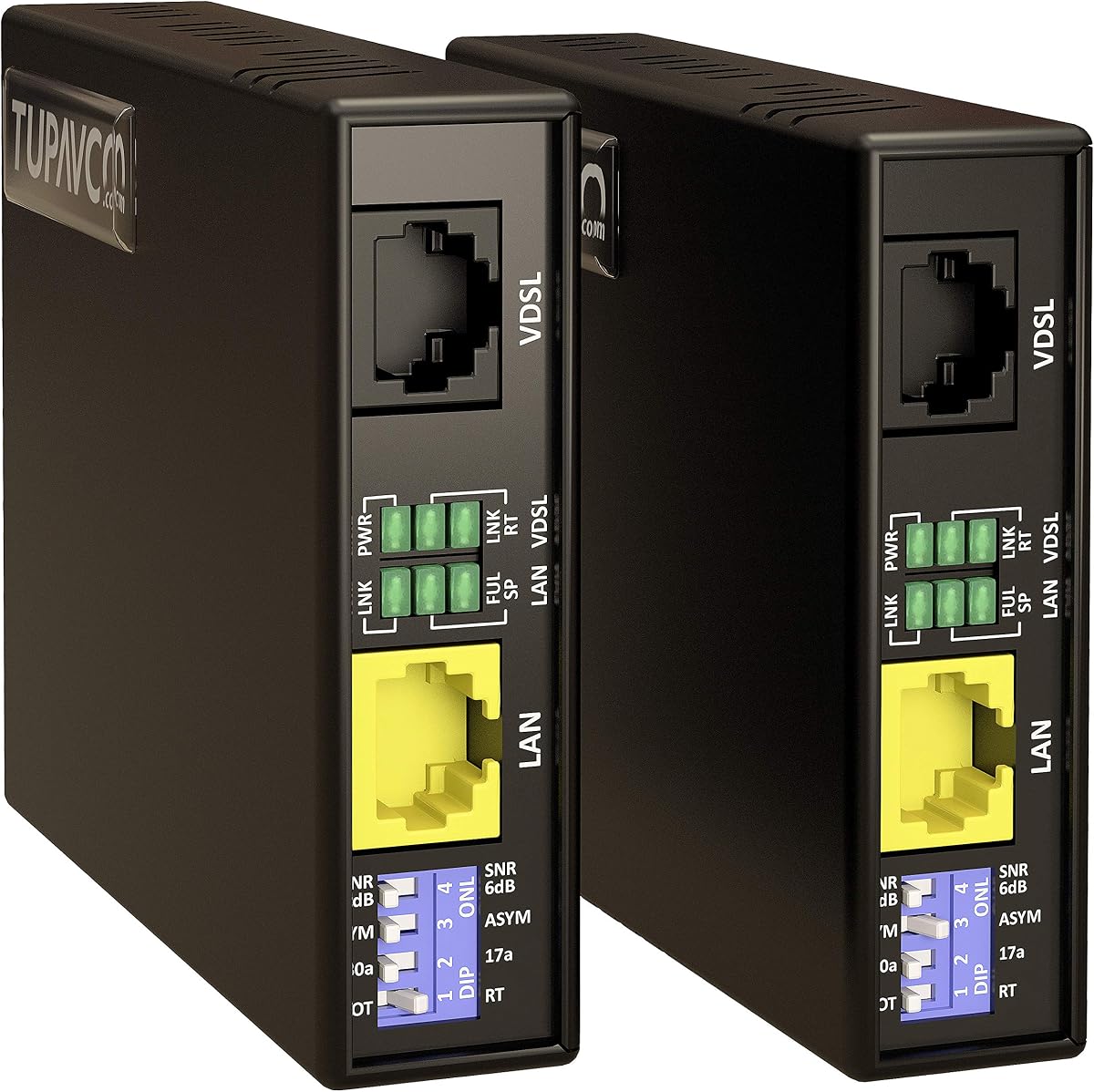
This VDSL extender pushes the boundaries of Ethernet limits by reaching up to 5000 feet. It achieves speeds up to 300Mbps using existing phone or network cabling.
We may earn a commission when you buy through this link, at no additional cost to you.
It includes G.INP technology to reduce noise and interference. This ensures that the connection remains clean and stable even over such long distances.
The DIP switch allows for different profile settings to optimize performance based on your specific cable type. This configurability is rare in budget units.
For large estates or buildings where distance is a challenge, this model offers a reliable fix. It delivers high speed without the need for costly infrastructure upgrades.
G.INP technology minimizes errors caused by interference, ensuring that data packets arrive intact and on time.
The DIP switch allows you to fine-tune the device for different environments, optimizing speed and stability for your needs.
We may earn a commission when you buy through this link, at no additional cost to you.
Selecting the right Ethernet Line Extender depends on your specific environment, distance needs, and budget. This guide outlines the key factors to consider before making a purchase.
Different extenders cover varying distances. Powerline adapters typically handle up to 750 feet within a home, while VDSL or coax options can reach thousands of feet. Measure the distance between your router and the target area to ensure the device meets your needs.
Choose a model with a range slightly higher than your measured distance to account for potential signal loss or environmental interference.
Speed requirements vary based on your activities. Streaming 4K video or gaming may require higher speeds like 1000 Mbps, while basic browsing works well with 100 Mbps. Check the rated throughput of the extender.
Ensure the extender supports the maximum speed of your internet plan to avoid bottlenecks in your network performance.
Look for plug and play devices that do not require software installation. Powerline adapters are generally the easiest as they just need to be plugged into an outlet. More complex industrial extenders might need configuration.
Prioritize kits that include cables and adapters to simplify the initial setup process.
Check what type of wiring the device supports. Some use standard Cat5e or Cat6 cables, while others use existing phone lines or coaxial cables. Using existing wiring can save money on new installation.
Verify the connector types required, such as RJ45 or RJ11, to ensure they match your current cables.
Features like PoE support allow for powering cameras directly through the network line. Power saving modes help reduce energy consumption. Some extenders also include extra outlets for other devices.
Consider these features if you have specific needs like security cameras or limited outlet access.
Stick with reputable brands that offer warranties and customer support. A reliable brand ensures better build quality and long-term stability. Look for reviews from other users to gauge real-world performance.
Choosing a known manufacturer reduces the risk of technical issues and ensures access to firmware updates if needed.
Prices vary significantly between simple couplers and full VDSL kits. Set a budget that aligns with your performance needs. Sometimes spending a bit more for a better range is worth the long-term value.
Avoid the cheapest options if they do not meet the essential range or speed requirements for your setup.
Security is vital for any network device. Look for extenders that support encryption and secure pairing features. This prevents unauthorized access to your network through the extender.
Choose devices that adhere to industry standards for network security to keep your data safe.
To use a powerline extender, plug one adapter into a wall outlet near your router and connect the router via Ethernet cable. Plug the second adapter into the outlet where you need internet.
For VDSL extenders, connect the master unit to your network and run the existing wiring to the remote unit. Connect the remote unit to your device using an Ethernet cable.
Regularly check the cables and connectors for any damage. Keep the units ventilated and avoid placing them near heat sources to maintain optimal performance over time.
Yes, they are designed to work through walls. Powerline adapters use electrical wiring, so physical walls do not block the signal. VDSL extenders use cabling that can also run through walls easily.
Absolutely. These extenders connect to your router via an Ethernet cable. They can extend the network to devices that are too far for Wi-Fi or require a stable wired connection.
Most modern extenders do not require software installation. They are plug and play devices that work immediately after connecting to power and the network.
Most reputable models include encryption and secure pairing features. This ensures that only your devices can use the connection. Check for secure-by-design certifications when buying.
Yes, you can connect multiple adapters to expand coverage further. Many kits support adding more units to reach different rooms or distant areas in your home.
Powerline uses existing electrical wiring to send data, while VDSL uses phone or network cabling. Powerline is easier to install, but VDSL can often reach longer distances with less interference.
We have reviewed ten excellent options that cater to different needs and environments. From simple powerline kits to industrial VDSL extenders, there is a solution for every situation.
Prioritize the range and speed that matches your specific home layout. Also consider ease of setup to ensure a smooth experience without technical headaches.
Remember that prices and stock can fluctuate. Always verify the current details before purchasing to get the best deal on your new network gear.