
Excel Cheat Sheet Desk pad
4.5Editor score
Nine major function modules
Waterproof smooth surface
Clear bright printing
Finding the right Excel Cheat Sheet Desk Pad can transform your daily workflow by keeping essential shortcuts at your fingertips. These specialized mats combine protection for your desk with instant access to commands, reducing the need to search online or flip through manuals constantly.
We evaluated ten top-rated products based on size, print quality, material durability, and the clarity of the shortcut layouts. Each option was assessed for its ability to support efficient typing and mouse movement while providing a reliable reference for both beginners and advanced users.
Each pick in this list highlights unique strengths ranging from budget-friendly designs to premium leather surfaces. Prices and availability change frequently, so be sure to check current listings before making your final decision to ensure you get the best value for your needs.
4.5Editor score

4.7Editor score

4.6Editor score
As an Amazon Associate we earn from qualifying purchases.
This side-by-side comparison breaks down the key specifications of every product on our list to help you quickly identify which mat fits your desk space and workflow requirements best.


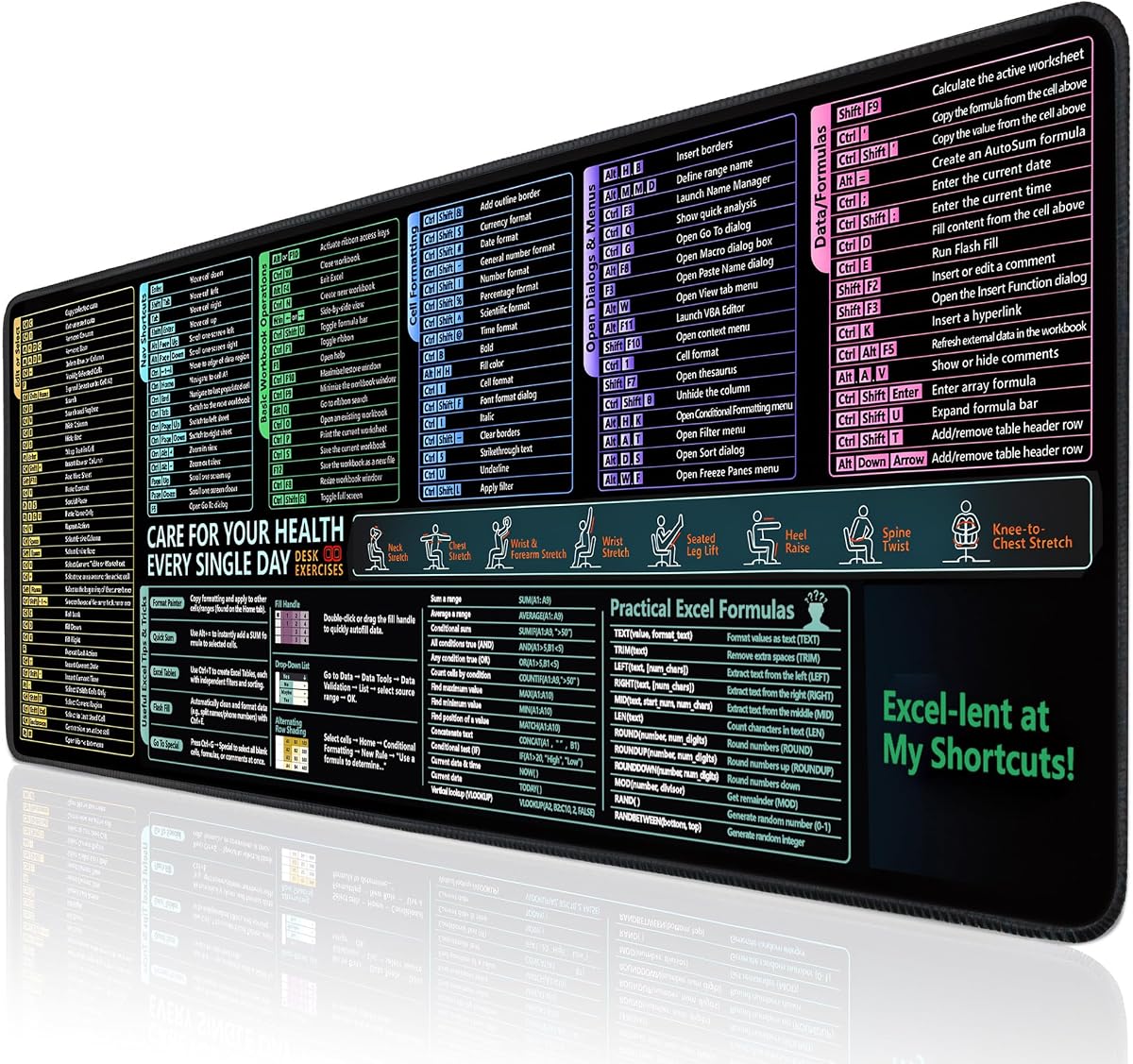


The Pixiecube Excel Cheat Sheet Desk Pad stands out as a top-tier option with its comprehensive collection of commands and tricks. It rates highly for its ability to streamline workflows and keep users engaged with practical design elements.
We may earn a commission when you buy through this link, at no additional cost to you.
Its clearly organized sections make it easy to find navigation and formatting commands quickly. The built-in exercise diagrams offer a unique health benefit that other mats lack, helping you recharge between tasks.
While it is priced slightly higher than some competitors, the added durability and UV-resistant inks justify the cost. The vivid color stays bright over time which maintains a professional look on your desk.
This mat is ideal for professionals who spend hours daily on spreadsheets. If you want a mix of productivity tools and desk protection that keeps your workspace lively and efficient, this is the pick to choose.
The desk-exercise diagrams provide quick stretches to reduce strain during long work sessions.
UV-resistant inks ensure the shortcut text remains crisp and legible through repeated cleaning.
We may earn a commission when you buy through this link, at no additional cost to you.
This Excel Cheat Sheet Desk pad delivers impressive value with nine major function modules compiled for daily use. It earns a strong rating for those who need reliable reference without spending a premium amount.
We may earn a commission when you buy through this link, at no additional cost to you.
The advanced inkjet technology ensures graphics are bright and clear without the chemical odor found in older prints. The waterproof cloth surface provides a silky smooth feeling that enhances mouse precision during tasks.
The double seam technology adds significant durability to the edges preventing early fraying. While the rubber base is standard it still performs well to prevent unwanted sliding during intensive data entry work.
Ideal for students and entry-level users this mat covers essential shortcuts and computer keys. It is a practical and affordable choice for anyone looking to improve spreadsheet speed and desk organization efficiently.
The high-quality waterproof cloth offers a smooth texture that supports comfortable daily use.
Nine categories of tips help you better handle spreadsheets and common FN key meanings.
We may earn a commission when you buy through this link, at no additional cost to you.
The Large Excel Cheat Sheet Desk Pad offers an XL giant surface that accommodates laptops and keyboards easily. It is a premium choice for professionals seeking quality and durability in their workspace accessories.
We may earn a commission when you buy through this link, at no additional cost to you.
Crafted with a water-resistant leather surface this mat protects your desk from scratches and stains effectively. The spill-repellent top allows for effortless maintenance keeping your area clean with just a simple wipe.
The robust anti-slip base ensures the mat stays flat and secure even during heavy usage. This stability helps optimize office efficiency by removing distractions caused by shifting equipment during critical tasks.
This pad is perfect for those who want a chic table mat that doubles as a tool. If you value a sleek look and a durable surface that supports your career growth this is a strong candidate.
The leather surface safeguards your desk from wear and maintains a pristine state over time.
Access commands without searching online to support your professional success effectively.
We may earn a commission when you buy through this link, at no additional cost to you.
This mouse pad serves as a reliable companion for Excel Word PowerPoint and Windows users alike. It ranks high for its ability to support a wide range of daily tasks across multiple essential applications.
We may earn a commission when you buy through this link, at no additional cost to you.
With over 200 shortcut keys grouped for easy reference it helps both beginners and experienced users work more efficiently. The clear organization ensures you can find the right command quickly during complex workflows.
The fade-resistant printing maintains the legibility of shortcut details over time. While the edge stitching is standard the reinforced design adds enough durability for extended office or home use.
Ideal for teams or students who switch between apps often this pad offers broad utility. It is a versatile choice that reduces screen switching and boosts productivity without needing multiple separate guides.
Shortcut keys for four apps are organized to support a flexible workflow effectively.
Fade-resistant printing keeps shortcut details clear and detailed over time.
We may earn a commission when you buy through this link, at no additional cost to you.
This pad compiles twelve types of common skills in Excel and Word to help you handle spreadsheets better. It rates well for its balanced coverage of tips and operations that are frequently used in office tasks.
We may earn a commission when you buy through this link, at no additional cost to you.
The inkjet technology ensures bright and clear graphics without traditional odors. The waterproof cloth provides a silky smooth feeling that supports accurate mouse control during work or gaming sessions.
Double seam technology ensures the product maintains a long service life. The non-slip rubber bottom keeps the pad secure so you do not have to worry about shifting during use.
A solid choice for home office workers this mat covers essential shortcuts effectively. It is a practical tool for anyone who works with both Excel and Word regularly and wants a unified reference.
Compiles common tips and operations to help you better handle spreadsheets effectively.
Advanced inkjet technology ensures graphics are bright without odor issues.
We may earn a commission when you buy through this link, at no additional cost to you.
This desk mat is designed to deliver a buttery-smooth rubber base that ensures lag-free accurate tracking. It rates exceptionally high for users who prioritize precise mouse control and comfortable typing experiences.
We may earn a commission when you buy through this link, at no additional cost to you.
Thermal transfer printing delivers vivid colors and crisp details that stay legible through daily use. The precision-stitched edges lock the shape and prevent fraying so the mat stays flat over time.
The seven-zone layout covers navigation and selection sections to boost efficiency. Its roomy design also serves as a protective keyboard mat that shields your desk during regular work hours.
If you want a workspace that supports fast cursor movement this is a great pick. It is an excellent choice for those who need a stable and reliable base for both work and play.
Precision-stitched edges lock shape and prevent fraying and lifting effectively.
The rubber base ensures lag-free accurate tracking for a smoother workspace.
We may earn a commission when you buy through this link, at no additional cost to you.
This XL mouse pad features color-coded hotkeys and practical formula guides for data editing and navigation. It achieves a top rating for its ability to help users stop wasting time searching for commands.
We may earn a commission when you buy through this link, at no additional cost to you.
The built-in desk-stretch exercise diagrams relieve wrist and spine strain from long sitting hours. The thermal-transfer printing keeps text sharp and vibrant so labels remain legible after months of use.
The stain-resistant surface handles coffee spills and dust with just a quick wipe. Reinforced stitching ensures the edges stop fraying and peeling to maintain a professional look over the years.
Ideal for finance majors and practitioners this mat serves as a unique practical gift. If you need a mix of health benefits and formula access this is a thoughtful and functional choice.
Color-coded hotkeys and guides covering formatting and operations help you work faster.
Built-in exercise diagrams effectively relieve strain from long hours at work.
We may earn a commission when you buy through this link, at no additional cost to you.
This desk pad offers a compact 27.6 by 11.8 inch surface ideal for those with limited desk space. It rates well for maintaining productivity without demanding a large footprint on your workstation.
We may earn a commission when you buy through this link, at no additional cost to you.
The printed surface can be wiped clean when exposed to water or dust ensuring easy maintenance. Reinforced stitched edges help prevent fraying and separation so the mat stays intact longer.
Shortcut keys are arranged to reduce repeated searching during data entry and accounting tasks. The rubber backing keeps the pad stable to ensure your mouse movement remains smooth and predictable.
A great fit for students and accountants with small workstations this mat delivers utility. It is a practical tool that keeps references accessible while protecting your desk effectively.
The surface provides room for keyboard and mouse while keeping shortcut info easy to read.
The printed surface can be wiped clean when exposed to water and dust.
We may earn a commission when you buy through this link, at no additional cost to you.
This large desk mat measures 35.4 by 15.7 inches and features a comfortable lycra surface for smooth glide. It rates highly for its soft feel that supports wrist comfort during long work hours.
We may earn a commission when you buy through this link, at no additional cost to you.
The flexible design allows you to roll it up for transport easily without deformation. Its rubber base keeps the surface in place preventing bunching that could interrupt your mouse movement.
You can throw it in the washing machine for easy cleaning which ensures it stays fresh. The stitched edges finish reduces deformation and degumming during prolonged use over time.
Ideal for those who want a clean organized desk this mat is a strong contender. It combines a soft tactile feel with the size needed to support gaming and work setups.
The comfortable lycra surface provides optimum speed and accurate control.
Throw it in the washing machine and let it hang dry for maintenance.
We may earn a commission when you buy through this link, at no additional cost to you.
This small mouse pad measures 11.8 by 9.8 inches and is designed to fit in bags or cases. It rates well for professionals and students who need reference tools that travel with them.
We may earn a commission when you buy through this link, at no additional cost to you.
The finely-textured surface ensures precise mouse control even when using it on varied surfaces. Clear print quality keeps the essential shortcuts legible through regular use and cleaning cycles.
Stitched edges reduce fraying while the non-slip base keeps the pad secure. Its compact size makes it a practical tool for frequent software users on the go.
A practical gift for office users this pad supports productivity in study settings. If you need a portable reference that fits your lifestyle this is the ideal pick.
Its compact size fits in bags or laptop cases for professionals and travelers.
High-resolution printing intended to remain legible through regular use.
We may earn a commission when you buy through this link, at no additional cost to you.
Selecting the right desk pad requires balancing size material and design with your specific workflow needs. This guide outlines the key factors to consider.
Ensure the pad dimensions match your desk space. Large XL sizes are great for dual setups but compact pads work better for smaller desks.
Measure your available area before buying to ensure enough room for keyboard and mouse movement.
Look for mats that include the specific software shortcuts you use most. Some focus on Excel alone while others include Word or Windows keys.
Choose a layout that aligns with your daily apps to maximize productivity gains.
High-resolution prints are essential so text remains legible over time. Thermal transfer or inkjet printing often delivers sharper results than standard methods.
Check customer photos to ensure the text is crisp under your lighting conditions.
Water-resistant and stain-resistant materials are important for spill protection. Leather surfaces offer a premium look while fabric provides a smooth glide.
Look for reinforced edges to prevent peeling and fraying after months of use.
A non-slip rubber base keeps the mat secure during typing. This prevents shifting that can disrupt your workflow or cause wrist strain.
Ensure the base grips your desk well without sliding around on smooth surfaces.
If you travel often consider a portable pad that fits in a bag. Standard XL mats are great for home but may be too heavy for commute.
Foldable or rollable designs add value if you work from multiple locations.
Prices vary based on material quality and extra features. Higher price often means better durability but budget options can still be effective.
Balance cost with the features you need to ensure you get the best value.
Some mats include humor or health diagrams which can boost morale. Consider the look and feel that matches your personal or office style.
Extras like built-in exercise guides provide additional wellness benefits beyond shortcuts.
Place the mat on a flat clean surface and ensure it is fully unrolled before use. This helps the non-slip base adhere properly to your desk.
Clean the surface with a damp cloth to remove dust or spills regularly. Avoid harsh chemicals that might fade the printed shortcuts over time.
Store it flat or rolled if you need to move it to prevent creases. Proper care will keep the material durable for years of daily use.
Yes most of these mats are designed to support mechanical keyboards. The large surface area provides enough room for the keyboard and mouse together ensuring a comfortable typing experience.
The shortcuts cover common commands that are consistent across most recent versions. However if you use very old software you may find slight differences in key functions.
Some models with lycra surfaces are machine washable but standard fabric mats should be wiped by hand. Always check the product details before attempting to machine wash.
High-quality UV-resistant and fade-resistant inks are used to minimize fading. Regular cleaning with harsh chemicals may still affect longevity over a long period.
The rubber bases are non-marking and safe for most desk materials. They grip firmly without leaving residue or scratches on wood or laminate surfaces.
For small desks a compact 11.8 by 9.8 inch size is often ideal. It saves space while still providing access to essential shortcuts and a smooth mouse surface.
The Pixiecube Excel Cheat Sheet Desk Pad leads our list for its comprehensive features and durable build. The budget-friendly option and the premium leather model also stand out for specific needs.
Prioritize the size and material that fit your desk and daily workflow best. A well-chosen pad will save you time and protect your workspace effectively.
Remember to check current prices and availability before making your purchase. This ensures you get the best value for your chosen Excel Cheat Sheet Desk Pad.