
Amazon Fire Stick USB Power Cable 2 Pack
4.4Editor score
Two pack value bundle
Compatible with most sticks
Short length for neat setup
This guide compares ten top Fire Stick USB Power Cable options to help you eliminate AC adapters and power streaming devices directly from your TV port.
Powering your streaming device often requires hunting for an outlet near your TV. A dedicated Fire Stick USB Power Cable solves this by drawing power directly from your television's USB port for a cleaner setup.
We evaluated ten real products based on compatibility, power management features, and build quality. Our analysis focuses on cables that prevent restart issues and ensure stable 4K streaming performance.
Each pick highlights specific strengths like cable length, adapter inclusion, and voltage regulation. Prices and availability change frequently, so verify current details before making your final purchase decision.
4.4Editor score

4.6Editor score

4.5Editor score
This table provides a side-by-side view of all ten products we analyzed. It highlights key specifications like connector type and special features to help you compare quickly.


This official cable stands out as our top pick for its reliable power management and included adapters. With a 4.6 rating, it solves the need for external power bricks effectively.
We may earn a commission when you buy through this link, at no additional cost to you.
Its advanced technology stores excess energy to release as needed, ensuring your stick runs smoothly even on lower power TV ports. The included USB-C to Micro-B adapter adds significant value for newer devices.
While it costs more than generic options, the peace of mind from an official accessory and the versatility of the cable length justify the investment. You avoid finding AC outlets near your TV setup.
If you want the most dependable setup for any Fire TV Stick, this cable is the smart choice. It delivers exactly what you need for a clean and clutter-free living room.
As a Made for Amazon product, it guarantees compatibility with your streaming device right out of the box.
The embedded energy storage circuit helps prevent unexpected restarts during high-demand streaming like 4K content.
We may earn a commission when you buy through this link, at no additional cost to you.
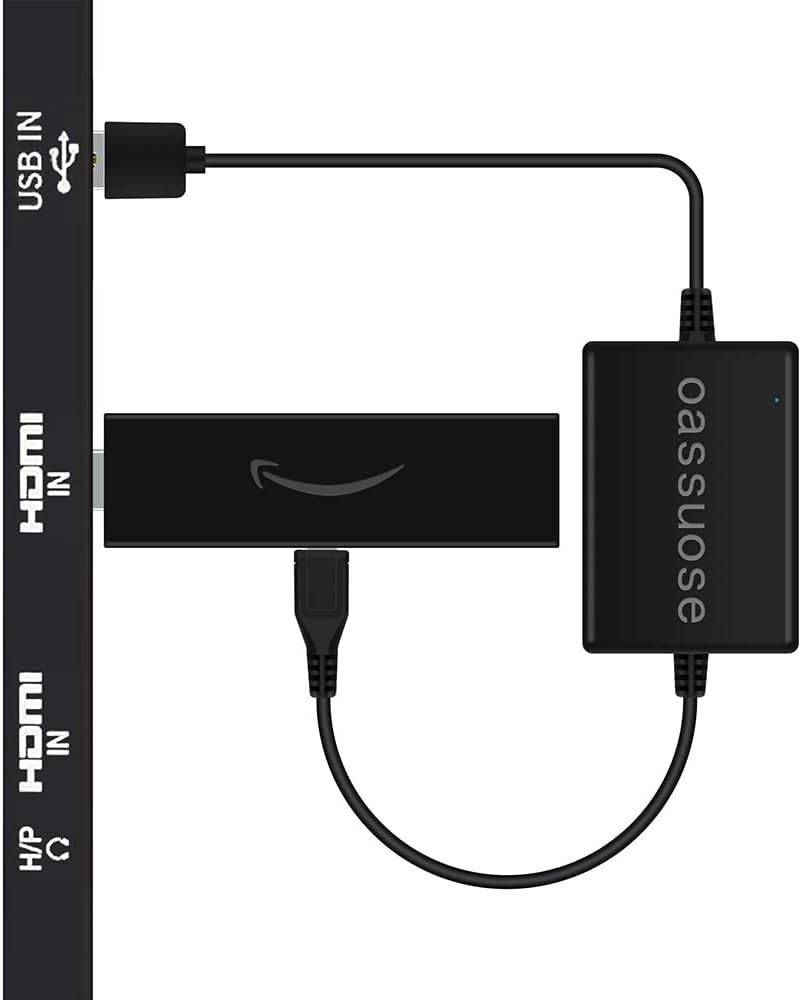
Oassuose offers a robust solution for TV ports that struggle to supply enough voltage for your stick. Its built-in conversion module ensures stable power delivery to prevent reboot loops.
We may earn a commission when you buy through this link, at no additional cost to you.
The smart power management feature automatically cuts power when the TV turns off, saving energy and protecting the cable. This is a great feature for those who prioritize efficiency.
Users note a short charge wait time before first use, which ensures the battery is ready for the initial setup. This minor inconvenience is outweighed by the reliability once installed.
This adapter is ideal if your TV keeps restarting the stick due to weak power. It effectively replaces the AC adapter with a simpler direct connection.
Power supply stops when the TV turns off, reducing unnecessary power draw and helping save energy.
Multiple protection circuits guard against short circuits and voltage spikes to keep your device safe.
We may earn a commission when you buy through this link, at no additional cost to you.
Getting two cables for one low price makes this bundle a standout value. It works with all Micro USB streaming sticks including Fire Stick, Roku, and Chromecast.
We may earn a commission when you buy through this link, at no additional cost to you.
The short length is designed specifically to run from the TV USB port to the HDMI port without dangling loose wires. This creates a clean and organized look behind your screen.
Keep in mind that your TV port must provide enough power for the stick to work properly. Testing with the original cable first can save you from compatibility confusion.
If you need an extra cable for a spare room or a backup, this pack is the most economical choice on the market today.
Works with most streaming devices using Micro USB connectors for versatile use.
Two cables included means you can upgrade your setup or have a spare without extra cost.
We may earn a commission when you buy through this link, at no additional cost to you.
This option excels when you need to reach a wall outlet far from your TV. The ten-foot length provides flexibility for mounting or placing devices anywhere in the room.
We may earn a commission when you buy through this link, at no additional cost to you.
In addition to Fire sticks, it works with Kindle Fire tablets and other Micro USB devices. It includes two cables for a great value if you need multiple lengths.
While it is not ideal for direct TV USB connections due to the length, it is perfect for traditional AC power setups. You get high-quality conductors for stable charging.
Consider this if your power outlet is not near your TV and you need a long cord to bridge the gap effectively.
Ten feet of cable allows you to place your streaming stick anywhere within reach.
Compatible with tablets and Kindle Fire devices for broader utility beyond just TV sticks.
We may earn a commission when you buy through this link, at no additional cost to you.
This kit is perfect if you need a full replacement charger rather than just a cable. It includes a 10W adapter and a durable 6-foot braided cord.
We may earn a commission when you buy through this link, at no additional cost to you.
The UL and FCC certifications ensure the adapter is safe and reliable for continuous use. It supports 2.4A charging current for efficient power delivery.
Keep in mind that this kit is for Micro USB devices only and does not fit newer USB-C sticks. The cable length is decent for reaching outlets behind furniture.
Buy this if your original charger is lost or broken and you want a complete certified replacement set.
Certified by UL and FCC for over heat and over voltage protection to protect your device.
The braided cable design resists wear and tear for a longer service life.
We may earn a commission when you buy through this link, at no additional cost to you.
This is a straightforward cable designed to extend your reach to an outlet. With a 10-foot length, it helps you position your stick without struggling with tight spots.
We may earn a commission when you buy through this link, at no additional cost to you.
It uses standard USB 2.0 high-speed transfer to ensure data and power flow smoothly. It fits all Fire TV Stick media players with Micro USB ports.
While it lacks advanced power management features, it is a reliable choice for basic power extension. It is budget-friendly and works well for most setups.
Use this if you need an extra length to reach a wall socket that is far away from your TV.
A simple and direct way to add length to your power setup without extra components.
Works with standard Fire Stick models that use the classic Micro USB connector.
We may earn a commission when you buy through this link, at no additional cost to you.
This premium adapter offers smart features like LED indicators to confirm power status. It is built specifically to handle high-demand 4K streaming without causing restarts.
We may earn a commission when you buy through this link, at no additional cost to you.
The auto power management turns the stick on and off with the TV to save energy and prevent overheating. This smart behavior protects your device long term.
The compact design tucks neatly behind your TV to eliminate visible clutter. You get a clean look with the reliability of a dedicated power adapter.
Choose this if you want advanced features and need to ensure your 4K content runs smoothly without interruption.
LED indicators confirm optimal performance so you know your stick has enough power.
Automatically manages power states to prevent failures and extend device life.
We may earn a commission when you buy through this link, at no additional cost to you.
This replacement charger provides a 10W fast charging output for efficient power delivery. It includes a 5-foot cable made of flame-retardant materials for safety.
We may earn a commission when you buy through this link, at no additional cost to you.
Multiple safeguards protect against over-current and short circuits to keep your device safe. It stops charging automatically when full to prevent overcharging issues.
While it is not for the newest HD 2026 model, it works perfectly with 4K Plus and Max devices. It is a solid choice for a complete replacement kit.
Consider this if you need a safe and durable charger replacement that supports fast charging speeds.
Delivers up to 2A current for quick and stable power delivery to your streaming device.
Built-in safeguards prevent overheating and electrical issues for safe daily use.
We may earn a commission when you buy through this link, at no additional cost to you.
This cable is designed for more than just Fire sticks. It supports data sync for phones and tablets and includes a magnetic ring to keep the connection secure.
We may earn a commission when you buy through this link, at no additional cost to you.
With a 24 month warranty, it offers great peace of mind for long-term use. The low-impedance wires ensure stable charging without signal drops.
The magnetic ring helps prevent loose fits which can cause charging interruptions. This is a handy feature for devices used frequently.
Use this if you need a versatile cable that works across multiple devices including gaming controllers and tablets.
The built-in magnetic ring ensures a secure fit that resists loosening during use.
Supports both fast charging and data sync for broader functionality than power-only cables.
We may earn a commission when you buy through this link, at no additional cost to you.
This cable offers an ultra-short design to remove clutter behind your TV. It eliminates the need for an AC adapter by using the TV's USB port directly.
We may earn a commission when you buy through this link, at no additional cost to you.
It is optimized for new HDTVs with USB 3.0 ports which typically provide more power. The 8.5 inch length is perfect for side USB and HDMI connections.
Check your TV port carefully before buying since it requires a USB 3.0 connection. This ensures enough power for stable streaming without external bricks.
Choose this if you have a compatible TV and want the simplest way to power your stick.
The short length keeps wires hidden and creates a clean look behind your TV.
Works directly with the TV port to remove extra plugs and outlets from your setup.
We may earn a commission when you buy through this link, at no additional cost to you.
Selecting the right cable depends on your TV port capabilities and your stick model. Here are the key factors to consider.
Most older Fire sticks use Micro USB while newer models use USB-C. Check your device port to ensure the cable matches. Some products include adapters to support both types.
Always verify the connector on your stick before buying to avoid fit issues.
TV USB ports vary in power output. Some only provide 5V 0.5A which may not be enough for 4K sticks. You may need a powered cable or adapter to boost this.
A cable with power management helps stabilize the voltage to prevent restarts.
Short cables keep your setup neat when connecting to a side port. Long cables are useful if you need to reach a wall outlet behind furniture.
Choose a length that fits your physical setup without leaving loose wires visible.
Look for braided jackets and thick copper wires for durability. Cheap cables may break easily or have high resistance that leads to heat.
A sturdy build ensures the cable lasts longer and handles daily bending.
Certifications like UL or FCC indicate the cable meets safety standards. This protects your device from over current or short circuits.
Prioritize certified cables to ensure safe operation for your streaming device.
Some packs include USB-C to Micro-B adapters which add versatility. This allows you to use one cable across different device generations.
An included adapter reduces the need to buy extra parts later.
Multi-packs offer better value if you need cables for multiple rooms. Single premium cables cost more but often come with better features.
Compare what is included to find the best balance of features and price.
Reputable brands like Amazon ensure compatibility and quality control. Generic brands may work but can vary in performance.
Stick to known brands for reliable results especially for official accessories.
Plug the USB A end of the cable into your TV's powered USB port first. Then connect the Micro USB or USB-C end to the power socket on your Fire Stick.
Ensure the TV is turned on to supply power. If your stick fails to start, try waiting ten minutes for any internal charge to build up.
Avoid bending the cable sharply near the connectors to prevent wire breaks. Keep it away from direct heat sources to protect the internal circuitry.
Yes you can use a TV USB port if it provides enough power. Older sticks usually work fine but 4K models may need a cable with power management. Always test with your original cable first.
A cable connects two devices directly without external components. An adapter often includes a chip or circuit to modify voltage. Some cables have built-in adapters to boost power for weak ports.
No newer models like the 4K Max and 2026 HD use USB-C while older ones use Micro USB. You need the right connector type or an adapter to match your specific device model.
This usually happens because the USB port does not supply enough current. The stick needs more power to run stably. A cable with power management can help stabilize the voltage output.
Powered ports often show a lightning icon or are blue indicating USB 3.0. If your device does not start the port may not be strong enough. Test with the original power cable to confirm.
Yes very long cables can cause voltage drops if they are not high quality. For short connections choose a tidy length. For long runs look for thick copper wires to maintain power.
Most cables work with other devices like Roku or Chromecast that use the same connectors. Check the product description for compatibility with other streaming sticks before you buy.
Look for UL or FCC certifications and built-in surge protection. Features like over current and short circuit protection prevent damage to your streaming device during use.
We found that the Made for Amazon USB Power Cable stands out as the top choice for reliability. It includes adapters and power management to handle all streaming models.
For value the 2 Pack bundle offers a great price. Consider the premium adapter if you need smart features for 4K stability.
Always check your TV port and stick model before buying to ensure compatibility. Prices may change so review current listings before making your purchase.