
Motherboard USB 2.0 to Type C Front Panel Cable
4.8Editor score
Converts 9pin USB 2.0 header
Compact 17cm cable length
No driver installation required
Front panel USB C headers are essential components for modern PC builds that demand high-speed connectivity and sleek aesthetics. These internal adapters allow you to add USB Type-C ports to your case front or side panel, enabling faster data transfer and convenient access to your devices without cluttering your desk.
We evaluated ten leading products based on speed capabilities, build quality, ease of installation, and overall value. Our analysis focuses on real-world performance, compatibility with various motherboard headers, and the durability of materials used. Each selection aims to solve specific needs, from budget-conscious upgrades to high-performance workstation requirements.
Each pick highlights key specifications, pros, cons, and ideal use cases to help you make an informed decision. Note that product availability and pricing fluctuate frequently, so verify current details before purchasing. We ensure all information reflects the latest manufacturer data and user feedback available as of October 2026.
4.8Editor score

4.6Editor score

4.6Editor score
As an Amazon Associate we earn from qualifying purchases.
The following table provides a side-by-side comparison of all ten products analyzed in this guide. It highlights key specifications, connectivity options, and primary features to help you quickly identify the right solution for your specific motherboard and case configuration.




The GRAUGEAR 20Gbps extension cable stands out as the top choice for users needing reliable high-speed connectivity. With a strong 4.6-star rating, it balances performance and build quality effectively. Its primary appeal lies in supporting the latest USB standards without compromising on durability or ease of use.
We may earn a commission when you buy through this link, at no additional cost to you.
This product connects directly to a Type E 20-Pin motherboard header to provide a front-panel USB-C port. It supports speeds up to 20Gbps when paired with compatible host controllers, making it ideal for transferring large files quickly. The included metal PCI bracket ensures a secure fit and a professional look on the back panel.
While highly capable, it is important to verify your motherboard has the specific Type E header before purchasing. Older systems might require additional adapter cards to utilize this cable fully. However, for modern builds, the stability provided by double-shielded wires minimizes signal noise effectively.
Buyers seeking maximum speed and durability should choose this model. It is perfect for professionals who need fast data access at their desk. Overall, it offers excellent value for anyone prioritizing performance and build quality in their PC expansion.
Supports USB 3.2 Gen 2×2 for up to 20Gbps transfer rates.
Metal bracket and double-shielded wires ensure long-term stability.
We may earn a commission when you buy through this link, at no additional cost to you.
This GRAUGEAR adapter cable offers nearly identical performance to our top pick with a similar 4.6-star rating. It provides a straightforward way to add a front USB-C port to your PC case. The design focuses on high-speed connectivity and a clean build aesthetic.
We may earn a commission when you buy through this link, at no additional cost to you.
It uses a Type E 20-Pin header to deliver up to 20Gbps speeds when supported by the motherboard. The cable includes a metal bracket to secure the connection and protect the port from physical damage. This makes it a reliable choice for daily use.
Users should ensure their system supports the Type E standard before installation. Without the correct header, additional adapters may be necessary. However, for compatible systems, the installation is quick and requires no driver software.
Ideal for users wanting high-speed access without complex setups, this cable is a solid choice. It balances price and performance well. We recommend it for modern workstations needing fast external storage access.
Connects phones, tablets, and storage devices seamlessly.
Metal bracket ensures the port stays fixed in place.
We may earn a commission when you buy through this link, at no additional cost to you.
This versatile adapter caters to users who need both Type-C and traditional Type-A ports at their front panel. With a solid 4.6-star rating, it offers a comprehensive solution for connectivity needs. It leverages the latest USB standards for fast data transfer.
We may earn a commission when you buy through this link, at no additional cost to you.
It requires both a Type E 20-Pin header and a 19-Pin USB 3.0 header on your motherboard. When connected, it delivers up to 20Gbps on the Type-C port and standard speeds on Type-A. This dual setup maximizes device compatibility.
Prospective buyers must verify their motherboard has both necessary headers before purchasing. Without them, installation is not possible. However, for compatible systems, the included bracket ensures a clean and secure setup on the case rear.
This adapter is perfect for users needing flexibility in their port selection. It supports legacy devices while embracing modern high-speed standards. Choose this if you require both connector types in one expansion.
Provides both USB-C and USB-A for maximum device compatibility.
Type-C port supports up to 20Gbps transfer speeds.
We may earn a commission when you buy through this link, at no additional cost to you.
This hub is designed for users needing multiple USB ports without external dongles. It replaces a 3.5-inch drive bay to offer two USB-C and two USB ports. With a 4.2-star rating, it focuses on stability and multi-device support.
We may earn a commission when you buy through this link, at no additional cost to you.
It connects using a Type E header and requires a SATA power connector for operation. This ensures sufficient power for all connected devices without overloading the motherboard header. The metal construction adds durability and heat dissipation.
The requirement for a SATA power line may limit placement for some builds. However, this design protects against power surges and ensures stable operation for high-demand peripherals. It includes over-current and short-circuit protection measures.
Best for workstations with many peripherals, this hub provides excellent expansion. It is ideal for those who need more than a single port. Ensure your case and power supply can accommodate the SATA connection before buying.
Offers four ports to connect multiple devices simultaneously.
Includes over-current and over-voltage safety features.
We may earn a commission when you buy through this link, at no additional cost to you.
This card is ideal for older motherboards lacking USB-C headers. It installs directly into a PCIe x1 slot to provide a front-panel Type-C and Type-A port. With a 4.5-star rating, it offers a practical solution for legacy systems.
We may earn a commission when you buy through this link, at no additional cost to you.
It provides up to 5Gbps transfer speeds, compatible with USB 3.0 standards. The design includes capacitors for stable power delivery and temperature control during operation. It works well with many major PC brands without driver issues on modern Windows systems.
The card requires an available PCIe slot, which may be occupied in some builds. Additionally, speeds are capped at 5Gbps compared to faster Type E headers. However, for standard peripherals, this is usually sufficient.
Select this card if you cannot utilize motherboard headers or lack a Type E header. It is a cost-effective way to add modern connectivity. Check slot availability and brand compatibility before purchasing.
Utilizes a PCIe slot rather than motherboard internal headers.
Integrated capacitors ensure consistent voltage for peripherals.
We may earn a commission when you buy through this link, at no additional cost to you.
This hub combines high-speed performance with multi-port versatility. It offers a 20Gbps USB-C port alongside two USB 3.0 ports for flexible connectivity. With a 4.6-star rating, it stands out for its balanced feature set and reliability.
We may earn a commission when you buy through this link, at no additional cost to you.
It requires both a Type E 20-Pin header and a 19-Pin USB 3.0 header to function. When installed correctly, it delivers top-tier speeds for external storage devices. The included safety protections ensure stable operation under various load conditions.
The need for two headers may limit compatibility with some systems. However, for motherboards with both options, it provides unmatched versatility. The metal construction ensures durability during frequent plugging and unplugging.
Ideal for advanced users needing maximum speed and multiple ports, this hub is a premium choice. It fits perfectly into the 3.5-inch slot space. Verify header availability before purchasing to ensure full functionality.
USB-C port supports up to 20Gbps for fast file transfers.
Includes multiple USB 3.0 ports for extra connectivity.
We may earn a commission when you buy through this link, at no additional cost to you.
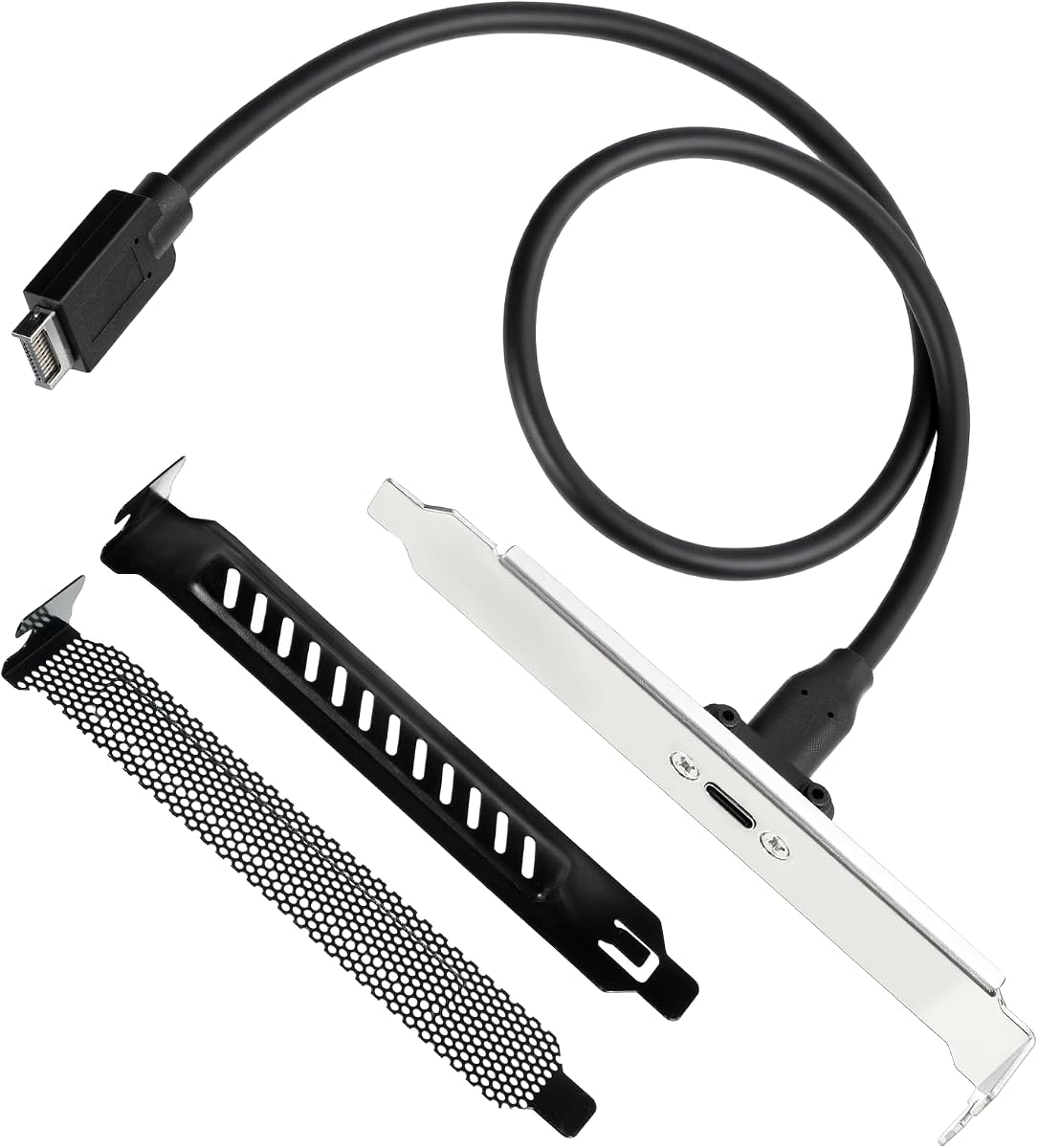
This cable provides an entry-level way to add a Type-C port to older motherboards. It converts a standard 9-pin USB 2.0 header into a front-panel USB-C interface. With a high 4.8-star rating, it excels in simplicity and affordability.
We may earn a commission when you buy through this link, at no additional cost to you.
While limited to 480Mbps speeds, it is perfect for basic peripherals like keyboards and mice. The cable length is compact, suitable for smaller cases where space is tight. It requires no drivers, making setup instantaneous.
Users should not expect high-speed data transfer with this model. It is strictly for low-bandwidth devices that benefit from the Type-C form factor. Additionally, it does not support video or audio output capabilities.
Choose this if you need a cheap, basic Type-C port without needing high speeds. It is excellent for office PCs or older systems. Ensure your motherboard has a USB 2.0 header before purchasing.
Low-cost solution to upgrade older motherboard headers.
Short cable length fits easily in tight case spaces.
We may earn a commission when you buy through this link, at no additional cost to you.
This adapter offers robust high-speed connectivity with added convenience features. It includes a metal bracket and two PCI slot covers for a professional finish. With a 3.8-star rating, it provides value despite mixed user feedback.
We may earn a commission when you buy through this link, at no additional cost to you.
The cable supports up to 20Gbps speeds when connected to a compatible motherboard header. The PVC-insulated wiring is flexible and resistant to breaking, ensuring long-term use. The clear labeling helps users avoid connection errors.
While capable, user reviews suggest occasional installation challenges or compatibility quirks. Ensure your motherboard supports the Type E header for best results. The included covers help protect unused slots effectively.
Best for those needing extra hardware for a clean build, this adapter is a solid contender. It balances speed with durability. Double-check motherboard compatibility before purchase to avoid issues.
Includes slot covers for a tidy internal appearance.
Metal bracket and flexible PVC materials resist wear.
We may earn a commission when you buy through this link, at no additional cost to you.
This cable offers a flexible approach to adding a front USB-C port. It supports up to 10Gbps speeds and uses a durable TPE material. With a 4.3-star rating, it balances cost and quality effectively for typical users.
We may earn a commission when you buy through this link, at no additional cost to you.
The 11.8-inch cable allows for flexible routing within the case. Silver-plated materials reduce impedance for stable transmission. It also includes a mounting screw to secure the front port in place.
It works best with Type E headers supporting 10Gbps. Users should ensure panel screw spacing matches their case requirements. This minor detail prevents installation issues for many builds.
Ideal for budget-conscious users needing solid speed, this cable is a good fit. It supports modern devices without breaking the bank. Verify your case's screw spacing before buying.
TPE material allows easy bending and routing inside cases.
Silver plating and double shielding reduce interference.
We may earn a commission when you buy through this link, at no additional cost to you.
This adapter offers an all-in-one solution for multi-device front panel needs. With a perfect 5.0-star rating, it delivers high satisfaction among users. It supports up to 20Gbps and combines multiple port types.
We may earn a commission when you buy through this link, at no additional cost to you.
It requires both Type E and 19-Pin headers for full functionality. This setup allows for a high-speed USB-C port alongside standard USB connections. The metal bracket ensures secure mounting and protects the connectors.
Users must verify header availability before installation. While setup is more involved than single cables, the resulting functionality is comprehensive. The shielding ensures stable signals even with multiple devices connected.
Best for systems needing maximum versatility, this adapter is a top pick for flexibility. It supports both high-speed and legacy devices seamlessly. Ensure your motherboard supports both headers before buying.
Provides multiple port types for maximum connectivity options.
Users report excellent build quality and performance.
We may earn a commission when you buy through this link, at no additional cost to you.
Selecting the right front panel USB C header involves understanding motherboard compatibility, desired data speeds, and installation complexity. This guide breaks down critical factors to help you find a solution that fits your build requirements.
The most critical factor is whether your motherboard supports the required header type. Most high-speed options use a 20-pin Type E key A header, while some alternatives rely on standard 19-pin USB 3.0 or even USB 2.0 headers. Always consult your motherboard manual to confirm which internal headers are available before purchasing an adapter.
Check your motherboard manual for available internal headers to ensure compatibility.
Speed varies significantly between models. Budget options may offer 480Mbps, while premium adapters support 20Gbps via USB 3.2 Gen 2×2. If you plan to connect fast external SSDs, prioritize headers supporting at least 10Gbps or higher. Lower speeds suffice for basic peripherals like keyboards or mice.
Choose adapters supporting at least 10Gbps for fast external storage devices.
Consider how many ports you need and what connector types are required. Some products offer a single USB-C port, while others provide multi-port hubs with both Type-C and Type-A connections. Multi-port options increase versatility but may require more motherboard headers and power connections.
Evaluate your peripheral needs to decide between single or multi-port configurations.
Materials matter for longevity. Look for adapters with metal brackets and double-shielded cables to reduce electromagnetic interference. These features ensure stable data transmission and physical durability over time. Plastic-only options might be cheaper but are generally less robust.
Prioritize metal brackets and shielded cables for better stability.
Most simple cables draw power directly from the motherboard header. However, multi-port hubs often require an additional SATA power connection to supply enough energy for multiple high-draw devices. Verify your power supply has available connectors if choosing a hub.
Check if your power supply has extra SATA connectors for hub power.
Cable length affects installation ease. Short cables work well in compact cases but might not reach across larger towers. Longer cables offer more flexibility but can clutter the interior. Ensure the length matches your case dimensions for a clean build.
Measure your case interior to select a suitable cable length.
Some adapters are simple cables, while others are PCIe cards or multi-component hubs. Cards require an open expansion slot and screwing into the case. Hubs replace drive bays and need careful screwing and power cabling. Choose based on your comfort with PC assembly.
Assess your skill level when deciding between simple cables or complex hubs.
Prices range from basic affordable cables to premium multi-port solutions. While expensive hubs offer more ports, they cost significantly more than simple adapters. Determine your specific needs to avoid paying for features you will not use.
Balance cost with the features you actually need.
Before installation, shut down your computer and disconnect the power cable. Open your PC case to locate the relevant motherboard headers. Verify that your motherboard supports the specific header type required by your adapter, such as Type E or USB 3.0.
For single-port cables, align the connector correctly with the motherboard header to avoid damage. Secure the external bracket to your case rear panel using provided screws. Connect any necessary power cables if using a hub, ensuring all connections are tight.
After closing the case, reconnect power and boot up. Test the port with various devices to confirm functionality. Regularly check connections for dust buildup to maintain stable signal transmission over time.
No, not all motherboards support native USB Type-C front headers. Older or budget models may only have standard USB 3.0 or 2.0 headers. You may need an adapter card to add USB-C ports if your board lacks the specific 20-pin Type E header.
Type E headers are a newer 20-pin standard designed for USB 3.2 Gen 2×2 with 20Gbps speeds. Type-A headers are often 19-pin and used for older USB 3.0 standards. Ensure your adapter matches your motherboard's physical header type.
Most standard USB-C front headers do not support video output unless explicitly stated by the manufacturer. They are generally designed for data and power only. Check product specifications carefully if you plan to connect external displays.
Measure the distance from your motherboard header to your case front or side panel opening. Select a cable that reaches comfortably without stretching or excess slack. Longer cables offer flexibility but may look messier inside the case.
Most front panel USB adapters are plug-and-play and require no drivers on modern Windows systems. Some older operating systems may need driver installation. Always check the product details to confirm driver requirements for your specific OS.
Yes, many USB front panel hubs allow a single motherboard header to power multiple external ports. However, power delivery may be shared among connected devices. High-demand peripherals may work best when connected to ports with dedicated power.
We reviewed ten top-rated front panel USB C headers covering various needs from budget-friendly adapters to high-speed multi-port hubs. Our top pick, the GRAUGEAR 20Gbps Type E Key A, offers the best balance of speed and durability for most modern builds.
Prioritize motherboard header compatibility and speed requirements before purchasing. While premium hubs offer more ports, simple cables provide faster speeds for single connections. Choose based on your specific use case to ensure the best experience.
Prices and availability change frequently. Always check current listings and verify motherboard details before finalizing your purchase to avoid compatibility issues.