
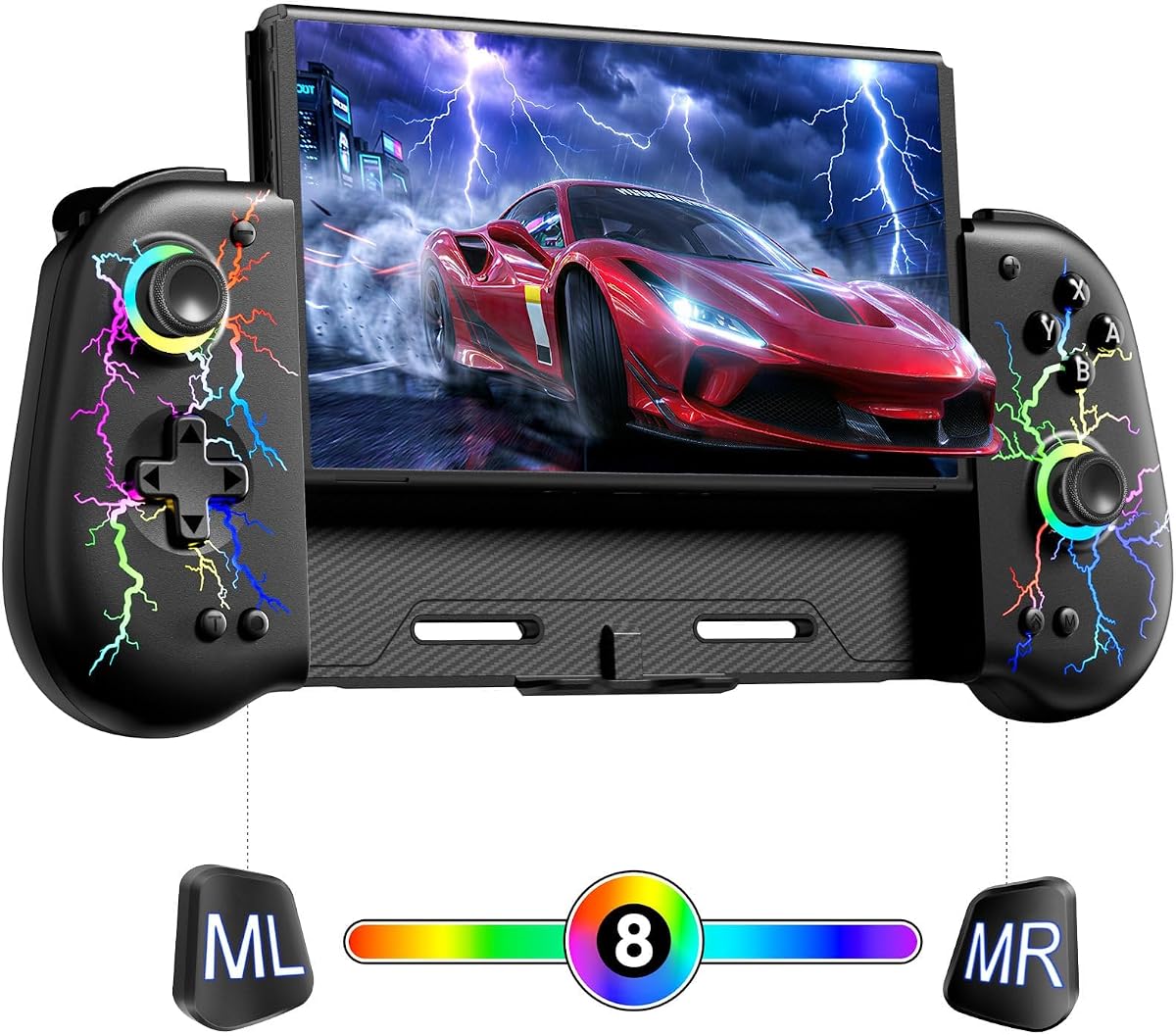
Gammeefy Wireless Switch Pro Controller
4.4Editor score
9 Color LED Lights
1000 mAh Battery
App Customization
Explore our comprehensive guide comparing the top ten Hall Effect Nintendo Switch controllers for performance, battery life, ergonomics, and drift-free
Finding a reliable controller is essential for any serious gamer seeking precision and longevity. Hall Effect technology eliminates drift by using magnetic sensors instead of physical contacts, ensuring consistent accuracy over millions of rotations. This guide explores the best options available for Nintendo Switch owners.
We evaluated ten top-rated controllers based on compatibility, build quality, battery life, and advanced features like programmable macros and vibration feedback. Each product was analyzed for its unique strengths, from budget-friendly dual packs to premium models with integrated charging docks and dynamic lighting effects.
Each selection highlights key specifications, pros, and cons to help you make an informed decision tailored to your gaming style. Prices and availability fluctuate frequently so always verify current details on the retailer page before purchasing your next gaming accessory for seamless play.
4.4Editor score

4.5Editor score

4.3Editor score
This side-by-side comparison evaluates all ten selected controllers across key performance metrics including connectivity options, battery capacity, unique features, and overall user ratings to help you identify the perfect match for your setup.




This dual-pack controller offers exceptional value for local multiplayer gamers seeking precision. The Hall Effect joysticks eliminate drift entirely ensuring smooth gameplay across thousands of hours of playtime.
We may earn a commission when you buy through this link, at no additional cost to you.
Each unit features an 800 mAh battery providing roughly 12 hours of continuous use on a single charge. The ergonomic design reduces hand fatigue while the 4-level vibration system allows fine-tuned feedback control.
The M1 and M2 programmable buttons simplify complex moves by mapping multiple commands to single inputs. Turbo modes support three speeds for rapid fire actions enhancing competitive play.
Ideal for families or friends wanting two reliable controllers without overspending. The long battery life and drift-free design make it a top contender for regular Switch users.
Hall Effect technology uses magnetic fields instead of physical contacts eliminating wear points that cause joystick drift over time.
Programmable M1 and M2 buttons let you remap actions to suit your playstyle reducing finger strain during intense gaming sessions.
We may earn a commission when you buy through this link, at no additional cost to you.
This budget-friendly controller delivers premium features like Hall Effect joysticks and a massive 1000 mAh battery. It appeals to cost-conscious players wanting reliability without sacrificing key functionalities.
We may earn a commission when you buy through this link, at no additional cost to you.
Customizable LED lights add a personal touch with nine color options creating a dynamic gaming atmosphere. The KeyLinker app allows deep button remapping for tailored control layouts on multiple platforms.
While wake-up works on Switch 1 models it supports Switch 2 and other devices via standard Bluetooth pairing. Turbo and vibration settings are adjustable to match different game genres.
A perfect entry-level choice for users prioritizing battery life and customization. The low cost combined with robust features makes it an outstanding budget option for Switch owners.
With 1000 mAh capacity the controller supports 12 to 16 hours of play reducing the need for frequent recharges during marathons.
Adjustable LED lights offer nine colors from magma red to lightning blue letting players express their personal gaming style.
We may earn a commission when you buy through this link, at no additional cost to you.
Designed for competitive play this controller uses an upgraded wireless chip to deliver zero latency responses. Hall Effect joysticks ensure precision accuracy for fast-paced action games.
We may earn a commission when you buy through this link, at no additional cost to you.
A dedicated screenshot button captures moments instantly without pausing gameplay. The 3-level Turbo boost aids in defeating tough enemies by automating rapid button presses.
The 600 mAh battery offers 8 to 12 hours of use with smart auto-sleep features. Ergonomic grips reduce fatigue while 4-level vibration adds immersive feedback.
Ideal for gamers prioritizing responsiveness and convenience. The combination of zero latency and easy screenshot access makes it great for streamers and competitive players.
Universal compatibility across Switch generations ensures instant pairing and play without setup hassles for any console owner.
360-degree pixel-precise accuracy from Hall Effect sensors guarantees consistent targeting in racing and fighting games.
We may earn a commission when you buy through this link, at no additional cost to you.
This model brings 8Bitdo's premium build quality at a streamlined price. The Hall Effect joysticks and non-linear triggers provide excellent precision for varied gaming needs.
We may earn a commission when you buy through this link, at no additional cost to you.
Wake-on-shake offers intuitive connection while extra bumpers enhance control versatility. The classic D-pad and double-shot buttons ensure durability during intense gameplay.
Although lacking advanced RGB it maintains a minimalist aesthetic that fits any setup. Firmware updates keep performance optimized ensuring smooth compatibility with Switch 2.
Perfect for players valuing simplicity and quality. Its compact design and robust internals make it a reliable choice for everyday Switch gaming.
Wake-on-shake lets you start playing instantly by moving the controller eliminating button delays when resuming from sleep.
Non-linear digital triggers offer crisp feedback for racing and shooting games ensuring accurate input registration.
We may earn a commission when you buy through this link, at no additional cost to you.
This controller bridges platforms seamlessly offering true multi-device flexibility. Hall Effect joysticks ensure drift-free precision across every supported system.
We may earn a commission when you buy through this link, at no additional cost to you.
Instant wake-up for Switch 2 mirrors first-party controller convenience saving time between sessions. The 6-axis gyro and screenshot button enhance immersion and content creation.
Macros and Turbo fire provide competitive advantages in various game genres. With robust battery and vibration feedback it delivers immersive play anywhere.
Ideal for gamers switching between Switch PC and mobile. The versatility and premium features make it a top choice for diverse gaming setups.
Bluetooth connectivity ensures instant pairing across platforms without extra adapters or cables.
6-axis gyro and 4-level vibration create immersive feedback that matches in-game actions precisely.
We may earn a commission when you buy through this link, at no additional cost to you.
This dual-pack offers great value for local multiplayer enthusiasts needing reliable controllers. Hall Effect joysticks ensure smooth input without drift issues.
We may earn a commission when you buy through this link, at no additional cost to you.
Each controller holds 600 mAh providing adequate runtime while dynamic RGB lighting adds visual flair. M1 and M2 macro buttons allow quick action customization.
Turbo and vibration settings adjust to game needs ensuring balanced play. The wireless range supports flexible seating arrangements during gaming sessions.
Best for families wanting multiple controllers affordably. The combination of drift-free tech and lighting customization makes this a smart buy.
Two wireless controllers allow instant local multiplayer without extra costs or setup delays.
Dynamic RGB lighting enhances mood and personalizes each controller's appearance during play.
We may earn a commission when you buy through this link, at no additional cost to you.
This controller features a unique exclusive M button for instant macro mode unmatched by many competitors. Hall Effect joysticks provide accurate control for precision tasks.
We may earn a commission when you buy through this link, at no additional cost to you.
Digital triggers ensure crisp feedback in racing and shooter games. RGB halo lights on joysticks create an immersive visual ambiance around the controller.
While limited to Switch 1 models it delivers strong performance for existing users. Turbo and vibration features enhance play across various genres.
Ideal for Switch OLED users needing macro flexibility. The M button and digital triggers make it a specialized tool for dedicated gamers.
Exclusive M programming button allows instant macro activation simplifying complex inputs efficiently.
Joystick halo lights provide static or breathing RGB modes for enhanced visual gaming atmosphere.
We may earn a commission when you buy through this link, at no additional cost to you.
The Gripcon focuses on ergonomics providing a streamlined shape for comfortable extended play. Hall sensing joysticks guarantee no dead zones or drift during intense gaming.
We may earn a commission when you buy through this link, at no additional cost to you.
USB Type-C port allows charging while playing ensuring uninterrupted sessions. RGB ring lights add visual flair while extra mapping buttons enhance functionality.
Designed for handheld mode comfort it suits players with larger hands well. Turbo and motion control add depth to gameplay interactions.
Best for handheld Switch users seeking comfort. The ergonomic design and drift-free tech make this a practical accessory for on-the-go play.
Streamlined shape ensures full comfortable grip reducing fatigue during long handheld gaming sessions.
Seven adjustable RGB ring colors create a mesmerizing gaming atmosphere around the controller.
We may earn a commission when you buy through this link, at no additional cost to you.
This flagship controller includes an integrated charging dock keeping your device ready to play. TMR joysticks offer higher sensitivity and precision than standard Hall Effect ones.
We may earn a commission when you buy through this link, at no additional cost to you.
Trigger mode switching allows customization between Hall Effect and tactile options. The RGB Fire Ring and Ultimate Software V2 enhance visual and functional customization.
Auto-reconnect after dock removal streamlines workflow. Wake-on-shake and motion control round out a premium experience for serious gamers.
Ideal for users wanting top-tier convenience. The dock and switchable triggers justify the investment for those seeking ultimate control.
Integrated dock keeps controller charged and ready eliminating downtime between gaming sessions.
Switchable trigger modes let you choose between linear or tactile feedback per game needs.
We may earn a commission when you buy through this link, at no additional cost to you.
This model features a unique LED indicator that shows controller status around the sticks ensuring clear visual feedback. Hall Effect joysticks guarantee deadzone-free precise movement.
We may earn a commission when you buy through this link, at no additional cost to you.
Fast charging supports quick turnaround between sessions. With 25-day standby power it remains ready whenever you want to play.
Non-slip ABS material ensures comfortable grip even with sweaty hands. Turbo and motion control enhance immersion during gameplay.
Best for users prioritizing battery standby and status indicators. The durable build and LED tech make this a practical and reliable option.
LED indicators around sticks change color when pressed confirming controller activity instantly.
25-day standby capability ensures the controller remains ready to use without frequent charges.
We may earn a commission when you buy through this link, at no additional cost to you.
Selecting the right controller requires understanding key features that impact gameplay experience longevity and comfort. This guide outlines the most important factors to consider before purchasing.
Hall Effect joysticks use magnetic fields instead of physical contacts to detect movement which eliminates mechanical wear and drift issues common in traditional controllers. This ensures precise control throughout the controller's lifespan reducing maintenance costs over time.
Always verify your controller explicitly states Hall Effect joysticks to ensure drift-free performance long term.
Battery life determines how long you can game without interruption typically ranging from 8 to 16 hours depending on usage and features like RGB lighting. Higher capacity batteries reduce recharging frequency ideal for long sessions or travel.
Look for at least 600 mAh capacity with USB-C support to ensure convenient fast charging and extended play.
Programmable back buttons allow mapping complex actions to single inputs simplifying gameplay and reducing strain on fingers during intense or repetitive sequences. This feature is essential for competitive or complex game genres.
Choose controllers offering dedicated macro buttons or software customization for personalized control layouts.
Wireless controllers should support stable Bluetooth connections with ranges of at least 10 meters to avoid lag or dropouts during play. Wired modes may also be useful for PC gaming or faster response times.
Check that your controller supports Bluetooth pairing and any necessary firmware updates for smooth connectivity.
Adjustable vibration levels and gyro sensors enhance immersion by matching in-game actions with physical feedback. Motion controls enable intuitive gameplay in sports and racing titles.
Controllers with 4-level vibration and 6-axis gyro offer better customization and responsiveness for varied games.
An ergonomic shape and non-slip grips reduce hand fatigue during extended sessions and improve overall comfort. Durable materials like ABS plastic ensure resistance to wear and accidental drops.
Choose controllers with textured grips and comfortable contours to support prolonged play without discomfort.
Verify that the controller supports your specific Switch model including Switch 2 OLED Lite and PC to ensure full feature functionality. Some controllers may lack support for certain platforms or require adapters.
Confirm compatibility details in product specifications before purchasing to avoid limitations on your console.
Features like RGB lighting turbo modes and software customization enhance visual appeal and control flexibility. These extras personalize your gaming setup but may impact battery life.
Consider which features matter most to your playstyle to balance aesthetics and functionality effectively.
To begin pairing your controller turn on your Switch console and navigate to the controller settings. Press and hold the SYNC button until the indicator light flashes to enter pairing mode then select your device from the list.
For optimal performance calibrate the joysticks before use to ensure accurate movement response. Keep the controller charged using the included USB-C cable to maintain battery health and consistent connectivity.
Regularly clean the controller surface with a soft dry cloth to remove dust and sweat. Avoid exposing the controller to extreme temperatures or moisture to prolong its lifespan.
Yes Hall Effect controllers use magnetic sensors instead of physical contacts to detect movement which eliminates mechanical wear that causes drift. This ensures consistent precise control over millions of rotations.
Many listed controllers support Switch 2 with Bluetooth compatibility but always verify product specs as features like wake-up or specific functions may vary by model.
To reset reconnect the controller via Bluetooth settings or press the SYNC button briefly. If using wired mode unplug and replug the USB-C cable to refresh the connection.
Some models support button customization through companion apps or back macro buttons. Check product features to confirm available remapping options for tailored control.
Battery life ranges from 8 to 16 hours depending on the model and feature usage. RGB lighting and vibration may reduce runtime while disabling them extends battery.
Most Bluetooth controllers work with PC in X-input mode or via wired connection. Confirm PC compatibility and any required drivers in the product description before purchase.
Activate turbo by pressing the designated turbo button or via settings menus. Select your desired speed to automate rapid button presses during gameplay.
Some controllers may require firmware updates to fully support Switch 2 features. Check the manufacturer's app or website for latest updates to ensure compatibility.
This guide highlights ten top Hall Effect controllers offering various strengths from budget-friendly dual packs to premium models with integrated docks and advanced customization options.
Prioritize battery life ergonomics and drift-free performance to ensure comfortable and precise gameplay sessions that match your preferred style.
Always check current prices and availability before purchasing as deals and stock may change frequently on retailer platforms.