
HDMI Extender Over Single Cat5e/6/7 Ethernet
4.9Editor score
1080p 60Hz support
Power over Cable technology
Smart EDID copy function
This guide compares the top HDMI Extender Cat 5 6 7 Ethernet models for 4K and 1080p signal extension over long distances using single cable setups.
Finding the right HDMI extender can transform your home theater or office setup by eliminating bulky cable runs. These devices allow you to send high-definition video and audio signals over standard Ethernet cables, reaching distances that traditional HDMI cables cannot match. Whether you need 4K resolution or reliable 1080p performance, choosing the correct extender ensures crisp visuals without signal degradation.
We evaluated ten leading HDMI over Ethernet extenders based on their maximum range, video resolution support, and ease of installation. Our analysis focused on models that support Cat5e, Cat6, and Cat7 cabling to give you versatile options for different infrastructure needs. Each product was assessed for features like Power over Cable, IR pass-through, and compatibility with various media sources and displays.
Each pick in this list highlights specific strengths, from budget-friendly 1080p solutions to premium 4K models for professional installations. Please note that product availability and pricing can change frequently, so verify current details before making a purchase. This guide aims to simplify your decision process by presenting clear comparisons and detailed breakdowns of every major feature.
4.9Editor score

4.6Editor score
4.2Editor score
The following table provides a side-by-side comparison of all ten HDMI extenders featured in this guide. We have extracted key specifications such as maximum distance, supported resolutions, and unique features to help you quickly identify the best model for your specific setup requirements.




The OREI HDMI Over Ethernet Extender is our top pick for users seeking high-performance 4K extension. With a rating of 4.6 stars, it consistently delivers reliable video transmission up to 230 feet. The standout feature is its support for uncompressed 4K at 60Hz with 4:4:4 chroma sampling, ensuring crisp text and detailed images even at long distances.
We may earn a commission when you buy through this link, at no additional cost to you.
This extender uses Power over Cable technology, meaning you only need to plug in the transmitter. This reduces cable clutter and makes it easier to hide components behind walls or in ceilings. The device supports HDMI 2.0a and HDCP 2.2, so it works seamlessly with modern streaming boxes, game consoles, and 4K TVs without compatibility issues.
While the performance is excellent, it is important to note that it requires high-quality Cat6 or Cat7 cables to achieve the maximum 230-foot range. Lower quality cables may result in signal drops at shorter distances. Additionally, the IR remote pass-through is one-way, which limits control options compared to bidirectional models.
If you need a reliable solution for a home theater or professional display setup, this OREI model is highly recommended. It balances price and performance well, offering features usually found in more expensive units. For anyone running cables through walls or across rooms, the single power adapter setup is a significant convenience factor.
The 4K 60Hz support with 4:4:4 color ensures that fast-moving images and sharp text remain clear without color bleeding or artifacts.
Power over Cable technology means you only install one power outlet, making clean installation possible in areas where outlets are scarce or hidden.
We may earn a commission when you buy through this link, at no additional cost to you.
The OREI 4K@60Hz HDMI Over Cat6 Balun offers a robust solution for extending video signals up to 165 feet. Rated 4.2 stars by users, this unit is particularly noted for its HDMI loop-out feature, which lets you connect a local monitor to the transmitter. This is incredibly useful for AV technicians or setups where you need to monitor the source simultaneously.
We may earn a commission when you buy through this link, at no additional cost to you.
This extender supports 18Gbps bandwidth and HDMI 2.1 features, ensuring it can handle modern high-bitrate content without compression artifacts. It also includes built-in EDID management, which helps handshake correctly with a wide variety of displays. The metal housing provides robust protection against physical damage and helps dissipate heat during long-term operation.
The range is shorter than some competing models, capping out at 165 feet for 4K signals. Additionally, it is designed to work with direct Cat6 connections and does not support network switches, which limits some networking flexibility. The IR support is also one-way, though sufficient for basic remote control needs.
This model is ideal for users who need to verify the signal at the source before sending it remotely. It is a strong choice for digital signage or conference rooms where a local preview is necessary. If you have a space under 165 feet, this provides a reliable and feature-rich option for 4K delivery.
The HDMI loop-out port on the transmitter allows you to connect a local screen for previewing content while it is being sent to the remote display.
Built-in EDID management ensures the source device knows the capabilities of the remote display, preventing resolution mismatches and black screen issues.
We may earn a commission when you buy through this link, at no additional cost to you.
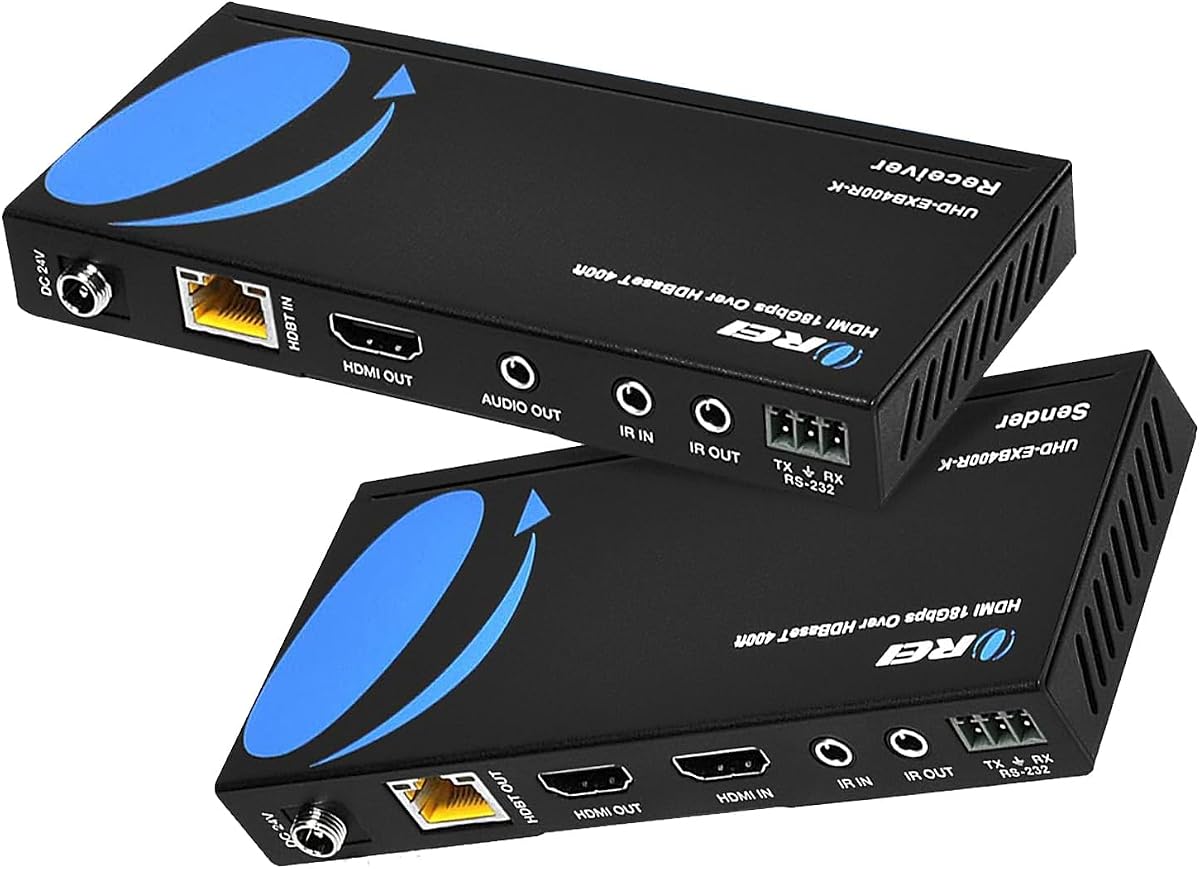
For projects requiring long-distance transmission, the OREI HDMI Extender HDBaseT 400ft is a premium solution. With a 4.2 rating, it stands out for its ability to push signals up to 400 feet using standard Cat5e, Cat6, or Cat7 cables. The use of HDBaseT technology guarantees zero latency, making it perfect for applications like gaming or live presentations where timing is critical.
We may earn a commission when you buy through this link, at no additional cost to you.
This unit includes advanced control features, including two-way IR and an RS-232 port. Two-way IR lets you control the source from the receiver location and vice versa, which is vital for complex setups. The RS-232 port allows for professional command integration, enabling automation systems to control the video source remotely.
The primary trade-off is the cost and compatibility constraints. This model is designed to work only with its matching transmitter and receiver, so you cannot mix and match with other OREI HDBaseT units or other brands. The price reflects these advanced features, making it less accessible for simple home setups compared to budget extenders.
Choose this model if you are installing AV systems in large rooms, auditoriums, or conference centers where long cables and professional control are necessary. The robust feature set ensures that your installation remains flexible and maintainable over time. It is a significant investment but delivers professional-grade reliability for critical installations.
HDBaseT technology provides lossless and lag-free transmission, ensuring that video and audio remain perfectly synchronized even at maximum range.
With two-way IR and an RS-232 port, this extender integrates easily into automation systems, allowing you to control devices from the receiver or via a central controller.
We may earn a commission when you buy through this link, at no additional cost to you.
The OREI HDMI Extender Over Cat5 is a strong budget option for users who need 4K capability without a high price tag. Rated 4.6 stars, it delivers stable video transmission up to 165 feet over Cat6 cables. While it caps 4K resolution at 30Hz, it still provides sharp images for standard content like slideshows or static displays.
We may earn a commission when you buy through this link, at no additional cost to you.
Like the more premium OREI models, this unit includes an HDMI loop-out port for local monitoring at the source. This is valuable for IT professionals or AV technicians who need to verify the signal before it reaches the destination. The Power over Cable feature means you only need one adapter, simplifying the installation process.
The limitation to 30Hz at 4K makes this less suitable for fast-paced gaming or high refresh rate content. Additionally, it is not compatible with HDMI ARC or IP-based systems, so you should check your specific audio setup needs before buying. However, for standard video extension, it performs reliably and consistently.
This extender is an excellent choice for digital signage, conference rooms, or home theaters where 60Hz is not a strict requirement. If you want to save money while still getting 4K resolution, this model offers the best balance of features and cost in the OREI lineup.
This model brings 4K extension to a lower price point, making it accessible for budget-conscious buyers who still want high-resolution support.
The included loop-out port lets you connect a monitor directly to the transmitter to ensure your source is outputting correctly before extending the signal.
We may earn a commission when you buy through this link, at no additional cost to you.
The HDMI Extender Over Single Cat5e/6/7 Ethernet is our top pick for budget shoppers. With an impressive 4.9 rating, it is one of the highest-rated products in this category. It supports Full HD 1080p at 60Hz up to 196 feet, making it perfect for standard TV setups where 4K is not strictly required.
We may earn a commission when you buy through this link, at no additional cost to you.
One of the most praised features is the Smart EDID copy function. This ensures that the extender can read your display's parameters and match them correctly, which often solves the 'no signal' issues common with other extenders. The aluminum alloy housing also adds a premium feel and helps dissipate heat during long usage periods.
The main limitation is that it does not support 4K resolution, so it may not be suitable for newer high-end TVs. It also lacks a built-in IR pass-through, meaning you cannot control the source device from the receiver location without additional components. However, the price and reliability make it a strong contender for basic setups.
If you need to extend a 1080p signal from a PC or streaming stick to a TV in another room, this is the most cost-effective solution. The plug-and-play design means no drivers or complex settings are required. It is an ideal choice for classrooms, small offices, or home media setups on a budget.
The intelligent EDID copy function automatically matches the display settings to prevent compatibility errors, ensuring a smooth setup process every time.
With a 4.9 rating and durable aluminum construction, this extender is built to last and delivers consistent results without technical glitches.
We may earn a commission when you buy through this link, at no additional cost to you.
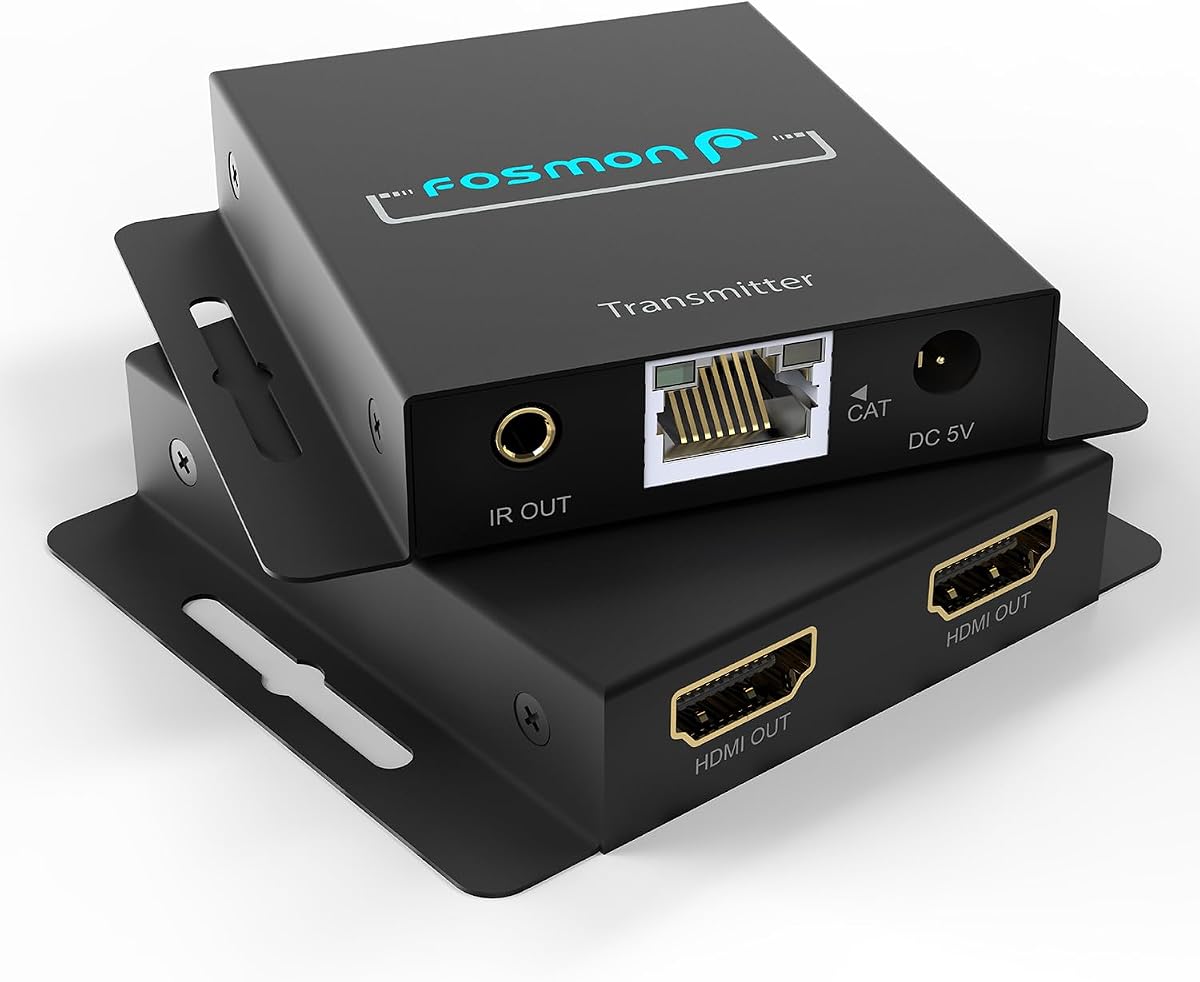
The Fosmon HDMI Extender provides a solid balance of range and flexibility for 1080p video. Rated 4.5 stars, it supports signal transmission up to 230 feet over Cat6a or Cat7 cables. A unique feature is the HDMI loop-out on both the transmitter and receiver, which allows for complex multi-screen setups without needing extra splitters.
We may earn a commission when you buy through this link, at no additional cost to you.
This model includes an EQ button that lets you auto-adjust cable length settings. This is helpful if you encounter signal stability issues over long distances or with varying cable quality. The device also supports standard IR remote pass-through, giving you full control over your source device from the receiver end.
The unit is limited to 1080p resolution, so it may not suit users with 4K TVs looking to leverage that extra detail. However, for standard HD content, it delivers pristine visuals with no compression artifacts. The dual loop-out capability is a significant advantage for users who need to display content locally and remotely.
Choose this extender for educational or office environments where 1080p is sufficient and flexibility is needed. It is also a good option for digital signage where multiple displays are required. The range and tuning features ensure it can adapt to different cabling environments without significant reconfiguration.
Loop-out ports on both units allow you to create 1-in-2-out or 1-in-3-out configurations, making it easy to send signals to multiple displays.
The EQ button lets you adjust the signal to match your specific cable length, ensuring stability even over long distances or with older cables.
We may earn a commission when you buy through this link, at no additional cost to you.
The avedio links 196ft HDMI Extender is designed for users who prioritize color depth and compatibility with older 3D content. Rated 4.2 stars, it supports up to 196 feet over Cat6 or Cat7 cables. The standout feature is its support for 36-bit deep color, which provides richer and more accurate colors than standard 24-bit transmission.
We may earn a commission when you buy through this link, at no additional cost to you.
This extender also maintains compatibility with 3D video content, which is increasingly rare in modern HDMI cables. The automatic adjustment system helps tune the signal for stability, reducing the need for manual configuration. Power over Cable is included, simplifying the setup by requiring only one power adapter for both units.
While the deep color support is impressive, the unit is limited to 1080p resolution and does not support 4K. Additionally, if you use Cat5e cables, the effective range drops to 165 feet rather than 196 feet. For most 1080p applications, these limitations are acceptable given the low price point.
This model is ideal for retro gaming setups or specific applications where color accuracy is paramount. If you have a 1080p display and want to ensure the best possible color reproduction, this extender offers features that are often missing from budget units. It is also a great choice for educational classrooms where basic video extension is needed.
Support for 36-bit deep color ensures that images look vibrant and accurate, which is beneficial for photo editing or artistic displays.
The built-in automatic adjustment system helps maintain a stable connection even if cable quality varies or if the distance is near the limit.
We may earn a commission when you buy through this link, at no additional cost to you.
The Monoprice 4K HDMI Extender stands out with a perfect 5.0 user rating, indicating high satisfaction with its performance and reliability. It supports 4K resolution at 30Hz and can extend signals up to 229 feet. One of its best features is the bidirectional IR passthrough, which allows you to control the source device from the remote end and vice versa.
We may earn a commission when you buy through this link, at no additional cost to you.
This extender also includes Smart EDID technology, which ensures the source device correctly identifies the display capabilities. This prevents issues like blank screens or incorrect resolutions. The HDMI loop-out on the transmitter allows for local monitoring, adding flexibility for setups where you need to view the source directly.
The unit is capped at 30Hz for 4K, which is suitable for most content but may feel less smooth for fast gaming. However, the bidirectional IR control is a rare feature at this price point, making it very convenient for home theater use. The build quality is also robust, with a metal casing that ensures long-term durability.
If you need 4K support with excellent remote control capabilities, this Monoprice model is a top choice. It is particularly useful for setups where the source is located in a cabinet or behind a wall, and you need to control it from the TV location. The 5.0 rating suggests it delivers consistent performance without technical complaints.
Bidirectional IR allows you to control your source device from the receiver location, meaning you don't need to access the source box to change channels or settings.
Smart EDID technology automatically negotiates the best resolution and audio settings between the source and the display, preventing handshake errors.
We may earn a commission when you buy through this link, at no additional cost to you.
The PWAY 4K @60Hz HDMI Extender offers a compelling mix of performance and value for mid-range users. With a 4.2 rating, it delivers uncompressed 4K video at 60Hz up to 200 feet. The inclusion of HDR10 support means you get a wider dynamic range and more vivid colors, which is excellent for streaming and gaming.
We may earn a commission when you buy through this link, at no additional cost to you.
This extender includes a loop-out port on the transmitter, allowing you to monitor the signal locally. This is useful for technicians or multi-display setups. It also supports Power over Cable, which simplifies installation by requiring only one power adapter. The package is also complete, including the necessary power supply and IR cables.
While it performs well, the IR functionality is somewhat limited compared to premium models. Additionally, to achieve the full 200-foot range, you will need high-quality Cat6 or Cat7 cables. If you use older or cheaper cables, you might experience signal degradation before reaching the maximum distance.
If you need 4K 60Hz without spending a premium price, this model is a strong contender. It is well-suited for home theaters or conference rooms where high resolution is needed but the budget is limited. The local loop-out feature adds extra utility for professional use cases.
HDR10 support enhances the viewing experience by providing higher contrast and more vivid colors, making the 4K image look more realistic.
The unit comes with all necessary accessories, including the power supply and IR cables, so you can set it up immediately without buying extra parts.
We may earn a commission when you buy through this link, at no additional cost to you.
The J-Tech Digital HDMI Extender offers a unique approach to signal transmission by converting HDMI to standard TCP/IP. Rated 4.1 stars, it can extend signals up to 400 feet, which is significantly longer than many non-TCP/IP models. This technology makes it suitable for environments where you might need to integrate video with existing network infrastructure.
We may earn a commission when you buy through this link, at no additional cost to you.
This extender uses M-JPEG compression to process image data, which allows for longer distances without sacrificing much quality. It supports 36-bit color on Cat7 cables, providing vibrant visuals for 1080p content. The unit also includes IR extension functionality, allowing you to control the source device from the receiver location.
The use of TCP/IP and compression can introduce slight latency, which might be noticeable in fast-paced gaming. Also, while the range is impressive, it is still limited to 1080p resolution. However, for static content like digital signage or presentations, this is rarely an issue.
Choose this model if you need to extend video over long distances where standard HDMI extenders might fail. It is also a good fit if you want to run video over existing network cabling without running dedicated coaxial or specialized AV cables. For business environments, the long range is a significant advantage.
By converting HDMI to standard TCP/IP, this device can leverage existing network infrastructure, making it easier to integrate into business environments.
The M-JPEG technique processes image data efficiently, allowing the signal to travel long distances without significant loss of visual fidelity.
We may earn a commission when you buy through this link, at no additional cost to you.
Choosing the right HDMI extender requires understanding your specific distance and resolution needs. This section breaks down the critical factors you should consider before making a purchase.
One of the first things to check is whether the extender supports the resolution your source and display use. Some models support 1080p at 60Hz, while others support 4K at 60Hz or 30Hz. If you plan to use a 4K TV or gaming console, ensure the extender explicitly supports 4K to avoid bandwidth bottlenecks.
Always verify the exact resolution and refresh rate supported by the device to ensure it matches your setup requirements.
The distance between your source and your display dictates which model you should choose. Most extenders work best with Cat6 or Cat7 cables for long distances, but some are optimized for Cat5e. Check the maximum range listed for the resolution you intend to use, as higher resolutions often have shorter effective ranges.
Select a model that offers a range at least 20 percent longer than your actual cable run to account for signal degradation.
PoC technology allows you to power both the transmitter and receiver using a single power adapter connected to the transmitter. This simplifies installation significantly, especially when the receiver is located in a hard-to-reach spot like a ceiling or a distant cabinet.
Prioritize models with PoC support if you want to minimize cable clutter and reduce the number of power outlets needed.
If you need to control your source device (like a streaming box or cable box) from the location of your TV, you need an extender with IR pass-through. Some models offer one-way IR (receiver to source), while others offer two-way IR for full bi-directional control.
Choose a model with IR pass-through if your source device will be hidden away from the display location.
A loop-out port on the transmitter allows you to connect a local monitor while simultaneously sending the signal to the remote display. This is particularly useful for professionals who need to verify the source content before it is sent to the audience.
Look for models with loop-out ports if you need to monitor the signal locally while extending it to another room.
EDID management helps the extender communicate the display's capabilities to the source device. This prevents 'no signal' errors and ensures the source sends the correct resolution and format. Smart EDID copy is a feature that automatically matches these settings.
Ensure the extender has built-in EDID management to avoid compatibility issues with various devices.
The type of Ethernet cable you use directly impacts performance. Cat6 and Cat7 cables are recommended for 4K signals, while Cat5e may suffice for 1080p. Solid copper cables generally perform better than CCA (copper-clad aluminum) cables for long-distance signal stability.
Use high-quality Cat6 or Cat7 solid copper cables to ensure you achieve the maximum range advertised.
Many modern streaming services and devices require HDCP compliance to transmit protected content. Ensure your chosen extender supports HDCP 2.2 (for 4K) or HDCP 1.4 (for 1080p) to avoid black screens or error messages.
Check that the extender complies with the latest HDCP standards for your content source.
Start by connecting your source device (like a laptop or game console) to the transmitter using a standard HDMI cable. Plug the transmitter into a power outlet or use the Power over Cable feature if supported. Ensure the receiver is connected to your TV or monitor via HDMI as well.
Next, connect a Cat5e, Cat6, or Cat7 cable between the transmitter and receiver. Make sure the cable is securely plugged into the Ethernet ports on both units. If you are using a long cable run, avoid bending the cable sharply or pinching it against walls, as this can degrade the signal.
Once connected, turn on your source and display devices. The extender should automatically detect the signal within a few seconds. If you experience issues, check that your cables are of high quality and that the power supply is correctly connected. Regularly dust the units to prevent overheating and ensure long-term performance.
While some extenders claim to support 4K over Cat5e, the effective range is significantly shorter. For reliable 4K at 60Hz, it is recommended to use Cat6 or Cat7 solid copper cables to maintain signal integrity over distances greater than 100 feet.
High-quality HDMI extenders generally have negligible latency, often under 5 milliseconds. However, models that use compression or TCP/IP transmission may introduce slight delays. For competitive gaming, choose a dedicated HDMI over Ethernet extender with zero-latency technology.
Most models come with a power adapter, but some budget options rely on Power over Cable to save costs. Always check the package contents listed in the product description. If you use PoC, you only need one power adapter for the transmitter unit.
A black screen usually indicates an HDCP handshake issue or a resolution mismatch. Ensure your extender supports HDCP 2.2 for 4K content. If the problem persists, try rebooting both the source and the display to reset the handshake process.
Most HDMI over Ethernet extenders are designed to work with a direct point-to-point connection. Using a network switch or router often breaks the signal. Always connect the transmitter and receiver directly unless you are using a specific IP-based HDMI extender.
For 1080p, many extenders can reach up to 400 feet depending on the model and cable quality. Using Cat6 or Cat7 cables will help you achieve the maximum advertised distance without signal loss.
Yes, HDMI extenders pass through audio signals, including those sent to soundbars. However, if your soundbar uses HDMI ARC, you may need an extender specifically compatible with ARC to ensure audio control works correctly.
Selecting the right HDMI extender depends heavily on your specific needs, whether that is long-distance 1080p delivery or high-fidelity 4K transmission. The OREI and Monoprice models stand out for their 4K capabilities, while budget options like the HDMI Extender Over Single Cat5e/6/7 Ethernet offer excellent value for standard setups.
Prioritize features like Power over Cable and IR pass-through if you want to keep your installation clean and functional. Ensure that the extender you choose supports the specific resolution of your display and source device to avoid compatibility issues down the line.
Prices and availability can change quickly, so we recommend checking current listings before finalizing your purchase. With the right setup, these extenders can eliminate the need for expensive custom wiring and allow you to enjoy high-quality video anywhere in your home or office.