
2×2 4k Video Wall Controller
4.6Editor score
HDMI and DVI input support
Eleven splicing modes available
Remote and button press control
This guide compares the top HDMI Video Wall Controller options for seamless multi-screen displays, evaluating features like resolution support, rotation, and
Creating a seamless multi-screen display requires a reliable HDMI Video Wall Controller to manage content distribution effectively. These devices allow you to combine multiple screens into a single cohesive visual experience for presentations or signage.
We compared ten leading models based on resolution support, display modes, control options, and audio extraction capabilities. Our analysis focuses on performance, ease of use, and value to help you find the right processor for your setup.
Each pick highlights specific strengths and limitations so you can match a device to your needs. Prices and availability change frequently, so always verify the latest details before making your final purchasing decision for your project.
4.6Editor score

4.8Editor score

4.2Editor score
This side-by-side comparison highlights the core specifications of each controller to help you identify the right fit for your multi-screen installation needs and technical requirements.

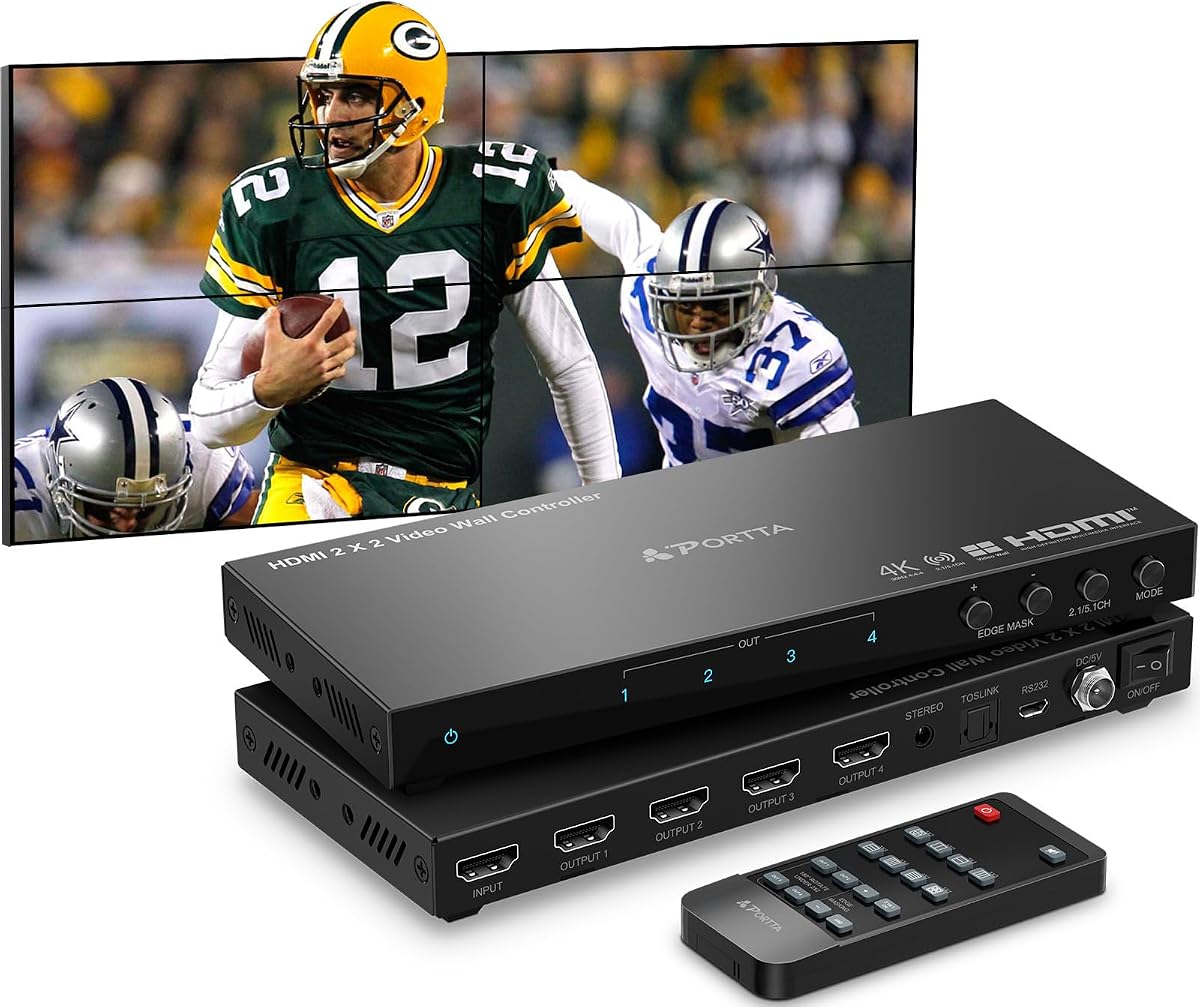


The J-Tech Digital HDMI Video Wall Controller 4K 2×2 stands out as a top performer for professionals seeking reliable multi-screen management. With a high rating and strong feature set, it delivers consistent performance for business and entertainment setups alike.
We may earn a commission when you buy through this link, at no additional cost to you.
This processor supports 4K inputs at 30Hz and splits them across four HDMI outputs for seamless viewing. Its eight display modes allow flexible configurations like 2×2 or 1×4, while the 180-degree rotation helps minimize bezel gaps visually.
While it lacks web control and only supports 30Hz input, the audio extraction via SPDIF and 3.5mm ports remains excellent for external sound systems. The edge masking tool further refines the display for a cleaner look across screens.
Buyers looking for a balance of features and value will find this controller ideal for offices, retail displays, or home theaters. Its lifetime technical support adds confidence to the purchase, ensuring long-term usability without worry.
Eight modes let you tailor layouts to screen count and orientation for perfect visual alignment.
Optical and analog outputs ensure high-quality sound routing to external speakers or receivers.
We may earn a commission when you buy through this link, at no additional cost to you.
This budget-friendly controller offers essential video wall functions without breaking the bank. It transforms four screens into one display using HDMI or DVI inputs, making it accessible for small businesses or home users.
We may earn a commission when you buy through this link, at no additional cost to you.
With 11 splicing modes and 180-degree rotation, it handles various screen orientations smoothly. The inclusion of RS232 control adds professional-grade flexibility for integration into larger automation systems or setups.
Although it caps at 30Hz input and lacks advanced scaling, its memory function saves settings for quick restarts. The audio output remains useful for basic needs, and the remote control ensures easy mode switching.
It suits buyers needing basic multi-screen capability at a low cost. For installations where cost matters most and high refresh rates are unnecessary, this model provides reliable performance and solid value.
DVI compatibility expands connectivity options for older projectors or legacy display devices.
IR remote, RS232, and buttons allow flexible control tailored to your installation setup.
We may earn a commission when you buy through this link, at no additional cost to you.
This premium controller delivers enterprise-grade functionality with 4K60Hz input and web control for remote management. Its multiviewer presets allow viewing multiple signals simultaneously, ideal for command centers or high-end installations.
We may earn a commission when you buy through this link, at no additional cost to you.
Scalable outputs let you downscale or upscale to fit screens while maintaining quality. The LAN interface simplifies integration with networked systems, making it a strong choice for professional IT environments.
The higher cost and complexity may deter casual users, but the flexibility it offers justifies the investment. It ensures seamless switching without delays, maintaining signal integrity across all connected displays reliably.
Buyers requiring robust performance and remote control will find this model unmatched. For mission-critical applications or high-end commercial use, it delivers reliability and advanced features that justify its price tag.
Manage and switch outputs remotely over LAN for greater flexibility and centralized control.
Preconfigured layouts show multiple signals on one screen for efficient monitoring or comparison.
We may earn a commission when you buy through this link, at no additional cost to you.
This OREI processor supports both HDMI and USB-C inputs, making it versatile for modern laptops and PCs. Its 4K 60Hz input ensures smooth video for presentations or dynamic content across four connected screens.
We may earn a commission when you buy through this link, at no additional cost to you.
With 180-degree rotation and multiple layout options, it adapts well to vertical or horizontal setups. RS-232 control and audio extraction via optical and analog outputs provide added flexibility for professional environments.
While it lacks HDR support, it handles standard dynamic range content efficiently. The included international adapter and one-year warranty make it a practical choice for global deployments or diverse installations.
It suits users needing USB-C compatibility alongside traditional HDMI inputs. For offices or retail spaces prioritizing flexibility and straightforward setup, this processor balances features with solid value and reliable performance.
Connect modern laptops directly via USB-C for simplified cabling and broader device support.
Dual voltage supply with international adapter ensures seamless operation across different regions.
We may earn a commission when you buy through this link, at no additional cost to you.
This controller supports 4K 60Hz inputs while converting them to 1080p outputs for wider compatibility. The RS-232 interface allows integration into professional automation systems, ensuring seamless control within large setups.
We may earn a commission when you buy through this link, at no additional cost to you.
Its dual input options support both HDMI and USB-C sources, ideal for mixed-device environments. The optical audio extraction maintains high-quality sound routing without additional converters or adapters for external systems.
Though outputs max at 1080p, the unit ensures smooth performance without frame loss. Its dual voltage power supply simplifies deployment across regions, making it a flexible option for international or varied installations.
It is ideal for buyers prioritizing automation and source flexibility over maximum output resolution. For businesses integrating with existing control systems, this model delivers reliable performance and professional-grade compatibility.
RS-232 support allows integration into centralized control systems for automation and remote management.
Supports HDMI and USB-C inputs to connect PCs, consoles, and modern devices effortlessly.
We may earn a commission when you buy through this link, at no additional cost to you.
This device combines a 4×4 HDMI matrix with video wall capabilities, enabling seamless switching between four sources across four screens. Web control allows intuitive management through a browser interface for easier operation.
We may earn a commission when you buy through this link, at no additional cost to you.
Its 4K 60Hz input ensures high-fidelity signal transmission for demanding content. Advanced EDID management maintains consistent performance across devices, while diverse audio formats support surround sound and standard stereo needs.
Though it demands more setup time and investment, its flexibility suits large displays or command centers. The seamless switching ensures no flickering or signal loss when changing sources between displays.
Buyers needing full matrix control and video wall features will find this ideal. For installations requiring multiple inputs alongside wall configurations, this model offers unmatched versatility and professional-grade performance.
Manage inputs and outputs via a web browser for easy remote administration.
Switch between four sources instantly without interruptions or signal degradation across displays.
We may earn a commission when you buy through this link, at no additional cost to you.
This processor features 11 splicing modes for diverse layouts, including portrait configurations for vertical screens. Its dedicated Toslink and 3.5mm audio ports simplify external sound system integration for presentations or events.
We may earn a commission when you buy through this link, at no additional cost to you.
The edge masking tool helps adjust image boundaries to reduce bezel gaps visually. With RS232 control and a 2-year warranty, it ensures reliability and professional integration for commercial environments or setups.
While outputs are fixed at 1080p, the unit maintains stable performance without drops. Its IR remote and optional PC settings make it accessible for users needing flexible multi-screen management without complexity.
It suits buyers prioritizing audio extraction and layout variety. For small venues or retail displays where sound and screen flexibility matter, this model delivers strong value and consistent visual quality.
Separate optical and analog ports allow high-quality audio routing to external systems.
Adjust image edges to minimize bezel gaps for cleaner visual alignment across screens.
We may earn a commission when you buy through this link, at no additional cost to you.
This controller delivers true 4K outputs across all four HDMI ports, preserving maximum detail for high-resolution content. Its 4K 60Hz inputs ensure smooth motion handling for demanding media or video feeds.
We may earn a commission when you buy through this link, at no additional cost to you.
With both HDMI and USB-C inputs, it connects easily to modern PCs and devices. The 180-degree rotation feature supports upside-down installations, and the plug-and-play design simplifies initial setup.
Though it lacks advanced audio options, its focus on output quality ensures crisp visuals. The 24×7 stable work rating indicates reliability for continuous use in commercial or monitoring applications.
It suits buyers needing full 4K output resolution without downscaling. For installations prioritizing sharp visuals across multiple displays, this model offers dependable performance and straightforward configuration.
Maintain full 4K resolution on all four outputs for unmatched visual clarity.
No drivers or complex configuration required for instant multi-screen display readiness.
We may earn a commission when you buy through this link, at no additional cost to you.
This unit features USB auto display, allowing direct video playback from drives without a computer. With 4K 60Hz inputs and analog outputs, it supports flexible content playback for digital signage or kiosks.
We may earn a commission when you buy through this link, at no additional cost to you.
The IR extension allows remote control from long distances, while the adjustable brightness and contrast options ensure optimal viewing. Its border adjustment eliminates black edges for cleaner full-screen visuals.
While it lacks network control, its USB playback simplifies standalone use. The diverse video and audio format support makes it versatile for various file types, and the remote ensures easy operation.
Buyers seeking standalone playback without extra media players will appreciate this design. For kiosks or public displays needing simple content cycling, this controller offers reliable performance and strong format compatibility.
Direct playback from USB drives eliminates the need for external computers or media players.
Fine-tune brightness and contrast for optimal visibility in varying ambient light conditions.
We may earn a commission when you buy through this link, at no additional cost to you.
This model stands out with six HDMI 4K outputs, ideal for larger video walls. It supports 2×3 and 3×2 configurations, offering more flexibility than standard four-screen controllers for expanded installations.
We may earn a commission when you buy through this link, at no additional cost to you.
With 4K 60Hz inputs and outputs, it delivers smooth visuals across all six displays. The 180-degree rotation supports various screen orientations, while the plug-and-play design ensures easy initial setup.
Although it lacks advanced audio features, its visual performance is exceptional for large-scale displays. The included remote simplifies switching modes between layouts, accommodating diverse setup or content requirements.
Buyers needing to expand beyond four screens will find this unit ideal. For large retail or corporate spaces requiring extensive multi-screen setups, this controller provides unmatched scalability and consistent performance.
Handles 2×3 and 3×2 modes to create larger video walls with six displays.
All outputs maintain 4K 60Hz resolution for high-detail visuals across the entire wall.
We may earn a commission when you buy through this link, at no additional cost to you.
Selecting the right HDMI Video Wall Controller involves evaluating technical specs, control options, and layout flexibility to match your display setup needs.
Ensure the controller supports your source resolution like 4K 60Hz inputs and delivers consistent outputs to screens. Higher input support ensures smooth motion and sharp details for professional media.
Choose a model with input/output resolution matching your content sources to avoid signal degradation or performance issues.
Look for controllers offering multiple modes like 2×2, 1×4, or custom layouts to fit your screen arrangement. Flexible options allow adapting to vertical or horizontal displays easily.
Verify available modes support your target layout for seamless multi-screen alignment and content distribution.
Consider controllers with RS-232, LAN, or web interfaces for professional integration or remote management. Basic units rely on IR remotes or buttons, which may suffice for smaller setups.
Pick control options that fit your operation needs, from simple buttons to network-based automation.
Controllers with optical or analog audio outputs simplify routing sound to external systems. This avoids relying on HDMI-only audio which may be insufficient for larger venues.
Prioritize models with dedicated audio outputs if you need external speakers or surround sound support.
180-degree rotation supports upside-down mounts while edge masking reduces bezel gaps visually. These features improve the seamless look of multi-screen installations significantly.
Ensure the controller offers rotation and masking for cleaner visual continuity across connected screens.
Dual voltage power supplies simplify global deployments while HDMI 2.0 and USB-C inputs increase source options. Check compatibility with devices like PCs, consoles, or media players.
Select a unit with wide input support and reliable power features for stable long-term operation.
A solid warranty and access to technical support reduce risk for investments. Some models offer lifetime support, which is valuable for complex or critical installations.
Verify manufacturer support options to ensure assistance if issues arise after purchase.
Basic models may cost less but lack advanced features like web control or 4K outputs. Balance cost with required capabilities to avoid overspending or under-delivering.
Invest in features you need to ensure reliable performance without unnecessary expense.
Begin by connecting your source device to the controller via HDMI or USB-C using high-quality cables. Ensure all display screens are connected securely to the controller output ports.
Use the included remote or control interface to select a display mode matching your screen arrangement. Adjust rotation or edge masking if needed to align bezels and minimize visual gaps.
Keep the controller in a well-ventilated area to prevent overheating during prolonged use. Clean dust gently and check connections periodically to maintain stable performance over time.
An HDMI Video Wall Controller is a device that splits a single video source across multiple displays arranged as one large wall. It manages signals, layouts, and synchronization for seamless viewing.
Many models support 4K inputs at 30Hz or 60Hz, though some output to 1080p screens. Check specific specs to ensure input output resolution compatibility with your screens.
Some controllers include USB-C inputs to connect modern laptops directly. Look for models listing USB-C support if you plan to use Macs or other USB-C source devices.
Most controllers provide optical or 3.5mm audio outputs to route sound to external speakers. Avoid relying solely on HDMI audio from displays for better sound quality.
Most units are plug-and-play with remote or control interface operation. Some advanced models offer web control, which requires browser access but no additional software installation.
Controllers with 180-degree rotation allow vertical displays by adjusting output orientation. Ensure your controller supports rotation for portrait mode setups.
Use high-speed HDMI cables rated for your resolution and secure them with clips. Label cables at both ends for easier troubleshooting and maintain ventilation around devices.
Basic controllers support up to four screens, while expanded models handle six or more. Choose a unit based on your target display count and desired layout.
The top picks like the J-Tech Digital controllers and OREI processors deliver reliable multi-screen performance for diverse needs. Each offers distinct strengths in input support, control, and layout flexibility.
Prioritize features that match your setup such as 4K output, USB-C input, or automation control. Balancing these needs ensures the controller fits your workflow and display goals.
Always verify current availability and specs before purchasing since product details may change. Investing time in choosing the right controller secures a smooth and visually impressive video wall.